HHOYC002Intelligent Wireless Router
Shenzhen Yichen Technology Development Co., Ltd.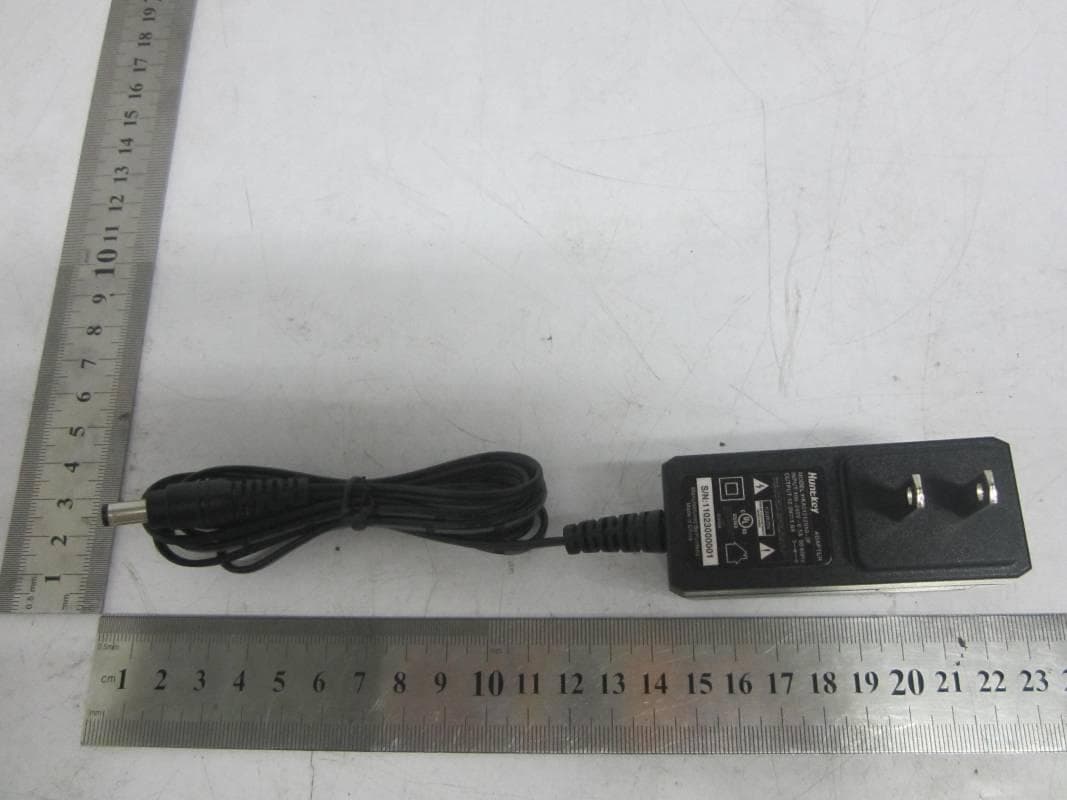
Click to zoom
Application Details
- Equipment Class
- DTS - Digital Transmission System
- Date of Grant
- Jul 08, 2012
- Application Purpose
- Original Equipment
- Date of Application
- Jul 08, 2012
- Equipment Note
- Intelligent Wireless Router
- Frequency Range
- 2422.00000000 - 2452.00000000
- Country
- China
Documents & Files
Document Text
Text extracted from the exhibit documents filed with the FCC. Open a document above to read the original.
Users Manual
Intelligent Wireless Router JHR-N805R JHR-N825R JHR-N916R JHR-N926R Quick Installation Guide VER: 0.0.1 About this Guide Thank you for choosing JCG Wireless Broadband Router. As a cost-effective product, this Intelligent Wireless Router provides dedicated solution for small office, home and dormitory. It integrates a variety of wireless applications, such as wireless bridge model, AP model etc. It provides a wide range of data security protection; support WEP, WPA, and WPS Encryption method. It is the best option of surfing on the wireless Internet and enjoying the fun of the wireless Internet and satisfies your need to watch high-definition video The JCG Intelligent Wireless Router is easy to configure, even if you are not so familiar with the router. In order to better use all functions of this product, please read this guide carefully before you install the router, Trademark, copyright statement: as a brand (trademark) is registered by Shenzhen Yichen Technology Development Co., Ltd. The copyright property of all the parts of the products, including accessories, software is owned by Shenzhen Yichen Technology Development Co., Ltd. Without permission, nobody shall be arbitrarily imitate, copy, or translate the products. The product specification and information in the manual are referred as a reference purposes only. May be its content will be updated without notice. Welcome to logon our website: http://www.jcg.com.cn Quick Installation Guide You should configure the Router correctly to ensure the normal use of the Router. This chapter describes how to configure the basic functions of the Wireless Router. We will show the detailed configuration in the next chapter. 1 Configuring windows XP of the PC 1. Configure the IP address Click the start menu, select network connect, show in figure 1-1 Figure 1- 1 Right-click the local connection as shown in figure 1-2.then select Properties will pop up figure 1-3 shown in the Network connection properties dialog box. Figure 1- 2 Figure 1- 3 Double-click Internet Protocol (TCP/IP) will appear IP address page. If you choose to automatically receive the IP address and the DNS server address, the computer will be gain the IP address from the router (Show in figure 1-4).Of course, you can also choose manual-setting as shown in figure 1-5. Figure 1- 4 Figure 1- 5 2. Connect wireless network The wireless network will be connected after finished configuring the network parameter. Select View available wireless connection as show in figure 1-2, your wireless network card will be in search of available network connection in current environment. Then the wireless network will be linked successfully by click link button. If the network is encrypted, password dialog box will pop up prompting you to enter key. Wireless N Router default network name(SSID) is JCG, select this network to connect the wireless router(show in figure 1-6). Figure 1- 6 Now, you can run the Ping command in the command prompt to verify the network connection between your PC and the router. If the result is similar to that show in figure 1-7, the connection between your PC and your router has been established. Figure 1- 7 If the link can not be established, please check the hardware connection between your PC and the router is normal, IP address is correct. 1.2 Quick Installation Guide Launch a Web browser (Internet Explorer 5.0 or higher) when the computer and the 150M Wireless Router are correctly connected, close the proxy browser. Then input http://192.168.1.1 into the browser address bar, press the Enter key, there will appear a login window as figure 1-8. Enter admin for the User Name and Password, both in lower case letters. Also you can modify the user name and the password to ensure the network security. Figure 1- 8 If the User Name and Password are correct, Router Management screen will appear, show in figure 1-9: Figure 1- 9 Click on Quick Setup the button, show in figure 2-10 , the router supports five connection type to connect to Internet. Figure 2-10 Click on the Next button, show in figure 1-11, If you use the DHCP (Auto config) connection, the router will receive the IP parameters from your ISP without needing to enter any parameter, show in figure 1-11 figure 1-11 ② If you use the STATIC(fixed IP) connection, the Static IP settings page will appear, show in figure 1-12, enter the Static IP address, Subnet Mask, Default Gateway and DNS figure 1-12 ③ If you use the PPPoE(ADSL) connection, the PPPoE settings page will appear, show in figure 1-13, please enter the user name and the password provided by your ISP. figure 1-13 Click on the Next button, show in figure 1-14. This page is used to configure the parameters for wireless LAN clients which may connect to your Access Point figure 1-14 Click on NEXT, the button, show in figure 1-15 Now, Quick Installation Guide is complete. FCC WARNING This device complies with Part 15 of the FCC Rules. Operation is subject to the following two conditions: (1) This device may not cause harmful interference, and (2) This device must accept any interference received, including interference that may cause undesired operation. NOTE 1: This equipment has been tested and found to comply with the limits for a Class B digital device, pursuant to part 15 of the FCC Rules. These limits are designed to provide reasonable protection against harmful interference in a residential installation. This equipment generates uses and can radiate radio frequency energy and, if not installed and used in accordance with the instructions, may cause harmful interference to radio communications. However, there is no guarantee that interference will not occur in a particular installation. If this equipment does cause harmful interference to radio or television reception, which can be determined by turning the equipment off and on, the user is encouraged to try to correct the interference by one or more of the following measures: - Reorient or relocate the receivin…
Text truncated - open the document above for the full version.
Block Diagram
55 44 33 22 11 D D C C B B A A PA RT3052 2.4GHz TX0 40MHzXTAL AntennaConnector BPF 2.4GHz TX02.4GHz RX0 3.3V LNA SPDT Switch Step-DownRegulator 2.4GHz RX0 2.4GHz TX1 2.4GHz RX1 BPF 2.4GHz RX1 SPDT Switch 2.4GHz TX1 PA LNA AntennaConnector RJ45x5 Transformer USBConnectorRGMII/MIIConnector RGMII/MII I/FUSB I/F 12V Step-DownRegulator 1.5V 12V Step-DownRegulator 5V 12V FLASH2Mx16SDRAMx28Mx16 SerialEEPROM RESET LDO 2.0V 3.3V SPIFLASH RT3052 AP Block 2.2 11n 2.4G AP-RT3052 Block RALINK TECHNOLOGY, CORP. CONFIDENTIAL C 14 14 Monday, December 21, 2009 TitleSize Document Number Rev Date: Sheet of
Cover Letter(s)
Agents letter (for TCB – TCB approval): Shenzhen Yichen Technology Development Co., Ltd. FCC ID: HHOYC002 Product Name: Intelligent Wireless Router Model No.: JHR-926R, JHR-936R, JHR-946R, JHR-956R, JHR-966R, JHR-976R, JHR-986R, JHR-996R Date (2012-06-12) BABT TCB Forsyth House, Churchfield Road, Walton-on-Thames, Surrey, KT12 2TD Dear Sir or Madam, We, Shenzhen Yichen Technology Development Co., Ltd. / 5F, No.1, Honghualing 2nd Industrial Zone, Xili Town, Nanshan District, 518055 Shenzhen, Guangdong, People’s Republic Of China., hereby authorize John Zhi (TUV SUD China Group-Shenzhen), to act as our agent in all matters relating to applications for equipment authorization, including the signing of all documents relating to these matters. This authorization expires on (31/12/2014) Sincerely,
Cover Letter(s)
Shenzhen Yichen Technology Development Co., LTD Declaration letter for multiple models We, Shenzhen Yichen Technology Development Co., LTD 5F, No.1, Honghualing 2nd Industrial Zone, Xili Town, Nanshan District, 518055 Shenzhen, Guangdong, People’s Republic Of China. Declare that the following product(s): Product Description: Intelligent Wireless Router Model Number: JHR-N946R, JHR-N956R, JHR-N966R, JHR-976R, JHR-986R, JHR-996R Utilize the identical circuit design, PCB layout, shielding and interface with (JHR-N926R), only the cosmetic is difference. Therefore this application can be regarded as identical in performance to the submitted test sample. The manufacturer would take all the responsibilities for the above product(s). For and on behalf of Date of issue: 2012-06-12 *I hereby declare that I am entitled to sign on behalf of the applicant and that the information supplied is correct and complete.
External Photos
Report No.:68.870.12.024.01F APPENDIX B – External of EUT Page 1 of 5 TÜV SÜD China. 6thFloor, H Hall, Century Craftwork Culture Square, No. 4001,Fuqiang Road, Futian District, Shenzhen, China. Report No.:68.870.12.024.01F APPENDIX B – External of EUT Page 2 of 5 TÜV SÜD China. 6thFloor, H Hall, Century Craftwork Culture Square, No. 4001,Fuqiang Road, Futian District, Shenzhen, China. Report No.:68.870.12.024.01F APPENDIX B – External of EUT Page 3 of 5 TÜV SÜD China. 6thFloor, H Hall, Century Craftwork Culture Square, No. 4001,Fuqiang Road, Futian District, Shenzhen, China. Report No.:68.870.12.024.01F APPENDIX B – External of EUT Page 4 of 5 TÜV SÜD China. 6thFloor, H Hall, Century Craftwork Culture Square, No. 4001,Fuqiang Road, Futian District, Shenzhen, China. Adapter Report No.:68.870.12.024.01F APPENDIX B – External of EUT Page 5 of 5 TÜV SÜD China. 6thFloor, H Hall, Century Craftwork Culture Square, No. 4001,Fuqiang Road, Futian District, Shenzhen, China. Adapter
Internal Photos
Report No.:68.870.12.024.01F APPENDIX C – Internal of EUT Page 1 of 3 TÜV SÜD China. 6thFloor, H Hall, Century Craftwork Culture Square, No. 4001,Fuqiang Road, Futian District, Shenzhen, China. Report No.:68.870.12.024.01F APPENDIX C – Internal of EUT Page 2 of 3 TÜV SÜD China. 6thFloor, H Hall, Century Craftwork Culture Square, No. 4001,Fuqiang Road, Futian District, Shenzhen, China. Report No.:68.870.12.024.01F APPENDIX C – Internal of EUT Page 3 of 3 TÜV SÜD China. 6thFloor, H Hall, Century Craftwork Culture Square, No. 4001,Fuqiang Road, Futian District, Shenzhen, China.
Operational Description
U2 the 40 MHz crystal oscillator provides the base clock source of U1 Wireless LAN network interface controller’s operating. U1 drives reference differential clock for modulator and demodulator of embedded RF transceiver. U1 combines a MAC and 2T2R capable based for host connection. Embedded MIMO RF transceiver consists of two receivers and two transmitters used to form a complete 2.4GHz ISM band Wireless LAN application. The Equipment shall be simultaneous transmission at the chain 0 and chain 1 for 802.11g and 802.11n HT20 or HT40, 802.11b mode shall be transmission only by single chain (chain 0 or chain 1). Through the antenna then transmit out 2412MHz to 2462MHz (for US, and 2412MHz to 2472MHz for EU) for 802.11b/g/n-HT20 transmission mode and 2422MHz to 2452MHz (for US, and 2422MHz to 2462MHz for EU) for 802.11n-HT40 transmission mode. Data Rate: 802.11b: 1, 2, 5.5, 11Mbps; 802.11g: 6, 9, 12, 24, 36, 48, 54Mbps; 802.11n: (20MHz) MCS0-15,Support up to 150Mbps (40MHz) MCS0-15, Support up to 300Mbps Modulation: BPSK, QPSK, CCK and OFDM (BPSK/QPSK/16-QAM/ 64-QAM) Antenna, Ground, and Power Source There are two external 2.4GHz band antenna with reversed SMA connector. Whole system power source is fed with DC 12Volt by DC interface.
Operational Description
Ǐ300Mbps High Power Intelligence Wireless N Routerǐ JHR-N926R Features: ·Support online host number display ·One Key to turn on/off wireless signal ·One Key to Regulate transmit power ·Support Wifi WPS switch button ·Integrates router, Wireless access point, Four-ports switch and firewall in one ·2.4GHz, IEEE802.11n/g/b, up to 300Mbps ·4x10/100Mbps LAN Port, 1x10/100Mbps WAN Port ·2x4dBi Detachable Antenna ·WDS Wireless Bridge ·Built-in firewall, Filtering on IP address, MAC address, Domain name, Applications, etc ·Supports 64/128-bits WEP, WPA/WPA2 Encryption Specifications Standard IEEE 802.11nǃIEEE 802.11gǃIEEE 802.11b IEEE 802.3ǃIEEE 802.3u Interface LAN 4 10/100M Auto MDI/MDIX RJ45 port WAN 1 10/100M Auto MDI/MDIX RJ45 port Frequency Range2.4GHz-2.4835GHz Radio Data Rate300M Channel1~11 (USA, Canada) ; 1~13 (Europe) ; 1~14 (Japan) Spread SpectrumDSSS ModulationBPSK, QPSK, CCK and OFDM (BPSK/QPSK/16-QAM/ 64-QAM) Transmission Distance Indoor up to 500m , outdoor up to 1000m (it is limited in an environment) Receive Sensitivity@PE 11n : -70dBm@10% PER 11g : -70dBm@10% PER 11b: -85dBm@8% PER Transmit Power<20dBm Antenna plus2x4dBi LED IndicatorStatus Data Security64/128-bits WEP; WPA/WPA2 Environment Operating Temperature: 0ć~40ć (32̧~104̧) Operating Humidity: 10%~90%RH (non-condensing) Power12V/ 1A Dimensions155mmx105mmx20mm Safety & EmissionFCC, CE Network Configuration:
Schematics
55 44 33 22 11 D D C C B B A A Filename:AP-RT3052-V22RW-LNA-2X2-080826.DSN AP-RT3052-V22RW-LNA.SCH 2.2 11n 2.4G AP-RT3052 RALINK TECHNOLOGY, CORP. CONFIDENTIAL B 114 Monday, December 21, 2009 TitleSize Document Number Rev Date: Sheet of 6-LED6-LED LINK0LINK1LINK2LINK3LINK4SECU_LEDWLAN_LEDWPS_LEDPWR_LEDWPS_PBCRST_PBC 1-CPU-RT30521-CPU-RT3052 FLASH_CSNWE_NOE_NSDRAM_CLKSDRAM_CSNSDRAM_RASNMADDR[0:22]MDATA[0:31] TXOM4 TXOP4 RXIM4 RXIP4 ANT_TRNANT_TRNBPA_PE_G0PA_PE_G1 CPURST_N SECU_LED WLAN_LED RFOUT_G0RFOUT_G1RFIN_G0RFIN_G1 LINK3LINK2LINK0LINK1LINK4 RXIM3 RXIP0RXIP1RXIP2RXIP3 RXIM0RXIM1RXIM2 TXOP0TXOP1TXOP2TXOP3 TXOM0TXOM1TXOM2TXOM3 LNA_PE_G0LNA_PE_G1 PWR_LED WPS_LED WPS_PBC RST_PBC TSSI_PA0 2-MEMORY2-MEMORY FLASH_CSN OE_N WE_N SDRAM_CLK SDRAM_CSN SDRAM_RASN MADDR[0:22] MDATA[0:31] FLASHRST_n 3-WLAN3-WLAN ANT_TRN ANT_TRNB PA_PE_G0PA_PE_G1 RFIN_G0RFIN_G1 RFOUT_G0RFOUT_G1 LNA_PE_G0LNA_PE_G1 TSSI_PA0 4-ETHERNET4-ETHERNET TXOM4TXOP4RXIM4RXIP4RXIM3RXIP3TXOM3TXOP3TXOM2TXOP2RXIM2RXIP2RXIM1RXIP1TXOM1TXOP1TXOM0TXOP0RXIM0RXIP0 5-POWER5-POWER CPURST_NFLASHRST_N FLASHRST_N PA_PE_G0WE_NANT_TRNSDRAM_CLKFLASH_CSNPA_PE_G1SDRAM_RASNOE_N TXOM4CPURST_N MADDR[0:22] TXOP4 MDATA[0:31]ANT_TRNBSDRAM_CSNRFIN_G0RFIN_G1RFOUT_G0RFOUT_G1 SECU_LEDWLAN_LEDLINK4LINK3LINK2LINK1LINK0RXIM4RXIP4RXIM3RXIP3TXOM3TXOP3TXOM2TXOP2RXIM2RXIP2RXIM1RXIP1TXOM1TXOP1TXOM0TXOP0RXIM0RXIP0 LNA_PE_G1LNA_PE_G0 PWR_LEDWPS_LEDWPS_PBCRST_PBC TSSI_PA0 55 44 33 22 11 D D C C B B A A Place RT1 closeto Power Amp. LDOPLL_Out(50mA) LDORF_Out(200mA) LDOADC_Out(200mA) 1.5V LDO_In(1100mA) 1.2V LDODIG_Out(600mA) 3.3V Input 11-RT3052-RF-A.SCH 2.2 RT3052-A RF RALINK TECHNOLOGY, CORP. CONFIDENTIAL B 214 Monday, December 21, 2009 TitleSize Document Number Rev Date: Sheet of RFG0_INRFG0_OUT INP0 GINP0 RFIN_G0RFOUT_G0 INN0 LNA_PE_G0RF2G_INP0 ANT_TRNB TP4 RF_V12A ANT_TRN RF2G_OUTP0 WLAN_LED RF2G_INN0 PLL_V12A TSSI_IN0 PA_PE_G0 PLL_VC_CAP40MX1 ADC_VREFN0 40MX2 ADC_VREFP0ADC_VREF025NADC_VREFADC_VREF025P LNA_PE_G1PA_PE_G1RF2G_OUTP1 RFOUT_G1 RFG1_OUT INN1 RFG1_IN INP1 RFIN_G1 RF2G_INP1RF2G_INN1 GINP1 1.5VD 1.5VDD BG_RES_12K LDODIG_OUT TSSI_PA0 V33A GND ADC_V12D GND GND GND GND GND GND 3.3VD GND 1.2VD GND GND 1.5VDD GND GND 3.3VD GNDGND GND GND GND GND GND GND GND GND GND GND TP4 1 C11 10pF 1 2 R712K 1% 12 C17 10pF 12 C7 10pF 12 C10 10pF 1 2 C191.5pF 12 R2 0 ohm 1 2 L1 1.5nH 12 2.5x3.2 U2 XTAL/3.2x2.5/40MHz 12 43 C3 1.5pF 1 2 C18 100pF 12 C30 0.1uF 12 L31.5nH 12 R4 0 ohm 1 2 C21310uF 12 C2610nF 12 t RT1 CT6103-3435-5P 12 L6 0 ohm 1 2 C3627pF 12 C400.1uF 12 C8 100pF 12 C21.5pF 12 C28 0.1uF 12 C35 0.1uF 1 2 C271pF/NI 12 R3 0 ohm 1 2 C121pF/NI 12 C21 10pF 1 2 C32 0.1uF 1 2 C39 0.1uF 12 R620K 12 C9100pF 12 C37 22nF 12 C31 4.7uF 12 L4 1.5nH 1 2 L40 0 ohm 1 2 C38 0.1uF 12 U1ART3052 A3A2C10D2B8B1C1D1B12E1F4F3G4C9D9D8C8 C7C6 A5 A4 A6E3 D3 B3B4 C4C5 B5 D6 A7B7B6A8 A12A9A10B11A11 B9 B10 D11C11C12 A13 E2A1 C2 D7 D12 RF0_2G_INN RF0_2G_OUT RF0_LNA_PE RF0_PA_PE RF0_TSSI_IN RF1_2G_INP RF1_2G_INN RF1_2G_OUT RF1_LNA_PE RF1_PA_PE WLAN_LED_N ANT_TRN ANT_TRNB BASE_TRX_QN BASE_TRX_QP BASE_TRX_IN BASE_TRX_IP PLL_X2PLL_X1PLL_VC_CAP RF0_2G_INP BG_RES_12KRF1_LO_V12ARF0_LO_V12ARF_BB1_V12AVCO_VCO_V12AVCO_LO_V12APLL_PRE_V12APLL_DIV_V12ABG_V33ALDORF_OUT_V12LDORF_IN_VXLDOPLL_OUT_V12RF_BB2_V12A ADC_VREF ADC_VREFN ADC_VREFP ADC_VREF025N ADC_VREF025P ADC_V12AADC_V12DLDOADC_OUT_V12LDOADC_IN_VXLDODIG_IN_VXLDODIG_OUT_V12RF_V33ARF0_V12ARF1_V12A RF1_TSSI_IN LDO_V33A C5 10pF 12 C33 0.1uF 1 2 R5 10K 1 2 R1 0 ohm 1 2 C4 10pF 1 2 C221uF 12 C20 1.5pF 1 2 C131uF 12 C14 10nF 1 2 C24 10pF 1 2 L2 1.5nH 1 2 C151uF 12 C34100pF 12 L5 0 ohm 1 2 C29 0.1uF 12 C16 0.1uF 12 C23 10pF 1 2 C6 10pF 12 C1 10nF 1 2 C25 10nF 12 RFOUT_G0 (8)RFIN_G0 (9) LNA_PE_G0 (9) ANT_TRNB (10) PA_PE_G0 (8) WLAN_LED (13)ANT_TRN (10) PA_PE_G1 (8)LNA_PE_G1 (9) RFOUT_G1 (8)RFIN_G1 (9) TSSI_PA0 (8) 55 44 33 22 11 D D C C B B A A 12-RT3052-Peripheral-B.SCH 2.2 RT3052-B Peripheral RALINK TECHNOLOGY, CORP. CONFIDENTIAL B 314 Sunday, June 05, 2011 TitleSize Document Number Rev Date: Sheet of SDCS_NFLASHCSN FLASH_CSNWE_N EJTAG-TRSTN SDCLK SDRAM_CSNSDRAM_CLK SDRAS_N EJTAG-TDOEJTAG-TMSEJTAG-TCK WEN EJTAG-TDI OEN OE_NSDRAM_RASN CPURST_NWPS_PBCPWR_LEDWPS_LEDRST_PBCUART_TXUART_RXPADPPADMUPHY_VRESSRAMCSNSECU_LED MADDR[0:22]MDATA[0:31] ID MADDR21MDATA3MDATA22MDATA5MDATA17MADDR3MDATA10MDATA12MADDR8MADDR15MADDR18MDATA26MADDR20MDATA4MADDR9MDATA18MADDR1MDATA11MDATA20MADDR13MADDR17MDATA1MDATA28MDATA19MADDR2MADDR5MDATA15MDATA24MDATA6MADDR14MADDR0MDATA2MDATA29MADDR10MADDR22MDATA23MDATA25MDATA8MADDR6MDATA0MDATA16MDATA30MDATA14MADDR11MADDR4MADDR16MDATA21MDATA7MDATA27MDATA9MADDR7MDATA31MADDR12MDATA13MADDR19 3.3VD GPI07 GPI07GPI08GPI011 GPI08GPI011 GPI012 3.3VD GND GND 3.3VD GND GND GND GND 3.3VD 12V 3.3VD GND 5V R231K 12 R221K 12 R204.7K 12 R2110K 12 R27 1K 1 2 J1 HEADER 4 1234 TP5 1 R18 4.7K/NI 1 2 R13 22 1 2 R9 22 1 2 R10 22 1 2 R241K 12 R11 22 1 2 C425pF 12 R8 22 1 2 R16 4.7K 1 2 R178.2K 1% 1 2 C435pF 12 C41 10pF/NI 12 J2HEADER 4 1234567 R12 22 1 2 U1B RT3052 H4G3G2J4F2H3F1G1K4J3H2K3J2J1L3T8R9U8T9U9R10T10U10R11T11U11U12T12 P12 R13U13 T13 P13 N14R12U14U15R14 P14 T14 R15 P15 U16 T15 T16U17R16 N15 P16 R17 T17 M15 N17N16 P17 M16M17 L16L17 K16K17K15 H15 F16F17 G16 H16 E17E16 D17 G15 F15 D16C17C16 E15A17B16B17 C15D15 A16B15 D13C14 A15 B14A14C13B13 RXD2 TXD2 RTS_N DTR_N TXD DCD_N DSR_N CTS_N RIN RXD UPHY_VRESUPHY_VBUS UPHY_PADM UPHY_PADP UPHY_ID PORST_N SPI_DIN SPI_DOUT SPI_CLK SPI_EN I2C_SCLK I2C_SD GPIO0 JTAG_TDO JTAG_TDI JTAG_TMS JTAG_TCLK JTAG_TRST_N MD31MD30MD29MD28MD27MD26MD25MD24MD23MD22MD21MD20MD19MD18MD17MD16 SDRAM_RAS_N SDRAM_CS_N SDRAM_CLK MA19MA18MA17MA16MA15MA14MA13MA12MA11MA10MA9MA8MA7MA6MA5MA4MA3MA2MA1MA0MD15MD14MD13MD12MD11MD10MD9MD8MD7MD6MD5MD4MD3MD2MD1MD0MA22MA21MA20 FLASH_CS_N SRAM_CS_N WE_N OE_N FLASH_CSN (6)OE_N (6,7)SDRAM_CSN (7)SDRAM_CLK (7)WE_N (6,7)SDRAM_RASN (7) CPURST_N (12)WPS_PBC (13)WPS_LED (13)PWR_LED (13)RST_PBC (13)SECU_LED (13) MADDR[0:22] (6,7) MDATA[0:31] (6,7) 55 44 33 22 11 D D C C B B A A 13-RT3052-Ethernet-C.SCH 2.2 RT3052-C Ethernet RA…
Text truncated - open the document above for the full version.
Test Report
TEST REPORT Date: 2012-06-15 Report No.: 68.870.12.024.01F Page 1 of 80 TÜV SÜD China. 6thFloor, H Hall, Century Craftwork Culture Square, No. 4001,Fuqiang Road, Futian District, Shenzhen, China. Applicant:Shenzhen Yichen Technology Development Co., LTD 5F, No.1, Honghualing 2nd Industrial Zone, Xili Town, Nanshan District, 518055 Shenzhen, Guangdong, People’s Republic Of China. Description of Samples:Model name: Intelligent Wireless Router Brand name: Model no.:JHR-N926R, JHR-N936R, JHR-N946R, JHR-N956R, JHR-N966R,JHR-976R, JHR-986R, JHR-996R FCCID:HHOYC002 Date Samples Received:2012-06-01 Date Tested:2012-06-01 to 2012-06-11 Investigation Requested:FCC Part 15 Subpart C, Section 15.247 Conclusions:The submitted product COMPLIED with the requirements of Federal Communications Commission [FCC] Rules and Regulations Part 15. The tests were performed in accordance with the standards described above and on Section 2.2 in this Test Report. Remarks:---- Checked by:Approved by:- John ZhiNicolas Cheng Project EngineerProject Manager Wireless & Telecom departmentWireless & Telecom department Report No.:68.870.12.024.01F Page 2 of 80 TÜV SÜD China. 6thFloor, H Hall, Century Craftwork Culture Square, No. 4001,Fuqiang Road, Futian District, Shenzhen, China. CONTENT: Cover Page 1 of 80 Content Page 2-3 of 80 1.0General Details 1.1Test Laboratory Page 4 of 80 1.2Applicant Details Page 4 of 80 1.3Equipment Under Test [EUT] Page 5 of 80 1.4 Related Submittal(s) Grants Page 5 of 80 2.0Technical Details 2.1Investigations Requested Page 6 of 80 2.2Test Standards and Results Summary Page 6 of 80 3.0Test Methodology 3.1Radiated Emission Page 7 of 80 3.2Field Strength Calculation Page 7 of 80 3.3Conducted Emission Page 7 of 80 4.0Test Results 4.1 6dB Bandwidth Measurement Page 8-24 of 80 4.2 Power Spectral DensityPage 25-38 of 80 4.3 Band Edge Measurement Page 39-48 of 80 4.4 Maximum Output PowerPage 49-62 of 80 4.5 Out of Band Emissions and Emissions in Restricted BandsPage 63-73 of 80 4.6 Conducted Emission on AC MainsPage 74-78 of 80 5.0RF Exposure Compliance Requirement Page 79 of 80 6.0List of Measurement Equipments Page 80 of 80 Report No.:68.870.12.024.01F Page 3 of 80 TÜV SÜD China. 6thFloor, H Hall, Century Craftwork Culture Square, No. 4001,Fuqiang Road, Futian District, Shenzhen, China. Appendix A Photos of Test Setup Appendix B External EUT Photos Appendix C Internal EUT Photos Report No.:68.870.12.024.01F Page 4 of 80 TÜV SÜD China. 6thFloor, H Hall, Century Craftwork Culture Square, No. 4001,Fuqiang Road, Futian District, Shenzhen, China. 1.0General Details 1.1Test Laboratory SEM.Test Compliance Services Co., Ltd. EMC Laboratory registered by FCC with FCC Registration Number: 994117 Test By˖ Susan Su 1.2Applicant Details Applicant Shenzhen Yichen Technology Development Co., LTD 5F, No.1, Honghualing 2nd Industrial Zone, Xili Town, Nanshan District, 518055 Shenzhen, Guangdong, People’s Republic Of China. Manufacturers Shenzhen Yichen Technology Development Co., LTD 5F, No.1, Honghualing 2nd Industrial Zone, Xili Town, Nanshan District, 518055 Shenzhen, Guangdong, People’s Republic Of China. Report No.:68.870.12.024.01F Page 5 of 80 TÜV SÜD China. 6thFloor, H Hall, Century Craftwork Culture Square, No. 4001,Fuqiang Road, Futian District, Shenzhen, China. 1.3Equipment Under Test [EUT] Description of EUT Product Description:Intelligent Wireless Router Model No.: JHR-N926R, JHR-N936R, JHR-N946R, JHR-N956R, JHR-N966R,JHR-976R, JHR-986R, JHR-996R Brand Name: FCCID: HHOYC002 Rating:DC12V, 1A powered by AC/DC adapter Model :HKA01212010-2F, XKD-C1000IC12.0-12W Operated Frequency:2412 -2462 MHz Modulation:BPSK, QPSK, CCK and OFDM (BPSK/QPSK/16-QAM/ 64-QAM) No. ofOperatedChannel:11(802.11b/g/nHT20) 7 (802.11nHT40) Data Rate:802.11b: 1, 2, 5.5, 11Mbps; 802.11g: 6, 9, 12, 24, 36, 48, 54Mbps; 802.11nHT20: MCS0-15ΔSupport up to 150Mbps 802.11nHT40: MCS0-15, Support up to 300Mbps Accessories and Auxiliary Equipments:AC/DC power adaptor. Antenna Type: 2x4dBi Fixed Antenna Manufacture of Antenna: SHENZHEN FLY ELECTRONIC CO., LTD Antenna Gain:4dBi Antenna Model:N/A General Operation of EUT The Equipment Under Test (EUT) is a Intelligent Wireless Router System operated at 2.4GHz. DSSS for IEEE 802.11b ; OFDM for IEEE 802.11g/n Operation Principle: This Systems using embedded MIMO RF transceiver consists of two receivers and two transmitters used to form a complete 2.4GHz ISM band Wireless LAN application. The EUT shall be simultaneous transmission at the antenna 0 and antenna 1 for 802.11g , 802.11n HT20 or HT40, 802.11b mode shall be transmission only single antenna (antenna 0 or antenna 1). As per client declaration, the model JHR-N936R, JHR-N946R, JHR-N956R, JHR-N966R,JHR- 976R, JHR-986R, JHR-996R, which utilize the identical circuit design, PCB layout, shielding and interface with the model JHR-N926R, only the cosmetic is difference. Therefore the mainly perform test on JHR-N926R model. Description of Test Modes The EUT has been tested under operating condition. Software used to control the EUT for staying in continuous transmitting and receiving mode is programmed. IEEE802.11b: Channel 1(2412MHz), Channel 6(2437MHz) and Channel 11(2462MHz) with 1Mbps data rate (worst case) are chosen for the final testing. IEEE802.11g: Channel 1(2412MHz), Channel 6(2437MHz) and Channel 11(2462MHz) with 6Mbps data rate (the worst case) are chosen for the final testing. IEEE802.11nHT20: Channel 1(2412MHz), Channel 6(2437MHz) and Channel 11(2462MHz) with MCS0 data rate (worst case) are chosen for the final testing. IEEE802.11nHT40: Channel 3(2422MHz), Channel 6(2437MHz) and Channel 9(2452MHz) with MCS0 data rate (the worst case) are chosen for the final testing. 1.4Related Submittal(s) Grants Thisis a signal applicationsubject to Certificate Authorization. Report No.:68.870.12.024.01F Page 6 of 80 TÜV SÜD China. 6thFloor, H Hall, Century Craftwork Culture Square, No. 4001,Fuqiang Road, Futian District, Shenzhen, China. 2.0Technic…
Text truncated - open the document above for the full version.
Test Setup Photos
Report No.:68.870.12.024.01F APPENDIX A – Photos of Test Setup Page 1 of 2 TÜV SÜD China. 6thFloor, H Hall, Century Craftwork Culture Square, No. 4001,Fuqiang Road, Futian District, Shenzhen, China. Conducted Emission Radiated Emission Report No.:68.870.12.024.01F APPENDIX A – Photos of Test Setup Page 2 of 2 TÜV SÜD China. 6thFloor, H Hall, Century Craftwork Culture Square, No. 4001,Fuqiang Road, Futian District, Shenzhen, China. Above 1GHz Emission
Contact Information
Applicant
Yong Zhou(Manager)
Test Firm
SEM.Test Compliance Service Co., Ltd.Jandy So
Technical Specifications
| # | Rule Parts | Frequency Range | Power Output |
|---|---|---|---|
| 2 | 15C | 2.42 GHz - 2.45 GHz | 6.90 mW |
Other Applications from Shenzhen Yichen Technology Development Co., Ltd.

HHOWAWAJI-01
Sep 24, 2014Andriod Media Player
Equipment Class
DTS - Digital Transmission System
HHOJYR-N490S
Jun 25, 2014300Mbps Intelligent Wireless Router
Equipment Class
DTS - Digital Transmission System
HHOJWA-N8002
Mar 19, 20142.4G repeater
Equipment Class
DTS - Digital Transmission System
HHOJYL-AC120
Mar 02, 2014Dual Band Wireless USB Adapter
Equipment Class
DTS - Digital Transmission System
HHOJHR-AC865
Dec 23, 20131200Mb/s 802.11ac Intelligent Dual Band Gigabit Wireless Router
Equipment Class
DTS - Digital Transmission System