HHOYC005300Mbps Dual Band Wireless N USB Adapter
Shenzhen Yichen Technology Development Co., Ltd.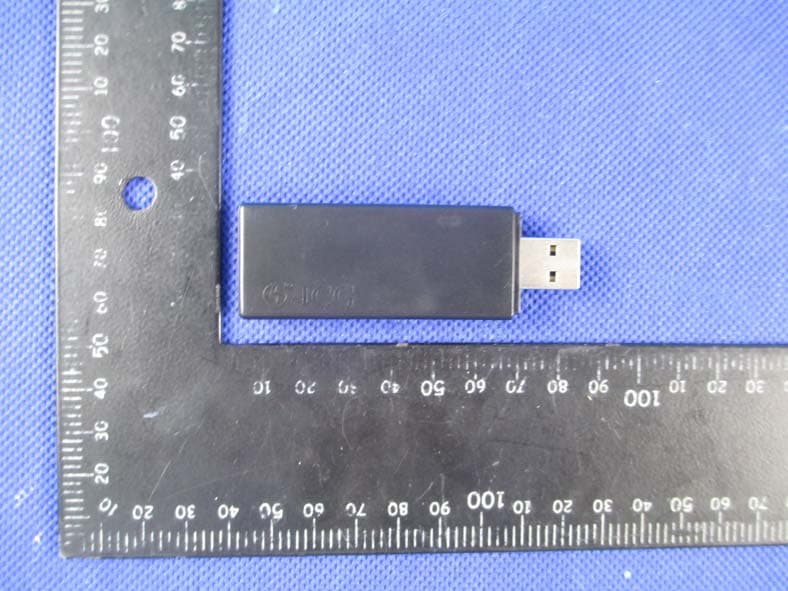
Click to zoom
Application Details
- Equipment Class
- NII - Unlicensed National Information Infrastructure TX
- Date of Grant
- Apr 08, 2013
- Application Purpose
- Original Equipment
- Date of Application
- Apr 08, 2013
- Equipment Note
- 300Mbps Dual Band Wireless N USB Adapter
- Frequency Range
- 5180.00000000 - 5240.00000000
- Country
- China
Documents & Files
Document Text
Text extracted from the exhibit documents filed with the FCC. Open a document above to read the original.
Users Manual
300Mbps Dual Band Wireless N USB Adapter Quick Installation Guide 1. Hardware Installation 1.1 Hardware Installation for PCI Adapter 1) Turn off your desktop PC and disconnect the power. 2) Open your PC’s case and locate an available PCI slot on the motherboard.Remove the metal slot cover on the back Of the PC. Check with your computermanufacturer for instructions if needed. 3) Slide the PCI adapter into the PCI slot. Make sure that all of its pins are touching the slot’s contacts. Once the adapter is firmly in place, secure its fastening tab to your PC’s chassis with a mounting screw. Then, close your PC’s case. 4) Reconnect your PC’s power and power on your desktop PC 1.2 Hardware Installation for USB Adapter Connect USB adapter to the USB interface on your computer. 1.3 Hardware Installation for Cardbus Adapter 1) Locate an available CardBus slot on your notebook PC. 2) With the connector pin end facing the CardBus slot and the label facing up, slide the adapter into the CardBus slot until it locks in place. 3) The Status LED should flash when the adapter is installed correctly.. 2. Software Installation for Windows XP 1. When “Found New Hardware Wizard” is prompted, click Cancel, then insert the Resource CD into your CD-ROM drive. Choose Wireless-N PCI/USB/Cardbus adapter driver , pitch on I accept the terms of the license agreement ,,then click Next to continue; 2. Follow the Install Shield Wizard steps, and click the Finish button when done to reboot the system,Just confirmed it like below: Note: If Windows XP warns about Windows Logo testing, click Continue Anyway to continue the installation. 3. Connecting to a Wireless Network 1. Open the Ralink Utility by double-clicking on the Ralink Utility icon in the taskbar in the bottom right corner of your screen, or by clicking Start > Programs > Ralink Wireless Utility. 2. The Ralink Utility appears, by default connected to an available open wireless network. Check the name of the network to which you are connected. If this is the correct network, no further steps are required. 3. To connect to an alternative network, click the Available Networks button. 4. In the Available Networks window that appears, select the name of the network to which you are connecting. Then click the connect icon and wait several seconds while the Utility sets up a connection. 5. The Ralink Utility automatically detects and displays the security settings of the network to which you are connecting in the Profile Settings screens. For instructions on setting up security, click on the security method detected for your network. a. If the Utility shows that WPA-PSK or WPA2-PSK security is detected, click the right arrow to save your settings. b. In the screen that displays, in the 'WPA Preshared Key' field, type a security key, the same as that used by the AP or wireless router to which you are connecting. Click the right arrow to save your settings and connect to the network. 6. Once you are connected the Available Networks screen shows the status of your connection. 4. Setting up a Wireless Network Profile 1. To quickly set up a profile by using the settings of an available network, click the Available Networks button to display the Available Networks screen. 2. In this screen, select a network and click on the Add to Profile button 3. The settings of the network you selected in the Available Networks screen are automatically displayed in the Profile Settings screens. 4. Click the right arrow in these screens to accept all settings. enter security settings such as the security key for your network. 5. After you have set up a profile, it appears in the Profile List screen. 6. To connect to the network associated with the profile, click the Connect button A tick icon appearing in the Profile List screen indicates a successful connection, while a cross iconindicates the connection was unsuccessful. FCC Caution: Any changes or modifications not expressly approved by the party responsible for compliance could void the user's authority to operate this equipment. This device complies with Part 15 of the FCC Rules. Operation is subject to the following two conditions: (1) This device may not cause harmful interference, and (2) this device must accept any interference received, including interference that may cause undesired operation. The device has been evaluated to meet general RF exposure requirement. The device can be used in portable exposure condition without restriction NOTE: This equipment has been tested and found to comply with the limits for a Class B digital device, pursuant to Part 15 of the FCC Rules. These limits are designed to provide reasonable protection against harmful interference in a residential installation. This equipment generates, uses and can radiate radio frequency energy and, if not installed and used in accordance with the instructions, may cause harmful interference to radio communications. However, there is no guarantee that interference will not occur in a particular installation. If this equipment does cause harmful interference to radio or television reception, which can be determined by turning the equipment off and on, the user is encouraged to try to correct the interference by one or more of the followingmeasures: -- Reorient or relocate the receiving antenna. -- Increase the separation between the equipment and receiver. -- Connect the equipment into an outlet on a circuit different from that to which the receiver is connected. -- Consult the dealer or an experienced radio/TV technician for help. This transmitter must not be co-located or operating in conjunction with any other antenna or transmitter. Operations in the 5.15-5.25GHz band are restricted to indoor usage only.
Attestation Statements
Date:2013-03-20 FCC ID: HHOYC005 Subject: Ad Hoc Mode Function Declaration To Whom it may concern, We, declare that the EUT (Model Name: JWL-D572R) doesn’t have Ad Hoc function on “non-US frequencies” and/or “on DFS frequencies”. In non-associated mode, that software and associated drivers will not initiate any transmission on DFS frequencies. This includes transmissions for beacon ad-hoc peer-to-peer modes. Regards, Yours sincerely, Signatory Signature Name: Yong Zhou Title: Manager Tel: +86-0755-33019922 Fax: +86-0755-86238830
Attestation Statements
Shenzhen Yichen Technoloy Development Co.,LTD Federal Communications Commission Authorization and Evaluation Division 1435 Oakland Mills Road Columbia, MD 21046 Date: 2013-3-21 SUBJECT: FCC Application for ( FCCID: HHOYC005) To Whom It May Concern: We, the undersigned, hereby attest to the fact that we will apply the Declaration of Conformity procedure to the class B computer peripheral portion of this composite device. We understand that devices subject to the DoC procedure are required to be tested to show compliance with the FCC technical regulations by a recognized accredited testing laboratory. The testing laboratory must be accredited by a Commission approved accreditation body or designated under the terms of a government-to-government Mutual Recognition Agreement (MRA). A listing of those accredited testing laboratories that have been recognized by the Commission is published on the FCC Webpage: https://apps.fcc.gov/oetcf/eas/reports/TestFirmSearch.cfm Select the "accredited" option to search for FCC recognized accredited test firms. Test facilities located in countries, where the U.S. does not have an operational Telcom MRA are not recognized by the FCC to test for the DoC procedure. Regards, Signatory Signature Client’s name / title : Yong Zhou / Manager Contact information / address : 5F, No.1, Honghualing 2nd Industrial Zone, Xili Town, Nanshan District, Shenzhen,China
Cover Letter(s)
SCS-F18: Project and Product Certification Representative Authorization Letter Page 1 of 2 Rev 3.0 775 Montague Expressway Milpitas, CA 95035 Tel: 408-526-1188 Fax: 408-526-1088 Email: [email protected] Project and Product Certification Representative Authorization Letter Reason for Amendment (current / obsolete) Revision History Approved Date From To Initial Release (obsolete) 1.0 1.0 Nov-14-2006 Revised wording (obsolete) 1.0 2.0 Sept–25-2007 Updated company template (current) 2.0 3.0 Jan-31-2012 SCS-F18: Project and Product Certification Representative Authorization Letter Page 2 of 2 Rev 3.0 Shenzhen Yichen Technoloy Development Co.,LTD 2013-3-20 To: SIEMIC, INC. 775 Montague Expressway, Milpitas, CA 95035 USA Dear Sir/Madam, Re: Project and Product Certification Representative Authorization Letter We, Shenzhen Yichen Technoloy Development Co.,LTD.hereby authorize SIEMIC, INC. to act as a Certification Body for certifying for the following project(s): (300Mbps Dual Band Wireless N USB Adapter,Model: JWL-D572R , FCC ID: HHOYC005) We affirm that between SIEMIC and Shenzhen Yichen Technoloy Development Co.,LTD., any difference in understanding, including test plan, measurement methods, applicable standards and relevant procedures and processes have been resolved prior to commencement of testing activities. Sincerely, Client’s signature Client’s name / title : Yong Zhou / Manager Contact information / address : 5F, No.1, Honghualing 2nd Industrial Zone, Xili Town, Nanshan District, Shenzhen,China
Cover Letter(s)
SCS-F19: Confidentiality Request Letter Page 1 of 2 Rev 3.0 775 Montague Expressway Milpitas, CA 95035 Tel: 408-526-1188 Fax: 408-526-1088 Email: [email protected] Confidentiality Request Letter Reason for Amendment (current / obsolete) Revision History Approved Date From To Initial Release (obsolete) 1.0 1.0 Nov-14-2006 Adding CFR 2.459 (obsolete) 1.0 2.0 August – 11 - 2008 Updated company template & Added text box (current) 2.0 3.0 Jan-31-2012 SCS-F19: Confidentiality Request Letter Page 2 of 2 Rev 3.0 Shenzhen Yichen Technoloy Development Co.,LTD 2013-3-20 To: Federal Communications Commission Authorization and Evaluation Division 7435 Oakland Mills Road Columbia, MD Subject: Permanent Confidentiality Request for FCC ID: HHOYC005 We hereby request confidential treatment of information accompanying this application as outlined below: - Block Diagram - Schematics - Operational Description The above materials contain trade secrets and proprietary information not customarily released to the public. The public disclosure of these materials may be harmful to the applicant and provide unjustified benefits to its competitors. The applicant understands that pursuant to Section 0.457 & 0.459 of the Rules, disclosure of this application and all accompanying documentation will not be made before the date of the Grant for this application. Sincerely, Client’s signature Client’s name / title : Yong Zhou / Manager Contact information / address : 5F, No.1, Honghualing 2nd Industrial Zone, Xili Town, Nanshan District, Shenzhen,China
External Photos
APPENDIX-PHOTOGRAPHS OF EUT CONSTRUCTIONAL DETAILS Photo 1 Photo 2 Photo 3 Photo 4 Photo 5 Photo 6
Internal Photos
Photo 7 Photo 8 Photo 9 Photo 10
RF Exposure Info
FCC ID:HHOYC005 RF EXPOSURE EVALUATION METHOD SAR Test Exclusion Thresholds for 100 MHz – 6 GHz and ≤ 50 mm Approximate SAR Test Exclusion Power Thresholds at Selected Frequencies and Test Separation Distances are illustrated in the following Table. Maximum measured transmitter power. 2.4GHz: Maximum Peak Conducted Output Power (dBm) Maximum Conducted Output Power(AV) (dBm) Maximum Conducted Output Power (mW) 13.67 9.78 9.50 5.8GHz Maximum Peak Conducted Output Power (dBm) Maximum Conducted Output Power(AV) (dBm) Maximum Conducted Output Power (mW) 10.67 6.67 4.65 FCC ID:HHOYC005 5.2GHz Maximum Peak Conducted Output Power (dBm) Maximum Conducted Output Power(AV) (dBm) Maximum Conducted Output Power (mW) 9.81 6.61 4.58 able for Filed Antenna Ant . Brand Model Name Antenna Type ConnectorGain (dBi) NOTE A N/A N/A PCB AntennaN/A 2.4GHz: 1.2 5GHz:2.3 N/A B N/A N/A PCB AntennaN/A 2.4GHz:1.2 5GHz:2.3 N/A For MIMO mode , Directional gain=GANT +10log(N)dbi =4.21dbi in 2.4GHz Directional gain=GANT +10log(N)dbi =5.31dbi in 5GHz Referto44749825D01GeneralRFExposureGuidancev05AppendixA, youseethatfor Maximum Conducted Output Power9.26mW(<10mW)in2.4GHz, Maximum Conducted Output Power4.65mW(<6mW)in5GHz sonoSAR is required.
Test Report
FCC RADIO TEST REPORT FCC ID: HHOYC005 Product: 300Mbps Dual Band Wireless N USB Adapter Trade Name: Model Name: JWL-D572R Serial Model: N/A Report No.: 2013NT0225203F2 Prepared for Shenzhen Yichen Technoloy Development Co., Ltd. 5F, No.1, Honghualing 2nd industrial Zone, Xili Town, Nanshan District, Shenzhen, Guangdong, People’s Republic Of China Prepared by Shenzhen NTEK Testing Technology Co., Ltd. 1/F, Building E, Fenda Science Park, Sanwei Community,Xixiang Street Bao’an District, Shenzhen P.R. China Tel.: +86-0755-61156588 Fax.: +86-0755-61156599 Website:www.ntek.org.cn Page 2 of 68 Report No.: 2013NT0225203F2 TEST RESULT CERTIFICATION Applicant’s name ................. : Shenzhen Yichen Technoloy Development Co., Ltd. Address ................................. : 5F, No.1, Honghualing 2nd industrial Zone, Xili Town, Nanshan District, Shenzhen, Guangdong, People’s Republic Of China Manufacture's Name ............ : Shenzhen Yichen Technoloy Development Co., Ltd. Address ................................. : 5F, No.1, Honghualing 2nd industrial Zone, Xili Town, Nanshan District, Shenzhen, Guangdong, People’s Republic Of China Product description Product name ........................... : 300Mbps Dual Band Wireless N USB Adapter Model and/or type reference : JWL-D572R Serial Model .............................. : N/A Standards ............................. : FCC Part15.407 Test procedure ..............................ANSI C63.4-2003 This device described above has been tested by NTEK, and the test results show that the equipment under test (EUT) is in compliance with the FCC requirements. And it is applicable only to the tested sample identified in the report. This report shall not be reproduced except in full, without the written approval of NTEK, this document may be altered or revised by NTEK, personal only, and shall be noted in the revision of the document. Date of Test ............................................ : Date (s) of performance of tests ............. : 25 Feb. 2013 ~19 Mar. 2013 Date of Issue ........................................... : 20 Mar. 2013 Test Result ............................................... : Pass Testing Engineer : (Apple Huang) Technical Manager : (Tom Zhang) Authorized Signatory : (Bovey Yang) Page 3 of 68 Report No.: 2013NT0225203F2 Table of Contents Page 1 . SUMMARY OF TEST RESULTS 5 1.1 TEST FACILITY 6 1.2 MEASUREMENT UNCERTAINTY 6 2 . GENERAL INFORMATION 7 2.1 GENERAL DESCRIPTION OF EUT 7 2.2 DESCRIPTION OF TEST MODES 9 2.3 BLOCK DIGRAM SHOWING THE CONFIGURATION OF SYSTEM TESTED 10 2.4 DESCRIPTION OF SUPPORT UNITS(CONDUCTED MODE) 11 2.5 EQUIPMENTS LIST FOR ALL TEST ITEMS 12 3 . EMC EMISSION TEST 13 3.1 CONDUCTED EMISSION MEASUREMENT 13 3.1.1 POWER LINE CONDUCTED EMISSION LIMITS 13 3.1.2 TEST PROCEDURE 14 3.1.3 DEVIATION FROM TEST STANDARD 14 3.1.4 TEST SETUP 14 3.1.5 EUT OPERATING CONDITIONS 14 3.1.6 TEST RESULTS 15 3.2 RADIATED EMISSION MEASUREMENT 17 3.2.1 RADIATED EMISSION LIMITS 17 3.2.2 TEST PROCEDURE 18 3.2.3 DEVIATION FROM TEST STANDARD 18 3.2.4 TEST SETUP 19 3.2.5 EUT OPERATING CONDITIONS 20 3.2.6 TEST RESULTS (BETWEEN 9KHZ – 30 MHZ) 21 3.2.7 TEST RESULTS (BETWEEN 30MHZ – 1GHZ) 22 3.2.8 TEST RESULTS (ABOVE 1000 MHZ) 24 4 . POWER SPECTRAL DENSITY TEST 40 4.1 APPLIED PROCEDURES / LIMIT 40 4.1.1 TEST PROCEDURE 40 4.1.2 DEVIATION FROM STANDARD 40 4.1.3 TEST SETUP 40 4.1.4 EUT OPERATION CONDITIONS 40 4.1.5 TEST RESULTS 41 5 . 26 BANDWIDTH TEST 45 5.1 APPLIED PROCEDURES / LIMIT 45 5.1.1 TEST PROCEDURE 45 Page 4 of 68 Report No.: 2013NT0225203F2 Table of Contents Page 5.1.2 DEVIATION FROM STANDARD 45 5.1.3 TEST SETUP 45 5.1.4 EUT OPERATION CONDITIONS 45 5.1.5 TEST RESULTS 46 6 . MAXIMUM CONDUCTED OUTPUT POWER 50 6.1 APPLIED PROCEDURES / LIMIT 50 6.1.1 TEST PROCEDURE 50 6.1.2 DEVIATION FROM STANDARD 50 6.1.3 TEST SETUP 50 6.1.4 EUT OPERATION CONDITIONS 51 6.1.5 TEST RESULTS 52 7 . PEAK EXCURSION RATIO MEASUREMENT 57 7.1 STANDARD REQUIREMENT 57 7.2 MEASURING INSTRUMENTS 57 7.3 TEST PROCEDURES 57 7.3 TEST SETUP 57 8 . FREQUENCY STABILITY MEASUREMENT 63 8.1 LIMIT OF FREQUENCY STABILITY 63 8.2 MEASURING INSTRUMENTS 63 8.3 TEST PROCEDURES 63 8.4 TEST SETUP 63 9 . AUTOMATICALLY DISCONTINUE TRANSMISSION 65 9.1 LIMIT OF AUTOMATICALLY DISCONTINUE TRANSMISSION 65 9.2 TEST RESULT OF AUTOMATICALLY DISCONTINUE TRANSMISSION 65 10 . ANTENNA REQUIREMENT 66 10.1 STANDARD REQUIREMENT 66 10.2 EUT ANTENNA 66 11 . EUT TEST PHOTO 67 APPENDIX-PHOTOGRAPHS OF EUT CONSTRUCTIONAL DETAILS Page 5 of 68 Report No.: 2013NT0225203F2 1. SUMMARY OF TEST RESULTS Test procedures according to the technical standards: FCC Part15 (15.407) , Subpart E IC RSS-210 Issued 8 Standard Section Test Item Judgment Remark 15.207& Gen 7.2.4 Conducted Emission PASS 15.403(i)& A9.2 26dB Bandwidth PASS 15.407(a) &A9.2 Maximum Conducted Output Power PASS 15.407(b)& A9.3 Peak Excursion Ratio PASS 15.407(b) &A9.3 Radiated Spurious Emission PASS 15.407(a) &A9.2 Power Spectral Density PASS 15.407(g)& A9.5 Frequency Stability PASS 15.407(c)& A9.5 Automatically Discontinue Transmission PASS 15.203& A9.2 Antenna Requirement PASS NOTE: (1)” N/A” denotes test is not applicable in this Test Report Page 6 of 68 Report No.: 2013NT0225203F2 1.1 TEST FACILITY NTEK Testing Technology Co., Ltd Add.:1/F, Building E, Fenda Science Park, Sanwei Community, Xixiang Street, Bao’an District, Shenzhen P.R. China. FCC Registration No.:238937; IC Registration No.:9270A-1 CNAS Registration No.:L5516 1.2 MEASUREMENT UNCERTAINTY The reported uncertainty of measurement y ± U,where expended uncertainty U is based on a standard uncertainty multiplied by a coverage factor of k=2,providing a level of confidence of approximately 95 %。 No. Item Uncertainty 1 Conducted Emission Test ±1.38dB 2 RF power,conducted ±0.16dB 3 Spurious emissions,conducted ±0.21dB 4 All emissions,radiated(<1G) ±4.68dB 5 All emissions,radiated(>1G) ±4.89dB 6 Temperature ±0.5°C 7 Humidity ±2% Page 7 of 68 Report No.: 2013NT0225203F2 2. GENERAL INFORMATION 2.1 …
Text truncated - open the document above for the full version.
Test Setup Photos
Page 115 of 116 Report No.: NTEK-2013NT0225203F1 8. EUT TEST PHOTO Radiated Measurement Photos Page 116 of 116 Report No.: NTEK-2013NT0225203F1 Conducted Measurement Photos
Contact Information
Applicant
Yong Zhou(Manager)
Test Firm
NTEK Testing Technology Co., Ltd.Wetow Huang
Technical Specifications
| # | Rule Parts | Frequency Range | Power Output |
|---|---|---|---|
| 1 | 15E | 5.18 GHz - 5.24 GHz | 9.00 mW |
Other Applications from Shenzhen Yichen Technology Development Co., Ltd.

HHOWAWAJI-01
Sep 24, 2014Andriod Media Player
Equipment Class
DTS - Digital Transmission System
HHOJYR-N490S
Jun 25, 2014300Mbps Intelligent Wireless Router
Equipment Class
DTS - Digital Transmission System
HHOJWA-N8002
Mar 19, 20142.4G repeater
Equipment Class
DTS - Digital Transmission System
HHOJYL-AC120
Mar 02, 2014Dual Band Wireless USB Adapter
Equipment Class
DTS - Digital Transmission System
HHOJHR-AC865
Dec 23, 20131200Mb/s 802.11ac Intelligent Dual Band Gigabit Wireless Router
Equipment Class
DTS - Digital Transmission System