I28RFID-R4CXNG-01P4T with Zcomax WiFi plus RFID radio
Zebra Technologies Corporation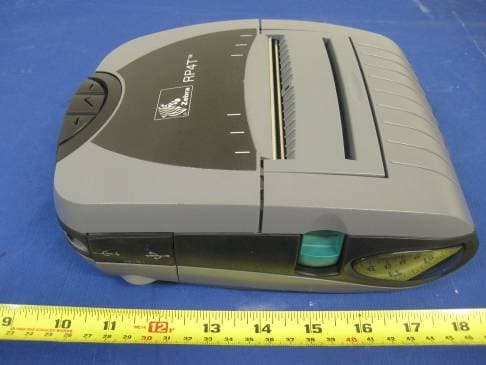
Click to zoom
Application Details
- Equipment Class
- DTS - Digital Transmission System
- Date of Grant
- Mar 02, 2011
- Application Purpose
- Original Equipment
- Date of Application
- Mar 02, 2011
- Equipment Note
- P4T with Zcomax WiFi plus RFID radio
- Frequency Range
- 2412.00000000 - 2462.00000000
- Country
- United States
Documents & Files
Document Text
Text extracted from the exhibit documents filed with the FCC. Open a document above to read the original.
Users Manual
Printer Preparation Connecting the Printer Radio Regulatory Information RP4T Printers Maintenance Troubleshooting Specifications Appendices Index P4T Overview Manual Introduction © ZIH Corp. 2008 UMAN-P4T-001 Rev.B Zebra P4T/RP4T™ Mobile Printer Series User Guide P4T/RP4TUser Guide 2 P4T Overview Manual Introduction Printer Preparation Connecting the Printer Radio Regulatory Information RP4T Printers Maintenance Troubleshooting Specifications Appendices Index Proprietary Statement This manual contains proprietary information of Zebra Technologies Corporation. It is intended solely for the information and use of parties operating and maintaining the equipment described herein. Such proprietary information may not be used, reproduced, or disclosed to any other parties for any other purpose without the expressed written permission of Zebra Technologies Corporation. Product Improvements Since continuous product improvement is a policy of Zebra Technologies Corporation, all specifications and signs are subject to change without notice. FCC Compliance Statement This device complies with part 15 of the FCC Rules. Operation is subject to the following two conditions: (1) This device may not cause harmful interference, and (2) this device must accept any interference received, including interference that may cause undesired operation. NOTE: This equipment has been tested and found to comply with the limits or a Class B digital device, pursuant to Part 15 of the FCC Rules. These limits are designed to provide reasonable protection against harmful interference in a residential installation. This equipment generates, uses and can radiate radio frequency energy and, if not installed and used in accordance with the instructions, may cause harmful interference to radio communications. However, there is no guarantee that interference will not occur in a particular installation. If this equipment does cause harmful interference to radio or television reception, which can be determined by turning the equipment off and on, the user is encouraged to try to correct the interference by one or more of the following measures: • Reorient or relocate the receiving antenna. • Increase the separation between the equipment and receiver. • Connect the equipment into an outlet or circuit different from that to which the receiver is connected. • Consult the dealer or an experienced radio/TV technician for help. WARNING: Exposure to Radio Frequency radiation. To conform to FCC RF exposure requirements this device shall be used in accordance with the operating conditions and instructions listed in this manual. Note that there are several radio options available with this printer. Additional regulatory information is contained in later sections devoted to each radio individually. NOTE: This unit was tested with shielded cables on the peripheral devices. Shielded cables must be used with the unit to insure compliance. Changes or modifications to this unit not expressly approved by Zebra Technologies Corporation could void the user’s authority to operate this equipment. Canadian Compliance Statement This Class B digital apparatus complies with Canadian ICES-003. Cet appareil numérique de la classe B est conforme á la norme NMB-003 du Canada. “IC:” before the equipment certification number signifies that the Industry Canada technical specifications were met. It does not guarantee that the certified product will operate to the user’s satisfaction. Agency Approvals and Regulatory Information • FCC part 15 • Canadian STD RSS-210 • NOM-ETL (Mexico) • EN60950: 2000 Safety Standard • EN55022:1998 Class B European • C-Tick (Australia) Electromagnetic Radiation Standard Liability Disclaimer Inasmuch as every effort has been made to supply accurate information in this manual, Zebra Technologies Corporation is not liable for any erroneous information or omissions. Zebra Technologies Corporation reserves the right to correct any such errors and disclaims liability resulting therefrom. No Liability for Consequential Damage In no event shall Zebra Technologies Corporation or anyone else involved in the creation, production, or delivery of the accompanying product (including hardware and software) be liable for any damages whatsoever (including, without limitation, damages for loss of business profits, business interruption, loss of business information, or other pecuniary loss) arising out of the use of or the results of use of or inability to use such product, even if Zebra Technologies Corporation has been advised of the possibility of such damages. Because some states do not allow the exclusion of liability for consequential or incidental damages, the above limitation may not apply to you. Copyrights The copyrights in this manual and the label print engine described therein are owned by Zebra Technologies Corporation. Unauthorized reproduction of this manual or the software in the label print engine may result in imprisonment of up to one year and fines of up to $10,000 (17 U.S.C.506). Copyright violators may be subject to civil liability. This product may contain ZPL ® , ZPL II ® , and ZebraLink tm programs; Element Energy Equalizer ® Circuit; E3 ® ; and AGFA fonts. Software © ZIH Corp. All rights reserved worldwide. ZebraLink and all product names and numbers are trademarks, and Zebra, the Zebra logo, ZPL, ZPL II, Element Energy Equalizer C ircuit, and E3 Circuit are registered trademarks of ZIH Corp. All rights reserved worldwide. Monotype ® , Intellifont ® and UFST ® are trademarks of Monotype Imaging, Inc. registered in the United States Patent and Trademark Office and may be registered in certain jurisdictions. Andy TM , CG Palacio TM , CG Century Schoolbook TM , CG Triumvirate TM , CG Times TM , Monotype Kai TM , Monotype Mincho TM and Monotype Sung TM are trademarks of Monotype Imaging, Inc. and may be registered in some jurisdictions. HY Gothic Hangul TM is a trademark of Hanyang Systems, Inc. Angsana TM is a trademark of Uni…
Text truncated - open the document above for the full version.
Users Manual
P4T/RP4TUser Guide 21 Printer Preparation Connecting the Printer Radio Regulatory Information RP4T Printers Maintenance Troubleshooting Specifications Appendices Index P4T Overview Manual Introduction Adjustable Shoulder Strap Refer to figure above. Snap each end of the shoulder strap into the retaining features on top of the printer. Hold the buckle and adjust the strap as shown until you achieve the desired length. Figure 11- Shoulder Strap Section Continues Hold Buckle Pull Strap here to lengthen Pull Strap here to shorten Snap into feature on printer P4T/RP4TUser Guide 22 Printer Preparation Connecting the Printer Radio Regulatory Information RP4T Printers Maintenance Troubleshooting Specifications Appendices Index P4T Overview Manual Introduction Verify the Printer Is Working Before you connect the printer to your computer or portable data terminal, make sure that the printer is in proper working order. You can do this by printing a con- figuration label using the “two key reset” method. If you can’t get this label to print, refer to the “Troubleshooting” section of this manual Printing a Configuration Label 1. Turn the printer off. Load the media compartment with journal media (media with no black bars printed on the back) 2. Press and hold the Feed Button. 3. Press and release the Power button and keep the Feed button pressed. When printing starts, release the Feed button. The unit will print a line of interlocking “x” characters to ensure all elements of the printhead are working, print out the version of software loaded in the printer and then print two reports. The first report indicates the printer model, ROM ver- sion, serial number, baud rate, etc. The second report prints out more detailed information on the printer’s con- figuration and parameter settings. If no second report appears, there is no application loaded. See the Troubleshooting Section for a further discussion on how to interpret the configuration label as a diagnostic tool. Figure 12 -Sample P4T Series Configuration Label P4T/RP4TUser Guide 23 Printer Preparation Connecting the Printer Radio Regulatory Information RP4T Printers Maintenance Troubleshooting Specifications Appendices Index P4T Overview Manual Introduction Connecting the Printer The printer must establish communications with a host device which sends the data to be printed. Communications occur in three basic ways: • By a cable between the printer and its host terminal using either RS232C or USB protocols • By means of a Bluetooth short-range radio frequency link • By means of a wireless LAN (Local Area Network) per 802.11b/g specifications Cable Communications Caution • The printer should be turned off before connecting or disconnecting any communications cable. Note • All P4T series printers can communicate by cable; the specific cable used with your printer can vary with the host terminal. Serial (RS232C) or USB Port The 10- pin modular connector on your communications cable plugs into the combination RS232C/USB communications port on the side of the printer. Signals and pin assignments for both communications ports are in the Specifications section of this manual. The protocol used with this port is determined by the communications cable you are using. Refer to Appendix A for more information on the communications cables offered with the P4T Series. Plug the connector into the RS232 port and ensure its locking device has clicked into position. The other end of the cable must be plugged into the host terminal as shown in Figure 14, or to a serial port on a computer as shown in Figure 15. Figure 13: P4T Series Communication Ports Section Continues RS232/USB Port USB Port Battery Charging Receptacle Align Locking Plug features with these cutouts. Rotate clockwise to lock the cable in place; counter- clockwise to un- lock the cable. P4T/RP4TUser Guide 24 Printer Preparation Connecting the Printer Radio Regulatory Information RP4T Printers Maintenance Troubleshooting Specifications Appendices Index P4T Overview Manual Introduction USB P4T Series Printers also have a USB type B port located directly above and to the right of the RS232C port. (Refer to Figure 13) The USB port is configured with the USB Open HCI interface driver allowing it to communicate with Windows ® based devices. USB drivers are included in the Zebra Universal Driver which can be downloaded from www.zebra.com. Other terminals or communications devices may require the installation of special drivers to use the USB connection. Consult your Zebra re-seller or the factory for further details. Section Continues Figure 14- Connecting to a TerminalFigure 15- Connecting to a PC RS232C or USB Communications Cable to Terminal Terminal RS232 Connector USB Connector Communications Ports RS-232C or USB Communications Cable to Computer Refer to Appendix A for part numbers. USB Connector RS232 Connector Communications Ports RS232 Connector USB Connector P4T/RP4TUser Guide 25 Printer Preparation Connecting the Printer Radio Regulatory Information RP4T Printers Maintenance Troubleshooting Specifications Appendices Index P4T Overview Manual Introduction Connect the Printer by Radio If your P4T Series printer has a radio option, you can connect wirelessly to either a terminal or a wireless network (WLAN.) Refer to the Mobile Printer Wireless Configuration Guide available on the product CD or at www.zebra.com/manuals for help on setting up wireless communications with your printer. Figure 16- Connecting Wirelessly to a Terminal Section Continues P4T Series printer with Wireless option Terminal with wireless communications capability P4T/RP4TUser Guide 26 Printer Preparation Connecting the Printer Radio Regulatory Information RP4T Printers Maintenance Troubleshooting Specifications Appendices Index P4T Overview Manual Introduction Wireless Communications Wireless Communications with Bluetooth ® “Bluetooth” is a worldwide standard for the exchange of data between two devices via radio frequencies. Blu…
Text truncated - open the document above for the full version.
Users Manual
P4T/RP4TUser Guide 30 Bluetooth ZBR4 Radio The following section only applies when the Bluetooth ZBR4 module is installed in a P4T series printer. This radio configuration has demonstrated compliance to FCC regulations. P4T series printers with this configuration sold in North America will have the FCC ID: I28-MD-ZBR4WA and the Industrie Canada ID: 3798B-ZBR4WA for this radio module on a label on the back of the printer. Caution • Exposure to Radio Frequency Radiation. The radiated output power of this internal Bluetooth radio is far below the FCC radio frequency exposure limits. The internal Bluetooth radio operates within guidelines found in radio frequency safety standards and recommendations. Do not use the printer in an unauthorized manner. Note • The following section only applies when the ZBR4 Bluetooth Radio is installed in a P4T Series printer. Unless specified elsewhere in this manual, the antenna used for this transmitter must not be co-located or must not operate in conjunction with any other antenna. European Regulatory Information for the ZBR4 Bluetooth Radio This device is intended for use in all EU and EFTA member states. Europe – EU Declaration of Conformity This device complies with the essential requirements of the R&TTE Directive 1999/5/EC. The following test methods have been applied in order to prove presumption of compliance with the R&TTE Directive 1999/5/EC: • EN 60950-1 Safety of Information Technology Equipment • EN 300 328-2 Technical requirements for spread-spectrum radio equipment • EN 301 489-1/-17 EMC requirements for spread-spectrum radio equipment. This device is a 2.4 GHz wireless LAN transceiver, intended for indoor home and office use in all EU and EFTA member states. WLAN Module Using 802.11b/g Radio The following section only applies when the 802.11b/g WLAN module is installed in a P4T series printer. Other than conditions specified elsewhere in this manual, only one of the radio options can be installed in the printer at one time and the antenna used for these transmitters must not be co-located or must not operate in conjunction with any other antenna. P4T Series printers for sale in North America will have the 802.11b/g radio FCC ID: 128-PLAN11BG or FCC ID: I28MD-CXLAN11G, and the Industrie Canada ID: 3798B-PLAN11BG or Industrie Canada ID: 3798B-CXLAN11G printed on a label on the back of the unit. Caution • The radiated output power of this internal 802.11b/g WLAN radio is far below the FCC radio frequency exposure limits. The internal radio operates within guidelines found in radio frequency safety standards and recommendations. Do not use the printer in an unauthorized manner. Caution • Use of a P4T printer with the radio module marked with FCC ID: 128-PLAN11BG or FCC ID: I28MD-CXLAN11G meets the FCC requirements for radio frequency (RF) radiation exposure in the standard body worn configuration with no minimum separation. In this configuration, which applies whether the belt clip or shoulder strap is used, the face of the printer from which paper is transported is facing away from the user’s body. The standard configuration must always be used when the printer is body worn. Industry Canada (IC) Warning This device complies with Industry Canada license-exempt RSS standard(s). Operation is subject to the following two conditions: 1) This device may not cause interference. 2) This device must accept any interference, including interference that may cause un- desired operation of the device. European Regulatory Information for this Radio ATBECYCZDK EEFIFRDEGR HUIEITLVLT LUMTNLPLPT SKSIESSEGB Note: -Member states in the EU with restrictive use for this device are crossed out! This device is also authorized for use in all EFTA member states (CH, IS, LI, NO) Important Notice: This device is a portable RF printer intended for commercial and industrial use in all EU and EFTA member states. Important Notice: This device is a portable RF printer intended for commercial and industrial use in all EU and EFTA member states except in France where restrictive use applies Radio Regulatory Information Section Continues Printer Preparation pg. 7 Connecting the Printer pg. 26 Radio Regulatory Information pg. 30 RP4T Printers pg. 34 Maintenance pg. 35 Troubleshooting pg. 37 Specifications pg. 42 Appendices pg. 45 Index pg. 51 P4T Overview- pg. 5 Manual Introduction pg. 4 P4T/RP4TUser Guide 31 Europe – EU Declaration of Conformity This device complies with the essential requirements of the R&TTE Directive 1999/5/EC. The following test methods have been applied in order to prove presumption of compliance with the R&TTE Directive 1999/5/EC: • EN55022 European Emissions Standard • EN 60950-1 Safety of Information Technology Equipment • EN 300 328-2 Technical requirements for spread-spectrum radio equipment • EN 301 489-17 EMC requirements for spread-spectrum radio equipment. This device is a 2.4 GHz wireless LAN transceiver, intended for indoor home and office use in all EU and EFTA member states, except in France where restrictive use applies. The use of this frequency band in France is subject to restrictions. You may only use channels 10 and 11 (2457 and 2462 MHz) on French territory, except in those French departments as listed in the table below where channels 1-13 (2412- 2472 MHz) may be used. For more information see http://www.anfr.fr/ and/or http://www.art-telecom.fr 01Ain36Indre69Rhone 02Aisne37Indre et Loire70Haute Saone 03Allier39Jura71Saone et Loire 05Hautes Alpes41Loir et Cher72Sarthe 08Ardennes42Loire75Paris 09Ariege45Loiret77Seine et Marne 10Aube50Manche78Yvelines 11Aude54 Meurthe et Moselle 79Deux Sievres 12Aveyron55Meuse82Tarn et Garonne 16Charente57Moselle84Vaucluse 19Correze58Nievre86Vienne 2ACorse Sud59Nord88Vosges 2BHaute Corse60Oise89Yonne 21Cote d’Or61Orne90Territoire de Belfort 24Dordogne63Puy de Dome91Essonne 25Doubs64 Pyrenees Atlantique 92Hauts de Seine 26Drome65Hautes Pyrenees93Seine St Denis 27Eure66 Pyrenees Orientales 94Val de Marne 32G…
Text truncated - open the document above for the full version.
Cover Letter(s)
Feb 4, 2011 To: SIEMIC, INC. 2206 Ringwood Avenue, San Jose, CA 95131 USA Dear Sir/Madam, Re: Project and Product Certification Representative Authorization Letter We, Zebra Technologies Corp, hereby authorize SIEMIC, INC. to act certifying for the following project(s): P4T using Zcomax WiFi radio plus RFID radio We affirm that between SIEMIC and Zebra Technologies Corp, any difference in understanding, including test plan, measurement methods, applica processes have been resolved prior to commencement of testing activities. Sincerely, Charles A. Derrow Director Compliance Engineering Tel: 847.793.5719 [email protected] Re: Project and Product Certification Representative Authorization Letter We, Zebra Technologies Corp, hereby authorize SIEMIC, INC. to act as a Certification Body for certifying for the following project(s): P4T using Zcomax WiFi radio plus RFID radio (FCC ID : I28RFID-R4CXNG-01 ) We affirm that between SIEMIC and Zebra Technologies Corp, any difference in understanding, including test plan, measurement methods, applicable standards and relevant procedures and processes have been resolved prior to commencement of testing activities. Director Compliance Engineering as a Certification Body for We affirm that between SIEMIC and Zebra Technologies Corp, any difference in understanding, ble standards and relevant procedures and
Cover Letter(s)
February 14, 2011 To: Federal Communications Commission Authorization and Evaluation Division Confidentiality Request regarding application for certification of FCC ID: I28RFID-R4CXNG- 01 We hereby request confidential treatment of information accompanying this application as outlined below: - RFID Radio Schematics - RFID Radio Block Diagram - RFID Operational Description - WIFI Radio Schematics - WIFI Radio Block Diagram - WIFI Operational Description - System Block Diagram - System Schematics The above materials contain trade secrets and proprietary information not customarily released to the public. The public disclosure of these materials may be harmful to the applicant and provide unjustified benefits to its competitors. The applicant understands that pursuant to Section 0.457 and 0.459 of the Rules, disclosure of this application and all accompanying documentation will not be made before the date of the Grant for this application. Sincerely, Charles A. Derrow Director, Compliance Engineering Tel: 847.793.5719 [email protected]
External Photos
EUT - Front View EUT - Rear View EUT - Right View EUT - Left View
ID Label/Location Info
Label Design FCC ID: I28RFID-R4CXNG IC ID: 3798B-R4CXNG01 Label Location Model : P4T R4CXNG-01 R4CXNG01 Label Location Label Location
Internal Photos
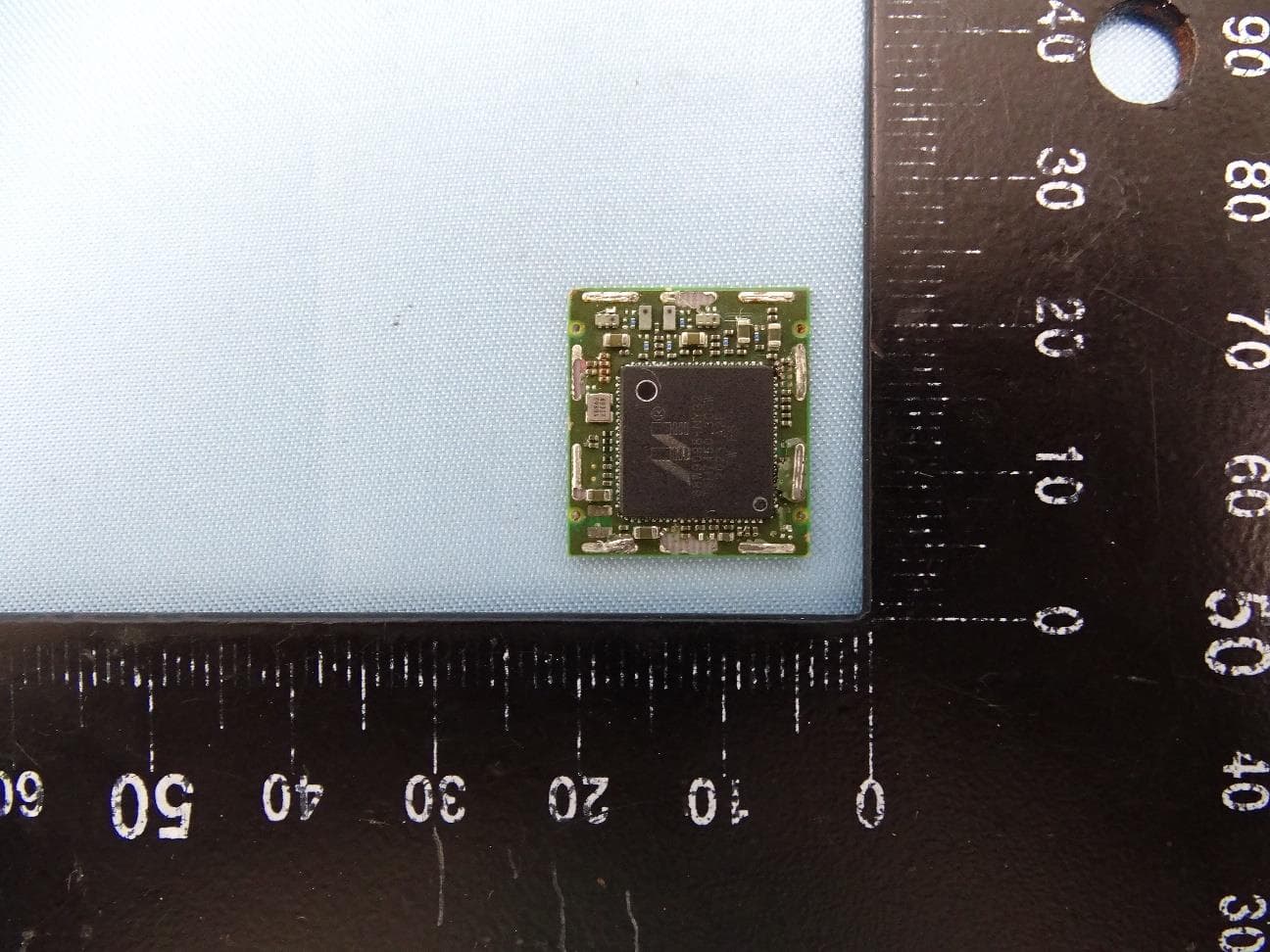
EUT Cover off View -1 EUT Cover off View -2 EUT Main PCBA Component View EUT Main PCBA Solder View RF Module(WLAN) PCBA Component View RF Module(WLAN) PCBA Solder View RF Module(RFID) PCBA Component View RF Module(RFID) PCBA Solder View EUT (WLAN Antenna) View 1 EUT (WLAN Antenna) View 2 EUT (RFID Antenna) View 1 EUT (RFID Antenna) View 2 Not Installed in this filing
RF Exposure Info
RFID According to §15.247(e)(i) and §1.1307(b)(1), systems operating under the provisions of this section shall be operated in a manner that ensures that the public is not exposed to radio frequency energy level in excess of the Commission’s guidelines. According to KDB 447498, no SAR required if power is lower than the flowing threshold: Frequency Range Center frequency (MHz) 60/f SAR Limitation (mw) Low Frequency (MHz) High Frequency(MHz) 902.75 927.25 915.25 66.67 Maximum measured transmitter power: Average Source Based Calculated Power (mw) 55.02 Threshold at which no SAR required is 66.67 mw. Average Source Based Calculated Power is 55.02mW. Conclusion: No SAR is required. WLAN Frequency Range Center frequency (MHz) 60/f SAR Limitation (mw) Low Frequency (MHz) High Frequency(MHz) 2412 2462 2437 25 Maximum measured transmitter power: 802.11b Conducted Power (dBm) (mW) 10.6 11.50 Maximum measured transmitter power: 802.11g Conducted Power (dBm) (mW) 10.8 12.00 Threshold at which no SAR required is 25 mw. Maximum Tx power is 12.00 mw . Conclusion: No SAR is required. SIMULTANEOUS TRANSMISSION EVALUATION EUT has meet KDB447498 (3)(b)(ii)(1) requirement so that No Simultaneous SAR is required. (a) Antennas separation is at least 5 cm. (b) Sum of 1-g SAR is less than 1.6W/KG for all simultaneous transmitting antennas pair. (c) Output Power is < 60/f (GHz) for any simultaneous transmitting antenna for which stand alone SAR is not required. (RFID)
Test Report
ZEBRA TECHNOLOGIES CORP P4T with Zcomax 802.11b/g radio module+RFID Model: P4T Dec 17th 2010 Report No.: SL100823061ZBR1063A1_FCC,IC(DTS) (This report supersedes NONE ) Modifications made to the product : None This Test Report is Issued Under the Authority of: David Zhang Test Engineer Leslie Bai Engineering Reviewer This test report may be reproduced in full only. Test result presented in this test report is applicable to the representative sample only. Title: RF Test Report P4T with Zcomax 802.11b/g radio module+RFID Model : P4T To FCC 15.247:2010,RSS*210 Issue 8:2010 Serial# SL10082306*ZBR*063A1_FCC,IC(DTS) Issue Date Dec 17th 2010 Page 2 of 86 www.siemic.com Laboratory Introduction ATION SIEMIC, headquartered in the heart of Silicon Valley, with superior facilities in US and Asia, is one of the leading independent testing and certification facilities providing customers with one*stop shop services for Compliance Testing and Global Certifications. In addition to testing and certification, SIEMIC provides initial design reviews and compliance management through out a project. Our extensive experience with China , Asia Pacific, North America, European, and international compliance requirements, assures the fastest, most cost effective way to attain regulatory compliance for the global markets. Accreditations for Conformity Assessment Country/Region Accreditation Body Scope USA FCC, A2LA EMC , RF/Wireless , Telecom Canada IC, A2LA, NIST EMC, RF/Wireless , Telecom Taiwan BSMI , NCC , NIST EMC, RF, Telecom , Safety Hong Kong OFTA , NIST RF/Wireless ,Telecom Australia NATA, NIST EMC, RF, Telecom , Safety Korea KCC/RRA, NIST EMI, EMS, RF , Telecom, Safety Japan VCCI, JATE, TELEC, RFT EMI, RF/Wireless, Telecom Mexico NOM, COFETEL, Caniety Safety, EMC , RF/Wireless, Telecom Europe A2LA, NIST EMC, RF, Telecom , Safety Accreditations for Product Certifications Country Accreditation Body Scope USA FCC TCB, NIST EMC , RF , Telecom Canada IC FCB , NIST EMC , RF , Telecom Singapore iDA, NIST EMC , RF , Telecom EU NB EMC & R&TTE Directive Title: RF Test Report P4T with Zcomax 802.11b/g radio module+RFID Model : P4T To FCC 15.247:2010,RSS*210 Issue 8:2010 Serial# SL10082306*ZBR*063A1_FCC,IC(DTS) Issue Date Dec 17th 2010 Page 3 of 86 www.siemic.com This page has been left blank intentionally. Title: RF Test Report P4T with Zcomax 802.11b/g radio module+RFID Model : P4T To FCC 15.247:2010,RSS*210 Issue 8:2010 Serial# SL10082306*ZBR*063A1_FCC,IC(DTS) Issue Date Dec 17th 2010 Page 4 of 86 www.siemic.com CONTENTS 1 EXECUTIVE SUMMARY & EUT INFORMATION ............................................................................................................. 6 2 TECHNICAL DETAILS .................................................................................................................................................. 7 3 MODIFICATION ............................................................................................................................................................ 8 4 TEST SUMMARY .......................................................................................................................................................... 9 5 MEASUREMENTS, EXAMINATION AND DERIVED RESULTS ...................................................................................... 10 ANNEX A. TEST INSTRUMENT & METHOD......................................................................................................................... 48 ANNEX B EUT PHOTOGRAPHS ........................................................................................................................................ 53 ANNEX C. TEST SETUP AND SUPPORTING EQUIPMENT ................................................................................................... 56 ANNEX D USER MANUAL, BLOCK & CIRCUIT DIAGRAM ................................................................................................... 60 ANNEX E SIEMIC ACCREDITATION ................................................................................................................................... 61 Title: RF Test Report P4T with Zcomax 802.11b/g radio module+RFID Model : P4T To FCC 15.247:2010,RSS*210 Issue 8:2010 Serial# SL10082306*ZBR*063A1_FCC,IC(DTS) Issue Date Dec 17th 2010 Page 5 of 86 www.siemic.com This page has been left blank intentionally. Title: RF Test Report P4T with Zcomax 802.11b/g radio module+RFID Model : P4T To FCC 15.247:2010,RSS*210 Issue 8:2010 Serial# SL10082306*ZBR*063A1_FCC,IC(DTS) Issue Date Dec 17th 2010 Page 6 of 86 www.siemic.com 1 Executive Summary & EUT information The purpose of this test programme was to demonstrate compliance of the ZEBRA Technologies Corp, P4T with Zcomax 802.11b/g radio module+RFID, and Model: P4T against the current Stipulated Standards. The P4T with Zcomax 802.11b/g radio module+RFID have demonstrated compliance with the FCC 15.247: 2010 & IC RSS210 Issue 8: 2010. EUT Information EUT Description : This is a Zebra Host Printer, primarily with P4T WLAN radio and Mercury5e*Compact (M5e*Compact) RFID radio. Those radios will be installed inside the product and will not be user accessible. The antenna is an internal antenna and will not be user accessible. 802.11b/g radios is designed to operate in the international ISM Band from 2.412 to 2.462 GHz. and RFID radio is designed to operate form 902.75MHz to 927.25MHz. Model No : P4T Serial No : XXPZJ103400046 Input Power : Input : 100*240V~, 1.5A, 50*60Hz Output : 12VDC, 4.16A Max (50W Max) Battery : 7.4VDC Classification Per Stipulated Test Standard : Spread Spectrum System / Device Title: RF Test Report P4T with Zcomax 802.11b/g radio module+RFID Model : P4T To FCC 15.247:2010,RSS*210 Issue 8:2010 Serial# SL10082306*ZBR*063A1_FCC,IC(DTS) Issue Date Dec 17th 2010 Page 7 of 86 www.siemic.com 2 TECHNICAL DETAILS Purpose Compliance testing of P4T with Zcomax 802.11b/g + RFID radio modules with stipulated standard Applicant / Client ZEBRA Techn…
Text truncated - open the document above for the full version.
Test Setup Photos
Radiated Emission Radiated Emission Test Setup (below 1GHz) - Front View Radiated Emission Test Setup (above 1GHz) – Rear View Conducted Emission Conducted Emission Test Setup – Front View Conducted Emission Test Setup – Rear View
Contact Information
Applicant
Jay Cadiz(Sr. Manager, Regulatory)
Test Firm
Bureau Veritas Consumer Products Services, Inc.Sarb Shelopal
[email protected]+1 925 963 4420
Technical Specifications
| # | Rule Parts | Frequency Range | Power Output |
|---|---|---|---|
| 1 | 15C | 2.41 GHz - 2.46 GHz | 12.00 mW |
Other Applications from Zebra Technologies Corporation
I28-WYSBHVDXP
May 19, 2021WLAN/BTLE module
Equipment Class
DTS - Digital Transmission System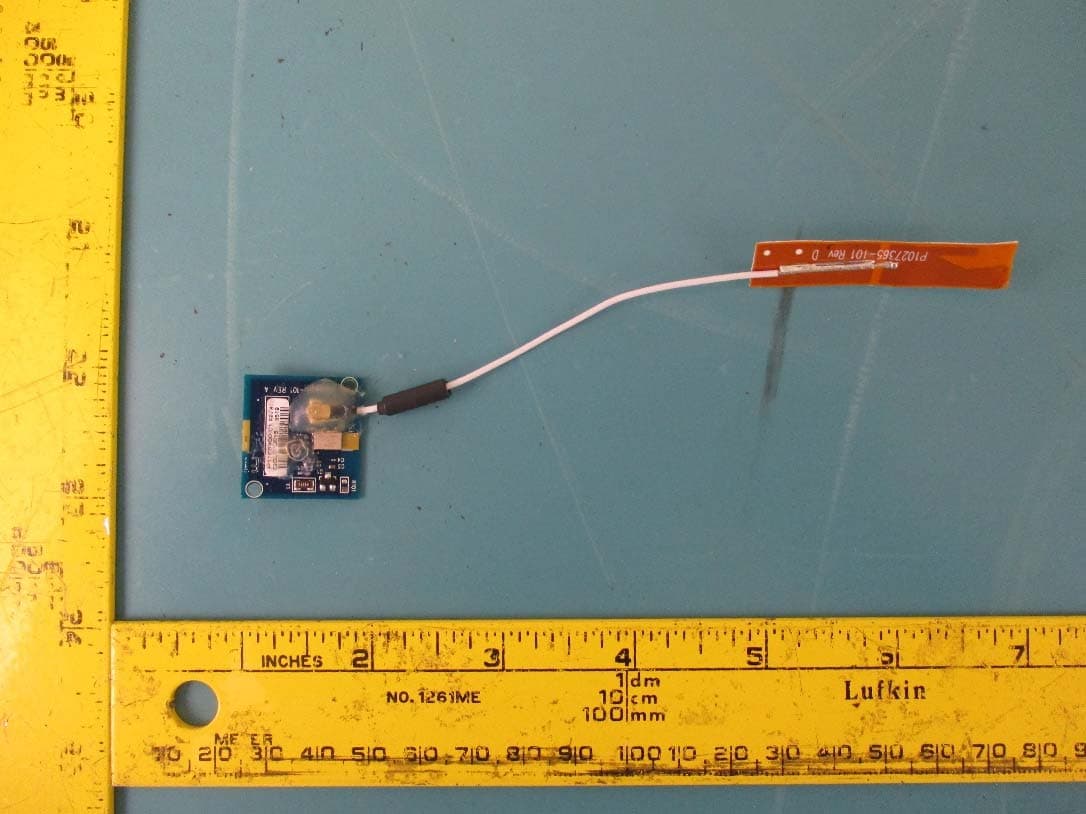
I28-EYSNSNZWWZ1
May 04, 2021BT5 Radio Module
Equipment Class
DTS - Digital Transmission System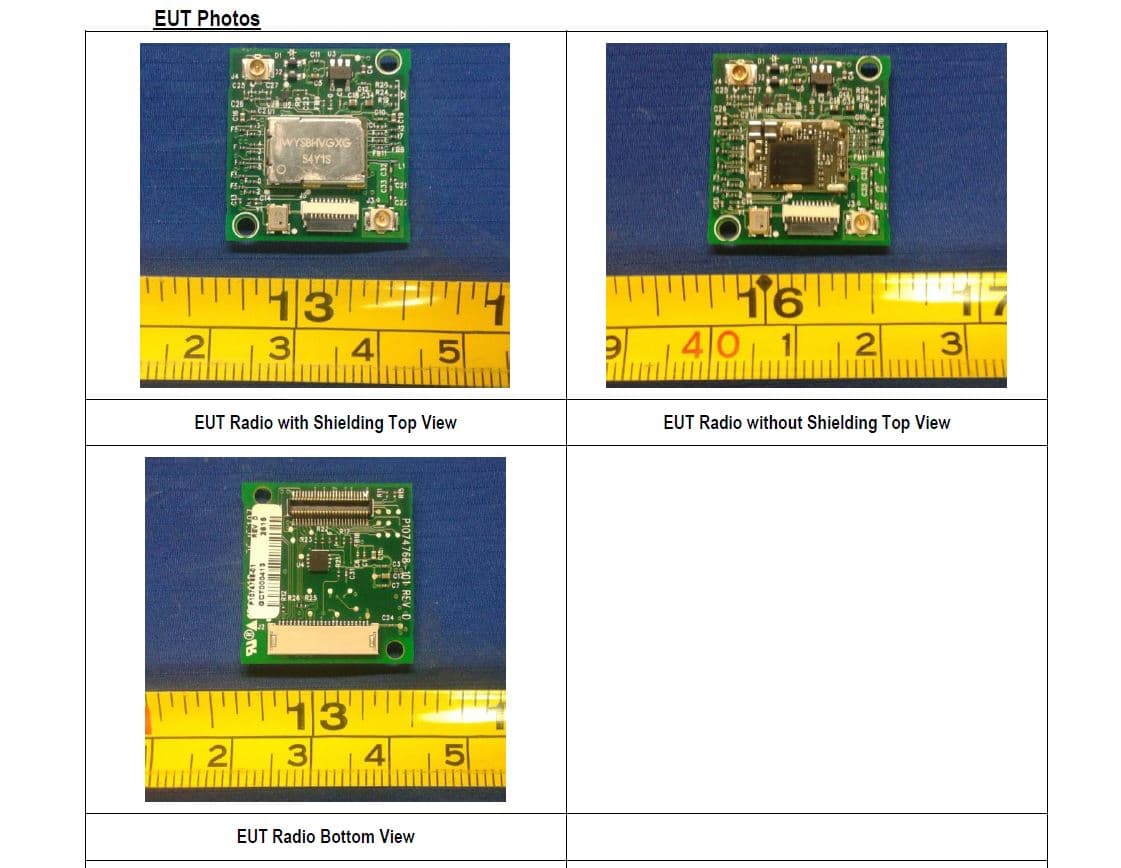
I28MD-FXLAN11AC
Nov 22, 2015Wireless 802.11ac + Bluetooth Module
Equipment Class
DSS - Part 15 Spread Spectrum Transmitter
I28MD-ZBRBLE
Nov 19, 2015Bluetooth Low Energy Module
Equipment Class
DTS - Digital Transmission System
I28MD-ZBR7BTLE
Jan 19, 2015Bluetooth 4.0 LE Module
Equipment Class
DSS - Part 15 Spread Spectrum Transmitter