MAU023Notebook with WLAN, WWAN, and Bluetooth
Getac Technology Corp.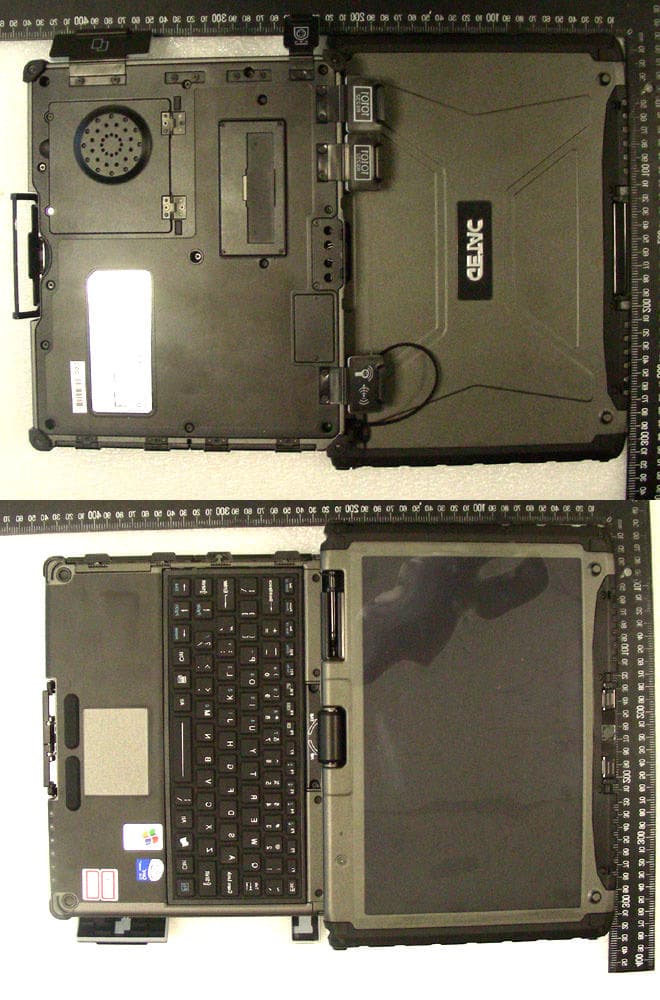
Click to zoom
Application Details
- Equipment Class
- PCB - PCS Licensed Transmitter
- Date of Grant
- Sep 13, 2007
- Application Purpose
- Original Equipment
- Date of Application
- Apr 24, 2007
- Equipment Note
- Notebook with WLAN, WWAN, and Bluetooth
- Frequency Range
- 1851.25000000 - 1908.75000000
- Company
- Getac Technology Corp.
- Country
- Taiwan
Documents & Files
Document Text
Text extracted from the exhibit documents filed with the FCC. Open a document above to read the original.
Users Manual
V100 User’s Manual IMPORTANT : This User’s Manual is for Safety Approval purpose only. This is not intended as final release for mass production. (February 2007) TRADEMARKS All brand and product names are trademarks or registered trademarks of their respective companies. NOTE The information in this manual is subject to change without notice. i Table of Contents Preface...................................................................................v Notational Conventions...................................................vi Chapter 1 Getting Started................................................1-1 Getting the Computer Running...........................................1-2 Unpacking....................................................................1-2 Connecting to AC Power...............................................1-2 Opening and Closing the Cover......................................1-3 Turning On and Off the Computer.................................1-3 Taking a Look at the Computer.........................................1-5 Right-Side Components.................................................1-5 Left-Side Components..................................................1-6 Rear Components.........................................................1-7 Front Components........................................................1-8 Bottom Components.....................................................1-9 Top-open Components................................................1-10 Where to Go from Here..................................................1-12 Chapter 2 Operating Your Computer...............................2-1 Starting and Stopping the Computer...................................2-2 Starting the Computer...................................................2-2 Stopping the Computer..................................................2-2 Using the Keyboard..........................................................2-4 Typewriter Keys...........................................................2-4 Cursor-Control Keys.....................................................2-4 Numeric Keypad..........................................................2-5 Function Keys..............................................................2-5 Fn Key........................................................................2-6 ii Hot Keys.....................................................................2-6 Using the Touchpad..........................................................2-8 Configuring the Touchpad.............................................2-9 Using the Touchscreen....................................................2-10 Using the Active Digitizer Feature....................................2-11 Using the Hard Disk Drive..............................................2-12 Replacing the Hard Disk Drive.....................................2-12 Using the Video Features.................................................2-14 Configuring the Display Modes....................................2-14 Using the Audio Features................................................2-16 Connecting Audio Devices...........................................2-16 Using the Communication Features..................................2-17 Using the Modem.......................................................2-17 Using the LAN...........................................................2-17 Using the Wireless LAN..............................................2-18 Using the Bluetooth Feature (Optional).........................2-21 Using the GPS (Optional)............................................2-24 Chapter 3 Managing Power..............................................3-1 AC Adapter......................................................................3-2 Battery Pack....................................................................3-3 Charging the Battery Pack.............................................3-3 Initializing the Battery Pack...........................................3-4 Battery Automatic Calibration Utility..............................3-5 Checking the Battery Level............................................3-7 Replacing the Battery Pack............................................3-7 Battery Low Signals and Actions....................................3-8 Power Management..........................................................3-9 Hibernation................................................................3-10 Power-Saving Tips.........................................................3-11 Chapter 4 Expanding Your Computer..............................4-1 Connecting an External Monitor (Optional).........................4-2 Connecting a Serial Device................................................4-3 Connecting a USB Device.................................................4-4 iii Using PC Cards................................................................4-5 PC Card Type..............................................................4-5 CardBus Support..........................................................4-5 Inserting and Removing a PC Card.................................4-5 Using the Card Reader......................................................4-7 System Memory Upgrade..................................................4-8 Chapter 5 Using BIOS Setup............................................5-1 When and How to Use BIOS Setup...................................5-2 When to Use................................................................5-2 Starting BIOS Setup......................................................5-2 Moving Around and Making Selections...........................5-4 Main Menu......................................................................5-5 Advanced Menu...............................................................5-6 Security Menu..................................................................5-9 Boot Menu....................................................................5-10 Exit Menu................…
Text truncated - open the document above for the full version.
Users Manual
V100 User’s Manual IMPORTANT : This User’s Manual is for Safety Approval purpose only. This is not intended as final release for mass production. (February 2007) TRADEMARKS All brand and product names are trademarks or registered trademarks of their respective companies. NOTE The information in this manual is subject to change without notice. i Table of Contents Preface...................................................................................v Notational Conventions...................................................vi Chapter 1 Getting Started................................................1-1 Getting the Computer Running...........................................1-2 Unpacking....................................................................1-2 Connecting to AC Power...............................................1-2 Opening and Closing the Cover......................................1-3 Turning On and Off the Computer.................................1-3 Taking a Look at the Computer.........................................1-5 Right-Side Components.................................................1-5 Left-Side Components..................................................1-6 Rear Components.........................................................1-7 Front Components........................................................1-8 Bottom Components.....................................................1-9 Top-open Components................................................1-10 Where to Go from Here..................................................1-12 Chapter 2 Operating Your Computer...............................2-1 Starting and Stopping the Computer...................................2-2 Starting the Computer...................................................2-2 Stopping the Computer..................................................2-2 Using the Keyboard..........................................................2-4 Typewriter Keys...........................................................2-4 Cursor-Control Keys.....................................................2-4 Numeric Keypad..........................................................2-5 Function Keys..............................................................2-5 Fn Key........................................................................2-6 ii Hot Keys.....................................................................2-6 Using the Touchpad..........................................................2-8 Configuring the Touchpad.............................................2-9 Using the Touchscreen....................................................2-10 Using the Active Digitizer Feature....................................2-11 Using the Hard Disk Drive..............................................2-12 Replacing the Hard Disk Drive.....................................2-12 Using the Video Features.................................................2-14 Configuring the Display Modes....................................2-14 Using the Audio Features................................................2-16 Connecting Audio Devices...........................................2-16 Using the Communication Features..................................2-17 Using the Modem.......................................................2-17 Using the LAN...........................................................2-17 Using the Wireless LAN..............................................2-18 Using the Bluetooth Feature (Optional).........................2-21 Using the GPS (Optional)............................................2-24 Chapter 3 Managing Power..............................................3-1 AC Adapter......................................................................3-2 Battery Pack....................................................................3-3 Charging the Battery Pack.............................................3-3 Initializing the Battery Pack...........................................3-4 Battery Automatic Calibration Utility..............................3-5 Checking the Battery Level............................................3-7 Replacing the Battery Pack............................................3-7 Battery Low Signals and Actions....................................3-8 Power Management..........................................................3-9 Hibernation................................................................3-10 Power-Saving Tips.........................................................3-11 Chapter 4 Expanding Your Computer..............................4-1 Connecting an External Monitor (Optional).........................4-2 Connecting a Serial Device................................................4-3 Connecting a USB Device.................................................4-4 iii Using PC Cards................................................................4-5 PC Card Type..............................................................4-5 CardBus Support..........................................................4-5 Inserting and Removing a PC Card.................................4-5 Using the Card Reader......................................................4-7 System Memory Upgrade..................................................4-8 Chapter 5 Using BIOS Setup............................................5-1 When and How to Use BIOS Setup...................................5-2 When to Use................................................................5-2 Starting BIOS Setup......................................................5-2 Moving Around and Making Selections...........................5-4 Main Menu......................................................................5-5 Advanced Menu...............................................................5-6 Security Menu..................................................................5-9 Boot Menu....................................................................5-10 Exit Menu................…
Text truncated - open the document above for the full version.
Cover Letter(s)
No. 65, Ku Dai Keng St., Hsichih, Taipei 221, R.O. C. Tel: 886-2-2646-2550 FAX: 886-2-26464641 No. 120, Lane 180, San Ho Tsuen, Hsin Ho Rd. Lung-Tan Hsiang, Tao Yuan County 325, Taiwan, R.O.C. Tel: 886-3-407-1718 FAX:886-3-407-1738 Date: Apr. 4th, 2007 American Telecommunications Certification Body, Inc. 6731 Whittier Avenue Suite C110 McLean, VA 22101 RE: Certification Applications FCC ID: MAU023 Model: V100 We would like to apply for FCC Certification on the subject model (EUT). The EUT is a Notebook Personal Computer built in 1)WLAN a+b+g Module 2) Bluettoth Module 3) WWAN Module. We have uploaded the related document for the EUT onto your website. Please review the information we submitted and issue us a grant for the subject model. If you have any comments, please do not hesitate to contact us. Thank you for your attention to these matters. Sincerely, ________________ Eddy Hsiung / Director International Standards Laboratory No. 65, Ku Dai Keng St., Hsichih, Taipei 221, R.O. C. Tel: 886-2-2646-2550 FAX: 886-2-26464641 No. 120, Lane 180, San Ho Tsuen, Hsin Ho Rd. Lung-Tan Hsiang, Tao Yuan County 325, Taiwan, R.O.C. Tel: 886-3-407-1718 FAX:886-3-407-1738 FCC Labeling Requirements and Information Date: Apr. 4th, 2007 American Telecommunications Certification Body, Inc. 6731 Whittier Avenue Suite C110 McLean, VA 22101 RE: Certification Applications FCC ID: MAU023 Model: V100 The following label information is required by the FCC Rules and Regulations for certified devices. Please find marketing information required by the FCC Rules and Regulations as following: Label Requirements An intentional radiator device subject to certification by the FCC shall carry a warning label which includes the following statement: This device complies with Part 15 of the FCC Rules. Operation is subject to the following two conditions: (1) this device may not cause harmful interference, and (2) this device must accept any interference received, including interference that may cause undesired operation. The sample label shown shall be permanently affixed at a conspicuous location on the device and be readily visible to the user at the time of purchase. FCC ID: MAU023 This device complies with Part 15 of the FCC Rules. Operation is subject to the following two conditions: (1) this device may not cause harmful interference, and (2) this device must accept any interference received, including interference that may cause undesired operation. Sincerely, ________________ Eddy Hsiung / Director International Standards Laboratory No. 65, Ku Dai Keng St., Hsichih, Taipei 221, R.O. C. Tel: 886-2-2646-2550 FAX: 886-2-26464641 No. 120, Lane 180, San Ho Tsuen, Hsin Ho Rd. Lung-Tan Hsiang, Tao Yuan County 325, Taiwan, R.O.C. Tel: 886-3-407-1718 FAX:886-3-407-1738 Request for Confidentiality Date: Apr. 4th, 2007 American Telecommunications Certification Body, Inc. 6731 Whittier Avenue Suite C110 McLean, VA 22101 RE: Certification Applications FCC ID: MAU023 Model: V100 Please be advised that the following information is to be held confidential on behalf of MITAC TECHNOLOGY CORP. q Block Diagram q Schematics q Product Specification q Part List The application contains technical information which MITAC TECHNOLOGY CORP. deems to be trade secrets and proprietary. If made public, the information might be used to the disadvantage of the applicant in the market place. Thank you for your attention to this matter. Sincerely, ________________ Eddy Hsiung / Director International Standards Laboratory
Cover Letter(s)
No. 65, Ku Dai Keng St., Hsichih, Taipei 221, R.O. C. Tel: 886-2-2646-2550 FAX: 886-2-26464641 No. 120, Lane 180, San Ho Tsuen, Hsin Ho Rd. Lung-Tan Hsiang, Tao Yuan County 325, Taiwan, R.O.C. Tel: 886-3-407-1718 FAX:886-3-407-1738 Date: Apr. 4th, 2007 American Telecommunications Certification Body, Inc. 6731 Whittier Avenue Suite C110 McLean, VA 22101 RE: Certification Applications FCC ID: MAU023 Model: V100 We would like to apply for FCC Certification on the subject model (EUT). The EUT is a Notebook Personal Computer built in 1)WLAN a+b+g Module 2) Bluettoth Module 3) WWAN Module. We have uploaded the related document for the EUT onto your website. Please review the information we submitted and issue us a grant for the subject model. If you have any comments, please do not hesitate to contact us. Thank you for your attention to these matters. Sincerely, ________________ Eddy Hsiung / Director International Standards Laboratory No. 65, Ku Dai Keng St., Hsichih, Taipei 221, R.O. C. Tel: 886-2-2646-2550 FAX: 886-2-26464641 No. 120, Lane 180, San Ho Tsuen, Hsin Ho Rd. Lung-Tan Hsiang, Tao Yuan County 325, Taiwan, R.O.C. Tel: 886-3-407-1718 FAX:886-3-407-1738 FCC Labeling Requirements and Information Date: Apr. 4th, 2007 American Telecommunications Certification Body, Inc. 6731 Whittier Avenue Suite C110 McLean, VA 22101 RE: Certification Applications FCC ID: MAU023 Model: V100 The following label information is required by the FCC Rules and Regulations for certified devices. Please find marketing information required by the FCC Rules and Regulations as following: Label Requirements An intentional radiator device subject to certification by the FCC shall carry a warning label which includes the following statement: This device complies with Part 15 of the FCC Rules. Operation is subject to the following two conditions: (1) this device may not cause harmful interference, and (2) this device must accept any interference received, including interference that may cause undesired operation. The sample label shown shall be permanently affixed at a conspicuous location on the device and be readily visible to the user at the time of purchase. FCC ID: MAU023 This device complies with Part 15 of the FCC Rules. Operation is subject to the following two conditions: (1) this device may not cause harmful interference, and (2) this device must accept any interference received, including interference that may cause undesired operation. Sincerely, ________________ Eddy Hsiung / Director International Standards Laboratory No. 65, Ku Dai Keng St., Hsichih, Taipei 221, R.O. C. Tel: 886-2-2646-2550 FAX: 886-2-26464641 No. 120, Lane 180, San Ho Tsuen, Hsin Ho Rd. Lung-Tan Hsiang, Tao Yuan County 325, Taiwan, R.O.C. Tel: 886-3-407-1718 FAX:886-3-407-1738 Request for Confidentiality Date: Apr. 4th, 2007 American Telecommunications Certification Body, Inc. 6731 Whittier Avenue Suite C110 McLean, VA 22101 RE: Certification Applications FCC ID: MAU023 Model: V100 Please be advised that the following information is to be held confidential on behalf of MITAC TECHNOLOGY CORP. q Block Diagram q Schematics q Product Specification q Parts List q Tune Up Procedure. q Operation Description The application contains technical information which MITAC TECHNOLOGY CORP. deems to be trade secrets and proprietary. If made public, the information might be used to the disadvantage of the applicant in the market place. Thank you for your attention to this matter. Sincerely, ________________ Eddy Hsiung / Director International Standards Laboratory
Cover Letter(s)
Applicant: Mitac Technology Corp. FCC ID: MAU023 Form 731 Confirmation Number: 1)EA199369, 2)EA745133, 3)EA193419, 4)EA818843 Date of Original E-Mail: 09/05/2007 Correspondence Reference Number: 1)33714, 2)33715, 3)33717, 4)33719 Dear Mr. Andrew Leimer, Here are our answers, 1) External photos exhibit has "EUT-1", "EUT-2", "EUT-3", "EUT-4" - please explain differences between these models / versions, and explain test results included in this filing if any intended to account for different versions and how. Ans: There are 2 configurations for this EUT. The difference from the exterior is the size of LCD. Configuration 1 is 10.4 inches, and 12.1 inches for Configuration 2. The photo of "EUT-1"and "EUT-4" are for configuration 1, and "EUT-2" and "EUT-3" are for configuration 2. All types of LCDDDR with related components have been tested, only shown the worst data using the configuration 2 in the test report. Test configurations: confi gurati on LCD CPU Adapter Type Hard Disk Modem Card Wireless LAN Card Battery DDR 1 Toshiba (Model: LTD104 KA1S) Genuine intel U2500 1.2GHz EPS (Model: F10903-A) Toshiba (Model:M K1234GS X) 120G Conexant (Model: RD-02-D3 30) Intel (Model:W M3945AB G) MITAC (Model:B P-LC2600 /33-0151) Hnnix (Model: PC2-53 00S555- 12) 2 Toshiba (Model: LTD121 EXEV) Genuine intel U2500 1.2GHz EPS (Model: F10903-A) Toshiba (Model:M K1234GS X) 120G Conexant (Model: RD-02-D3 30) Intel (Model:W M3945AB G) MITAC (Model:B P-LC2600 /33-0151) Hnnix (Model: PC2-53 00S555- 12) 2) Preliminary user manual has SAR values listed for 802.11abg modes - please submit if updated manual or manual excerpts are available considering WWAN operations. Ans: Please refer to page 117 of the updated manual for SAR value. 3) At least SAR report, for example, mentions other FCC IDs for WWAN and WLAN transmitter components - fyi please note the present FCC ID applies only for combination of WWAN, WLAN, BT in specific final-product, and is not valid if any of these are not installed or are exchanged for any other similar transmitter components. In other words, separate FCC IDs for WWAN, WLAN etc are not valid in this case where transmitters are used as components in specific final-product FCC ID. Ans: Thanks a lot for your kindly instruction. 4) If not in filing already, please provide details about how transmissions are disabled for certain tablet-mode screen orientations, as part of confidential op. desc. exhibits if preferred. Ans: Please refer to the operation description exhibit- V100 Firmware.pdf Please review Best Regards Daphne Liu/ISL
External Photos
International Standards Laboratory Report Number: ISL-07LR008P -1- EUT-1. International Standards Laboratory Report Number: ISL-07LR008P -2- EUT-2. International Standards Laboratory Report Number: ISL-07LR008P -3- EUT-3. International Standards Laboratory Report Number: ISL-07LR008P -4- EUT-4.
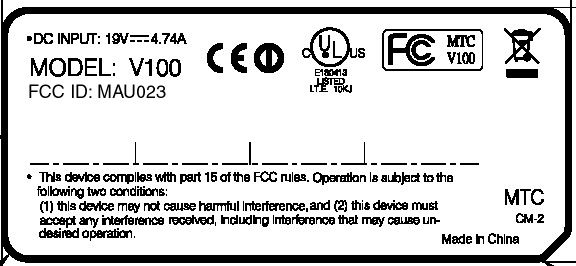
ID Label/Location Info
V100 Label Location LABEL
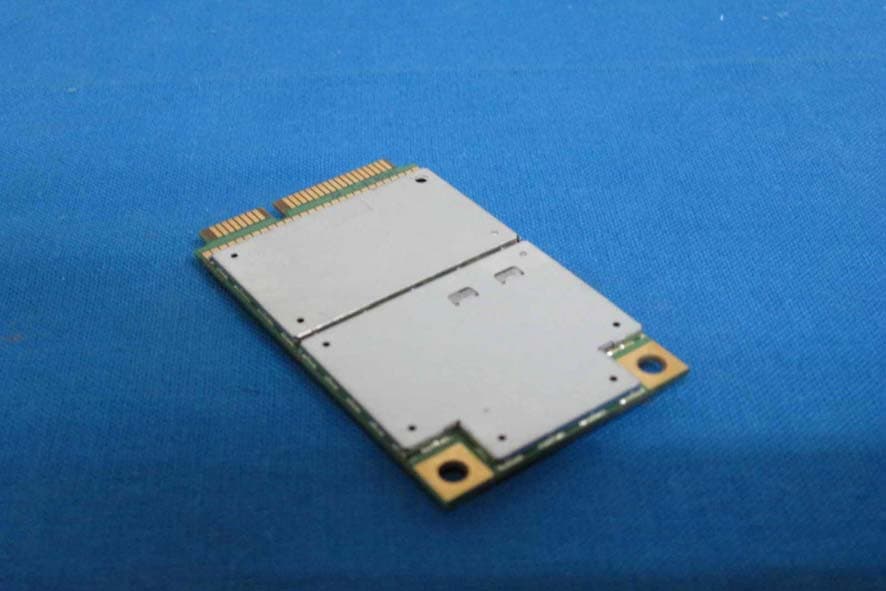
Internal Photos
International Standards Laboratory Report Number: ISL-07LR008P -5- EUT-5. International Standards Laboratory Report Number: ISL-07LR008P -6- EUT-6. International Standards Laboratory Report Number: ISL-07LR008P -7- EUT-7. International Standards Laboratory Report Number: ISL-07LR008P -8- EUT-8. International Standards Laboratory Report Number: ISL-07LR008P -9- EUT-9. International Standards Laboratory Report Number: ISL-07LR008P -10- EUT-10. International Standards Laboratory Report Number: ISL-07LR008P -11- EUT-11. International Standards Laboratory Report Number: ISL-07LR008P -12- EUT-12. International Standards Laboratory Report Number: ISL-07LR008P -13- EUT-13. International Standards Laboratory Report Number: ISL-07LR008P -14- EUT-14.
Internal Photos
International Standards Laboratory Report Number: ISL-07LR008P -15- EUT-15. International Standards Laboratory Report Number: ISL-07LR008P -16- EUT-16. International Standards Laboratory Report Number: ISL-07LR008P -17- EUT-17. International Standards Laboratory Report Number: ISL-07LR008P -18- EUT-18. International Standards Laboratory Report Number: ISL-07LR008P -19- EUT-19. International Standards Laboratory Report Number: ISL-07LR008P -20- EUT-20. International Standards Laboratory Report Number: ISL-07LR008P -21- EUT-21. International Standards Laboratory Report Number: ISL-07LR008P -22- EUT-22. International Standards Laboratory Report Number: ISL-07LR008P -23- EUT-23. International Standards Laboratory Report Number: ISL-07LR008P -24- EUT-24.
Internal Photos
International Standards Laboratory Report Number: ISL-07LR008P -25- EUT-25. International Standards Laboratory Report Number: ISL-07LR008P -26- EUT-26. International Standards Laboratory Report Number: ISL-07LR008P -27- EUT-27. International Standards Laboratory Report Number: ISL-07LR008P -28- EUT-28. International Standards Laboratory Report Number: ISL-07LR008P -29- EUT-29. International Standards Laboratory Report Number: ISL-07LR008P -30- EUT-30. International Standards Laboratory Report Number: ISL-07LR008P -31- EUT-31. International Standards Laboratory Report Number: ISL-07LR008P -32- EUT-32. International Standards Laboratory Report Number: ISL-07LR008P -33- EUT-33. International Standards Laboratory Report Number: ISL-07LR008P -34- EUT-34.
Internal Photos
International Standards Laboratory Report Number: ISL-07LR008P -35- EUT-35. International Standards Laboratory Report Number: ISL-07LR008P -36- EUT-36. International Standards Laboratory Report Number: ISL-07LR008P -37- EUT-37. International Standards Laboratory Report Number: ISL-07LR008P -38- EUT-38. International Standards Laboratory Report Number: ISL-07LR008P -39- EUT-39. International Standards Laboratory Report Number: ISL-07LR008P -40- EUT-40. International Standards Laboratory Report Number: ISL-07LR008P -41- EUT-41. International Standards Laboratory Report Number: ISL-07LR008P -42- EUT-42. International Standards Laboratory Report Number: ISL-07LR008P -43- EUT-43. International Standards Laboratory Report Number: ISL-07LR008P -44- EUT-44.
Internal Photos
International Standards Laboratory Report Number: ISL-07LR008P -45- EUT-45. International Standards Laboratory Report Number: ISL-07LR008P -46- EUT-46. International Standards Laboratory Report Number: ISL-07LR008P -47- EUT-47. International Standards Laboratory Report Number: ISL-07LR008P -48- EUT-48. International Standards Laboratory Report Number: ISL-07LR008P -49- EUT-49. International Standards Laboratory Report Number: ISL-07LR008P -50- EUT-50.
RF Exposure Info
Report Number: ISL-07LR008SAR-F Issue Date: 2007/04/04 HC LAB:NVLAP:200234-0;VCCI: R-341,C-354; NEMKO:ELA 113A;BSMI:SL2-IN-E-0037;SL2-R1-E-0037;TAF:1178; IC:IC4067 LT LAB: NVLAP:200234-0;VCCI: R-1435,C-1440;NEMKO:ELA 113B; BSMI:SL2-IN-E-0013;TAF:0997; IC:IC4164-1 ISL-T10-R4-14 SAR Test Report of Product Name Notebook Personal Computer Model V100 (With WLAN & Bluetooth & WWAN Module) Applied by: MITAC Technology Corporation 4F, No.1, R&D Road 2, Hsinchu Science-Based industrial Park, Hsinchu 300 Taiwan,R. O. C. Test Performed by: International Standards Laboratory No. 120, Lane 180, San Ho Tsuen, Hsin Ho Rd. Lung-Tan Hsiang, Tao Yuan County 325 Taiwan, R.O.C. Tel:(03)407-1718 Fax:(03)407-1738 - i - International Standards Laboratory Report Number: ISL-07LR008SAR-F HC LAB:NVLAP:200234-0;VCCI: R-341,C-354; NEMKO:ELA 113A;BSMI:SL2-IN-E-0037;SL2-R1-E-0037;TAF:1178; IC:IC4067 LT LAB: NVLAP:200234-0;VCCI: R-1435,C-1440;NEMKO:ELA 113B; BSMI:SL2-IN-E-0013;TAF:0997; IC:IC4164-1 Contents of Report 1. General..................................................................................................................................1 1.1 Certification of Accuracy of Test Data.........................................................................1 2. Description of Equipment under Test (EUT).......................................................................2 2.1 Test Environment..........................................................................................................3 3. SAR Measurement System...................................................................................................4 3.1 ALSAS-10U System Description.................................................................................4 3.1.1 Applications..........................................................................................................4 3.1.2 Area Scans............................................................................................................4 3.1.3 Zoom Scan (Cube Scan Averaging).....................................................................5 3.1.4 ALSAS-10U Interpolation and Extrapolation Uncertainty..................................5 3.1.5 3-6 GHz SAR Requirements.................................................................................5 3.1.6 3-6GHz System Accuracy....................................................................................5 3.2 Isotropic E-Field Probe.................................................................................................6 3.2.1 Isotropic E-Field Probe Specification...................................................................7 3.3 Boundary Detection Unit and Probe Mounting Device................................................7 3.4 Daq-Paq (Analog to Digital Electronics)......................................................................8 3.5 Axis Articulated Robot.................................................................................................8 3.6 ALSAS Universal Workstation....................................................................................9 3.7 Universal Device Positioner........................................................................................9 3.8 Phantom Types...........................................................................................................10 3.8.1 APREL Laboratories Universal Phantom...........................................................10 4. Tissue Simulating Liquid....................................................................................................11 4.1 The composition of the tissue simulating liquid.........................................................11 4.2 Tissue Calibration Result............................................................................................12 4.3 Tissue Dielectric Parameters for Head and Body Phantoms......................................15 5. SAR Measurement Procedure.............................................................................................16 5.1 SAR System Validation..............................................................................................16 5.1.1 Validation Dipoles..............................................................................................16 5.1.2 Validation Result................................................................................................17 5.2 Arrangement Assessment Setup.................................................................................19…
Text truncated - open the document above for the full version.
Contact Information
Applicant
Vincent Hsieh(Senior Engineer)
Technical Contact
International Standars LaboratoryJerry Chiou
[email protected]886 3 407 1718
No. 65, Ku Dai Keng Street · Hsichih · Taiwan
Non-Technical Contact
International Standards LaboratoryDaphne Liu
[email protected]886 2 2646 2550
Test Firm
International Standards LaboratoryDavid Wu
Technical Specifications
| # | Rule Parts | Frequency Range | Power Output | Emission | Tolerance |
|---|---|---|---|---|---|
| 2 | 24E | 1.85 GHz - 1.91 GHz | 424.00 mW | 1M25F9W | 0.1 ppm |
Other Applications from Getac Technology Corp.
MAU050
Dec 02, 2012LTE Module
Equipment Class
PCB - PCS Licensed Transmitter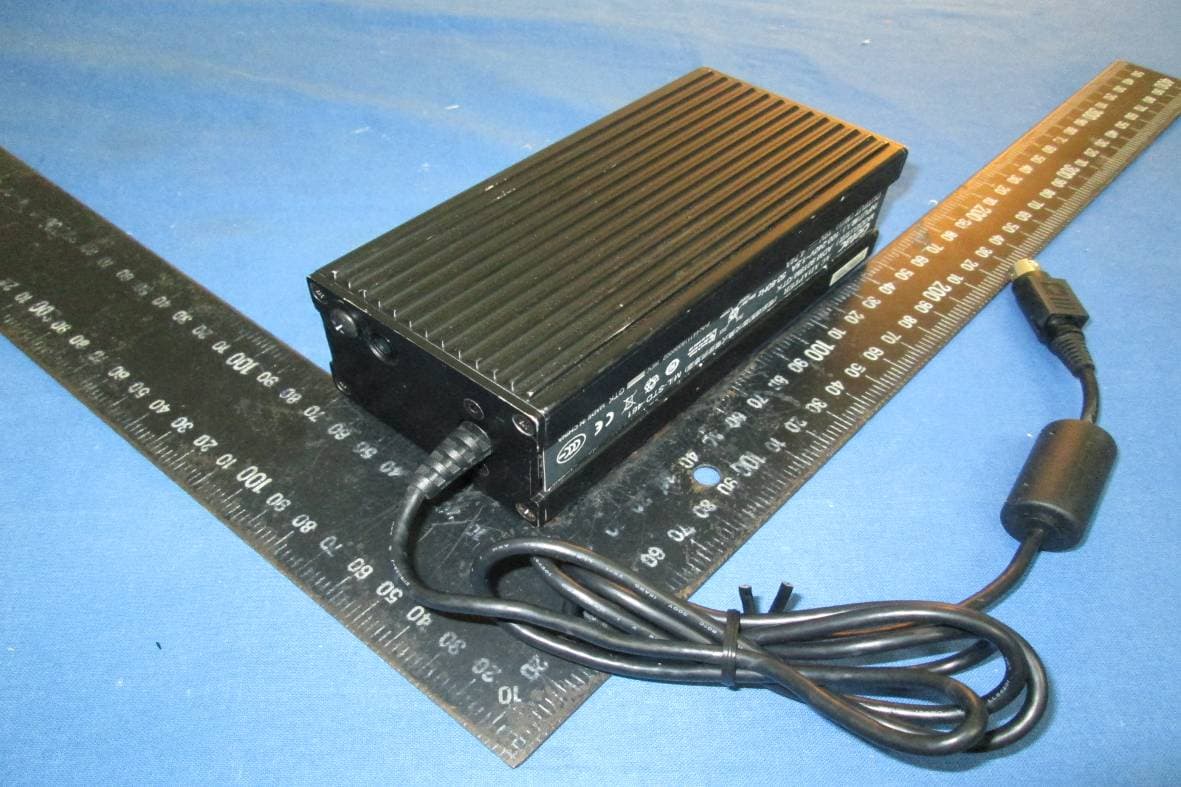
MAU048
Nov 04, 2012Notebook Computer
Equipment Class
NII - Unlicensed National Information Infrastructure TX
MAU049
Nov 04, 2012Notebook Computer
Equipment Class
DSS - Part 15 Spread Spectrum Transmitter
MAU046
Sep 05, 2012Wireless LAN Module
Equipment Class
DSS - Part 15 Spread Spectrum Transmitter
MAU047
Aug 29, 2012WWAN Module
Equipment Class
PCB - PCS Licensed Transmitter