NIYKW2033Wireless Keyboard
Dexin Corp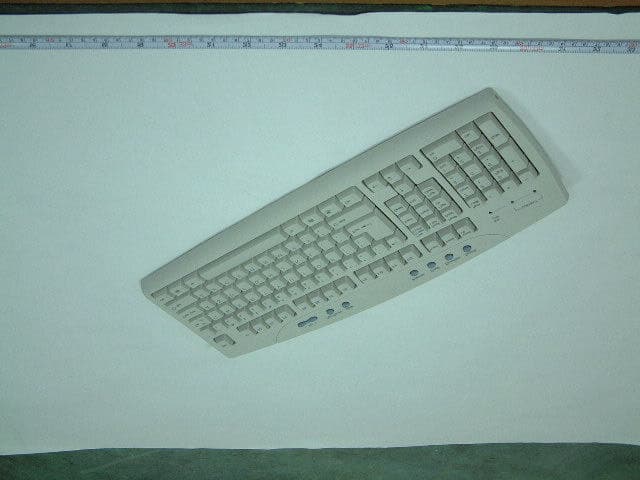
Click to zoom
Application Details
- Equipment Class
- DXX - Part 15 Low Power Communication Device Transmitter
- Date of Grant
- Apr 22, 2002
- Application Purpose
- Original Equipment
- Date of Application
- Apr 22, 2002
- Equipment Note
- Wireless Keyboard
- Frequency Range
- 26.96000000 - 27.28000000
- Company
- Dexin Corp
- Country
- Taiwan
Documents & Files
Document Text
Text extracted from the exhibit documents filed with the FCC. Open a document above to read the original.
Users Manual
1 Wireless Radio Frequency Multimedia Keyboard & Mouse Users Manual FCC ID:NIYKW2033 ERGONOMICS GUIDE 1. Introduction Personalizing your environment so that it is comfortable for your work situation promotes a healthy physical and mental lifestyle. Studies show that a carefully planned work environment can actually increase productivity. Applying proper ergonomic principals will help make our office more comfortable. Of course, only you can judge what is best for you, so we encourage you to adapt the tips on the following pages to your own needs. Ergonomics is a science that addresses human performance and well being in relation to various types of jobs, equipment, tools, and environment. Ergonomics as it relates to computers, is concerned with the interactions among a person using a computer, the methods and tools employed when using a computer, and the work area. We've done extensive testing on the designs of our hardware and software products because we want to come up with the most easy-to-use and comfortable products possible. Use the tips in this booklet to take responsibility for your comfort and health when using the computer. COMPUTERS AND POSTURE It is important when you're using your computer to make sure that your wrists are straight when typing. Position your hands above the keyboard with a minimum of a 90-degree right angle at the elbow. Keep your fingers curled under slightly. Your arms should fall relaxed at your side-don't shrug your shoulders to keep your arms at right angles. Place your monitor at eye level, minimizing the bending of your neck while typing. Ensuring that your chair, work surface, and keyboard are in the correct positions is important. Maintaining proper body posture can not only lessen your risk of injury, but also help you work more comfortably. ??Adjust the height of the chair back so that there's contact between the seat back and the most curved part of your back. ??If you have a chair with armrests, they should be height-adjustable so that you're not hunching or slouching your shoulders to use them. ??Adjust chair positions and postures throughout the day. Changing positions reduces muscle fatigue. ??Don't let the edge of your chair press into the backs of your knees. ??Keep feet on floor or supported by a footrest. ??Alternate between the mouse and other pointing device and the keyboard. This provides a recovery pause from both. 2 ARRANGING YOUR SPACE If possible, arrange your tools around your desk so that you minimize the distance you have to reach for them. Divide your workspace into three zones: ??Primary work zone - the distance from elbow to hand. ??Secondary work zone - within arm's reach. Use this zone to position those items that you use frequently, but don't need all the time. ??Reference zone - outside arm's reach. Use this zone for your least-often used items. Incorporate these tips into your space. ??If you use a pointing device more than the keyboard, place the pointing device in front of you and the keyboard slightly to one side. ??Use a document holder to position papers, large books, or printouts. ??Keep noise to a minimum. Locate your desk away from high-traffic areas. ??Place reference materials at same height as and next to the monitor for easy access. COMPUTERS AND BODY FATIGUE Computer users sometimes experience such discomfort as back pain, stiff neck and shoulders, sore hands and wrists, or tried legs. Much of this discomfort can be prevented because the symptoms often arise from pushing the body beyond its natural limits. In addition to improving the setup of your workspace, it's also important to consider your lifestyle. Healthful food, exercise, and rest can help improve your health and comfort. Seek medical assistance for any persistent discomfort. Minimize the following actions: ??Sitting in awkward or twisted postures. Clear area under and around desk to optimize your posture. Ensure reference materials storage does not require excessive reaching or twisting. Place materials between knee and shoulder height on shelves. ??Maintaining the same posture for too long. ??Reaching Frequently. ??Using too much muscular effort, even for relatively easy tasks. ??Pressing on the soft tissues of your body-for example, leaning against a hard desk edge. ??Performing repetitive tasks that require awkward body positions or forceful exertions, without allowing the body a chance to recover. MAINTAINING GOOD HABITS When you're not typing, rest your arms and wrists on a palm rest, rather than on a hard desk edge. Alternatively, move your keyboard well in from the edge of the work surface so that you're not resting on the edge. Performing different tasks gives your body a chance to recover while you keep up your productivity. Alternate among several different tasks so that you don't do the same task for long periods at a time. Incorporate these tips into your lifestyle: ??Let your arms fall relaxed at your sides to avoid shrugging. ??Place hands above the keyboard, with elbows at 90-degree angles. ??Hold your wrists in a neutral, straight position to achieve greater comfort while computing. ??If your chair needs to be positioned high to accommodate a straight wrist position, use a footrest to support your legs. Consider support for your lower back. ??Curl your fingers under slightly. ??Use a light touch when pressing the keyboard keys and using a pointing device. ??Keep the mouse or other pointing device close to the keyboard to minimize reaching from the shoulder. ??Use short cuts. Learn as much as you can about your software programs to help you minimize keystrokes and become more efficient at using your computer. COMPUTERS AND VISION Use proper lighting and adjust your computer screen and paperwork appropriately to help reduce eyestrain and fatigue. When you work on a computer, the light level should be dimmer than when you work with paper. If you work with both, choose relatively dim room lighting plus an adjustable reading lamp that …
Text truncated - open the document above for the full version.
Block Diagram
Circuit Description of KW2033 FCC ID:NIYKW2033 Battery provides the necessary power for operation. The proposed one is a single size AA battery. Battery Low Indicator will light up when the capacity of the battery is below the required level needed for normal operation. Key Matrix is actually a keypad assembly. Here it provides all necessary keys for daily operation. ID Switch is a TAC switch, used to initialize the sequency of generating a new identification code when two or more sets of the products are operated nearby. Keyboard Controller and Data Encoder is a composite ASIC component specifically for handling all input signals and generating a serial data stream. This data stream consists of a SYNC byte, an identification code, a matrix code (indicating the key depressed), the type of data packet, and the status of battery capacity. RF Transmission Circuit is a radio frequency transmitter applying FSK modulation technique. The data stream coming from the main controller is modulated to the center frequency and radiated through the antenna, which is actually a piece of conducting wire inside the keyboard housing. Key Matrix Bat. Low Indicator RF Transmission Circuit KEYBOARD CONTROLLER AND DATA ENCODER ID Switch Battery 27.092MHz
Block Diagram
Circuit Description of RX2033 FCC ID:NIYKW2033 Mouse and Keyboard Receiver consists of two individual receiver modules for receiving and demodulating mouse and keyboard data respectively. Mouse Controller is a specific ASIC designed for receiving data stream, decoding data stream, identifying the received data stream, and form a 3-byte or 4-byte mouse data packet. It also communicates with the host PC to perform the power-on initialization on mouse port. ID Switch is a TAC switch, used to initialize the sequence of updating a new identification code sent from the RF keyboard. Main Controller is a general purpose microcontroller programmed to receive data stream, decode data stream, identify data stream, and form a variable length of keyboard packet and send it to the host. It also takes care of EEPROM read/write operaations from the Mouse controller, and does real access to the EEPROM. The Main Controller communicates with the host PC to perform the power-on initialization on the keyboard port. EEPROM is a non-volatile memory device used to save identification codes of mouse and keyboard. Whenever the RX2033 is powered on, the main controller reads these two identification codes, and passes the one belonging to mouse to the mouse controller. PS/2 Mouse and Keyboard Connectors are two identical PS/2 connectors (with different color or different icon) which connect directly to a PC ́s PS/2 mouse and keyboard ports respectively. Communication is done through these two connectors. MOUSE & KEYBOARD RECEIVER MAIN CONTROLLER ID Switch PS/2 Keyboard connector PS/2 Mouse Connector Mouse Controller EEPROM 26.640MHz
External Photos
FCC ID : NIYKW2033 FRONT SIDE OF EUT Number 1 FCC ID : NIYKW2033 REAR SIDE OF EUT Number 2
ID Label/Location Info
FCC ID Label Drawing FCC ID:NIYKW2033 The following statement will be placed in the User’s Manual. This device complies with Part 15 of the FCC Rules. Operation is subject to the following two conditions: (1) this device may not cause harmful interference, and (2) this device must accept any interference received, including interference that may cause undesired operation. LABEL SIZE:59.539.5mm
ID Label/Location Info
FCC ID : NIYKW2033 FCC ID LOCATION
Internal Photos
FCC ID : NIYKW2033 Mechanical Construction Number 1 FCC ID : NIYKW2033 Mechanical Construction Number 2 FCC ID : NIYKW2033 Mechanical Construction Number 3 FCC ID : NIYKW2033 Rear side of Main Board Of Keyboard Number 4 (Please refer to page 12 of test report item 1 for the EMI suppression component description) 1 FCC ID : NIYKW2033 Front side of Main Board Of Keyboard Number 5
Operational Description
Circuit Description of KW2033 FCC ID:NIYKW2033 Battery provides the necessary power for operation. The proposed one is a single size AA battery. Battery Low Indicator will light up when the capacity of the battery is below the required level needed for normal operation. Key Matrix is actually a keypad assembly. Here it provides all necessary keys for daily operation. ID Switch is a TAC switch, used to initialize the sequency of generating a new identification code when two or more sets of the products are operated nearby. Keyboard Controller and Data Encoder is a composite ASIC component specifically for handling all input signals and generating a serial data stream. This data stream consists of a SYNC byte, an identification code, a matrix code (indicating the key depressed), the type of data packet, and the status of battery capacity. RF Transmission Circuit is a radio frequency transmitter applying FSK modulation technique. The data stream coming from the main controller is modulated to the center frequency and radiated through the antenna, which is actually a piece of conducting wire inside the keyboard housing. Key Matrix Bat. Low Indicator RF Transmission Circuit KEYBOARD CONTROLLER AND DATA ENCODER ID Switch Battery
Schematics
FCC ID: NIYKW2033 FCC ID: NIYKW2033 FCC ID: NIYKW2033
Test Report
FCC TEST REPORT Report No. : F240103 SPORTON International Inc. TEL : 886-2-2696-2468 FAX : 886-2-2696-2255 FCC TEST REPORT for 47 CFR, Part 15, Subpart C Equipment : Wireless Keyboard Model No. : KW2033 FCC ID : NIYKW2033 Filing Type : Certification Applicant : DEXIN Corporation 8F-8, No. 502, Yuan Shan Rd., Chung Ho City, Taipei Hsien, Taiwan, R.O.C. ??The test result refers exclusively to the test presented test model / sample. ??Without written approval of SPORTON International Inc., the test report shall not be reproduced except in full. ??Certificate or Test Report must not be used by the applicant to claim the product in this test report endorsement by NVLAP or any agency of U.S. government. SPORTON International Inc. 6F, No.106, Sec. 1, Hsin Tai Wu Rd., Hsi Chih, Taipei Hsien, Taiwan, R.O.C. FCC TEST REPORT Report No. : F240103 SPORTON International Inc. FCC ID : NIYKW2033 TEL : 886-2-2696-2468 Page No. : i FAX : 886-2-2696-2255 Issued Date : Apr. 15, 2002 Table of Contents History of this test report.........................................................................................................ii CERTIFICATE OF COMPLIANCE..............................................................................................................1 1. General Description of Equipment under Test.....................................................................................2 1.1. Applicant.......................................................................................................................................................................................2 1.2. Manufacturer.................................................................................................................................................................................2 1.3. Basic Description of Equipment under Test...................................................................................................................................2 1.4. Feature of Equipment under Test..................................................................................................................................................2 2. Test Configuration of Equipment under Test.......................................................................................3 2.1. Test Manner..................................................................................................................................................................................3 2.2. Description of Test System...........................................................................................................................................................3 2.3. Connection Diagram of Test System...........................................................................................................! 3. General Information of Test.................................................................................................................7 3.1. Test Facility...................................................................................................................................................................................7 3.2. Standard for Methods of Measurement.........................................................................................................................................7 3.3. Test in Compliance with................................................................................................................................................................7 3.4. Frequency Range Investigated......................................................................................................................................................7 3.5. Test Distance................................................................................................................................................................................7 4. Test of Conducted Powerline...............................................................................................................8 5. Test of Radiated Emission...................................................................................................................9 5.1. Major Measuring Instruments........................................................................................................................................................9 5.1.1. from 30MHz to 1GHz 9 5.2. Test Procedures..........................................................................................................................................................................10 5.3. Typical Test Setup Layout of Radiated Emission........................................................................................................................11 5.4. Test Result of Radiated Emission...............................................................................................................................................12 6. EMI Suppression Component List.......................................................................................................13 7. Antenna Factor & Cable Loss.............................................................................................................14 8. List of Measuring Equipments Used...................................................................................................15 9. Uncertainty of Test Site.......................................................................................................................16 Appendix A. Photographs of EUT..................................................................................................A1 ~ A4 FCC TEST REPORT Report No. : F240103 SPORTON International Inc. FCC ID : NIYKW2033 TEL : 886-2-2696-2468 Page No. : ii FAX : 886-2-2696-2255 Issued Date : Apr. 15, 2002 History of this test report Original Report Issue Date: Apr. 15, 2002 No additional attachment. Additional attachment were issued as following record: Attac…
Text truncated - open the document above for the full version.
Test Setup Photos
FCC TEST REPORT Report No. : F240103 SPORTON International Inc. FCC ID : NIYKW2033 TEL : 886-2-2696-2468 Page No. : 1 of 1 FAX : 886-2-2696-2255 Issued Date : Apr, 16, 2002 1.1. Photographs of Radiated Emission Test Configuration ??The photographs show the configuration that generates the maximum emission. FRONT VIEW REAR VIEW
Contact Information
Applicant
Lu Ho Lung(Manager)
Test Firm
SPORTON International IncKathy Lin
Technical Specifications
| # | Rule Parts | Frequency Range | Power Output |
|---|---|---|---|
| 1 | 15C | 26.96 MHz - 27.28 MHz | - |
Other Applications from Dexin Corp

NIYP707TX
Feb 24, 2021Optical Gaming Mouse
Equipment Class
DXX - Part 15 Low Power Communication Device Transmitter
NIYP707RX
Feb 22, 2021Optical Gaming Mouse Dock
Equipment Class
DXX - Part 15 Low Power Communication Device Transmitter
NIY-VENGEANCEM90
Nov 29, 2011USB Gaming Mouse
Equipment Class
JBP - Part 15 Class B Computing Device Peripheral
NIY-VENGEANCEM60
Nov 29, 2011USB Gaming Mouse
Equipment Class
JBP - Part 15 Class B Computing Device Peripheral
NIYMWP177P6S
Jun 13, 20112.4G Wireless mouse
Equipment Class
DXX - Part 15 Low Power Communication Device Transmitter