NIYMWP5016Wireless Optical Mouse
Dexin Corp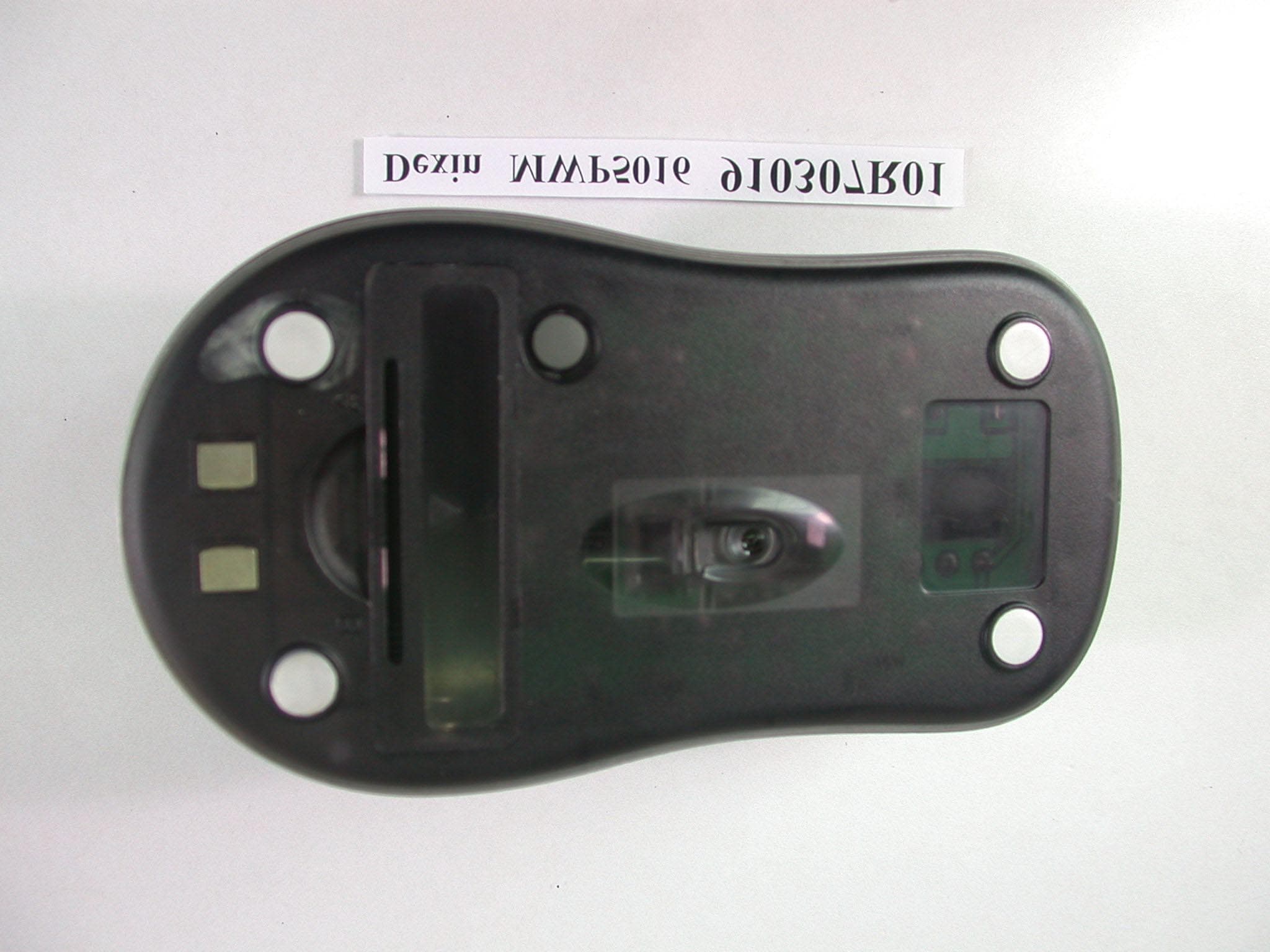
Click to zoom
Application Details
- Equipment Class
- DXX - Part 15 Low Power Communication Device Transmitter
- Date of Grant
- Apr 09, 2002
- Application Purpose
- Original Equipment
- Date of Application
- Apr 09, 2002
- Equipment Note
- Wireless Optical Mouse
- Frequency Range
- 27.04500000 - 27.14500000
- Company
- Dexin Corp
- Country
- Taiwan
Documents & Files
Document Text
Text extracted from the exhibit documents filed with the FCC. Open a document above to read the original.
Users Manual
1 STANDARD RF OPTICAL MOUSE USER’S MANUAL Model #: MWP5016 2 Important Ergonomic Information Some experts believe that using any mouse or trackball may cause serious injury to hands, wrists, arms, neck, or back. If you feel pain, numbness, or weakness in these areas, see a qualified health professional. TO REDUCE THE RISK OF INJURY, FOLLOW THESE PRECAUTIONS: l Take frequent breaks, Get up and walk around several times every hour. l Vary your tasks throughout the day. l Keep your shoulders relaxed with your elbows at your side. Position your keyboard and mouse so you do not have to reach. l Adjust your chair and keyboard so your upper arms and wrists are straight. l Avoid resting your wrists on sharp edges. System Requirement l Mouse compatible with standard Microsoft mode l 3 rd button and wheel function require Win98/2000/Me/XP l If without driver installed: 4 th & 5 th button require Win2000/XP if without driver installed. Before you begin l Keep this installation guide for future reference! It contains Important Troubleshooting Information. l Keep your old PS/2 mouse as a back-up device. Getting Started Congratulations on your purchase of an RF (Radio Frequency) wireless & multimedia mouse. By using the advanced RF technology, a 360of operation is possible, and no line-of-sight is required between the receiver and the mouse. The MWP5016 Mouse doesn't have to aim at the receiver when using. Package Contains Your DC1095 Mouse package includes the following: 1. MWP5016 Mouse (Transmitter) 2. RX1085-2 Mini Receiver 3. User’s manual 4. One AA size of lithium ion rechargeable battery 5. Charge base for RF Mouse. 6. CD-ROM Driver Windows 95/98/2000/NT/ME/XP NoteIf any part is missing, please contact your dealer for a replacement immediately. 3 Precaution ! For optimal performance, place the receiver at least 8 inches or 20 centimeters away from other electrical devices, such as the computer, the computer monitor, speakers or other external storage drives. ! For a better transmission distance, avoid using this device on a metal plate or desktop because a large surface of iron, aluminum, copper and other metal will be a shielding or ground to the RF antenna of the mouse and receiver. Operating on a metal may cause the transmission distance shorter. ! For this RF optical mouse, it is not suggested operate the mouse on a dark surface for the consideration of saving battery power, so the LED is not illuminated too bright. Although the working surface is not strictly restricted, it is strongly recommended to operate an optical mouse on a white paper to obtain the best performance. ! If your notebook computer or PC has a metal (contains Al or Mg) case, the metal housing of the LCD panel will isolate partial radiation of the RF signal from the mouse. This will possibly result in reducing the distance of transmission when you operate the mouse right in front of the notebook or PC, and the receiver is connected on the back of the notebook or PC. However, the RF mouse should work properly while you are operating the mouse just beside your notebook computer or PC Installation Guide Step 1. Connecting the Receiver By using this MWP5016 mouse, you need to keep a free USB port for the included receiver. Please follow the steps below to finish the connecting: 1. Turn off your computer. 2. Plug the USB connector end of the receiver into the USB port. Of your notebook ( or PC) or your charge base if the charge base is already connected to your notebook or PC through the USB cable. 3. Prepare your original Microsoft Windows CD. 4. Turn the notebook or PC power on, then follow the instructions of Windows to complete the registration of a new USB device. Step 2. Setting up the correct channel for both of receiver and mouse This RF wireless mouse provides 2 different RF channels, and 256 identification codes to avoid interference with other radio devices or other same model of RF wireless mouse. Before you using the wireless mouse, please select the same RF channel (indicated by A and B) by sliding the switch to A or B on both receiver and mouse. (See Fig. 3.1 and 3.2 for the location of channel switch.) 4 Step 3. Connecting the power 1. Connect the AC plug of power adaptor into AC power outlet. 2. Connect the DC output connector of the adaptor into the female DC jack on the back of charger. 3. Then the red LED will be lighten on. Step 4. Full charge the batteries 1. Put the wireless optical mouse with its rechargeable batteries on the correct location of the charger. 2. Before you use the wireless optical mouse, you have to charge the batteries as full as possible. It will take about 3 to 4 hours to full charge the lithium-ion batteries inside the mouse. 3. During charging the lithium-ion battery, the lefts green LED on the charger base will be lighten on. When the battery is full charged, the green LED will be turned off. Please follow the procedures to set up: 1. Installing the Batteries To apply the battery, please follow the following steps: n Turn the mouse to the bottom side and remove the battery cover by moving the opening tab and pull the battery cover out. n There are signs to indicate the polarity of the battery. Follow the signs to place the battery. n Place the battery cover back and make sure it is firmly closed. Battery Warning! Be sure to use the included lithium battery. 2. Establishing communication between the receiver and the mouse n First, make sure that channel switches on the mouse and the receiver are placed at the same channel, i.e., channel A or channel B. n Press and release the connect button, or ID SW, on bottom of the wireless mouse (refer to Fig-3.1). n Press and release the connected button, or ID SW, on the receiver (refer to Fig- 3.2). Note: The location of the ID switch may vary according to different model of receiver. n The "connect" light on the top cover of receiver will flash while the same ID is selected on both of the receiver and the mouse. 5 Channel switch GENERAL SPEC…
Text truncated - open the document above for the full version.
Cover Letter(s)
American Telecommunications Certification Body Inc. 6731 Whittier Ave, McLean, VA 22101 April 10, 2002 RE: DEXIN CORPORATION FCC ID: NIYMWP5016 After a review of the submitted information, I have a few comments on the above referenced Application. 1) Please provide a block diagram for the RF circuitry that includes the frequencies as specified by CFR 2.1033(a)(5). 2) The FCC logo and phrase "FOR HOME OR OFFICE USE" on the label signifies a DoC approval. This is not necessary since the mouse does not attach via cables to a PC (see 15.3(r)). Please provide a new label with the FCC logo and phrase "FOR HOME OR OFFICE USE" removed. 3) The schematics contain reference designators but does not provide component values. Please provide either an updated schematic or component listing which goes with the schematic. 4) Two pages of the schematic appear identical except one is labeled revision 1 and the other revision 2. Please comment. 5) The manual does not include the statements of 15.21 & 15.105 (these are necessary for the receiver/PC peripheral portion of the product). 6) Please provide photograph that clearly shows (labeled) where the antenna of the product is located. Timothy R. Johnson Examining Engineer mailto: [email protected] The items indicated above must be submitted before processing can continue on the above referenced application. Failure to provide the requested information may result in application termination. Correspondence should be considered part of the permanent submission and may be viewed from the Internet after a Grant of Equipment Authorization is issued. Please do not respond to this correspondence using the email reply button. In order for your response to be processed expeditiously, you must submit your documents through the AmericanTCB.com website. Also, please note that partial responses increase processing time and should not be submitted. Any questions about the content of this correspondence should be directed to the sender.
External Photos
Page 1 ANNEX PHOTOGRAPHS OF EUT Page 2
ID Label/Location Info
FCC ID Label Location
ID Label/Location Info
MWP5016 Label
Internal Photos
Page 3 Page 4
Internal Photos
Page 5 Page 6
Internal Photos
Antenna
Operational Description
FCC ID: NIYMWP5016 ADT No.910307R01 Operational Description The transmitter of the EUT (Wireless Optical Mouse) is powered by 3.7V Battery. The receiver is powered by host computer. Both transmitter and receiver use Integral antenna. The output power of this device is very low. Under normal use condition, the transmitter and the receiver are quite close, so high EIRP power is neither necessary nor allowed because of interference.
Test Report
FCC ID: NIYMWP5016 Report No.: RF910307R01 1 Issued: March 29, 2002 FCC TEST REPORT REPORT NO.: RF910307R01 MODEL NO.: MWP5016 RECEIVED: March 7, 2002 TESTED: March 21, 2002 APPLICANT:DEXIN Corporation ADDRESS: 20F-2, 37, Sec 2, San-Ming Rd Pan-Chiao City, Taipei Hsien, Taiwan,R.O.C ISSUED BY:Advance Data Technology Corporation LAB LOCATION:47 14th Lin, Chia Pau Tsuen, Linkou Hsiang, Taipei, Taiwan, R.O.C. This test report consists of 14 pages in total. It may be duplicated completely for legal use with the approval of the applicant. It should not be reproduced except in full, without the written approval of our laboratory. The client should not use it to claim product endorsement by NVLAP or any U.S. government agencies. The test results in the report only apply to the tested sample. Lab Code: 200102-0 0528 ILAC MRA FCC ID: NIYMWP5016 Report No.: RF910307R01 2 Issued: March 29, 2002 Table of Contents 1CERTIFICATION..............................................................................................3 2SUMMARY OF TEST RESULTS .....................................................................4 3GENERAL INFORMATION..............................................................................5 3.1GENERAL DESCRIPTION OF EUT ................................................................5 3.2DESCRIPTION OF TEST MODES ..................................................................6 3.3GENERAL DESCRIPTION OF APPLIED STANDARDS .................................6 3.4DESCRIPTION OF SUPPORT UNITS ............................................................6 4TEST PROCEDURE AND RESULT ................................................................7 4.1CONDUCTED EMISSION MEASUREMENT...................................................7 4.2RADIATED EMISSION MEASUREMENT........................................................7 4.2.1 LIMITS OF RADIATED EMISSION MEASUREMENT .....................................7 4.2.2 TEST INSTRUMENT .......................................................................................8 4.2.3 TEST PROCEDURE........................................................................................9 4.2.4 TEST SETUP.................................................................................................10 4.2.5 EUT OPERATING CONDITION.....................................................................10 4.2.6 TEST RESULT............................................................................................... 11 5PHOTOGRAPHS OF THE TEST CONFIGURATION ....................................13 6INFORMATION ON THE TESTING LABORATORIES ..................................14 FCC ID: NIYMWP5016 Report No.: RF910307R01 3 Issued: March 29, 2002 1 CERTIFICATION PRODUCT : Wireless Optical Mouse BRAND NAME : Dexin MODEL NO : MWP5016 APPLICANT : DEXIN Corporation STANDARDS : 47 CFR Part 15, Subpart C(15.227) ANSI C63.4-1992, Canada RSS 210 We, Advance Data Technology Corporation, hereby certify that one sample of the designation has been tested in our facility on March 21, 2002. The test record, data evaluation and Equipment Under Test (EUT) configurations represented herein are true and accurate accounts of the measurements of the sample's EMC characteristics under the conditions herein specified. FCC ID: NIYMWP5016 Report No.: RF910307R01 4 Issued: March 29, 2002 2 SUMMARY OF TEST RESULTS The EUT has been tested according to the following specifications: APPLIED STANDARD: 47 CFR Part 15, Subpart C STANDARD PARAGRAPH TEST TYPERESULTREMARK 15.207Conducted Emission TestN/A Power supply is 3.7VDC from batteries 15.227Radiated Emission TestPASS Minimum passing margin is –9.0dBuV at 54.00MHz NOTE: The receiver part to communicate with the EUT has been verified to comply with FCC Part 15, Subpart B, Class B (DoC). The test report can be provided upon request. FCC ID: NIYMWP5016 Report No.: RF910307R01 5 Issued: March 29, 2002 3 GENERAL INFORMATION 3.1 GENERAL DESCRIPTION OF EUT PRODUCTWireless Optical Mouse MODEL NO.MWP5016 POWER SUPPLY3.7VDC from battery MODULATION TYPEFSK CARRIER FREQUENCY OF EACH CHANNEL 27.045MHz / 27.145MHz BANDWIDTH OF EACH CHANNEL 100KHz NUMBER OF CHANNEL2 ANTENNA TYPEIntegral antenna DATA CABLENA I/O PORTSNA ASSOCIATED DEVICESNA NOTE: 1. The EUT is the transmitter part of a Wireless Optical Mouse. 2. The Wireless Mouse can only use its own recharged battery. 3. For more detailed features description of the EUT, please refer to the manufacturer's specifications or the User's Manual. FCC ID: NIYMWP5016 Report No.: RF910307R01 6 Issued: March 29, 2002 3.2 DESCRIPTION OF TEST MODES Two channels were provided in this EUT. ChannelFrequencyChannelFrequency 127.045MHz227.145MHz NOTE: Two channels were pre-tested in chamber. Channel 1, the worst case, was chosen for final test. 3.3 GENERAL DESCRIPTION OF APPLIED STANDARDS The EUT is the transmitter part of a Wireless Optical Mouse. According to the specifications of the manufacturer, it must comply with the requirements of the following standards: FCC CFR 47 Part 15, Subpart C (15.227) ANSI C63.4-1992, Canada RSS 210 All tests have been performed and recorded as per the above standards. 3.4 DESCRIPTION OF SUPPORT UNITS The EUT has been tested as an independent unit together with other necessary accessories or support units. The following support units or accessories were used to form a representative test configuration during the tests. NA FCC ID: NIYMWP5016 Report No.: RF910307R01 7 Issued: March 29, 2002 4 TEST PROCEDURE AND RESULT 4.1 CONDUCTED EMISSION MEASUREMENT NA 4.2 RADIATED EMISSION MEASUREMENT 4.2.1 LIMITS OF RADIATED EMISSION MEASUREMENT According to 15.227 the field strength of emissions from intentional radiators operated under these frequencies bands shall not exceed the following: Fundamental Frequency (MHz) Field Strength of Fundamental (dBuV/m) PeakAverage 26.96-27.28 10080 Field strength limits are at the distance of 3 meters, emissions radiated outside of the specified bands, shall be …
Text truncated - open the document above for the full version.
Test Setup Photos
FCC ID: NIYMWP5016 Report No.: RF910307R01 13 Issued: March 29, 2002 5 PHOTOGRAPHS OF THE TEST CONFIGURATION RADIATED EMISSION TEST
Contact Information
Applicant
Lu Ho Lung(Manager)
Technical Contact
Advance Data Technology CorporationAlan Lane
[email protected]+886-3-327-0910
13-1, Lane 19, WenShan 3rd., St. · Taoyuan · Taiwan
Non-Technical Contact
Advance Data Technology CorporationAlan Lane
[email protected]+886-3-327-0910
Test Firm
Bureau Veritas CPS (H.K.) Ltd. Taoyuan BranchTommy Wu
Technical Specifications
| # | Rule Parts | Frequency Range | Power Output |
|---|---|---|---|
| 1 | 15C | 27.045 MHz - 27.145 MHz | - |
Other Applications from Dexin Corp

NIYP707TX
Feb 24, 2021Optical Gaming Mouse
Equipment Class
DXX - Part 15 Low Power Communication Device Transmitter
NIYP707RX
Feb 22, 2021Optical Gaming Mouse Dock
Equipment Class
DXX - Part 15 Low Power Communication Device Transmitter
NIY-VENGEANCEM90
Nov 29, 2011USB Gaming Mouse
Equipment Class
JBP - Part 15 Class B Computing Device Peripheral
NIY-VENGEANCEM60
Nov 29, 2011USB Gaming Mouse
Equipment Class
JBP - Part 15 Class B Computing Device Peripheral
NIYMWP177P6S
Jun 13, 20112.4G Wireless mouse
Equipment Class
DXX - Part 15 Low Power Communication Device Transmitter