NM80P3P500Smartphone
HTC Corporation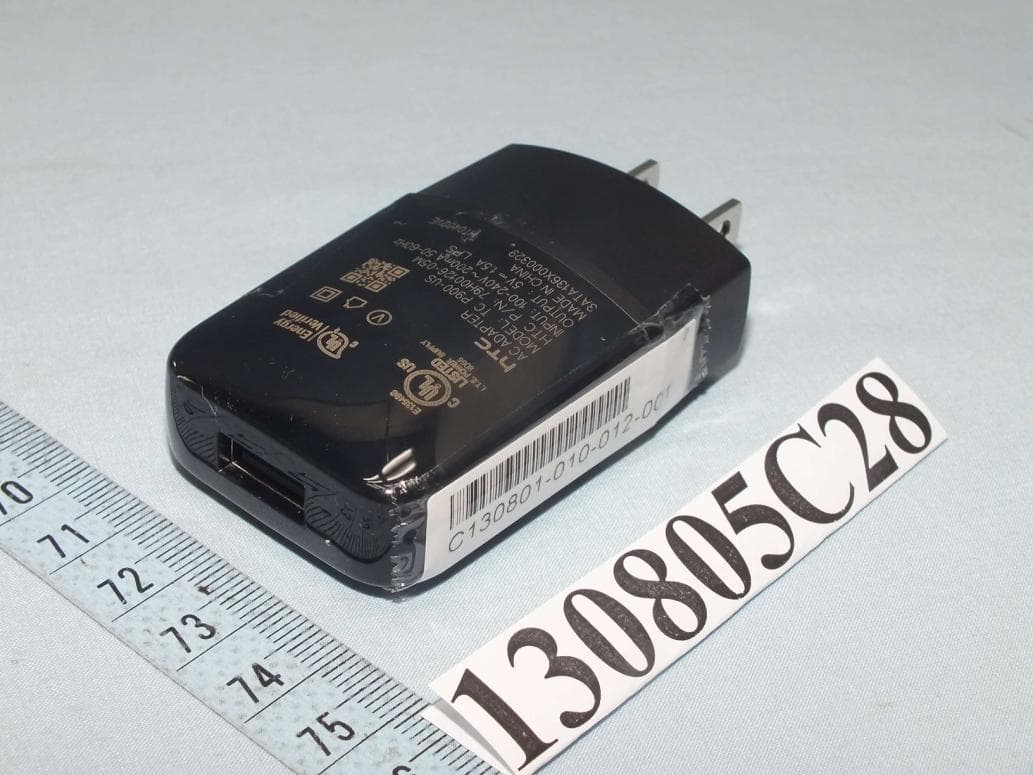
Click to zoom
Application Details
- Equipment Class
- DXX - Part 15 Low Power Communication Device Transmitter
- Date of Grant
- Oct 20, 2013
- Application Purpose
- Original Equipment
- Date of Application
- Oct 16, 2013
- Equipment Note
- Smartphone
- Frequency Range
- 13.56000000 - 13.56000000
- Company
- HTC Corporation
- Country
- Taiwan
Documents & Files
Document Text
Text extracted from the exhibit documents filed with the FCC. Open a document above to read the original.
Users Manual
Your HTC One max User guide Only for certification Only for certification Only for certification Contents Unboxing HTC One max7 Back cover8 micro SIM card10 Storage card11 Charging the battery12 Switching the power on or off12 Want some quick guidance on your phone?13 Setting up your phone Setting up your new phone for the first time14 Transferring content from an Android phone15 Transferring contacts from your old phone through Bluetooth16 Getting contacts and other content into HTC One max17 Transferring photos, videos, and music between your phone and computer17 Getting to know your settings18 About the Fingerprint sensor18 Updating your phone's software20 Your first week with your new phone Basics21 Notifications29 Working with text32 Battery37 Camera Camera basics41 Taking a photo42 Recording video42 Taking continuous camera shots43 Camera scenes44 Improving portrait shots44 Taking a self portrait44 Taking HTC Zoe photos44 What is HTC Zoe?45 Taking a panoramic photo45 Using HDR45 Recording videos in slow motion46 2Contents Only for certification Only for certification Only for certification Personalizing Making HTC One max truly yours47 Changing your wallpaper47 Personalizing the launch bar48 Adding a widget to your Home screen48 Adding apps and other shortcuts on your Home screen49 Rearranging or removing widgets and icons on your Home screen50 Arranging apps on the All Apps screen50 Grouping apps into a folder51 Hiding or unhiding apps52 Adding, removing, or arranging widget panels52 Changing your main Home screen53 Changing the sounds for your ringtone, notifications, and alarm53 Rearranging application tabs53 Phone calls Making a call with Smart dial54 Dialing an extension number55 Returning a missed call55 Using Speed dial55 Calling a phone number in a text message56 Calling a phone number in an email56 Calling a phone number in a Calendar event56 Making an emergency call56 Receiving calls57 What can I do during a call?58 Setting up a conference call59 Checking calls in the Call History59 Changing ringtone settings60 Home dialing61 Messages Sending a text message (SMS)62 Sending a multimedia message (MMS)62 Sending a group message64 Resuming a draft message65 Replying to a message65 Saving a text message in the Tasks app66 Forwarding a message66 Viewing and saving an attachment from a multimedia message67 Moving messages to the secure box67 Blocking unwanted messages68 WAP push messages68 Copying a text message to your micro SIM card69 Deleting messages and conversations69 Search and web browser Searching HTC One max and the Web70 Getting instant information with Google Now71 Browsing the Web73 Bookmarking a webpage75 3Contents Only for certification Only for certification Only for certification Using your browsing history76 Clearing your browsing history77 Entertainment Music78 TV82 Wireless media88 Storage Types of storage90 Copying files to or from HTC One max90 Making more storage space91 Encrypting data on HTC One max92 People Your contacts list94 Setting up your profile95 Adding a new contact96 Editing a contact’s information97 Getting in touch with a contact97 Importing or copying contacts97 Merging contact information98 Sending contact information99 Contact groups100 Email Gmail102 Mail104 Travel and maps Location settings109 Google Maps109 HTC Car113 Google Play and other apps Getting apps117 Essential apps119 Fun apps123 Productivity apps126 Internet connections Data connection128 Managing your data usage129 Wi-Fi130 Connecting to a virtual private network (VPN)132 Using HTC One max as a wireless router134 Sharing your phone's Internet connection by USB tethering135 Connecting to the Internet through a computer136 4Contents Only for certification Only for certification Only for certification Wi-Fi printing136 Wireless sharing Connecting a Bluetooth headset138 Unpairing from a Bluetooth device139 Where sent information is saved139 Receiving files using Bluetooth140 Sharing content with NFC141 Settings and security Checking your phone's HTC Sense version143 Turning Airplane mode on or off143 Turning Do not disturb mode on and off143 Turning automatic screen rotation off144 Adjusting the time before the screen turns off145 Adjusting the screen brightness145 Touch sounds and vibration145 Changing the display language146 Accessibility settings146 Magnifying your phone's screen146 Working with certificates147 Protecting your SIM card with a PIN147 Showing or hiding notifications on the lock screen148 Protecting HTC One max with a screen lock148 Securing HTC One max with face unlock149 Bypassing the lock screen150 Trademarks and copyrights Index 5Contents Only for certification Only for certification Only for certification Conventions used in this guide In this user guide, we use the following symbols to indicate useful and important information: This is a note. A note often gives additional information, such as what happens when you choose to do or not to do a certain action. A note also provides information that may only be applicable to some situations. This is a tip. A tip gives you an alternative way to do a particular step or procedure, or lets you know of an option that you may find helpful. This indicates important information that you need in order to accomplish a certain task or to get a feature to work properly. This provides safety precaution information, that is, information that you need to be careful about to prevent potential problems. 6Conventions used in this guide Only for certification Only for certification Only for certification Unboxing HTC One max Front panel 1.BACK 2.USB connector 3.HOME 4.Dual speakers 5.POWER 6.VOLUME 7.Front camera 8.3.5mm headset jack 9.IR SENSOR 10.Proximity sensor 11.Notification LED 12.Back cover lock §HTC One max is available in either a 3G or LTE version, depending on your region and mobile operator. You need an LTE plan to use your operator's 4G/LTE network for voice calls and data services. Check with your operator for det…
Text truncated - open the document above for the full version.
Users Manual
Safety and regulatory guide 2 Safety and regulatory guide Please read before proceeding THE BATTERY IS NOT FULLY CHARGED WHEN YOU TAKE THE DEVICE OUT OF THE BOX. Privacy restrictions Some countries require full disclosure of recorded telephone conversations. Important health information and safety precautions When using this product, the safety precautions below must be taken to avoid possible legal liabilities and damages. Retain and follow all product safety and operating instructions. Observe all warnings in the operating instructions on the product. To reduce the risk of bodily injury, electric shock, fire, and damage to the equipment, observe the following precautions. Electrical safety This product is intended for use when supplied with power from the designated battery or power supply unit. Other usage may be dangerous and will invalidate any approval given to this product. Safety precautions for proper grounding installation CAUTION: Connecting to improperly grounded equipment can result in an electric shock to your device. This product is equipped with a USB Cable for connecting with desktop or notebook computer. Be sure your computer is properly grounded (earthed) before connecting this product to the computer. The power supply cord of a desktop or notebook computer has an equipment-grounding conductor and a grounding plug. The plug must be plugged into an appropriate outlet which is properly installed and grounded in accordance with all local codes and ordinances. Safety precautions for power supply unit Use the correct external power source A product should be operated only from the type of power source indicated on the electrical ratings label. If you are not sure of the type of power source required, consult your authorized service provider or local power company. For a product that operates from battery power or other sources, refer to the operating instructions that are included with the product. Safety and regulatory guide 3 This product should be operated only with the following designated power supply unit(s). AC adapter: HTC, TC P900-US Handle battery packs carefully This product contains a Lithium-ion polymer or Lithium-ion battery. There is a risk of fire and burns if the battery pack is handled improperly. WARNING: To reduce risk of fire or burns, do not disassemble, crush, puncture, short external contacts or circuits, expose to temperature above 60° C (140° F), or dispose of in fire or water. Recycle or dispose of used batteries according to the local regulations or reference guide supplied with your product. Take extra precautions Keep the device dry and away from water or any liquid as it may cause a short circuit. The phone should only be connected to products that bear the USB-IF logo or have completed the USB-IF compliance program. Only use the battery with a charging system that has been qualified with the system per this standard, IEEE-Std-1725. Use of an unqualified battery or charger may present a risk of fire, explosion, leakage or other hazard. Avoid dropping the phone. If the phone or battery is dropped, especially on a hard surface, and the user suspects damage, take it to a service centre for inspection. If the battery leaks: Do not allow the leaking fluid to come in contact with skin or clothing. If already in contact, flush the affected area immediately with clean water and seek medical advice. Do not allow the leaking fluid to come in contact with eyes. If already in contact, DO NOT rub; rinse with clean water immediately and seek medical advice. Take extra precautions to keep a leaking battery away from fire as there is a danger of ignition or explosion. 4 Safety and regulatory guide Safety precautions for direct sunlight Keep this product away from excessive moisture and extreme temperatures. Do not leave the product inside a vehicle or in places where the temperature may exceed 60°C (140°F), such as on a car dashboard, window sill, or behind glass that is exposed to direct sunlight or strong ultraviolet light for extended periods of time. This may damage the product, overheat the battery, or pose a risk to the vehicle. Prevention of hearing loss CAUTION: Permanent hearing loss may occur if earphones or headphones are used at high volume for prolonged periods of time. Safety in aircraft Due to the possible interference caused by this product to an aircraft’s navigation system and its communications network, using this device’s phone function on board an airplane is against the law in most countries. If you want to use this device when on board an aircraft, remember to turn off your phone by switching to Airplane Mode. Environment restrictions Do not use this product in gas stations, fuel depots, chemical plants or where blasting operations are in progress, or in potentially explosive atmospheres such as fuelling areas, fuel storehouses, below deck on boats, chemical plants, fuel or chemical transfer or storage facilities, and areas where the air contains chemicals or particles, such as grain, dust, or metal powders. Please be aware that sparks in such areas could cause an explosion or fire resulting in bodily injury or even death. When in any area with a potentially explosive atmosphere or where flammable materials exist, the product should be turned off and the user should obey all signs and instructions. Users are advised not to use the equipment at refueling points such as service or gas stations, and are reminded of the need to observe restrictions on the use of radio equipment in fuel depots, chemical plants, or where blasting operations are in progress. Road safety Full attention must be given to driving at all times in order to reduce the risk of an accident. Using a phone while driving (even with a hands free kit) causes distraction and can lead to an accident. You must comply with local laws and regulations Safety and regulatory guide 5 restricting the use of wireless devices while driving. Safety precautions for …
Text truncated - open the document above for the full version.
Cover Letter(s)
SCS-F18: Project and Product Certification Representative Authorization Letter Page 1 of 2 Rev 3.0 775 Montague Expressway Milpitas, CA 95035 Tel: 408-526-1188 Fax: 408-526-1088 Email: [email protected] Project and Product Certification Representative Authorization Letter Reason for Amendment (current / obsolete) Revision History Approved Date From To Initial Release (obsolete) 1.0 1.0 Nov-14-2006 Revised wording (obsolete) 1.0 2.0 Sept–25-2007 Updated company template (current) 2.0 3.0 Jan-31-2012 SCS-F18: Project and Product Certification Representative Authorization Letter Page 2 of 2 Rev 3.0 October 08, 2013 To: SIEMIC, INC. 775 Montague Expressway, Milpitas, CA 95035 USA Dear Sir/Madam, Re: Project and Product Certification Representative Authorization Letter We, HTC Corporation, hereby authorize SIEMIC, INC. to act as a Certification Body for certifying for the following project(s): Smartphone, NM80P 3P500 W e affirm that between SIEMIC and HTC Corporation, any difference in understanding, including test plan, measurement methods, applicable standards and relevant procedures and processes have been resolved prior to commencement of testing activities. Sincerely, ____________________________ Daniel Lee / Vice President Bureau Veritas Consumer Products Services (H.K.) Ltd., Taoyuan Branch Tel: +886 3 318 3232 #1857 宏達國際電子股份有限公司 宏達國際電子股份有限公司宏達國際電子股份有限公司 宏達國際電子股份有限公司 1F, 6-3 Baoqiang Road, HTC Corporation Xindian District, New Taipei Ci ty, Taiwan 231
External Photos
Page 1 CONSTRUCTION PHOTOS OF EUT The EUT has following accessories. Product Brand MODEL Description Power Adapter Salcomp TC P900-US I/P: 100-240Vac, 200mA O/P: 5Vdc, 1.5A Battery ATL B0P3P100 Rating: 3.8Vdc, 3300mAh Type: Li-ion USB Cable 1 Foxlink DC M600 1m non-shielded cable without core USB Cable 2 Foxconn DC M600 1m non-shielded cable without core Page 2 Page 3 Page 4
Internal Photos
Page 5 Page 6 Page 7 Page 8 Page 9 Page 10 Page 11 Page 12 Page 13 Page 14 Page 15 Page 16
Test Report
Report No.: RF130805C28-8 1 of 31 Report Format Version 5.0.0 FCC TEST REPORT (NFC) REPORT NO.: RF130805C28-8 MODEL NO.: 0P3P500 FCC ID: NM80P3P500 RECEIVED: Aug. 05, 2013 TESTED: Aug. 26, 2013 ~ Sep. 01, 2013 ISSUED: Sep. 05, 2013 APPLICANT: HTC Corporation ADDRESS: No. 23,Xinghua Rd.,Taoyuan 330,Taiwan,R.O.C. ISSUED BY: Bureau Veritas Consumer Products Services (H.K.) Ltd., Taoyuan Branch LAB ADDRESS: No. 47, 14th Ling, Chia Pau Vil., Lin Kou Dist., New Taipei City, Taiwan, R.O.C. TEST LOCATION: No. 19, Hwa Ya 2nd Rd, Wen Hwa Tsuen, Kwei Shan Hsiang, Taoyuan Hsien 333, Taiwan, R.O.C. This report is for your exclusive use. Any copying or replication of this report to or for any other person or entity, or use of our name or trademark, is permitted only with our prior written permission. This report sets forth our findings solely with respect to the test samples identified herein. The results set forth in this report are not indicative or representative of the quality or characteristics of the lot from which a test sample was taken or any similar or identical product unless specifically and expressly noted. Our report includes all of the tests requested by you and the results thereof based upon the information that you provided to us. You have 60 days from date of issuance of this report to notify us of any material error or omission caused by our negligence, provided, however, that such notice shall be in writing and shall specifically address the issue you wish to raise. A failure to raise such issue within the prescribed time shall constitute your unqualified acceptance of the completeness of this report, the tests conducted and the correctness of the report contents. Unless specific mention, the uncertainty of measurement has been explicitly taken into account to declare the compliance or non-compliance to the specification. This report should not be used by the client to claim product certification, approval, or endorsement by TAF or any government agencies. Report No.: RF130805C28-8 2 of 31 Report Format Version 5.0.0 Table of Contents RELEASE CONTROL RECORD .............................................................................................................. 3 1. CERTIFICATION ........................................................................................................................... 4 2. SUMMARY OF TEST RESULTS .................................................................................................. 5 2.1 MEASUREMENT UNCERTAINTY ................................................................................................ 5 3. GENERAL INFORMATION ........................................................................................................... 6 3.1 GENERAL DESCRIPTION OF EUT ............................................................................................. 6 3.2 DESCRIPTION OF TEST MODES ............................................................................................... 7 3.2.1 TEST MODE APPLICABILITY AND TESTED CHANNEL DETAIL ............................................... 7 3.3 DESCRIPTION OF SUPPORT UNITS ......................................................................................... 8 3.3.1 CONFIGURATION OF SYSTEM UNDER TEST .......................................................................... 8 3.4 GENERAL DESCRIPTION OF APPLIED STANDARDS .............................................................. 9 4. TEST TYPES AND RESULTS ....................................................................................................10 4.1 RADIATED EMISSION MEASUREMENT ..................................................................................10 4.1.1 LIMITS OF RADIATED EMISSION MEASUREMENT ...............................................................10 4.1.2 TEST INSTRUMENTS ................................................................................................................ 11 4.1.3 TEST PROCEDURES ................................................................................................................12 4.1.4 DEVIATION FROM TEST STANDARD ......................................................................................12 4.1.5 TEST SETUP ..............................................................................................................................13 4.1.6 EUT OPERATING CONDITIONS ...............................................................................................13 4.1.7 TEST RESULTS..........................................................................................................................14 4.2 CONDUCTED EMISSION MEASUREMENT .............................................................................20 4.2.1 LIMITS OF CONDUCTED EMISSION MEASUREMENT ..........................................................20 4.2.2 TEST INSTRUMENTS ................................................................................................................20 4.2.3 TEST PROCEDURES ................................................................................................................21 4.2.4 DEVIATION FROM TEST STANDARD ......................................................................................21 4.2.5 TEST SETUP ..............................................................................................................................21 4.2.6 EUT OPERATING CONDITIONS ...............................................................................................21 4.2.7 TEST RESULTS..........................................................................................................................22 4.3 FREQUENCY STABILITY ...........................................................................................................24 4.3.1 LIMITS OF FREQUENCY STABILITY MEASUREMENT ...........................................................24 4.3.2 TEST INSTRUMENTS .........................................................…
Text truncated - open the document above for the full version.
Test Setup Photos
1 PHOTOGRAPHS OF THE TEST CONFIGURATION CONDUCTED EMISSION TEST (For Bluetooth & Bluetooth LE 4.0) 2 CONDUCTED EMISSION TEST (For WLAN 2.4GHz & 5GHz) 3 CONDUCTED EMISSION TEST (For NFC) 4 RADIATED EMISSION TEST (For Bluetooth) 5 RADIATED EMISSION TEST (For WLAN 2.4GHz) 6 RADIATED EMISSION TEST (For WLAN 5GHz) (5180-5240MHz & 5500-5700MHz & 5745-5805MHz) 7 RADIATED EMISSION TEST (For WLAN 5GHz) (5260-5320MHz) 8 (WWAN) (PART 22) RADIATED EMISSION TEST (GSM/EDGE/WCDMA) 9 RADIATED EMISSION TEST (LTE Band 5) 10 ERP POWER TEST 11 (PART 24) RADIATED EMISSION TEST (GSM/EDGE/WCDMA) 12 RADIATED EMISSION TEST (LTE Band 2) 13 EIRP POWER TEST (GSM/EDGE/WCDMA) 14 EIRP POWER TEST (LTE Band 2) 15 (PART 27) RADIATED EMISSION TEST (LTE Band 17 & Band 4) 16 RADIATED EMISSION TEST (LTE Band 7) 17 ERP POWER TEST (LTE Band 17) 18 EIRP POWER TEST (LTE Band 4) 19 EIRP POWER TEST (LTE Band 7)
Contact Information
Applicant
Sylvia Shen
Test Firm
Bureau Veritas CPS (H.K.) Ltd., Taoyuan BranchRichard Chen
Technical Specifications
| # | Rule Parts | Frequency Range | Power Output |
|---|---|---|---|
| 1 | 15C | 13.56 MHz - 13.56 MHz | - |
Other Applications from HTC Corporation
NM82QDJ100
Dec 31, 2025VIVE Headset
Equipment Class
DSS - Part 15 Spread Spectrum TransmitterNM82QD4100
Sep 01, 2024Headset
Equipment Class
6XD - 15E 6 GHz Low Power Indoor Client
NM82QBP100
May 10, 2023Tracker
Equipment Class
DTS - Digital Transmission System
NM82QCD100
May 07, 2023Dongle
Equipment Class
DTS - Digital Transmission System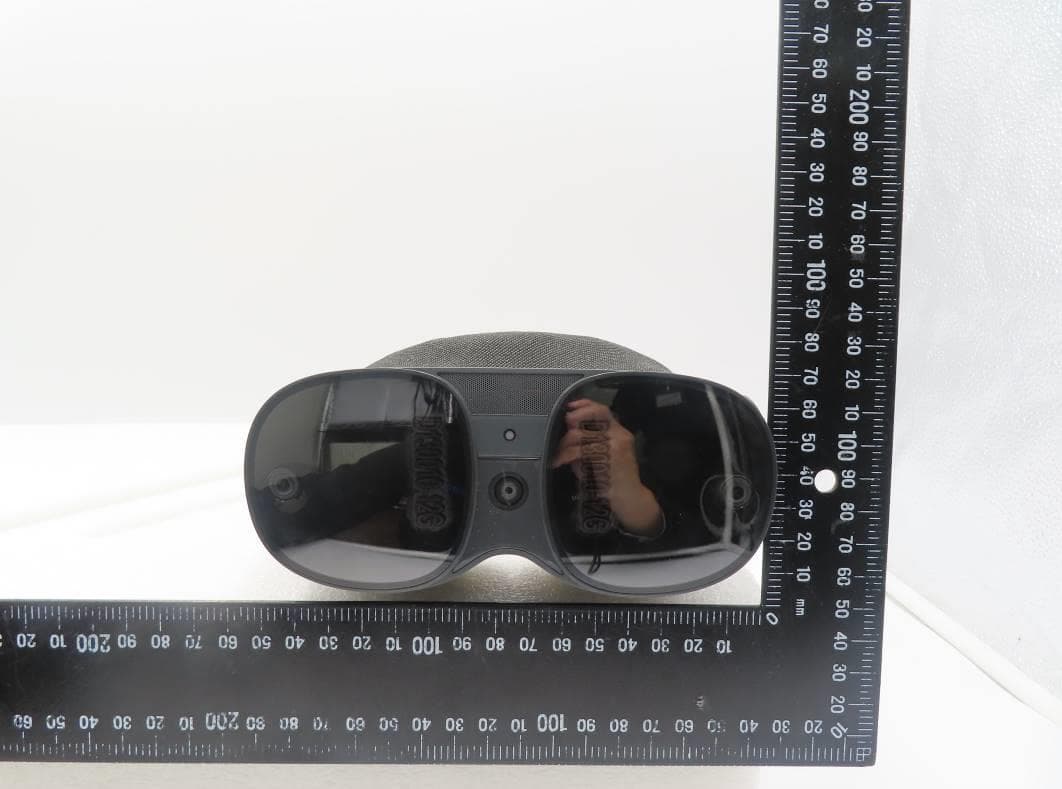
NM82QBB100
Jan 08, 2023Headset
Equipment Class
DTS - Digital Transmission System