NM82QA4100Headset
HTC Corporation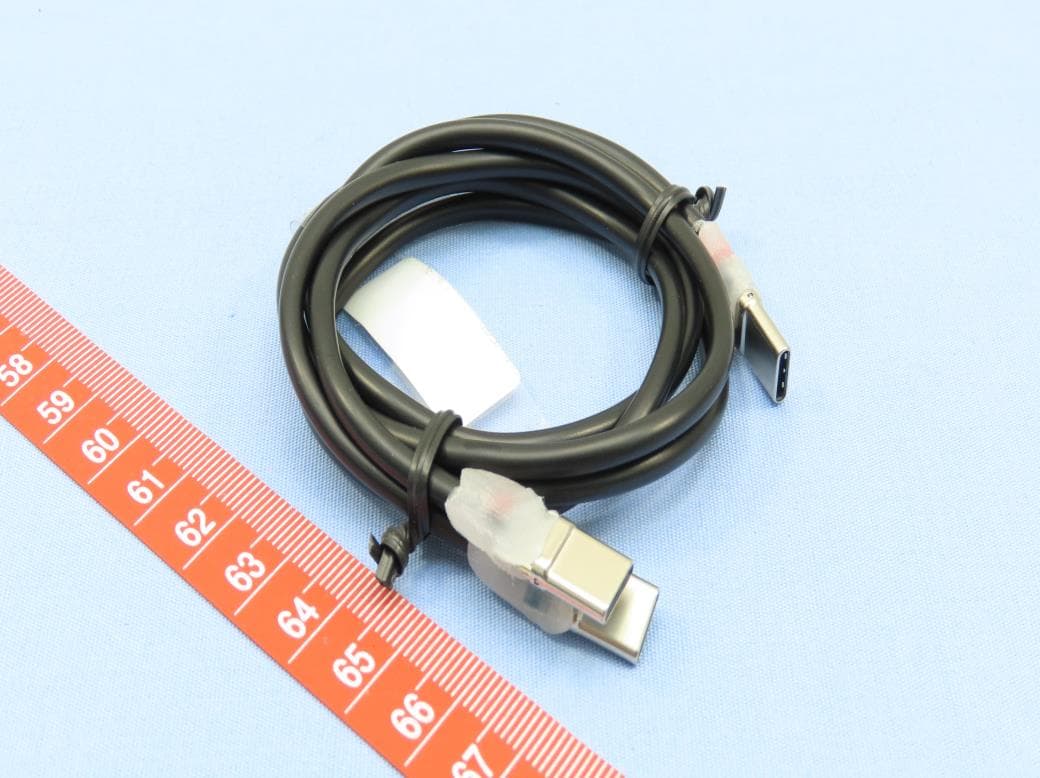
Click to zoom
Application Details
- Equipment Class
- NII - Unlicensed National Information Infrastructure TX
- Date of Grant
- May 30, 2021
- Application Purpose
- Original Equipment
- Date of Application
- May 12, 2021
- Equipment Note
- Headset
- Frequency Range
- 5745.00000000 - 5825.00000000
- Company
- HTC Corporation
- Country
- Taiwan
Documents & Files
Document Text
Text extracted from the exhibit documents filed with the FCC. Open a document above to read the original.
Users Manual
English 2QA4100 Guide © 2021 HTC Corporation. All rights reserved. VIVE, the VIVE logo, HTC and the HTC logo are trademarks of HTC Corporation. HTC CONFIDENTIAL For Certification reference only HTC CONFIDENTIAL For Certification reference only HTC CONFIDENTIAL For Certification reference only HTC CONFIDENTIAL For Certification reference only HTC CONFIDENTIAL For Certification reference only HTC CONFIDENTIAL For Certification reference only HTC CONFIDENTIAL For Certification reference only English English What’s in the box Headset Wrist straps (x2)USB splitter cable Controllers (x2) AC adapter Top view 1. Headset camera 2. 3.5mm headphone jack 3. USB-C port 4. Face gasket 5. Headset speakers 6. Back pad 7. Charging port 8. Power button 9. Battery level LEDs 10. Headset dial 11. Top strap 12. Headset button 13. Microphone 14. Headset LED HTC CONFIDENTIAL For Certification reference only HTC CONFIDENTIAL For Certification reference only HTC CONFIDENTIAL For Certification reference only HTC CONFIDENTIAL For Certification reference only HTC CONFIDENTIAL For Certification reference only HTC CONFIDENTIAL For Certification reference only HTC CONFIDENTIAL For Certification reference only English English Lens view 1. Proximity sensor2. microSD card Bottom view 1. USB-C port (remove cover) 2. IPD adjustment knob 3. Volume buttons 4. Microphone 5. Quick release Charge your headset with the included adapter. Charging Putting on your headset for the first time Your headset needs to be set up before using it for the first time. To set it up, do the following: 1. Press and hold the power button for 3 seconds to power on the headset. The headset LED will start blinking when the device turns on. If it doesn’t turn on, make sure the battery is charged. 2. Turn on the controllers by briefly pressing the VIVE/Menu buttons. Note: Controllers come paired with the headset. If the controller LEDs aren’t green, pair them again. 3. Put on the headset and follow the on-screen instructions to finish Room Setup. 4. Your headset is now ready to use. Toggle headset power on and off by pressing and holding the power button for 3 seconds. Press for 1 second to show remaining charge. Powering on and off 3 sec 1 sec HTC CONFIDENTIAL For Certification reference only HTC CONFIDENTIAL For Certification reference only HTC CONFIDENTIAL For Certification reference only HTC CONFIDENTIAL For Certification reference only HTC CONFIDENTIAL For Certification reference only HTC CONFIDENTIAL For Certification reference only HTC CONFIDENTIAL For Certification reference only English English 2. Position the headset over your eyes. While holding the quick release button, slide the head strap until it’s flush with the back of your head. 3. Turn the headset dial to tighten. 4. When you’re ready to take the headset off, you can use the quick release to release the headband. Headset fit The headset features a quick release button for quick donning and doffing. To quickly don the headset: 1. Press the quick release button, and then gently pull until fully extended. Inserting a microSD Card microSD cards can give you more storage space for your media, as well as provide a convenient way to install custom apps or setup many headsets quickly. The microSD card slot is under the headset frame, which is held in place by magnets. To install a microSD card: 1. Remove the frame by gently pulling. 2. Align your microSD card with the slot, with gold contacts facing out. 3. Gently push until it clicks into place. Press the card again to eject. HTC CONFIDENTIAL For Certification reference only HTC CONFIDENTIAL For Certification reference only HTC CONFIDENTIAL For Certification reference only HTC CONFIDENTIAL For Certification reference only HTC CONFIDENTIAL For Certification reference only HTC CONFIDENTIAL For Certification reference only HTC CONFIDENTIAL For Certification reference only English Connecting to a Wi-Fi network You can add or change networks from settings. Here’s how: 1. Press the VIVE button on your controller to open the dashboard. 2. Select More > Wi-Fi on the quick menu. You will be taken to the Settings menu. 3. Choose a Wi-Fi network to add from the list. If your network is hidden, you can add it manually by selecting Add Network. 4. If this is the first time you’ve connected to this network, enter your network information. Your network will now connect if it’s in range. Your previous network will remain saved, so you can easily switch later. HTC CONFIDENTIAL For Certification reference only HTC CONFIDENTIAL For Certification reference only HTC CONFIDENTIAL For Certification reference only HTC CONFIDENTIAL For Certification reference only HTC CONFIDENTIAL For Certification reference only HTC CONFIDENTIAL For Certification reference only HTC CONFIDENTIAL For Certification reference only
Users Manual
1 Safety and Regulatory Guide Safety and regulatoryguide...........................................................................................2 Guide de sécurité et de réglementations..................................................................8 Guida sulla sicurezza e sulla normativa.................................................................15 Sicherheitshinweise und Regelungen......................................................................21 Guía de seguridad y normativas................................................................................27 Przewodnik dotyczący bezpieczeństwa i przepisów.....................................................33 安全與法令注意事項......................................................................................................40 安全与法规指南...............................................................................................................45 安全と規制に関するガイド..................................................................................51 안전 및 규정 가이드.......................................................................................................56 Руководство по безопасности и соответствию стандартам.................62 دليل السلامة والمعلومات التنظيمية .........................................................................................................69 2 Important Safety Information – Read Before Use READ THE FOLLOWING WARNINGS AND INFORMATION BEFORE USE OF THE PRODUCT AND FOLLOW ALL PRODUCT SAFETY AND OPERATING INSTRUCTIONS. FAILURE TO DO SO MAY CAUSE BODILY INJURY (INCLUDING ELECTRIC SHOCK, FIRE, AND OTHER INJURY), PROPERTY DAMAGE, OR EVEN DEATH. IF YOU ALLOW OTHERS TO USE THE PRODUCT, YOU ARE RESPONSIBLE FOR ENSURING EACH USER IS AWARE OF AND FOLLOWS ALL PRODUCT SAFETY AND OPERATING INSTRUCTIONS. Ensure You Are Able to Safely Use the Product Consult your doctor before using the product if you have pre-existing serious medical conditions (such as a heart ailment), conditions that affect your ability to safely perform physical activities, psychiatric conditions (such as anxiety disorders or post-traumatic stress disorder), or if you are pregnant or elderly. Do not use the product if you are sick, fatigued, under the influence of intoxicants/drugs, or are not feeling generally well, as it may exacerbate your condition. Ensure the Area around You is Safe for Use of the Product While wearing the product you are blind to the world around you. The image displayed in the headset will not match the real world. Always use the product in a clear and safe area. Do not rely on the product’s chaperone system for protection. Do not use near stairways, large windows, balconies, heat sources, or outdoors. Clear the play area of people, furniture, and other things that may be obstacles, tripping hazards, or that block you from freely moving around. For example, if a pet comes into the room while you are using the product, you likely will not be aware of the pet’s presence and you could trip over your pet while moving in the virtual reality environment. Do not move outside the set play area. Use outdoors is not recommended. Injuries may occur from losing balance on uneven surfaces or from tripping over or running into objects. Do not handle sharp objects, hot liquids, or other potentially hazardous items while wearing the product. Do not use while driving or engaging in activities that require the ability to view your surroundings. It is recommended that the product be used only while under the supervision of another person who is ready to warn of hazards that may arise while the product is being used. Examples of hazards that could arise include, but are not limited to, tangling of a cable in a manner that presents a tripping hazard, pets entering the area where the product is being used, and the user walking too close to a wall or another hazard. Use Caution When Charging the Product Remain seated if using the product’s headset while it is plugged in and keep in mind the location of the charging cable. Standing up or moving around energetically could cause personal injury or damage to the product. Take Care with the Controller While using the controller, always check that you have sufficient overhead and surrounding clearance to allow you to fully extend your arms outwards and upwards. Hitting persons or objects may cause injury or damage. Hold the controller firmly and always use the wrist strap. If released during use, the controller may cause injury or damage to nearby persons, pets, or objects. Do not attempt to open the controller as doing so may lead to you coming into contact with internal parts that could cause electrical shock or electrocution. Photosensitive Seizures Like other products that produce visual effects (including light flashes), the product may trigger epileptic seizures, seizures, fainting, or severe dizziness even in people who have no history of these conditions. If you have a previous history of epilepsy or seizures, loss of awareness, or other symptoms linked to an epileptic condition, consult your doctor before using the product. To reduce the likelihood of a seizure do not use the product if you are tired or need sleep. Repetitive Stress Injuries Operate the product in a comfortable posture. Do not grip the product too tightly. Press the buttons lightly. If you have tingling, numbness, stiffness, throbbing, or other discomfort, immediately stop using the product and consult your doctor. Physical and Psychological Effects Content viewed using the product can be intense, immersive, and appear very life-like and may cause your brain and body to react accordingly. Certain types of content (e.g. violent, scary, emotional, or adrenaline- based content) could trigger increased heart rate, spikes in blood pressure, panic attacks, anxiety, PTSD, fainting, and other adverse effects. If you have a history of negative physical or psychological reactions to certain real-life circumstances, or are sensitive to …
Text truncated - open the document above for the full version.
Cover Letter(s)
Parts List
Cover Letter(s)
HTC Corporation One No. 88, Sec. 3, Zhongxing Rd. Xindian Dist., New Taipei City 231, Taiwan DFS client device channel plan and software operational declaration Date: 2021-05-11 We, HTC Corporation, declare that the device, FCC ID: NM82QA4100 Model Name: 2QA4100, does not have Ad Hoc on “non-US frequencies” and/or on“ DFS frequencies“. Also, the client software and associated drivers will not initiate any transmission on DFS frequencies without initiation by a master. This includes restriction on transmissions for beacons and support for ad-hoc peer-to-peer modes. Below is the channel / frequency plan for the device (if without support~2474, please delete CH12, CH13) 5G band 1 (if without 80MHz, please delete CH 42) 5G band 2 (if without 80MHz, please delete CH 58) 5G band 3 (if without 80MHz, please delete CH106 & CH122) (if without support~5720, please delete CH138, CH142 & CH144) 5G band 4 (if without 80MHz, please delete CH155) Also, on DFS channels, the WLAN driver in the device operates under the control of an AP at all times, except when in ad-hoc mode on US non-DFS channels. The device passively scans DFS frequencies until a master device is detected. The control of this functionality is not accessible to anyone under any conditions. Furthermore, the firmware is protected by a special signature and CRC checksum. Signature and CRC checksum will be calculated and verified before firmware upgrade. Unauthorized modification to firmware will lead to the failure of verification and thus firmware upgrade will not be allowed. Sincerely yours, CH 1 2 3 4 5 6 7 8 9 10 11 Frequency (MHz) 2412 2417 2422 2427 2432 2437 2442 2447 2452 2457 2462 Scan Type Active Active Active Active Active Active Active Active Active Active Active CH 36 38 40 42 44 46 48 Frequency (MHz) 5180 5190 5200 5210 5220 5230 5240 Scan Type Active Active Active Active Active Active Active CH 52 54 56 58 60 62 64 Frequency (MHz) 5260 5270 5280 5290 5300 5310 5320 Scan Type Passive Passive Passive Passive Passive Passive Passive CH 100 102 104 106 108 110 112 116 118 120 122 Frequency (MHz) 5500 5510 5520 5530 5540 5550 5560 5580 5590 5600 5610 Scan Type Passive Passive Passive Passive Passive Passive Passive Passive Passive Passive Passive CH 124 126 128 132 134 136 138 140 142 144 Frequency (MHz) 5620 5630 5640 5660 5670 5680 5690 5700 5710 5720 Scan Type Passive Passive Passive Passive Passive Passive Passive Passive Passive Passive CH 149 151 153 155 157 159 161 165 Frequency (MHz) 5745 5755 5765 5775 5785 5795 5805 5825 Scan Type Active Active Active Active Active Active Active Active HTC Corporation One No. 88, Sec. 3, Zhongxing Rd. Xindian Dist., New Taipei City 231, Taiwan Sincerely yours, ----------------------------------- Barry Hsieh, Sr. Engineer HTC Corporation Tel: 886-2-8912-4138 ext.26146 E-mail: [email protected]
External Photos
Reference No.: BCBB-WTW-P20120637_EXT Page 1 / 10 CONSTRUCTION PHOTOS OF EUT Brand :VIVE / Model:2QA4100 The EUT contains following accessory devices. Product Brand Model Manufacturer Description Adapter HTC TC NE30W-US LUCENT TRANS I/P: 100-240 Vac, 50-60 Hz, 750 mA O/P: 12 Vdc, 2.5 A Power Cord length: 1.2 meter (DC side) Battery VIVE B028QK100 SCUD Input Power Rating: 12 Vdc, 2.5 A Output power rating: 11 Vdc, 2000 mAH USB Cable (Y-cable) N/A 6691-11A9-Z18P Foxlink Cable length: 50+/-2cm, Shielding or not: No Reference No.: BCBB-WTW-P20120637_EXT Page 2 / 10 Reference No.: BCBB-WTW-P20120637_EXT Page 3 / 10 Reference No.: BCBB-WTW-P20120637_EXT Page 4 / 10 Reference No.: BCBB-WTW-P20120637_EXT Page 5 / 10 Reference No.: BCBB-WTW-P20120637_EXT Page 6 / 10 Reference No.: BCBB-WTW-P20120637_EXT Page 7 / 10 Reference No.: BCBB-WTW-P20120637_EXT Page 8 / 10 Reference No.: BCBB-WTW-P20120637_EXT Page 9 / 10 Reference No.: BCBB-WTW-P20120637_EXT Page 10 / 10
Internal Photos
Reference No.: BCBB-WTW-P20120637_INT Page 1 / 13 CONSTRUCTION PHOTOS OF EUT Brand :VIVE / Model:2QA4100 Reference No.: BCBB-WTW-P20120637 Page 2 / 13 Reference No.: BCBB-WTW-P20120637 Page 3 / 13 Reference No.: BCBB-WTW-P20120637 Page 4 / 13 Reference No.: BCBB-WTW-P20120637 Page 5 / 13 Reference No.: BCBB-WTW-P20120637 Page 6 / 13 Reference No.: BCBB-WTW-P20120637 Page 7 / 13 Reference No.: BCBB-WTW-P20120637 Page 8 / 13 Reference No.: BCBB-WTW-P20120637 Page 9 / 13 Reference No.: BCBB-WTW-P20120637 Page 10 / 13 Reference No.: BCBB-WTW-P20120637 Page 11 / 13 Reference No.: BCBB-WTW-P20120637 Page 12 / 13 Reference No.: BCBB-WTW-P20120637 Page 13 / 13
RF Exposure Info
SAR Test Report Report Format Version 5.0.0 Page No. : 1 of 28 Report No. : SFBCBB-WTW-P20120637 Issued Date : Jan. 27, 2021 SAR Test Report Report No. : SFBCBB-WTW-P20120637 Applicant : HTC Corporation Address : No. 88, Sec. 3, Zhongxing Rd. Xindian Dist., New Taipei City 231, Taiwan Product : Headset FCC ID : NM82QA4100 Brand : VIVE Model No. : 2QA4100 Standards : FCC 47 CFR Part 2 (2.1093), IEEE C95.1:1992, IEEE Std 1528:2013 KDB 865664 D01 v01r04, KDB 865664 D02 v01r02 KDB 248227 D01 v02r02, KDB 447498 D01 v06 Sample Received Date : Dec. 18, 2020 Date of Testing : Jan. 08, 2021 ~ Jan. 12, 2021 Lab Address : No. 47-2, 14th Ling, Chia Pau Vil., Lin Kou Dist., New Taipei City, Taiwan Test Location : No. 19, Hwa Ya 2nd Rd., Wen Hwa Vil., Kwei Shan Dist., Taoyuan City, Taiwan CERTIFICATION: The above equipment have been tested by Bureau Veritas Consumer Products Services (H.K.) Ltd., Taoyuan Branch–Lin Kou Laboratories, and found compliance with the requirement of the above standards. The test record, data evaluation & Equipment Under Test (EUT) configurations represented herein are true and accurate accounts of the measurements of the sample’s SAR characteristics under the conditions specified in this report. It should not be reproduced except in full, without the written approval of our laboratory. The client should not use it to claim product certification, approval, or endorsement by TAF or any government agencies. Prepared By : Shelly Hsueh / Specialist Approved By : Gordon Lin / Manager FCC Accredited No.: TW0003 This report is for your exclusive use. Any copying or replication of this report to or for any other person or entity, or use of our name or trademark, is permitted only with our prior written permission. This report sets forth our findings solely with respect to the test samples identified herein. The results set forth in this report are not indicative or representative of the quality or characteristics of the lot from which a test sample was taken or any similar or identical product unless specifically and expressly noted. Our report includes all of the tests requested by you and the results thereof based upon the information that you provided to us. You have 60 days from date of issuance of this report to notify us of any material error or omission caused by our negligence, provided, however, that such notice shall be in writing and shall specifically address the issue you wish to raise. A failure to raise such issue within the prescribed time shall constitute your unqualified acceptance of the completeness of this report, the tests conducted and the correctness of the report contents. Unless specific mention, the uncertainty of measurement has been explicitly taken into account to declare the compliance or non-compliance to the specification. SAR Test Report Report Format Version 5.0.0 Page No. : 2 of 28 Report No. : SFBCBB-WTW-P20120637 Issued Date : Jan. 27, 2021 Table of Contents Release Control Record ............................................................................................................................................................... 3 1. Summary of Maximum SAR Value ....................................................................................................................................... 4 2. Description of Equipment Under Test ................................................................................................................................. 5 3. SAR Measurement System ................................................................................................................................................... 6 3.1 Definition of Specific Absorption Rate (SAR) ............................................................................................................... 6 3.2 SPEAG DASY6 System ............................................................................................................................................... 6 3.2.1 Robot ............................................................................................................................................................... 7 3.2.2 Probes ............................................................................................................................................................. 8 3.2.3 Data Acquisition Electronics (DAE) .................................................................................................................. 8 3.2.4 Phantoms ......................................................................................................................................................... 8 3.2.5 Device Holder .................................................................................................................................................. 9 3.2.6 System Validation Dipoles ............................................................................................................................. 10 3.2.7 Power Source ................................................................................................................................................ 10 3.2.8 Tissue Simulating Liquids .............................................................................................................................. 11 3.3 SAR System Verification ............................................................................................................................................ 13 3.4 SAR Measurement Procedure ................................................................................................................................... 14 3 .4.1 Area Scan and Zoom Scan Procedure .......................................................................................................... 14 3.4.2 Volume Scan Procedure ................................................................................................................................ 15 3.4.3 Power Drift Monitoring …
Text truncated - open the document above for the full version.
RF Exposure Info
SAR Test Report Report Format Version 5.0.0 Issued Date : Jan. 27, 2021 Report No. : SFBCBB-WTW-P20120637 Appendix D. Photographs of EUT and Setup The setup photographs for SAR testing are shown as follows. SAR Test Report Report Format Version 5.0.0 Issued Date : Jan. 27, 2021 Report No. : SFBCBB-WTW-P20120637 Appendix E. Maximum Target Conducted Power The maximum conducted average power (Unit: dBm) including tune-up tolerance is shown as below. ModeChannel Frequency MIMO Ant 0 Tune up MIMO Ant 1 Tune up MIMO Ant 0+1 Max Tune up 1241217.017.020.0 6243717.017.020.0 11246217.017.020.0 1241215.015.018.0 6243715.015.018.0 11246215.015.018.0 1241215.015.018.0 6243715.015.018.0 11246215.015.018.0 3242215.015.018.0 6243715.015.018.0 9245215.015.018.0 1241215.015.018.0 6243715.015.018.0 11246215.015.018.0 3242215.015.018.0 6243715.015.018.0 9245215.015.018.0 1241215.015.018.0 6243715.015.018.0 11246215.015.018.0 3242215.015.018.0 6243715.015.018.0 9245215.015.018.0 802.11n HT20 802.11g 802.11b WLAN2.4GHz WLAN Tune-up Power (Full) 802.11ac VHT40 802.11ac VHT20 802.11ax HE20 802.11n HT40 802.11ax HE40 WLAN Tune-up Power (Full) ModeChannel Frequency 02402 392441 782480 02402 192440 392480 Bluetooth Max Tune-up 7.0 7.0 7.0 7.0 7.0 7.0 LE BR / EDR WLAN Tune-up Power (Full) ModeChannel Frequency MIMO Ant 0 Tune up MIMO Ant 1 Tune up MIMO Ant 0+1 Max Tune up 36518014.514.517.5 40520014.514.517.5 44522014.514.517.5 48524014.514.517.5 36518014.514.517.5 40520014.514.517.5 44522014.514.517.5 48524014.514.517.5 38519014.514.517.5 46523014.514.517.5 36518014.514.517.5 40520014.514.517.5 44522014.514.517.5 48524014.514.517.5 38519014.514.517.5 46523014.514.517.5 802.11ac VHT8042521014.514.517.5 36518014.514.517.5 40520014.514.517.5 44522014.514.517.5 48524014.514.517.5 38519014.514.517.5 46523014.514.517.5 802.11ax HE8042521014.514.517.5 802.11ac VHT20 802.11n HT20 WLAN 5.2GHz 802.11n HT40 802.11ac VHT40 802.11ax HE20 802.11ax HE40 802.11a WLAN Tune-up Power (Full) ModeChannel Frequency MIMO Ant 0 Tune up MIMO Ant 1 Tune up MIMO Ant 0+1 Max Tune up 52526014.514.517.5 56528014.514.517.5 60530014.514.517.5 64532014.514.517.5 52526014.514.517.5 56528014.514.517.5 60530014.514.517.5 64532014.514.517.5 54527014.514.517.5 62531014.514.517.5 52526014.514.517.5 56528014.514.517.5 60530014.514.517.5 64532014.514.517.5 54527014.514.517.5 62531014.514.517.5 802.11ac VHT8058529014.514.517.5 52526014.514.517.5 56528014.514.517.5 60530014.514.517.5 64532014.514.517.5 54527014.514.517.5 62531014.514.517.5 802.11ax HE8058529014.514.517.5 802.11n HT20 802.11n HT40 802.11ac VHT20 WLAN 5.3GHz 802.11a 802.11ac VHT40 802.11ax HE40 802.11ax HE20 WLAN Tune-up Power (Full) ModeChannel Frequency MIMO Ant 0 Tune up MIMO Ant 1 Tune up MIMO Ant 0+1 Max Tune up 100550014.514.517.5 116558014.514.517.5 120560014.514.517.5 124562014.514.517.5 132566014.514.517.5 140570014.514.517.5 144572014.514.517.5 100550014.514.517.5 116558014.514.517.5 120560014.514.517.5 124562014.514.517.5 132566014.514.517.5 140570014.514.517.5 144572014.514.517.5 102551014.514.517.5 110555014.514.517.5 118559014.514.517.5 126563014.514.517.5 134567014.514.517.5 142571014.514.517.5 100550014.514.517.5 116558014.514.517.5 120560014.514.517.5 124562014.514.517.5 132566014.514.517.5 140570014.514.517.5 144572014.514.517.5 102551014.514.517.5 110555014.514.517.5 118559014.514.517.5 126563014.514.517.5 134567014.514.517.5 142571014.514.517.5 106553014.514.517.5 122561014.514.517.5 138569014.514.517.5 100550014.514.517.5 116558014.514.517.5 120560014.514.517.5 124562014.514.517.5 132566014.514.517.5 140570014.514.517.5 144572014.514.517.5 102551014.514.517.5 110555014.514.517.5 118559014.514.517.5 126563014.514.517.5 134567014.514.517.5 142571014.514.517.5 106553014.514.517.5 122561014.514.517.5 138569014.514.517.5 802.11ac VHT20 802.11ac VHT80 WLAN 5.6GHz 802.11a 802.11n HT20 802.11n HT40 802.11ax HE20 802.11ax HE40 802.11ax HE80 802.11ac VHT40 WLAN Tune-up Power (Full) ModeChannel Frequency MIMO Ant 0 Tune up MIMO Ant 1 Tune up MIMO Ant 0+1 Max Tune up 149574514.514.517.5 153576514.514.517.5 157578514.514.517.5 161580514.514.517.5 165582514.514.517.5 149574514.514.517.5 153576514.514.517.5 157578514.514.517.5 161580514.514.517.5 165582514.514.517.5 151575514.514.517.5 159579514.514.517.5 149574514.514.517.5 153576514.514.517.5 157578514.514.517.5 161580514.514.517.5 165582514.514.517.5 151575514.514.517.5 159579514.514.517.5 802.11ac VHT80155577514.514.517.5 149574514.514.517.5 153576514.514.517.5 157578514.514.517.5 161580514.514.517.5 165582514.514.517.5 151575514.514.517.5 159579514.514.517.5 802.11ax HE80155577514.514.517.5 802.11ac VHT20 802.11n HT40 802.11a 802.11n HT20 802.11ax HE20 802.11ax HE40 802.11ac VHT40 WLAN 5.8GHz SAR Test Report Report Format Version 5.0.0 Issued Date : Jan. 27, 2021 Report No. : SFBCBB-WTW-P20120637 Appendix F. Measured Conducted Power Result The measuring conducted power (Unit: dBm) are shown as below. ModeChannel Frequency MIMO Ant 0 Avg. Power MIMO Ant 1 Avg. Power MIMO Ant 0+1 Avg. Power 1 2412 16.67 16.82 19.76 6 2437 16.45 16.77 19.62 11 2462 16.37 16.61 19.5 802.11b WLAN Conducted Power (Full) WLAN2.4GHz Ant 0+1 WLAN Conducted Power (Full) ModeChannel Frequency SISO Ant 0 Avg. Power 024025.74 39 2441 6.72 78 2480 6.35 024025.91 19 2440 6.79 39 2480 6.56 Bluetooth Ant 0 BR / EDR LE WLAN Conducted Power (Full) ModeChannel Frequency MIMO Ant 0 Avg. Power MIMO Ant 1 Avg. Power MIMO Ant 0+1 Avg. Power 802.11ac VHT80 58 5290 13.22 14.82 17.1 WLAN 5.3GHz Ant 0+1 WLAN Conducted Power (Full) ModeChannel Frequency MIMO Ant 0 Avg. Power MIMO Ant 1 Avg. Power MIMO Ant 0+1 Avg. Power 106 5530 13.08 14.71 16.98 122 5610 12.99 14.75 16.97 138 5690 13.2 14.87 17.13 WLAN 5.6GHz Ant 0+1 802.11ac VHT80 WLAN Conducted Power (Full) ModeChannel Frequency MIMO Ant 0 Avg. Power MIMO Ant 1 Avg. Power MIMO Ant 0+1 Avg. Power 802.11ac VHT80 155 5775 13.54 14.89 17.28 WLAN 5.8GHz Ant 0+1 SAR Test Report Report Format Version 5.0.0 Issued Date : Jan. 27, …
Text truncated - open the document above for the full version.
Test Report
Report No.: RFBCBB-WTW-P20120637-4 Page No. 1 / 122 Report Format Version:6.1.2 FCC Test Report Report No.: RFBCBB-WTW-P20120637-4 FCC ID: NM82QA4100 Test Model: 2QA4100 Received Date: Dec. 18, 2020 Test Date: Dec. 28, 2020 ~ May 12, 2021 Issued Date: May 13, 2021 Applicant: HTC Corporation Address: No. 88, Sec. 3, Zhongxing Rd. Xindian Dist., New Taipei City 231, Taiwan Issued By: Bureau Veritas Consumer Products Services (H.K.) Ltd., Taoyuan Branch Lin Kou Laboratories Lab Address: No. 47-2, 14th Ling, Chia Pau Vil., Lin Kou Dist., New Taipei City, Taiwan Test Location: No.19, Hwa Ya 2nd Rd., Wen Hwa Vil., Kwei Shan Dist., Taoyuan City 33383, Taiwan FCC Registration / Designation Number: 788550 / TW0003 This report is for your exclusive use. Any copying or replication of this report to or for any other person or entity, or use of our name or trademark, is permitted only with our prior written permission. This report sets forth our findings solely with respect to the test samples identified herein. The results set forth in this report are not indicative or representative of the quality or characteristics of the lot from which a test sample was taken or any similar or identical product unless specifically and expressly noted. Our report includes all of the tests requested by you and the results thereof based upon the information that you provided to us. You have 60 days from date of issuance of this report to notify us of any material error or omission caused by our negligence, provided, however, that such notice shall be in writing and shall specifically address the issue you wish to raise. A failure to raise such issue within the prescribed time shall constitute your unqualified acceptance of the completeness of this report, the tests conducted and the correctness of the report contents. Unless specific mention, the uncertainty of measurement has been explicitly taken into account to declare the compliance or non-compliance to the specification. Report No.: RFBCBB-WTW-P20120637-4 Page No. 2 / 122 Report Format Version:6.1.2 Table of Contents Release Control Record .................................................................................................................................. 4 1 Certificate of Conformity ........................................................................................................................... 5 2 Summary of Test Results ........................................................................................................................... 6 2.1 Measurement Uncertainty ..................................................................................................................... 6 2…
Text truncated - open the document above for the full version.
Contact Information
Applicant
Sylvia Shen
Test Firm
Bureau Veritas CPS (H.K.) Ltd., Taoyuan BranchRichard Chen
Technical Specifications
| # | Rule Parts | Frequency Range | Power Output |
|---|---|---|---|
| 4 | 15E | 5.75 GHz - 5.83 GHz | 54.00 mW |
Other Applications from HTC Corporation
NM82QDJ100
Dec 31, 2025VIVE Headset
Equipment Class
DSS - Part 15 Spread Spectrum TransmitterNM82QD4100
Sep 01, 2024Headset
Equipment Class
6XD - 15E 6 GHz Low Power Indoor Client
NM82QBP100
May 10, 2023Tracker
Equipment Class
DTS - Digital Transmission System
NM82QCD100
May 07, 2023Dongle
Equipment Class
DTS - Digital Transmission System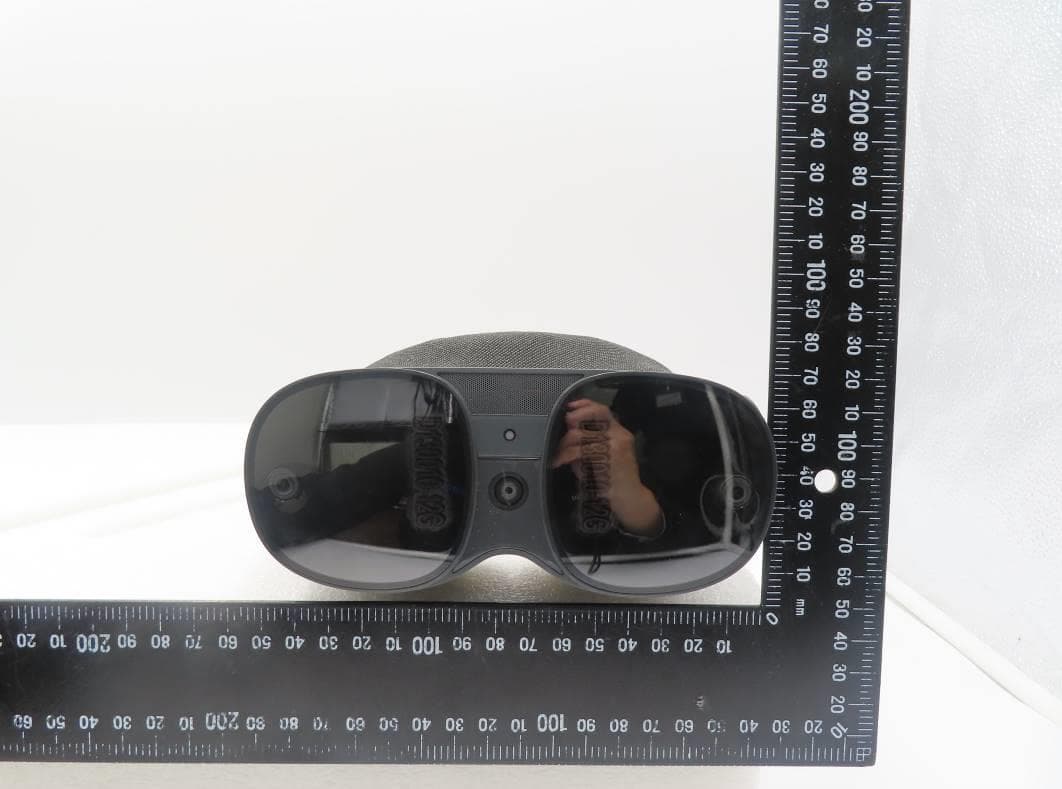
NM82QBB100
Jan 08, 2023Headset
Equipment Class
DTS - Digital Transmission System