NM8FORESmartphone
HTC Corporation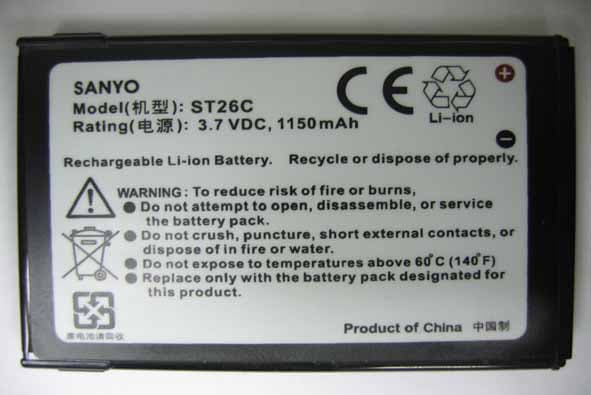
Click to zoom
Application Details
- Equipment Class
- PCE - PCS Licensed Transmitter held to ear
- Date of Grant
- Aug 29, 2006
- Application Purpose
- Original Equipment
- Date of Application
- Aug 29, 2006
- Equipment Note
- Smartphone
- Frequency Range
- 824.20000000 - 848.80000000
- Company
- HTC Corporation
- Country
- Taiwan
Documents & Files
Document Text
Text extracted from the exhibit documents filed with the FCC. Open a document above to read the original.
Users Manual
Smart User Manual 2 Congratulations on the purchase of your new Windows Mobile™ Smartphone! Please Read Before Proceeding. THIS DEVICE IS NOT CHARGED WHEN YOU TAKE IT OUT OF THE BOX. DO NOT REMOVE THE BATTERY PACK WHEN THE DEVICE IS CHARGING. YOUR WARRANTY IS INVALIDATED IF YOU OPEN OR TAMPER WITH THE DEVICE’S OUTER CASING. PRIVACY RESTRICTIONS Some countries require full disclosure of recorded telephone conversations, and stipulate that you must inform the person with whom you are speaking that the conversation is being recorded. Always obey the relevant laws and regulations of your country when using the recording feature of your phone. COPYRIGHT INFORMATION Microsoft, MS-DOS, Windows, Windows NT, Windows Server, Windows Mobile, ActiveSync, Excel, Internet Explorer, MSN, Outlook, PowerPoint, and Word are either registered trademarks or trademarks of Microsoft Corporation in the United States and/or other countries. 3 Important Health Information and Safety Precautions When using this product, the safety precautions below must be taken to avoid possible legal liabilities and damages. Retain and follow all product safety and operating instructions. Observe all warnings in the operating instructions on the product. To reduce the risk of bodily injury, electric shock, fire and damage to the equipment, observe the following precautions. ELECTRICAL SAFETY This product is intended for use when supplied with power from the designated battery or power supply unit. Other usage may be dangerous and will invalidate any approval given to this product. SAFETY PRECAUTIONS FOR PROPER GROUNDING INSTALLATION CAUTION – Improper connection of associated equipment-grounding can result in a risk of electric shock. This product equipped with an ActiveSync Cable for connecting with desk- top or notebook computer. Be sure your computer is properly grounded (earthed) before connecting this product to the computer. The desk-top or notebook computer is equipped with a power supply cord having an equipment grounding conductor and a grounding plug. The plug must be plugged into an appropriate outlet which is properly installed and grounded in accordance with all local codes and ordinances. SAFETY PRECAUTIONS FOR POWER SUPPLY UNIT •Use the correct external power source A product should be operated only from the type of power source indicated on the electrical ratings label. If you are not sure of the type of power source required, consult your authorized service provider or local power company. For a product that operates from battery power or other sources, refer to the operating instructions that are included with the product. •Handle battery packs carefully This product contains a Li-ion Polymer battery. There is a risk of fire and burns if the battery pack is handled improperly. Do not attempt to open or service the battery pack. Do not disassemble, crush, puncture, short external contacts or circuits, dispose of in fire or water, or expose a battery pack to temperatures higher than 60 ̊C (140 ̊F). 4 WARNING! Danger of explosion if battery is incorrectly replaced. To reduce risk of fire or burns, do not disassemble, crush, puncture, short external contacts, expose to temperature above 60 o C (140 o F), or dispose of in fire or water. Replace only with specified batteries. Recycle or dispose of used batteries according to the local regulations or reference guide supplied with your product. SAFETY PRECAUTIONS FOR DIRECT SUNLIGHT Keep this product away from excessive moisture and extreme temperatures. Do not leave the product or its battery inside a vehicle or in places where the temperature may exceed 60°C (140°F), such as on a car dashboard, window sill, or behind a glass that is exposed to direct sunlight or strong ultraviolet light for extended periods of time. This may damage the product, overheat the battery, or pose a risk to the vehicle. SAFETY PRECAUTIONS FOR ACOUSTIC PRESSURE CAUTION –Permanent hearing loss may occur if earphones or headphones are used and prolonged listening at high volume. NOTE: For France, mobile headphones or earphones for this device (Manufactured by Supplier Name:Merry, Model Numbers: EMC220-001) has been tested to comply with the Sound Pressure Level requirement laid down in NF EN 50332-1:2000 standard as required by French Article L. 5232-1. 5 SAFETY IN AIR CRAFTS Due to the possible interference caused by this product to an aircraft’s navigation system and its communications network, using this device’s phone function on board an airplane is against the law in most countries. If you want to use this device when on board an aircraft, remember to turn off your phone by switching to Flight Mode. ENVIRONMENT RESTRICTIONS Do not use this product in gas stations, fuel depots, chemical plants or where blasting operations are in progress, or in potentially explosive atmospheres such as fuelling areas, fuel storehouses, below deck on boats, chemical plants, fuel or chemical transfer or storage facilities, and areas where the air contains chemicals or particles, such as grain, dust, or metal powders. Please be aware that sparks in such areas could cause an explosion or fire resulting in bodily injury or even death. EXPLOSIVE ATMOSPHERES When in any area with a potentially explosive atmosphere or where flammable materials exist, the product should be turned off and the user should obey all signs and instructions. Sparks in such areas could cause an explosion or fire resulting in bodily injury or even death. Users are advised not to use the equipment at refueling points such as service or gas stations, and are reminded of the need to observe restrictions on the use of radio equipment in fuel depots, chemical plants, or where blasting operations are in progress. Areas with a potentially explosive atmosphere are often, but not always, clearly marked. These include fueling areas, below deck on boats, fuel or chemical transfer or storage facilities, and areas where the air contains chemicals or …
Text truncated - open the document above for the full version.
Users Manual
Getting Connected 81 4. Click Menu > New. Your device searches for other Bluetooth-enabled devices and displays them in the list. 5. Select the name of the headset and click Next. 6. In Passcode, enter the alphanumeric passcode for the Bluetooth headset, then click Next. 7. Select the check box for the Hands Free service and click Done. Note If the Bluetooth stereo headset becomes disconnected, turn the headset on and repeat steps 1 to 3 above. Select the stereo headset and click Menu > Set as Wireless Stereo. 82 Getting Connected Beam information using Bluetooth You can beam information, such as contacts, calendar items and tasks, as well as files from your phone to your computer or to another Bluetooth- enabled device. Note If your computer does not have built-in Bluetooth capabilities, you need to connect and use a Bluetooth adapter or dongle on your computer. To beam information from your phone to a computer 1. Set Bluetooth on your phone to visible mode. For information about this, see “To make your phone visible”. 2. Next, set Bluetooth on your computer to visible mode, create a Bluetooth partnership, then enable your computer to receive Bluetooth beams. If your computer has Windows XP SP2 and your computer’s built-in or external Bluetooth adapter is supported by Windows XP SP2, do the following steps: a. On your computer, open Bluetooth Devices from the Control Panel then click the Options tab. b. Select the Turn discovery on and the Allow Bluetooth devices to connect to this computer options. c. Create a Bluetooth partnership between your phone and computer. For information about creating a partnership, see “Bluetooth partnerships”. d. In the Options tab of Bluetooth Devices, select Show the Bluetooth icon in the notifi cation area. e. To enable your computer to receive Bluetooth beams, right-click the Bluetooth icon at the bottom-right of your computer screen. A menu then opens. Click Receive a File. Whereas if the Bluetooth adapter on your computer was installed using a third-party provided driver, do the following steps: a. Open the Bluetooth software that came with the Bluetooth adapter. This software varies by manufacturer, but in most cases, you will find a Bluetooth Configuration utility which you can open from the Control Panel. Getting Connected 83 b. Click the Accessibility tab in the Bluetooth Configuration dialog box, then select Let other Bluetooth devices to discover this computer. c. Create a Bluetooth partnership between your phone and computer. For information about creating a partnership, see “Bluetooth partnerships”. d. Refer to the Bluetooth adapter’s documentation for instructions on how to enable your computer to receive Bluetooth beams. 3. Now you’re ready to beam. On your phone, select an item to beam. The item can be an appointment in your calendar, a task, a contact card or a file. 4. Click Menu >Beam [type of item]. 5. Select the device name to which you want to beam to. 6. Click Beam. 7. If you beamed a calendar, task or contact item to your computer and it is not automatically added to Outlook, click File > Import and Export to import it to Microsoft Outlook on your computer. To beam information to a Bluetooth-enabled device such as another phone, create a Bluetooth partnership then do steps 3 to 6 in the above procedure. Notes • If the computer or device you want to beam to cannot be detected by your phone, make sure that it is turned on, visible, and within close range (10 meters) of your phone. • The default folder on your computer where beamed items are stored may be: C:\Documents and Settings\your_username\My Documents. • If your computer’s Bluetooth adapter was installed using a third-party provided driver, the folder location where it stores beamed items will be indicated in the Information Exchange tab of the Bluetooth Configuration utility. 84 Getting Connected Use the phone as a Bluetooth modem You can connect your phone to a notebook or desktop computer through Bluetooth and use the phone as a modem for the computer. For the computer to use the Internet connection of your phone, activate Internet Sharing on your phone, then set up a Bluetooth Personal Area Network (PAN) between the computer and your phone. 1. On your phone, turn on Bluetooth and set it to Visible mode. 2. Initiate a Bluetooth partnership from your phone by following the steps in “To create a Bluetooth partnership.“ Alternatively, you can initiate a Bluetooth partnership from the computer by following these steps (based on Windows XP SP2): a. In the Control Panel or System Tray, double-click the Bluetooth Devices icon. b. In the Bluetooth Devices window, click Add. c. The Add Bluetooth Device Wizard opens. Select the My device is set up and ready to be found check box, then click Next. d. The wizard then detects your phone and displays its name in the dialog box. Select the phone name, then click Next. e. Select Let me choose my own passkey, then enter a passkey (1 up to 16 digits) that will serve as an identification number for establishing a secure connection between your phone and the computer. Click Next. f. A confirmation message then appears on your phone. Click Yes to accept the connection, enter the same passcode, then click Next. g. On the computer, click Finish to exit the wizard. h. On your phone’s Partnership Settings screen, you can change the display name for the computer, then click Finish. 3. Now, open the Internet Sharing program on your phone. Click Start > Internet Sharing. 4. Select Bluetooth PAN as the PC Connection. 5. From the Network Connection list, select the name of the connection that your phone uses to connect to the Internet. Getting Connected 85 6. Click Connect. 7. On your computer, set up a Bluetooth Personal Area Network (PAN) with your phone: a. Click Start > Control Panel > Network Connections. b. Under Personal Area Network, click the Bluetooth Network Connection icon. c. Under Network Tasks, click View Bluetooth network devices. d. In th…
Text truncated - open the document above for the full version.
External Photos
Report No.: ER/2006/70003 FCC ID: NM8FORE Issue Date: Aug. 29, 2006 Page: 74 This document is issued by the Company subject to its General Conditions of Service printed overleaf or available on request and accessible at www.sgs.com. Atten- tion is drawn to the limitations of liability, indemnification, and Jurisdictional issued defined therein. Unless otherwise stated, the results shown in this test report refer only to the sample(s) tested. This document cannot be reproduced except in full, without prior approval of Company. Any unauthorized alteration, forgery or falsification of the content or appearance of this report is unlawful and offenders may be prosecuted to the fullest extent of the law. , 列www.sgs.com 說 不更 SGS Taiwan Ltd. No. 134, Wu Kung Rd., Wuku Industrial Zone, Taipei Country, Taiwan. / 北路134 t (886-2) 2299-3939 f (886-2) 2298-2698 www.sgs.com.tw All View of EUT Adaptor Report No.: ER/2006/70003 FCC ID: NM8FORE Issue Date: Aug. 29, 2006 Page: 75 This document is issued by the Company subject to its General Conditions of Service printed overleaf or available on request and accessible at www.sgs.com. Atten- tion is drawn to the limitations of liability, indemnification, and Jurisdictional issued defined therein. Unless otherwise stated, the results shown in this test report refer only to the sample(s) tested. This document cannot be reproduced except in full, without prior approval of Company. Any unauthorized alteration, forgery or falsification of the content or appearance of this report is unlawful and offenders may be prosecuted to the fullest extent of the law. , 列www.sgs.com 說 不更 SGS Taiwan Ltd. No. 134, Wu Kung Rd., Wuku Industrial Zone, Taipei Country, Taiwan. / 北路134 t (886-2) 2299-3939 f (886-2) 2298-2698 www.sgs.com.tw Front View of EUT Back View of EUT Report No.: ER/2006/70003 FCC ID: NM8FORE Issue Date: Aug. 29, 2006 Page: 76 This document is issued by the Company subject to its General Conditions of Service printed overleaf or available on request and accessible at www.sgs.com. Atten- tion is drawn to the limitations of liability, indemnification, and Jurisdictional issued defined therein. Unless otherwise stated, the results shown in this test report refer only to the sample(s) tested. This document cannot be reproduced except in full, without prior approval of Company. Any unauthorized alteration, forgery or falsification of the content or appearance of this report is unlawful and offenders may be prosecuted to the fullest extent of the law. , 列www.sgs.com 說 不更 SGS Taiwan Ltd. No. 134, Wu Kung Rd., Wuku Industrial Zone, Taipei Country, Taiwan. / 北路134 t (886-2) 2299-3939 f (886-2) 2298-2698 www.sgs.com.tw Right View of EUT Left View of EUT Report No.: ER/2006/70003 FCC ID: NM8FORE Issue Date: Aug. 29, 2006 Page: 77 This document is issued by the Company subject to its General Conditions of Service printed overleaf or available on request and accessible at www.sgs.com. Atten- tion is drawn to the limitations of liability, indemnification, and Jurisdictional issued defined therein. Unless otherwise stated, the results shown in this test report refer only to the sample(s) tested. This document cannot be reproduced except in full, without prior approval of Company. Any unauthorized alteration, forgery or falsification of the content or appearance of this report is unlawful and offenders may be prosecuted to the fullest extent of the law. , 列www.sgs.com 說 不更 SGS Taiwan Ltd. No. 134, Wu Kung Rd., Wuku Industrial Zone, Taipei Country, Taiwan. / 北路134 t (886-2) 2299-3939 f (886-2) 2298-2698 www.sgs.com.tw Bottom View of EUT Open View of EUT – 1 Report No.: ER/2006/70003 FCC ID: NM8FORE Issue Date: Aug. 29, 2006 Page: 78 This document is issued by the Company subject to its General Conditions of Service printed overleaf or available on request and accessible at www.sgs.com. Atten- tion is drawn to the limitations of liability, indemnification, and Jurisdictional issued defined therein. Unless otherwise stated, the results shown in this test report refer only to the sample(s) tested. This document cannot be reproduced except in full, without prior approval of Company. Any unauthorized alteration, forgery or falsification of the content or appearance of this report is unlawful and offenders may be prosecuted to the fullest extent of the law. , 列www.sgs.com 說 不更 SGS Taiwan Ltd. No. 134, Wu Kung Rd., Wuku Industrial Zone, Taipei Country, Taiwan. / 北路134 t (886-2) 2299-3939 f (886-2) 2298-2698 www.sgs.com.tw Battery – 1 Battery – 2 Report No.: ER/2006/70003 FCC ID: NM8FORE Issue Date: Aug. 29, 2006 Page: 79 This document is issued by the Company subject to its General Conditions of Service printed overleaf or available on request and accessible at www.sgs.com. Atten- tion is drawn to the limitations of liability, indemnification, and Jurisdictional issued defined therein. Unless otherwise stated, the results shown in this test report refer only to the sample(s) tested. This document cannot be reproduced except in full, without prior approval of Company. Any unauthorized alteration, forgery or falsification of the content or appearance of this report is unlawful and offenders may be prosecuted to the fullest extent of the law. , 列www.sgs.com 說 不更 SGS Taiwan Ltd. No. 134, Wu Kung Rd., Wuku Industrial Zone, Taipei Country, Taiwan. / 北路134 t (886-2) 2299-3939 f (886-2) 2298-2698 www.sgs.com.tw Battery - 3 Open View of EUT – 2
Internal Photos
Report No.: ER/2006/70003 FCC ID: NM8FORE Issue Date: Aug. 29, 2006 Page: 79 This document is issued by the Company subject to its General Conditions of Service printed overleaf or available on request and accessible at www.sgs.com. Atten- tion is drawn to the limitations of liability, indemnification, and Jurisdictional issued defined therein. Unless otherwise stated, the results shown in this test report refer only to the sample(s) tested. This document cannot be reproduced except in full, without prior approval of Company. Any unauthorized alteration, forgery or falsification of the content or appearance of this report is unlawful and offenders may be prosecuted to the fullest extent of the law. , 列www.sgs.com 說 不更 SGS Taiwan Ltd. No. 134, Wu Kung Rd., Wuku Industrial Zone, Taipei Country, Taiwan. / 北路134 t (886-2) 2299-3939 f (886-2) 2298-2698 www.sgs.com.tw Battery - 3 Open View of EUT – 2 Report No.: ER/2006/70003 FCC ID: NM8FORE Issue Date: Aug. 29, 2006 Page: 80 This document is issued by the Company subject to its General Conditions of Service printed overleaf or available on request and accessible at www.sgs.com. Atten- tion is drawn to the limitations of liability, indemnification, and Jurisdictional issued defined therein. Unless otherwise stated, the results shown in this test report refer only to the sample(s) tested. This document cannot be reproduced except in full, without prior approval of Company. Any unauthorized alteration, forgery or falsification of the content or appearance of this report is unlawful and offenders may be prosecuted to the fullest extent of the law. , 列www.sgs.com 說 不更 SGS Taiwan Ltd. No. 134, Wu Kung Rd., Wuku Industrial Zone, Taipei Country, Taiwan. / 北路134 t (886-2) 2299-3939 f (886-2) 2298-2698 www.sgs.com.tw Open View of EUT – 3 Open View of EUT – 4 GSM Antenna Report No.: ER/2006/70003 FCC ID: NM8FORE Issue Date: Aug. 29, 2006 Page: 81 This document is issued by the Company subject to its General Conditions of Service printed overleaf or available on request and accessible at www.sgs.com. Atten- tion is drawn to the limitations of liability, indemnification, and Jurisdictional issued defined therein. Unless otherwise stated, the results shown in this test report refer only to the sample(s) tested. This document cannot be reproduced except in full, without prior approval of Company. Any unauthorized alteration, forgery or falsification of the content or appearance of this report is unlawful and offenders may be prosecuted to the fullest extent of the law. , 列www.sgs.com 說 不更 SGS Taiwan Ltd. No. 134, Wu Kung Rd., Wuku Industrial Zone, Taipei Country, Taiwan. / 北路134 t (886-2) 2299-3939 f (886-2) 2298-2698 www.sgs.com.tw Internal View of EUT – 1 Internal View of EUT – 2 Report No.: ER/2006/70003 FCC ID: NM8FORE Issue Date: Aug. 29, 2006 Page: 82 This document is issued by the Company subject to its General Conditions of Service printed overleaf or available on request and accessible at www.sgs.com. Atten- tion is drawn to the limitations of liability, indemnification, and Jurisdictional issued defined therein. Unless otherwise stated, the results shown in this test report refer only to the sample(s) tested. This document cannot be reproduced except in full, without prior approval of Company. Any unauthorized alteration, forgery or falsification of the content or appearance of this report is unlawful and offenders may be prosecuted to the fullest extent of the law. , 列www.sgs.com 說 不更 SGS Taiwan Ltd. No. 134, Wu Kung Rd., Wuku Industrial Zone, Taipei Country, Taiwan. / 北路134 t (886-2) 2299-3939 f (886-2) 2298-2698 www.sgs.com.tw Internal View of EUT – 3 Internal View of EUT – 4 Report No.: ER/2006/70003 FCC ID: NM8FORE Issue Date: Aug. 29, 2006 Page: 83 This document is issued by the Company subject to its General Conditions of Service printed overleaf or available on request and accessible at www.sgs.com. Atten- tion is drawn to the limitations of liability, indemnification, and Jurisdictional issued defined therein. Unless otherwise stated, the results shown in this test report refer only to the sample(s) tested. This document cannot be reproduced except in full, without prior approval of Company. Any unauthorized alteration, forgery or falsification of the content or appearance of this report is unlawful and offenders may be prosecuted to the fullest extent of the law. , 列www.sgs.com 說 不更 SGS Taiwan Ltd. No. 134, Wu Kung Rd., Wuku Industrial Zone, Taipei Country, Taiwan. / 北路134 t (886-2) 2299-3939 f (886-2) 2298-2698 www.sgs.com.tw Internal View of EUT – 5
RF Exposure Info
Report No. : ES/2006/70001 Page : 1 of 10 Contents 1. Photographs of Test Setup 02 2. Photographs of EUT 06 3. Photographs of the Battery 08 Report No. : ES/2006/70001 Page : 2 of 10 Photographs of Test Setup Fig.1 Photograph of the SAR measurement System Fig.2.1 Photograph of the Tissue Simulant Fluid liquid depth 15cm for Left-head Side Fig.2.2 Photograph of the Tissue Simulant Fluid liquid depth 15cm for Right-head Side 15 cm 900MHz 15 cm 1900MHz Report No. : ES/2006/70001 Page : 3 of 10 Fig.2-3 Photograph of the Tissue Simulant Fluid liquid depth 15cm for Flat (Body) Fig.2-4 Photograph of the Tissue Simulant Fluid liquid depth 15cm for Flat (Body) Fig.3 Right Head Section / Cheek-Touch Position Fig.4 Right Head Section / Ear-Tilt Position(15°) 15° Tilt Touch 15 cm 1900MHz 15 cm 900MHz Report No. : ES/2006/70001 Page : 4 of 10 Fig.5 Left Head Section / Cheek-Touch Position Fig.6 Left Head Section / Ear-Tilt Position(15°) Fig.7 Body position with holster & belt clip and EUT back to phantom (testing in EDGE&GPRS Mode) , distance between flat phantom and mobile phone is 2.0 cm 15° Tilt Touch 2.0 cm EUT back to phantom Report No. : ES/2006/70001 Page : 5 of 10 Fig.8 Body position with holster &belt clip and EUT front to phantom (testing in EDGE&GPRS Mode), distance between flat phantom and mobile phone is 2.0 cm 2.0cm EUT front to phantom Report No. : ES/2006/70001 Page : 6 of 10 Photographs of the EUT Fig.9 Front view of device Fig.10 Back view of device Report No. : ES/2006/70001 Page : 7 of 10 Fig.11 Side view of device Fig.12 Accessories (Headset and Holster & Belt Clip) Report No. : ES/2006/70001 Page : 8 of 10 Photographs of the Battery Fig.13 Front view of Battery (Model:ST26A) Fig.14 Back view of Battery (Model:ST26A) Report No. : ES/2006/70001 Page : 9 of 10 Fig.15 Front view of Battery (Model:ST26B) Fig.16 Back view of Battery (Model:ST26B) Report No. : ES/2006/70001 Page : 10 of 10 Fig.17 Front view of Battery (Model:ST26C) Fig.18 Back view of Battery (Model:ST26C)
Test Report
Report No.: ER/2006/70003 FCC ID: NM8FORE Issue Date: Aug. 29, 2006 Page: 1 of 83 This document is issued by the Company subject to its General Conditions of Service printed overleaf or available on request and accessible at www.sgs.com. Atten- tion is drawn to the limitations of liability, indemnification, and Jurisdictional issued defined therein. Unless otherwise stated, the results shown in this test report refer only to the sample(s) tested. This document cannot be reproduced except in full, without prior approval of Company. Any unauthorized alteration, forgery or falsification of the content or appearance of this report is unlawful and offenders may be prosecuted to the fullest extent of the law. , 列www.sgs.com 說 不更 SGS Taiwan Ltd. No. 134, Wu Kung Rd., Wuku Industrial Zone, Taipei Country, Taiwan. / 北路134 t (886-2) 2299-3939 f (886-2) 2298-2698 www.sgs.com.tw ELECTROMAGNETIC EMISSIONS COMPLIANCE REPORT INTENTIONAL RADIATOR CERTIFICATION TO FCC PART 22 SUBPART H and PART 24 SUBPART E REQUIREMENT OF Product Name: FORE100 Brand Name: N/A Model Name: FORE100 FCC ID: NM8FORE Report No.: ER/2006/70003 Issue Date: Jul. 26, 2006 FCC Rule Part: 2 & 24E& 22H Prepared for High Tech Computer Corp. No.23, Xinghua Rd., Taoyuan City, Taoyuan County 330, Taiwan Prepared by SGS Taiwan Ltd. No. 134, Wu Kun g Rd., Wuku Industrial Zone, Taipei County, Taiwan. Note: This report shall not be reproduced except in full, without the written approval of SGS Taiwan Ltd. This document may be altered or revised by SGS Taiwan Ltd. personnel only, and shall be noted in the revision section of the document. Report No.: ER/2006/70003 FCC ID: NM8FORE Issue Date: Aug. 29, 2006 Page: 2 This document is issued by the Company subject to its General Conditions of Service printed overleaf or available on request and accessible at www.sgs.com. Atten- tion is drawn to the limitations of liability, indemnification, and Jurisdictional issued defined therein. Unless otherwise stated, the results shown in this test report refer only to the sample(s) tested. This document cannot be reproduced except in full, without prior approval of Company. Any unauthorized alteration, forgery or falsification of the content or appearance of this report is unlawful and offenders may be prosecuted to the fullest extent of the law. , 列www.sgs.com 說 不更 SGS Taiwan Ltd. No. 134, Wu Kung Rd., Wuku Industrial Zone, Taipei Country, Taiwan. / 北路134 t (886-2) 2299-3939 f (886-2) 2298-2698 www.sgs.com.tw VERIFICATION OF COMPLIANCE Applicant: High Tech Computer Corp. No.23, Xinghua Rd., Taoyuan City, Taoyuan County 330, Taiwan Equipment Under Test: FORE100 FCC ID: NM8FORE Brand Name: N/A Model No.: FORE100 Model Difference: N/A File Number: ER/2006/70003 Date of test: Jul. 07, 2006 ~ Aug. 29, 2006 Date of EUT Received: Jul. 07, 2006 We hereby certify that: The above equipment was tested by SGS Taiwan Ltd. The test data, data evaluation, test proce- dures, and equipment configurations shown in this report were made in accordance with the procedures given in TIA/EIA-603-1-1998 and the energy emitted by the sample EUT tested as described in this report is in compliance with conducted and radiated emission limits of FCC Rule FCC PART 22 subpart H and FCC PART 24 subpart E. The test results of this report relate only to the tested sample identified in this report. Test By: Date Aug. 29, 2006 Alex Hsieh Prepared By: Date Aug. 29, 2006 Elisa Chen Approved By Date Aug. 29, 2006 Vincent Su Report No.: ER/2006/70003 FCC ID: NM8FORE Issue Date: Aug. 29, 2006 Page: 3 This document is issued by the Company subject to its General Conditions of Service printed overleaf or available on request and accessible at www.sgs.com. Atten- tion is drawn to the limitations of liability, indemnification, and Jurisdictional issued defined therein. Unless otherwise stated, the results shown in this test report refer only to the sample(s) tested. This document cannot be reproduced except in full, without prior approval of Company. Any unauthorized alteration, forgery or falsification of the content or appearance of this report is unlawful and offenders may be prosecuted to the fullest extent of the law. , 列www.sgs.com 說 不更 SGS Taiwan Ltd. No. 134, Wu Kung Rd., Wuku Industrial Zone, Taipei Country, Taiwan. / 北路134 t (886-2) 2299-3939 f (886-2) 2298-2698 www.sgs.com.tw Version Version No. Date 00 Jul. 26, 2006 01 Aug. 29, 2006 Report No.: ER/2006/70003 FCC ID: NM8FORE Issue Date: Aug. 29, 2006 Page: 4 This document is issued by the Company subject to its General Conditions of Service printed overleaf or available on request and accessible at www.sgs.com. Atten- tion is drawn to the limitations of liability, indemnification, and Jurisdictional issued defined therein. Unless otherwise stated, the results shown in this test report refer only to the sample(s) tested. This document cannot be reproduced except in full, without prior approval of Company. Any unauthorized alteration, forgery or falsification of the content or appearance of this report is unlawful and offenders may be prosecuted to the fullest extent of the law. , 列www.sgs.com 說 不更 SGS Taiwan Ltd. No. 134, Wu Kung Rd., Wuku Industrial Zone, Taipei Country, Taiwan. / 北路134 t (886-2) 2299-3939 f (886-2) 2298-2698 www.sgs.com.tw Table of Contents 1. GENERAL INFORMATION ..................................................................................................... 6 1.1 Product Description ......................................................................................................................... 6 1.2 Related Submittal(s) / Grant (s) ....................................................................................................... 7 1.3 Test Methodology ............................................................................................................................ 8 1.4 Test Facility.............................................................................…
Text truncated - open the document above for the full version.
Contact Information
Applicant
Sylvia Shen
Test Firm
SGS TAIWAN LTD.NELSON BAI
Technical Specifications
| # | Rule Parts | Frequency Range | Power Output | Emission | Tolerance |
|---|---|---|---|---|---|
| 4 | 22H | 824.2 MHz - 848.8 MHz | 405.00 mW | 300KG7W | 0.05 ppm |
Other Applications from HTC Corporation
NM82QDJ100
Dec 31, 2025VIVE Headset
Equipment Class
DSS - Part 15 Spread Spectrum TransmitterNM82QD4100
Sep 01, 2024Headset
Equipment Class
6XD - 15E 6 GHz Low Power Indoor Client
NM82QBP100
May 10, 2023Tracker
Equipment Class
DTS - Digital Transmission System
NM82QCD100
May 07, 2023Dongle
Equipment Class
DTS - Digital Transmission System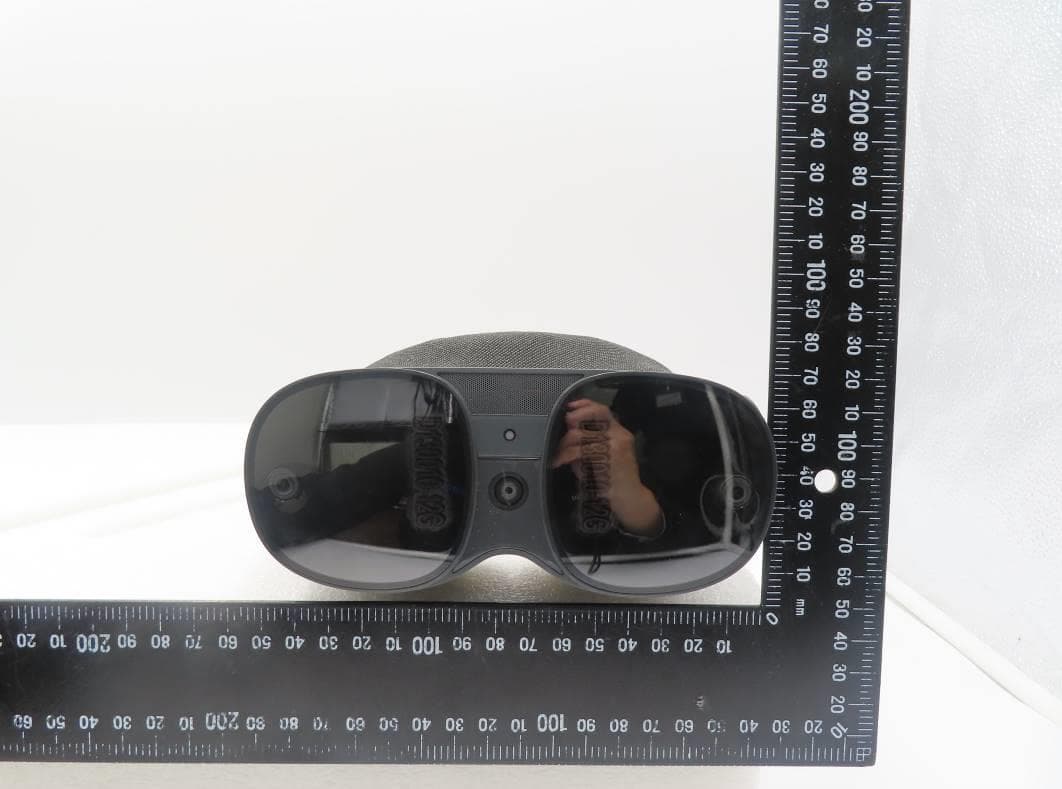
NM82QBB100
Jan 08, 2023Headset
Equipment Class
DTS - Digital Transmission System