NM8PN07120Smartphone
HTC Corporation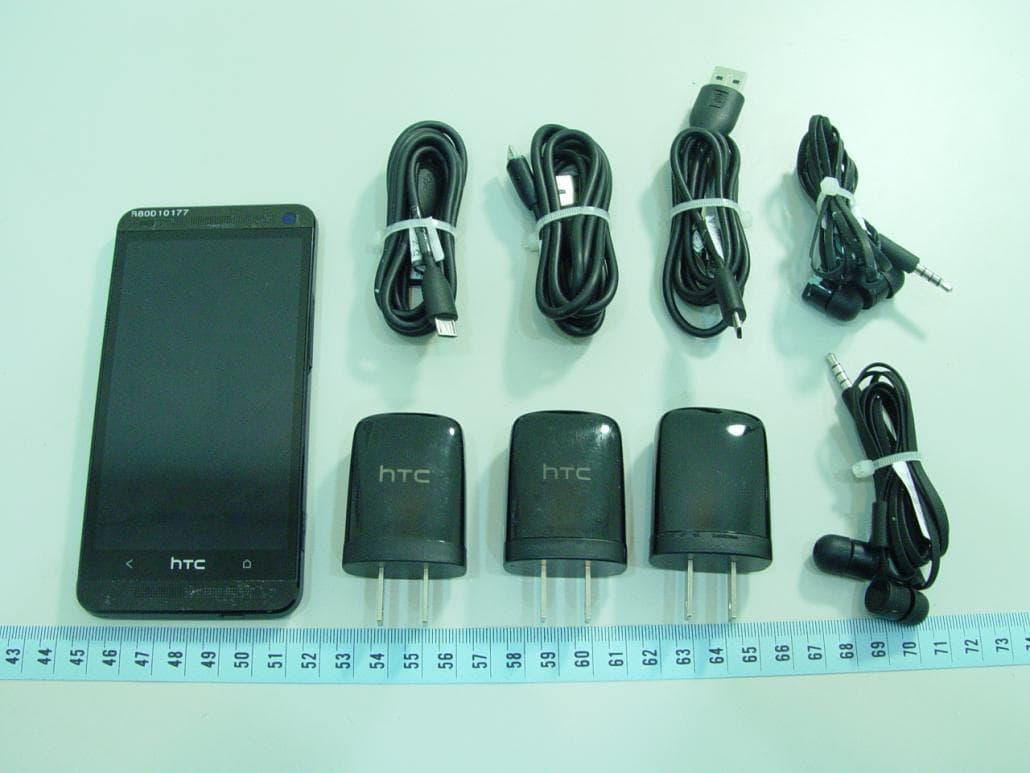
Click to zoom
Application Details
- Equipment Class
- PCE - PCS Licensed Transmitter held to ear
- Date of Grant
- Feb 19, 2013
- Application Purpose
- Original Equipment
- Date of Application
- Feb 06, 2013
- Equipment Note
- Smartphone
- Frequency Range
- 1715.00000000 - 1750.00000000
- Company
- HTC Corporation
- Country
- Taiwan
Documents & Files
Document Text
Text extracted from the exhibit documents filed with the FCC. Open a document above to read the original.
Users Manual
Safety and regulatory guide 2 Safety and regulatory guide Please read before proceeding THE BATTERY IS NOT FULLY CHARGED WHEN YOU TAKE THE DEVICE OUT OF THE BOX. YOUR WARRANTY IS INVALIDATED IF YOU DISASSEMBLE OR ATTEMPT TO DISASSEMBLE THE DEVICE. Privacy restrictions Some countries require full disclosure of recorded telephone conversations. Important health information and safety precautions When using this product, the safety precautions below must be taken to avoid possible legal liabilities and damages. Retain and follow all product safety and operating instructions. Observe all warnings in the operating instructions on the product. To reduce the risk of bodily injury, electric shock, fire, and damage to the equipment, observe the following precautions. Electrical safety This product is intended for use when supplied with power from the designated battery or power supply unit. Other usage may be dangerous and will invalidate any approval given to this product. Safety precautions for proper grounding installation CAUTION: Connecting to improperly grounded equipment can result in an electric shock to your device. This product is equipped with a USB Cable for connecting with desktop or notebook computer. Be sure your computer is properly grounded (earthed) before connecting this product to the computer. The power supply cord of a desktop or notebook computer has an equipment-grounding conductor and a grounding plug. The plug must be plugged into an appropriate outlet which is properly installed and grounded in accordance with all local codes and ordinances. Safety precautions for power supply unit Use the correct external power source A product should be operated only from the type of power source indicated on the electrical ratings label. If you are not sure of the type of power source required, consult your authorized service provider or local power company. For a Safety and regulatory guide 3 product that operates from battery power or other sources, refer to the operating instructions that are included with the product. This product should be operated only with the following designated power supply unit(s). AC adapter: HTC, TC U250 Handle battery packs carefully This product contains a Lithium-ion polymer or Lithium-ion battery. There is a risk of fire and burns if the battery pack is handled improperly. Do not attempt to open or service the battery pack. Do not disassemble, crush, puncture, short external contacts or circuits, dispose of in fire or water, or expose a battery pack to temperatures higher than 60 ̊C (140 ̊F). WARNING: To reduce risk of fire or burns, do not disassemble, crush, puncture, short external contacts, expose to temperature above 60° C (140° F), or dispose of in fire or water. Recycle or dispose of used batteries according to the local regulations or reference guide supplied with your product. Take extra precautions Keep the device dry and away from water or any liquid as it may cause a short circuit. The phone should only be connected to products that bear the USB-IF logo or have completed the USB-IF compliance program. Only use the battery with a charging system that has been qualified with the system per this standard, IEEE-Std-1725. Use of an unqualified battery or charger may present a risk of fire, explosion, leakage or other hazard. Avoid dropping the phone. If the phone or battery is dropped, especially on a hard surface, and the user suspects damage, take it to a service centre for inspection. If the battery leaks: Do not allow the leaking fluid to come in contact with skin or clothing. If already in contact, flush the affected area immediately with clean water and seek medical advice. 4 Safety and regulatory guide Do not allow the leaking fluid to come in contact with eyes. If already in contact, DO NOT rub; rinse with clean water immediately and seek medical advice. Take extra precautions to keep a leaking battery away from fire as there is a danger of ignition or explosion. Safety precautions for direct sunlight Keep this product away from excessive moisture and extreme temperatures. Do not leave the product inside a vehicle or in places where the temperature may exceed 60°C (140°F), such as on a car dashboard, window sill, or behind a glass that is exposed to direct sunlight or strong ultraviolet light for extended periods of time. This may damage the product, overheat the battery, or pose a risk to the vehicle. Prevention of hearing loss CAUTION: Permanent hearing loss may occur if earphones or headphones are used at high volume for prolonged periods of time. Safety in aircraft Due to the possible interference caused by this product to an aircraft’s navigation system and its communications network, using this device’s phone function on board an airplane is against the law in most countries. If you want to use this device when on board an aircraft, remember to turn off your phone by switching to Airplane Mode. Environment restrictions Do not use this product in gas stations, fuel depots, chemical plants or where blasting operations are in progress, or in potentially explosive atmospheres such as fuelling areas, fuel storehouses, below deck on boats, chemical plants, fuel or chemical transfer or storage facilities, and areas where the air contains chemicals or particles, such as grain, dust, or metal powders. Please be aware that sparks in such areas could cause an explosion or fire resulting in bodily injury or even death. Explosive atmospheres When in any area with a potentially explosive atmosphere or where flammable materials exist, the product should be turned off and the user should obey all signs and instructions. Sparks in such areas could cause an explosion or fire resulting in bodily injury or even death. Users are advised not to use the equipment at Safety and regulatory guide 5 refueling points such as service or gas stations, and are reminded of the need to observe restrictions on the use of radio equipment in f…
Text truncated - open the document above for the full version.
Users Manual
Your HTC Phone User guide HTC CONFIDENTIAL HTC CONFIDENTIAL Unboxing SIM card HTC Phone uses a microSIM card. The microSIM card contains your phone number, service details, and memory for storing phonebook contacts and/or text messages. Inserting the SIM card 1.Hold the phone face up and the top panel facing you. 2.Insert the tip of the SIM eject tool (or a small bent paperclip) into the small hole next to the SIM card tray slot. 3.Push the tip all the way into the hole until the SIM card tray ejects. 4.Pull the SIM card tray out, and place the SIM card (contacts facing down) into the tray. 5.Insert the SIM card tray back into the slot. 6Unboxing HTC CONFIDENTIAL HTC CONFIDENTIAL Removing the SIM card Make sure to switch off HTC Phone before removing your SIM card. 1.Hold the phone face up and the top panel facing you. 2.Insert the tip of the SIM eject tool (or a small bent paperclip) into the small hole next to the SIM card tray slot. 3.Push the tip all the way into the hole until the SIM card tray ejects. 4.Pull the SIM card tray out, and remove the SIM card. When removing the SIM card, make sure that you insert the empty SIM card tray back into the slot. 7Unboxing HTC CONFIDENTIAL HTC CONFIDENTIAL Charging the battery Before you turn on and start using HTC Phone, it is recommended that you charge the battery. Only the power adapter and USB cable provided in the box must be used to charge the battery. 1.Insert the small end of the USB cable into the USB connector. 2.Insert the other end of the USB cable into the power adapter. 3.Plug in the power adapter to an electrical outlet to start charging the battery. As a safety precaution, the battery stops charging if it overheats. Switching the power on or off Switching the power on Press the POWER button. When you turn on HTC Phone for the first time, you’ll need to set it up. Switching the power off 1.If the display is off, press the POWER button to turn it back on, then unlock the screen. 2.Press and hold the POWER button for a few seconds. 3.Tap Power off on the options menu. 8Unboxing HTC CONFIDENTIAL HTC CONFIDENTIAL Want some quick guidance on your phone? Learning the basics with Quick Tips After your phone starts, you'll see a transparent overlay of Quick Tips on some screens (such as the Home screen) that will guide you in using HTC Phone. The tips for a screen won't display again after you've closed them. To view the Quick Tips again, slide the Notifications panel open, and then tap > About > Help > Show all quick tips. Exploring HTC Phone Tips & Help lets you get the most out of HTC Phone in seconds. §Ever have the feeling that you're not getting the most out of your phone? Browse through the friendly walkthroughs on Tips & Help to learn how. The topics range from intro to advanced and the Tips & Help feed on the Home screen even recommends topics that you might like. §Need to know how to do something right away? Just type in some keywords and get clear, up-to-date answers right on HTC Phone. To open Tips & Help from the Home screen, tap > Tips & Help. If you haven't downloaded Tips & Help content yet, or if there's updated content available, just tap the download link to get it. To change the sync settings of Tips & Help, tap > Update settings. Searching Tips & Help 1.In Tips & Help, tap , and then enter the words you want to search for. 2.Tap a search result to jump straight to that item. 9Unboxing HTC CONFIDENTIAL HTC CONFIDENTIAL Setting up your phone Setting up HTC Phone for the first time When you switch on HTC Phone for the first time, you’ll be asked to set it up. Walk through the on-device setup to choose your Internet connection, sign in to your online accounts, and more. Some features that need to connect to the Internet such as location-based services and auto-sync of your online accounts may incur extra data fees. Don’t worry. You can enable or disable them in Settings later on. Home screen Your Home screen is where you make HTC Phone your own. §After you've turned on and set up HTC Phone, you'll see the Feeds view as the main Home screen. Customize it to show posts from your social networks, headlines from your favorite news media, and more. For details, see Checking feeds on your Home screen on page 20. §You can change the apps on the launch bar at the bottom of the Home screen. See Personalizing the launch bar on page 39. §Swipe left and you’ll discover another Home screen panel for adding your favorite apps, widgets, and more so they’re just a tap away. And if you need more Home screen panels, you can add more. For details, see Personalizing on page 36. Press to return to the main Home screen. Your social networks When you sign in to your social network accounts and authorize HTC Sense to access them, you can: §Post status updates from the Home screen when using the Feeds view. §See your contacts and their status updates in People. §See photos in Gallery or on the Home screen. 10Setting up your phone HTC CONFIDENTIAL HTC CONFIDENTIAL §Check your friends’ status updates and posts on the Home screen when using the Feeds view. §View events and reminders in Calendar. Posting an update on your social network You can easily post a status update from the Home screen. 1.From the Feeds view, tap , and then choose a social network. If the icon doesn't show, scroll to the top and pull down the screen. 2.Compose your status update and post it on your social network. Getting to know your settings Want to change the ringtone, set up a Wi‑Fi ® connection or make HTC Phone more secure? Do this and more in Settings. Slide the Notifications panel open, and then tap . Here are some of the basic settings you can change: §Tap the On/Off switch next to an item such as Wi-Fi to turn it on or off. Tap the item itself to configure its settings. §Tap Sound to set a ringtone, choose a sound profile, and configure incoming call sound settings. §Tap Personalize to change the Home screen wallpaper, lock screen style, and more. §Tap Security to…
Text truncated - open the document above for the full version.
Cover Letter(s)
宏達國際電子股份有限公司 宏達國際電子股份有限公司宏達國際電子股份有限公司 宏達國際電子股份有限公司 1F, No. 6-3, HTC Corporation Baoqiang Rd., Xindian City, New Taipei City, Taiwan February 1, 2013 Power of Attorney To whom it may concern, Please be notified that I, Lucy Shih, have designated Daniel Lee of Bureau Veritas Consumer Products Services (H.K.) Ltd., Taoyuan Branch (BV CPS Taoyuan Branch) of Taiwan and Yuju Tai in HTC Corporation as the persons being responsible for this project and to sign the form 731 and other documentation. Any and all acts carried out by Daniel Lee of Bureau Veritas Consumer Products Services (H.K.) Ltd., Taoyuan Branch (BV CPS Taoyuan Branch) of Taiwan and Yuju Tai in HTC Corporation on the matters relating to all processes required in the FCC approval and any communication needed with the national authority, shall have the same legal authority as acts on our own behalf. As defined in 47 CFR Ch. 1.2002 (b), we further certify that neither the applicant nor any party to this application is subject to a denial to Federal benefits, including FCC benefits, pursuant to section 5301 of the Anti-Drug Abuse Act of 1998, 21 U.S.C. 835(a). This authorization is limited to the product of as following: FCC ID: NM8PN07120 If you have any acknowledgement and response, please send it to Daniel Lee of Bureau Veritas Consumer Products Services (H.K.) Ltd., Taoyuan Branch (BV CPS Taoyuan Branch) of Taiwan directly. Should you have any question or comment regarding this matter, please have my best attention. Sincerely yours, Lucy Shih HTC Corporation Tel: +886 8912 4138 #28402 E-mail: [email protected]
External Photos
Page 1 CONSTRUCTION PHOTOS OF EUT The EUT has following accessories. Product Brand MODEL Description Power Adapter 1 Salcomp TC X250 (X=U,E) I/P: 100-240Vac, 200mA O/P: 5Vdc, 1A Power Adapter 2 Phihong TC X250 (X=U,E,A) I/P: 100-240Vac, 200mA O/P: 5Vdc, 1A Power Adapter 3 Delta TC X250 (X=U,E,B,A) I/P: 100-240Vac, 200mA O/P: 5Vdc, 1A Battery 1 ATL BN07100 Rating: 3.8Vdc, 2300mAh Type: Li-ion Battery 2 WTE BN07100 Rating: 3.8Vdc, 2300mAh Type: Li-ion Earphone 1 Merry Max 300 1.1m cable Earphone 2 Cotron Max 300 1.1m cable USB Cable 1 Foxlink DC M600 1m cable USB Cable 2 Foxconn DC M600 1m cable USB Cable 3 Coxoc DC M600 1m cable LCM 1 JDI ACX456AKM-7 -- LCM 2 Sharp LS047T1SC01 -- Photo Camera Sharp RJ63RC111 -- Front Camera 1 PRIMAX W205H -- Front Camera 2 LITEON 12plsf216 -- Page 2 Page 3 Page 4 Page 5 Page 6
Internal Photos
Page 7 Main Sample Page 8 Page 9 Page 10 Page 11 Page 12 Page 13 Page 14 Page 15 Page 16 Page 17 Page 18 Page 19 Page 20 Page 21 Page 22 Page 23 2 nd Sample Page 24 Page 25 Page 26 Page 27 Page 28 Page 29 Page 30 Page 31 Page 32 Page 33 Page 34 Page 35 Page 36 Page 37 Page 38 Page 39 Page 40 Page 41
RF Exposure Info
FCC SAR Test Report Report Format Version 5.0.0 Issued Date : Jan. 31, 2013 Report No. : SA121129C10 Revision : R01 Appendix C. Calibration Certificate for Probe and Dipole The SPEAG calibration certificates are shown as follows.
RF Exposure Info
FCC SAR Test Report Report Format Version 5.0.0Page No.:1of65 Report No. : SA121129C10Issued Date:Jan. 31, 2013 Revision : R01 FCC SAR Test Report Report No.:SA121129C10 Applicant:HTC Corporation Address:No. 23, Xinghua Rd., Taoyuan City, Taiwan Product:Smartphone FCC ID:NM8PN07120 Brand:HTC Model No.:PN07120 Standards:FCC 47 CFR Part 2 (2.1093) / IEEE C95.1:1991 / IEEE 1528:2003 FCC OET Bulletin 65 Supplement C (Edition 01-01) KDB 248227 D01 v01r02/ KDB 447498 D01 v05 / KDB 648474 D04v01 KDB 941225 D01 v02 / KDB 941225 D02 v02r01/ KDB 941225 D03 v01 KDB 941225 D05 v02 / KDB 941225 D06 v01 Date of Testing:Dec. 28, 2012 ~ Jan. 24, 2013 CERTIFICATION: The above equipment have been tested by Bureau Veritas Consumer Products Services (H.K.) Ltd., Taoyuan Branch - Taiwan HwaYa Lab, and found compliance with the requirement of the above standards. The test record, data evaluation & Equipment Under Test (EUT) configurations represented herein are true and accurate accounts of the measurements of the sample’s SAR characteristics under the conditions specified in this report. It should not be reproduced except in full, without the written approval of our laboratory. The client should not use it to claim product certification, approval, or endorsement by TAF or any government agencies. Prepared By : Evonne Liu / Specialist Approved By : Roy Wu / Manager This report is for your exclusive use. Any copying or replication of this report to or for any other person or entity, or use of our name or trademark, is permitted only with our prior written permission. This report sets forth our findings solely with respect to the test samples identified herein. The results set forth in this report are not indicative or representative of th e quality or characteristics of the lot from which a test sample was taken or any similar or identical product unless specifically and expressly noted. Our report includes all of the tests requested by you and the results thereof based upon the information that you provided to us. You have 60 days from date of issuance of this report to notify us of any material error or omission caused by our negligence, provided, however, that such notice shall be in writing and shall specifically address the issue you wish to raise. A failure to raise such issue within the prescribed time shall constitute your unqualified acceptance of the completeness of this report, the tests conducted and the correctness of the report contents. Unless specific mention, the uncertainty of measurement has been explicitly taken into account to declare the compliance or non-compliance to the specification. FCC SAR Test Report Report Format Version 5.0.0Page No.:2of65 Report No. : SA121129C10Issued Date:Jan. 31, 2013 Revision : R01 Table of Contents Release Control Record ............................................................................................................................................................... 3 1. Summary of Maximum SAR Value ....................................................................................................................................... 4 2. Description of Equipment Under Test ................................................................................................................................. 5 3. SAR Measurement System ................................................................................................................................................... 6 3.1 Definition of Specific Absorption Rate (SAR) ................................................................................................................ 6 3.2 SPEAG DASY System ................................................................................................................................................. 6 3.2.1 Robot.................................................................................................................................................................. 7 3.2.2 Probes ................................................................................................................................................................ 8 3.2.3 Data Acquisition Electronics (DAE) .................................................................................................................... 8 3.2.4 Phantoms ........................................................................................................................................................... 9 3.2.5 Device Holder ................................................................................................................................................... 10 3.2.6 System Validation Dipoles ................................................................................................................................ 10 3.2.7 Tissue Simulating Liquids ................................................................................................................................. 11 3.3 SAR System Verification ............................................................................................................................................ 13 3.4 SAR Measurement Procedure ................................................................................................................................... 14 3.4.1 Area & Zoom Scan Procedure ......................................................................................................................... 14 3.4.2 Volume Scan Procedure................................................................................................................................... 14 3.4.3 Power Drift Monitoring ...................................................................................................................................... 15 3.4.4 Spatial Peak SAR Evaluation ........................................................................................................................... 15 3.4.5 SAR Avera…
Text truncated - open the document above for the full version.
Test Report
FCC HAC (RF Emission) Test Report Report Format Version 5.0.0 Page No. : 1 of 22 Report No. : SA121129C10-1 Issued Date : Jan. 29, 2013 Revision : R02 FCC HAC (RF Emission) Test Report Report No. : SA121129C10-1 Applicant : HTC Corporation Address : 23, Xinghua Rd., Taoyuan 330, Taiwan, R.O.C. Product : Smartphone FCC ID : NM8PN07120 Brand : HTC Model No. : PN07120 Standards : FCC 47 CFR Part 20.19 ANSI C63.19-2007 Date of Testing : Dec. 19, 2012 ~ Jan. 16, 2012 Summary M-Rating : M3 CERTIFICATION: The above equipment have been tested by Bureau Veritas Consumer Products Services (H.K.) Ltd., Taoyuan Branch - Taiwan HwaYa Lab, and found compliance with the requirement of the above standards. The test record, data evaluation & Equipment Under Test (EUT) configurations represented herein are true and accurate accounts of the measurements of the sample’s HAC characteristics under the conditions specified in this report. It should not be reproduced except in full, without the written approval of our laboratory. The client should not use it to claim product certification, approval, or endorsement by TAF or any government agencies. Prepared By : Evonne Liu / Specialist Approved By : Gordon Lin / Assistant Manager This report is for your exclusive use. Any copying or replication of this report to or for any other person or entity, or use of our name or trademark, is permitted only with our prior written permission. This report sets forth our findings solely with respect to the test samples identified her ein. The results set forth in this report are not indicative or representative of the quality or characteristics of the lot from which a test sample was taken or any similar or identical product unless specifically and expressly noted. Our report includes all of the tests requested by you and the results thereof based upon the information that you provided to us. You have 60 days from date of issuance of this report to notify us of any material error or omission caused by our negligence, provided, however, that such notice shall be in writing and shall specifically address the issue you wish to raise. A failure to raise such issue within the prescribed time shall constitute your unqualified acceptance of the completeness of this report, the tests conducted and the correctness of the report contents. Unless specific mention, the uncertainty of measurement has been explicitly taken into account to declare the compliance or non-compliance to the specification. FCC HAC (RF Emission) Test Report Report Format Version 5.0.0 Page No. : 2 of 22 Report No. : SA121129C10-1 Issued Date : Jan. 29, 2013 Revision : R02 Table of Contents Release Control Record ............................................................................................................................................................... 3 1. Summary of Maximum M-Rating .......................................................................................................................................... 4 2. Description of Equipment Under Test ................................................................................................................................. 5 3. HAC RF Emission Measurement System ............................................................................................................................ 6 3.1 SPEAG DASY System ................................................................................................................................................. 6 3.1.1 Robot.................................................................................................................................................................. 7 3.1.2 Probes ................................................................................................................................................................ 7 3.1.3 Data Acquisition Electronics (DAE) .................................................................................................................... 8 3.1.4 Phantoms ........................................................................................................................................................... 8 3.1.5 Device Holder ..................................................................................................................................................... 8 3.1.6 RF Emission Calibration Dipoles ........................................................................................................................ 8 3.2 DASY System Verification ............................................................................................................................................ 9 3.3 EUT Measurements Reference and Plane ................................................................................................................. 10 3.4 HAC RF Emission Measurement Procedure .............................................................................................................. 11 3.5 Probe Modulation Factor ............................................................................................................................................ 13 4. HAC Measurement Evaluation ............................................................................................................................................ 15 4.1 M-Rating Category ..................................................................................................................................................... 15 4.2 EUT Configuration and Setting ................................................................................................................................... 16 4.3 System Verification ..................................................................................................................................................... 16 4.4 Conducted Power Results ...........................................................................…
Text truncated - open the document above for the full version.
Test Report
FCC HAC (T-Coil) Test Report Report Format Version 5.0.0 Page No. : 1 of 20 Report No. : SA121129C10-2 Issued Date : Jan. 29, 2013 Revision : R02 FCC HAC (T-Coil) Test Report Report No. : SA121129C10-2 Applicant : HTC Corporation Address : 23, Xinghua Rd., Taoyuan 330, Taiwan, R.O.C. Product : Smartphone FCC ID : NM8PN07120 Brand : HTC Model No. : PN07120 Standards : FCC 47 CFR Part 20.19 ANSI C63.19-2007 Date of Testing : Dec. 06, 2012 ~ Jan. 05, 2013 Summary M-Rating : T4 CERTIFICATION: The above equipment have been tested by Bureau Veritas Consumer Products Services (H.K.) Ltd., Taoyuan Branch - Taiwan HwaYa Lab, and found compliance with the requirement of the above standards. The test record, data evaluation & Equipment Under Test (EUT) configurations represented herein are true and accurate accounts of the measurements of the sample’s HAC characteristics under the conditions specified in this report. It should not be reproduced except in full, without the written approval of our laboratory. The client should not use it to claim product certification, approval, or endorsement by TAF or any government agencies. Prepared By : Evonne Liu / Specialist Approved By : Gordon Lin / Assistant Manager This report is for your exclusive use. Any copying or replication of this report to or for any other person or entity, or use of our name or trademark, is permitted only with our prior written permission. This report sets forth our findings solely with respect to the test samples identified herein. The results set forth in this report are not indicative or representative of the quality or characteristics of the lot from which a test sample was taken or any similar or identical product unless specifically and expressly noted. Our report includes all of the tests requested by you and the results thereof based upon the information that you provided to us. You have 60 days from date of issuance of this report to notify us of any material error or omission caused by our negligence, provided, however, that such notice shall be in writing and shall specifically address the issue you wish to raise. A failure to raise such issue within the prescribed time shall constitute your unqualified acceptance of the completeness of this report, the tests conducted and the correctness of the report contents. Unless specific mention, the uncertainty of measurement has been explicitly taken into account to declare the compliance or non-compliance to the specification. FCC HAC (T-Coil) Test Report Report Format Version 5.0.0 Page No. : 2 of 20 Report No. : SA121129C10-2 Issued Date : Jan. 29, 2013 Revision : R02 Table of Contents Release Control Record ............................................................................................................................................................... 3 1. Summary of Maximum T-Rating ........................................................................................................................................... 4 2. Description of Equipment Under Test .............…
Text truncated - open the document above for the full version.
Contact Information
Applicant
Sylvia Shen
Test Firm
Bureau Veritas CPS (H.K.) Ltd. Taoyuan BranchRichard Chen
Technical Specifications
| # | Rule Parts | Frequency Range | Power Output | Emission | Tolerance |
|---|---|---|---|---|---|
| 14 | 27 | 1.72 GHz - 1.75 GHz | 112.00 mW | 8M93G7D | 0.006 ppm |
Other Applications from HTC Corporation
NM82QDJ100
Dec 31, 2025VIVE Headset
Equipment Class
DSS - Part 15 Spread Spectrum TransmitterNM82QD4100
Sep 01, 2024Headset
Equipment Class
6XD - 15E 6 GHz Low Power Indoor Client
NM82QBP100
May 10, 2023Tracker
Equipment Class
DTS - Digital Transmission System
NM82QCD100
May 07, 2023Dongle
Equipment Class
DTS - Digital Transmission System
NM82QBB100
Jan 08, 2023Headset
Equipment Class
DTS - Digital Transmission System