NMTET136The Find One Find All Keyfinder
IDT Technology Limited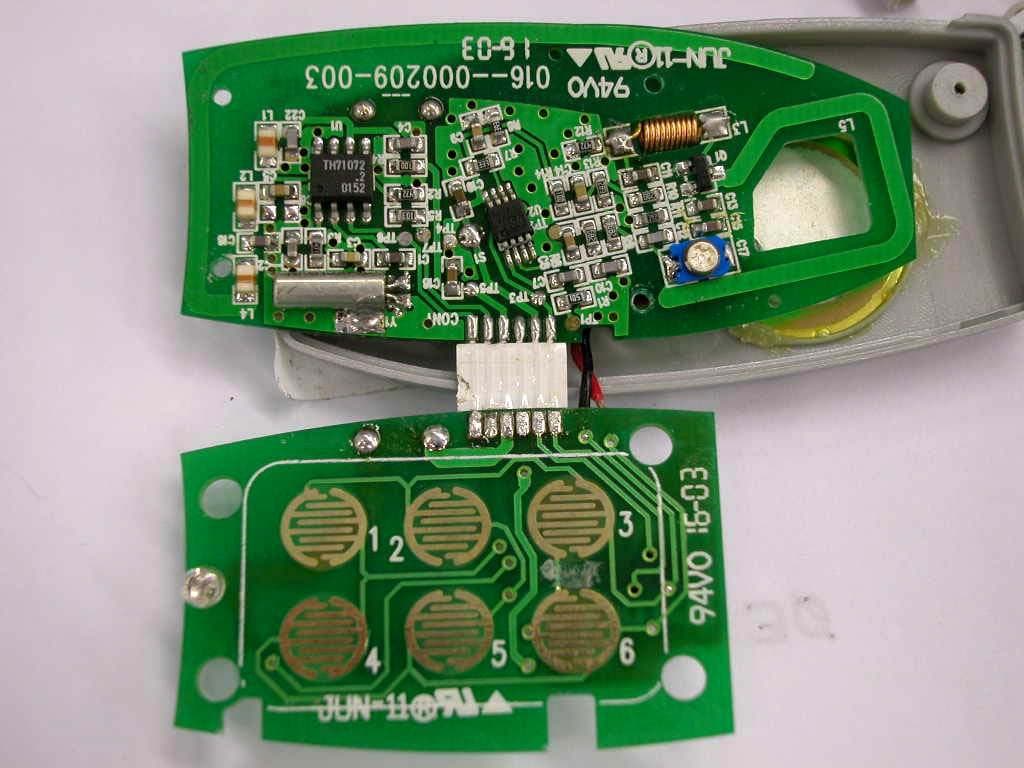
Click to zoom
Application Details
- Equipment Class
- DSC - Part 15 Security/Remote Control Transmitter
- Date of Grant
- Aug 06, 2003
- Application Purpose
- Original Equipment
- Date of Application
- Aug 06, 2003
- Equipment Note
- The Find One Find All Keyfinder
- Frequency Range
- 433.60000000 - 433.60000000
- Company
- IDT Technology Limited
- Country
- Hong Kong
Documents & Files
Document Text
Text extracted from the exhibit documents filed with the FCC. Open a document above to read the original.
Users Manual
ET136 Find One Find All™ Keyfinder RadioShack Congratulations on the purchase of your FOFA™ keyfinder. Your FOFA is a keyfinder system that can be expanded up to 36 unique FOFA units. You attach them to objects that are easily lost. If you can find one FOFA, you can find them all! OVERVIEW Each FOFA unit can find any other FOFA unit in a range up to 30 feet. FOFA keyfinders are sold in pairs. Each FOFA unit belongs to a Set that you define. You can have up to 6 unique Sets of 6 FOFA Items for a total of 36 unique FOFA units. Your FOFA units come with plastic stickers for customizing the buttons of each FOFA. USING FOFA FOR THE FIRST TIME Before you can begin using your FOFA, you must install the batteries and set each unit. INSTALLING OR REPLACING THE BATTERY Each FOFA needs one CR2032 battery (supplied). When the FOFA stops working properly, replace the battery. Follow these steps to install/replace the battery: 1. Pull out the battery tray and take out the old battery (if present). 2. Place the new battery on the tray with + face up. 3. Push in the battery tray. 4. When the FOFA beeps and the LED begins to flash, you will need to set FOFA’s Identity (See “Setting FOFA”). If you don’t set it in time before the flashing stops, you can re-enter the set-up mode by pressing any key on the keypad (Also see “Setting FOFA”). CAUTIONS: 1. Use only fresh batteries of required size and recommended type. 2. If you do not want to use the FOFA for a month or more, remove the battery. WARNING: Dispose of the old battery promptly and properly. Do not burn or bury it. QUICK SETUP Many first-time FOFA owners set their first FOFA pair to Set 1, Item 1 and Set 1, Item 2 respectively. To do this, immediately after installing the battery, press “1”, then ”1” again on the first FOFA and press “1”, then “2” on the second FOFA For more details, see “Setting FOFA”. IMPORTANT: FOFA’s only locate other FOFA’s within their Set number; (the first number you enter when setting) however, you can easily re-program your FOFA to find units in other sets at any time. . SETTING FOFA You can set FOFA to your desired Set (Set 1, Set 2...Set 6) and Item (up to 6 items). Follow these steps to set FOFA: 1. If you have just installed the battery, FOFA goes into setup mode immediately without having to press any keys (I.e. proceed to Step 2). To enter Setup mode at any other time, press and hold the 1 and 3 keys at the same time until the FOFA unit has beeped and flashed 4 times. The LED will begin flashing slowly. 2. Press one number key on the FOFA unit to define the Set number. The LED will begin flashing quickly. 3. Press another number key on the FOFA unit to define the Item number. The LED stops flashing. 4. The new identity setting is then read back to you by the FOFA unit. The first series of beeps indicates the Set number. After a brief pause, the next series of beeps indicates the Item number. Setting is complete! CHECK SET AND ITEM NUMBER OF ONE FOFA To verify the identity (Set number and Item number) of each FOFA, follow these steps: 1. Press and hold the 5 and 6 keys at the same time 2. A high pitched beep and short flash is followed by the identification beeps. The first series of beeps corresponds to the Set number. After a brief pause, the next series of beeps corresponds to the Item number. 3. No further steps are necessary to exit the identify mode. ATTACHING FOFA You can attach one FOFA to easily lost objects using either the provided key ring or double sided tape. OPERATION To find a lost object, locate one of your other FOFA units and press the key that corresponds to the FOFA on the lost object. The FOFA you are holding will begin to flash slowly. If you are within range of the FOFA attached to the lost object, you will begin to hear it beep and see the LED flash. (Note: If you hear 4 quick beeps, you have pressed the key corresponding to the FOFA unit your are holding.) If you press and hold the number corresponding to the FOFA you are holding, after the 4 quick beeps, the light from the bright LED can be used to assist in finding keyholes. NOTES: For best results, hold the FOFA unit with the LED pointing away from you. Move around while searching for an object. This can improve the clarity of the radio frequency signal. Keep the FOFA far away from the large metal objects and other radio source that might reduce the transmitter range. To avoid confusion, use only one FOFA to search for the lost object. Quiet other sounds so that you can more easily identify the direction of the beep sound from the object you are looking for. SUGGESTED USES Each member in a family can have his or her own Set number. Assign objects of the same type (i.e. TV remotes or cordless phones) to the same Set number. Set # Item # Suggested Use 1 1 Dad’s Keys 1 2 Dad’s Wallet 2 1 Mom’s keys 2 2 Mom’s purse 3 1-6 All remotes 4 1 Medical appliance (i.e. nebulizer, glucometer, etc.) CARE and MAINTENANCE Keep the FOFA dry; if it gets wet, wipe it dry immediately. Use and store the FOFA only in normal temperature environments. Handle the FOFA carefully; do not drop it. Keep the FOFA away from dust and dirt, and wipe it with a damp cloth occasionally to keep it looking new. TROUBLESHOOTING 1. If you cannot find a FOFA unit, trying replacing the batteries of the unit you are using or consider using another FOFA unit that might have a stronger battery. 2. If you cannot find a FOFA unit, you may want to experiment changing the Set number of the unit you are using to locate the lost item. FOFA’s only locate other FOFA’s within their Set number. To change the Set number, see “Setting FOFA”. 3. If you receive 4 rapid beep tones when pressing a button on a FOFA unit and the LED does not begin to flash, you have just pressed the button corresponding to that FOFA. Press the correct button corresponding to the FOFA item number of the misplaced object. 4. If a FOFA beeps whenever any key is pressed on another FOFA, the FOFA unit has …
Text truncated - open the document above for the full version.
ID Label/Location Info
Cat.No. 63-1155 find One, Find All Keyfinder Power: 1 x CR2032 Battery Custom Manufactured in China for RadioShack Corporation, Fort Worth TX76102 TM FCC ID : NMTET136 This device complies with Part 15 of the FCC Rules. Operation is subject to the following two conditions:(1)this device may not cause harmful interference, and (2) this device must accept any interference received, including interference that may cause undesired operation MMAYY MMAYY FCC ID : NMTET136 This device complies with Part 15 of the FCC Rules. Operation is subject to the following two conditions:(1)this device may not cause harmful interference, and (2) this device must accept any interference received, including interference that may cause undesired operation 19. 5 19. 5 4 F C C ID L a bel: S iz e: 19. 5x19. 5mm R 1. 5mm C olor: 1C (bla ck) Ma teria l: Woodfree P a per C oa ting : P P Da te C ode L a bel: S iz e: 10x4mm R 1mm C olor: 1C (bla ck) Ma teria l: Woodfree P a per *All dimens ion in MM 10 Cat.No. 63-1155 find One, Find All Keyfinder Power: 1 x CR2032 Battery Custom Manufactured in China for RadioShack Corporation, Fort Worth TX76102 TM
Internal Photos
Test Setup FCC ID : NMTET136 Internal Photo – 1 Internal Photo - 2 Test Setup FCC ID : NMTET136 Internal Photo – 3
Test Report
E • The test results reported in this test report shall refer only to the sample actually tested and shall not refer or be deemed to refer to bulk from which such a sample may be said to have been obtained. • This report shall not be reproduced except in full without prior authorization from Intertek Testing Services Hong Kong Limited. • For Terms And Conditions of the services, it can be provided upon request. • The evaluation data of the report will be kept for 3 years from the date of issuance. Intertek Testing Services Hong Kong Ltd. 2/F., Garment Centre, 576 Castle Peak Road, Kowloon, Hong Kong. Tel: (852) 2173 8888 Fax: (852) 2371 0521 Website: www.hk.intertek-etlsemko.com IDT Technology Limited Application For Certification (FCC ID: NMTET136) Transmitter 0308466 DL/Sandy July 10, 2003 INTERTEK TESTING SERVICES FCC ID: NMTET136 i LIST OF EXHIBITS INTRODUCTION EXHIBIT 1: General Description EXHIBIT 2: System Test Configuration EXHIBIT 3: Emission Results EXHIBIT 4: Equipment Photographs EXHIBIT 5: Product Labelling EXHIBIT 6: Technical Specifications EXHIBIT 7: Instruction Manual EXHIBIT 8: Miscellaneous Information EXHIBIT 9: Confidentiality Request INTERTEK TESTING SERVICES FCC ID: NMTET136 ii MEASUREMENT/TECHNICAL REPORT IDT Technology Limited – MODEL NO.: ET136 FCC ID: NMTET136 July 10, 2003 This report concerns (check one:) Original Grant X Class II Change Equipment Type: Low Power Transmitter (example: computer, printer, modem, etc.) Deferred grant requested per 47 CFR 0.457(d)(1)(ii)? Yes No X If yes, defer until: date Company Name agrees to notify the Commission by: date of the intended date of announcement of the product so that the grant can be issued on that date. Transition Rules Request per 15.37? Yes No X If no, assumed Part 15, Subpart C for intentional radiator - the new 47 CFR [08-20-02 Edition] provision. Report prepared by: Derek Leung Intertek Testing Services 2/F., Garment Center, 576, Castle Peak Road, HONG KONG. Phone: 852-2173-8504 Fax: 852-2371-0521 INTERTEK TESTING SERVICES FCC ID: NMTET136 iii Table of Contents 1.0 General Description............................................................................................................2 1.1 Product Description ...........................................................................................................2 1.2 Related Submittal(s) Grants...............................................................................................2 1.3 Test Methodology..............................................................................................................3 1.4 Test Facility .......................................................................................................................3 2.0 System Test Configuration .................................................................................................5 2.1 Justification .......................................................................................................................5 2.2 EUT Exercising Software ..................................................................................................5 2.3 Special Accessories...........................................................................................................5 2.4 Equipment Modification ....................................................................................................6 2.5 Measurement Uncertainty..................................................................................................6 2.6 Support Equipment List and Description ...........................................................................6 3.0 Emission Results ..................................................................................................................8 3.1 Field Strength Calculation .................................................................................................9 3.2 Radiated Emission Configuration Photograph .................................................................11 3.3 Radiated Emission Data...................................................................................................12 4.0 Equipment Photographs ...................................................................................................15 5.0 Product Labelling ..............................................................................................................17 6.0 Technical Specifications ....................................................................................................19 7.0 Instruction Manual ...........................................................................................................21 8.0 Miscellaneous Information ...............................................................................................23 8.1 Measured Bandwidth .......................................................................................................24 8.2 Discussion of Pulse Desensitization .................................................................................25 8.3 Calculation of Average Factor .........................................................................................26 8.4 Emissions Test Procedures ..............................................................................................27 9.0 Confidentiality Request ....................................................................................................30 INTERTEK TESTING SERVICES FCC ID: NMTET136 iv List of attached file Exhibit type File Description filename Test Report Test Report report.pdf Operation Description Technical Description descri.pdf Test Setup Photo Radiated Emission radiated photos.doc Test Report Bandwidth Plot bw.pdf External Photo External Photo external photos.doc Internal Photo Internal Photo internal photos.doc Block Diagram Block Diagram block.pdf Schematics Circuit Diagram circuit.pdf ID Label/Location Label Artwork and Location label.pdf User Manual User Manual manual.…
Text truncated - open the document above for the full version.
Test Setup Photos
Test Setup FCCID : NMTET136 Radiated -front Radiated - rear
Contact Information
Applicant
Alex Chan(Project Manager)
Technical Contact
Intertek Testing Services Hong Kong Ltd.Derek Leung
[email protected]852-2173-8504
2/F., Garment Centre, · Kowloon, · Hong Kong
Non-Technical Contact
Intertek Testing Services Hong Kong Ltd.Derek Leung
[email protected]852-2173-8504
Test Firm
Intertek Testing Services Hong KongBilly Chow
Technical Specifications
| # | Rule Parts | Frequency Range | Power Output |
|---|---|---|---|
| 1 | 15.231 | 433.6 MHz - 433.6 MHz | - |
Other Applications from IDT Technology Limited

NMTBAR228-01
Dec 03, 2015Weather+BLE Connected Weather Station
Equipment Class
DTS - Digital Transmission System
NMTRTGN130A-01
Sep 10, 2015Outdoor sensor
Equipment Class
DSC - Part 15 Security/Remote Control Transmitter
NMTPE961
Nov 11, 2014Activity Tracker
Equipment Class
DTS - Digital Transmission System
NMTRTHN129-01
Sep 12, 20145 Channel Remote RCC-Thermo Sensor
Equipment Class
DSC - Part 15 Security/Remote Control Transmitter
NMTPE289
Aug 21, 20142nd generation activity and sleep monitor wrist device
Equipment Class
DTS - Digital Transmission System