NMTSZ912B2.4GHz Chest Belt
IDT Technology Limited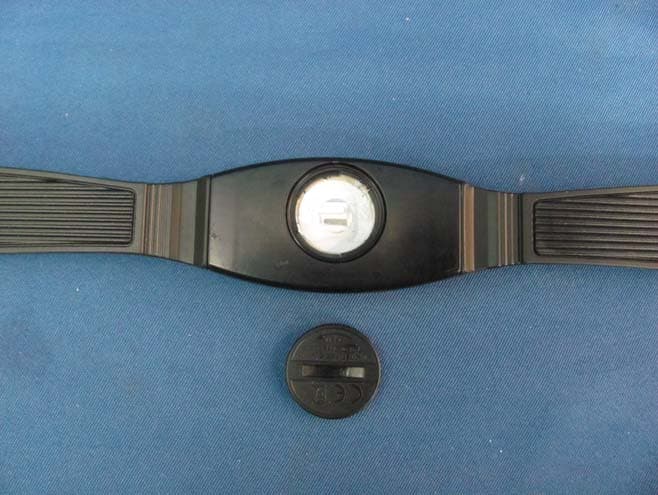
Click to zoom
Application Details
- Equipment Class
- DXX - Part 15 Low Power Communication Device Transmitter
- Date of Grant
- May 20, 2010
- Application Purpose
- Original Equipment
- Date of Application
- May 20, 2010
- Equipment Note
- 2.4GHz Chest Belt
- Frequency Range
- 2457.00000000 - 2457.00000000
- Company
- IDT Technology Limited
- Country
- Hong Kong
Documents & Files
Document Text
Text extracted from the exhibit documents filed with the FCC. Open a document above to read the original.
Users Manual
Heart Rate Monitor with PC MODEL: SE833L (including SZ912 and AD112) USER MANUAL EN INTRODUCTION Thank you for selecting the Oregon Scientific TM Heart Rate Monitor with PC. Apart from being an advanced heart rate monitor, this watch is also designed with PC download function and Internet connection to allow users to store exercise data and upload to the web for analysis and fitness management. Other functions such as stopwatch with laps and user profiles are available for users to optimize their workout. 2.4GHz-ANT Sports System is used in this watch to achieve reliable transmission linkage with other accessories, such as chest belt (SZ912) and USB dongle (AD112) as well as foot pod and bike pod . IMPORTANT This watch is for sport purposes only and is not meant to replace any medical device. CONTROL BUTTONS 1. - / SP : Toggle options; decrease value; pause/stop during exercise 2. MODE : Toggle modes; return to previous page 3. ST / LAP / + : Toggle options; increase value; mute/un-mute in time display 4. / : Activate backlight; lock / unlock keypad 5. SET : Confirm settings; set alarm on/off in time display DISPLAY 1. : Key to press indicator 2. or : Indicates battery power is low or empty 3. : 12 hour clock 4. : Press the key to exit 5. : Indicates up / down or upper / lower limit 6. : Indicates beep tone is off 7. : Indicates chronometer (stopwatch) is activated 8. : Indicates alarm is on 9. : Indicates heart rate signal is received or heart rate chest belt is paired 10. : Indicates bike and cadence signal is received or bike pod is paired 11. : Resolutions per minute (unit of cadence) 12. : Indicates keypad is locked OPERATING MODES STARTING YOUR WATCH (FIRST TIME) After removing the watch from the package, activate it by pressing and holding MODE until the display is shown. The watch will prompt you to set your profile. The screen below will be shown. 1. Press ST/LAP/+ to select option, then press SET to confirm. 2. Continue setting your profile according to the following order: year of birth, month of birth, day of birth, weight unit and weight value, by pressing the following buttons: • ST/LAP/+ to increase value or select option • -/SP to decrease value • SET to confirm selected option 3. After your profile is set, the screen below will be shown. You can continue to set the watch profile by pressing ST/LAP/+ to select “SET WATCH” option. Refer to “SET WATCH PROFILE” section in this manual. IMPORTANT To ensure accurate calculations with your exercise, you are strongly required to set the watch and user profiles before exercising. NOTE When the watch is left idle for 30 seconds during set up, it will automatically exit and display the time. CONNECTING WITH COMPUTER SOFTWARE Your watch can connect with the computer Application Software via the USB dongle (AD112). 1. Insert the AD112 USB dongle in the computer. 2. Press MODE to select . 3. Press SET to start connecting. 4. If connection is successful, the screen will display “DONE” . If connection fails, the screen will display “FAILED” , press ST/LAP/+ to try again. SETTING UP YOUR WATCH IMPORTANT • To ensure accurate calculations with your exercise, you are strongly required to set the watch and user profiles before exercising. • Remember to set the watch and user profiles after every battery replacement or power reset. NOTE When the watch is left idle for 30 seconds during set up, it will automatically exit and display the time. SET WATCH PROFILE 1. Press MODE to select . 2. Press ST/LAP/+ to select “SET WATCH” . 3. Press SET to enter watch profile setting options. 4. Press ST/LAP/+ or -/SP to select the option to set: set alarm, set time, set date, set unit, set alert * , set view ** . 5. Press SET and start setting the selected option by pressing the following buttons: • ST/LAP/+ to increase value or select option • -/SP to decrease value • SET to confirm selected option * During exercise, when the heart rate or speed rate is out of the target zone, the watch will send out visual and sound alert. You can select to turn on/off the sound alert in the “SET ALERT” option. ** During exercise, the watch will toggle display your exercise information. You can select to turn on/off the toggle display in the “SET VIEW” option. SET USER PROFILE IMPORTANT Reset the user profile if the watch will be used by another person. 1. Press MODE to select . 2. Press ST/LAP/+ to select “SET USER” . 3. Press SET to enter user profile setting options. 4. Follow steps 1 and 2 in “STARTING YOUR WATCH (FIRST TIME)” section in this manual. SET EXERCISE PROFILE IMPORTANT Reset the exercise profile if the watch will be used by another person. You can set exercise profiles for your training and workout. The watch has 3 exercise options: Cardio, Run and Cycling. 1. Press MODE to select . 2. Press ST/LAP/+ to select “SET PROG” . 3. Press SET to enter exercise options. 4. Press ST/LAP/+ or -/SP to select the exercise to set: set run, set cycling, set cardio. 5. Press SET to confirm selection, then continue to set the profile * of the selected exercise by pressing the following buttons: • ST/LAP/+ to increase value or select option • -/SP to decrease value • SET to confirm selected option * The profile setting options are as follows: • Warm up time • Interval training on/off • Number of interval (2-5) • Exercise time for each exercise or interval • Rest time for each interval • Exercise by time • Target heart rate zone (1-5) • Recovery timer on/off PAIRING AND CALIBRATING DEVICE IMPORTANT To ensure accurate calculations with your exercise, you are strongly required to pair and calibrate the watch with the AZ112 heart rate chest belt, foot pod and bike pod before exercise. The bike pod and foot pod should be purchased separately and should be compatible with ANT Sports System. 1. Press MODE to select . 2. Press SET to enter “PAIR DEVICE” . • Press SET to start pairing. OR • If the watch is already paired with device, you can continue to set the paired device by pre…
Text truncated - open the document above for the full version.
Block Diagram
Block Diagram Model: SZ912 1 of 2 2.457GHz AXH01 U5 Q1 - Q6, U1, U2, U3 L1,L8,L9,L10,C42,C41, L3,C36,L4,C43 2 of 2
External Photos
INTERTEK TESTING SERVICE Report No.: HK10040585-1 FCC ID: NMTSZ912B Equipment Photographs Model : SZ912 (External) INTERTEK TESTING SERVICE Report No.: HK10040585-1 FCC ID: NMTSZ912B Equipment Photographs Model : SZ912 (External)
ID Label/Location Info
19MM L.GRAY PMS 427C ADD SILVER LOGO WAVES SILKSCREEN COLOR ORANGE PMS 144C 6.5MM ABS, hard case SZ912OS-E SZ912-COLOR SPEC LIUNIN SZ912-COLOR SPEC 22, APR. 10 FCC ID: NMTSZ912B BACK Front SILKSCREEN COLOR IN WHITE SILKSCREEN COLOR IN WHITE 11MM 7.8MM Rated Voltage DC 3.0V FCC ID: NMTSZ912B BACK 34MM 3.5MM Front 100% FCC ID: NMTSZ912B BACK 34MM 3.5MM Front 400%
Internal Photos
INTERTEK TESTING SERVICE Report No.: HK10040585-1 FCC ID: NMTSZ912B Equipment Photographs Model : SZ912 (Internal) INTERTEK TESTING SERVICE Report No.: HK10040585-1 FCC ID: NMTSZ912B Equipment Photographs Model : SZ912 (Internal)
Operational Description
SZ912 Theory of operation The SZ912 chest belt is a one way wireless chest belt that operates in conjunction with SE833 or other compatible watches. It is worn on the chest and detects the user’s heart rate. The microcontroller in the chest belt calculates the heart rate of the user and transmits the heart rate to the watch and the watch display the heart rate reading on its LCD and may store the received heart rate information in its internal memory. The SZ912 chest belt contains a pair of heart rate detection electrodes and an amplifier to detect and convert the ECG signal from the chest of the user into digital signal for the microcontroller to read. The microcontroller calculates the heart rate and transmits the data to the watch via a radio link that operates at 2.457 GHz. The data signal is transferred through matching network(L1,L8,L9,L10,C42,C41,L3,C36,L4 and C43) fed to antenna. Crystal 32768Hz Microcontroller Heart rate detection, electrodes and amplifier 2.4GHz Transceiver IC (nRF24L01+) Crystal 16MHz Antenna Matching Network Antenna NRF24L01/ NRF24L01+ is a single-chip 2.4GHz transceiver for operation in the world wide ISM band at 2.4-2.4835 GHz. This transceiver include : z RF Synthesizer 1. Fully integrated synthesizer 2. Accepts low cost 16MHz crystal z Transmitter and Receiver 1. Worldwide 2.4GHz ISM band operation 2. Common Rx and Tx pins 3. GFSK modulation 4. 1 and 2Mbps air data rate 5. Programmable output power:0,-6,-12 or -18dBm 6. Integrated channel filters z Power Management 1. Integrated voltage regulator 2. 1.9 to 3.6V supply range 3. Idle modes with fast start-up times for advanced power management z Host Interface 1. 4-Pin hardware SPI(serial peripheral interface),through SPI all configuration registers is available 2. 3 separate Tx and Rx FIFOs z Enhanced ShockBurst 1. Automatic packet handling 2. Auto packet transaction handling The radio front end uses GFSK modulation. it has user configurable parameters like frequency channel, output power and air data rate.
Test Report
- The test report only allows to be revised within the retention period unless further standard or the requirement was noticed. - This report is for the exclusive use of Intertek's Client and is provided pursuant to the agreement between Intertek and its Client. Intertek's responsibility and liability are limited to the terms and conditions of the agreement. Intertek assumes no liability to any party, other than to the Client in accordance with the agreement, for any loss, expense or damage occasioned by the use of this report. Only the Client is authorized to permit copying or distribution of this report and then only in its entirety. Any use of the Intertek name or one of its marks for the sale or advertisement of the tested material, product or service must first be approved in writing by Intertek. The observations and test results in this report are relevant only to the sample tested. This report by itself does not imply that the material, product, or service is or has ever been under an Intertek certification program. Intertek Testing Services Hong Kong Ltd. 2/F., Garment Centre, 576 Castle Peak Road, Kowloon, Hong Kong. Tel: (852) 2173 8888 Fax: (852) 2785 5487 Website: www.hk.intertek-etlsemko.com TEST REPORT Report No.: HK10040585-1 IDT Technology Limited Application For Certification (Original Grant) (FCC ID: NMTSZ912B) Transmitter Prepared and Checked by: Approved by: Signed On File Kenneth Wong Engineer Chan Chi Hung, Terry Senior Lead Engineer Date: May 17, 2010 INTERTEK TESTING SERVICES Report No.: HK10040585-1 FCC ID: NMTSZ912B i GENERAL INFORMATION IDT Technology Limited BRAND NAME: Oregon Scientific, MODEL: SZ912 FCC ID: NMTSZ912B Grantee: IDT Technology Limited Grantee Address: Block C, 9/F., Kaiser Estate, Phase 1, 41 Man Yue Street, Hunghom, Kowloon, Hong Kong. Contact Person: Mr. Thoms Wong Tel: 86-755-29701087 Fax: 86-755-29709021 e-mail: [email protected] Manufacturer: N/A Manufacturer Address: N/A Brand Name: Oregon Scientific Model: SZ912 Type of EUT: Transmitter Description of EUT: 2.4GHz Chest Belt Serial Number: N/A FCC ID: NMTSZ912B Date of Sample Submitted: April 14, 2010 Date of Test: April 23, 2010 Report No.: HK10040585-1 Report Date: May 17, 2010 Environmental Conidtions: Temperature: +10 to 40°C Humidity: 10 to 90% INTERTEK TESTING SERVICES Report No.: HK10040585-1 FCC ID: NMTSZ912B ii SUMMARY OF TEST RESULT IDT Technology Limited BRAND NAME: Oregon Scientific, MODEL: SZ912 FCC ID: NMTSZ912B TEST SPECIFICATION REFERENCE RESULTS Maximum Peak Output Power 15.247(b), (c) / RSS-210 A8.4 N/A Hopping Channel Carrier Frequencies Separation 15.247(e) / RSS-210 A8.1 (for 2.4GHz Digital) N/A 20dB Bandwidth of the Hopping Channel 15.247(a) / RSS-210 A8.1 N/A Number of Hopping Frequencies 15.247(e) / RSS-210 A8.1 N/A Average Time of Occupancy of Hopping Frequency 15.247(e) / RSS-210 A8.1 N/A Antenna Conducted Spurious Emissions 15.247(d) / RSS-210 A8.5 N/A Radiated Spurious Emissions 15.247(d) / RSS-210 A8.5 N/A RF Exposure Compliance 15.247(i) / RSS-Gen 5.5 N/A Transmitter Power Line Conducted Emissions 15.207 / RSS-Gen 7.2.2 N/A Transmitter Field Strength (for 27MHz) 15.227 / RSS-310 3.8 N/A Transmitter Field Strength (for 40MHz) 15.229 / RSS-210 A2.7 N/A Transmitter Field Strength, Bandwidth and Timing Requirement 15.231(a) / RSS-210 A1.1.1 (for Remote Control) N/A Transmitter Field Strength, Bandwidth and Timing Requirement 15.231(e) / RSS-210 A1.1.5 (for 433MHz) N/A Transmitter Field Strength and Bandwidth Requirement 15.239 / RSS-210 A2.8 (for 88-108MHz) N/A Transmitter Field Strength and Bandwidth Requirement 15.249 / RSS-210 A2.9 (for 902-928MHz or 2.4GHz) Pass Transmitter Field Strength and Bandwidth Requirement 15.235 / RSS-310 3.9 (for 49MHz) N/A Receiver / Digital Device Radiated Emissions 15.109 / ICES-003 N/A Digital Device Conducted Emissions 15.107 / ICES-003 N/A Note: 1. The EUT uses a permanently attached antenna which, in accordance to section 15.203, is considered sufficient to comply with the pervisions of this section. 2. Pursuant to FCC part 15 Section 15.215(c), the 20 dB bandwidth of the emission was contained within the frequency band designated (mentioned as above) which the EUT operated. The effects, if any, from frequency sweeping, frequency hopping, other modulation techniques and frequency stability over excepted variations in temperature and supply voltage were considered. INTERTEK TESTING SERVICES Report No.: HK10040585-1 FCC ID: NMTSZ912B iii Table of Contents 1.0 General Description........................................................................................ 1 1.1 Product Description ........................................................................................... 1 1.2 Related Submittal(s) Grants............................................................................... 1 1.3 Test Methodology.............................................................................................. 1 1.4 Test Facility ....................................................................................................... 1 2.0 System Test Configuration ............................................................................. 2 2.1 Justification ....................................................................................................... 2 2.2 EUT Exercising Software................................................................................... 2 2.3 Special Accessories .......................................................................................... 2 2.4 Equipment Modification ..................................................................................... 2 2.5 Measurement Uncertainty.................................................................................. 2 2.6 Support Equipment List and Description ............................................................ 2 3.0 Emission Results ............................................................................................ 3…
Text truncated - open the document above for the full version.
Test Setup Photos
INTERTEK TESTING SERVICE Report No: HK10040585-1 FCC ID: NMTSZ912B Configuration Photographs Worst-Case Radiated Emissions (Front View) Model : SZ912 INTERTEK TESTING SERVICE Report No: HK10040585-1 FCC ID: NMTSZ912B Configuration Photographs Worst-Case Radiated Emissions (Back View) Model : SZ912
Contact Information
Applicant
Alex Chan(Project Manager)
Technical Contact
Intertek Testing Services Hong Kong LtdBen Ho
[email protected]852-2173 8505
2/F Garment Centre · Kowloon · Hong Kong
Non-Technical Contact
Intertek Testing Services Hong Kong LtdBen Ho
[email protected]852-2173 8505
Test Firm
Intertek Testing Services Hong Kong Ltd.Billy Chow
Technical Specifications
| # | Rule Parts | Frequency Range | Power Output |
|---|---|---|---|
| 1 | 15C | 2.46 GHz - 2.46 GHz | - |
Other Applications from IDT Technology Limited

NMTBAR228-01
Dec 03, 2015Weather+BLE Connected Weather Station
Equipment Class
DTS - Digital Transmission System
NMTRTGN130A-01
Sep 10, 2015Outdoor sensor
Equipment Class
DSC - Part 15 Security/Remote Control Transmitter
NMTPE961
Nov 11, 2014Activity Tracker
Equipment Class
DTS - Digital Transmission System
NMTRTHN129-01
Sep 12, 20145 Channel Remote RCC-Thermo Sensor
Equipment Class
DSC - Part 15 Security/Remote Control Transmitter
NMTPE289
Aug 21, 20142nd generation activity and sleep monitor wrist device
Equipment Class
DTS - Digital Transmission System