ODGBFX7ECL1
Hantel Co., Ltd.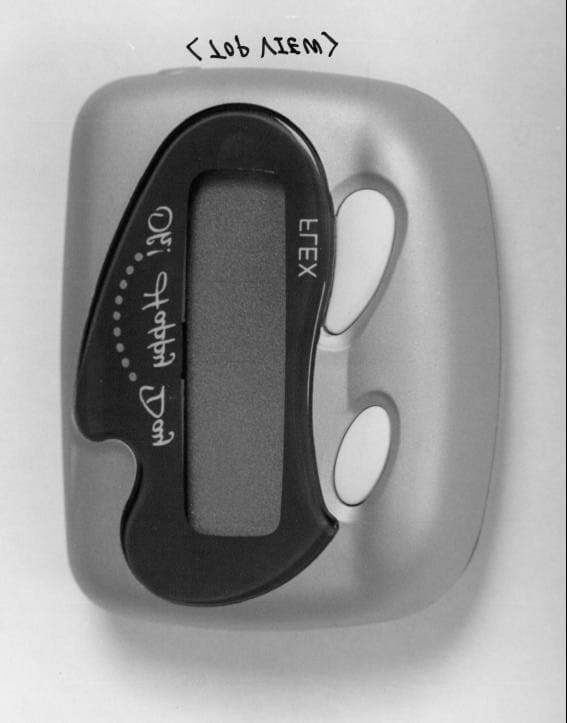
Click to zoom
Application Details
- Equipment Class
- CXX - Communications Rcvr for use w/ licensed Tx and CBs
- Date of Grant
- Mar 29, 1999
- Application Purpose
- Original Equipment
- Date of Application
- Jan 19, 1999
- Frequency Range
- 929.01200000 - 931.98800000
- Company
- Hantel Co., Ltd.
- Country
- South Korea
Documents & Files
Document Text
Text extracted from the exhibit documents filed with the FCC. Open a document above to read the original.
Users Manual
1 HANTEL FLEX PAGER Function button Read button Caution : Any changes or modifications in construction of this device which are not expressly approved by responsible for compliance could void the user’s authority to operate the equipment. This device complies with part 15 of the FCC Rules. Operation is subject to the condition that device does not harmful interference. 2 USER MANUAL 1.Controls The. PERCOMM has 2 push buttons ( Read and Function buttons ) for the pager controls and operations. A. Read button . Used to read the received messages . Used to exit to current function mode . Used to select functions . Used to delete a message B. Function button . Used to select functions . Used to set the lock and unlock the message 2. LCD & Icons Audio alert mode enabled icon Alarm activated icon Low battery icon Message locked icon In service area icon Message continuation icon 3 3. Message display and read message When a message is received, the pager alerts with either audio or vibration (depending on alert mode set). The word "1 NEW" is displayed. If there are 2 unread messages, the word "2 NEW" While the standby screen is displayed, press the read button to display the first received message. À Pager automatically stores incoming messages, along with the time each message is received. Press the read button to display next message. à In case of no message, "NO PAGE" is displayed. 4. Lock/Unlock message Up to 5 messages can be selectively locked in the memory so that they cannot be overwritten by incoming messages or erased if CLEAR function is selected. Select the message you want to lock. 4 À Press the function button to display "LOCK" à Press the read button to lock the message,. "LOCKED" is displayed. When you read a message and try to lock it, if the number of the locked message received is more than 5, "LOCK FULL" is displayed on the LCD. A locked message can be unlocked in the same way. when the locked message is confirmed, "Lock icon" is displayed in the upper part of screen. Select the locked message to want to unlock. À Press the function Button : "UNLOCK?" is displayed. à Press the read button : "Lock icon" is disappeared. 5. Clear individual message Press the function button while the message desired to be deleted is on screen. Then "CLEAR ?" will be displayed. Select the message to erase through Read button 5 À Press twice the function button . "CLEAR ?" will be displayed. à Press the read button. "CLEARED" will be displayed. After that the message will be deleted. 6. Power on Insert battery into the battery compartment and close the battery door. The pager alerts with full display lit. and it will go into standby mode which is a state of capable of receiving a message. 7. Select function menu. To enter Function menu ; At standby screen , press the function button for over 2 seconds to scroll through the function menu, which enables the user to access various features of the pager through a series of icons and prompts. À Every time press the function button, pager enter next mode. Then press the read button, you can select the wanted function à Pager is at standby, if you don't press any button for 8 seconds. 8. Set VIBRATION/AUDIO Vibration/ Audio Power off Set alarm Set alert silent / alert Clear all Set time Escape 6 There are two alert modes ; vibration/audio ∂ While in standby mode, press Function button for more than 2 seconds. Screen shows "AUDIO ?" or "VIBRATION ?" This screen shows unselected mode. < State of audio mode > < State of vibration mode > ∑ Press the read button to enter the displayed mode < State of vibration mode > < State of audio mode > 9. PAGER OFF While in pager off, pager shows only date and time. It can't receive message at this mode. But alarm feature is operating normally. ∂ While in pager standby, press the function button for 2 seconds. After that select function mode until pager shows "POWER OFF?" . ∑ Press the read button. Pager is in Power Off. 10. ALARM on/off 7 Select alarm on ∂While in standby mode , press the function button for more than 2 seconds. and choose "SET ALARM ?" ∑ Press the read button, pager shows "ALARM ON" ∏ Press the function button , pager is in alarm setting mode.. The hour digits blink. π To press the read button enables you to set time. ∫ To repeat above procedure enables you to set time, minute and AM/PM ª After setting your desired time, pager is in standby. Select alarm off ∂ While in standby mode press the function button for more than 2 seconds then pager enters in function mode. Press button until "SET ALARM?" appears ∑ Press the read button "ALARM ON" appears. 8 ∏ Press the read button one more time "ALARM OFF" appears. π Press the function button pager is in standby as well as select alarm off mode. 11. SELECT SILENT/AUDIO/MELODY You can choose the alert mode, audio or melody, according to your preference . Silent mode is useful in sleeping or meeting. ∂ While in standby mode, press the function button for more than 2 seconds choose the wanted function mode. Press until pager shows " SET ALERT ?" ∑ Press the read button pager shows present chosen mode. ∏ Press the read button until pager shows melody/ audio mode you want. 9 π Press any button then stop melody/audio . After that press Function button, chosen melody is decided. 12. CLEAR ALL This function mode is capable if only all received messages are more than 2 ones. ∂ While in standby mode, press the function button for more than 2 seconds choose the wanted Function mode. Press until pager shows " CLEAR ALL ?" ∑ Press the read button, all received messages are cleared. But unread or locked ones are not cleared. 13. Set Time manually You can set up present time, date, and year ∂ While in standby mode, press the function button for more than 2 seconds choose the wanted function mode. Press until pager shows " SET TIME ?" ∑ Press Read button, the year digit blinks. Press the read button continually to increment. year's digit. ∏ Press the function button, the da…
Text truncated - open the document above for the full version.
Block Diagram
1 BLOCK DIAGRAM & SCHEMATIC DIAGRAM 2 3
Block Diagram
1 BLOCK DIAGRAM & SCHEMATIC DIAGRAM 2 3
ID Label/Location Info
1 ATTACHMENTS 1 STATEMENT FOR SECTION 15.37 OF THE RULES 2 Hantel Co., Ltd. #321-1, Shin Sung B/D 2F, Yangjae-dong, Seocho-Ku, Seoul, Korea Tel : (02) 571-4653 Fax : (02) 571-4654 Date : January 20, 1999 Statement for Section 15.37 of the Rules Equipment : Pager Receiver FCC ID. : ODGBFX7ECL1 Concerning the FCC Part 15, section 15.37 transition provision, we, Hantel Co., Ltd., hereby confirm above referenced device as follows. This device(Pager Receiver) subject to the regulations in FCC Part 15 that are manufactured on or after June 23, 1999 complies with new rules adopted under Docket 87-389. This Device is not associated with a transmitter that could not have been authorized under regulations in effect prior to June 23, 1989. e.q., a transmitter operating under the provisions of section 15.209 or section 15.249 (below 960MHz). This device is not scanning receivers or frequency converters designed or marketed for use with scanning receivers. Best Regards Hoe-Bum Kim, General Manager Hantel Co., Ltd. 3 ATTACHMENTS 2 PROPOSED FCC ID. LABEL AND MARKING 4 5 ATTACHMENTS 3 MANUAL FOR INSTALLATION AND OPERATING INSTRUCTION 6 HANTEL FLEX PAGER Function button Read button Caution : Any changes or modifications in construction of this device which are not expressly approved by responsible for compliance could void the user’s authority to operate the equipment. This device complies with part 15 of the FCC Rules. Operation is subject to the condition that device does not harmful interference. 7 USER MANUAL 1.Controls The. PERCOMM has 2 push buttons ( Read and Function buttons ) for the pager controls and operations. A. Read button . Used to read the received messages . Used to exit to current function mode . Used to select functions . Used to delete a message B. Function button . Used to select functions . Used to set the lock and unlock the message 2. LCD & Icons Audio alert mode enabled icon Alarm activated icon Low battery icon Message locked icon In service area icon Message continuation icon 8 3. Message display and read message When a message is received, the pager alerts with either audio or vibration (depending on alert mode set). The word "1 NEW" is displayed. If there are 2 unread messages, the word "2 NEW" While the standby screen is displayed, press the read button to display the first received message. À Pager automatically stores incoming messages, along with the time each message is received. Press the read button to display next message. à In case of no message, "NO PAGE" is displayed. 4. Lock/Unlock message Up to 5 messages can be selectively locked in the memory so that they cannot be overwritten by incoming messages or erased if CLEAR function is selected. Select the message you want to lock. 9 À Press the function button to display "LOCK" à Press the read button to lock the message,. "LOCKED" is displayed. When you read a message and try to lock it, if the number of the locked message received is more than 5, "LOCK FULL" is displayed on the LCD. A locked message can be unlocked in the same way. when the locked message is confirmed, "Lock icon" is displayed in the upper part of screen. Select the locked message to want to unlock. À Press the function Button : "UNLOCK?" is displayed. à Press the read button : "Lock icon" is disappeared. 5. Clear individual message Press the function button while the message desired to be deleted is on screen. Then "CLEAR ?" will be displayed. Select the message to erase through Read button 10 À Press twice the function button . "CLEAR ?" will be displayed. à Press the read button. "CLEARED" will be displayed. After that the message will be deleted. 6. Power on Insert battery into the battery compartment and close the battery door. The pager alerts with full display lit. and it will go into standby mode which is a state of capable of receiving a message. 7. Select function menu. To enter Function menu ; At standby screen , press the function button for over 2 seconds to scroll through the function menu, which enables the user to access various features of the pager through a series of icons and prompts. À Every time press the function button, pager enter next mode. Then press the read button, you can select the wanted function à Pager is at standby, if you don't press any button for 8 seconds. 8. Set VIBRATION/AUDIO Vibration/ Audio Power off Set alarm Set alert silent / alert Clear all Set time Escape 11 There are two alert modes ; vibration/audio ∂ While in standby mode, press Function button for more than 2 seconds. Screen shows "AUDIO ?" or "VIBRATION ?" This screen shows unselected mode. < State of audio mode > < State of vibration mode > ∑ Press the read button to enter the displayed mode < State of vibration mode > < State of audio mode > 9. PAGER OFF While in pager off, pager shows only date and time. It can't receive message at this mode. But alarm feature is operating normally. ∂ While in pager standby, press the function button for 2 seconds. After that select function mode until pager shows "POWER OFF?" . ∑ Press the read button. Pager is in Power Off. 10. ALARM on/off 12 Select alarm on ∂While in standby mode , press the function button for more than 2 seconds. and choose "SET ALARM ?" ∑ Press the read button, pager shows "ALARM ON" ∏ Press the function button , pager is in alarm setting mode.. The hour digits blink. π To press the read button enables you to set time. ∫ To repeat above procedure enables you to set time, minute and AM/PM ª After setting your desired time, pager is in standby. Select alarm off ∂ While in standby mode press the function button for more than 2 seconds then pager enters in function mode. Press button until "SET ALARM?" appears ∑ Press the read button "ALARM ON" appears. 13 ∏ Press the read button one more time "ALARM OFF" appears. π Press the function button pager is in standby as well as select alarm off mode. 11. SELECT SILENT/AUDIO/MELODY You can choose the alert mode, audio or melody, according to your…
Text truncated - open the document above for the full version.
Test Report
REPORT OF MEASUREMENT CERTIFICATION Product : Communications Receiver (Pager Receiver) --------------------------------------------------------------------------------------- Applicant : Hantel Co., Ltd. --------------------------------------------------------------------------------------- Grantee Name : Hantel Co., Ltd. --------------------------------------------------------------------------------------- FCC ID. : ODGBFX7ECL1 --------------------------------------------------------------------------------------- Trade Name : Oh! Happy Day --------------------------------------------------------------------------------------- Model No. : BFX7ECL1 --------------------------------------------------------------------------------------- Report No. : 341-003 --------------------------------------------------------------------------------------- Date : January 20, 1999 --------------------------------------------------------------------------------------- KOREA ACADEMY OF INDUSTRIAL TECHNOLOGY(KAITECH) Address : 222-13, Guro-Dong, Guro-Gu, Seoul 152-053, Korea Tel. : (02)860-1462~4. Telefax : (02)860~1468 TABLE OF CONTENTS I. GENERAL INFORMATION ............................................................................................................ 1 1. Applicant's Name and Mailing Address 2. Manufacturer's Name and Mailing Address 3. Equipment Descriptions 4. Rules and Regulations 5. Measuring Procedure 6. Date of Measurement 7. Statement of Compliance •±. GENERAL REQUIREMENTS OF THE EUT ................................................................. 2 1. Labelling Requirement (Section 15.19) 2. Information to User (Sections 15.21) 3. Special Accessories (Section 15.27) •≤. RADIATED EMISSION MEASUREMENT (Section 15.109) ........................................................... 3-7 1. Test Procedure 2. Photograph for the worst case configuration 3. Sample Calculation 4. Measurement Data •≥. TEST EQUIPMENTS USED FOR MEASUREMENT.................................................................. 8 ATTACHMENTS 1. Statement for Section 15.37 of the Rules 2. Proposed FCC ID. Label and Marking 3. Manual for Installation and Operating Instruction 4. Block Diagram & Schematic Diagram 5. Description of Circuit Function 6. Photographs: See the illustration of photographs attached KAITECH Log No. 341 - 003 Sheet 1 of 8 Sheets •∞. GENERAL INFORMATION 1. Applicant's Name and : Hantel Co., Ltd. Mailing Address #321-1, Shin Sung B/D 2F, Yangjae-dong, Seocho-Ku, Seoul, Korea 137-130 2. Manufacturer's Name and: Hantel Co., Ltd. Mailing Address#321-1, Shin Sung B/D 2F, Yangjae-dong, Seocho-Ku, Seoul, Korea 137-130 3. Equipment Descriptions 3.1 Tuning Frequency : 929.0125MHz ~ 931.9875MHz (25kHz Spacing) 3.2 Detect Method : Superheterodyne Detector 3.3 Local Oscillator: 1st Local Osc. Frequency = Tuning Frequency - 21.4MHz(1st IF) 2nd Local Osc. Frequency = 20.945MHz (2nd IF : 455kHz) 3.4 Used Crystal: 1st Local Crystal = 1st Local Osc. Frequency/12 2nd Local Crystal = 20.945MHz 3.5 Power Supply : DC 1.5V (Battery) 4. Rules and Regulations: FCC Part 15, Subpart B 5. Measuring Procedure: ANSI C63.4-1992 6. Date of Measurement 6.1 Line Conducted: Not Applicable 6.2 Radiated Emission : January 18, 1999 7. Statement of Compliance We, KAITECH, HEREBY STATE THAT the measurements shown in this report were made in accordance with the procedures indicated and the emission emitted by this equipment was found to be within the limits applicable. Measured by ; Reviewed by ; Soun-Kweon Seol Seok-Jin Kim Engineer Team Leader EMC Team KAITECH Log No. 341 - 003 Sheet 2 of 8 Sheets •±. GENERAL REQUIREMENTS OF THE EUT 1. Labelling Requirement (Section 15.19) This device complies with Part 15 of the FCC Rules. Operation is subject to the condition that this device does not cause harmful interference. 1.1 Location on Enclosure : Manual for Installation and Operating Instruction 1.2 How Applied : Printing 2. Information to User (Section 15.21) The following or similar statements were provided in the manual for user instruction. Please refer page 1 of the attached manual for details. CAUTION : Any changes or modifications in construction of this device which are not expressly approved by the party responsible for compliance could void the user's authority to operate the equipment. 3. Special Accessories (Section 15.27) 3.1 Were the special Accessories provided? [ ] yes, [ x ] no 3.2 If yes, details for the special accessories are as follows : 3.3 If yes, were the appropriate instructions provided on the first page of the text concerned with the device? [ ] yes, [ ] no 3.4 Are these accessories provided of the type which can be readily obtained from multiple retail outlets ? [ ] yes, [ ] no And therefore does the manual specify what additional components or accessories are required to used in order to comply with the Rules? [ ] yes, [ ] no KAITECH Log No. 341 - 003 Sheet 3 of 8 Sheets •≤. RADIATED EMISSION MEASUREMENT (Section 15.109) 1. Test Procedure 1.1 Preliminary Testing for Reference This pager receiver(EUT) is designed to operate in the band 929.0125MHz to 931.9875MHz by changing a local oscillator installed in internal PCB. According to section 15.31(m), the measurements were performed with three equipments which were selected as bottom, middle, and top frequency in the operating band. Preliminary testing was performed in a KAITECH absorber-lined room to determine the emission characteristics of the EUT. The EUT was placed on the wooden table which has dimensions of 0.8 meters in height, 1 meter in length and 1.5 meters in width. Receiving antenna(Biconical antenna : 30 to 300MHz, Log-periodic antenna : 200 to 1000MHz or Horn Antenna : 1 to 18GHz) was placed at the distance of 1 meter from the EUT. An attempt was made to maximize the emission level with the various configurations of the EUT while rotating the table and varying antenna height. Emissions level from the EUT with various configurations were examined on a S…
Text truncated - open the document above for the full version.
Test Report
REPORT OF MEASUREMENT CERTIFICATION Product : Communications Receiver (Pager Receiver) --------------------------------------------------------------------------------------- Applicant : Hantel Co., Ltd. --------------------------------------------------------------------------------------- Grantee Name : Hantel Co., Ltd. --------------------------------------------------------------------------------------- FCC ID. : ODGBFX7ECL1 --------------------------------------------------------------------------------------- Trade Name : Oh! Happy Day --------------------------------------------------------------------------------------- Model No. : BFX7ECL1 --------------------------------------------------------------------------------------- Report No. : 341-003 --------------------------------------------------------------------------------------- Date : January 20, 1999 --------------------------------------------------------------------------------------- KOREA ACADEMY OF INDUSTRIAL TECHNOLOGY(KAITECH) Address : 222-13, Guro-Dong, Guro-Gu, Seoul 152-053, Korea Tel. : (02)860-1462~4. Telefax : (02)860~1468 TABLE OF CONTENTS I. GENERAL INFORMATION ............................................................................................................ 1 1. Applicant's Name and Mailing Address 2. Manufacturer's Name and Mailing Address 3. Equipment Descriptions 4. Rules and Regulations 5. Measuring Procedure 6. Date of Measurement 7. Statement of Compliance •±. GENERAL REQUIREMENTS OF THE EUT ................................................................. 2 1. Labelling Requirement (Section 15.19) 2. Information to User (Sections 15.21) 3. Special Accessories (Section 15.27) •≤. RADIATED EMISSION MEASUREMENT (Section 15.109) ........................................................... 3-7 1. Test Procedure 2. Photograph for the worst case configuration 3. Sample Calculation 4. Measurement Data •≥. TEST EQUIPMENTS USED FOR MEASUREMENT.................................................................. 8 ATTACHMENTS 1. Statement for Section 15.37 of the Rules 2. Proposed FCC ID. Label and Marking 3. Manual for Installation and Operating Instruction 4. Block Diagram & Schematic Diagram 5. Description of Circuit Function 6. Photographs: See the illustration of photographs attached KAITECH Log No. 341 - 003 Sheet 1 of 8 Sheets •∞. GENERAL INFORMATION 1. Applicant's Name and : Hantel Co., Ltd. Mailing Address #321-1, Shin Sung B/D 2F, Yangjae-dong, Seocho-Ku, Seoul, Korea 137-130 2. Manufacturer's Name and: Hantel Co., Ltd. Mailing Address#321-1, Shin Sung B/D 2F, Yangjae-dong, Seocho-Ku, Seoul, Korea 137-130 3. Equipment Descriptions 3.1 Tuning Frequency : 929.0125MHz ~ 931.9875MHz (25kHz Spacing) 3.2 Detect Method : Superheterodyne Detector 3.3 Local Oscillator: 1st Local Osc. Frequency = Tuning Frequency - 21.4MHz(1st IF) 2nd Local Osc. Frequency = 20.945MHz (2nd IF : 455kHz) 3.4 Used Crystal: 1st Local Crystal = 1st Local Osc. Frequency/12 2nd Local Crystal = 20.945MHz 3.5 Power Supply : DC 1.5V (Battery) 4. Rules and Regulations: FCC Part 15, Subpart B 5. Measuring Procedure: ANSI C63.4-1992 6. Date of Measurement 6.1 Line Conducted: Not Applicable 6.2 Radiated Emission : January 18, 1999 7. Statement of Compliance We, KAITECH, HEREBY STATE THAT the measurements shown in this report were made in accordance with the procedures indicated and the emission emitted by this equipment was found to be within the limits applicable. Measured by ; Reviewed by ; ___________________ ________________ Soun-Kweon Seol Seok-Jin Kim Engineer Team Leader EMC Team KAITECH Log No. 341 - 003 Sheet 2 of 8 Sheets •±. GENERAL REQUIREMENTS OF THE EUT 1. Labelling Requirement (Section 15.19) This device complies with Part 15 of the FCC Rules. Operation is subject to the condition that this device does not cause harmful interference. 1.1 Location on Enclosure : Manual for Installation and Operating Instruction 1.2 How Applied : Printing 2. Information to User (Section 15.21) The following or similar statements were provided in the manual for user instruction. Please refer page 1 of the attached manual for details. CAUTION : Any changes or modifications in construction of this device which are not expressly approved by the party responsible for compliance could void the user's authority to operate the equipment. 3. Special Accessories (Section 15.27) 3.1 Were the special Accessories provided? [ ] yes, [ x ] no 3.2 If yes, details for the special accessories are as follows : 3.3 If yes, were the appropriate instructions provided on the first page of the text concerned with the device? [ ] yes, [ ] no 3.4 Are these accessories provided of the type which can be readily obtained from multiple retail outlets ? [ ] yes, [ ] no And therefore does the manual specify what additional components or accessories are required to used in order to comply with the Rules? [ ] yes, [ ] no KAITECH Log No. 341 - 003 Sheet 3 of 8 Sheets •≤. RADIATED EMISSION MEASUREMENT (Section 15.109) 1. Test Procedure 1.1 Preliminary Testing for Reference This pager receiver(EUT) is designed to operate in the band 929.0125MHz to 931.9875MHz by changing a local oscillator installed in internal PCB. According to section 15.31(m), the measurements were performed with three equipments which were selected as bottom, middle, and top frequency in the operating band. Preliminary testing was performed in a KAITECH absorber-lined room to determine the emission characteristics of the EUT. The EUT was placed on the wooden table which has dimensions of 0.8 meters in height, 1 meter in length and 1.5 meters in width. Receiving antenna(Biconical antenna : 30 to 300MHz, Log-periodic antenna : 200 to 1000MHz or Horn Antenna : 1 to 18GHz) was placed at the distance of 1 meter from the EUT. An attempt was made to maximize the emission level with the various configurations of the EUT while rotating the table and varying antenna height. Emissions level from the EUT with variou…
Text truncated - open the document above for the full version.
Test Report
REPORT OF MEASUREMENT CERTIFICATION Product : Communications Receiver (Pager Receiver) --------------------------------------------------------------------------------------- Applicant : Hantel Co., Ltd. --------------------------------------------------------------------------------------- Grantee Name : Hantel Co., Ltd. --------------------------------------------------------------------------------------- FCC ID. : ODGBFX7ECL1 --------------------------------------------------------------------------------------- Trade Name : Oh! Happy Day --------------------------------------------------------------------------------------- Model No. : BFX7ECL1 --------------------------------------------------------------------------------------- Report No. : 341-003 --------------------------------------------------------------------------------------- Date : January 20, 1999 --------------------------------------------------------------------------------------- KOREA ACADEMY OF INDUSTRIAL TECHNOLOGY(KAITECH) Address : 222-13, Guro-Dong, Guro-Gu, Seoul 152-053, Korea Tel. : (02)860-1462~4. Telefax : (02)860~1468 TABLE OF CONTENTS I. GENERAL INFORMATION ............................................................................................................ 1 1. Applicant's Name and Mailing Address 2. Manufacturer's Name and Mailing Address 3. Equipment Descriptions 4. Rules and Regulations 5. Measuring Procedure 6. Date of Measurement 7. Statement of Compliance •±. GENERAL REQUIREMENTS OF THE EUT ................................................................. 2 1. Labelling Requirement (Section 15.19) 2. Information to User (Sections 15.21) 3. Special Accessories (Section 15.27) •≤. RADIATED EMISSION MEASUREMENT (Section 15.109) ........................................................... 3-7 1. Test Procedure 2. Photograph for the worst case configuration 3. Sample Calculation 4. Measurement Data •≥. TEST EQUIPMENTS USED FOR MEASUREMENT.................................................................. 8 ATTACHMENTS 1. Statement for Section 15.37 of the Rules 2. Proposed FCC ID. Label and Marking 3. Manual for Installation and Operating Instruction 4. Block Diagram & Schematic Diagram 5. Description of Circuit Function 6. Photographs: See the illustration of photographs attached KAITECH Log No. 341 - 003 Sheet 1 of 8 Sheets •∞. GENERAL INFORMATION 1. Applicant's Name and : Hantel Co., Ltd. Mailing Address #321-1, Shin Sung B/D 2F, Yangjae-dong, Seocho-Ku, Seoul, Korea 137-130 2. Manufacturer's Name and: Hantel Co., Ltd. Mailing Address#321-1, Shin Sung B/D 2F, Yangjae-dong, Seocho-Ku, Seoul, Korea 137-130 3. Equipment Descriptions 3.1 Tuning Frequency : 929.0125MHz ~ 931.9875MHz (25kHz Spacing) 3.2 Detect Method : Superheterodyne Detector 3.3 Local Oscillator: 1st Local Osc. Frequency = Tuning Frequency - 21.4MHz(1st IF) 2nd Local Osc. Frequency = 20.945MHz (2nd IF : 455kHz) 3.4 Used Crystal: 1st Local Crystal = 1st Local Osc. Frequency/12 2nd Local Crystal = 20.945MHz 3.5 Power Supply : DC 1.5V (Battery) 4. Rules and Regulations: FCC Part 15, Subpart B 5. Measuring Procedure: ANSI C63.4-1992 6. Date of Measurement 6.1 Line Conducted: Not Applicable 6.2 Radiated Emission : January 18, 1999 7. Statement of Compliance We, KAITECH, HEREBY STATE THAT the measurements shown in this report were made in accordance with the procedures indicated and the emission emitted by this equipment was found to be within the limits applicable. Measured by ; Reviewed by ; ___________________ ________________ Soun-Kweon Seol Seok-Jin Kim Engineer Team Leader EMC Team KAITECH Log No. 341 - 003 Sheet 2 of 8 Sheets •±. GENERAL REQUIREMENTS OF THE EUT 1. Labelling Requirement (Section 15.19) This device complies with Part 15 of the FCC Rules. Operation is subject to the condition that this device does not cause harmful interference. 1.1 Location on Enclosure : Manual for Installation and Operating Instruction 1.2 How Applied : Printing 2. Information to User (Section 15.21) The following or similar statements were provided in the manual for user instruction. Please refer page 1 of the attached manual for details. CAUTION : Any changes or modifications in construction of this device which are not expressly approved by the party responsible for compliance could void the user's authority to operate the equipment. 3. Special Accessories (Section 15.27) 3.1 Were the special Accessories provided? [ ] yes, [ x ] no 3.2 If yes, details for the special accessories are as follows : 3.3 If yes, were the appropriate instructions provided on the first page of the text concerned with the device? [ ] yes, [ ] no 3.4 Are these accessories provided of the type which can be readily obtained from multiple retail outlets ? [ ] yes, [ ] no And therefore does the manual specify what additional components or accessories are required to used in order to comply with the Rules? [ ] yes, [ ] no KAITECH Log No. 341 - 003 Sheet 3 of 8 Sheets •≤. RADIATED EMISSION MEASUREMENT (Section 15.109) 1. Test Procedure 1.1 Preliminary Testing for Reference This pager receiver(EUT) is designed to operate in the band 929.0125MHz to 931.9875MHz by changing a local oscillator installed in internal PCB. According to section 15.31(m), the measurements were performed with three equipments which were selected as bottom, middle, and top frequency in the operating band. Preliminary testing was performed in a KAITECH absorber-lined room to determine the emission characteristics of the EUT. The EUT was placed on the wooden table which has dimensions of 0.8 meters in height, 1 meter in length and 1.5 meters in width. Receiving antenna(Biconical antenna : 30 to 300MHz, Log-periodic antenna : 200 to 1000MHz or Horn Antenna : 1 to 18GHz) was placed at the distance of 1 meter from the EUT. An attempt was made to maximize the emission level with the various configurations of the EUT while rotating …
Text truncated - open the document above for the full version.
Contact Information
Applicant
Gun Yong Kim(Manager)
Test Firm
Korea Testing LaboratoryJeong-Min Kim
Technical Specifications
| # | Rule Parts | Frequency Range | Power Output | Tolerance |
|---|---|---|---|---|
| 1 | 15B | 929.012 MHz - 931.988 MHz | - | % |
Other Applications from Hantel Co., Ltd.
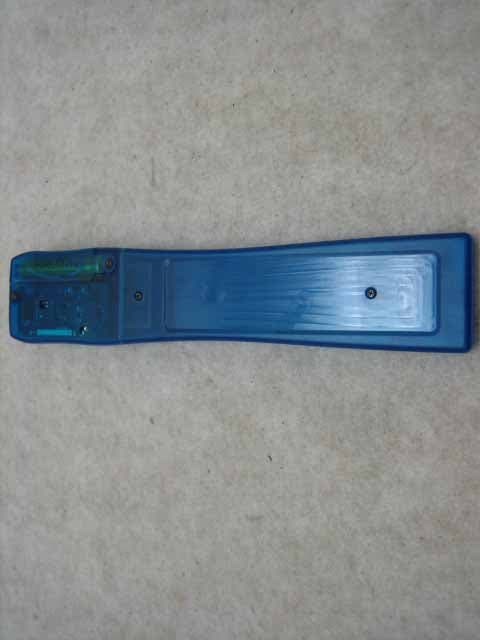
ODGCLIENTPAGER
Oct 12, 2006Client Pager
Equipment Class
CXX - Communications Rcvr for use w/ licensed Tx and CBs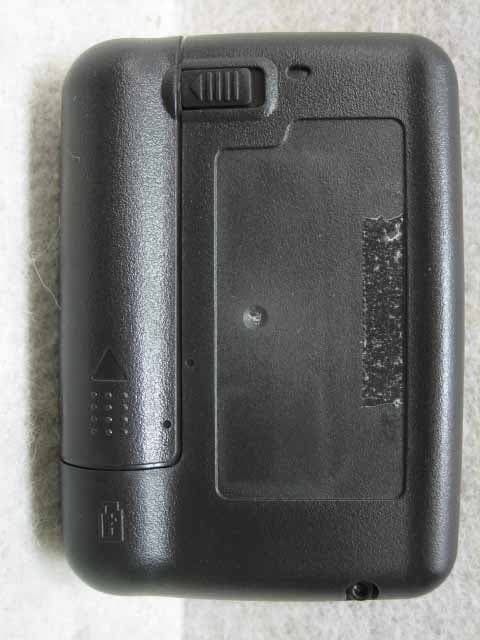
ODGT4POCSAGPLLUHF
Jul 12, 2006Alphanumeric 1Way Pager
Equipment Class
CXX - Communications Rcvr for use w/ licensed Tx and CBs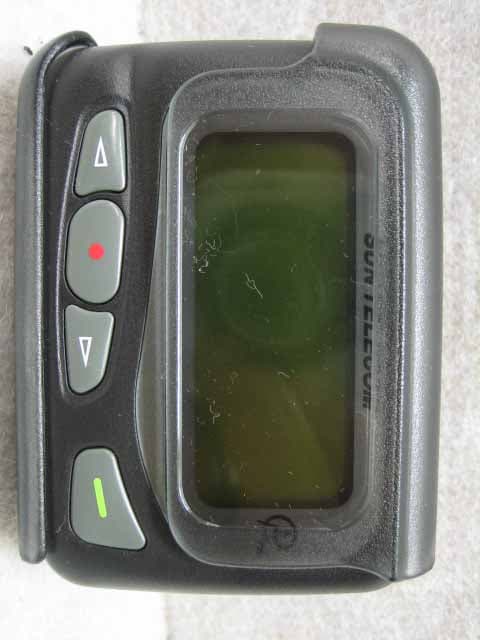
ODGT4POCSAGPLLVHF
Jul 12, 2006Alphanumeric 1WAY Pager
Equipment Class
CXX - Communications Rcvr for use w/ licensed Tx and CBs
ODGQOOLQEEX
Jul 14, 2005Digital Audio Player
Equipment Class
JBP - Part 15 Class B Computing Device Peripheral
ODGT4
Feb 03, 2005Pager
Equipment Class
CXX - Communications Rcvr for use w/ licensed Tx and CBs