OGXANDROIDBOXANDROID BOX
Guangzhou Shiyuan Electronics Co., Ltd.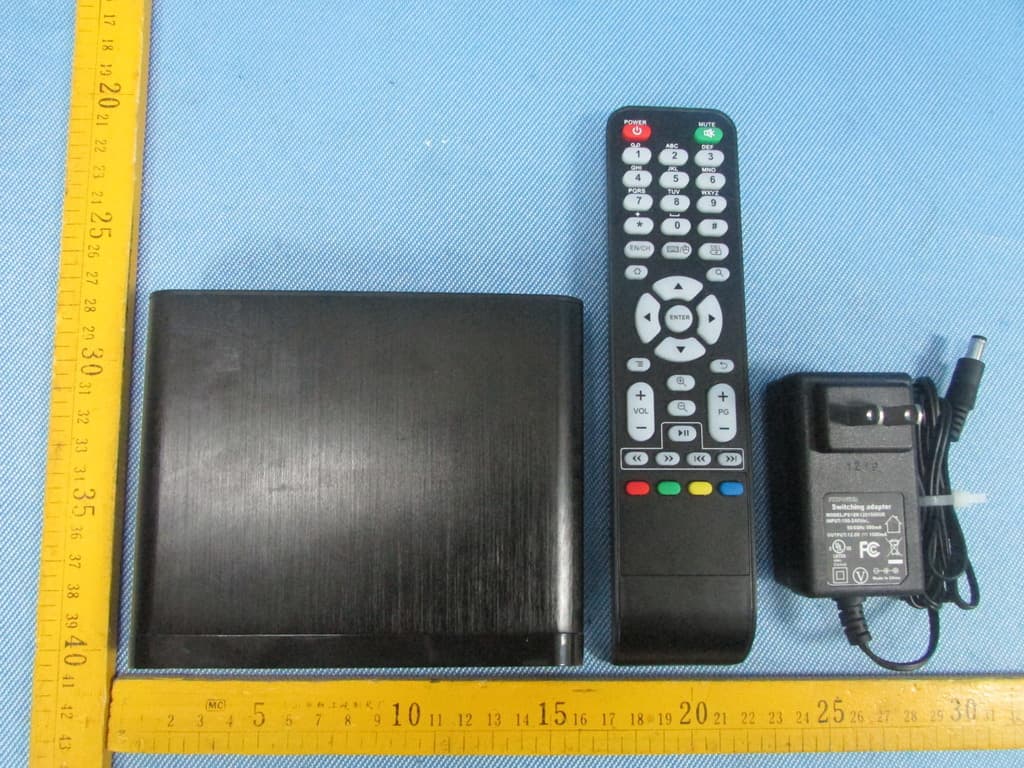
Click to zoom
Application Details
- Equipment Class
- DTS - Digital Transmission System
- Date of Grant
- Feb 19, 2013
- Application Purpose
- Original Equipment
- Date of Application
- Feb 19, 2013
- Equipment Note
- ANDROID BOX
- Frequency Range
- 2422.00000000 - 2452.00000000
- Country
- China
Documents & Files
Document Text
Text extracted from the exhibit documents filed with the FCC. Open a document above to read the original.
Users Manual
Android Box User Manual A31 series Version: V1.0 Before operating the unit, please read through this manual. Safety Warning Preparation 5 1.1.Introduction 5 Connection 7 2.1.How to connect 7 2.2.Terminal 7 Install Wizard 8 3.1.Welcome page 8 3.2.Setup page 8 Main launcher 11 4.1.Media player 11 4.2.Settings 11 4.3.Applications 15 4.3.1.Install from U-disk/micro SD card 15 4.3.2.Install from Browser 15 4.3.3.Install from ApkInstaller 15 4.4.Browser 16 Specifications 17 Exception handling 18 6.1.System restore 18 .............................................................................. .......................................................................... ................................................................................. ..................................................................... ................................................................................. ............................................................................... ....................................................................... ........................................................................... ............................................................................. .......................................................................... ................................................................................. ........................................................................... ...................................... ........................................................... ..................................................... ................................................................................. ............................................................................... ..................................................................... ....................................................................... Contents Safety Warning Before operating the unit, please read through this manual. PLACEMENT ●Do not place the unit on an unstable cart, stand, tripod, bracket, table, or shelf. ●Do not expose the unit to direct sunlight and other sources of heat. ●Do not handle liquids near or on the unit. ●Never spill liquid of any kind into the unit ●Do not put the unit near appliances that create magnetic fields. ●Do not put heavy objects on top of the unit. POWER SUPPLY ●Check that the unit’s operating voltage is identical with your local power supply. ●Please unplug power supply and aerial plug when the weather is thunder-storm or light- ning. ●Please unplug power supply, when there is nobody at home or didn’t use over a long period of time. ●Please keep power cord from physical or mechanical damage. ●Please use exclusive power cord, don’t modify or lengthen it. ●Please check and ensure AC source is connected with the ground. TEMPERATURE ●Do not place the unit near or over a radiator or a heater register. ●If your unit is suddenly moved from a cold to a warm place, unplug the power cord for at least two hours so that moisture that may have formed inside the unit can dry completely. HUMIDITY ●Do not expose machine in rain, damp or place near water. ●Ensure the indoor drying, cool. VENTILATION ●Keep the ventilation openings clear. ●Ensure that the unit has enough space for ventilation around: left, right and back >10cm, top> 20cm. BATTERY ●Accurate transaction and recal l scrap battery after using. ●Please don’t let kid touch battery, in case of dangerous don’t throw battery into fire. SOFTWARES ●Some softwares for smart phones or unique CPU solutions may not suit for this product. ●Some softwares need unique peripherals to support, like G-sensor, may not suit for this product. FrontFuction Signal receiver Signal LED(red--power off, green--power on) Power button Preparation 1.1. Introduction 1.1.1 Sketch BackFunction USB port x 2 AV output (Best resolution experience in 480i or 576i)[Only for A31A] micro SD slot[SD card slot for A31] HDMI output (Best resolution experience in 720p or 1080p) Ethernet input Recovery button DC in A31 A31A Preparation 1.1. Introduction 1.1.2 Peripheral 1.1.3 Remote 1 2 3 4 5 8 6 7 9 10 11 12 remoteAC adapterUser manual ButtonFunction 1.Turn on/off 2.Sound/Mute 3.Number 1~9 and “*”, “#” 4.Switch input language (EN/CH) Turn on/off Mouse Mood Delete 5.HOME button, back to main page 6.Search 7.Up, down, left and right direction control Confirm 8.Menu button 9.Back 10.Volume “+,-“(Turn up/down) Page turning ”+,-“(Up/down) Zoom in/out Multimedia: Play/Pause 11.Multimedia: Forward/Backward/ Preview/Next 12.Defined function button CH/EN ~ HDMI cable(Optional) AV cable(Optional) Connection 2.1. How to connect Connect the Android box to a display equiment ReminderThe display equipment must have a HDMI terminal or AV terminals 2.2. Terminal Warning!USB port allows only one mobile HDD at the same time! ●Micro SD slot (support up to 32GB) ●USB 2.0 port support keyboard, mouse, U disk, mobile HDD and etc. ●LAN allows Ethernet Best resolution suggest: HDMI 720p; 1080p AV 480i; 576i (AV output only for A31A) Install Wizard 3.1. WELCOME PAGE 3.2. Setup page When the Android Box is first powered up, Welcome Page will be shown. It will help you to configure the device. Select Language: Select network type: If you want to skip this wizard, press “HOME” key. If you have finished this wizard once, it will not auto-open again. If you do not want to choose your network , you can skip this step by press “Skip”. You will also find the network settings in fuction “Settings” Reminder Reminder Install Wizard 3.2. Setup page Select Wireless network(Wi-Fi) Set up the correct Time Zone Select Ethernet network(LAN)Configure Ethernet manually If choose‘Wi-Fi’, select a Wi-Fi Access Point If choose‘Ethernet’ ,the screen will show Ethernet connection status If network is not connected, setup the date and time manu- ally Reminder Reminder Install Wizard 3.2. Setup page Configuration Setup time/data manually Adjust screen size, using the arrow…
Text truncated - open the document above for the full version.
Cover Letter(s)
Guangzhou Shiyuan Electronics Co., Ltd. Date: January 16,2013 Federal Communications Commission Authorization and Evaluation Division Confidentiality Request regarding application for certification of FCC ID: OGXANDROIDBOX. Pursuant to Sections 0.457 and 0.459 of the Commission’s Rules, we hereby request confidential treatment of information accompanying this application as outlined below: Exhibit Type File Name Schematics Block Diagram Operational Description SCH.pdf BlockDiagram.pdf CircuitDescription.pdf The above materials contain trade secrets and proprietary information not customarily released to the public. The public disclosure of these materials may be harmful to the applicant and provide unjustified benefits to its competitors. The applicant understands that pursuant to Section 0.457 of the Rules, disclosure of this application and all accompanying documentation will not be made before the date of the Grant for this application. Sincerely, Guangzhou Shiyuan Electronics Co., Ltd. ................................................ Signature Mingfu He / Engineer ................................................ Typed name and Title
Cover Letter(s)
Guangzhou Shiyuan Electronics Co., Ltd. Date: February 16,2013 Federal Communications Commission Authorization and Evaluation Division FCC ID: OGXANDROIDBOX. Remote Control Statement This device uses with a remote control which is a IR remote. The remote is an exempt device which complies with FCC rules. Sincerely, Guangzhou Shiyuan Electronics Co., Ltd.
External Photos
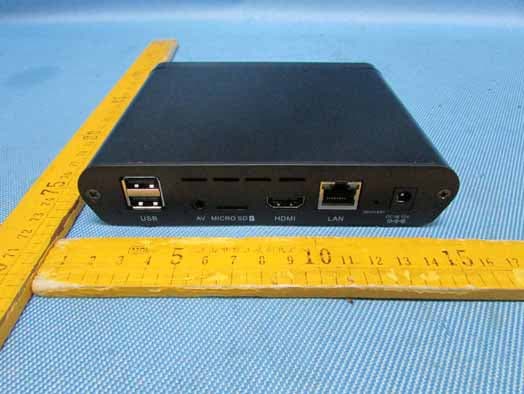
Reference No.: WTS13S0100415E Page 91 of 102 Waltek Services (Shenzhen) Co.,Ltd. http://www.waltek.com.cn 17 Photographs - Constructional Details 17.1 EUT – External View for model A31A Reference No.: WTS13S0100415E Page 92 of 102 Waltek Services (Shenzhen) Co.,Ltd. http://www.waltek.com.cn Reference No.: WTS13S0100415E Page 93 of 102 Waltek Services (Shenzhen) Co.,Ltd. http://www.waltek.com.cn 17.2 EUT – External View for model A31 Reference No.: WTS13S0100415E Page 94 of 102 Waltek Services (Shenzhen) Co.,Ltd. http://www.waltek.com.cn Reference No.: WTS13S0100415E Page 95 of 102 Waltek Services (Shenzhen) Co.,Ltd. http://www.waltek.com.cn
ID Label/Location Info
FCC Label Location for model: A31&A31A The Label must not be a stick-on paper. The Label on these products must be permanently affixed to the product and readily visible at the time of purchase and must last the expected lifetime of the equipment not be readily detachable. FCC ID: OGXANDROIDBOX This device complies with Part 15 of the FCC Rules. Operation is subject to the following two conditions: (1) this device may not cause harmful interference, and (2) this device must accept any interference received, including interference that may cause undesired operation.
ID Label/Location Info
FCC Label Sample for model: A31&A31A FCC ID: OGXANDROIDBOX This device complies with Part 15 of the FCC Rules. Operation is subject to the following two conditions: (1) this device may not cause interference, and (2) this device must accept any interference, including interference that may cause undesired operation of the device.
Internal Photos
EUT- Internal View for A31 EUT- RF module RF module
Internal Photos
EUT- Internal View for A31A ANT.
Test Report
Reference No.: WTS13S0100415E Page 1 of 102 FCC TEST REPORT Waltek Services (Shenzhen) Co.,Ltd. http://www.waltek.com.cn FCC ID : OGXANDROIDBOX Applicant : Guangzhou Shiyuan Electronics Co., Ltd. Address : No.192,Kezhu Road,Science Park,Guangzhou,Guangdong,China Manufacturer : the same as above Address : the same as above Equipment Under Test (EUT) : Product Name : Android BOX Model No. : A31&A31A Rules : FCC CFR47 Part 15 C Section 15.247:2010 Date of Test : January 12~28,2013 Date of Issue : January 28,2013 Test Result : PASS* Remark: * The sample detailed above has been tested to the requirements of FCC rules mentioned above. The test results have been reviewed against the directives above and found to meet their essential requirements. The results shown in this test report refer only to the sample(s) tested, this test report cannot be reproduced, except in full, without prior written permission of the company. The report would be invalid without specific stamp of test institute and the signatures of compiler and approver. PERPARED BY: Waltek Services (Shenzhen) Co., Ltd. 1/F, Fukangtai Building, West of Baima Road., Songgang Street, Bao’an District, Shenzhen, China Tel: +86-755-83551033 Fax: +86-755-83552400 Compiled by: Approved by: Zero Zhou / Project Engineer Philo Zhong / Manager Reference No.: WTS13S0100415E Page 2 of 102 Waltek Services (Shenzhen) Co.,Ltd. http://www.waltek.com.cn 2 Test Summary Test Items Test Requirement Result Radiated Emissions 15.205(a) 15.209(a) PASS Conducted Emissions 15.207(a) PASS 6dB Bandwidth 15.247(a)(2) PASS Maximum Peak Output Power 15.247(b)(3),(4) PASS Power Spectral Density 15.247(e) PASS Band Edge 15.247(d) PASS Emissions from out of band 15.247(d) PASS Emissions from the restricted bands 15.247(d) PASS Antenna Requirement 15.203 PASS Maximum Permissible Exposure (Exposure of Humans to RF Fields) 1.1307(b)(1) PASS Reference No.: WTS13S0100415E Page 3 of 102 Waltek Services (Shenzhen) Co.,Ltd. http://www.waltek.com.cn 3 Contents Page 1 COVER PAGE .......................................................................................................................................... 1 2 TEST SUMMARY ................................................................................................................................................... 2 3 CONTENTS ............................................................................................................................................................. 3 4 GENERAL INFORMATION .................................................................................................................................. 5 4.1 GENERAL DESCRIPTION OF E.U.T. ................................................................................................................. 5 4.2 DETAILS OF E.U.T. .......................................................................................................................................... 5 4.3 DESCRIPTION OF SUPPORT UNITS .................................................................................................................. 6 4.4 TEST FACILITY ................................................................................................................................................. 7 4.5 TEST LOCATION ............................................................................................................................................... 7 4.6 GENERAL CONDITION....................................................................................................................................... 7 5 EQUIPMENT USED DURING TEST ................................................................................................................... 8 5.1 EQUIPMENTS LIST ........................................................................................................................................... 8 5.2 MEASUREMENT UNCERTAINTY ........................................................................................................................ 8 5.3 TEST EQUIPMENT CALIBRATION ..................................................................................................................... 8 6 CONDUCTED EMISSION ..................................................................................................................................... 9 6.1 E.U.T. OPERATION .......................................................................................................................................... 9 6.2 EUT SETUP ................................................................................................................................................... 10 6.3 CONDUCTED EMISSION TEST RESULT .......................................................................................................... 10 7 RADIATED EMISSIONS ..................................................................................................................................... 13 7.1 EUT OPERATION : ......................................................................................................................................... 13 7.2 TEST SETUP .................................................................................................................................................. 14 7.3 SPECTRUM ANALYZER SETUP ...................................................................................................................... 15 7.4 TEST PROCEDURE ......................................................................................................................................... 16 7.5 CORRECTED AMPLITUDE & MARGIN CALCULATION ..................................................................................... 16 7.6 SUMMARY OF TEST RESULTS ....................................................................................................................... 17 8 BAND EDGE MEASUREMENT ...............................................…
Text truncated - open the document above for the full version.
Test Setup Photos
Reference No.: WTS13S0100415E Page 88 of 102 Waltek Services (Shenzhen) Co.,Ltd. http://www.waltek.com.cn 16 Photographs – Test Setup 16.1 Conducted Emission Reference No.: WTS13S0100415E Page 89 of 102 Waltek Services (Shenzhen) Co.,Ltd. http://www.waltek.com.cn 16.2 Radiated Emission Test frequency below 30MHz Test frequency from 30MHz to 1GHz Reference No.: WTS13S0100415E Page 90 of 102 Waltek Services (Shenzhen) Co.,Ltd. http://www.waltek.com.cn Test frequency above 1GHz
Contact Information
Applicant
Tina Ye(Engineer)
Test Firm
Waltek Services(Shenzhen) Co., Ltd.Philo zhong
Technical Specifications
| # | Rule Parts | Frequency Range | Power Output |
|---|---|---|---|
| 2 | 15C | 2.42 GHz - 2.45 GHz | 167.10 mW |
Other Applications from Guangzhou Shiyuan Electronics Co., Ltd.
OGXA71A
Jan 13, 2014ANDROID BOX
Equipment Class
DTS - Digital Transmission System
OGX-D311
May 29, 2013ANDROID DONGLE
Equipment Class
DTS - Digital Transmission System
OGXCVTD3X
Feb 25, 2013Android Dongle
Equipment Class
DTS - Digital Transmission System
OGXCVTSTBDONGLE
Nov 14, 2012Android Dongle
Equipment Class
DTS - Digital Transmission System