OKUBT0218RVSOUNDBAR PLAYER
Shenzhen Junlan Electronic Ltd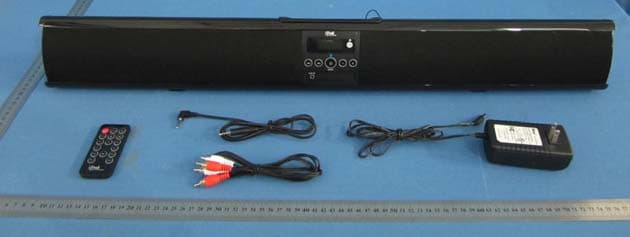
Click to zoom
Application Details
- Equipment Class
- DXX - Part 15 Low Power Communication Device Transmitter
- Date of Grant
- Jan 22, 2013
- Application Purpose
- Original Equipment
- Date of Application
- Jan 22, 2013
- Equipment Note
- SOUNDBAR PLAYER
- Frequency Range
- 2402.00000000 - 2480.00000000
- Country
- China
Documents & Files
Document Text
Text extracted from the exhibit documents filed with the FCC. Open a document above to read the original.
Users Manual
SAFETY INSTRUCTIONS 1.Read these instructions. 2.Keep these instructions. 3.Heed all warnings. 4.Follow all instructions. 5.Do not use this apparatus near water. 6.Clean only with a slightly damp cloth. 7.Do not block any ventilation openings. 8.Install in accordance with the manufacturer’s instructions. 9.Do not install or operate near any heat sources such heat. 10.Unplug this apparatus during lightning storms or when unused for long periods of time. 11.Servicing is required when the apparatus has been damaged in any way, such as the power-supply cord as radiators, stoves, or other apparatus that produce or plug is damaged, liquid has been spilled or objects have fallen into the apparatus, the apparatus has normally, or has been dropped. Warning: shock, do not expose this product to rain or moisture. The product must not be exposed to dripping and placed on the product. Caution: Changes or modifications not expressly approved by the manufacturer could void the user’s authority to operate this device. Caution: Usage of controls or adjustments or herein may result in hazardous exposure. Refer all servicing to qualified service personnel. Caution: To reduce the risk of fire or electrical. No fire sources such as candles should be splashing and no object filled with liquids should be placed on the products. 1 PRODUCT OVERVIEW Front View 1. LCD Display6. Remote Sensor 2. Standby / Source Button7. Volume+ Button 3. Tune- Button8. Volume- Button 4. Tune+ Button9. Speakers 5. AUX IN Jack Rear View 10. DC IN Jack13. Optical Input Jack 11. RCAAudio Input Jacks 214. FM Antenna 12. RCAAudio Input Jacks 1 Remote Control 1.SOURCE Button6.EQ Button12. CLOCK/MO/ST Button 2.Standby Button7. VOL-(Volume-) Button 13. VOL+ (Volume+) Button 3. FM SCAN Button8. BASS- Button14. BASS+ Button 4. TUNE-Button9. TREBLE- Button15. Play/Pause Button 5.M+(Memory+) Button 10.Mute Button16. TREBLE+ Button 11. TUNE+ Button BATTERY INSTALLATION - Before installation Remove and discard the insulation tab. -Replace battery for the remote control 1. Push and slide out the battery holder as Figure 1 below. 2. Replace the battery with a new CR2025 button cell with the polarity (+) side upward. 3. Slide into the battery holder. Battery precautions • Never recharge the batteries, apply heat to them or take them apart. • Battery shall not be exposed to excessive heat such as sunshine, ire or the like. • Do not throw the batteries in ire! • Attention should be drawn to the environmental aspects of battery disposal. • If the remote control is not going to be used for a long time, remove the battery to avoid damage caused by battery leakage corrosion. 3 POWER CONTROL - To turn the unit on ·Connect the supplied AC/DC adapter. ·Press STANDBY button to turn on the unit. - To turn the unit off ·Press STANDBY button on the remote control or hold STANDBY button in the front of the unit. NOTE: If the unit is not used for a long period of time, disconnect the power adapter. TIME SETTING 1. Place the unit to standby mode. 2. Hold CLOCK/MO/ST button on the remote control until the hour digit flashes. 3.Then press TUNE+ or TUNE- button on the unit or remote control to adjust the hour. 4. Press CLOCK/MO/ST button on the remote control to confirm the hour setting and the minute digit will flash. 5. Then press TUNE+ or TUNE- button on the unit or remote control to adjust the minute. 6. Press CLOCK/MO/ST button on the remote control to confirm the minute setting. FM RADIO Power on the unit and press SOURCE button repeatedly until the FM frequency appears on the display. - Search and store the stations 1. Hold TUNE+ or TUNE- button to search stationsforward or backward. The unit will stop if a station is found. Then press FM SCAN button, “CH XX” will flash and then use M+ button to select the place you want the station stored to. Press FM SCAN button to confirm. Or 2. Hold FM SCAN button then release the unit will search and store the stations automatically. - Listen to the preset stations PressM+buttonrepeatedlytoselectthedesiredpresetstationstolistento. NOTE: If the received FM stations are in stereo mode, the unit will play in stereo mode automatically.If reception is weak, press the CLOCK/MO/ST button to turn the unit to mono mode. Press again to turn to stereo mode again. 4 AUX IN - AUX IN source may include: ·Personal audio players ·Personal computers or laptops - AUX IN connection: 1. Connect a stereo 3.5mm jack cable (supplied) between the headphone or LINE/Audio output of the personal audio player and the AUX IN jack on the front of the unit. 2. Power on the unit and press SOURCE button repeatedly until "AUX 1" appears on the display. Set your personal audio player/computer to play. NOTE: If there is no sound or if the volume is not loud enough, you may increase the setting on the source. - During playback ·Press MUTE button to turn off the sound. Press again to resume the sound. ·Press VOLUME+/- buttons to adjust the volume level. ·Press BASS+/- buttons to adjust bass level. ·Press TREBLE+/-buttons to adjust treble level. ·Press EQ button to switch betweenPOP/JAZZ/CLASSIC/ROCK/NORMAL. 5 RCA AUX IN - RCA AUX IN sources may include ·TV/DVD/VCR - RCA AUX IN connection 1. Connect the RCA audio cable (supplied) to the audio output jack on DVD player and AUX IN 1orAUXIN2jackontherearoftheunit. 2. Press SOURCE button repeatedly until "AUX 1" or "AUX 2" appears on the display. NOTE:Before RCA AUX IN 1 connection, make sure the AUX IN cable is not inserted into the AUX IN jack on the front of the unit. - During playback ·Press MUTE button to turn off the sound. Press again to resume the sound. ·Press VOLUME+/- buttons to adjust the volume level. ·Press BASS+/- buttons to adjust bass level. ·Press TREBLE+/-buttons to adjust treble level. ·Press EQ button to switch betweenPOP/JAZZ/CLASSIC/ROCK/NORMAL. 6 BLUETOOTH - Paring: 1.Press SOURCE button repeatedly until "BT" appears on the display. 2. Turn off the Bluetooth functionality of other devices t…
Text truncated - open the document above for the full version.
Cover Letter(s)
Differences Declaration To whom concern, We Shenzhen Junlan Electronic Ltd hereby declares: The product model(s) SBB-021C2, SBB-021C3, SBB-021C4, SBB-021C5, SBB-021C6, SBB-021C7, SBB-021C8, SBB-021C9, BT0218GBMO, BT0218RV, SBB-0218, SBB-0718, SBP-3210, SBB-021C0, SBB-081F, SBB-101FA, SBB-101F, SBB-101FB, SBB-181F4, SBB-0618, SBB-050A, SBB-0319, SBB-040A, SBB-0116, SBB-151L, BT5021, BT5021GBMO, BT5021GB, BT5021MO, BT0218, BT0218MO and BT0218GB are identical in the same PCB layout, interior structure and electrical circuits with the model SBB-021C1 which tested in Global United Technology Services Co., Ltd., the only differences are the model name for commercial purpose. Authorized signature: Date: 2013-01-15
Cover Letter(s)
Shenzhen Junlan Electronic Ltd District 2 type A plant in the second layer 1-4, NO.2 Industria Fuyuan Baoan Shenzhen China 2013-01-15 Equipment Autorisation Division Federal Communications Commission 7435 Oakland Mills Road Columbia, MD 21046 FCC ID: OKUBT0218RV Product Name: SOUNDBAR PLAYER Request for Confidentiality Pursuant to Sections 0.457 and 0.459 of the commissions rules, we hereby request that the following documents be held confidential: • Schematics • Block diagram • Operational Description These materials contain trade secrets and proprietary information and are not customarily released to the public. The public disclosure of this information might be harmful to the company and provide unjustified benefits to our competitors. Dated this 01/15/2013 By: Peng Xiao Signature Printed Title: safety engineer On behalf of : Shenzhen Junlan Electronic Ltd Telephone: 0755-27309169
ID Label/Location Info
70x30mm 80x15mm MODEL: BT0218MO Sound bar with FM/Bluetooth Music Player Power Supply: DC 16V, 1.8A Distributed by Electro Brand, Inc Westchester, ILL Made In China FCC ID:OKUBT0218RV Size: Size:
ID Label/Location Info
Label location
Test Report
Global United Technology Services Co., Ltd. Report No.: GTSE13010002201 Authorized Signature: Robinson Lo Laboratory Manager This report details the results of the testing carried out on one sample. The results contained in this test report do not relate to other samples of the same product and does not permit the use of the GTS product certification mark. The manufacturer should ensure that all products in series production are in conformity with the product sample detailed in this report. This report may only be reproduced and distributed in full. If the product in this report is used in any configuration other than that detailed in the report, the manufacturer must ensure the new system complies with all relevant standards. Any mention of GTS International Electrical Approvals or testing done by GTS International Electrical Approvals in connection with, distribution or use of the product described in this report must be approved by GTS International Electrical Approvals in writing. This document cannot be reproduced except in full, without prior written approval of the Company. Any unauthorized alteration, forgery or falsification of the content or appearance of this document is unlawful and offenders may be prosecuted to the fullest extent of the law. Unless otherwise stated the results shown in this test report refer only to the sample(s) tested and such sample(s) are retained for 90 days only.” Page FCC REPORT Applicant: Shenzhen Junlan Electronic Ltd Address of Applicant: District 2 type A plant in the second layer 1-4, NO.2 Industria Fuyuan Baoan Shenzhen China Equipment Under Test (EUT) Product Name: SOUNDBAR PLAYER Model No.: See Section 5.2 Trade Mark: iTrak by Encore Technology FCC ID: OKUBT0218RV Applicable standards: FCC CFR Title 47 Part 15 Subpart C Section 15.249:2011 Date of sample receipt: January 06, 2013 Date of Test: January 07-15, 2013 Date of report issued: January 15, 2013 Test Result : PASS * * In the configuration tested, the EUT complied with the standards specified above. Report No.: GTSE13010002201 Global United Technology Services Co., Ltd. Project No.: GTSE130100022RF 2nd Floor, Block No.2, Laodong Industrial Zone, Xixiang Road Baoan District, Shenzhen, China 518102 Telephone: +86 (0) 755 2779 8480 Fax: +86 (0) 755 2779 8960 Page 2 of 32 2 Version Version No. Date Description 00 January 15, 2013 Original Prepared By: Date: January 15, 2013 Project Engineer Check By: Date: January 15, 2013 Reviewer Report No.: GTSE13010002201 Global United Technology Services Co., Ltd. Project No.: GTSE130100022RF 2nd Floor, Block No.2, Laodong Industrial Zone, Xixiang Road Baoan District, Shenzhen, China 518102 Telephone: +86 (0) 755 2779 8480 Fax: +86 (0) 755 2779 8960 Page 3 of 32 3 Contents Page 1 COVER PAGE............................................................................................................................................ 1 2 VERSION .................................................................................................................................................. 2 3 CONTENTS .............................................................................................................................................. 3 4 TEST SUMMARY ..................................................................................................................................... 4 5 GENERAL INFORMATION ...................................................................................................................... 5 5.1 CLIENT INFORMATION......................................................................................................................... 5 5.2 GENERAL DESCRIPTION OF EUT ......................................................................................................... 5 5.3 TEST MODE........................................................................................................................................ 7 5.4 DESCRIPTION OF SUPPORT UNITS....................................................................................................... 7 5.5 TEST FACILITY.................................................................................................................................... 7 5.6 TEST LOCATION................................................................................................................................. 7 5.7 OTHER INFORMATION REQUESTED BY THE CUSTOMER......................................................................... 7 6 TEST INSTRUMENTS LIST ..................................................................................................................... 8 7 TEST RESULTS AND MEASUREMENT DATA...................................................................................... 9 7.1 ANTENNA REQUIREMENT:.................................................................................................................... 9 7.2 CONDUCTED EMISSIONS................................................................................................................... 10 7.3 RADIATED EMISSION METHOD........................................................................................................... 13 7.3.1 Field Strength of The Fundamental Signal ................................................................................ 15 7.3.2 Spurious emissions.................................................................................................................... 16 7.3.3 Bandedge emissions.................................................................................................................. 20 7.4 20DB OCCUPY BANDWIDTH.............................................................................................................. 21 8 TEST SETUP PHOTO ............................................................................................................................ 23 9 EUT CONSTRUCTIONAL DETAILS ..................................................…
Text truncated - open the document above for the full version.
Test Setup Photos
Radiated Emission Conducted Emission
Contact Information
Applicant
peng xiao(safety engineer)
Technical Contact
Global United Technology Services Co., Ltd.Hans Hu
[email protected]+86-0755-27798480
2nd Floor, Block No.2, Laodong Industrial Zone · Shenzhen · China
Test Firm
Global United Technology Service Co., LtdRobinson Lo
Technical Specifications
| # | Rule Parts | Frequency Range | Power Output |
|---|---|---|---|
| 1 | 15C | 2.40 GHz - 2.48 GHz | - |
Other Applications from Shenzhen Junlan Electronic Ltd
OKUJP2326
Sep 07, 2026Retro Bluetooth Turntable
Equipment Class
DSS - Part 15 Spread Spectrum Transmitter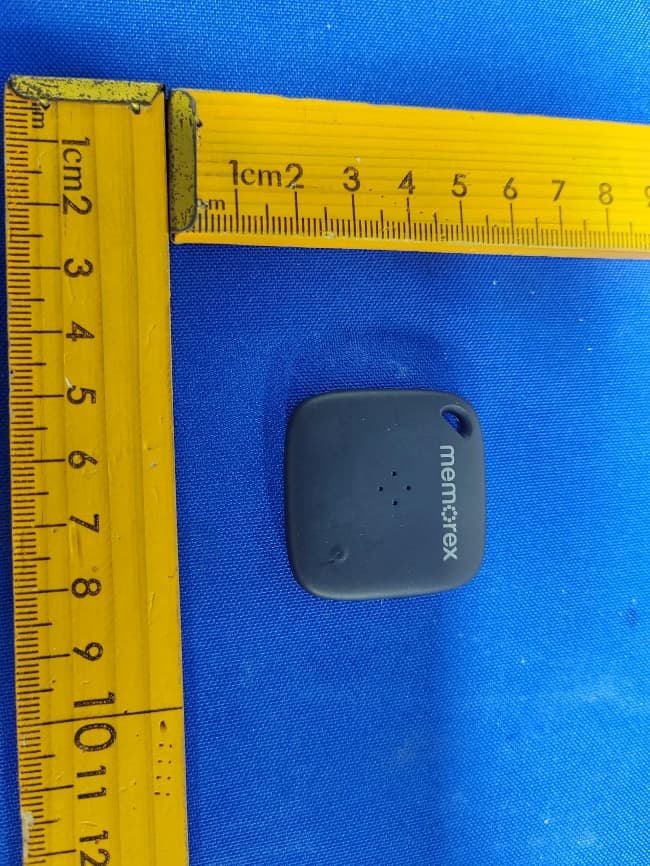
OKUBS6207S
Sep 01, 2026Smart Finder
Equipment Class
DTS - Digital Transmission System
OKUBS2708EC
May 15, 2026STEREO
Equipment Class
DSS - Part 15 Spread Spectrum Transmitter
OKUJC9021
Apr 27, 2026BLUETOOTH TURNTABLE
Equipment Class
DSS - Part 15 Spread Spectrum Transmitter
OKUBS2708CA
Apr 17, 2026STEREO
Equipment Class
DSS - Part 15 Spread Spectrum Transmitter