OR7GP102TWIRELESS PRESENTER
Globlink Technology Inc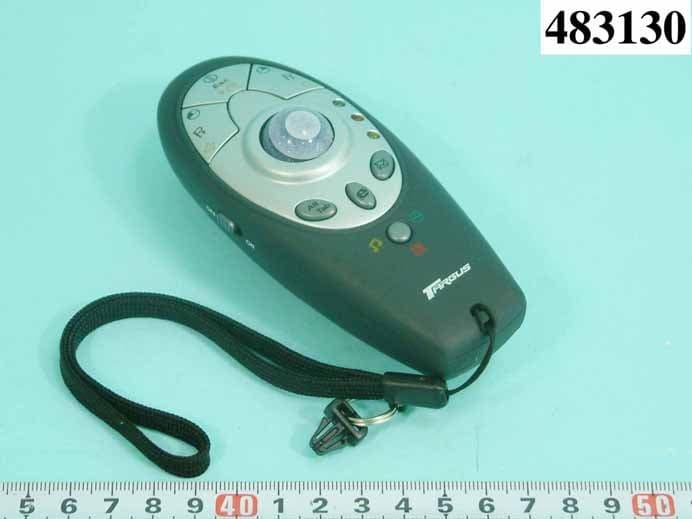
Click to zoom
Application Details
- Equipment Class
- DXX - Part 15 Low Power Communication Device Transmitter
- Date of Grant
- Oct 12, 2004
- Application Purpose
- Original Equipment
- Date of Application
- Oct 12, 2004
- Equipment Note
- WIRELESS PRESENTER
- Frequency Range
- 2423.00000000 - 2477.00000000
- Company
- Globlink Technology Inc
- Country
- Taiwan
Documents & Files
Document Text
Text extracted from the exhibit documents filed with the FCC. Open a document above to read the original.
Users Manual
Quick Reference 1. Insert batteries. 2. Turn on your computer. (Presenter doesn’t compatible with IMAC system, only compatible with IBM PC or compatible system.) 3. Plug the receiver to the computer’s USB port. 4. Turn the power switch to “on” of the presenter. 5. Press “Lock” key of the receiver. 6. The “Lock” LED will light off of the receiver. 7. Press “ID” key of the presenter. 8. The “Lock” LED will light on again of the receiver. 9. Now you can use the wireless presenter. User’s Manual Features and Specifications: z RF presenter; Dimension: 120(L) x 51(W) x 46(H) mm z RF receiver; Dimension: 68.7(L) x 23.7(W) x 14(H) mm z Laser pointer z Optical trackball mouse function、presentation function、multimedia function z Error detection ability z Total of 1024 sets and 8 channels z Advanced power saving design when presenter stop working z Power switch for on/off z Microsoft Windows 98SE/ME/2000/XP compatible(Internet access hotkey、 email access hotkey and multimedia keys functions cannot use Windows 98SE system) z CE, FCC approval Installation: 1. Battery installation: Push out the cover of the battery compartment to open it as shown in fig. 1, then insert the alkaline batteries(AAA*2)that comes with the product, ensuring that the polarities are correct. Close the cover of the battery compartment. Fig(1) Battery insert Battery Cover ID Key 2. Connect the receiver that comes with the product to a USB port on the computer, the LED on the receiver lights to indicate that the PnP connection has been successful. 3. Setting the identification code: 3.1 Press the "Lock" key on the receiver once, as indicated in fig. 2, the LED lamp goes off . 3.2 Press the "ID" key on the presenter once, as indicated in fig. 1, the LED will light up to indicate that the setup has been completed, and the presenter is now working. 3.3 This product features a total of 1024 sets and 8 channels of identification codes to avoid interference. The setup mechanism automatically generates a set and channel of identification code every time you press the “ID” key, the presenter can only be used after the setup has completed. Fig(2) 4. Power switch ON/OFF: If you have purchased the presenter, an on/off power switch is provided on the bottom of it, as shown in fig 3, please switch it off to save battery usage when carrying the presenter as you travel. The presenter becomes ready once the switch is turned to "on" and no identification code setting up will be necessary. Fig(3) Power switch LED Lock key Operating environment: Positions of presenter and receiver may affect the RF transmission performance. 1. Avoid putting presenter and/or receiver on a metal desk. This may shorten transmission distance. Function introduction 1. Presenter (1) Mouse mode * Button 1:right key * Button 2:medium key * Button 3:left key * Button 4:Alt-Tab * Button 5:Internet * Button 6:Email * Button 7:mode select * Button 8:ID key * Trackball:move cursor * Power switch:power on/off * Laser button:laser pointer * Mouse mode lamp:mouse function Laser button ID key Medium key Left key Right key Mouse mode lamp Presentation mode lamp Multimedia mode lamp Email Internet Mode select Alt-Tab Power switch Trackball (2) Presentation mode * Button 1:page down * Button 2:ESC * Button 3:page up * Button 4:Alt-Tab * Button 5:Internet * Button 6:Email * Button 7:mode select * Button 8:ID key * Trackball:move cursor * Power switch:power on/off * Laser button:laser pointer * Presentation mode lamp:presentation function Laser button ID key ESC Page up Page down Mouse mode lamp Presentation mode lamp Multimedia mode lamp Email Internet Mode select Alt-Tab Power switch Trackball (3) Multimedia mode * Button 1:volume down * Button 2:play/pause * Button 3:volume up * Button 4:Alt-Tab * Button 5:Internet * Button 6:Email * Button 7:mode select * Button 8:ID key * Trackball:move cursor * Power switch:power on/off * Laser button:laser pointer * Multimedia mode lamp:multimedia function Laser button ID key Play/Pause Vo l u m e up Volume down Mouse mode lamp Presentation mode lamp Multimedia mode lamp Email Internet Mode select Alt-Tab Power switch Trackball 2. Receiver * ID & Channel lock button:It make lock and unlock ID. * ID & Channel lock lamp:It will be red lighting when the receiver is locked by lock button. Q&A: Q1:Presenter doesn’t work! A:check batteries are inserted already or not, plug in the receiver to PC or not, check power switch is turn on or not, do the initialization process or not. Q2:Laser pointer doesn’t work ! A:check batteries are inserted already or not, check power switch is turn on or not. LED Lock key FEDERAL COMMUNICATIONS COMMISSION This device complies with Part 15 of the FCC Rules. Operation is subject to the following two conditions:(1) this device may not cause harmful interference, and (2) this device must accept any interference received, including interference that may cause undesired operation. Changes or modifications not expressly approved by the party responsible for compliance could void the user‘s authority to operate the equipment. NOTE This equipment has been tested and found to comply with the limits for a Class B digital device, pursuant to Part 15 of the FCC Rules. These limits are designed to provide reasonable protection against harmful interference in a residential installation. This equipment generates, uses and can radiated radio frequency energy and, if not installed and used in accordance with the instructions, may cause harmful interference to radio communications. However, there is no guarantee that interference will not occur in a particular installation If this equipment does cause harmful interference to radio or television reception, which can be determined by turning the equipment off and on, the user is encouraged to try to correct the interference by one or more of the following measures: -Reorient or relocate the receiving antenna. -Increase the separation between the equipment and receiver. -Connect the equipme…
Text truncated - open the document above for the full version.
Block Diagram
海歐科技股份有限公司 GlobLink Technology Inc. 線路方塊圖 Regulator Low Battery Detect Key Matrix Laser Pointer Power Switch Battery LED Indicator MCU RF ANT Channel Select Country Select Model Select Optical Sensor 6MHz 16MHz
External Photos
REPORT NO. : F483130 SPORTON International Inc. PAGE NUMBER : A1 OF A12 TEL : 886-2-2696-2468 ISSUED DATE : Sep. 29, 2004 FAX : 886-2-2696-2255 APPENDIX A. Photographs of EUT REPORT NO. : F483130 SPORTON International Inc. PAGE NUMBER : A2 OF A12 TEL : 886-2-2696-2468 ISSUED DATE : Sep. 29, 2004 FAX : 886-2-2696-2255
ID Label/Location Info
FCC ID: RST-GINGO8000 Label Location
Internal Photos
REPORT NO. : F483130 SPORTON International Inc. PAGE NUMBER : A3 OF A12 TEL : 886-2-2696-2468 ISSUED DATE : Sep. 29, 2004 FAX : 886-2-2696-2255 REPORT NO. : F483130 SPORTON International Inc. PAGE NUMBER : A4 OF A12 TEL : 886-2-2696-2468 ISSUED DATE : Sep. 29, 2004 FAX : 886-2-2696-2255 REPORT NO. : F483130 SPORTON International Inc. PAGE NUMBER : A5 OF A12 TEL : 886-2-2696-2468 ISSUED DATE : Sep. 29, 2004 FAX : 886-2-2696-2255 REPORT NO. : F483130 SPORTON International Inc. PAGE NUMBER : A6 OF A12 TEL : 886-2-2696-2468 ISSUED DATE : Sep. 29, 2004 FAX : 886-2-2696-2255 REPORT NO. : F483130 SPORTON International Inc. PAGE NUMBER : A7 OF A12 TEL : 886-2-2696-2468 ISSUED DATE : Sep. 29, 2004 FAX : 886-2-2696-2255 REPORT NO. : F483130 SPORTON International Inc. PAGE NUMBER : A8 OF A12 TEL : 886-2-2696-2468 ISSUED DATE : Sep. 29, 2004 FAX : 886-2-2696-2255 REPORT NO. : F483130 SPORTON International Inc. PAGE NUMBER : A9 OF A12 TEL : 886-2-2696-2468 ISSUED DATE : Sep. 29, 2004 FAX : 886-2-2696-2255 REPORT NO. : F483130 SPORTON International Inc. PAGE NUMBER : A10 OF A12 TEL : 886-2-2696-2468 ISSUED DATE : Sep. 29, 2004 FAX : 886-2-2696-2255 REPORT NO. : F483130 SPORTON International Inc. PAGE NUMBER : A11 OF A12 TEL : 886-2-2696-2468 ISSUED DATE : Sep. 29, 2004 FAX : 886-2-2696-2255 REPORT NO. : F483130 SPORTON International Inc. PAGE NUMBER : A12 OF A12 TEL : 886-2-2696-2468 ISSUED DATE : Sep. 29, 2004 FAX : 886-2-2696-2255
Operational Description
FCC ID:OR7GP102T Description of Operation EUT is a Wireless Presentation Mouse with 8 channels. This device provided transmitting data rate up to 100Kbps. The device optimized for 2.4GHz worldwide ISM band wireless application and RF carrier is GFSK. The antenna is Printed Antenna, and there is no antenna connector. This Wireless Presentation Mouse is a Wireless ISM adapter. It allows you to connect to your computer and other USB interface resources, This device has excellent operating performance with Notebook PC . Especially under less interferenced environment , the operating distance will be more perfect without any angel limit. The EUT is a Wireless Presentation Mouse can Remote to Computer And other the USB interface of solution. It allows you change to audio Frequency when the device is interference
Schematics
海歐科技股份有限公司 GlobLink Technology Inc. 線路圖 1 2 3 4 56 A BC D 6 5 4 3 2 1 D C B A Title Number Revision Size B Date: 27-Sep-2004 Sheet of File: C:\Documents and Settings\Tupro\®à-±\  ²³ø¹«\(GP-101T)¥ú¾Ç  ²³ø¹«\¹q ̧ô¹Ï\(GP-101T)O p Drawn By: VCC 123 J1 JUMP CON R21470K Channel Select R24DNFR25DNF X16MHz VCC C5104 SW1 Email SW5 ID SW8 RKEY SW4 MODE SW7 LKEY SW3 Internet SW2 Alt-Tab SW6 MKEY D2MS-LEDD3PRE-LEDD4MULTI-LED R11.3K VCC X216MHz C722P C822P R151M RF-VCC SW10Laser Button BAT M1Laser Module SW9 Power on/off (GREEN) (YELLOW) (DNF) R142KR131.3K D6 LOW BAT-LED (RED) R16(DNF) + C34.7uF/16V P90 1 P91 2 P92 3 P93 4 P94 5 P95 6 P50 7 P51 8 P52 9 P53 10 P54 11 P55 12 P56 13 P57 14 P80 15 P81 16 NC 17 P82 18 P83 19 P84 20 P85 21 P86 22 P87 23 P60 24 P61 25 P62 26 P63 27 P64 28 P65 29 P66 30 P67 31 P72 32 P71 33 P70 34 NC 35 NC 36 NC 37 VDD 38 R-OSCI 39 OSCO 40 VSS 41 /INT 42 DATA 43 CLK 44 U1 EM78P451AQ CE 1 CS 2 CLK 3 DIN 4 VSS 5 XC2 6 XC1 7 VDD 8 VSS_PA 9 ANT1 10 ANT2 11 VDD_PA 12 VDD 13 VSS 15 IREF 14 PWR_UP 16 U2 NRF2402 R2470KR3DNF VCC LOW BAT-Detect C12683 C1322P C110.5P C90.5P C10DNF L43.3nH L522nH R1222K RF-VCC RF-VCC C2102C41uF ANT Channel SelectCountry Select R23470K VCC R2910KR2810K BATTERY ALKALINE AAA X2 TB-VCC D1 1SS357 L1330uH BAT + C147uF/6.3V 1 2 LX OUT 3 VSS U3 ELM9337 1 OSC_IN 2 OSC_OUT 3 SDIO 4 SCK 5 LED-CNTL 6 GND 7 VDD 8 REFA U4ADNS-2620 R41K R5100K R6130R Q43906 D5 HLMP-ED80 R,S,T X324M + C174.7uF/16V TB-VCC C16104 + C154.7uF/16V SDIOSCK Q13904(SOT-23) R17470KR19100K(1%) R2047K R18470K BAT LOW BAT-Detect VCC L30RL20R SDIOSCK D74148 VCC VCC Globlink Technology Inc. ¥ú¾Ç²³ø¹«TX (GP-101T) PCB-278F-04-01 R7470K VCC 123 J2 JUMP CON R22DNF Country Select R26DNFR27DNF PCB-278B-04-02 (DNF) + C18DNF TP2 TP1 Power Test Function Test Q23904(SOT-23) Q3 8550(SOT-23) R81K R910K RF_PWR RF_PWR
Test Report
FCC ID: OR7GP102T Issued on Sep. 29, 2004 Report No.: F483130 SPORTON International Inc. TEL : 886-2-2696-2468 FAX : 886-2-2696-2255 FCC TEST REPORT CATEGORY : Portable End Product PRODUCT NAME : Wireless Presenter FCC ID. : OR7GP102T FILING TYPE : Certification MODEL NAME : AMP01, GP102T BRAND NAME : Targus, Globlink, Trust, Centrios, Nexxtec, RadioShack APPLICANT : Globlink Technology Inc. 2Fl., 101 Rui-hu Street Nei-hu, Taipei , Taiwan MANUFACTURER : Same as Applicant ISSUED BY : SPORTON INTERNATIONAL INC. 6F, No. 106, Sec. 1, Hsin Tai Wu Rd., His Chih, Taipei Hsien, Taiwan, R.O.C. Statements: The test result in this report refers exclusively to the presented test model / sample. Without written approval of SPORTON International Inc., the test report shall not be reproduced except in full. Certificate or Test Report could not be used by the applicant to claim the product endorsement by CNLA, NVLAP or any agency of U.S. government. The test equipment used to perform the test are calibrated and traceable to NML/ROC or NIST/USA. Dr. Alan Lane Vice General Manager Sporton International Inc. Lab Code: 200079-0 FCC ID: OR7GP102T Issued on Sep. 29, 2004 Report No.: F483130 SPORTON International Inc. Page No. : i TEL : 886-2-2696-2468 Issued Date : Sep. 29, 2004 FAX : 886-2-2696-2255 Table of Contents History of this test report....................................................................................................................................ii 1. General Description of Equipment under Test.............................................................................................1 1.1 Applicant ......................................................................................................................................................................................... 1 1.2 Manufacturer.....................................................................................................................................................................................1 1.3 Basic Description of Equipment under Test......................................................................................................................................1 1.4 Features of Equipment under Test ...................................................................................................................................................1 2. Test Configuration of the Equipment under Test.........................................................................................2 2.1 Description of the Test ......................................................................................................................................................................2 2.1 Frequency Range Investigated .........................................................................................................................................................2 2.2 Description of Test Supporting Units ................................................................................................................................................2 2.3 Connection Diagram of Test System ................................................................................................................................................4 2.4 Test Software....................................................................................................................................................................................5 3. Test Location and Standards .........................................................................................................................6 3.1 Test Location ....................................................................................................................................................................................6 3.2 Test Conditions .................................................................................................................................................................................6 3.3 Standards for Methods of Measurement...........................................................................................................................................6 3.4 DoC Statement .................................................................................................................................................................................6 4. List of Measurements......................................................................................................................................7 4.1 Summary of the Test Results............................................................................................................................................................7 5. Test Result .......................................................................................................................................................8 6 Antenna Requirements .................................................................................................................................28 7 List of Measuring Equipments Used ...........................................................................................................29 Appendix A. Photographs of EUT........................................................................................................ A1 ~ A12 FCC ID: OR7GP102T Issued on Sep. 29, 2004 Report No.: F483130 SPORTON International Inc. Page No. : ii TEL : 886-2-2696-2468 Issued Date : Sep. 29, 2004 FAX : 886-2-2696-2255 History of this test report No additional attachment. Additional attachment were issued as following record: Attachment No. Issue Date Description FCC ID: OR7GP102T Issued on Sep. 29, 2004 Report No.: F483130 Page No. : 1 of 29 TEL : 886-2-2696-2468 Issued Date : Sep. 29, 2004 FAX : 886-2-2696-2255 1. General Description of Equipment under Test 1.1 Applicant Globlink Technology Inc. 2Fl., 101 Rui-hu Street Nei-hu, Taipei , Taiwan 1.2 Manufacturer…
Text truncated - open the document above for the full version.
Test Setup Photos
z raphs show the configuration that generates the maximum emission. FRONT VIEW REAR VIEW
Contact Information
Applicant
Eric Weng(Manager)
Test Firm
SPORTON International IncKathy Lin
Technical Specifications
| # | Rule Parts | Frequency Range | Power Output |
|---|---|---|---|
| 1 | 15C | 2.42 GHz - 2.48 GHz | - |
Other Applications from Globlink Technology Inc

OR7GM521
Feb 24, 2008Wireless Ring Mouse
Equipment Class
DXX - Part 15 Low Power Communication Device Transmitter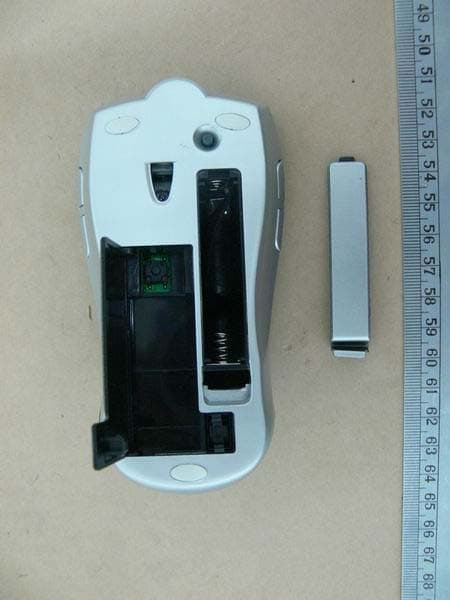
OR7GM322
Sep 15, 2007Wireless Free Wheel Mouse
Equipment Class
DXX - Part 15 Low Power Communication Device Transmitter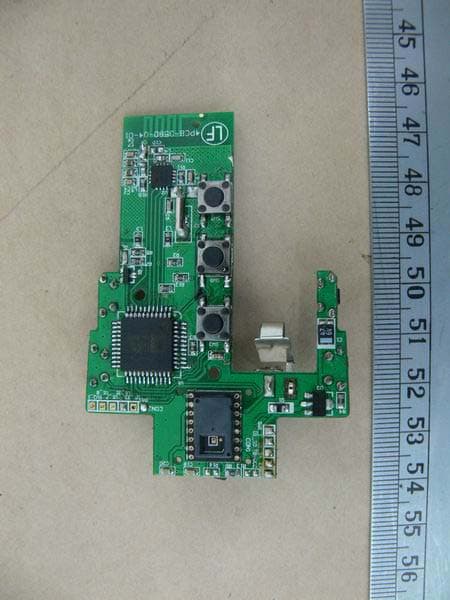
OR7GM323
Sep 15, 2007Wireless Free Wheel Mouse
Equipment Class
DXX - Part 15 Low Power Communication Device Transmitter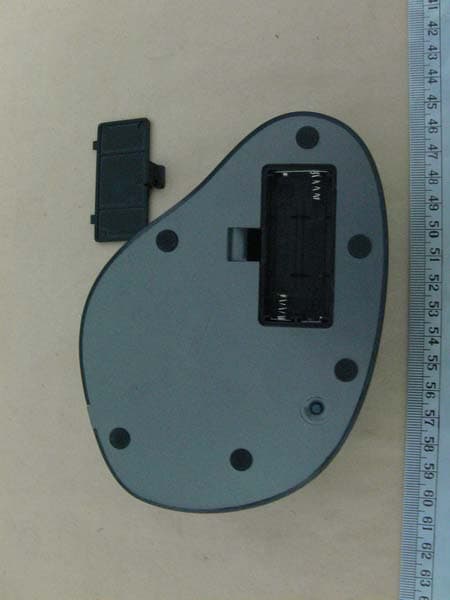
OR7GM520
Sep 11, 2007Wireless Big Optical Trackball Mouse
Equipment Class
DXX - Part 15 Low Power Communication Device Transmitter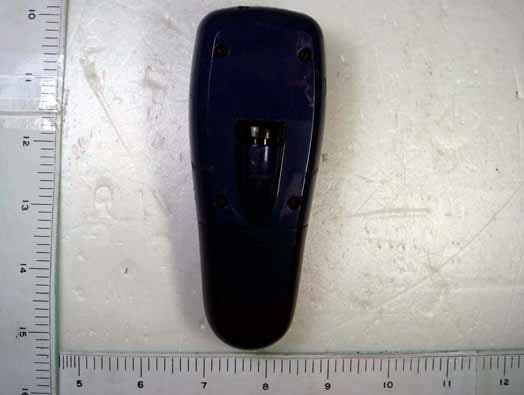
OR7GP300
Dec 11, 20062.4 GHz RF Wireless Optical Presentation Mouse
Equipment Class
DXX - Part 15 Low Power Communication Device Transmitter