PB4TRAVANFW20GBTravan FireWire 20GB Drive
Imation Corp.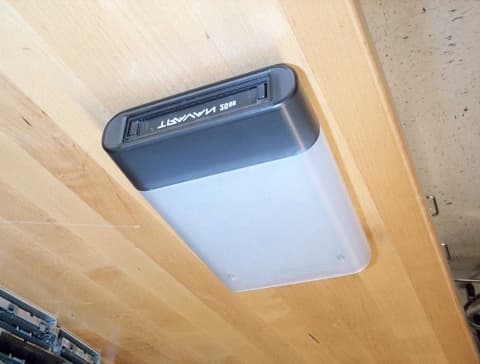
Click to zoom
Application Details
- Equipment Class
- JBP - Part 15 Class B Computing Device Peripheral
- Date of Grant
- Jan 18, 2001
- Application Purpose
- Original Equipment
- Date of Application
- Oct 30, 2000
- Equipment Note
- Travan FireWire 20GB Drive
- Company
- Imation Corp.
- Country
- United States
Documents & Files
Document Text
Text extracted from the exhibit documents filed with the FCC. Open a document above to read the original.
Users Manual
Travan™ FireWire 20GB Drive Travan™ FireWire 20GB DriveTravan™ FireWire 20GB Drive Travan™ FireWire 20GB Drive External Drive for use with Macintosh™ Systems User Guide ©Imation 2000 52-0001-2238-1, Revision A Trademarks Travan, Travan NS, Imation and the Imation logo are trademarks of Imation Corporation. Macintosh, FireWire and the FireWire logo are trademarks of Apple Computer, Inc. Retrospect is a trademark of Dantz Development Corporation. All other trademarks are the property of their respective owners. The material in sections 3 and 5 is ©Copyright 1998, Seagate Technology, Inc., and is used by permission. Copyright ©2000 Imation Corporation. All rights reserved. Intended Use This manual shows how to install and use the Imation Travan FireWire 20GB Drive on your Macintosh™ computer. iii Table of Contents 1. GETTING STARTED ......................................................1 2. INSTALLATION..............................................................2 3. USING YOUR TAPE DRIVE...........................................3 4. CLEANING YOUR TAPE DRIVE....................................4 5. TROUBLESHOOTING ...................................................5 6. SPECIFICATIONS..........................................................6 7. LIMITED WARRANTY....................................................7 8. IMATION TECHNICAL SUPPORT .................................9 1 1. Getting Started Thank you for purchasing the Imation Travan™ FireWire 20GB Drive. Designed for digital video editors, this drive is ideal for archiving and backing up your “in-process” and completed video projects. The FireWire interface is compatible with the Macintosh™ G4, PowerBook, and iMac DV. Your new tape drive is a powerful, state-of-the-art tool that allows for rapid storage and backup for up to 20 gigabytes of data. You can use your new tape drive to perform all of the following: • Backup and restore in-process and completed video projects as well as other important files and folders. • Create space by archiving files on your hard drive or network. • Protect private information by removing secure information from the network or personal hard drives and backing up on tape. Make sure the following items are included in your box: • Imation Travan FireWire 20GB Drive • AC power adapter • Power supply cord • FireWire cable • Travan NS20 cartridge • Installation CD-ROM (containing Dantz Retrospect™ backup software and this guide) • Quick Start and warranty card Macintosh™ Requirements: • Macintosh OS 9.x or later with built-in FireWire port • 64MB of RAM • 32MB of available hard disk space 2 2. Installation 1. Insert the CD-ROM provided with the drive into your Macintosh™. 2. Double-click on the Dantz Retrospect CD-ROM when it appears on your desktop. 3. Double-click on the Install Retrospect icon, then follow the prompts to load the Dantz Retrospect software. Note: Refer to the Dantz Retrospect User Guide PDF located on the CD-ROM for information regarding the software. 4. Connect the power supply cord into the wall outlet. Note: Two FireWire ports are available on the drive. It does not matter which FireWire port you connect to on the drive. The second port is available to daisy-chain other devices. 5. Connect the AC power adapter to the Travan™ FireWire Drive. 6. Connect the Travan FireWire interface cable to the FireWire ports on the drive and the Macintosh™. Your Travan FireWire drive is now ready for use. 3 3. Using Your Tape Drive The tape drive has a flip-up door that covers the cartridge opening when a tape cartridge is not installed in the drive. Once a cartridge is inserted, it is held firmly in place by the drive’s positive locking mechanism. CAUTION Do not remove a tape cartridge while the drive is active. Complete any tape operations and wait until the amber LED is OFF before removing the cartridge. Loading a Tape Cartridge To load a cartridge, insert it with the metal base down and the tape access door facing the drive. Unloading a Tape Cartridge To unload a cartridge, wait until the drive activity LED is OFF. Then pull the cartridge straight out. Setting the Write-Protect Switch Travan™ cartridges feature a sliding write-protect tab located in the upper left corner of the tape. Use this switch when you want to make sure data on the tape is not overwritten. Write-Protect Switch in Unlocked Position (non-protected read/write position) Write-Protect Switch in Locked Position (protected read only) 4 4. Cleaning your Tape Drive To ensure optimum drive performance, clean the read/write head after every 40 to 80 hours of operation. No other maintenance is required. Follow these guidelines: • Operate the drive in a clean, dust-free environment. • Never apply a lubricant to the drive. • When using new tape cartridges, clean the head after the first two hours of movement. Thereafter, the drive can be cleaned as per normal operations. Clean the drive using the Imation approved Travan NS Dry Process Head Cleaning Cartridge (part number 12132) available wherever Travan cartridges are sold. 5 5. Troubleshooting Your Travan™ FireWire 20GB Drive is designed to provide years of service. If you encounter problems, please read through the following possible solutions. • Make sure all connections are secure. • If a power interruption occurs during a backup or restore operation, start over when the power is restored. • If the drive appears to fail during a backup or restore operation, try the following steps: 1. Remove and replace the cartridge and try again. Make sure you are using the correct type of tape cartridge: Travan NS20 or Travan NS8 (read only). 2. Turn off all power to the computer and drive. Wait for the computer to power down, then start over. 3. Try a different tape – preferably one that has never been used. 4. Check all cable connections for proper contact. 5. Clean the tape drive as instructed in section 4, then try operation again. 6. If problems persist, visit our Imation web site at http://www.…
Text truncated - open the document above for the full version.
Block Diagram
Firwire Travan Drive IDE Bus IEEE 1394 (Firewire) cable Seagate ST22000 Travan Tape Drive Firewire Interface Board Computer (iMac, Power Mac) Optional 2 nd Firewire device Imation Corp. Model: Travan FW-20GB Drive Block Diagram
External Photos
Imation Corp. Model: Travan FW-20GB Drive External Photos Imation Corp. Model: Travan FW-20GB Drive External Photos
ID Label/Location Info
Black Spot color Process Match Imation / Data Storage / Travan FireWire 20GB Drive Regulatory Class 1 Laser Label - Global ART NUMBER 52000128208ARTWORK REVISION LEVEL A FINAL ART DATE _ SUPERSEDES ART NUMBER None STRUCTURE NUMBER 34-9998-0673-9VENDOR Lofton _ Go East Design #36639 / 9-27-00 / (651) 702-2900. 1 COLOR Travan ™ FireWire ™ 20GB Drive Drive made in Singapore. Kit assembled in U.S.A. This device complies with part 15 of the FCC rules. Operation is subject to the following two conditions: 1) This device may not cause harmful interference, and 2) This device must accept any interference received, including interference that may cause undesired operation. Complies with Canadian ICES-003 Class B INPUT:+5/+12 VDC 2. 0A MODEL NO. TRAVAN-FW-20GB SERIAL NO. Tested To Comply With FCC Standards FPO 8R88 LISTED I.T.E. E183585
ID Label/Location Info
Imation Corp. Model: Travan FW-20GB Drive Label Position Photo
ID Label/Location Info
Black Spot color Process Match Imation / Data Storage / Travan FireWire 20GB Drive Regulatory Class 1 Laser Label - Global ART NUMBER 52000128208ARTWORK REVISION LEVEL B FINAL ART DATE _ SUPERSEDES ART NUMBER None STRUCTURE NUMBER 34-9998-0673-9VENDOR Lofton _ Go East Design #37122 / 11-15-00 / (651) 702-2900. 1 COLOR Travan ™ FireWire ™ 20GB Drive Drive made in Malaysia. Kit assembled in U.S.A. This device complies with part 15 of the FCC rules. Operation is subject to the following two conditions: 1) This device may not cause harmful interference, and 2) This device must accept any interference received, including interference that may cause undesired operation. Complies with Canadian ICES-003 Class B INPUT:+5/+12 VDC 2. 0A MODEL NO. TRAVAN-FW-20GB SERIAL NO. Tested To Comply With FCC Standards FCC ID: PB4TRAVANFW20GB FPO 8R88 LISTED I.T.E. E183585
Internal Photos
Imation Corp. Model: Travan FW-20GB Drive Internal Photos Total Assembly Top View Bottom View Imation Corp. Model: Travan FW-20GB Drive Internal Photos Internal PC Boards Top View Bottom View Imation Corp. Model: Travan FW-20GB Drive Internal Photos Interface Board Top View Bottom View Imation Corp. Model: Travan FW-20GB Drive Internal Photos Drive Board Top View Bottom View Imation Corp. Model: Travan FW-20GB Drive Internal Photos Internal Shield
Operational Description
Imation Corp. Model: Travan FW-20GB Drive Installation Instructions 1. Getting Started Thank you for purchasing the Imation Travan™ FireWire 20GB Drive. Designed for digital video editors, this drive is ideal for archiving and backing up your “in- process” and completed video projects. The FireWire interface is compatible with the Macintosh™ G4, PowerBook, and iMac DV. Your new tape drive is a powerful, state-of-the-art tool that allows for rapid storage and backup for up to 20 gigabytes of data. You can use your new tape drive to perform all of the following: Backup and restore in-process and completed video projects as well as other important files and folders. Create space by archiving files on your hard drive or network. Protect private information by removing secure information from the network or personal hard drives and backing up on tape. Make sure the following items are included in your box: Imation Travan FireWire 20GB Drive AC power adapter Power supply cord FireWire cable Travan NS20 cartridge Installation CD-ROM (containing Dantz Retrospect™ backup software and this guide) Quick Start and warranty card Macintosh™ Requirements: Macintosh OS 9.x or later with built-in FireWire port 64MB of RAM 32MB of available hard disk space 2. Installation 1. Insert the CD-ROM provided with the drive into your Macintosh™. 2. Double-click on the Dantz Retrospect CD-ROM when it appears on your desktop. 3. Double-click on the Install Retrospect icon, then follow the prompts to load the Dantz Retrospect software. Note: Refer to the Dantz Retrospect User Guide PDF located on the CD-ROM for information regarding the software. 4. Connect the power supply cord into the wall outlet. Note: Two FireWire ports are available on the drive. It does not matter which FireWire port you connect to on the drive. The second port is available to daisy- chain other devices. 5. Connect the AC power adapter to the Travan™ FireWire Drive. 6. Connect the Travan FireWire interface cable to the FireWire ports on the drive and the Macintosh™. Your Travan FireWire drive is now ready for use.
Test Report
TEST REPORT #270900 STANDARD: FCC PART 15 SUBPART B--UNINTENTIONAL RADIATORS SECTION 15.109 RADIATION EMISSION LIMITS EQUIPMENT TESTED: IMATION CORP. MODEL: TRAVAN FW-20GB TEST DATE: 27 SEPTEMBER 2000 INTERNATIONAL CERTIFICATION SERVICES, INC. 1100 Falcon Avenue Glencoe, MN 55336 Tele: 320-864-4444 Fax: 320-864-6611 Prepared for: Test agent: Test location: Prepared by: . Imation Corp 1 Imation Place Oakdale, MN 55128-3414 International Certification Services, Inc. 1100 Falcon Avenue Glencoe, MN 55336 Tele: 320-864-4444 Fax: 320-864-6611 International Certification Services, Inc. 1100 Falcon Avenue Glencoe, MN 55336 Tele: 320-864-4444 Fax: 320-864-6611 International Certification Services, Inc. 1100 Falcon Avenue Glencoe, MN 55336 International Certification Services represents to the client that testing is done in accordance with standard procedures applicable and that reported test results are accurate within generally accepted commercial ranges of accuracy. This report only applies to the specific samples tested under stated test conditions. It is the manufacturer’s responsibility to assure that additional production units of this model are manufactured with identical electrical and mechanical components. International Certification Services shall have no liability for any deductions, inferences or generalizations drawn by the client or others from this report. This report is the confidential property of the client. As a mutual protection to our clients, the public and ourselves, extracts from the test report shall not be reproduced except in full without our written approval. 1.0 TEST SUMMARY TEST REPORT: #270900 COMPANY: AGENT: International Certification Services, Inc. PHONE: 320-864-4444 TEST DATE: EQUIPMENT UNDER TEST: GENERAL TEST SUMMARY: VERIFICATION / CERTIFICATION STATUS: MODIFICATIONS NECESSARY: TESTED BYWRITTEN BY Steve WendlandtDuane R. Bagdons Imation Corp. 27 September, 2000 High Density Firewire magnetic tape drive The testing was performed at International Certification Services, Inc. at 1100 Falcon Ave, Glencoe, MN 55336 The Imation Corp. Model: The Travan FW-20GB Drive system was found to be in compliance with the FCC Part 15 Subpart B, Section 15.109 requirements. None Applicable Standards 47 CFR Ch.1 (10-1-98 Edition) FCC Part 15Radio Frequency Devices Subpart BUnintentional Radiators Section 15.109Radiated Emission Limits 2.1Referenced Standards ANSI C63.4-1992Methods of Measurement of Radio-Noise Emissions from Low- Voltage Electrical and Electronic Equipment in the Range of 9 Khz to 40 Ghz. 2.2 Equipment Units Tested The Imation Firewire Travan Drive is an external tape drive that works on a Firewire or IEEE 1394 interface. The internal drive is a standard Seagate Model: STT220000A. Imation adds a Firewire interface board to this standard drive for the total product. During testing a downline computer was connected to the Firewire interface that was connected to the Travan Drive (EUT). Data was constantly passed back an forth between the two devices to simulate normal operating conditions. 2.3 Equipment and Cable Configuration See photos of the EUT pc board and schematic and test configuration setup in Attachment A 2.4 List of Test Equipment Measurement cable losses, and antenna correction factors are included in the data sheets. Quasi-Peak detection methods were used in the measurements. The Resolution BW was set at 100 Khz and the Video BW was set at 300 Khz. 2.5 Units of Measurement. All measurements were taken in dBuV/m with the antenna located at 3 meters distance from the EUT. Frequency measurements are recorded in Mhz 2.6 Location of Test Site The open area test site (OATS) measurement facility used to collect the data was International Certification Services, Inc. at 1100 Falcon Ave in Glencoe, MN 55336. This site has been certified to be in spec of the normalized site attenuation per ANSI C63.4-1992 . See letter of compliance from FCC dated July 23, 1998. (FCC 31040/SIT 1300F2) Test Equipment Spectrum Analyzer Preamp Biconical Antenna Log Periodic Antenna (200-1000 MHz) Model Hewlett-Packard 8566B MiniCircuits ZKL-2R7 AH Systems Model SAS- 200/540 EMCO 3146 S/N 2421A00458 N/A 328 9111-3280 Calibration Date 09/24/00 09/24/00 09/24/00 09/24/00 2.7 Measurement Procedures The Imation Corp. Firewire Travan Drive was placed on a non conducting table with cables plugged into all external connectors. A peripheral computer device was connected to the Firewire interface to keep data flowing during the testing to the computer. The receiving antenna was placed at a distance of 3 meters from the EUT. The EUT was set on an insulating table in the OATS site and rotated through 360 degrees to determine the worst case EUT orientation. The antenna was positioned vertical and horizontal to determine which antenna polarity orientation was worst case. Then certification data was recorded at all the frequencies from the fundamental to the 10 th harmonic at an antenna height variation of from 1-4 meters. 2.8Reporting Measurement Data See data sheets and plots in Attachment B. 2.9Radiated Emissions Data The frequency and amplitude of the tuned frequency of the EUT along with the frequencies and amplitudes of the harmonics are reported in the data sheets in Attachment B. This information is plotted against the limit of section 15.109 of FCC Part 15 subpart B. The polarization of the antenna for each measurement is also recorded. The Final Level, expressed in dBuV/m, is arrived at by taking the reading from the spectrum analyzer (Level dBuV) and adding the antenna correction factor and cable loss factor (Factor dB) and subtracting the preamp gain. This result then has the FCC limit subtracted from it to provide the margin which gives the tabular data as shown in the data sheets in Attachment B. Example: FrequencyLevel + Factor = Corr Data - FCC Limit = Margin (MHz)(dBuV) + (dB) = (dBuV/m) - (dBuV/m) = (dB) 100.020.6 + 11.0 = 31.6 -43.5=-11.9 2.10 Operating Frequency Data for Uni…
Text truncated - open the document above for the full version.
Test Setup Photos
Imation Corp. Model: Travan FW-20GB Drive Test Set-Up Photos Imation Corp. Model: Travan FW-20GB Drive Test Set-Up Photos
Contact Information
Applicant
Lawrence Lai(Project Management Manager)
Test Firm
International Certification Services Inc.Duane Bagdons
Technical Specifications
| # | Rule Parts | Frequency Range | Power Output |
|---|---|---|---|
| 1 | 15B | - | - |
Other Applications from Imation Corp.

PB4-TDKA08
May 10, 2015Wireless Speaker
Equipment Class
DSS - Part 15 Spread Spectrum Transmitter
PB4-TDKWR680
Dec 16, 2014Wireless Headphones
Equipment Class
DXX - Part 15 Low Power Communication Device Transmitter
PB4-TDKA28
Nov 20, 2014Wireless Speaker
Equipment Class
DSS - Part 15 Spread Spectrum Transmitter
PB4-TDKA20
Jul 13, 2014Wireless Speaker
Equipment Class
DSS - Part 15 Spread Spectrum Transmitter
PB4-TDKWR780
May 29, 2014Wireless Headphones
Equipment Class
DXX - Part 15 Low Power Communication Device Transmitter