PDNRAB-3NPCS Band GSM Communicator
Microsoft Corporation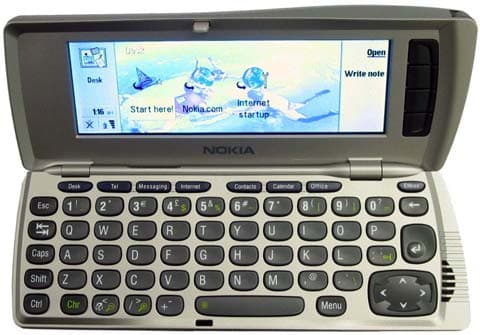
Click to zoom
Application Details
- Equipment Class
- PCE - PCS Licensed Transmitter held to ear
- Date of Grant
- Mar 03, 2002
- Application Purpose
- Original Equipment
- Date of Application
- Mar 03, 2002
- Equipment Note
- PCS Band GSM Communicator
- Frequency Range
- 1850.20000000 - 1908.80000000
- Company
- Microsoft Corporation
- Country
- United States
Documents & Files
Document Text
Text extracted from the exhibit documents filed with the FCC. Open a document above to read the original.
Users Manual
Nokia 9290 Communicator User Guide 2 The wireless phone described in this guide is approved for use in GSM 1900 networks. LEGAL INFORMATION Part No. 9354379, Issue No. 1 ©2002 Nokia Mobile Phones. All rights reserved. Nokia is a registered trademark of Nokia Corporation. Printed in Canada February/2002 Nokia, Nokia Connecting People and the Original Accessories logos are trademarks of Nokia Corporation and/or its affiliates. US Patent No 5818437 and other pending patents. Reproduction, transfer, distribution or storage of part or all of the contents in this document in any form without the prior written permission of Nokia is prohibited. Nokia and Nokia Connecting People are registered trademarks of Nokia Corporation. Other product and company names mentioned herein may be trademarks or tradenames of their respective owners. This product includes software licensed from Symbian Ltd © Symbian Ltd 1998 - 2001. All rights reserved. Symbian OS and all Symbian OS -based trademarks and logos are trademarks of Symbian Limited. . Java™ is a trademark of Sun Microsystems, Inc Part of the software in this product is © Copyright STNC Ltd. 1994-1997. All rights reserved. © 1984-1997 DataViz Inc. All rights reserved. This software contains portions of the file translation library of Conversions Plus, a product of DataViz Inc., 55 Corporate Drive, Trumbull, CT 06611 USA (203) 268-0030. International CorrectSpell™ English spelling correction system, 1995 by Lernout & Hauspie Speech Products N.V. All rights reserved. Reproduction or disassembly of embodied algorithms or database prohibited. English spelling software developed by Lernout & Hauspie Speech Products N.V. UK English Concise International Electronic Thesaurus Copyright © 1995 by Lernout & Hauspie Speech Products N.V. All rights reserved. Reproduction or disassembly of embodied programs and databases prohibited. Incorporates MPPC® compression from Hi/fn™ 3 Part of the software in this product is © Copyright ANT Ltd. 1998. All rights reserved. Stac ®, LZS ®, ©1996, Stac, Inc., ©1994-1996 Microsoft Corporation. Includes one or more U.S. Patents: No. 4701745, 5016009, 5126739, 5146221, and 5414425. Other patents pending. Incorporates LZS® compression from Hi/fn™. Hi/fn ®, LZS ®, ©1988-98, Hi/fn. Includes one or more U.S. Patents: No. 4701745, 5016009, 5126739, 5146221, and 5414425. Other patents pending. The availability of particular products may vary by region. Please check with the Nokia dealer nearest to you. This product uses certificates for security functionality. More information on Nokia certificates can be acquired from Nokia web pages. Includes RSA BSAFE cryptographic or security protocol software from RSA Security. The information contained in this user guide was written for Nokia 9290 phone. Nokia operates a policy of continuous development. Nokia reserves the right to make changes and improvements to any of the products described in this document without prior notice. UNDER NO CIRCUMSTANCES SHALL NOKIA BE RESPONSIBLE FOR ANY LOSS OF DATA OR INCOME OR ANY SPECIAL, INCIDENTAL, AND CONSEQUENTIAL OR INDIRECT DAMAGES HOWSOEVER CAUSED. THE CONTENTS OF THIS DOCUMENT ARE PROVIDED “AS IS.” EXCEPT AS REQUIRED BY APPLICABLE LAW, NO WARRANTIES OF ANY KIND, EITHER EXPRESS OR IMPLIED, INCLUDING, BUT NOT LIMITED TO, THE IMPLIED WARRANTIES OF MERCHANTABILITY AND FITNESS FOR A PARTICULAR PURPOSE, ARE MADE IN RELATION TO THE ACCURACY AND RELIABILITY OR CONTENTS OF THIS DOCUMENT. NOKIA RESERVES THE RIGHT TO REVISE THIS DOCUMENT OR WITHDRAW IT AT ANY TIME WITHOUT PRIOR NOTICE. EXPORT CONTROLS This product contains commodities, technology or software exported from the United States in accordance with the Export Administration regulations. Diversion contrary to U.S. law is prohibited. FCC/INDUSTRY CANADA NOTICE Your phone may cause TV or radio interference (for example, when using a telephone in close proximity to receiving equipment). The FCC or Industry Canada can require you to stop using your telephone if such interference cannot be eliminated. If you require assistance, contact your local service facility. This device complies with part 15 of the FCC rules. Operation is subject to the condition that this device does not cause harmful interference. 4 5 Contents Getting started 17 Using the phone 17 First start-up 18 Communicator interface 23 Setup configuration 25 PC connectivity 27 Desk 29 Telephone 29 Messaging 31 Internet 34 Contacts 36 Calendar 37 Office 39 Extras 43 Phone 45 Introduction 48 Getting help 49 Facts about your communicator 51 General information 57 6 Communicator display 57 Communicator keyboard 62 Connectors 66 Charging the battery 67 Memory card 71 General features 72 Install software from the CD-ROM 81 Activate the infrared connection 82 Phone 83 Selection keys 84 Display indicators 85 Make a call 86 Answer a call 89 Manage calls 89 Keypad lock 90 Change profiles 91 View help 92 Using the menus 92 Messages (Menu 1) 94 Call log (Menu 2) 96 Settings (Menu 3) 100 7 Forwarding (Menu 4) 105 Infrared (Menu 5) 106 SIM services (Menu 6) 106 Desk 107 Main view 107 Telephone 111 Make a call manually 112 Call a number in the telephone directory 112 Call a number in a recent calls list 113 Answer a call 113 Call and create a voice mailbox 114 Record a call 115 Make a new call during a call 115 Make conference calls 116 Transfer calls 118 Answer a waiting call 118 Send touch tones during a call 119 Telephone Settings 119 Flight profile 133 Contacts 135 Contacts directory 135 8 Make a contact card 136 Open a contact card 138 Move or copy contacts from a SIM card 138 Search for a contact card 138 Change fields in a contact card 139 Attach a ringing tone 140 Insert a picture 141 Create or modify templates 141 Store touch tones 142 Create contact groups 143 Create a SIM contact card 145 Send a contact card as a business card 147 Receive a business card 148 Settings 148 Create a new contacts database 150 Calendar 153 Calendar entries 153 Views 160 …
Text truncated - open the document above for the full version.
Users Manual
199 M e s s a g i n g 10. Messaging Messaging contains the following applications: Fax, Mail and SMS (Short Message Service). To start Messaging, press the Messaging application button on the communicator keyboard. The overall requirements for using fax, mail and SMS, applications are as follows: •The phone must be turned on. •The system you are using must support fax calls, data calls, and the Short Message Service. •The fax, data and Short Message Service service must be activated for your SIM card. Tip: To set Internet settings, see page 173. To set Mail settings, see page 213. •You must have obtained an Internet Access Point (IAP) from an Internet service provider. •You must have entered the proper Internet and Mail settings •The short message center number must be stored in the settings of the SMS application. Contact your home service provider for details. When you connect your communicator to a PC, you can synchronize your e-mails with Microsoft Windows programs. You can also reply to and read remotely Microsoft Windows and Lotus e-mail. For information on synchronization, see ‘Mail synchronization with your PC’ on page 225 and the PC Suite Guide. 200 M e s s a g i n g Messaging center Figure 76 Tip: You can move between the two frames with the Arrows or Tab key. The main view of Messaging has two frames: on the left is a list of the folders in the Messaging center, and on the right are the messages connected to the currently selected folder. Folders in the Messaging main view are: Inbox - Received faxes and short messages. Received mail appears in the Remote mailbox folder. Outbox - Messages which are waiting to be sent from the communicator. Drafts - Saved message drafts. Sent - Messages which have been sent from the communicator. Any remote mailboxes that you set up appear at the bottom of the folder list. Open folders and messages To open a folder, select the left frame in the main view of Messaging, go to the folder and press Open folder. 201 M e s s a g i n gTip: You can also press Enter to open messages and folders. To open a message, in the message list of the main view, go to the message and press Open. The message opens in the appropriate viewer, for example, a mail message opens in the mail viewer. Manage folders You can create your own folders in Drafts, in your own folders and in the root of the folder list. You cannot create new folders in Inbox, Outbox or Sent. Tip: You can create folders to IMAP4 remote mailboxes when online. 1Select the left frame in the main view of the Messaging. 2Press the Menu key and select File > Folder > Create new folder.... 3Type a name for the new folder. 4Select where you want to create the folder. 5Press Create. The new folder appears on the folder list. To move faxes, mail and short messages from one folder to another, select the file, press the Menu key and select Edit > Move. To search faxes, mail and short messages for names, dates, time, or any other pieces of text press the Menu key and select Tools > Find.... For further details, see ‘Search for text’ on page 76. Sort messages and faxes You can also sort faxes, mail and short messages by various criteria, such as date and size, which affects the way they appear in the different views of Messaging. 202 M e s s a g i n gTip: To choose the sorting order, press the Menu key and select View > Sorting order. Choose between Ascending and Descending. 1Open the folder where you want to sort the messages and faxes. 2Press the Menu key and select View > Sort by. 3Choose from the following options: Message type/Sender/Recipient/Subject/Date/ Size/Priority. Inbox Figure 77 Tip: To reply to a message in the Inbox, press the Menu key and select Write > Reply. Unread messages appear in bold. The icons in front of messages indicate message type, priority and possible attachments. Here are some of the icons that you may see: new mail in remote mailbox new fax new short message (SMS) new voice mail message new message from your system service provider new business card 203 M e s s a g i n gnew calendar invitation new ringing tone new remote configuration data unread mail unread mail received from PC by synchronization priority high priority low message contains an attachment Outbox Tip: You can send faxes, mail and short messages immediately, at a predefined time or upon request, depending on a delivery setting. See Sending options in the corresponding editors. Figure 78 Statuses Faxes, mail and short messages waiting to be sent from the communicator can have the following statuses in Outbox: •Sending - The fax or short message is currently being sent. 204 M e s s a g i n gUpon request - The mail, fax, or short message will be sent only if you specifically press Send now in the Outbox view. Waiting - The fax or short message is queuing to be sent and will be sent as soon as possible, for example, when the phone is switched on, signal strength becomes adequate, or the previous phone call ends. In the case of mail messages, Waiting shows that the message will be sent the next time you connect to your remote mailbox. Calling - Outbox is calling the recipient of the fax message. Preparing - Outbox is rendering a T.4 format fax image; this means that color is converted to black and white. Failed - One or more pages of a fax or short message failed to be sent. Tip: If the status of a fax, mail or short message is Suspended, Resend or Scheduled, you can open and delete it, or resume sending. Suspended -You have suspended the sending of the message or fax. You can resume the sending of a message by pressing Send now in the Outbox view. Resend - The fax or short message failed to be sent but the communicator will retry to send it. Scheduled - The fax or short message is scheduled to be sent at a specific time. To cancel the sending of a fax, mail or short message, select it and press Cancel sending. When a message or fax has been successfully sent, it is automatically moved to the Sent folder. 205 M e s s …
Text truncated - open the document above for the full version.
Cover Letter(s)
American Telecommunications Certification Body Inc. 6731 Whittier Ave, McLean, VA 22101 February 18, 2002 RE: Nokia Corporation FCC ID: PDNRAB-3N I have a few comments on this Application. 1.) Radiated Carrier Output Power test appears to have been performed using a field strength measurement converted to EIRP. This is not acceptable to the Commission. Only the substitution method at the carrier frequency similar to that used for your Spurious Emissions test is satisfactory. Please note that testing on a standard .8M high tabletop may produce unreliable results because of ground reflections. Be sure to identify the signal source used to feed the substitution antenna. 2.) If available, a chart of EUT antenna gain over frequency within the 1850-1910 MHz PCS band would be helpful. 3.) Test Equipment listed on pp. 20 of 26 appears to be out of calibration. Please advise. 4.) Please provide justification for 256K necessary bandwidth. A plot showing measured values would be appropriate. 5.) This device appears capable of transmitting high speed data. If so, then can it transmit across multiple time slots? Assuming it can, this could affect the total mean power and SAR probe crest factor. Please advise. 6.) Measurement uncertainty does not appear to conform with FCC’s current recommended practice. Please review. 7.) FYI: Tissue fluid temperature for each test printed on each plot is advisable. 8.) What is the expected range for RF Pout in production? SAR values can be scaled up to 5% from measured values to cover “worst case” conditions. William H. Graff President and Examining Engineer mailto: [email protected] The items indicated above must be submitted before processing can continue on the above referenced application. Failure to provide the requested information may result in application termination. Correspondence should be considered part of the permanent submission and may be viewed from the Internet after a Grant of Equipment Authorization is issued. Please do not respond to this correspondence using the email reply button. In order for your response to be processed expeditiously, you must submit your documents through the AmericanTCB.com website. Also, please note that partial responses increase processing time and should not be submitted. Any questions about the content of this correspondence should be directed to the sender.
Cover Letter(s)
NOKIA CORPORATION Nokia Mobile Phones Sinitaival 5 FIN-33720 Tampere FINLAND Tel. +358 7180 08000 Fax. +358 7180 48377 January 18, 2002 Federal Communications Commission, Authorization & Evaluation Division, 7435 Oakland Mills Road, Columbia, MD. 21046 Attention: Equipment Authorization Branch COMPLIANCE STATEMENT OF FCC ID: PDNRAB-3N The compliance statement can be seen in User Guide of PDNRAB-3N because the size of the handportable and its identification label are so small that the compliance statement can’t be printed visible enough. NOKIA CORPORATION Marko Erkkilä Product Program Manager Nokia Mobile Phones, PC Site Tampere 2 The wireless phone described in this guide is approved for use in GSM 1900 networks. LEGAL INFORMATION Part No. 9354379, Issue No. 1 ©2002 Nokia Mobile Phones. All rights reserved. Nokia is a registered trademark of Nokia Corporation. Printed in Canada February/2002 Nokia, Nokia Connecting People and the Original Accessories logos are trademarks of Nokia Corporation and/or its affiliates. US Patent No 5818437 and other pending patents. T9 text input software Copyright ©1999-2001. Tegic Communications, Inc. All rights reserved. Includes RSA BSAFE cryptographic or security protocol software from RSA Security. The information contained in this user guide was written for Nokia 9290 phone. Nokia operates a policy of continuous development. Nokia reserves the right to make changes and improvements to any of the products described in this document without prior notice. UNDER NO CIRCUMSTANCES SHALL NOKIA BE RESPONSIBLE FOR ANY LOSS OF DATA OR INCOME OR ANY SPECIAL, INCIDENTAL, AND CONSEQUENTIAL OR INDIRECT DAMAGES HOWSOEVER CAUSED. THE CONTENTS OF THIS DOCUMENT ARE PROVIDED “AS IS.” EXCEPT AS REQUIRED BY APPLICABLE LAW, NO WARRANTIES OF ANY KIND, EITHER EXPRESS OR IMPLIED, INCLUDING, BUT NOT LIMITED TO, THE IMPLIED WARRANTIES OF MERCHANTABILITY AND FITNESS FOR A PARTICULAR PURPOSE, ARE MADE IN RELATION TO THE ACCURACY AND RELIABILITY OR CONTENTS OF THIS DOCUMENT. NOKIA RESERVES THE RIGHT TO REVISE THIS DOCUMENT OR WITHDRAW IT AT ANY TIME WITHOUT PRIOR NOTICE. EXPORT CONTROLS This product contains commodities, technology or software exported from the United States in accordance with the Export Administration regulations. Diversion contrary to U.S. law is prohibited. FCC/INDUSTRY CANADA NOTICE Your phone may cause TV or radio interference (for example, when using a telephone in close proximity to receiving equipment). The FCC or Industry Canada can require you to stop using your telephone if such interference cannot be eliminated. If you require assistance, contact your local service facility. This device complies with part 15 of the FCC rules. Operation is subject to the condition that this device does not cause harmful interference.
Cover Letter(s)
1.) Radiated Carrier Output Power test appears to have been performed using a field strength measurement converted to EIRP. This is not acceptable to the Commission. Only the substitution method at the carrier frequency similar to that used for your Spurious Emissions test is satisfactory. Please note that testing on a standard .8M high tabletop may produce unreliable results because of ground reflections. Be sure to identify the signal source used to feed the substitution antenna. Following results were measured using substitution method in unechoic chamber: 1850.2MHz 29.5 dBm EIRP 891 mW EIRP 1880.0MHz 28.9 dBm EIRP 776 mW EIRP 1909.8MHz 29.2 dBm EIRP 832 mW EIRP Maximum radiated power output was sought rotating EUT 360 degrees. At each measured angle antenna was lowered and raised between one and four meters using both horizontal and vertical polarizations. Maximum radiated emission was recorded. After this EUT was replaced by a ½ wave dipole, which was polarized in accordance with the measurement antenna. Dipole was fed with a signal generator connected to amplifier using GSM modulated signal and its level was raised until the same field strength was reached than with EUT. Used level was then measured at the dipole feeding point, which is the ERP level. EIRP was calculated using known gain of dipole antenna. 2.) If available, a chart of EUT antenna gain over frequency within the 1850-1910 MHz PCS band would be helpful. Unfortunately this information is not available. 3.) Test Equipment listed on pp. 20 of 26 appears to be out of calibration. Please advise. Test report shows all the equipment to be calibrated. 4.) Please provide justification for 256K necessary bandwidth. A plot showing measured values would be appropriate. Measured 99% OBW is 251K. 5.) This device appears capable of transmitting high speed data. If so, then can it transmit across multiple time slots? Assuming it can, this could affect the total mean power and SAR probe crest factor. Please advise. There is currently no network support for HSCSD nor any plans of implementing it in USA. Maximum available time slots for HSCSD is 2. Used modulation method and power output are similar to GSM mode. Therefore and just in case, we request that existing measurement values are doubled for body-worn measurements. HSCSD dual-slot operation is available only for data mode; therefore when this device is used in normal conversation, only a single-slot mode is available. Corresponding value in the user guide will be updated from 0.33W/kg to 0.66W/kg. SAR, averaged over 1g (mW/g) Mode Channel/ f (MHz) Power (dBm) Ant In/Out CSL-25 CSL-26 Position 1 CSL-26 Position 2 29.8 In 0.28 0.38 0.44 512/1850.20 29.8 Out 0.56 0.66 0.42 29.8 In 0.24 0.30 0.34 661/1880.00 29.8 Out 0.50 0.58 0.30 29.7 In 0.16 0.18 0.30 HSCSD 1900 810/1909.80 29.7 Out 0.42 0.52 0.34 6.) Measurement uncertainty does not appear to conform with FCC’s current recommended practice. Please review. New attachment has been uploaded. 7.) FYI: Tissue fluid temperature for each test printed on each plot is advisable. This is already a standard procedure, but at the time when this particular report was prepared, it was not yet required. 8.) What is the expected range for RF Pout in production? SAR values can be scaled up to 5% from measured values to cover “worst case” conditions. Comparing tuning levels of measured sample to mass production tuning targets reported SAR values are regarded to be appropriate. Tuning target values are reported in Exhibit 10.
Cover Letter(s)
NOKIA CORPORATION Nokia Mobile Phones Sinitaival 5 FIN-33720 Tampere FINLAND Tel. +358 7180 08000 Fax. +358 7180 48377 February 18, 2002 Federal Communications Commission, Authorization & Evaluation Division, 7435 Oakland Mills Road, Columbia, MD. 21046 Attention: Equipment Authorization Branch REQUEST FOR CONFIDENTIALITY Pursuant to Sections 0.457 (d) (l) (ii) and 0.459 of the Commission’s Rules, the Applicant hereby requests confidential treatment of some of the information accompanying this Application of FCC ID: PDNRAB-3N and as outlined below: - Exhibit 4: Block Diagram - Exhibit 5: Schematic Diagrams - Exhibit 10: List of Active Devices and Tune-Up Procedure - Exhibit 12: Theory of Operation / Description of Circuitry These materials contain trade secrets and proprietary information not customarily released to the public and the public disclosure of these matters might be harmful to the Applicant and provide unjustified benefits to its competitors. The Applicant understands that pursuant to Rule 0.457 (d) (l) (ii) disclosure of this Application and all accompanying documentation will not be made before the date of the Grant for this Application. For and Behalf of: NOKIA CORPORATION Marko Erkkilä Product Program Manager Nokia Mobile Phones, PC Site Tampere
External Photos
16 Jan 2002 Exhibit 3: External Photographs FCC ID: PDNRAB-3N Applicant: Nokia Corporation Copyright © 2002 Nokia Corporation 16 Jan 2002 Exhibit 3: External Photographs FCC ID: PDNRAB-3N Applicant: Nokia Corporation Copyright © 2002 Nokia Corporation 16 Jan 2002 Exhibit 3: External Photographs FCC ID: PDNRAB-3N Applicant: Nokia Corporation Copyright © 2002 Nokia Corporation
ID Label/Location Info
FCC ID: PDNRAB-3N IC: 661 -RAB3N Ty p e : Model: RAB-3N 9290 Code: : Use only Li-ion battery 0630481 MADE IN FINLAND FCC ID: PDNRAB-3N Copyright 2002 Nokia Corporation Exhibit 1: Type Label Position Applicant: Nokia Corporation 10 Jan 2002 FCC ID: PDNRAB-3N Copyright 2002 Nokia Corporation Exhibit 1: Type Label Applicant: Nokia Corporation 10 Jan 2002 FCC ID: PDNRAB-3N IC: 661 -RAB3N Ty p e : Model: RAB-3N 9290 Code: : Use only Li-ion battery 0630481 MADE IN FINLAND FCC ID: PDNRAB-3N IC: 661 -RAB3N Ty p e : Model: RAB-3N 9290 Code: : Use only Li-ion battery 0630481 MADE IN FINLAND
Internal Photos
16 Jan 2002 Exhibit 9: Internal Photographs FCC ID: PDNRAB-3N Applicant: Nokia Corporation Copyright © 2002 Nokia Corporation 16 Jan 2002 Exhibit 9: Internal Photographs FCC ID: PDNRAB-3N Applicant: Nokia Corporation Copyright © 2002 Nokia Corporation 16 Jan 2002 Exhibit 9: Internal Photographs FCC ID: PDNRAB-3N Applicant: Nokia Corporation Copyright © 2002 Nokia Corporation
RF Exposure Info
NOKIA CORPORATION Nokia Mobile Phones Sinitaival 5 FIN-33720 Tampere FINLAND Tel. +358 7180 08000 Fax. +358 7180 48377 January 18, 2002 Federal Communications Commission, Authorization & Evaluation Division, 7435 Oakland Mills Road Columbia, MD. 21046 Attention: Equipment Authorization Branch We hereby certify that the transceiver FCC ID: PDNRAB-3N complies with ANSI/IEEE C95.1- 1992 Standard for Safety Levels with Respect to Human Exposure to Radio Frequency Electromagnetic Fields, 3 kHz to 300 GHz. Compliance was determined by testing appropriate parameters according to standard. NOKIA CORPORATION Marko Erkkilä Product Program Manager Nokia Mobile Phones, PC Site Tampere PC Site Oulu Exhibit 11: SAR Report DTX03705-EN Applicant: Nokia Corporation FCC ID: PDNRAB-3N Copyright 2002 Nokia Corporation 1 (13) SAR Compliance Test Report Test report no.: Not numbered Date of report: 2002-01-29 Number of pages: 44 Contact person: Olli Kautio Responsible test engineer: Pertti Mäkikyrö Testing laboratory: Nokia Corporation Elektroniikkatie 10 P.O. Box 50 FIN-90571 OULU Finland Tel. +358-10-5051 Fax. +358-10-505 7222 Client: Nokia Corporation Elektroniikkatie 10 P.O. Box 50 FIN-90571 OULU Finland Tel.+358-10-5051 Fax. +358-10-505 7222 Tested devices: PDNRAB-3N, CSL-25, CSL-26 Supplement reports: - Testing has been carried out in accordance with: IEEE P1528-200X Draft 6.4 Recommended Practice for Determining the Peak Spatial-Average Specific Absorption Rate (SAR) in the Human Body Due to Wireless Communications Devices: Experimental Techniques Documentation: The documentation of the testing performed on the tested devices is archived for 15 years at PC Site Oulu Test results: The tested device complies with the requirements in respect of all parameters subject to the test. The test results and statements relate only to the items tested. The test report shall not be reproduced except in full, without written approval of the laboratory. Date and signatures: 2002-01-29 For the contents: Pertti Mäkikyrö Engineering Manager, EMC Miia Nurkkala Test Engineer PC Site Oulu Exhibit 11: SAR Report DTX03705-EN Applicant: Nokia Corporation FCC ID: PDNRAB-3N Copyright 2002 Nokia Corporation 2 (13) CONTENTS 1.SUMMARY FOR SAR TEST REPORT ..........................................................................................................................3 1.1MAXIMUM RESULTS FOUND DURING SAR EVALUATION............................................................................................................ 3 1.1.1Head Configuration.......................................................................................................................................................... 3 1.1.2Body Worn Configuration............................................................................................................................................... 3 1.1.3Measurement Uncertainty ............................................................................................................................................. 3 2.DESCRIPTION OF TESTED DEVICE .............................................................................................................................4 2.1PICTURE OF PHONE...................................................................................................................................................................... 4 2.2D ESCRIPTION OF THE ANTENNA................................................................................................................................................... 4 2.3B ATTERY OPTIONS........................................................................................................................................................................ 4 2.4B ODY WORN ACCESSORIES......................................................................................................................................................... 5 3.TEST CONDITIONS ........................................................................................................................................................5 3.1AMBIENT CONDITIONS................................................................................................................................................................. 5 3.2RF CHARACTERISTICS OF THE TEST SITE........................................................................................................................................ 5 3.3T EST SIGNAL, FREQUENCIES, AND OUTPUT POWER..................................................................................................................... 5 4.DESCRIPTION OF THE TEST EQUIPMENT.................................................................................................................6 4.1SYSTEM ACCURACY VERIFICATION.............................................................................................................................................. 6 4.2T ISSUE SIMULANTS...................................................................................................................................................................... 7 4.2.1Head Tissue Simulant ...................................................................................................................................................... 7 4.2.2Muscle Tissue Simulant................................................................................................................................................... 7 4.3P HANTOMS.................................................................................................................................................................................. 8 4.4I SOTROPIC E-FIELD PROBE ET3DV6........................................................................................................................................... 8 5.DESCRIPTION OF THE TEST PROCEDURE ................................................................…
Text truncated - open the document above for the full version.
RF Exposure Info
PC Site Oulu 1. DIPOLE ANTENNA The dipole antenna, which is manufactured by Schmid & Partner Engineering AG, is matched to be used near flat phantom filled with tissue simulating solution. Length of the dipole is 68 mm with overall height of 300mm. A specific distance holder is used in the positioning of the antenna to ensure correct spacing between the phantom and the dipole. Manufacturer's reference dipole data is presented as a part of this supplemental report. 2. Z-PLOTS Z-plots of maximum measurement results in ‘at the ear’ –position (PDNRAB-3N) and ‘body-worn’ –positions (PDNRAB-3N, CSL-26) in GSM1900 mode are presented as a part of this supplemental report. …
Text truncated - open the document above for the full version.
Contact Information
Applicant
Hasnain Syed(Director, EMC, SI and RF Compliance)
Technical Contact
Nokia CorporationKare Oksanen
[email protected]+011 358 7180 08000
Elektroniikkatie 10 · Oulu · Finland
Technical Specifications
| # | Rule Parts | Frequency Range | Power Output | Emission | Tolerance |
|---|---|---|---|---|---|
| 1 | 24E | 1.85 GHz - 1.91 GHz | 891.00 mW | 256KGXW | 0.1000000000 ppm |
Other Applications from Microsoft Corporation

PDNRM-1020
Jul 07, 2014GSM/WCDMA cellular device w/BT, BLE, WLAN
Equipment Class
JBP - Part 15 Class B Computing Device Peripheral
PDNRM-1018
Jul 06, 2014GSM/WCDMA cellular device w/BT, BLE, WLAN
Equipment Class
DSS - Part 15 Spread Spectrum Transmitter
PDNRM-975
May 27, 2014GSM/WCDMA/LTE cellular device w/BT, BLE, WLAN
Equipment Class
DTS - Digital Transmission System
PDNRM-974
May 12, 2014GSM/WCDMA/LTE cellular device w/BT, BLE, WLAN
Equipment Class
DTS - Digital Transmission System
PDNRM-979
Mar 09, 2014GSM/WCDMA cellular device w/BT, BLE, WLAN
Equipment Class
DTS - Digital Transmission System