PZ9-WB101X-WG1KInternet Phone
WebGate Inc.
Click to zoom
Application Details
- Equipment Class
- JBP - Part 15 Class B Computing Device Peripheral
- Date of Grant
- Nov 08, 2001
- Application Purpose
- Original Equipment
- Date of Application
- Nov 08, 2001
- Equipment Note
- Internet Phone
- Company
- WebGate Inc.
- Country
- South Korea
Documents & Files
Document Text
Text extracted from the exhibit documents filed with the FCC. Open a document above to read the original.
Users Manual
WebEye B101 Manual Ver 1.0 WebEye B101 User’s Guide * This manual is for WebEye B101 firmware version 1.2.0. If you have later version of firmware, please download the last updated user’s guide from WebGate’s homepage (www.webgateinc.com) WebGate Inc. System Requirements nn For WebEye • Network: 10 Base-T LAN (Leased line, xDSL, Cable Modem, ISDN) or PSTN nn For a PC to access WebEye • Processor: Pentium II and above • RAM: 64MB and More • OS: Windows 98/ME/NT/2000 • Screen Resolution: 1024 X 768 pixels and above • Network: 10 Base-T LAN or PSTN WebEye WebEye B101B101 User’s Guide 2 FCC Compliance Statement Caution : Any changes or modifications in construction of this device which are not expressly approved the party responsible for compliance could void the user's authority to operate the equipment. NOTE : This equipment has been tested and found to comply with the limits for a Class B digital device, pursuant to part 15 of the FCC Rules. These limits are designed to provide reasonable protection against harmful interference in a residential installation. This equipment generates, uses and can radiate radio frequency energy and, if not installed and used in accordance with the instructions, may cause harmful interference to radio communications, However, there is no guarantee that interference will not occur in a particular installation. If this equipment does cause harmful interference to radio or television reception, which can be determined by turning the equipment off and on, the user is encouraged to try to correct the interference by one or more of the following measures: - Reorient or relocate the receiving antenna. - Increase the separation between the equipment and receiver. - Connect the equipment into an outlet on a circuit different from that to which the receiver is connected. - Consult the dealer or an experienced radio/TV technician for help. WebEye WebEye B101B101 User’s Guide 3 Important Notice 1. WebEye B101 is not weatherproof. Therefore you should be well aware of environmental specifications that are included in the manual. In case of outdoor use, where it needs additional weather criteria, you should equip weatherproof case to protect WebEye B101 from water, moisture, or temperature (higher or lower than specification). For WebEye cleaning, gently wipe with clean dry cloth. 2. Be sure to use a 12V DC or 24V AC adaptor to supply power to WebEye B101. Connecting WebEye B101 to an adaptor other than 12V DC or 24V AC, may cause electric damage to WebEye B101. 3. Be caution in handling WebEye B101 for physical shocks may harm the product. 4. WebEye B101 is made of aluminum. Therefore you can hurt human beings if you throw it to them or hit on them. When installing WebEye B101, be sure it is attached tight and stable to avoid any human injures. Be cautious to locate on safe places where children are unreachable. 5. If WebEye B101 does not operate properly, please contact the closest local WebGate distributor for after sales service. In all cases, you are prohibited to disassemble the product. If so, WebGate is not responsible for any malfunction nor service warranty. 6. Camera surveillance laws may differ for each country. Therefore, please contact the local region first to avoid any surveillance law violations and to apply for authorized purposes only. WebEye WebEye B101B101 User’s Guide 4 CONTENTS I. Introduction.....................................................................................................................................................................6 II. Product Description.....................................................................................................................................................7 1. Contents........................................................................................................................................................................7 2. WebEye B101 view and description........................................................................................................................7 1) Front view and description..............................................................................................................................7 2) Rear view and description...............................................................................................................................8 3) LED of Ethernet port........................................................................................................................................8 4) Descriptions on DIP Switches........................................................................................................................9 III. WebEye Installation Summary, Connection & Placing....................................................................................9 1. Installation Summary..................................................................................................................................................9 2. Connecting....................................................................................................................................................................9 IV. Installing WebEye Setup Program..........................................................................................................................9 V. Assigning IP Address and Configuring Administrator’s Condition.............................................................10 1. Connecting WebEye to a PC...................................................................................................................................10 1) Connecting WebEye on Internet or LAN....................................................................................................10 2) Connecting WebEye to a PC.........................................................................................................................10 2. Assigning IP address and Configuring administrator’s condition…
Text truncated - open the document above for the full version.
External Photos
Test report Our reference : KEL01I-B016K Page : B1 of Appendix Issued date : 2001-10-19 Appendix-B : External Photographs of E.U.T <FRONT VIEW OF EUT> <REAR VIEW OF EUT>
ID Label/Location Info
Test report Our reference : KEL01I-B016K Page : D1 of Appendix Issued date : 2001-10-19 Appendix-D : FCC ID label location information and Sample - FCC ID label location information The label included following statement will be attached on the bottom side of product. - FCC ID label sample
Internal Photos
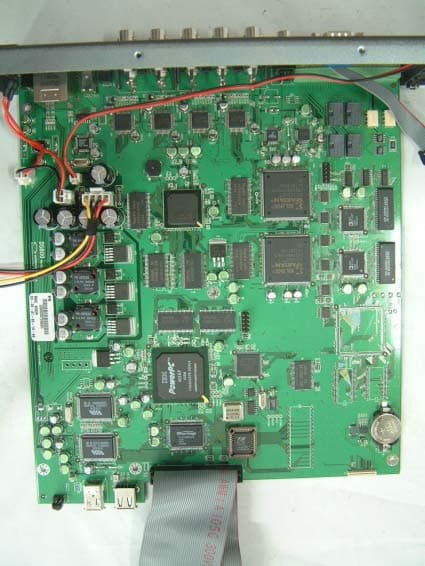
Test report Our reference : KEL01I-B016K Page : C1 of Appendix Issued date : 2001-10-19 Appendix-C : Internal Photographs of E.U.T <INTERNAL VIEW OF E.U.T> Test report Our reference : KEL01I-B016K Page : C2 of Appendix Issued date : 2001-10-19 <FRONT VIEW OF MAIN BOARD> Test report Our reference : KEL01I-B016K Page : C3 of Appendix Issued date : 2001-10-19 <REAR VIEW OF MAIN BOARD>
Test Report
CERTIFICATE OF COMPLIANCE 352 Youngduk-Ri, Kihung-Eup, Yongin-City, Kyunggi-Do, Korea 449-908 TEL : (82)31-206-4693 FAX : (82)31-206-3051 http://www.kesilab.com [email protected] http://www.koreaemc.co.kr [email protected] (CLASS B) CERTIFICATION OF COMPLIANCE is hereby issued to the named Applicant and is VALID ONLY for the equipment identified below: Date of Tested : Oct. 15. 2001 Applicant’s Name : WebGate Inc. Applicant’s Address : 4F, Pika Bldg., 894-20, Hokye 2-Dong, Dongan-Ku, Anyang-Si, Kyunggi-Do, Korea. Manufacturer’s Name : WebGate Inc. Manufacturer’s Address : 4F, Pika Bldg., 894-20, Hokye 2-Dong, Dongan-Ku, Anyang-Si, Kyunggi-Do, Korea. Declares that the product Product Description : Web Server Camera Brand Name : Model Number : WebEye B101 FCC ID : PZ9-WB101X-WG1K Conforms to FCC Rules and Regulations Part 15 Subpart B requirements. This product herewith complies with the requirements of the FCC Rules and Regulations as listed below: Part 15.107: Conducted Emissions. Part 15.109: Radiated Spurious Emissions. TESTED and CERTIFIED by: KOREA EMC LABORATORY 352 Youngduk-Ri, Kihung-Eup, Yongin-Si, Kyunggi-Do, 449-908, KOREA Date : Oct. 19. 2001 Report No : KEL01I-B016K Authorized Signature : M. S. CHO / President Test report Our reference : KEL01I-B016K Page : 2 of 13 Issued date : 2001-10-19 Korea EMC Laboratory TABLE OF CONTENTS DESCRIPTION Page 0. VERIFICATION OF COMPLIANCE 3 1. GENERAL INFORMATION 1.1 Product Description 4 1.2 Related Submittal(s)/Grant(s) 4 1.3 Tested System Details 4 1.4 System Configuration 4 1.5 General Setup of the test Shield room 5 1.6 Test Facility 5 2. Measurement Procedure 2.1 System test configuration 6 2.1.1 Video mode Justification 6 2.1.2 EUT Exercise S/W 6 2.2 Special Accessories 6 2.3 Equipment Modification 6 2.4 System Configuration Diagram 6 2.5 Preliminary testing 7 2.6 Shielded Enclosure 7 2.7 Data Reporting Format 7 2.8 Operating Condition 7 2.9 Conditioning of the EUT 7 2.10 Power Line Conducted Emissions 8 2.11 Open field Radiated Emissions Tests 8 3. Measurement Data 3.1 Conducted Emission Data 9 3.2 Conducted Emission Graph 10 3.3 Radiated Emission Data 11 3.4 Summary 12 4. Labeling Requirement 13 Appendix - A : Test set-up Photographs (Conducted and Radiated) - B : External Photographs of E.U.T - C : Internal Photographs of E.U.T - D : FCC ID label location information and sample - E : Block Diagram - F : User’s Manual Test report Our reference : KEL01I-B016K Page : 3 of 13 Issued date : 2001-10-19 Korea EMC Laboratory 0 . VERIFICATION OF COMPLIANCE Equipment Under Test : Web Server Camera Model Number : WebEye B101 Serial Number : Prototype Manufacturer : WebGate Inc. 4F, Pika Bldg., 894-20, Hokye 2-Dong, Dongan-Ku, Anyang-Si, Kyunggi-Do, Korea. Type of Test : FCC CLASS B Report Number : KEL01I-B016K Date Tested : Oct. 15. 2001 Tested By : S. J. LEE The results show that the sample equipment tested as described in this reports is in compliance with the CLASS B conducted and radiated emission limits of FCC Rules Part 15, Subpart B. Test report Our reference : KEL01I-B016K Page : 4 of 13 Issued date : 2001-10-19 Korea EMC Laboratory 1. GENERAL INFORMATION 1.1 PRODUCT DESCRIPTION The WebEye B101 is a Web Server Camera made by WebGate Inc. in Korea. Refer to the user's manual for more information. 1.2 Related Submittal(s)/Grant(s) N/A 1.3 Tested System Details Type MODEL NAME FCC ID Serial No Manufacturer --------------------------------------------------------------------------------------------------------------------------- Web Server Camera WebEye B101 PZ9-WB101X-WG1K Prototype WebGate Inc. PC VECTRA VL400/800 DoC SG05005352 HP Monitor G790 GSS19001 M885200416 Viewsonic Corp. Keyboard SKR-1032 GJJSKR-1032 1EAC000237 SEJIN Mouse SMB-601 GJJB50PAQ SKBE020496 SEJIN Camera EIA 9909252 WebGate Inc. CCTV Monitor VA242NV NONE PU WON CO., LTD. Adapter HPW-2012U NONE HIGH POWER Adapter PW108 NONE AULT KOREA CO. 1.4 System Configuration Type Model Name Serial NO Manufacturer Remark Main Board WEBEYE B101 NONE WebGate Inc. KOREA Test report Our reference : KEL01I-B016K Page : 5 of 13 Issued date : 2001-10-19 Korea EMC Laboratory 1.5 General Set-up of the Test Shielded Room The EUT was set up in accordance with the suggested configuration given in FCC measurement Procedure ANSI C63.4, 1992. The measurement are performed in the shielded room which dimension is 3.0*7.0*2.5(m). The EUT was placed on a non conductive table which is 1.0*1.5(m), 80cm above an earthed ground plane and is kept at least 1m from any other earthed ground plane except the rear of table top being removed 40cm from a vertical conducting plane. Power to the EUT was provided through the LISN(KNW-407,Kyoritsu) which has the Impedance vs Frequency Characteristic in accordance with the Fig.1 Impedance Characteristic of LISN. Peripheral equipment required to provide a functional system(support equipment) for EUT testing was powered through another LISN(NSLK8128,Schwarzbeck). Power to the LISN was filtered to eliminate ambient signal interference. A coaxial type connector which provides a 50 Ohm terminating impedance was provided for the test instrument. The excess length of the power cord was wrapped in the two non metallic pegs attached to the top of the LISN. The two pegs are 9cm high, approximately 2.0cm in diameter and that are spaced 6cm on the center apart. 1.6 Test Facility Location: Korea EMC Laboratory 352 Yungduck-Ri Kihung-Eup,Yongin-City Kyungki-Do,Korea Site : - 3/10m Open Fielded Radiated - Indoor Line Conducted Room(Shielded) The Open Field Radiated and Indoor Line Conducted sites are constructed and calibrated to meet the FCC requirements in documents ANSI C63.4 1992. Korea EMC Lab. was refiled in FCC in 1998. INSTRUMENTATION Description Model Manufacturer Serial No. Last Cal. Due Cal. Test Receiver ESH-2 RodeSchwarz 893268/004 '2001.06.15. '2002.06.15 Test Receiver ESVS10 RodeSchwarz 825120/006 '2001.10.10. '2002.10.10 Test Receiver ESPC RodeSchwarz 84…
Text truncated - open the document above for the full version.
Test Setup Photos
Test report Our reference : KEL01I-B016K Page : A1 of Appendix Issued date : 2001-10-19 Appendix-A : Test Setup Photographs - Conducted Setup Photographs LINE CONDUCTED SETUP PHOTOGRAPH - FRONT VIEW LINE CONDUCTED SETUP PHOTOGRAPH - REAR VIEW Test report Our reference : KEL01I-B016K Page : A2 of Appendix Issued date : 2001-10-19 - Radiated Setup Photograph RADIATED EMISSION SETUP PHOTOGRAPH - FRONT VIEW ( 30 - 300 MHz ) RADIATED EMISSION SETUP PHOTOGRAPH - REAR VIEW ( 30 - 300 MHz ) Test report Our reference : KEL01I-B016K Page : A3 of Appendix Issued date : 2001-10-19 RADIATED EMISSION SETUP PHOTOGRAPH - FRONT VIEW ( 300- 1000 MHz ) RADIATED EMISSION SETUP PHOTOGRAPH - REAR VIEW ( 300 - 1000 MHz )
Contact Information
Applicant
Richard Cho(R & D center Team leader)
Test Firm
Korea EMC Laboratory Co., LtdMan-sung Cho
Technical Specifications
| # | Rule Parts | Frequency Range | Power Output |
|---|---|---|---|
| 1 | 15B | - | - |
Other Applications from WebGate Inc.
Sep 11, 2003
Equipment Class
JBP - Part 15 Class B Computing Device Peripheral
PZ9-EB418X-WG1U
Apr 22, 2003Digital Video Recorder
Equipment Class
JBP - Part 15 Class B Computing Device Peripheral
PZ9-WE020N-WG1U
Aug 01, 2002Web Server Camera
Equipment Class
JBP - Part 15 Class B Computing Device Peripheral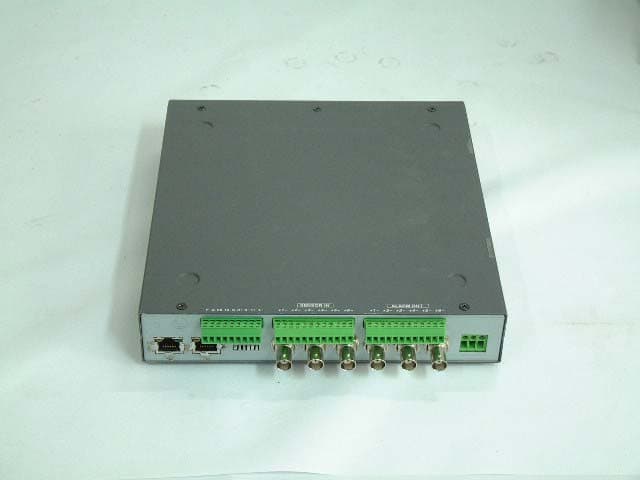
PZ9-WB106X-WG1K
Mar 07, 2002WEB SERVER CAMERA
Equipment Class
JBP - Part 15 Class B Computing Device Peripheral