QK3-WB0001S6120, S6120D LIFEBOOK Ginger Laptop PC's
Fujitsu Australia Ltd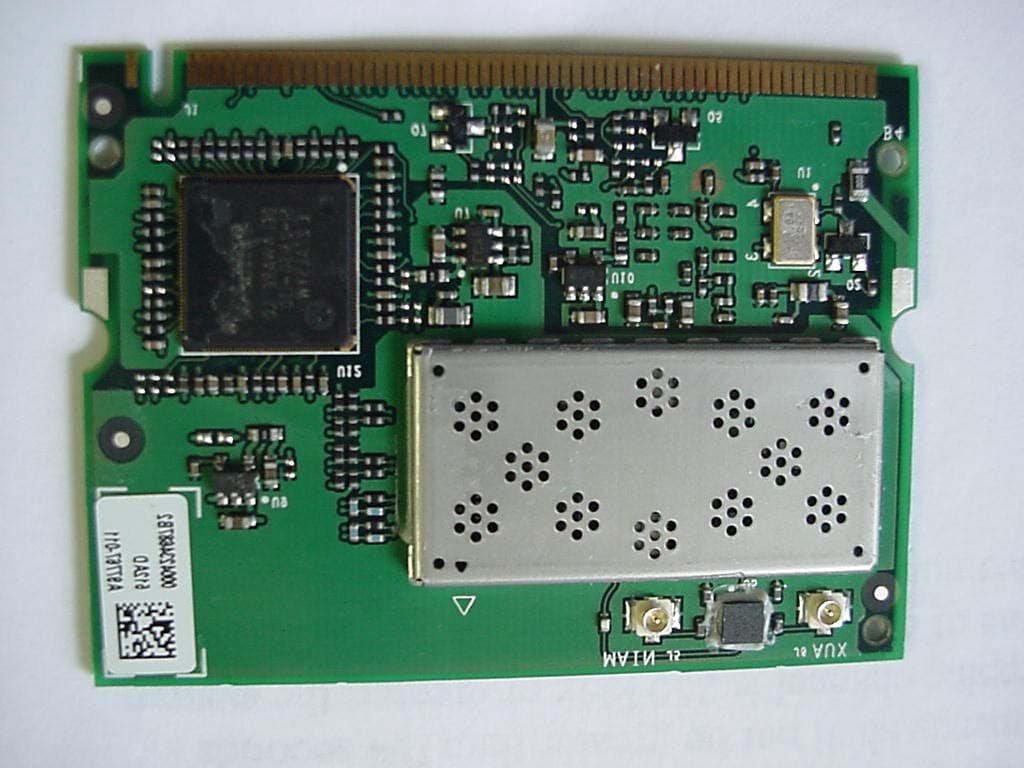
Click to zoom
Application Details
- Equipment Class
- DSS - Part 15 Spread Spectrum Transmitter
- Date of Grant
- May 26, 2003
- Application Purpose
- Original Equipment
- Date of Application
- May 26, 2003
- Equipment Note
- S6120, S6120D LIFEBOOK Ginger Laptop PC's
- Frequency Range
- 2402.00000000 - 2480.00000000
- Company
- Fujitsu Australia Ltd
- Country
- Australia
Documents & Files
Document Text
Text extracted from the exhibit documents filed with the FCC. Open a document above to read the original.
Users Manual
FCC ID: QK3-WB0001 IC: 337H-WB0001 Report No. M030507_Certification_Ginger_CalWB EMC Technologies Pty Ltd. 57 Assembly Drive, Tullamarine VIC 3043 Australia www.emctech.com EMC TECHNOLOGIES REPORT NUMBER M030507_Certification_Ginger_CalWB APPENDIX J - USER MANUALS (SUPPLIED TO END USER) APPENDIX J1 - MINI-PCI WIRELESS LAN (Calexico) USER MANUAL Intel(R) PRO/Wireless LAN Mini PCI Adapter User's Guide This document provides information for the following wireless devices: • Intel(R) PRO/Wireless LAN 2100 3B Mini PCI Adapter, operating at 2.4 GHz These wireless adapters operate with high-capacity networks using multiple access points within large or small environments. Using the Intel(R) PROSet Windows utility you can configure, manage wireless local area network (WLAN) management tasks, adapter switching functions, and connections. Wireless LAN General Information 1.About Wireless LAN Technology Adapter Setup and Configuration 2.Software Installation 3.Using Intel(R) PROSet 4.Connecting to a Network using Intel® PROSet 5.Security Overview 6.Setting Up WEP Encryption and Authentication 7.Troubleshooting 8.Specifications 9.Glossary Support and Warranty 10.Customer Support 11.Software License 12.Safety and Regulatory Notices 13.Limited Warranty 14.Legal Notices Copyright (c) 2003 Intel Corporation. All rights reserved. Intel Corporation, 5200 N.E. Elam Young Parkway, Hillsboro, OR 97124-6497 USA Intel Corporation assumes no responsibility for errors or omissions in this document. Nor does Intel make any commitment to update the information contained herein. Intel, Itanium, and Pentium are trademarks or registered trademarks of Intel Corporation or its subsidiaries in the United States and other countries. *Other names and brands may be claimed as the property of others. 1.About Wireless LAN Technology A wireless network connects computers without using network cables. Computers use radio communications to send data between each other. You can communicate directly with other wireless computers, or connect to an existing network through a wireless access point. When you set up your wireless adapter, you select the operating mode for the kind of wireless network you want. You can use your Intel(R) PRO/Wireless adapter to connect to other similar wireless devices that comply with the 802.11 standard for wireless networking. Choosing a Wireless LAN Mode Wireless LANs can operate with or without access points, depending on the number of users in the network. Infrastructure mode uses access points to allow wireless computers to send and receive information. Wireless computers transmit to the access point, the access point receives the information and rebroadcasts it to other computers. The access point can also connect to a wired network or to the Internet. Multiple access points can work together to provide coverage over a wide area. Peer-to-Peer mode, also called Ad Hoc mode, works without access points and allows wireless computers to send information directly to other wireless computers. You can use Peer-to-Peer mode to network computers in a home or small office or to set up a temporary wireless network for a meeting. Configuring a Wireless LAN There are three basic components that must be configured for a wireless LAN to operate properly: • Network Name—Each wireless network uses a unique Network Name to identify the network. This name is called the Service Set Identifier (SSID). When you set up your wireless adapter, you specify the SSID. If you want to connect to an existing network, you must use the name for that network. If you are setting up your own network you can make up your own name and use it on each computer. The name can be up to 32 characters long and contain letters and numbers. • Profiles—When you set up your computer to access a wireless network, Intel(R) PROSet creates a profile for the wireless settings that you specify. If you want to connect to another network, you can scan for existing networks and make a temporary connection, or create a new profile for that network. After you create profiles, your computer will automatically connect when you change locations. • Security—The 802.11 wireless networks use encryption to help protect your data. Wired equivalent privacy (WEP) uses a 64-bit or 128-bit shared encryption key to scramble data. Before a computer transmits data, it scrambles the data using the secret encryption key. The receiving computer uses this same key to unscramble the data. If you are connecting to an existing network, use the encryption key provided by the administrator of the wireless network. If you are setting up your own network you can make up your own key and use it on each computer. Identifying a Wireless Network Depending on the size and components of a wireless LAN, there are many ways to identify a wireless LAN: • The Network Name or Service Set Identifier (SSID)—Identifies a wireless network. All wireless devices on the network must use the same SSID. • Extended Service Set Identifier (ESSID)—A special case of SSID used to identify a wireless network that includes access points. • Independent Basic Service Set Identifier (IBSSID)—A special case of SSID used to identify a network of wireless computers configured to communicate directly with one another without using an access point. • Basic Service Set Identifier (BSSID)—A unique identifier for each wireless device. The BSSID is the Ethernet MAC address of the device. • Broadcast SSID—An access point can respond to computers sending probe packets with the broadcast SSID. If this feature is enabled on the access point, any wireless user can associate with the access point by using a blank (null) SSID. Surveying the Site of Your Wireless LAN Conducting a site survey for your wireless LAN is the most crucial step in the process of setting up a wireless network. It greatly reduces the amount of troubleshooting you will have to do once you have the wireless LAN set up and ready for connection testing. T…
Text truncated - open the document above for the full version.
Users Manual
FCC ID: QK3-WB0001 IC: 337H-WB0001 Report No. M030507_Certification_Ginger_CalWB EMC Technologies Pty Ltd. 57 Assembly Drive, Tullamarine VIC 3043 Australia www.emctech.com EMC TECHNOLOGIES REPORT NUMBER M030507_Certification_Ginger_CalWB APPENDIX J - USER MANUALS (SUPPLIED TO END USER) APPENDIX J2 - LIFEBOOK GINGER BLUETOOTH USER MANUAL LIFEBOOK Operating Manual BLUETOOTH™ with Plugfree English Are there ... ... any technical problems or other questions which you would like to be clarified? Please contact: _ your sales partner _ your sales outlet Further information can be found in the "Safety" and "Warranty" manuals. The latest information on our products, tips, updates, etc., can be found on the internet under: http://www.fujitsu-siemens.com Published by Fujitsu Siemens Computers GmbH Order No.: A26391-K118-Z130-1-7619 Printed in the Federal Republic of Germany AG 0602 06/02 BLUETOOTH™ with Plugfree Operating Manual June 2002 edition The BLUETOOTH trademarks are the property of BLUETOOTH SIG, Inc., U.S.A. licensed for Fujitsu Siemens Computers GmbH. Microsoft, MS, MS-DOS, Windows, and Windows NT are registered trademarks of Microsoft Corporation. VESA and DPMS are trademarks of Video Electronics Standards Association. PS/2 is a registered trademark of International Business Machines, Inc. Pentium is a registered trademark of Intel Corporation, USA. All other trademarks referenced are trademarks or registered trademarks of their respective owners, whose protected rights are acknowledged. Copyright _ Fujitsu Siemens Computers GmbH 2002 All rights, including rights of translation, reproduction by printing, copying or similar methods, in part or in whole, are reserved. Offenders will be liable for damages. All rights, including rights created by patent grant or registration of a utility model or design, are reserved. Delivery subject to availability. Right of technical modification reserved. This manual was produced by cognitas. Gesellschaft für Technik-Dokumentation mbH www.cognitas.de A26391-K118-Z130-2-7619 Contents Introduction to wireless communication .......................................................................................1 Notational conventions ......................................................................................................................2 Important notes ...............................................................................................................................3 Safety ................3 CE marking........4 Selecting a location ...........................................................................................................................4 Producing readiness for operation ................................................................................................5 Installing BLUETOOTH device drivers...............................................................................................5 Plugfree software for BLUETOOTH...................................................................................................6 Installing the Plugfree software..................................................................................................7 Starting BLUETOOTH and Plugfree software ............................................................................8 Search for other BLUETOOTH devices .....................................................................................9 Establishing connection ...........................................................................................................10 Disconnecting connection........................................................................................................11 Ending Plugfree .......................................................................................................................11 Troubleshooting ............................................................................................................................13 Index...............15 Regulatory Compliance Statements A26391-K118-Z130-2-7619 1 Introduction to wireless communication With your notebook with an integrated BLUETOOTH™ module you can communicate wirelessly with other BLUETOOTH devices, e.g. with another notebook. This notebook with integrated BLUETOOTH is a Power Class 1 device, i.e. it has a maximum range of 100 meters. The range of the communication paths is shortened depending on the user environment (e.g. walls or furniture), building structure and output power class of the partner. BLUETOOTH supports many functions (Services), e.g. wireless printing of documents, accessing the Internet and transmitting or receiving data, e-mails and faxes. i However, please note that not every BLUETOOTH device can make use of all Services. Details are contained in the operating manual for your device. Technical information on wireless communication can be found on our website at www.fujitsu-siemens.com/wireless. This operating manual describes how to put BLUETOOTH into operation and install the related Plugfree software. Read through this manual carefully before you use BLUETOOTH for the first time. Familiarise yourself with the proper use of the technology. What must be observed when setting up the notebook and when operating notebooks with a radio connection is contained in the chapter "Important notes". You will find additional information in the manuals for your notebook, your operating system and the Plugfree online help. wireless communication Introduction to wireless communication Notational conventions 2 A26391-K118-Z130-2-7619 Notational conventions The meanings of the symbols and fonts used in this manual are as follows: ! Indicates information which is important for your health or for preventing physical damage. Failure to follow the instructions may lead to loss of data, invalidate your warranty, destroy the notebook, or endanger your life. i Indicates important information which is required to use the system properly. E Text which follo…
Text truncated - open the document above for the full version.
Block Diagram
FCC ID: QK3-WB0001 IC: 337H-WB0001 Report No. M030507_Certification_Ginger_CalWB EMC Technologies Pty Ltd. 57 Assembly Drive, Tullamarine VIC 3043 Australia www.emctech.com EMC TECHNOLOGIES REPORT NUMBER M030507_Certification_Ginger_CalWB ANNEX 2: MINI-PCI WIRELESS LAN (CALEXICO) THEORY OF OPERATION Calexico Single Band Card Theory of Operation Overview The Intel® PRO/Wireless LAN 2100 miniPCI adapter implements the 802. 11b physical (RF) specificati on. It operates at 1, 2, 5.5, and 11 Mbps. The Mini PCI card uses a Complementary code keying (CCK) baseband and SA2400 IC for modulation, demodulation, spreading and despreading of the RF signal. LAN 2100 The Intel® PRO/Wireless LAN 2100 miniPCI adapter implements the 82531ME, 802.11b CCK Baseband, and the Philips SA2400 radio ICs . 82531ME MAC Baseband OFDM processor CCK Baseband Processor Antennas MINI PCI Interface SA2400 2.4 GHz Radio Chip Tx, Rx Figure 1: Simplified Block Diagram for the Intel® PRO/Wireless LAN 2100 miniPCI adapter Transmit mode: The “upper” Media Access Control (MAC) logic inside the 82531ME is used to send and receive packets and transfers data to/from the host computer via the miniPCI interface. The 85231ME communicates with the CCK BBP IC through a special parallel interface called the Host Bus (H-BUS) interface. This i nterface uses registers with double-synchronizing flip-flops on all communica tion signals to prevent any ti ming-related problems between the two ICs. The CCK BBP IC functions as a “lower” MAC for the 80211b standard. This IC is also used to generate differential, analog I/Q vo ltage levels. The transmit I/Q signals are generated by 10 bit DACs (while the rece ive I/Q signals are read by 8 bit ADCs). These voltage level signals are first converted to current levels by external resistors networks and then are up-converted inside the SA2400 to the desired transmitt ing frequency. An integrated 4 th order low-pass Butterworth 9.75MHz filt er is used in the up-converter section fo r spectral shaping and reconstruction filterin g. Figure 1: Detailed Block Diagram for the Intel® PRO/Wireless LAN 2100 miniPCI adapter (Red items are on back side of PCB) 82531ME BBP MAC miniPCI SA2400 2.45GHz Direct Conversion Radio 40 MHz 22 MHz CCK BBP Differential I and Q MAX2242 RF PA 2.4-2.5GHz LOW PASS FILTER DP2T RF SWITCH 2.45GHz BANDPASS FILTER LNA 6dB PAD 6dB PAD 2.45GHz BANDPASS FILTER BALUN BALUN EEPROM ISOLATOR Rx Tx LOW PASS FILTER 1.8VA 1.8VD 3.3V 3.3VA 1.8VD 3.3V 2.9VA 3.3VA 3.3VA 3.3V 2.9VA J5 J6 Transmit mode (cont’d): The SA2400 generates a differential RF signal at the desired operat ing frequency. Please note, that since this is a zero-IF typ e design, there are no Intermediate Frequency (IF) stages used. The SA2400 beats the IQ modulation directly up to the appropriate frequency of ope ration set by its built-in PLL. Upon exiting from the SA2400, this differential signal is transformed to single ended form using a discrete balu n circuit. The balun is designed to convert 100ohm differential impedance to 50ohms single ended impedance while also supplying proper bias voltage to the output stage of the Philips IC. From the output of the balun, the signal is band pass filtered with a ceramic 2400 to 2500MHz Band Pas s filter (BPF). This filtered signal is then attenuated using a 6dB, 50ohm resi stive pi-attenuator network. A MAXIM 2242 chip scale RF Power am plifier (PA) IC is used to amplify the low level filtered compos ite signal to approximately +20dBm levels. At the output of the PA, a ceramic 2400 to 2500MHz Low Pass Filter (LPF) is used to reduce harmonic content in the amplified si gnal. From this point the signal is routed through the single band anten na diversity switch to one of the two U.FL antennae connector s. A discrete logic IC (not shown in the diagram) is used to decode antennae switching information from the CCK BBP IC in order to correctly operat e the antenna switch. This IC is a 74LVC08 IC on the back of the PCB. An RF signal level of approx -5dBm at the output of the SA2400 IC can be expected to produce an amplified RF signal of approxim ately +16dBm at the antennae connectors. Receive mode: During receive; the signal is first routed through a ceramic 24 00 to 2500MHz Band Pass filter (BPF) and through a single transi stor, Low Noise Amplifier (LNA). The amplified and filtered signal is then attenuated via a 6dB, 50ohm resistive pi-attenuator network. A 50ohm to 100ohm integrated balun is then used to convert the single ended signal to a differential voltage which can be applied to the receive terminals on the SA2400 IC. The LNA and attenuator form an isolation network which is requir ed to isolate the low level Voltage Controlled Oscillator (VCO) frequency leakage from the antennae. An isolation network helps to reduce DC offsets that occur when switching antennae in diversity application s. Inside the SA2400, the received signal is first amplified with an Automatic Gain Controlled (AGC) amplifier and then mixed down in frequency (from RF to DC) using a quadrature IQ up/down mixer. From her e the downconverted signal is then low-pass filtered using Chebych ev 5 th order active filters. A DC cancellation mechanism is able to reduce DC offsets by 70dB hence clipping of the baseband signals can be avoided. The baseband IQ signals are transmitted differentially via current signal which are converted to voltage by the external resist or networks. These differential analog IQ voltage levels are read by the 6 bit ADCs inside of the CCK BBP IC. The CCK BBP IC is used to demodulate the IQ signals to produce packets of data whic h is communicated to the 82531ME upper MAC a nd onwards to the host computer via the miniPCI bus. SA2400 Radio The SA2400 from Philips is a fully integrated single IC RF transc eiver designed for 2.4 GHz wireless LAN applications. It is a direct conversion radio architecture device and combines a low-noise aut omatic gain control (AGC) amplif ier, receive and transmi…
Text truncated - open the document above for the full version.
Block Diagram
FCC ID: QK3-WB0001 IC-337H-WB0001 Report No. M030507_Certification_Ginger_CalWB EMC Technologies Pty Ltd 57 Assembly Drive, Tullamarine VIC 3043 Australia www.emctech.com.au EMC TECHNOLOGIES REPORT NUMBER M030507_Certification_Ginger_CalWB APPENDIX C2: LIFEBOOK GINGER BLUETOOTH (BLOCK DIAGRAM) UGXZ1-#### Block Diagram DAC LNA Demodulator ADC PA Clock generation Physical layer hardware engine DSP Burst mode controller Memory management unit RAM Memory mapped control / status USB Syncronous Serial Interface UART Audio PCM Interface Extended Memory Driver 18 16 Programmable PIO RISC micro- controller Interrupt controller Event timer RF Synthesizer /N/N+1 Fref Tune -45 +45 AUX DAC VDD_MEM VDD_PADS VDD_RADIO VDD_VCO VDD_ANA VDD_CORE VSS_MEM VSS_PADS VSS_PIO VSS_RADIO VSS_VCO VSS_ANA VSS_CORE X'tal (16MHz) 1.8V Voltage Regrlator Baseband and Logic Microcontroller RF Synthesizer RF Transmitter RF Receiver IQ Demod. IQ mod. RSSI 4Mb Flash ROM BlueCore TM 2-EXT Loop Filter UART_RxD (#19) UART_TxD (#20) UART_CTS (#21) UART_RTS (#22) PCM_CLK (#14) PCM_OUT (#15) PCM_SYNC (#16) PCM_IN (#17) SPI_CLK (TP) SPI_MISO (TP) SPI_MOSI (TP) SPI_CSB (TP) USB_D+ (#23) USB_D- (#24) PORT1 (#10) USB_WAKE (#9) VBUS_IN (#7) USB_DETACH (#8) PIO[2] PIO[3] PIO[4] PIO[5] UART_RX UART_TX UART_CTS UART_RTS PCM_CLK PCM_OUT PCM_SYNC PCM_IN SPI_CLK SPI_MISO SPI_MOSI SPI_CSB USB_D+ USB_D- PIO[6] PIO[7] PIO[8] PIO[9] PIO[10] PIO[11] PORT3 (#12) PORT2 (#11) Balun PA PIO[1]/TXEN AUX_DAC PIO[0]/RXEN ANT-SW RF-BPF RF IN/OUT (#5) VCC (#2) VDD (#3) RESET GND (#1, 6, 13, 18) RF front-end RESET (#4) ALPS PROPRIETARY INFORMATION CONFIDENTIAL REQUESTED Copyright (c) 2002 ALPS Electric Co., Ltd.
Cover Letter(s)
FUJITSU AUSTRALIA LIMITED ACN 001 011 427 5 Lakeside Drive Burwood East, Victoria 3151 Australia Tel (+61 3) 9845 4300 Fax (+61 3) 9845 4600 ENGINEERING SERVICES, TELECOMMUNICATIONS Federal Communications Commission Equipment Authorization Division Application Processing Branch 7435 Oakland Mills Road Columbia, MD 21045 9th May 2003 Reference: FCC ID: QK3-WB0001 (Report M030507_Cetification_Ginger_CalWB) Subject: Request for Confidentiality for FCC Certification Application Company:Fujitsu Australia Ltd Test Sample: LIFEBOOK GINGER with Calexico WLAN & BLUETOOTH device Product Type Intentional radiator Pursuant to Rule 47 CFR, Chapter 1, Section 0.457(d)(1)(ii), Fujitsu Australia Ltd, requests that prior to the equipment authorization grant for the LIFEBOOK GINGER with Calexico WLAN & Bluetooth device, the entire application be classified and deemed confidential by the Federal Communications Commission (FCC) and as such be withheld from public inspection. As per 47 CFR, Chapter 1, Section 0.457, the exhibits tendered for the purpose of this grant, contain details of trade secrets and technical data that is not made available to competitors and the general public. This information is treated in a confidential manner by Fujitsu Australia Ltd and guarded from disclosure to our competitors. The exhibits outlined below are not routinely made available Fujitsu Australia Ltd staff, with such access granted only to those specifically involved with this particular project. They contain information detailing the unique technology and circuitry of the product that would be of significant benefit to our competitors. All employees treat this technical data in a confidential manner. The manufacture of this product has taken place after an extensive research and development process that has seen the company invest a considerable amount of time and money. The time and effort taken has enabled the product to meet the specific demands of the competitive market for which it is intended and it would be therefore detrimental to allow competitors easy access to design and development details. Apart from a limited number of employees, the information has previously only been disclosed to the Test House responsible for conducting testing and authorized to act as our agent during the certification process. Pursuant to 47CFR Chapter 1, Section 0.459, Fujitsu Australia Ltd requests post-grant confidentiality for the following items, ensuring that this material continue to be withheld from public inspection following the grant of this authorization. Exhibit - PCB Layouts47 CFR 2.1033, Complete technical PCB Layouts Exhibit - Schematics47 CFR 2.1033, Complete technical schematic circuit diagrams Exhibit - Antenna InformationDetailed technical antenna information Sincerely Yours, ___________________ Praveen Rao Senior Compliance Engineer, Fujitsu Australia Ltd.
Cover Letter(s)
Response to TCB Findings 1. Please supply an operational description for the Calexico WLAN module. Supplied. See Annex2. 2. Please supply the details of both antennas used in the laptop. We have an Appendix I - Antenna Information file. Does this apply for both transmitters? Yes, there are two Antennas used in the device - one for each transmitter. Both antennas are identical (Monopole) as shown in Appendix I. Also refer to the revised test report - pg 18, section 4.6. 3. In the test report the band-edge measurement at 2483.5MHz is only submitted for Calexico WLAN module, please supply the same measurement for the Bluetooth module. Supplied. Refer to the revised test report pg 12 Section 4.3.2. 4. Please describe the spectrum analyzer settings for the 30-1000MHz radiated emissions test. (RBW, VBW) Supplied with the revised test report. 5. The user manual needs a warning against antenna co-location issues stating that the transmitters must not be co-located or operating in conjunction with any other antenna or transmitter. Supplied. Please refer to the revised user manuals for both transmitters. 6. Please ask Fujitsu if the transmitters are capable of working when the laptop lid is in closed position? Fujitsu have confirmed that the transmitters are OFF when the lid is in the closed position. The system goes to 'standby'. This also explained in the revised test report.
External Photos
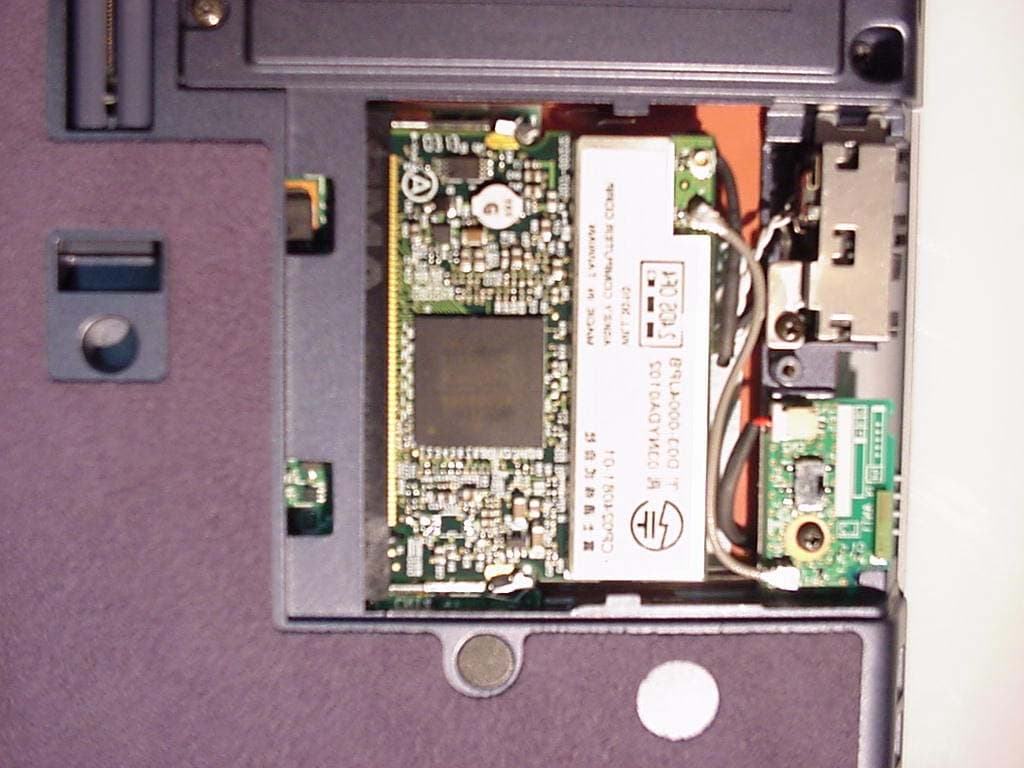
FCC ID: QK3-WB0001 IC-337H-WB0001 Report No. M030507_Certification_Ginger_CalWB EMC Technologies Pty Ltd 57 Assembly Drive, Tullamarine VIC 3043 Australia www.emctech.com.au APPENDIX B1: TEST SAMPLE PHOTOGRAPHS EMC Technologies Pty Ltd: Report Number M030507_Certification_Ginger_CalWB FCC ID: QK3-WB0001 IC: 337H-WB0001 Report No. M030507_Certification_Ginger_CalWB EMC Technologies Pty Ltd. 57 Assembly Drive, Tullamarine VIC 3043 Australia www.emctech.com PHOTOGRAPHS OF TEST SAMPLE LIFEBOOK Ginger, model S6120, S6120D FCC ID: QK3-WB0001 IC: 337H-WB0001 Report No. M030507_Certification_Ginger_CalWB EMC Technologies Pty Ltd. 57 Assembly Drive, Tullamarine VIC 3043 Australia www.emctech.com PHOTOGRAPHS OF TEST SAMPLE LIFEBOOK Ginger, model S6120, S6120D - Calexico WLAN (WM3B2100) FCC ID: QK3-WB0001 IC: 337H-WB0001 Report No. M030507_Certification_Ginger_CalWB EMC Technologies Pty Ltd. 57 Assembly Drive, Tullamarine VIC 3043 Australia www.emctech.com PHOTOGRAPHS OF TEST SAMPLE LIFEBOOK Ginger, model S6120, S6120D - Calexico WLAN LIFEBOOK Ginger, model S6120, S6120D - Calexico WLAN EMC Technologies Pty Ltd, 57 Assembly Drive, Tullamarine VIC 3043 Australia www.emctech.com PHOTOGRAPHS of TEST SAMPLE LIFEBOOK Ginger, model S6120, S6120D - Bluetooth device LIFEBOOK Ginger, model S6120, S6120D - Bluetooth device EMC Technologies Pty Ltd, 57 Assembly Drive, Tullamarine VIC 3043 Australia www.emctech.com PHOTOGRAPHS of TEST SAMPLE (Full Card) LIFEBOOK Ginger, model S6120, S6120D - Bluetooth device (Full Card ) LIFEBOOK Ginger, model S6120, S6120D - Bluetooth device
ID Label/Location Info
FCC ID: QK3-WB0001 IC: 337H-WB0001 Report No. M030507_Certification_Ginger_CalWB EMC Technologies Pty Ltd. 57 Assembly Drive, Tullamarine VIC 3043 Australia www.emctech.com EMC TECHNOLOGIES REPORT NUMBER M030507_Certification_Ginger_CalWB APPENDIX D1 - FCC ID LABELLING - CALEXICO WLAN (WM3B2100)
ID Label/Location Info
FCC ID: QK3-WB0001 IC-337H-WB0001 Report No. M030507_Certification_Ginger_CalWB EMC Technologies Pty Ltd 57 Assembly Drive, Tullamarine VIC 3043 Australia www.emctech.com.au EMC TECHNOLOGIES REPORT NUMBER M030507_Certification_Ginger_CalWB APPENDIX D2: FCC ID LABELLING - LIFEBOOK GINGER BLUETOOTH APPR. CHECK DATE EDIT FMV WORD FDCC-4967-2 2001.3 TITLE 1 CUST DESIG. DESCRIPTION DESIG. CHECK APPR. DRAW. NO. 15 54g Wireless LAN Card (Mini PCI for 11ch) Purchase Specification L0CP024081-XX FUJITSU LIMITED S H E E T The label is printed on Mylar material and fixed to the unit FCC ID: QK3-WB0001 IC-337H-WB0001 This device complies with part 15 of the FCC Rules. Operation is subject to the following two conditions: (1) This device may not cause harmful interference, and (2) this device must accept any interference received, including interference that may cause undesired operation Bottom Panel of the Notebook LABEL LCD Screen side
Internal Photos
FCC ID: QK3-WB0001 IC-337H-WB0001 Report No. M030507_Certification_Ginger_CalWB EMC Technologies Pty Ltd 57 Assembly Drive, Tullamarine VIC 3043 Australia www.emctech.com.au APPENDIX B1: TEST SAMPLE PHOTOGRAPHS EMC Technologies Pty Ltd: Report Number M030507_Certification_Ginger_CalWB FCC ID: QK3-WB0001 IC: 337H-WB0001 Report No. M030507_Certification_Ginger_CalWB EMC Technologies Pty Ltd. 57 Assembly Drive, Tullamarine VIC 3043 Australia www.emctech.com PHOTOGRAPHS OF TEST SAMPLE LIFEBOOK Ginger, model S6120, S6120D FCC ID: QK3-WB0001 IC: 337H-WB0001 Report No. M030507_Certification_Ginger_CalWB EMC Technologies Pty Ltd. 57 Assembly Drive, Tullamarine VIC 3043 Australia www.emctech.com PHOTOGRAPHS OF TEST SAMPLE LIFEBOOK Ginger, model S6120, S6120D - Calexico WLAN (WM3B2100) FCC ID: QK3-WB0001 IC: 337H-WB0001 Report No. M030507_Certification_Ginger_CalWB EMC Technologies Pty Ltd. 57 Assembly Drive, Tullamarine VIC 3043 Australia www.emctech.com PHOTOGRAPHS OF TEST SAMPLE LIFEBOOK Ginger, model S6120, S6120D - Calexico WLAN LIFEBOOK Ginger, model S6120, S6120D - Calexico WLAN EMC Technologies Pty Ltd, 57 Assembly Drive, Tullamarine VIC 3043 Australia www.emctech.com PHOTOGRAPHS of TEST SAMPLE LIFEBOOK Ginger, model S6120, S6120D - Bluetooth device LIFEBOOK Ginger, model S6120, S6120D - Bluetooth device EMC Technologies Pty Ltd, 57 Assembly Drive, Tullamarine VIC 3043 Australia www.emctech.com PHOTOGRAPHS of TEST SAMPLE (Full Card) LIFEBOOK Ginger, model S6120, S6120D - Bluetooth device (Full Card ) LIFEBOOK Ginger, model S6120, S6120D - Bluetooth device
Internal Photos
FCC ID: QK3-WB0001 IC: 337H-WB0001 Report No. M030507_Certification_Ginger_CalWB EMC Technologies Pty Ltd. 57 Assembly Drive, Tullamarine VIC 3043 Australia www.emctech.com EMC TECHNOLOGIES REPORT NUMBER M030507_Certification_Ginger_CalWB APPENDIX B3 - ANTENNA, WLAN & BLUETOOTH LOCATION FCC ID: QK3-WB0001 IC: 337H-WB0001 Report No. M030507_Certification_Ginger_CalWB EMC Technologies Pty Ltd. 57 Assembly Drive, Tullamarine VIC 3043 Australia www.emctech.com ANTENNA, WLAN & BLUETOOTHLOCATION PHOTOGRAPHS Ginger BT module Bluetooth WLAN Antenna WLAN LIFEBOOK Ginger, model S6120, S6120D FCC ID: QK3-WB0001 IC: 337H-WB0001 Report No. M030507_Certification_Ginger_CalWB EMC Technologies Pty Ltd. 57 Assembly Drive, Tullamarine VIC 3043 Australia www.emctech.com ANTENNA, WLAN & BLUETOOTH LOCATION PHOTOGRAPHS BT module WLAN module
Internal Photos
FCC ID: QK3-WB0001 IC: 337H-WB0001 Report No. M030507_Certification_Ginger_CalWB EMC Technologies Pty Ltd. 57 Assembly Drive, Tullamarine VIC 3043 Australia www.emctech.com EMC TECHNOLOGIES REPORT NUMBER M030507_Certification_Ginger_CalWB APPENDIX B4: LIFEBOOK GINGER INTERNAL PHOTOS FCC ID: QK3-WB0001 IC: 337H-WB0001 Report No. M030507_Certification_Ginger_CalWB EMC Technologies Pty Ltd. 57 Assembly Drive, Tullamarine VIC 3043 Australia www.emctech.com APPENDIX B4 LIFEBOOK GINGER INTERNAL PHOTOGRAPHS
Operational Description
FCC ID: QK3-WB0001 IC: 337H-WB0001 Report No. M030507_Certification_Ginger_CalWB EMC Technologies Pty Ltd. 57 Assembly Drive, Tullamarine VIC 3043 Australia www.emctech.com EMC TECHNOLOGIES REPORT NUMBER M030507_Certification_Ginger_CalWB ANNEX 2: MINI-PCI WIRELESS LAN (CALEXICO) THEORY OF OPERATION Calexico Single Band Card Th…
Text truncated - open the document above for the full version.
Contact Information
Applicant
Rao Praveen(Senior Compliance Engineer)
Test Firm
EMC Technologies Pty. Ltd.Chris Zombolas
Technical Specifications
| # | Rule Parts | Frequency Range | Power Output |
|---|---|---|---|
| 2 | 15C | 2.40 GHz - 2.48 GHz | 25.00 mW |
Other Applications from Fujitsu Australia Ltd
QK3-WL0006
Jun 03, 2003LifeBook ST Series Tablet PC's
Equipment Class
DTS - Digital Transmission System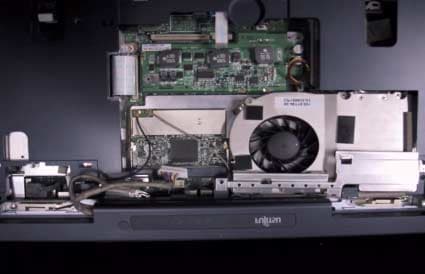
QK3-WL0002-1
May 05, 2003LIFEBOOK N Series N3010
Equipment Class
DTS - Digital Transmission System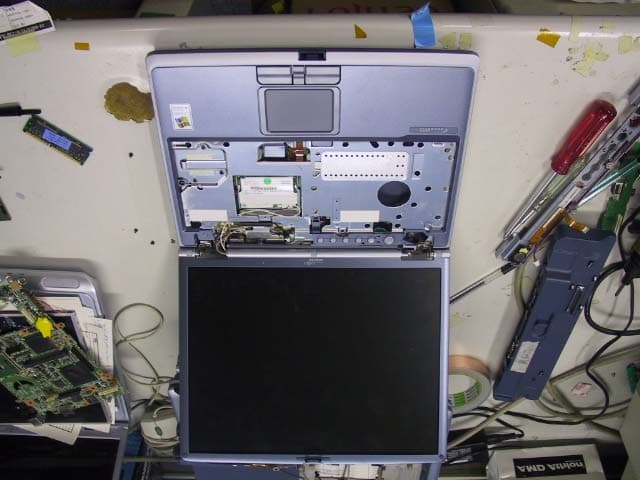
QK3-BT0001
Apr 13, 2003Notebook PC with Bluetooth transmitter
Equipment Class
DSS - Part 15 Spread Spectrum Transmitter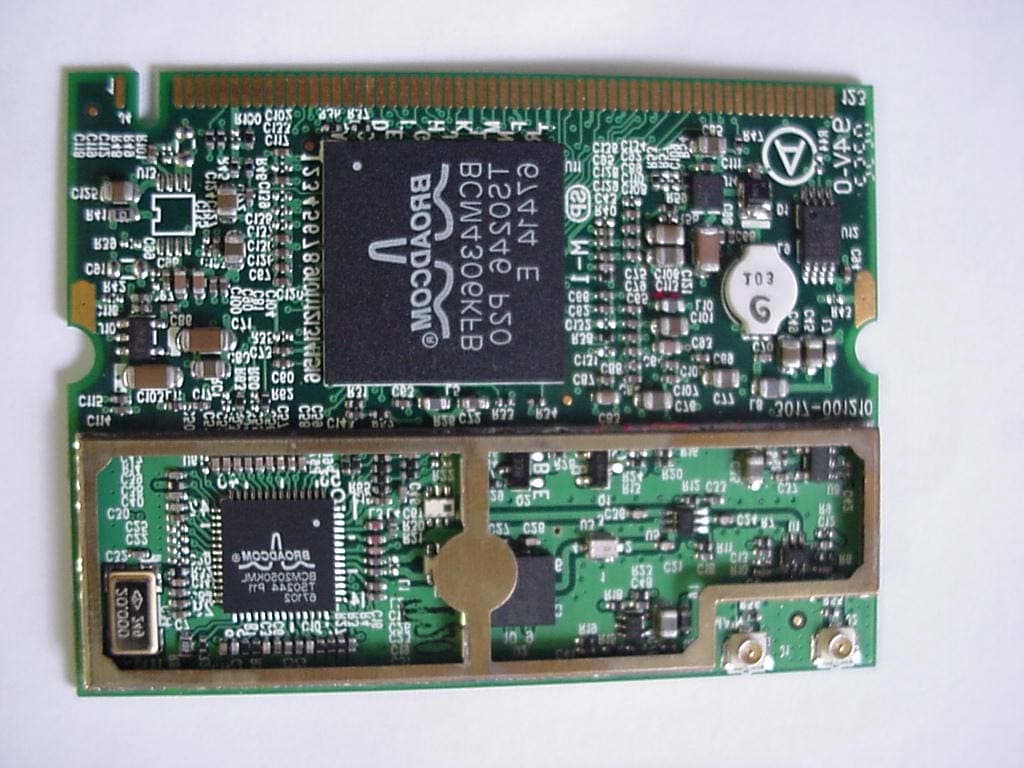
QK3-WL0002
Apr 03, 2003Mini-PCI Wireless LAN Module
Equipment Class
DTS - Digital Transmission System