QTLBH-310Bluetooth headset
Microsoft Corporation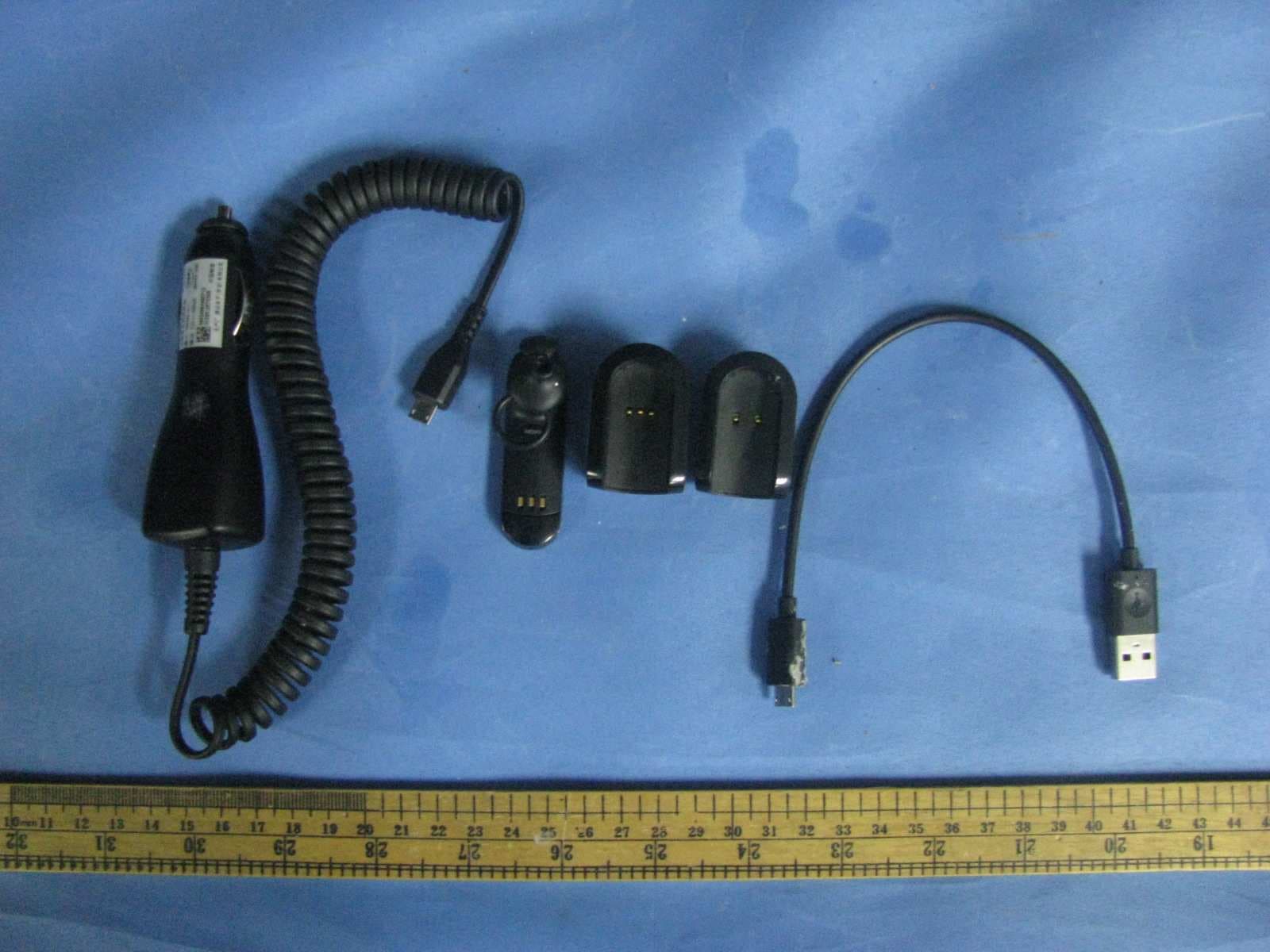
Click to zoom
Application Details
- Equipment Class
- DSS - Part 15 Spread Spectrum Transmitter
- Date of Grant
- Dec 07, 2011
- Application Purpose
- Original Equipment
- Date of Application
- Dec 07, 2011
- Equipment Note
- Bluetooth headset
- Frequency Range
- 2402.00000000 - 2480.00000000
- Company
- Microsoft Corporation
- Country
- United States
Documents & Files
Document Text
Text extracted from the exhibit documents filed with the FCC. Open a document above to read the original.
Users Manual
Nokia Bluetooth Mono Headset BH-310 5555555/1 CyanCyanMagentaMagentaYellowYellowBlackBlack CyanCyanMagentaMagentaYellowYellowBlackBlack Introduction About your headset With the Nokia Bluetooth Mono Headset BH– 310, you can handle calls hands-free, even when using two phones at the same time. The surface of this product is nickel-free. Read this user guide carefully before using the product. Also, read the user guide for the device that you connect to the product. For more info, go to www.nokia.com/ support. About Bluetooth connectivity You can use Bluetooth to make a wireless connection to other compatible devices, such as mobile phones. Devices do not need to be in direct line-of- sight, but they must be within 10 metres (33 feet) of each other. The connection may be affected by obstructions such as walls or other electronic devices. This device is compliant with Bluetooth Specification 3.0 + EDR supporting the following profiles: headset profile (1.1) , handsfree profile (1.5). Check with the manufacturers of other devices to determine their compatibility with this device. ENGLISH CyanCyanMagentaMagentaYellowYellowBlackBlack Get started Keys and parts 1 Charger connector 2 Multifunction key 3 NFC area 4 Earloop 5 Earpiece 6 Carrying clip 7 Microphone 8 Car holder 9 Charger connector 10 Indicator light Charge the battery Warning: Use only chargers approved by Nokia for use with this particular model. The use of any other types may invalidate any approval or warranty, and may be dangerous. Use of unapproved chargers may present a risk of fire, explosion, or other hazard. 1. Plug the charger into a wall outlet. 2. Plug the charger to the charger connector on the headset or on the car holder. The red indicator light turns green when the battery is fully charged. 3. Unplug the charger from the headset or car holder, then from the wall outlet. ENGLISH CyanCyanMagentaMagentaYellowYellowBlackBlack When you unplug a charger, hold and pull the plug, not the cord. The fully charged battery has power for up to 5 hours of talk time and up to 114 hours of standby time. If you keep the headset in the clip, the standby time is up to 90 days. When the battery charge is low, the red indicator light flashes, and you hear a voice prompt every 5 minutes. If you've switched voice prompts off, the headset beeps every 5 minutes. Check the battery charge — When the headset is switched on and you're not in a call, press . A green light means there is enough power. If the light is yellow, you may need to recharge the battery soon. If the light is red, recharge the battery. Switch the headset on or off Switch on — Remove the headset from the clip or from the car holder. The headset beeps, and a green indicator light flashes once. If you've never paired the headset with a phone, or you've cleared the pairings, pairing mode is switched on. Pair and connect the headset with your phone within 3 minutes. If you've paired the headset before, it connects to the last phone it was used with. If the headset can't find that phone, it tries the next phone on its list of paired devices. If ENGLISH CyanCyanMagentaMagentaYellowYellowBlackBlack not connected to a phone within 30 minutes, the headset switches off. Switch off — Put the headset in the clip. The headset beeps, and a red indicator light flashes once. All calls are ended. Tip: Don't have the clip with you? To switch the headset off, press and hold for 5 seconds. To switch the headset on, press . Wear the headset Slide the earloop behind your ear, then gently push the earpiece against your ear. Point the headset towards your mouth. Change the earpad 1. The headset comes with different-sized earpads. Select the earpad that fits the best, and is the most comfortable for your ear. 2. To change the earpad, pull the current earpad from the earpiece, and push the new earpad into place. The headset is set up to be used on your right ear. Use the headset on your left ear — Remove and attach the earloop so that it is to the left of . When you're not using your headset, keep it in the clip, or car holder. ENGLISH CyanCyanMagentaMagentaYellowYellowBlackBlack Tip: Have your headset always at hand – clip it to your pocket as you would a pen. Use the car holder 1. Make sure the surface of the car dashboard is dry and clean. 2. Remove the protective film from the bottom of the car holder. 3. Firmly press the car holder into place. Tip: You can also charge your headset through the car holder. Use a compatible charger that uses the car cigarette lighter socket, and connect it to the holder. Pair the device Pair and connect the headset to your phone Before using the headset, you must pair and connect it to a compatible phone. You can pair your headset with 8 phones, but you can only connect it to a maximum of 2 phones at the same time. With some phones, you may need to make the connection separately after pairing. When the headset is connected to a phone, the Bluetooth indicator light flashes slowly. ENGLISH CyanCyanMagentaMagentaYellowYellowBlackBlack Pair and connect the headset using NFC If the compatible phone supports NFC, switch its NFC feature on, then switch the headset on, and touch the NFC area of the headset with the NFC area of your phone. The headset connects to the phone automatically. You can also disconnect the headset using NFC. For details on NFC, see the user guide of the phone. If the phone does not support NFC, pair the headset manually. Pair the headset manually 1. Make sure your headset is switched off and your compatible phone is on. 2. If you've never paired the headset with a device, or you've cleared the pairings, switch the headset on. If you've previously paired your headset with another device, press and hold for 5 seconds. Pairing mode is switched on, and a blue indicator light starts to flash quickly. 3. Within 3 minutes, switch Bluetooth on in your phone, then set it to search for Bluetooth devices. For details, see the user guide of the phone. 4. On you…
Text truncated - open the document above for the full version.
Cover Letter(s)
Nokia (China) Investment Co., Ltd B2, Nokia China Campus Beijing Economic and Tech Development Area, No.5 Donghuan Zhonglu Beijing, 100176 China PRC Tel. +861087118888 Fax +861087114550 Nov 25 , 2010 Federal Communications Commission Authorization & Evaluation Division, 7435 Oakland Mills Road, Columbia, MD. 21046 Attention: Equipment Authorization Branch This letter will authorize the appointment of Liu Chunbin act as our agent in all FCC matters for grantee code QTL. This appointment is effective until otherwise notified by us. Sincerely, Nokia (China) Investment Co., Ltd Wang Yan Product Certification Officer Beijing, PRC.
External Photos
External Photos:
ID Label/Location Info
Label Artwork and Location
Internal Photos
Internal Photos:
RF Exposure Info
INTERTEK TESTING SERVICES Radio Frequency Radiation Exposure, FCC Rule 15.247(i): The EUT is a Bluetooth headset. According to the DA 00-705 and KDB 447498, The power thresholds for source-based time-averaging conducted output power (in the worst-case duty cycle of DH5 of 8DPSK modulation type) = 5.45*(T on/ (Ton+Toff)) mW <5.45mW, since (T on/ (Ton+Toff)) < 1 The power thresholds for source-based time-averaging radiated output power (The worst-case radiated emission is 102.5 dBμV/m at 3m in 8DPSK modulation type) = [(FS*D) ^2 / 30]*(Ton/ (Ton+Toff)) mW = 5.33*(T on/ (Ton+Toff)) mW < 5.33mW, since (Ton/ (Ton+Toff)) < 1 And SAR Low Threshold Level: 60/f (GHz) = 60/2.45 = 24.5 mW = 13.9 dBm Since the source-based time-averaging conducted output power and radiated output power is well below the SAR low threshold level, so the EUT is considered to comply with SAR requirement without testing. FCC ID: QTLBH-310
Test Report
Intertek Testing Services Shenzhen Ltd. Kejiyuan Branch 6F, D Block, Huahan Building, Langshan Road, Nanshan District, Shenzhen, P. R. China Tel: (86 755) 8601 6288 Fax: (86 755) 8601 6751 Website: www.china.intertek-etlsemko.com 23 November, 2011 Nokia (China) Investment Co., Ltd B2, Nokia China Campus. Beijing Economic and Tech Development Area, No.5. Donghuan Zhonglu. Beijing China Dear Yan Wang, Enclosed you will find your file copy of a Part 15 report (FCC ID: QTLBH-310). For your reference, TCB will normally take another one week for reviewing the report. Approval will then be granted when no query is sorted. Please contact me if you have any questions regarding the enclosed material. Sincerely, Shawn Xing Manager Enclosure • The test results reported in this test report shall refer only to the sample actually tested and shall not refer or be deemed to refer to bulk from which such a sample may be said to have been obtained. • This report is for the exclusive use of Intertek's Client and is provided pursuant to the agreement between Intertek and its Client. Intertek's responsibility and liability are limited to the terms and conditions of the agreement. Intertek assumes no liability to any party, other than to the Client in accordance with the agreement, for any loss, expense or damage occasioned by the use of this report. Only the Client is authorized to copy or distribute this report. Any use of the Intertek name or one of its marks for the sale or advertisement of the tested material, product or service must first be approved in writing by Intertek. The observations and test results referenced from this report are relevant only to the sample tested. This report by itself does not imply that the material, product, or service is or has ever been under an Intertek certification program. • For Terms And Conditions of the services, it can be provided upon request. • The evaluation data of the report will be kept for 3 years from the date of issuance. TRF No.: FCC 15C_TXa FCC ID: QTLBH-310 Intertek Testing Services Shenzhen Ltd. Kejiyuan Branch 6F, D Block, Huahan Building, Langshan Road, Nanshan District, Shenzhen, P. R. China Tel: (86 755) 8601 6288 Fax: (86 755) 8601 6751 Website: www.china.intertek-etlsemko.com Nokia (China) Investment Co., Ltd Application For Certification (FCC ID: QTLBH-310) Bluetooth headset (including cradle and clip) Model: BH-310 (HW: V0.31; SW: V0.4; MV: V0.31), CR-127 (Black MV: V0.31, White MV: V0.32), CH-4 (Black MV: V0.31, White MV: V0.32) 2.4GHz Transceiver Note: This report supersedes the previous report with report No. SZ11110102-1 dated 18 November, 2011. SZ11110102-1R1 Billy Li 23 November, 2011 INTERTEK TESTING SERVICES TRF No.: FCC 15C_Txa FCC ID: QTLBH-310 i LIST OF EXHIBITS INTRODUCTION EXHIBIT 1: General Description EXHIBIT 2: System Test Configuration EXHIBIT 3: Emission Results EXHIBIT 4: Equipment Photographs EXHIBIT 5: Product Labelling EXHIBIT 6: Technical Specifications EXHIBIT 7: Instruction Manual EXHIBIT 8: Miscellaneous Information EXHIBIT 9: Test Equipment List INTERTEK TESTING SERVICES TRF No.: FCC 15C_Txa FCC ID: QTLBH-310 ii MEASUREMENT/TECHNICAL REPORT Nokia (China) Investment Co., Ltd MODEL: BH-310 (HW: V0.31; SW: V0.4; MV: V0.31), CR-127 (Black MV: V0.31, White MV: V0.32), CH-4 (Black MV: V0.31, White MV: V0.32) FCC ID: QTLBH-310 18 November, 2011 This report concerns (check one:) Original Grant X Class II Change Equipment Type: DSS - Part 15 Spread Spectrum Transmitter Deferred grant requested per 47 CFR 0.457(d)(1)(ii)? Yes No X If yes, defer until: date Company Name agrees to notify the Commission by: date of the intended date of announcement of the product so that the grant can be issued on that date. Transition Rules Request per 15.37? Yes No X If no, assumed Part 15, Subpart C for intentional radiator − the new 47 CFR [10-1-10 Edition] provision. Report prepared by: Shawn Xing Intertek Testing Services Shenzhen Ltd. Kejiyuan Branch 6F, Block D, Huahan Building, Langshan Road, Nanshan District, Shenzhen, P. R. China Phone: (86 755) 8601 6288 Fax: (86 755) 8601 6751 INTERTEK TESTING SERVICES TRF No.: FCC 15C_Txa FCC ID: QTLBH-310 iii Table of Contents 1.0 General Description............................................................................................ 2 1.1 Product Description ............................................................................................ 2 1.2 Test Methodology............................................................................................... 2 1.3 Test Facility........................................................................................................ 2 2.0 System Test Configuration ................................................................................. 4 2.1 Justification ........................................................................................................ 4 2.2 EUT Exercising Software.................................................................................... 4 2.3 Special Accessories ........................................................................................... 4 2.4 Equipment Modification ...................................................................................... 4 2.5 Measurement Uncertainty .................................................................................. 5 2.6 Support Equipment List and Description ............................................................. 5 3.0 Test Results ......................................................................................................... 7 3.1 Radiated Test Result .......................................................................................... 8 3.1.1 Field Strength Calculation................................................................................ 8 3.1.2 Radiated Emission Configuration Photograph .................................................. 9 3.1.3 Radiated Emissions....................................…
Text truncated - open the document above for the full version.
Test Setup Photos
Radiated Photos
Test Setup Photos
Conducted Photos
Contact Information
Applicant
Hasnain Syed(Director, EMC, SI and RF Compliance)
Technical Contact
Intertek Testing Services Shenzhen Ltd. Kejiyuan BShawn Xing
[email protected](86-755) 8614 0603
6F, D Block, Huahan Building, Langshan Road · Shenzhen · China
Non-Technical Contact
Intertek Testing Services Shenzhen Ltd. Kejiyuan BShawn Xing
[email protected](86-755) 8614 0603
Test Firm
Intertek Testing Services Shenzhen Ltd.Shawn Xing
Technical Specifications
| # | Rule Parts | Frequency Range | Power Output |
|---|---|---|---|
| 1 | 15C | 2.40 GHz - 2.48 GHz | 5.50 mW |
Other Applications from Microsoft Corporation
QTLRM-1041
Nov 03, 2014GSM/WCDMA/LTE/CDMA Cellular Device with BT, BTLE, WLAN, NFC
Equipment Class
PCE - PCS Licensed Transmitter held to ear
QTLRM-1078
Sep 24, 2014GSM/WCDMA/LTE/CDMA cellular device w/BT, BTLE, WLAN
Equipment Class
JBP - Part 15 Class B Computing Device Peripheral
QTLRM-1039
Sep 10, 2014GSM/WCDMA/LTE cellular device w/BT, BTLE, WLAN and NFC
Equipment Class
JBP - Part 15 Class B Computing Device Peripheral
QTLRM-1040
Aug 25, 2014GSM/WCDMA cellular device w/BT, BTLE, WLAN, NFC
Equipment Class
PCB - PCS Licensed Transmitter
QTLRM-1038
Aug 14, 2014GSM/WCDMA cellular device w/BT, BTLE, WLAN, NFC
Equipment Class
PCE - PCS Licensed Transmitter held to ear