QTLRH-6Triple Band GSM Phone
Microsoft Corporation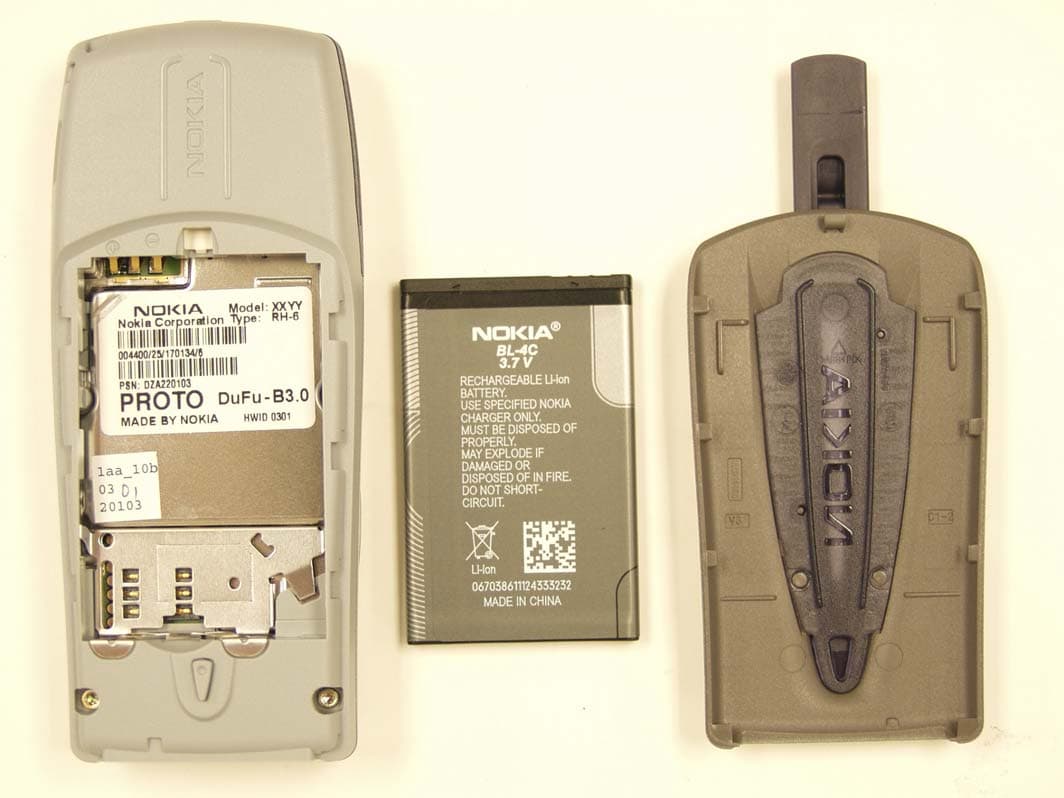
Click to zoom
Application Details
- Equipment Class
- PCE - PCS Licensed Transmitter held to ear
- Date of Grant
- Nov 06, 2003
- Application Purpose
- Original Equipment
- Date of Application
- Nov 06, 2003
- Equipment Note
- Triple Band GSM Phone
- Frequency Range
- 1850.20000000 - 1909.80000000
- Company
- Microsoft Corporation
- Country
- United States
Documents & Files
Document Text
Text extracted from the exhibit documents filed with the FCC. Open a document above to read the original.
Users Manual
-10 3108_Dufu_fcc_1.1.fm Page -10 Friday, October 24, 2003 2:11 AM -9 English List of menu functions 1. Messages 1. Text messages 2. Multimedia msgs. 3. Chat 4. Voice messages 5. Info messages 6. Message settings 7. Service commands 2. Call register 1. Missed calls 2. Received calls 3. Dialled numbers 4. Delete recent call lists 5. Call duration 6. Call costs 7. GPRS data counter 8. GPRS connection timer 3. Contacts 1. Search 2. Add contact 3. Delete 4. Copy 5. Settings 6. Speed dials 7. Info numbers 1 8. Service numbers 1 9. My numbers 2 10.Caller groups 2 4. Profiles 1. General 2. Silent 3. Meeting 4. Outdoor 5. Pager 5. Settings 1. Right selection key settings 1. Select options 2. Organise 2. Screen saver 3. Time and date settings 1. Clock 2. Date 3. Auto-update of date & time 4. Call settings 1. Call divert 2. Anykey answer 3. Flip call handling 4. Automatic redial 5. Speed dialling 6. Call waiting 7. Summary after call 8. Send my caller ID 9. Line for outgoing calls 3 5. Phone settings 1. Language settings 2. Automatic keyguard 3. Recognition time-out 4. Cell info display 5. Welcome note 6. Operator selection 1. Shown if supported by your SIM card. For availability, contact your network or ser- vice provider. 2. If Info numbers or Service numbers is not supported, or, if neither is supported, the number of this menu item changes accordingly. 3. Shown if supported by your SIM card and network services. Contact your network operator or service provider for more information. 3108_Dufu_fcc_1.1.fm Page -9 Friday, October 24, 2003 2:11 AM -8 7. Confirm SIM service actions 8. Help text activation 9. Start-up tone 6. Display settings 1. Wallpaper 2. Colour schemes 3. Operator logo 4. Display brightness 7. Tone settings 1. Incoming call alert 2. Ringing tone 3. Ringing volume 4. Vibrating alert 5. Message alert tone 6. Keypad tones 7. Warning tones 8. Alert for 8. Enhancement settings 1 9. Security settings 1. PIN code request 2. Call barring service 3. Fixed dialling 4. Closed user group 5. Security level 6. Access codes 1. Change security code 2. Change PIN code 3. Change PIN2 code 4. Change barring password 10.Restore factory settings 6. Alarm clock 7. Gallery 1. View folders 2. Add folder 3. Delete folder 4. Rename folder 5. Gallery downloads 8. Calendar 9. Games 1. Select game 2. Game downloads 3. Memory 4. Settings 10.Applications 1. Select application 2. App. downloads 3. Memory 11.Extras 1. Calculator 2. Stopwatch 12.Services 1. Home 2. Bookmarks 3. Download links 4. Service inbox 5. Settings 6. Go to address 7. Clear the cache 13.SIM services 2 1. Shown only if the phone is or has been connected to a compatible headset, handsfree unit or loopset approved by the manufacturer. 2. Only shown if supported by your SIM card. The name and contents vary depending on the SIM card. 3108_Dufu_fcc_1.1.fm Page -8 Friday, October 24, 2003 2:11 AM -7 English The wireless phone described in this guide is approved for use in GSM 900, 1800 and 1900 networks. LEGAL INFORMATION Part number ___ Issue 1. Copyright © 2003 Nokia. All rights reserved. Nokia, Nokia Connecting People, Nokia 3108, Xpress-on, Pop-Port and the Original Accessories logos are trademarks or registered trademarks of Nokia Corporation. All other product and company names mentioned herein may be trademarks or tradenames of their respective owners. US Patent No 5818437 and other pending patents. T9 text input software Copyright (C) 1997-2003. Tegic Communications, Inc. All rights reserved. Includes RSA BSAFE cryptographic or security protocol software from RSA Security. Java is a trademark of Sun Microsystems, Inc. The information in this user guide was written for the Nokia 3108 phone. Nokia operates a policy of continuous development. Nokia reserves the right to make changes and improvements to any of the products described in this document without prior notice. Under no circumstances shall Nokia be responsible for any loss of data or income or any special, incidental, consequential or indirect damages howsoever caused. THE CONTENTS OF THIS DOCUMENT ARE PROVIDED “AS IS.” EXCEPT AS REQUIRED BY APPLICABLE LAW, NO WARRANTIES OF ANY KIND, EITHER EXPRESS OR IMPLIED, INCLUDING, BUT NOT LIMITED TO, THE IMPLIED WARRANTIES OF MERCHANTABILITY AND FITNESS FOR A PARTICULAR PURPOSE, ARE MADE IN RELATION TO THE ACCURACY AND RELIABILITY OR CONTENTS OF THIS DOCUMENT. NOKIA RESERVES THE RIGHT TO REVISE THIS DOCUMENT OR WITHDRAW IT AT ANY TIME WITHOUT PRIOR NOTICE. EXPORT CONTROLS This product contains commodities, technology or software exported from the United States in accordance with the Export Administration regulations. Diversion contrary to U.S. or Canadian law is prohibited. FCC/INDUSTRY CANADA NOTICE Your phone may cause TV or radio interference (for example, when using a telephone in close proximity to receiving equipment). The FCC or Industry Canada can require you to stop using your telephone if such interference cannot be eliminated. If you require assistance, contact your local service facility. This device complies with part 15 of the FCC rules. Operation is subject to the condition that this device does not cause harmful interference . 3108_Dufu_fcc_1.1.fm Page -7 Friday, October 24, 2003 2:11 AM Table of Contents -6 Ta b l e o f C o n t e n t s List of menu functions -9 General information................. -1 Stickers in the sales package ...... -1 Access codes .............................. -1 Shared memory ........................... 0 1.Your phone ............................. 1 Keys............................................. 1 Functions of the flip cover .......... 2 Stylus and touch pad ................... 2 Connectors................................... 2 Standby mode.............................. 2 Screen saver..................................... 3 Wallpaper ........................................ 3 Essential indicators in standby mode . 3 2.Getting started ........................ 5 Remove and mount the back cover 5 For cov…
Text truncated - open the document above for the full version.
Users Manual
Menu functions 43 English Flip call handling Opening or closing the flip cover may or may not affect voice call handling. You can set this by yourself. 1. Press Menu, and select Settings, Call settings, Flip call handling. 2. Three options are listed: •None (default setting): Opening or closing the flip cover does not affect the status of the voice call. •Answer & end calls: • Opening the flip cover answers a voice call. • Closing the flip cover ends a voice call. •Answer calls only: • Opening the flip cover answers a voice call. • Closing the flip cover does not end a voice call. Automatic redial Press Menu, and select Settings, Call settings and Automatic redial. Select On, and your phone will make a maximum of ten attempts to connect the call after an unsuccessful call attempt (Depending on the network environment). Speed dialling Press Menu, and select Settings, Call settings and Speed dialling. Select On and the names and phone numbers assigned to the speed dialling keys, from to , can be dialled by pressing and holding the corresponding number key. Call waiting Press Menu, and select Settings, Call settings and Call waiting. Select Activate and the network will notify you of an incoming call while you have a call in progress (network service). See ”Handle a waiting call” on page 11. Summary after call Press Menu, and select Settings, Call settings, and Summary after call. Select On. After each call, the phone briefly displays the approximate duration and cost of the call (network service). Send my caller identity Press Menu, and select Settings, Call settings and Send my caller ID. Select Ye s and your phone number will be displayed to the person you are calling (network service). Select Set by network and the setting agreed upon with your service provider is used. Line for outgoing calls Line for outgoing calls is a network service to select the phone line 1 or 2, that is, the subscriber number, for making calls. Press Menu, and select Settings, Call settings and Line for outgoing 3108_Dufu_fcc_1.1.fm Page 43 Friday, October 24, 2003 2:20 AM Menu functions 44 calls. If you select Line 2 and have not subscribed to this network service, you will not be able to make calls. However, calls on both lines can be answered regardless of the selected line. If supported by your SIM card, you can prevent the line selection by selecting the option Lock. For more information on availability, contact your network operator or service provider. Tip: In standby mode, you can switch from one line to the other by pressing and holding . Phone settings Language settings Press Menu, and select Settings, Phone settings, Language settings and Phone language. Select the language for the display texts. If Automatic is selected, the phone selects the language according to the information on the SIM card. Press Menu, and select Settings, Phone settings, Language settings and Writing language. Select and set the permanent writing language you want to use when inputting or editing text. Automatic keyguard Note: When Keyguard is on, calls may be possible to the emergency number programmed into your phone (e.g. 112, 911, or other official emergency number). Key in the emergency number and press . The number is displayed only after you have keyed in its last digit. You can set the keypad of your phone to lock automatically after a period of time. When the phone is in standby mode with no function in use, and the set time is reached, the keypad locks automatically to prevent accidental phone calls. Press Menu, and select Settings, Phone settings and Automatic keyguard. • To activate the automatic keyguard, select On. The phone prompts Set delay: Input the time and press OK. You can set the time from 10 seconds up to 60 minutes. • To deactivate the automatic keyguard, select Off. Refer also to ”Keypad lock (Keyguard)” on page 8. Recognition time-out You can set the maximum time the phone will wait for your next stroke when writing with the stylus, before the phone starts to recognise the strokes you wrote on the touch pad. 3108_Dufu_fcc_1.1.fm Page 44 Friday, October 24, 2003 2:20 AM Menu functions 45 English For more information about recognition timeout, see also “Recognition timeout” on page 17. 1. Press Menu, and select Settings, Phone settings and Recognition time-out. 2. A list of three options: Fast, Normal and Slow is displayed: 3. Press if necessary to highlight the option you want, and press Select. Cell info display (network service) Press Menu, and select Settings, Phone settings and Cell info display. Select On to set the phone to indicate when it is used in a cellular network based on Micro Cellular Network (MCN) technology. If the GPRS connection is set to Always online, the cell identity may not be received. In that case, set the GPRS connection to When needed to enable it, see “GPRS Connection” on page 60. Welcome note Press Menu, and select Settings, Phone settings and Welcome note. Enter the note you would like to be shown briefly when the phone is switched on. To save the note, press Options, and select Save. Network selection Press Menu, and select Settings, Phone settings and Operator selection. Select Automatic and the phone automatically selects one of the cellular networks available in your area. If you select Manual, you can select a network that has a roaming agreement with your home network operator. If No network access is displayed, you must select another network. The phone stays in manual mode until the automatic mode is selected or another SIM card is inserted into the phone. Confirm SIM service actions See ”SIM services (Menu 13)” on page 66. Help text activation To set the phone to show or not to show the help texts, press Menu, and select Settings, Phone settings and Help text activation. Start-up tone To set the phone to play or not to play a start-up tone when the phone is switched on, press Menu, and select Start-up tone, Phone settings and Start-up tone. Display settings Wallp…
Text truncated - open the document above for the full version.
Cover Letter(s)
NOKIA NOKIA(China)InvestmentCompany PacificCenturyPlace2A GongTi BeiLu,ChaoyangDistrict Beijing,PRChina100027 +861065392828ext.3052 +861065393824 (14-0ct-2003) Attention:EquipmentAuthorizationBranch REQUESTFORCONFIDENTIALITY PursuanttoSections0.457(d)(l)(ii)and0.459oftheCommission'sRules,theApplicant herebyrequestsconfidentialtreatmentofsomeoftheinformationaccompanyingthis ApplicationofFCCID:QTLRH-6andasoutlinedbelow: Exhibit4:BlockDiagram Exhibit5:SchematicDiagrams Exhibit10:ListofActiveDevicesandTune-UpProcedure Exhibit12:TheoryofOperationIDescriptionofCircuitry Thesematerialscontaintradesecretsandproprietaryinformationnotcustomarilyreleasedto thepublicandthepublicdisclosureofthesemattersmightbeharmfultotheApplicantand provideunjustifiedbenefitstoitscompetitors. TheApplicantunderstandsthatpursuanttoRule0.457(d)(l)(ii)disclosureofthisApplication andallaccompanyingdocumentationwillnotbemadebeforethedateoftheGrantforthis Application. NOKIAMOBILEPHONES ~ ~ MarkoRantanen ProductProgramManager,Beijing
Cover Letter(s)
American Telecommunications Certification Body Inc. 6731 Whittier Ave, McLean, VA 22101 October 29, 2003 RE: FCC ID: QTLRH-6_ATCB000848 Attention: Petri Visuri I have a few comments on this Application. 1. Please note that as this is a licensed device and not a part 15 device the proper test method is TIA603 as applicable. The report states ANSI C63.4 was used as a test method. Please note that ANSI C63.4 is not a proper test method for licensed devices. The only test which would use ANSI C63.4 would be the receiver spurious emissions verification under Part 15. However, this test is not part of the report. Please explain why this improper test method is listed? Please list the proper test methods used for antenna substitution measurements. 2. Please note that test reports are to reflect the actual conditions during the test sequence. Please note that on page 12 (section 3.4.1) you state that “ The excess length of the cables of the EUT were made into bundles 30-40 cm in length.” Please note that the setup photos show that there are no cables with the device. Please report the actual conditions during testing. Please remove ‘canned text’ report items that do not apply. 3. Please provide the calibration dates for equipment used in the EMC report. Dennis Ward mailto:[email protected] The items indicated above must be submitted before processing can continue on the above referenced application. Failure to provide the requested information may result in application termination. Correspondence should be considered part of the permanent submission and may be viewed from the Internet after a Grant of Equipment Authorization is issued. Please do not respond to this correspondence using the email reply button. In order for your response to be processed expeditiously, you must submit your documents through the AmericanTCB.com website. Also, please note that partial responses increase processing time and should not be submitted. Any questions about the content of this correspondence should be directed to the sender.
Cover Letter(s)
1. Please note that as this is a licensed device and not a part 15 device the proper test method is TIA603 as applicable. The report states ANSI C63.4 was used as a test method. Please note that ANSI C63.4 is not a proper test method for licensed devices. The only test which would use ANSI C63.4 would be the receiver spurious emissions verification under Part 15. However, this test is not part of the report. Please explain why this improper test method is listed? Please list the proper test methods used for antenna substitution measurements. We confirm, that substitution measurement method was used for EIRP and spurious emission measurements. The EIA/TIA-603-A has been added as reference to the revised test report. 2. Please note that test reports are to reflect the actual conditions during the test sequence. Please note that on page 12 (section 3.4.1) you state that “The excess length of the cables of the EUT were made into bundles 30-40 cm in length.” Please note that the setup photos show that there are no cables with the device. Please report the actual conditions during testing. Please remove ‘canned text’ report items that do not apply. The note was left in the report by accident, it has been corrected in the revised test report. 3. Please provide the calibration dates for equipment used in the EMC report. The calibration dates are stored in a register, from which the values would need to be picked manually one by one. It is the laboratory’s policy, that all test equipment are calibrated once a period, which is stated in the section containing the list of test equipment. Uncalibrated equipment are not used for the measurements. See the revised test report.
External Photos
Exhibit 3: External Picture no1 Exhibit 3: External Picture no2 Exhibit 3: External Picture no3 Exhibit 3: External Picture no4 Exhibit 3: External Picture no5 Exhibit 3: External Picture no6
ID Label/Location Info
Material Sheet 1 of 1 Original Scale Original Size A4 1:1 NMP Code Item Name Document Number Doc. Vers. Tool Vers. Name / Date Change Ref. Approved / Date Original Designer FUNCTIONAL CHARACTERISTICS KEY MAIN FUNCTIONAL CHARACTERISTIC MAIN FUNCTIONAL CHARACTERISTIC ( Proof of Process Capability Required ) Copyright c Nokia Mobile Phones. All rights reserved THIS DRAWING IS PROTECTED BY COPYRIGHT AS AN UNPUBLISHED WORK UNAUTHORIZED REPRODUCTION OF THIS DRAWING IS NOT PERMITTED THIS DRAWING CONTAINS PROPRIETARY AND CONFIDENTIAL INFORMATION This document is the property of Nokia Mobile Phones TYPE LABEL RH-6, Made By NOKIA DMP07621 Bar Code 128 Subset B/C, height 2.5 mm Module width 3 dots. Bar Code 128 Subset B , Module width 3 dots. height 2.5 mm Brady B-7575 thermal transfer printable tamper evident metallized polyester 65 um See table. 2. Place tolerance of printing +/-0.3 Layout 2:1 Michu 160603 Abin 241003 1. Blank label material: To be printed in NMP production using (600dpi) Thermal Transfer Printer BLANK LABEL 30,5 x 20 CONNECTIONTOPDMS FollowingitemsareprintedfromPDMSdatabase -IMEI““ -ProductCode“Code:” XXXXXX/xx/yyyyyy/0 XXXXXXX Artwork for production ( 1:1 pcx-file) ( 2 0 . 0 ) (30.5 ) Quiet Zone2.0 1 . 2 8 , 8 1 3 , 4 No. Part nameQty Drw no.Note 11 21 NMP CODE: DMD03291 9381149 See Data sheet 3 Thermal Transfer Ribbon R-7963 4 NMP CODE: 9730082 1 1 P07210XXdpi600.pcx P07210XXdpi300.pcx PRINTING FILE PRINTING FILE XX = Doc. Version Number XX = Doc. Version Number Type: RH-6 Nokia Corporation 168 FCC ID: QTLRH-6 MADE BY NOKIA Model: 3108 IC: 661AB-RH6 168 FCC ID: QTLRH-6 MADE BY NOKIA IC: 661AB-RH6 Notes: Type: RH-6 Nokia Corporation Model: 3108 0,2 ------------ --------------------- Michu 160603 0,1 168 FCC ID: QTLRH-6 MADE BY NOKIA IC: 661AB-RH6 Type: RH-6 Nokia Corporation Model: 3108
ID Label/Location Info
NOKIA NOKIA(China)InvestmentCompany PacificCenturyPlace2A GongTi BeiLu,ChaoyangDistrict Beijing,PRChina100027 +861065392828ext.3052 +861065393824 (14-0ct-2003) FederalCommunicationsCommission Authorizationa EvaluationDivision, 7435OaklandMillsRoad, Columbia,MD.21046 Attention:EquipmentAuthorizationBranch COMPLIANCESTATEMENTOFQTLRH-6 ThecompliancestatementcanbeseeninUserGuideofQTLRH-6becausethesizeofthehand portableQTLRH-6anditsidentificationlabelaresosmallthatthecompliancestatement cannotbeprintedlargeenoughtobevisible. NOKIAMOBILEPHONES ~~ ~ MarkoRantanen ProductProgramManager,Beijing
Internal Photos
Exhibit 9: Internal Picture no1 Exhibit 9: Internal Picture no2 Exhibit 9: Internal Picture no3 Exhibit 9: Internal Picture no4 Exhibit 9: Internal Picture no5
RF Exposure Info
TCC Oulu Exhibit 11: SAR Report DTX08365-EN Applicant: Nokia Corporation FCC ID: QTLRH-6 Copyright 2003 Nokia Corporation 1 (14) SAR Compliance Test Report Test report no.: Not numbered Date of report: 2003-10-10 Number of pages: 51 Contact person: Petri Visuri Responsible test engineer: Kai Niskala Testing laboratory: Nokia Corporation Yrttipellontie 6 P.O. Box 300 FIN-90401 OULU Finland Tel. +358-7180-08000 Fax. +358-7180-47222 Client: Nokia Inc. Nokia Tower, Pacific Century Place 2-A Gong Ti Bei Lu Chaoyang District 100027 BEIJING, China Tel. +8610-65392828 Fax. +86-10-65393838 Tested device: QTLRH-6 Supplement reports: Testing has been carried out in accordance with: 47CFR §2.1093 Radiofrequency Radiation Exposure Evaluation: Portable Devices IEEE P1528/D1.2, April 21, 2003 Recommended Practice for Determining the Peak Spatial-Average Specific Absorption Rate (SAR) in the Human Body Due to Wireless Communications Devices: Experimental Techniques FCC OET Bulletin 65 (Edition 97-01), Supplement C (Edition 01-01) Evaluating Compliance with FCC Guidelines for Human Exposure to Radiofrequency Electromagnetic Fields Documentation: The documentation of the testing performed on the tested devices is archived for 15 years at TCC Oulu Test results: The tested device complies with the requirements in respect of all parameters subject to the test. The test results and statements relate only to the items tested. The test report shall not be reproduced except in full, without written approval of the laboratory. Date and signatures: 2003-10-10 For the contents: Kai Niskala Test Engineer TCC Oulu Exhibit 11: SAR Report DTX08365-EN Applicant: Nokia Corporation FCC ID: QTLRH-6 Copyright 2003 Nokia Corporation 2 (14) CONTENTS 1. SUMMARY FOR SAR TEST REPORT............................................................................................................................ 3 1.1 MAXIMUM RESULTS FOUND DURING SAR EVALUATION.............................................................................................................3 1.1.1 Head Configuration .......................................................................................................................................................3 1.1.2 Body Worn Configuration...........................................................................................................................................3 1.1.3 Measurement Uncertainty..........................................................................................................................................3 2. DESCRIPTION OF TESTED DEVICE.............................................................................................................................. 4 2.1 PICTURE OF PHONE......................................................................................................................................................................4 2.2 DESCRIPTION OF THE ANTENNA..................................................................................................................................................4 2.3 BATTERY OPTIONS.......................................................................................................................................................................4 2.4 BODY WORN ACCESSORIES..........................................................................................................................................................4 3. TEST CONDITIONS.......................................................................................................................................................... 5 3.1 AMBIENT CONDITIONS.................................................................................................................................................................5 3.2 RF CHARACTERISTICS OF THE TEST SITE.......................................................................................................................................5 3.3 TEST SIGNAL, FREQUENCIES, AND OUTPUT POWER ...................................................................................................................5 4. DESCRIPTION OF THE TEST EQUIPMENT................................................................................................................. 5 4.1 SYSTEM ACCURACY VERIFICATION................................................................................................................................................6 4.2 TISSUE SIMULANTS......................................................................................................................................................................6 4.2.1 Head Tissue Simulant...................................................................................................................................................7 4.2.2 Muscle Tissue Simulant ................................................................................................................................................7 4.3 PHANTOMS...................................................................................................................................................................................7 4.4 ISOTROPIC E-FIELD PROBE ET3DV6..........................................................................................................................................8 5. DESCRIPTION OF THE TEST PROCEDURE................................................................................................................. 8 5.1 TEST POSITIONS..........................................................................................................................................................................8 5.1.1 Against Phantom Head................................................................................................................................................8 5.1.2 Body Worn Configuration..................................................…
Text truncated - open the document above for the full version.
RF Exposure Info
NOKIA NOKIA(China)InvestmentCompany PacificCenturyPlace2A GongTi BeiLu,ChaoyangDistrict Beijing,PRChina100027 +861065392828ext.3052 +861065393824 (14-0ct-2003) FederalCommunicationsCommission, Authorization8: EvaluationDivision, 7435OaklandMillsRoad Columbia,MD.21046 Attention:EquipmentAuthorizationBranch WeherebycertifythatthetransceiverFCCID:QTLRH-6complieswith ANSI/IEEEC95.1-1992StandardforSafetyLevelswithRespecttoHuman ExposuretoRadioFrequencyElectromagneticFields,3 kHzto300GHz. Compliancewasdeterminedbytestingappropriateparametersaccordingto standard. NOKIAMOBILEPHONES ~ :::::::.. MarkoRantanen ProductProgramManager,Beijing -~------- --
Test Report
Nemko Oy • P.O.Box 19, FIN-02601 Espoo, Finland Street address: Perkkaantie 11, FIN-02600 Espoo Telephone +358 (0)424 5454 1 • Telefax +358 (0)9 5489 6371 T EST REPORT Date: ESPOO 03.11.2003 Page: 1 (19) Appendices − Date of handing in: 25.09.2003 Number: 1031934 No. 1 / 1 Tested by: Timo Hietala, Test Engineer Reviewed by: Jyrki Leino, Technical Director SORT OF EQUIPMENT: Triple band (900/1800/1900) GSM Mobile phone MARKETING NAME: TYPE: RH-6 MANUFACTURER: Nokia Corporation CLIENT: Nokia Corporation / TCC Salo ADDRESS: P.O.Box 86, (Joensuunkatu 7E), FIN-24101 Salo, Finland TELEPHONE: +358 (0)50 3687123 TEST LABORATORY: Nemko Oy FCC REG. NO. 91087 August 27, 2001 IC FILE NO. IC 4627 July 2, 2003 SUMMARY: This test report supersedes test report 1031906 dated 14.10.2003 In regard to the performed tests the equipment under test fulfils the requirements defined in the test specifications, see page 2 for details The test results are valid for the tested unit only. Without a written permission of Nemko Oy it is allowed to copy this report as a whole, but not partially. Version f1.00 Type: RH-6 Test report 1031934 Page 2 (19) Date 03.11.2003 Summary of performed tests and test results Section in CFR 47 Section in RSS-133 Result 24.232, (b) 6.2 Radiated RF output PASS 2.1049, (h) 5.6 99% occupied bandwidth X 24.238 (a) 6.3 Band-edge compliance PASS 24.238 (a), 2.1053 6.3 Spurious radiated emissions PASS 24.235, 2.1055 (a)(1)(b) 7 Frequency stability, temperature variation PASS 24.235, 2.1055 (d)(1)(2) 7 Frequency stability, voltage variation PASS Explanations: PASS The EUT passed that particular test. FAIL The EUT failed that particular test. X The measurement was done, but there is no applicable performance criteria. Type: RH-6 Test report 1031934 Page 3 (19) Date 03.11.2003 Contents Summary of performed tests and test results........................................................................................ 2 1. EUT and Accessory Information ...................................................................................................... 4 1.1 EUT description ..................................................................................................................... 4 1.2 EUT and accessories.............................................................................................................4 2. Standards and measurement methods ............................................................................................ 5 3. Test results ...................................................................................................................................... 5 3.1 Radiated RF output power ..................................................................................................... 5 3.1.1 Test method and limit ............................................................................................................ 5 3.1.2 Limit....................................................................................................................................... 6 3.1.3 EUT operation mode .............................................................................................................6 3.1.4 Test results ............................................................................................................................ 6 3.2 99% occupied bandwidth....................................................................................................... 7 3.2.1 Test method and limit ............................................................................................................ 7 3.2.2 Limit....................................................................................................................................... 7 3.2.3 EUT operation mode ................................................…
Text truncated - open the document above for the full version.
Contact Information
Applicant
Hasnain Syed(Director, EMC, SI and RF Compliance)
Technical Contact
Nokia (China) Investment Company Co. LtdPetri Visuri
[email protected]86 10 6539 2828
Pacific Century Place 2A · Beijing · China
Technical Specifications
| # | Rule Parts | Frequency Range | Power Output | Emission | Tolerance |
|---|---|---|---|---|---|
| 1 | 24E | 1.85 GHz - 1.91 GHz | 1.047 W | 243KGXW | 0.0230000000 ppm |
Other Applications from Microsoft Corporation
QTLRM-1041
Nov 03, 2014GSM/WCDMA/LTE/CDMA Cellular Device with BT, BTLE, WLAN, NFC
Equipment Class
PCE - PCS Licensed Transmitter held to ear
QTLRM-1078
Sep 24, 2014GSM/WCDMA/LTE/CDMA cellular device w/BT, BTLE, WLAN
Equipment Class
JBP - Part 15 Class B Computing Device Peripheral
QTLRM-1039
Sep 10, 2014GSM/WCDMA/LTE cellular device w/BT, BTLE, WLAN and NFC
Equipment Class
JBP - Part 15 Class B Computing Device Peripheral
QTLRM-1040
Aug 25, 2014GSM/WCDMA cellular device w/BT, BTLE, WLAN, NFC
Equipment Class
PCB - PCS Licensed Transmitter
QTLRM-1038
Aug 14, 2014GSM/WCDMA cellular device w/BT, BTLE, WLAN, NFC
Equipment Class
PCE - PCS Licensed Transmitter held to ear