QTLRM-833GSM 850/1900 Cellular Telephone with BT
Microsoft Corporation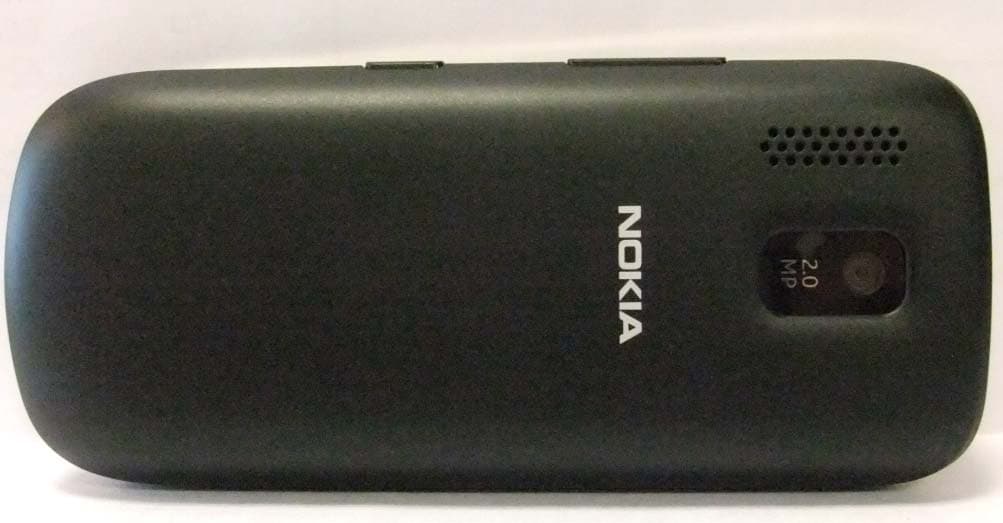
Click to zoom
Application Details
- Equipment Class
- DSS - Part 15 Spread Spectrum Transmitter
- Date of Grant
- Feb 08, 2012
- Application Purpose
- Original Equipment
- Date of Application
- Feb 08, 2012
- Equipment Note
- GSM 850/1900 Cellular Telephone with BT
- Frequency Range
- 2402.00000000 - 2480.00000000
- Company
- Microsoft Corporation
- Country
- United States
Documents & Files
Document Text
Text extracted from the exhibit documents filed with the FCC. Open a document above to read the original.
Users Manual
Nokia 203 User Guide Issue 1EN Keys and parts 6 7 8 9 1Headset connector (3.5 mm) 2Micro-USB connector 3Charger connector 4Earpiece 5End/Power key 6Keypad 7Microphone 8Call key 9Screen 10 11 14 12 13 10 Loudspeaker 11 Volume keys 12 Key lock button 13 Antenna area (highlighted). See 1 in "Feature specific instructions". 14 Camera lens. Before using the camera, remove the protective tape from the lens. Insert a SIM card and battery Switch the phone off, then remove the back cover. 1 If the battery is in the phone, lift it out. 2 Open the holder, then put the SIM in with the contact area face down. See 4. 3 Line up the battery contacts, then push the battery in. 4 Press the back cover down until it locks into place. 5 To switch on, press and hold until the phone vibrates. 6 Insert a memory card Switch the phone off, then remove the back cover. 1 If the battery is in the phone, lift it out. 2 Slide the memory card holder towards the bottom of the phone. 3 Lift the holder. 4 Put a compatible memory card in with the contact area face down. 5 Lower the holder. 6 Slide the holder to its original position. 7 Line up the battery contacts, then push the battery in. 8 Press the back cover down until it locks into place. See 2. 9 Charge the battery Plug the charger into a wall outlet. 1 Connect the charger to the phone. 2 Battery full? Unplug from the phone, then from the wall outlet. 3 Lock or unlock the keys and screen Lock the keys and screen when not using your phone. Press the key lock button. 1 Attach a strap Switch the phone off, then remove the back cover. 1 Loop the strap around the wrist strap peg. 2 Press the back cover down until it locks into place. 3 Explore your phone NamesMenu Go to To see the features and apps in your phone, press Menu. 1 Back To go back to the previous view, press Back. 2 Exit To go back to the home screen, press . 3 Options Tap an app or other item to open it. 4 Go to MenuNames Tap and hold an item to see more options. 5 Options To swipe, steadily slide your finger to the desired direction. 6 Options To scroll, slide your finger quickly up or down, then lift your finger. See 3. 7 Swipe to open applications Go toMenu Open your favourite app with a single swipe on the home screen. BackOptions Select Menu > Settings. 1 BackBack Go to Display Tones Date and time My shortcuts Left selection key Right selection key Names Swipe gesture Select My shortcuts > Swipe gesture. 2 Back Camera Change outg. Back Call divert Favourites Countd. timer Apps and games Create message Select which app to open when you swipe left. 3 Back Mail Back Log Create message Meeting Message inbox Make a to-do Apps and games Select which app to open when you swipe right. 4 Copy content from your old phone Easily get your contacts, calendar, and other stuff to your new phone. Back Switch Bluetooth on in both phones. 1 BackOptions Select Menu > Settings. 2 BackBack Date and time My shortcuts Sync with server Restore backup Connectivity Create backupSync & backup Phone switch Select Sync & backup > Phone switch. 3 Back Synchronise Copy from this Copy to this Contacts Calendar Text messages Multimedia msg. Notes Done Options Select Copy to this and what you want to copy, then select Done. 4 New search Nokia XX Back Options Select your old phone from the list of found devices. 5 Clear OK Options # ?!£ 123 Enter passcode: ***** If asked, create a one-time passcode (such as 123), then select OK. 6 NoYes 123456 Does code match with code on other device? Check that the codes match on both phones. 7 Follow the instructions on both phones. 8 Indicators — You have unread messages. — You have unsent, cancelled, or failed messages. — The touch screen and keys are locked. — The phone doesn't ring when somebody calls or sends a message. — An alarm is set. / — The phone is connected to a GPRS or EGPRS network. / — A GPRS or EGPRS connection is open. / — The GPRS or EGPRS connection is on hold. — Bluetooth is on. — All incoming calls are forwarded to another number. — The profile in use is timed. After a set amount of time, the phone changes back to the previously used profile. — A headset is connected to the phone. — The phone is connected to a device, such as a PC, with a USB cable. Make or answer a call Call your friend. Clear Options 23456789 01 Save Type in the phone number, then press . 1 Contact In call 0123456789 Options Mute Loudsp. To end the call, press . 2 OptionsSilence 9876543210 Incoming call When your phone rings, press to answer. 3 Call the last dialled number Go toNamesMenu On the home screen, press . 1 Mike Tod a y, 0 8: 2 9 0123456789 Today, 08:29 Send message Call Back Back Options Anna Tod a y, 0 7: 2 9 Select the number, then press . 2 View your missed calls View 1 missed call Mike On the home screen, select View. See 5. 1 Mike Tod a y, 1 4: 2 9 0123456789 Today, 14:29 Send message Call Back Back Options To call back, select the number, then press . 2 Options Exit Back Names Add new Log Synchronise all Tip: To view missed calls later, select Menu > Contacts > Log. Change the volume Is the volume too loud during a call or when listening to the radio? Use the volume keys. 1 Better. 2 Save a name and phone number Add new contacts to your phone. BackOptions Select Menu > Contacts. 1 Back Names Add new Log Synchronise all Select Add new. 2 Clear OK # ?!£ 123 Number: 9876543210 Type in the phone number, then select OK. 3 Clear OK Options # ?!£ abc First name: Jim Write the first name, then select OK. 4 Clear Save Jim Brown Done Options # ?!£ abc Last name: Brown Send message Call Send mail Write the last name, then select Save > Done. 5 BackBack Dad Mum Anna Names Add new Log Synchronise all Jim Brown Options To edit details, select Names and a contact. 6 BackBack Options Add detail View conversat. Add image Delete contact Jim Brown Send message Call Send mail Select Options > Add detail. 7 Make calls quickly End call Mike Calling End call Call someone often? Set their number as a speed dial. BackO…
Text truncated - open the document above for the full version.
Cover Letter(s)
Nokia (China) Investment Co., Ltd B2, Nokia China Campus Beijing Economic and Tech Development Area, No.5 Donghuan Zhonglu Beijing, 100176 China PRC Tel. +861087118888 Fax +861087114550 February 01, 2012 Federal Communications Commission Authorization & Evaluation Division, 7435 Oakland Mills Road, Columbia, MD. 21046 Attention: Equipment Authorization Branch REQUEST FOR CONFIDENTIALITY Pursuant to Sections 0.457 (d) (l) (ii) and 0.459 of the Commission’s Rules, the Applicant hereby requests confidential treatment of some of the information accompanying this Application of FCC ID: QTLRM-833 and as outlined below: - Exhibit 4: Block Diagram - Exhibit 5: Schematic Diagrams - Exhibit 12: Theory of Operation / Description of Circuitry These materials contain trade secrets and proprietary information not customarily released to the public and the public disclosure of these matters might be harmful to the Applicant and provide unjustified benefits to its competitors. The Applicant understands that pursuant to Rule 0.457 (d) (l) (ii) disclosure of this Application and all accompanying documentation will not be made before the date of the Grant for this Application. NOKIA CORPORATION Ren Shuifang Product Certification Officer Beijing, PRC.
Cover Letter(s)
Nokia (China) Investment Co., Ltd B2, Nokia China Campus Beijing Economic and Tech Development Area, No.5 Donghuan Zhonglu Beijing, 100176 China PRC Tel. +861087118888 Fax +861087114550 February 01, 2012 Federal Communications Commission Authorization & Evaluation Division, 7435 Oakland Mills Road, Columbia, MD. 21046 Attention: Equipment Authorization Branch REQUEST FOR SHORT TERM CONFIDENTIALITY Pursuant to Section 0.459 of the Commission’s Rules and Public Notice DA 04-1705 of June 15, 2004, the Applicant hereby requests for 180 days short term confidential treatment of some of the information accompanying this application of FCC ID: QTLRM-833 and as outlined below: - Exhibit 3: External photos - Exhibit 7: Test setup photos - Exhibit 8: User's manual - Exhibit 9: Internal photos These materials contain proprietary information not yet released to the public and the public disclosure of these matters might be harmful to the Applicant and provide unjustified benefits to its competitors. NOKIA CORPORATION Ren Shuifang Product Certification Officer Beijing, PRC.
External Photos
Applicant: Nokia Corporation FCC ID: QTLRM-833 Copyright © 2012 Nokia. All rights reserved. Applicant: Nokia Corporation FCC ID: QTLRM-833 Copyright © 2012 Nokia. All rights reserved.
ID Label/Location Info
FCC ID: QTLRM-833 Applicant: Nokia Corporation Copyright © 2012 Nokia. All rights reserved. Type label placement on the phone
Internal Photos
App plicant: Nokia a Corporatio GS M n M antenna C Copyright © B F 2012 Nokia. BT antenna FCC ID: QTLR All rights res RM‐833 served. Applicant: Nokia Corporation FCC ID: QTLRM‐833 Copyright © 2012 Nokia. All rights reserved.
Test Report
FCC Part 15C Compliance Test Report / Template Version 15.0 FCC15CBT_RM‐833_07.docx Copyright © TCC Nokia 1 (38) TCC Nokia Salo Laboratory P.O.Box(86) Joensuunkatu 7H / Kiila 1B FIN‐24101 SALO, FINLAND Tel. +358 (0) 7180 08000 Fax. +358 (0) 7180 45220 FCC Part 15C Compliance Test Report Test Report no.: FCC15CBT_RM-833_07.docx Date of Report: 19-Jan-2012 Number of pages: 38 Customer’s Contact person: David Zhang Testing laboratory: TCC Nokia Salo Laboratory P.O.Box(86) Joensuunkatu 7H / Kiila 1B FIN-24101 SALO, FINLAND Tel. +358 (0) 7180 08000 Fax. +358 (0) 7180 45220 Customer: Nokia Corporation Beijing Economic and Technological Development Area No.5 Donghuan Zhonglu Beijing PRC China 100176 Tel. +86 10 8711 8888 Fax. +86 10 8711 4550 FCC listing no.: IC recognition no.: 533467 661V-1 Tested devices/ accessories: Phone RM-833 / Battery BL-5C / Headset WH-102 / AC-Charger AC-11E FCC ID: QTLRM-833 IC: - Supplement reports: - Testing has been carried out in accordance with: CFR 47, FCC rules Part 15 Subpart C, ANSI C63.4 (2003), Public Notice DA 00-705, DTS procedures KDB 558074, IC standards, RSS-210 (Issue 8, December 2010). Deviations, modifications or clarifications (if any) to above mentioned documents are written in each section under "Test method and limit". Documentation: The test report must always be reproduced in full; reproduction of an excerpt only is subject to written approval of the testing laboratory. The documentation of the testing performed on the tested devices is archived for 15 years at TCC Nokia. Test Results: The EUT complies with the requirements in respect of all parameters subject to the test. The test results relate only to devices specified in this document Date and signature for the contents: Sami Lehtonen, System Specialist, EMC FCC Part 15C Compliance Test Report / Template Version 15.0 FCC15CBT_RM‐833_07.docx Copyright © TCC Nokia 2 (38) TCC Nokia Salo Laboratory P.O.Box(86) Joensuunkatu 7H / Kiila 1B FIN‐24101 SALO, FINLAND Tel. +358 (0) 7180 08000 Fax. +358 (0) 7180 45220 1. Summary for FCC Part 15C Compliance Test Report Date of receipt 11-Jan-2012 Testing completed 16-Jan-2012 The customer's contact person David Zhang Test Plan referred to T:\Projects\RM-833\TestPlan\RS_testplan_RM-833.xls Notes - Document name T:\Projects\RM-833\EMC\FCC15CBT_RM-833_07.docx 1.1. EUT and Accessory Information The EUT is a mobile phone with following features: GSM/Bluetooth The EUT is tested with maximum rated TX power, modulated with pseudo random bit sequence (PRBS9). Devices under tests Product Type SN HW MV SW DUT Phone RM-833 004402138010362 0202 - ma20.11 16143 Battery BL-5C 0670400382066S40305KA35084 - - - 16152 Headset WH-102 06943231401B3104036 - - - 16151 AC-Charger AC-11E 4090491397970509502ö0675479 - - - 16149 Phone RM-833 004402138010370 0202 - ma20.11 16146 Battery BL-5C 0670400382066S40305KA35243 - - - 16167 AC-Charger AC-11E 4090491397970509484ö0675479 - - - 16150 Headset WH-102 06943231401B3104011 - - - 16148 Phone RM-833 004402138010693 0202 - ma20.11 16144 1.2. Summary of Test Results Bluetooth: Section in CFR 47 Section in RSS-GEN or RSS-210 Name of the test Result 15.247(b)(1) A8(0.4(2)) Conducted peak output power PASSED 15.247(d), 15.205(b) A8(0.5) Band edge compliance of RF emissions PASSED 15.247(d) A8(0.5) Spurious RF conducted emissions PASSED 15.247(d), 15.209 A8(0.5) Spurious radiated emissions PASSED 15.207 7.2.2 AC powerline conducted emissions PASSED 15.247(a)(1) A8(0.1(1)) 20dB(bandwidth) PASSED 15.247(a)(1) A8(0.1(2)) Carrier frequency separation PASSED 15.247(a)(1)(iii) A8(0.1(4)) Number of hopping frequencies PASSED 15.247(a)(1)(iii) A8(0.1(4)) Time of occupancy PASSED PASSED The EUT complies with the essential requirements in the standard. FAILED The EUT does not comply with the essential requirements in the standard. NP The test was not performed by the TCC Nokia Laboratory. FCC Part 15C Compliance Test Report / Template Version 15.0 FCC15CBT_RM‐833_07.docx Copyright © TCC Nokia 3 (38) TCC Nokia Salo Laboratory P.O.Box(86) Joensuunkatu 7H / Kiila 1B FIN‐24101 SALO, FINLAND Tel. +358 (0) 7180 08000 Fax. +358 (0) 7180 45220 CONTENTS 1. Summary for FCC Part 15C Compliance Test Report ............................................... 2 1.1. EUT and Accessory Information ........................................................................................................ 2 1.2. Summary of Test Results .................................................................................................................. 2 2. Conducted peak output power (15.247(b)(1), RSS-210 A8.4 (2)) ......................................................................................... 5 2.1. Test Setup ......................................................................................................................................... 5 2.2. Test method and limit ........................................................................................................................ 5 2.3. Bluetooth Test results ....................................................................................................................... 6 3. Band edge compliance of RF emissions (FCC §15.247(d), 15.205(b), RSS-210 A8.5) ....................................................................... 9 3.2. Test method and limit ........................................................................................................................ 9 3.3. Bluetooth Test results ..................................................................................................................... 10 4. Spurious RF conducted emissions (FCC §15.247(d), RSS-210 A8.5) ....................................................................................... 14 4.1. Test Setup ....................................................................................................................................... 14 4.2. Test method and limit ...........................................…
Text truncated - open the document above for the full version.
Contact Information
Applicant
Hasnain Syed(Director, EMC, SI and RF Compliance)
Test Firm
TCC Microsoft SaloKalle Hannila
Technical Specifications
| # | Rule Parts | Frequency Range | Power Output |
|---|---|---|---|
| 2 | 15C | 2.40 GHz - 2.48 GHz | 2.56 mW |
Other Applications from Microsoft Corporation
QTLRM-1041
Nov 03, 2014GSM/WCDMA/LTE/CDMA Cellular Device with BT, BTLE, WLAN, NFC
Equipment Class
PCE - PCS Licensed Transmitter held to ear
QTLRM-1078
Sep 24, 2014GSM/WCDMA/LTE/CDMA cellular device w/BT, BTLE, WLAN
Equipment Class
JBP - Part 15 Class B Computing Device Peripheral
QTLRM-1039
Sep 10, 2014GSM/WCDMA/LTE cellular device w/BT, BTLE, WLAN and NFC
Equipment Class
JBP - Part 15 Class B Computing Device Peripheral
QTLRM-1040
Aug 25, 2014GSM/WCDMA cellular device w/BT, BTLE, WLAN, NFC
Equipment Class
PCB - PCS Licensed Transmitter
QTLRM-1038
Aug 14, 2014GSM/WCDMA cellular device w/BT, BTLE, WLAN, NFC
Equipment Class
PCE - PCS Licensed Transmitter held to ear