QW6MP-430THMP3 PLAYER
Cenix Digicom Co., Ltd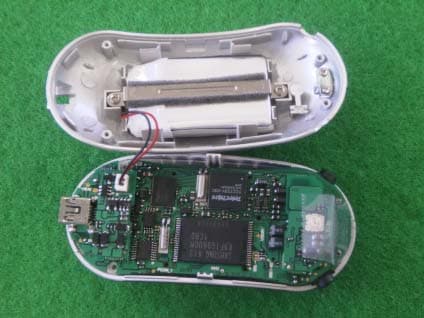
Click to zoom
Application Details
- Equipment Class
- JBP - Part 15 Class B Computing Device Peripheral
- Date of Grant
- Aug 29, 2004
- Application Purpose
- Original Equipment
- Date of Application
- Aug 29, 2004
- Equipment Note
- MP3 PLAYER
- Company
- Cenix Digicom Co., Ltd
- Country
- South Korea
Documents & Files
Document Text
Text extracted from the exhibit documents filed with the FCC. Open a document above to read the original.
Users Manual
MP-430T User’s Manual PDF created with pdfFactory Pro trial version www.pdffactory.com Features Multi◎-Codec Player - MP3, WMA, OGG(Q10) Support Voice Recording◎ - Voice, Line In, FM Radio - 32KHz, 44.1KHz Sample Rate - 32Kbps ~ 128Kbps Bitrate F◎irmware Upgrade Graphic LCD supporting◎ multiple languages ◎ Lyric support FM Radio◎ - FM area setting - FM sensitivity setting ◎ Clock & Reservation & Alarm 7◎ Equalizer Types (EQ) - Normal, Rock, Jazz, Classic, Pops, User, SRS ◎ SRS WOW support File ◎Browser - Supports the file browser for both play and stop mode. Bookmark, Playlist Browser◎ - Supports bookmark and playlist browser - Adds or deletes bookmark and playlist Tab◎-type Menu - Easy to check the settings USB 1.1◎ Support PDF created with pdfFactory Pro trial version www.pdffactory.com Name of the Parts Front View Rear View Volume –(Down) Volume +(Up) Select/Browser/Menu Microphone REW (Previous/Next) FF (Next/Previous) Earphone LINE-IN Hold On/Off Necklace Hole RESET Recording/Stop Mode Setting/ FUNCTION/ A<->B Play/Stop Power On/Off USB Connection Terminal PDF created with pdfFactory Pro trial version www.pdffactory.com Description on LCD Audio Play Lyric FM Radio Recording Menu PDF created with pdfFactory Pro trial version www.pdffactory.com PDF created with pdfFactory Pro trial version www.pdffactory.com Basic Functions 1) Lock / Unlock 2) Power On / Power Off 3) Volume Control Lock: Push the HOLD switch up to the arrow direction. Unlock: Push the HOLD switch down to the arrow direction. Power On: Press the PLAY/STOP button longer than 2 seconds to turn on the player. Power Off: Press the PLAY/STOP button longer than 2 seconds to turn off the player. ☞ Note ☜ ▶ You can prevent button operation when you set the HOLD switch. ▶ If you press any button while the HOLD switch is locked, the “KEY HOLD” message for about 2 seconds and button input will be disabled. Push Up/Down Press Longer Press the +(Up)/-(Down) button shortly to increase the volume by 1 step, or hold the button to increase the volume continuously. Push down/up ● Do not increase the volume too high during playback using an earphone. Your hearing ability can be impaired. ● Turn the volume down first and increase to the one you want. Warning PDF created with pdfFactory Pro trial version www.pdffactory.com 4) Mode Switching Audio Play FM Radio Recording System Menu Press the SELECT button longer once. Use the REW(◀◀)/FF(▶▶) button to select the mode you want, and press the SELECT button again to enter into the selected mode 1) Audio Play Mode: MP3, WMA or OGG audio file playback 2) FM Radio Mode: FM radio listening 3) Voice Mode: Voice, Line in or FM radio recording 4) System Menu Mode: System setting. Audio Play Mode 1) Switching to the Audio Play Mode Press the SELECT button longer once to change the mode if you have selected the mode other than the audio play mode. Use the REW(◀◀)/FF(▶▶) button to select the audio play mode and press the SELECT button to switch to the audio play mode. ☞ Note ☜ ▶ Press the REC/STOP button in the audio play mode to start voice recording. ▶ To enter into the menus of each mode, move to the target mode using the REW(◀◀)/FF(▶▶) button and press the +(Up) button. Press longer PDF created with pdfFactory Pro trial version www.pdffactory.com 2) Playback/Stop Playback Stop 3) File Search/Navigation/Selection ☞ Note ☜ ▶ If the Study key function is engaged, press the REW(◀◀)/FF(▶ ▶) button to skip playback of the current file by the designated time period. Playback: Press the PLAY/STOP button shortly once. Stop: Press the PLAY/STOP button shortly once again. Press shortly <Moving to the previous/next file > Push to the REW(◀◀)/FF(▶▶) direction shortly once during playback. <Navigation> Push to the REW(◀◀)/FF(▶▶) direction longer once during playback. <Selecting the previous/next file > Push to the REW(◀◀)/FF(▶▶) direction shortly once during stop. Push to the left/right shortly once. PDF created with pdfFactory Pro trial version www.pdffactory.com 4) Audio Setting Mode Press the FUNC button longer in the stop or playback mode to enter into the audio setting mode. Press the FUNC button to change the audio setting mode to EQ Setting ⇒ Repeat Setting ⇒ Play Speed. EQ Setting Repeat setting - Play Speed Press longer ▶ Set the EQ mode using the +(Up)/-(Down) button. (Normal ⇒ Rock ⇒ Jazz ⇒ Classic ⇒ Pops ⇒ User ⇒ SRS) ▶ Set the level of 5 bands using the REW(◀◀)/FF(▶▶) button.(Except the normal and SRS mode) ▶ Press the +(Up)/-(Down) button to change the repetition mode, or press the REW (◀◀)/FF(▶▶) button to change the repetition region. Press the REC/STOP button to set the shuffle mode. ▶Press the REW(◀◀)/FF(▶▶) button to select playback speed you want. Playback speed control is applicable for the file currently being played back. ☞ Note ☜ ▶ To return to the stop or playback mode in any setting mode, press the SELECT button or PLAY/STOP button. PDF created with pdfFactory Pro trial version www.pdffactory.com 5) Sector Repetition (A↔B) Plays back the selected sector repetitively. 4) Browser Mode File Browser:① Browser displaying the directory and files. -- Run in the audio playback mode or the recording wait mode. Bookmark Browser:② Browser displaying the bookmark – Run in the audio playback mode only. Playlist Browser: ③Browser displaying the playlist – Run in the audio playback mode. Press shortly Press shortly ☞ Note ☜ ▶Bookmark : Keeps record of the file name and current playback time during audio file playback. ▶Playlist : A list of files that you want to play back, like the M3U in the Winamp (Similar to the program function of the CD Player) Setting A Point Setting B Point On: Press the FUNC button once shortly during playback to set the A point. Press the FUNC button shortly again to set the B point. Then, playback will be repeated between the point A and B. Off: Press the FUNC button once shortly. If you press the SELECT button in the audio play mode or recording wait mode, the browser mode w…
Text truncated - open the document above for the full version.
Block Diagram
A A B B C C D D 11 22 33 44 TitleSize No. Rev. File Date Time of Top CircuitA4 .docno. .rev. C:\...\ \BLOCK.sch 2004/08/23 16:54 1 1 note1note2note3note4note5 DC3.7V SRAM TUNER_PACK USB JACK CHARGER INTERFACE USB TUNER_CONTROL LCD CONTROL GRAPHIC_LCD X-TAL12MHz FLASH_MEMORY FLASH_MEMORY CONTROL DATA CONTROL CONTROLFM_POWER AD_KEY IN H/P OUT MP-430T BLOCK DIAGRAM DDC2.5V1.8VREG.DDC2.7V H/P JACK LINE_IN JACK 3.0VREG.3.0VREG. LED DRIVE R.T.C X-TAL 32.768KHz R.T.C CONTROL LED CONTROL DC5V VDD LINE_IN C-MIC_IN Single Chip Digital Audio Encoder/Decoder With MCU
ID Label/Location Info
MP3 Player MODEL NO: MP-430TH FCC ID: QW6MP-430TH
Test Report
EMI TEST REPORT Emission of electromagnetic disturbance Test Report No. : ERI-FCC04-0049 Equipment : MP3 Player Name of basic model : MP-430TH Family model : MP-430TE, MP-430TF, MP-430TG Manufacturer : CENIX DIGICOM CO., LTD. Applicant : CENIX DIGICOM CO., LTD. Tested date : 2004. 8. 24 – 8. 28 Issued date : 2004. 8. 30 Test results : PASS Test Standards : FCC Part 15 Subpart B (Class B) /Digital devices & peripherals Test Procedure and Items: - AC Power line Conducted emissions measurement : ANSI C63.4-1992 - Radiated emissions measurement : ANSI C63.4-1992 Tested by: YOUNG-SIK, KIM Approved by: SANG-KYU, LEE The results in this report apply only to the sample tested. This test report shall not be reproduced except in full, without the written approval of ERI Laboratory. EMC RESEARCH INSTITUTE EMC Research Institute CONTENTS 1. CLIENT INFORMATION 2. LABORATORY INFORMATION 3. EQUIPMENT UNDER TEST INFORMATION(EUT) 3.1 Identification of the EUT 3.2 Additional information about the EUT 3.3 Peripheral equipment 4. CONTINUOUS DISTURBANCE VOLTAGE, MAIN TERMINAL 4.1 Operating environment 4.2 Test set-up and test procedures 4.3 Operation Conditions 4.4 Test instrument 4.5 Test results 5. RADIATED DISTURBANCE : 30MHz – 1000MHz 5.1 Operating environment 5.2 Test set-up 5.3 Test conditions 5.4 Test instrument 5.5 Test results (Test mode: Up & Download mode) 5.6 Test results (Test mode: Play mode) 5.7 Test results (Test mode : FM Tuner mode) APPENDIX (None) EMC Research Institute 1. CLIENT INFORMATION The EUT has been tested by request of : Company : CENIX DIGICOM CO., LTD. Address : #584-4 PAJANG-DONG, JANGAN-KU, SUWON-CITY, KYUNGGI-DO, KOREA Name of contact : - Telephone : +82-31-245-2900 Facsimile : +82-31-251-6425 2. LABORATORY INFORMATION The 10m full-anechoic chamber and/or EMC facilities are used for these testing. These facilities were accredited by KOLAS, EK, MIC of Korea and FCC of USA. Address ELECTROMAGNETIC RESEARCH INSTITUTE. 66-6, JEIL-RI, YANGJI-MYUN, YOUNGIN-CITY, KYUNGGI-DO, KOREA Telephone No. : +82-31-336-1186~7 Facsimile No. : +82-31-336-1184 Registered No. KOLAS : 111 EK : J MIC : KR0030 FCC Filing No. : 302567 3. EQUIPMENT UNDER TEST INFORMATION(EUT) 3.1 Identification of the EUT Type of equipment : MP3 Player Model name : MP-430TH Brand name : - Manufacturer : CENIX DIGICOM CO., LTD. Address : #584-4 PAJANG-DONG, JANGAN-KU, SUWON-CITY, KYUNGGI-DO, KOREA Telephone : +82-31-245-2900 Facsimile : +82-31-251-6425 Country of origin : KOREA Rating : DC 1.5V EMC Research Institute 3.2 Additional information about the EUT Class B, Family Models List: Basic Model Variant Model Differential point Memory size MP-430TE 128M MP-430TF 256M MP-430TH (1G) MP-430TG Memory size 512M 3.3 Peripheral equipment Defined as equipment needed for correct operation of the EUT. Description Model No. Serial No. Manufacture PC MTC2 FSZS91S Dell Monitor PN15VT P181G80R907989 - Keyboard TRI-270 108018331 Solid Year Co., Ltd. Mouse M-S48a LZA95250340 Logitech Printer C6247A CN13V1B1RY HP EMC Research Institute 4. CONTINUOUS DISTURBANCE VOLTAGE, MAIN TERMINAL : Frequency range 0.15 MHz to 30 MHz 4.1 Operating environment Temperature : 22.0 Relative Humidity : 46.0 % 4.2 Test set-up and test procedures The mains terminal disturbance voltage was measured with the equipment under test(EUT) in a shield room. The EUT was connected to an artificial mains network(LISN) placed on the floor. The EUT was placed on non-metallic table 0.4m above the metallic, grounded floor. The distance to other metallic surface was at least 0.8m. Amplitude measurements were performed with a quasi-peak detector and an average detector. 4.3 Operation Conditions Up & Down load mode, play mode 4.4 Test instrument Instrument Model No Serial No. Makers Next cal.date Used Test receiver ESCS30 100022 R&S 2005. 06. 16 ESH3-Z5 100029 R&S 2004. 11. 11 L.I.S.N. ESH3-Z5 100031 R&S 2005. 01. 06 Shield room 8 6 3.3m/H - - - AC Main LISN LISN PC Printer EUT Keyboard Monitor Earphone Mouse EMC Research Institute 4.5 Test results Date of test: Aug 24, 2004. An overview sweep performed with peak detector & average detector are included in the report as test reports. Frequency Tested LISN Meter Range Freq. Reading Limits Margin QP AV QP AV QP AV [MHz] [MHz] [dBuV] [dBuV] [dBuV] 0.156 N 35.4 35.0 65.7 55.7 30.3 20.7 0.195 H 33.9 33.8 63.8 53.8 29.9 20.0 0.15-30 0.981 H 33.4 33.0 56.0 46.0 22.6 13.0 2.253 N 34.0 33.2 56.0 46.0 22.0 12.8 2.646 H 35.5 35.2 56.0 46.0 20.5 10.8 2.742 N 34.1 33.0 56.0 46.0 21.9 13.0 3.820 H 36.6 36.1 56.0 46.0 19.4 9.9 3.920 N 36.4 35.6 56.0 46.0 19.6 10.4 4.700 H 33.7 32.9 60.0 50.0 26.3 17.1 7.640 H 33.3 30.1 60.0 50.0 26.7 19.9 * <5 : mean less than 5dB * Other frequency keep over 20dB margin. EMC Research Institute [Live line] [Neutral line] EMC Research Institute 5. RADIATED DISTURBANCE : 30MHz – 1000MHz 5.1 Operating environment Temperature : 23.0 Relative Humidity : 48.0 % 5.2 Test set-up The frequency range investigated was 30 MHz to 1000 MHz. All readings are quasi-peak unless stated otherwise. The half-wave dipole antenna was tuned to the frequency found during Preliminary radiated measurements. The EUT, support equipment and Interconnecting cables were re-configured to the set-up to the producing the Maximum emission for the frequency and were placed on top of a 0.8 meter High non-metallic 1 X 1.5 meter table. The EUT, support equipment, and interconnecting cables were re-arranged and manipulated to maximize each EME emission. The turntable containing the system was rotated the antenna height was varied 1 to 4 meters and stopped at the azimuth or height producing the maximum emission. And this device(EUT) was tested in 3 orthogonal planes. The antenna measured both horizontal and vertical polarization. <General test set-up for radiated emissions> 5.3 Operation Conditions Up load mode, play mode, tuner mode EMC Research Institute 5.4 Test instrument Instrument Model No. Serial No. Makers Next cal.date Used Test receiver…
Text truncated - open the document above for the full version.
Contact Information
Applicant
Gi - Yeon Lee(Researcher)
Test Firm
EMC Research InstituteKyu-Hong Jung
Technical Specifications
| # | Rule Parts | Frequency Range | Power Output |
|---|---|---|---|
| 1 | 15B | - | - |
Other Applications from Cenix Digicom Co., Ltd
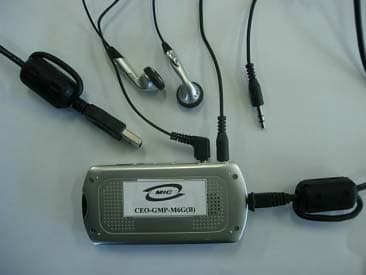
QW6MFDU03
Dec 22, 2005MP3 PLAYER
Equipment Class
JBP - Part 15 Class B Computing Device Peripheral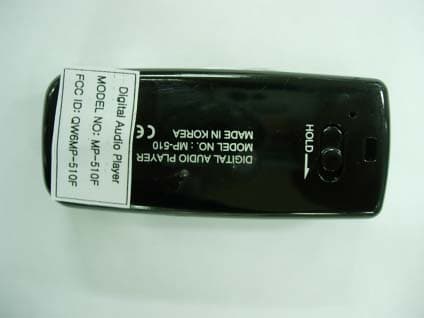
QW6MP-510F
May 08, 2005DIGITAL AUDIO PLAYER
Equipment Class
JBP - Part 15 Class B Computing Device Peripheral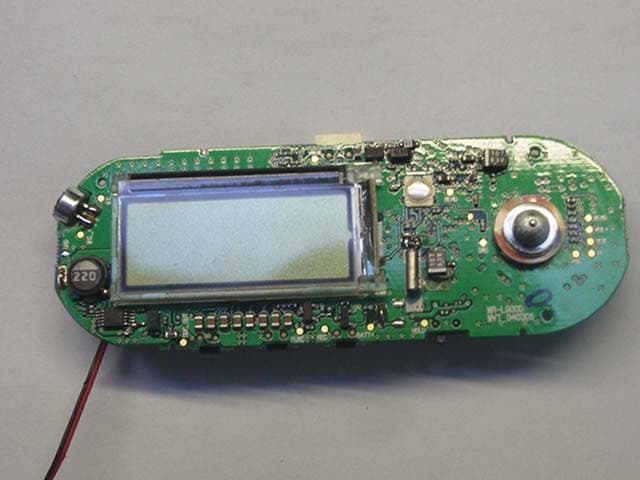
QW6MR-L900
Apr 15, 2004MP3 Player
Equipment Class
JBP - Part 15 Class B Computing Device Peripheral
QW6WVR175
Jan 13, 2004DIGITAL VOICE RECORDER
Equipment Class
JBP - Part 15 Class B Computing Device Peripheral
QW6WVR165
Jan 13, 2004DIGITAL VOICE RECORDER
Equipment Class
JBP - Part 15 Class B Computing Device Peripheral