RTP-55010016-2Wireless Access Point
Hewlett Packard Enterprise
Click to zoom
Application Details
- Equipment Class
- NII - Unlicensed National Information Infrastructure TX
- Date of Grant
- Apr 13, 2004
- Application Purpose
- Original Equipment
- Date of Application
- Apr 13, 2004
- Equipment Note
- Wireless Access Point
- Frequency Range
- 5745.00000000 - 5805.00000000
- Company
- Hewlett Packard Enterprise
- Country
- United States
Documents & Files
Document Text
Text extracted from the exhibit documents filed with the FCC. Open a document above to read the original.
Users Manual
CN3200 Administrator’s Guide DRAFT Note: Any references to CN3000 in this draft also apply to the CN3200. : 2 First Edition (January 2004)43-10-3200-06 Colubris is a registered trademark of Colubris Networks Inc. Microsoft, Windows, Windows 2000, Windows NT, Windows 95, Windows 98, Windows ME, Internet Explorer, and the Windows logo are either registered trademarks or trademarks of Microsoft Corporation in the United States and/or other countries. IBM is a registered trademark of International Business Machines. All other names mentioned herein are trademarks or registered trademarks of their respective owners. Changes are periodically made to the information herein; these changes will be incorporated into new editions of the document. Copyright © 2004 Colubris Networks Inc. All rights reserved, including those to reproduce this document or parts thereof in any form without permission in writing from Colubris Networks, Inc. Colubris Networks Inc. 420 Armand-Frappier (suite 200) Laval (Quebec) Canada H7V 4B4 Telephone: +1 (450) 680-1661 Fax: +1 (450) 680-1910 : 3 DRAFT Table of Contents Chapter 1 Introduction.......................................... 7 Introducing the CN3200..........................................................8 Scalable solution...............................................................8 Secure infrastructure ........................................................8 Enhanced user experience ................................................9 Secure remote management ...........................................10 Wireless bridging ............................................................10 Multiple SSID support.....................................................12 Feature summary ..................................................................13 Wireless radio .................................................................13 Hardware ........................................................................16 Networking .....................................................................16 Network management .....................................................17 Access controller functions.............................................17 Security...........................................................................17 RF Tools ..........................................................................17 Compatibility ...................................................................17 Authentication and accounting........................................18 Management ...................................................................18 Interfaces ........................................................................18 Operating Environment ...................................................18 Regulatory Approvals......................................................18 Package contents ..................................................................19 Technical support..................................................................19 Syntax conventions...............................................................20 Chapter 2 Important concepts ................................21 Networking areas ..................................................................22 Wireless cells ..................................................................22 Attaching to a wired LAN ................................................24 Network operating center (NOC) ...........................................25 NOC components ............................................................25 Sending traffic to the NOC ..............................................26 The public access interface ...................................................27 Connecting to and using the wireless network......................28 Broadcast IP address ......................................................28 Allow any IP address ......................................................28 WPA/802.1x clients.........................................................28 Proxy server support ......................................................28 The RADIUS server ...............................................................29 Main tasks ......................................................................29 More information ............................................................29 Customer authentication .......................................................30 RADIUS server................................................................30 Local user list .................................................................30 MAC-based authentication ..............................................30 WPA/802.1x ....................................................................30 Chapter 3 Planning your installation........................31 Multi-site installation ............................................................32 About this installation .....................................................32 Installation strategy ........................................................33 Multi-area installation ...........................................................34 About this installation .....................................................34 Installation strategy ........................................................35 Chapter 4 Installation ......................................... 37 Anatomy ............................................................................... 38 Antenna connectors ....................................................... 38 Ports .............................................................................. 38 Powering the CN3200 .................................................... 39 Status lights ................................................................... 39 Radio .............................................................................. 39 Reset button................................................................... 40 Installing the CN3200 ..…
Text truncated - open the document above for the full version.
Users Manual
Chapter 15: Customizing the public access interface194 DRAFT Source code for the internal pages This section presents commented source code for the default internal pages. Important: Do not create your own pages by saving a page from within your web browser. The server side code is removed when you do this and the resulting pages will not work. Use the examples in this section or those on the CD in \HTML\Colubris\Internal as the basis for your pages. Login page <!-- Colubris --> <!-- Default --> <!-- iPass <WISPAccessGatewayParam> <Redirect> <MessageType>100</MessageType> <ResponseCode><% iPassGetRedirectResponseCode(); %></ResponseCode> <AccessProcedure><% iPassGetAccessProcedure(); %></AccessProcedure> <LocationName><% iPassGetLocationName(); %></LocationName> <AccessLocation><% iPassGetAccessLocation(); %></AccessLocation> <LoginURL><% iPassGetLoginUrl(); %></LoginURL> <AbortLoginURL><% iPassGetAbortLoginUrl(); %></AbortLoginURL> </Redirect> </WISPAccessGatewayParam> --> <!DOCTYPE HTML PUBLIC "-//W3C//DTD HTML 4.01 Transitional//EN" "http://www.w3.org/TR/1999/REC-html401-19991224/loose.dtd"> <html lang="en"> <head> <meta http-equiv="content-type" content="text/html; charset=iso-8859-1"> <meta http-equiv="Expires" CONTENT="0"> <meta http-equiv="Cache-Control" CONTENT="no-cache"> <meta http-equiv="Pragma" CONTENT="no-cache"> <title>Login</title> <style type="text/css"> <!-- .labels { font-family: verdana, sans-serif; } #title { font-size: 14px; color: #000000; padding-left: 5px; } #tags { font-size: 10px; color: #000000; } #error { font-size: 12px; color: #CC0000; font-weight: bold; } #input { font-family: verdana, sans-serif; font-size: 11px; Chapter 15: Customizing the public access interface195 DRAFT width: 120px; color: #003366; } #submit { font-family: verdana, sans-serif; font-size: 10px; font-weight: bold; color: #003366; } --> </style> <script language="Javascript"> //Make sure the required information was entered function setfocus() { if (document.forms[0]) { document.forms[0].elements[0].focus(); } } //--> </script> </head> <body bgcolor="#FFFFFF" onLoad="setfocus();"> <form action="/goform/HtmlLoginRequest" method="POST"> <table border="0" width="99%" height="70%" cellspacing="0" cellpadding="0"> <tr><td align="center" valign="middle"> <table border="0" width="300" cellspacing="0" cellpadding="3"> <tr bgcolor="#FFFFFF"> <td> <img src="/logo.gif" alt="" width="125" height="50" border="0"> </td> </tr> <tr> <td align="center"> <span class="labels" ID="title"> <%GetAuthenticationErrorMessage();%> <%GetRadiusReplyMessage();%> <%GetMsChapV2Failed();%> </span> </td> </tr> </table> <br> <table border="0" width="300" cellspacing="0" cellpadding="3" bgcolor="#CC0033"> <tr> <td align="center" valign="middle" colspan="2"> <table border="0" width="300" cellspacing="0" cellpadding="4" bgcolor="#E6E6E6"> <tr> <td align="right"> <span class="labels" ID="tags">Username:</span> </td> <td> <input type="text" name="username" maxlength="30" size="32"> </td> <td> </td> </tr> <tr> <td align="right"> <span class="labels" ID="tags">Password:</span> Chapter 15: Customizing the public access interface196 DRAFT </td> <td> <input type="password" name="password" maxlength="30" size="32"> </td> <td valign="bottom"> <input type="submit" name="login" value="Go >>"> </td> </tr> <tr> <td> <input type="hidden" name="original_url" value=<%GetOriginalUrl();%>> </td> </tr> </table> </td> </tr> </table> </td></tr> </table> </form> </body> </html> Transport page <!-- Colubris --> <!-- Default --> <!-- iPass <WISPAccessGatewayParam> <AuthenticationReply> <MessageType>120</MessageType> <ResponseCode><% iPassGetLoginResponseCode(); %></ResponseCode> <ReplyMessage><% GetRadiusReplyMessage(); %></ReplyMessage> <LogoffURL><% iPassGetLogoffUrl(); %></LogoffURL> </AuthenticationReply> </WISPAccessGatewayParam> --> <!DOCTYPE HTML PUBLIC "-//W3C//DTD HTML 3.2 Final//EN"> <html> <head> <meta http-equiv="content-type" content="text/html; charset=iso-8859-1"> <meta http-equiv="Expires" CONTENT="0"> <meta http-equiv="Cache-Control" CONTENT="no-cache"> <meta http-equiv="Pragma" CONTENT="no-cache"> <meta http-equiv="refresh" content="1; URL=<%GetWelcomeUrl();%>"> <title>Transport</title> <script type="text/javascript" language="Javascript"> <!-- function opensessionwin(whichone) { // Define the size of your remote window in pixels with "width" and "height." remote = window.open("","sessionwin","width=240,height=400,toolbar=0,location=0,directories=0,status=0,me nubar=0,scrollbars=1,resizable=1"); if (remote.blur) remote.focus(); // Put the full url of your remote document where you see "URL". remote.location.href = "<%GetSessionUrl();%>"; Chapter 15: Customizing the public access interface197 DRAFT if (remote.opener == null) remote.opener = window; remote.opener.name = "opener"; } //--> </script> </head> <body onload="opensessionwin();" bgcolor="#FFFFFF"> <font face="verdana, arial, helvetica" size="2"> <h4>This should take 1 second...</h4> If you are not redirected within a few seconds, please <a href="<%GetWelcomeUrl();%>">click here</ a>. If you have JavaScript disabled and the session page doesn't appear, please <a href="<%GetSessionUrl();%>">click here</a>. </font> </body> </html> Session page <!-- Colubris --> <!-- Default --> <!DOCTYPE HTML PUBLIC "-//W3C//DTD HTML 3.2 Final//EN"> <html> <head> <meta http-equiv="content-type" content="text/html; charset=iso-8859-1"> <meta http-equiv="Expires" CONTENT="0"> <meta http-equiv="Cache-Control" CONTENT="no-cache"> <meta http-equiv="Pragma" CONTENT="no-cache"> <% SetSessionRefreshInterval("20");%> <title>Session</title> </head> <body bgcolor="#FFFFFF"> <table border="0" cellpadding="0" cellspacing="5" align="center" style="border:1px dotted #CC0000"> <tr> <td colspan="2" align="center"> <img src="/logo.gif" alt="" width="125" height="50" border="0"></td> </tr> <tr> <td colspan="2"> <font face="verdana" size="3"><b>Session</b></font> </td> </tr> <tr> <td colspan="2" align="…
Text truncated - open the document above for the full version.
Attestation Statements
420 Armand Frappier #200, Laval, Québec, H7V, tel : 450-680-1661, fax : 450-680-1910 200 West street, Waltham, MA, 02451, tel: 781-684-0001, fax: 781-684-0009 Operating channel The following operational description applies to the devices, whose FCC ID is RTP-55010016-2 The devices can be configured for operation in the 2.4 GHz band, 5.3 GHz band or 5.8 GHz band. For each band, the channel set allowed is the following 2.4 GHz band channel 1 to 11 5.3 GHz band channel 56-64 5.8 GHz band channel 149-161 The installer or operator can select any of the channels listed above. The device’s configurator will only accept a channel corresponding to the choice available in the table above. Claude Robitaille Director Hardware Engineering Colubris Networks 450-680-5070
Attestation Statements
420 Armand Frappier #200, Laval, Québec, H7V, tel : 450-680-1661, fax : 450-680-1910 200 West street, Waltham, MA, 02451, tel: 781-684-0001, fax: 781-684-0009 Device operation in relation to clause 15.407(c) (c) 5GHz U-NII band of the FCC rules. The following operational description applies to the devices, whose FCC ID is RTP-55010016-2 The devices are either an IP bridge or router and only transmit if they have IP traffic to transmit, with the exception of some control frames. Also, at the physical level, the radio is half duplex with acknowledgement, which means that one end of the radio link must give the chance to the other end, at the minimum, to reply with acknowledgement frames. Finally, the 802.11 protocol requires that frames have a maximum length and that some silence period follows the transmission of a frame. Furthermore, a station that wishes to transmit must also perform a "clear channel" assessment before starting to transmit. Claude Robitaille Director Hardware Engineering Colubris Networks 450-680-5070
Cover Letter(s)
420 Armand Frappier #200, Laval, Québec, H7V, tél : 450-680-1661, fax : 450-680-1910 200 West street, Waltham, MA, 02451, tél: 781-684-0001, fax: 781-684-0009 Attention: Application Examiner Reviewing Engineer Re: Request for confidentiality, made pursuant to 47 CFR 0.459 of FCC Rules Applicant: Colubris Networks, Inc. FCC ID: RTP-55010016-2 To whom it may concern, Request is hereby submitted Colubris Networks, Inc., to withhold from public review certain portions of the application for equipment certification for the referenced FCC identifier. In particular, the following sections of the application and report are requested to be kept confidential: • Schematics • Detailed Block diagrams • Detailed Operational/Functional Description • Internal photos Rationale for request for confidentiality: Colubris Networks wishes to keep these items confidential to maintain a competitive advantage in the marketplace. Confidentiality for the internal photographs is requested based on professional installation of the equipment; users will not have access to internal parts. The authenticated operator or installer must supply a username and a password in order to gain access to configuration pages. Wireless LAN users do not access the configuration interface. If they try to, same as for the operator or installer, they get to a login page where they must supply a proper username and password in order to gain access to the configuration pages. Authenticated operators or installers are the people responsible to operate and install the equipment. They may be hired or contracted by the network/enterprise owner or operator. The $145 fee for confidentiality has been submitted along with the fee for certification. If you have questions or need further information, please contact the undersigned. Sincerely, Claude Robitaille Director Hardware Engineering Colubris Networks 450-680-5070
Cover Letter(s)
From: Roland Gubisch ES-Box Sent: Tuesday, April 13, 2004 8:57 AM To: 'Claude Robitaille @ Colubris' Cc: 'John O'Hara @ Colubris'; Danielle Fontaine ES-Box Subject: FW: 5 GHz modes of Colubris FCC ID: RTP-55010016-1, -2 Claude, I am reviewing the items needed for the exhibit upload to the FCC database: A. ATTESTATION ON COLUBRIS LETTERHEAD, addressing each of the following: 1) 15.407(c) (c) 5 GHz U-NII band: The device shall automatically discontinue transmission in case of either absence of information to transmit or operational failure. These provisions are not intended to preclude the transmission of control or signaling information or the use of repetitive codes used by certain digital technologies to complete frame or burst intervals. Applicants shall include in their application for equipment authorization a description of how this requirement is met. 2) The installation manual, p.67 "Choosing channels" does not indicate that channel choice is limited to those allowed in the US and consistent with the application (channels 1-11 in the 2.4 GHz band, channels 56-64 in the 5.3 GHz band, and channels 149-161 in the 5.8 GHz band). Please provide an attestation (letter on your letterhead) stating that channel selection is limited, and cannot be superceded by installers, to the channels noted. B. ADDED STATEMENT TO LABEL 1) Add 15.19(a)(3) text to the label. A sample of the original label for each unit is attached. Please add the following text to one sample label each for the -1 and -2, in type no smaller than 8-point, and e-mail each revised sample to me: This device complies with part 15 of the FCC Rules. Operation is subject to the following two conditions: (1) This device may not cause harmful interference, and (2) this device must accept any interference received, including interference that may cause undesired operation. The text may appear anywhere on the label, but preferably near the FCC ID. (This text appears in the installation manual, but must also appear on the label where possible). 2) Revise the Request for Confidentiality letters (one for each FCC ID) to: a) reference the relevant FCC Rule Part, and b) more fully support the request for confidentiality of the internal photos, based on professional installation. The original letters are attached, together with a sample letter. You may copy the sample onto your letterhead. Please note that, if you do not need to hold the internal photos confidential, you should delete them from the list and delete the paragraph in the letter that refers to professional installation. Please contact me if you have any questions. Thank you, Roland Gubisch Intertek
External Photos
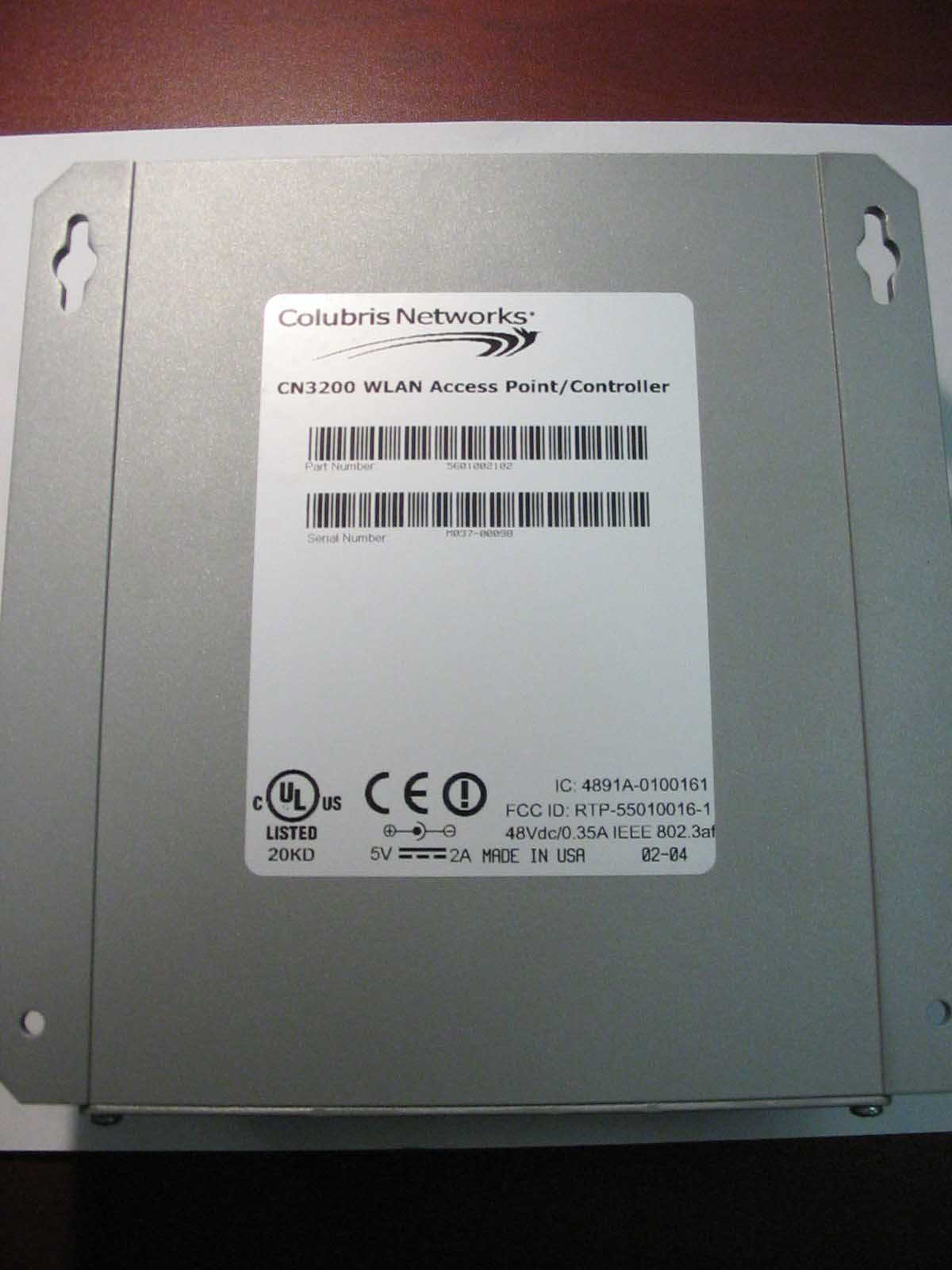
External photos FCC ID: RTP-55010016-2 Top view Bottom view
RF Exposure Info
RF Exposure Information - DTS and NII FCC ID: RTP-5500016-2 is capable of transmitting in only one frequency band at a time. The maximum measured EIRP values and power densities at 20 cm in each operating band with a +2dBi antenna are: 2.4 GHz 14.7 dBm 29.5 mW 0.0059 mW/cm 2 . 5.3 GHz 18.6 dBm 72.4 mW 0.014 mW/cm 2 . 5.8 GHz 22.6 dBm 182 mW 0.036 mW/cm 2 . Power density at 20 cm is calculated from EIRP/(4*π*20 2 ). The highest power density occurs in the 5.8 GHz band, and is well below the 1 mW/cm 2 limit allowed in 47 CFR 1.1310.
Test Report
70 Codman Hill Road Boxborough MA 01719 Colubris Networks, Model: OptimistDates of Test: December 15, 2003 – April 1, 2004 Report # 30519782FCC Part 15.407 Subpart E Table of Contents 1.0Summary of Tests..................................................................................................................................................3 2.0General Description..............................................................................................................................................4 2.1Product Description................................................................................................................................4 2.2Related Submittal(s) Grants....................................................................................................................4 2.3Test Facility..............................................................................................................................................5 2.4Test Equipment and Support Equipment.............................................................................................6 3.0RF Output Power and Exposure, 26 dB Bandwidth, and Peak Power Spectral Density............................7 3.1Test Procedure.........................................................................................................................................7 3.2Test Results..............................................................................................................................................7 4.0 Field Strength of Spurious Radiation and Line-Conducted Emissions..........................................................8 4.1Test Procedure.........................................................................................................................................8 4.2Test Results..............................................................................................................................................8 4.3Configuration Photographs – Spurious Emissions..........................................................................13 5.0 Frequency Stability............................................................................................................................................16 5.1Test Procedure.......................................................................................................................................16 5.2Test Results............................................................................................................................................16 70 Codman Hill Road Boxborough MA 01719 Colubris Networks, Model: OptimistDates of Test: December 15, 2003 – April 1, 2004 Report # 30519783FCC Part 15.407 Subpart E 1.0Summary of Tests Colubris Networks’s Access Point Model: Optimist Serial #: M033-00015 Rule PartDESCRIPTION OF TESTRESULTSREPORT PAGE 15.407(a)(2), (3) 1.1310 RF Output Power and Exposure, 26 dB Bandwidth and Peak Power Spectral Density Passed7 15.407(b)(2), (3), (5)Spurious EmissionsPassed8 15.407(g)Frequency StabilityPassed16 70 Codman Hill Road Boxborough MA 01719 Colubris Networks, Model: OptimistDates of Test: December 15, 2003 – April 1, 2004 Report # 30519784FCC Part 15.407 Subpart E 2.0General Description 2.1Product Description The Access Point, Model: Optimist, is a wireless LAN router conforming to the IEEE 802.11a/b/g standards. The normal temperature range of operation is from 0 to 50 degrees celsius. The Optimist unit contains an 802.11a/b/g radio module. A production version of the EUT was received on December 8, 2003 in good operating condition. As declared by the Applicant, it is identical to production units. An additional radio module with serial number C00840401564C01 and identical RF characteristics to the one installed in the Optimist EUT was provided on March 25, 2004 for further testing of band edge compliance. Overview of the EUT DescriptionAccess Point Model No. , Part No.Access Point Model: Optimist Serial #: M033-00015 Operating FrequencyIEEE 802.11b/g: 2.412 – 2.462 GHz (Channels 1 – 11) IEEE 802.11a: 5.18-5.32 GHz (Channels 36 – 64) 5.745 – 5.805 GHz (Channels 149 – 161) Number of ChannelsIEEE 802.11b/g: 11 Channels, IEEE 802.11a: 19 Channels Type of ModulationIEEE 802.11a/b/g Operating Temperature0 0 C to +50 0 C AntennaIEEE 802.11b/g: Cushcraft SRSM2400MRA 2.0 dBi Gain Reverse-SMA IEEE 802.11a: Cushcraft SRSM5150MRA 2.0 dBi Gain Reverse-SMA The Colubris Networks Access Point, Model: Optimist, has been tested at the request of: Company:Colubris Networks 420 Armand-Frappier Suite 200 QC, H7V 4B4, Canada Name of contact:Mr. Claude Robitaille Telephone:450-680-1661 Fax:450-680-1910 Email:[email protected] 2.2Related Submittal(s) Grants None. 70 Codman Hill Road Boxborough MA 01719 Colubris Networks, Model: OptimistDates of Test: December 15, 2003 – April 1, 2004 Report # 30519785FCC Part 15.407 Subpart E 2.3Test Facility Site 2C (Middle Site) is a 3m and 10m sheltered EMI measurement range located in a light commercial environment in Boxborough, Massachusetts. It meets the technical requirements of ANSI C63.4-1992 and CISPR 22:1993/EN 55022:1994 for radiated and conducted emission measurements. The shelter structure is entirely fiberglass and plastic, with outside dimensions of 33 ft x 57 ft. The structure resembles a quonset hut with a center ceiling height of 16.5 ft. The testing floor is covered by a galvanized sheet metal groundplane that is earth-grounded via copper rods around the perimeter of the site. The joints between individual metal sheets are bridged with 2 inch wide metal strips to provide low RF impedance contact throughout. The sheets of metal are screwed in place with stainless steel, round-head screws every three inches. Site illumination and HVAC are provided from beneath the ground reference plane through flush entry ports, the port covers are electrically bonded to the ground plane. A flush metal turntable with 12 ft. diameter…
Text truncated - open the document above for the full version.
Test Setup Photos
Radiated Spurious Test Setup, Front View Radiated Spurious Test Setup, Back View Power Supply Conducted Spurious Test Setup, Front View Power Supply Conducted Spurious Test Setup, Side View Power over Ethernet Conducted Spurious Test Setup, Front View Power over Ethernet Conducted Spurious Test Setup, Side View
Contact Information
Applicant
Brent Ford(Regulatory Engineer Manager)
Technical Contact
Colubris Networks Inc.Claude Robitaille
[email protected]450 680 1661
420 Armand-Frappier · Laval · Canada
Non-Technical Contact
Colubris Networks Inc.Jonathan Zarkower
[email protected]781 684 0001
Test Firm
Intertek Testing Services NA Inc.Roland Gubisch
Technical Specifications
| # | Rule Parts | Frequency Range | Power Output |
|---|---|---|---|
| 2 | 15E | 5.75 GHz - 5.80 GHz | 115.00 mW |
Other Applications from Hewlett Packard Enterprise

RTP-MRLBB1303
Feb 17, 2014WLAN 802.11a/n/ac mini-PCIe Module
Equipment Class
NII - Unlicensed National Information Infrastructure TX
RTP-MRLBB1003
Aug 28, 2011WLAN 802.11a/b/g/n mini PCIe module
Equipment Class
DTS - Digital Transmission System
RTP-MRLBB1003S
Dec 12, 2010802.11a/b/g/n Access Point
Equipment Class
DTS - Digital Transmission System
RTP-DNMA83S
Sep 26, 2009WLAN a+n mini-PCI Module
Equipment Class
NII - Unlicensed National Information Infrastructure TX
RTPWCB-200
Jan 20, 2008Wireless Client Bridge
Equipment Class
DTS - Digital Transmission System