RWO-RZ030133Gaming Lapboard
Razer Inc.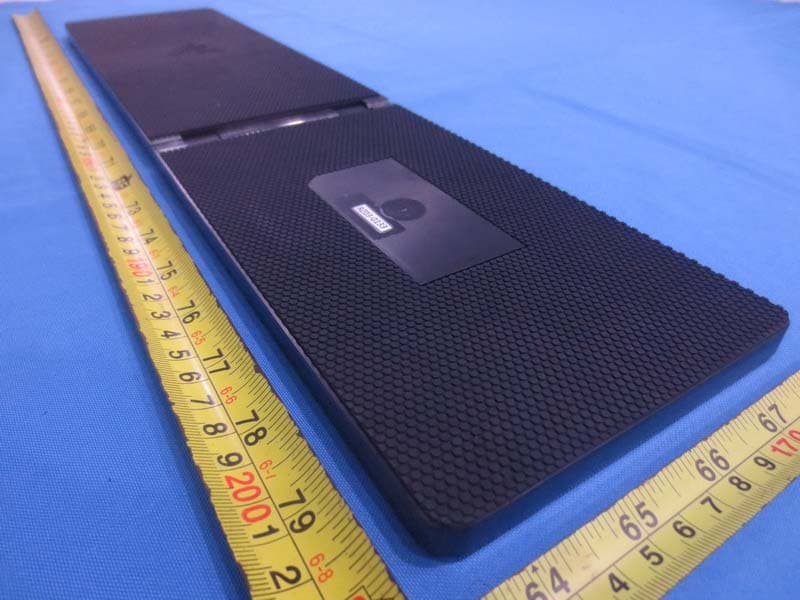
Click to zoom
Application Details
- Equipment Class
- DXX - Part 15 Low Power Communication Device Transmitter
- Date of Grant
- Jul 30, 2015
- Application Purpose
- Original Equipment
- Date of Application
- Jul 28, 2015
- Equipment Note
- Gaming Lapboard
- Frequency Range
- 2402.00000000 - 2480.00000000
- Company
- Razer Inc.
- Country
- United States
Documents & Files
Document Text
Text extracted from the exhibit documents filed with the FCC. Open a document above to read the original.
Users Manual
0 | For gamers by gamers™ USER MANUAL 1 | razer™ 3. TECHNICAL SPECIFICATIONS Lapboard (RZ03-0133) • Anti-ghosting capability for up to 10 simultaneous key presses • Chiclet styled keycaps • Dedicated Android buttons • Cortex quick launch button • Battery life of up to 4 months - The life expectancy of this battery depends upon its usage • Battery type: Li-Po (1500 mAh) Mouse (RZ01-0133) • 3500 DPI optical sensor • Ambidextrous form factor • 40 hours battery life for continuous use - The life expectancy of this battery depends upon its usage • Battery type: Li-Po (1000 mAh) 2 | For gamers by gamers™ 4. DEVICE LAYOUT A. lapboard B. mouse C. RF USB Dongle D. Rechargeable battery for Razer Turret gaming mouse E. Charging dock F. Power connector cable G. Power adapter H. Interchangeable plugs* *May include adapter plugs for specific regions 3 | razer™ CONNECTING THE RAZER TURRET VIA BLUETOOTH® SMART Note: The Razer Turret gaming lapboard and mouse are set to Bluetooth mode by default. Razer Turret gaming mouse 1. Push the slider switch on the Razer Turret mouse to . This switches the mouse on and activates pairing mode. The LED indicator will start to blink in blue. 2. Activate Bluetooth® on your device and search for new Bluetooth® devices. 3. Select “Razer Turret gaming mouse” from the list of devices found. 4 | For gamers by gamers™ 4. When pairing is complete, the LED indicator will stay lit in blue for 5s before fading off. Note: To pair your Razer Turret gaming mouse to a different device, disconnect the current Bluetooth connection from host device. Then, press and hold the 4 side buttons for 3s to manually activate pairing mode. 5 | razer™ Razer Turret gaming lapboard 1. Push the Slider switch on the Razer Turret gaming lapboard to . 2. Press the Power button to turn the Razer Turret gaming lapboard on and activate pairing mode. The LED indicator will start to blink in blue. 6 | For gamers by gamers™ 3. Activate Bluetooth® on your device and search for new Bluetooth® devices. 4. Select “Razer Turret gaming lapboard” from the list of devices found. 5. When pairing is complete, the LED indicator will stay lit in blue for 5s before fading off. Note: To pair your Razer Turret gaming lapboard to a different device, disconnect the current Bluetooth connection from host device. Then, press and hold the power button for 3s to manually activate pairing mode. 7 | razer™ CONNECTING THE RAZER TURRET VIA THE WIRELESS DONGLE 1. Push the Slider switch on both the Razer Turret gaming lapboard and mouse to (2.4GHz wireless). 2. Remove the top cover of the Razer Turret gaming mouse by lifting the back of the top cover and pulling it backwards. Retrieve the USB dongle. Reattach the top cover. 8 | For gamers by gamers™ 3. Plug the USB dongle to the device you wish to pair to. 4. Press the Power button to turn the Razer Turret gaming lapboard on. 5. When successfully connected, the LED indicator will stay lit in green for 5s before fading off. 9 | razer™ 6. INSTALLING YOUR RAZER TURRET Step 1: Connect your Razer device to the USB port of your computer. Step 2: Install Razer Synapse when prompted* or download the installer from www.razerzone.com/synapse. Step 3: Create your Razer ID or login to Synapse with your existing Razer ID. *Applicable for Windows 8 or later. Note: Razer Synapse is only available when the Razer Turret is connected to a PC. 10 | For gamers by gamers™ 11. SAFETY AND MAINTENANCE IMPORTANT SAFETY & MAINTENANCE INFORMATION WARNING : Failure to follow these safety instructions could result in fire, electric shock, or other injury or damage. Please follow these safety rules for handling your Razer Turret and for working more comfortably. Keep these guide handy for future reference by you and others. To operate your Razer Turret safely and reduce the possibility of heat-related injuries, follow these guidelines: 1. Set up your Razer Turret and power adapter on a stable work surface that allows for adequate air circulation under and around the computer/TV. 2. Do not use or install near water, moisture, or other wet surfaces. 3. Do not use or install near any heat or naked flame sources. Do not use around radiators, stoves, fire places, candles or other hot surfaces. 4. Do not block ventilation grills or openings. Install the apparatus in a cool, dry place. 5. Clean only with a dry or damp cloth. Unplug the apparatus before cleaning and do not use aerosol or liquid cleaning agents. 6. Do not insert or push any objects into openings on the product. 7. Refer all servicing to qualified service personnel. Do not attempt to service this apparatus yourself. Removing the covers will expose you to dangerous electric currents. 11 | razer™ POWER ADAPTER FOR THE RAZER TURRET NOTICE : Incorrect storage or use of your power adapter may void the manufacturer’s warranty. This power adapter complies with the user-accessible surface temperature limits defined by the International Standard for Safety of Information Technology Equipment (IEC 60950-1). This apparatus should only be operated from the type of power source indicated on the label. If you are unsure of the power source in the location you intend to operate the apparatus please consult the local power company or a qualified technician. The use of AC Plug Adapters is cautioned because it can allow the product to be plugged into voltages in which the product was not designed to operate. If you are unsure of the correct operational voltage, please contact your local distributor and/or retailer. 1. Use only the power adapter that came with your Razer Turret, or the Razer- authorized power adapter that is compatible with this product. 2. The power adapter is equipped with exchangeable adapter plug, use only the appropriate adapter plug for your region. 3. Make sure the exchangeable adapter plug is fully inserted into the power adapter before plugging the adapter into a power outlet. 4. The power adapter may become very warm during normal use. Never place a…
Text truncated - open the document above for the full version.
Cover Letter(s)
RF_160, Issue 02 Declaration of Authorization We Name: Razer Inc. Address: 9 Pasteur, Suite 100 Irvine City: Irvine State: California 92618 Country: United States Declare that: Name Representative of agent: Ms. Cathy Wang Agent Company name: BTL Inc. Address: No.3 Jinshagang 1st Road, Shixia, Dalang Town City: Dong Guan Country: China is authorized to apply for Certification and signing related documents of the following product(s), including 731 form(s): Product description: Gaming Lapboard Type designation: RZ03-0133 Trademark: RAZER on our behalf. Date: 2015-05-14 City: Irvine,CA Name: Johnsen Tia Function: Senior Engineer Signature: ...............................
External Photos
Project No.: 1503C157 Page 2 of 1 0 Project No.: 1503C157 Page 3 of 1 0 Project No.: 1503C157 Page 9 of 1 0 Project No.: 1503C157 Page 10 of 1 0
ID Label/Location Info
Product Label
Internal Photos
Project No.: 1503C157 Page 5 of 9 Project No.: 1503C157 Page 6 of 9 Project No.: 1503C157 Page 7 of 9 Project No.: 1503C157 Page 8 of 9 Project No.: 1503C157 Page 9 of 9
Test Report
Report No.: BTL-FCCP-2-1503C157 Page 1 of 49 FCC Radio Test Report FCC ID: RWO-RZ030133 This report concerns (check one): Original Grant Class II Change Project No. : 1503C157 Equipment : Gaming Lapboard Model Name : RZ03-0133 Applicant : Razer Inc. Address : 9 Pasteur, Suite 100 Irvine, California 92618, United States Date of Receipt : Mar. 19, 2015 Date of Test : Mar. 19, 2015 ~ Apr. 13, 2015 Issued Date : Apr. 14, 2015 Tested by : BTL Inc. Testing Engineer : (David Mao) Technical Manager : (Leo Hung) Authorized Signatory : (Steven Lu) BTL INC. No.3,Jinshagang 1st Road, Shixia,Dalang Town, Dongguan, Guangdong, China. TEL: +86-769-8318-3000FAX: +86-769-8319-6000 Report No.: BTL-FCCP-2-1503C157 Page 2 of 49 Declaration BTL represents to the client that testing is done in accordance with standard proced ures as applicable and that test instruments used has been calibrated with the standards traceable to National Measurement Laboratory (NML) of R.O.C., or National Institute of Standards and Technology (NIST) of U.S.A. BTL's reports apply only to the specific samples tested under conditions. It is manufacture’s responsibility to ensure that additional production units of this model are manufactured with the identical electrical and mechanical components. BTL shall have no liability for any declarations, inferences or generalizations drawn by the client or others from BTL issued reports. BTL’s reports must not be used by the client to claim product endorsement by the authorities or any agency of the Government. This report is the confidential property of the client. As a mutual protection to the clients, the public and BTL-self, extracts from the test report shall not be reproduced except in full with BTL’s authorized written approval. BTL’s laboratory quality assurance procedures are in compliance with the ISO Guide17025 requirements, and accredited by the conformity assessment authorities listed in this test report. Limitation For the use of the authority's logo is limited unless the Test Standard(s)/Scope(s)/Item(s) mentioned in this test report is (are) included in the conformity assessment authorities acceptance respective. Report No.: BTL-FCCP-2-1503C157 Page 3 of 49 Table of Contents Page 1 . CERTIFICATION 6 2 . SUMMARY OF TEST RESULTS 7 2.1 TEST FACILITY 8 2.2 MEASUREMENT UNCERTAINTY 8 3 .GENERAL INFORMATION 9 3.1 GENERAL DESCRIPTION OF EUT 9 3.2 DESCRIPTION OF TEST MODES 11 3.3 BLOCKDIAGRAMSHOWINGTHECONFIGURATIONOFSYSTEMTESTED 12 3.4 DESCRIPTION OF SUPPORT UNITS 12 4 .EMC EMISSION TEST 13 4.1 CONDUCTED EMISSION MEASUREMENT 13 4.1.1 POWER LINE CONDUCTED EMISSION 13 4.1.2 TESTPROCEDURE 13 4.1.3 DEVIATIONFROMTESTSTANDARD 13 4.1.4 TESTSETUP 14 4.1.5 EUT OPERATING CONDITIONS 14 4.1.6 EUT TEST CONDITIONS 14 4.1.7 TEST RESULTS 14 4.2 RADIATED EMISSION MEASUREMENT 15 4.2.1 RADIATED EMISSION LIMITS 15 4.2.2 TESTPROCEDURE 16 4.2.3 DEVIATIONFROMTESTSTANDARD 16 4.2.4 TESTSETUP 17 4.2.5 EUT OPERATING CONDITIONS 18 4.2.6 EUT TEST CONDITIONS 18 4.2.7 TEST RESULTS (BELOW 30MHz) 18 4.2.8 TEST RESULTS (30 to 1000 MHz) 18 4.2.9 TEST RESULTS(ABOVE1000 MHz) 19 5 . BANDWIDTH TEST 20 5.1 TEST PROCEDURE 20 5.2 DEVIATION FROM STANDARD 20 5.3 TEST SETUP 20 5.4 EUT OPERATION CONDITIONS 20 5.5 EUT TEST CONDITIONS 20 5.6 TEST RESULTS 20 6 . MEASUREMENT INSTRUMENTS LIST AND SETTING 21 ATTACHMENT A - CONDUCTED EMISSION 22 Report No.: BTL-FCCP-2-1503C157 Page 4 of 49 Table of Contents Page ATTACHMENT B -RADIATED EMISSION (9KHZ to 30MHZ) 25 ATTACHMENT C -RADIATED EMISSION (30MHZ TO 1000MHZ) 27 ATTACHMENT D -RADIATED EMISSION (ABOVE 1000MHZ) 34 ATTACHMENT E - BANDWIDTH 47 Report No.: BTL-FCCP-2-1503C157 Page 5 of 49 REPORT ISSUED HISTORY Issued No. Description Issued Date BTL-FCCP-2-1503C157 Original Issue. Apr. 14, 2015 Report No.: BTL-FCCP-2-1503C157 Page 6 of 49 1. CERTIFICATION Equipment : Gaming Lapboard Brand Name : RAZER Model Name : RZ03-0133 Applicant : Razer Inc. Manufacturer : Razer (Asia-Pacific) Pte Ltd Address : 514 Chai Chee Lane #07-01 ~ 06 Singapore 469029 Factory : RAZER TECHNOLOGY AND DEVELOPMENT (SHENZHEN) CO., LTD Address : East Wing, 3rd Floor, Block 2, Phase 1 of Vision Shenzhen Business Park Keji South Road, Hi-Tech Industrial Park, Shenzhen 518057, China Date of Test : Mar. 19, 2015 ~ Apr. 13, 2015 Test Sample : Engineering Sample Standard(s) : FCC Part15, Subpart C :2014 (15.249)/ ANSI C63.4-2009 The above equipment has been tested and found compliance with the requirement of the relative standards by BTL Inc.. The test data, data evaluation, and equipment configuration contained in our test report (Ref No. BTL-FCCP-2-1503C157) were obtained utilizing the test procedures, test instruments, test sites that has been accredited by the Authority of TAF according to the ISO-17025 quality assessment standard and technical standard(s). Report No.: BTL-FCCP-2-1503C157 Page 7 of 49 2. SUMMARY OF TEST RESULTS Test procedures according to the technical standard(s): FCC Part15, Subpart C (15.249) StandardSection Test Item Judgment Remark FCC 15.207(a) Conducted Emission PASS 15.205 Restricted Band of Operation PASS 15.209 15.249(a) Radiated Emissions PASS 15.215(c) 20dB Bandwidth Test PASS NOTE: (1)”N/A” denotes test is not applicable in this test report. Report No.: BTL-FCCP-2-1503C157 Page 8 of 49 2.1 TEST FACILITY The test facilities used to collect the test data in this report is at the location of No.3,Jinshagang 1st Road, Shixia,Dalang Town, Dongguan, Guangdong, China. BTL's test firm number for FCC: 319330 2.2 MEASUREMENT UNCERTAINTY Where relevant, the following measurement uncertainty levels have been estimated for tests performed on the EUT as specified in CISPR 16-4-2: The reported uncertainty of measurement y ± U, where expended uncertainty U is based on astandard uncertainty multiplied by a coverage factor of k=2, providing a level of confidence of approximately 95%. A. Conducted Measurement : Test Site Method Measurement Frequency Range U,(dB) NOTE DG-C02 CISPR 150 KHz~30MHz 1.94 B. Radia…
Text truncated - open the document above for the full version.
Test Setup Photos
Conducted Measurement Photos Radiated Measurement Photos 9KHz to 30MHz Radiated Measurement Photos 30M to 1000MHz Radiated Measurement Photos Above 1000MHz
Contact Information
Applicant
Johnsen Tia(Director, Regulatory & Compliance)
Technical Contact
Non-Technical Contact
BTL Inc.Cathy Wang
[email protected]86-769-83183000
Test Firm
BTL Inc.Daisy Dai
Technical Specifications
| # | Rule Parts | Frequency Range | Power Output |
|---|---|---|---|
| 1 | 15C | 2.40 GHz - 2.48 GHz | - |
Other Applications from Razer Inc.
RWO-RZ060519
Sep 02, 2026Gaming Controller
Equipment Class
DTS - Digital Transmission SystemRWO-RZ010566
Aug 26, 2026Gaming Mouse
Equipment Class
DTS - Digital Transmission SystemRWO-RZ380426
Jun 26, 2026Gaming Chair
Equipment Class
DTS - Digital Transmission SystemRWO-DGRFG8
May 28, 2026Wireless Dongle
Equipment Class
DTS - Digital Transmission SystemRWO-RZ010569
May 27, 2026Wireless Mouse
Equipment Class
DTS - Digital Transmission System