RWO-RZ040348Gaming Headset
Razer Inc.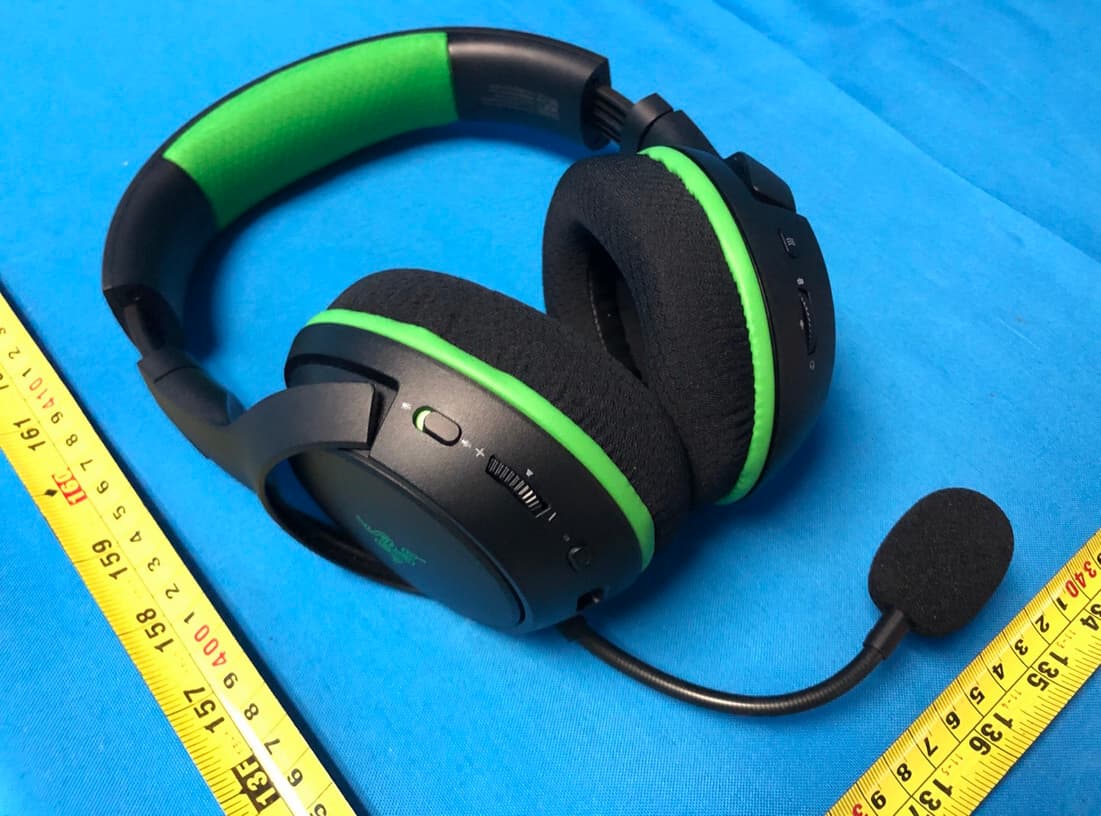
Click to zoom
Application Details
- Equipment Class
- DTS - Digital Transmission System
- Date of Grant
- Nov 05, 2020
- Application Purpose
- Original Equipment
- Date of Application
- Nov 04, 2020
- Equipment Note
- Gaming Headset
- Frequency Range
- 2412.00000000 - 2462.00000000
- Company
- Razer Inc.
- Country
- United States
Documents & Files
Document Text
Text extracted from the exhibit documents filed with the FCC. Open a document above to read the original.
Users Manual
Date: 23 Oct 2020 Product Manual for Gaming Headset Model: RZ04-0348 . WHAT’S INSIDE / WHAT’S NEEDED WHAT’S INSIDE Gaming Headset (Model: RZ04-0348) A. Adjustable padded headband B. Leatherette ear cushions C. Connect / EQ preset button D. Game / Chat balance wheel E. Mic with mic foam F. Mic mute / Mic monitoring switch G. Volume wheel H. Status indicator I. Power button J. Charging port Charging cable Important Product Information Guide WHAT’S NEEDED Xbox One TM / Xbox One TM S / Xbox One TM X / Xbox Series TM X OR PC (Windows® 10 64-bit or higher) with a free USB port* Internet connection for app installation *May require the Xbox Wireless Adapter for Windows 10 (not included). LEFT RIGHT FOR GAMERS. BY GAMERS. ™ 1 SAFETY STATEMENT IMPORTANT! Before using your Xbox console with this product, read its instruction manual for safety, health, and other information regarding the use of your Xbox console. FOR GAMERS. BY GAMERS. ™ 1 LET’S GET YOU COVERED You’ve got a great device in your hands, complete with a 2-year limited warranty coverage. Now maximize its potential and score exclusive Razer benefits by registering at razerid.razer.com Got a question? Ask the Razer Support Team at support.razer.com Your product’s serial number can be found here. FOR GAMERS. BY GAMERS. ™ 2 GETTING STARTED CHARGING YOUR HEADSET Connect your Gaming Headset (Model: RZ04-0348) to a powered USB port using the charging cable. For best results, please fully charge your headset before using it for the first time. A depleted headset will fully charge in about x hours. While charging, your Gaming Headset (Model: RZ04-0348) will continuously show its battery level on the status indicator. [IMAGE PLACEHOLDER] Type C FOR GAMERS. BY GAMERS. ™ 3 PAIRING YOUR HEADSET A. TO YOUR XBOX CONSOLE 1. Press the Connect button on your console. 2. Press and hold the power button until the status indicator is lit, or until you hear a tone. Indicator Battery level Charging Fully charged [IMAGE PLACEHOLDER] FOR GAMERS. BY GAMERS. ™ 4 3. Wait until the status indicator becomes static green, indicating that the headset is now paired to the Xbox console. B. TO YOUR PC VIA XBOX WIRELESS ADAPTER FOR WINDOWS 10* Make sure that your Xbox Wireless Adapter for Windows 10 is up-to-date. Some systems have Xbox Wireless built in which allows you to pair your headset by using Add a device in Settings. 1. Plug in your Xbox Wireless Adapter for Windows 10* to your PC and then press its Connect button. [IMAGE PLACEHOLDER] Indicator Status Pairing Connected [IMAGE PLACEHOLDER] FOR GAMERS. BY GAMERS. ™ 5 2. While powered off, press and hold the power button until the status indicator is lit, or until you hear a tone. 3. Wait until the status indicator becomes static green, indicating that the headset is now paired to the wireless adapter. [IMAGE PLACEHOLDER] [IMAGE PLACEHOLDER] FOR GAMERS. BY GAMERS. ™ 6 Indicator Status Pairing Connected [IMAGE PLACEHOLDER] FOR GAMERS. BY GAMERS. ™ 7 USING YOUR GAMING HEADSET (MODEL: RZ04-0348) POWER BUTTON Power on or off your headset by holding the power button until the status indicator is on; and press and hold the button again to turn off. Two distinct tones will help notify you that the headset is powered on or off. O ther power button functions are available when the headset is powered on and connected to your device. These functions operate based on your device’s current activity. BATTERY LEVEL When unplugged and powered on, the status indicator will briefly show the connection and battery status. While in use, there will be a tone notification when the headset needs to be recharged; during such time, the indicator will continue showing the battery status until you charge the headset. Single press Play/pause Double press Skip track Triple press Previous track [IMAGE PLACEHOLDER] Indicator Battery Level Critical Low Tone Warning tone Warning tone [IMAGE PLACEHOLDER] FOR GAMERS. BY GAMERS. ™ 8 CONNECT / EQ PRESET BUTTON Pairing Mode When pairing the headset to a different Xbox console or wireless adapter, use the Connect / EQ Preset button to activate its pairing mode. Simply press and hold the Connect / EQ button until the status indicator starts to blink in blue or until you hear a tone, indicating that the headset can now be paired with a different Xbox console or wireless adapter. EQ presets Press the EQ Preset button to switch between the equalizer presets available on the headset. [image placeholder] Preset Description Default All- around balance of audio clarity and bass Bass Boost Immerse more on solid, realistic bass FPS Hear the most subtle of footsteps sneaking from behind Custom* Your own custom balance of audio clarity * This preset will only become available upon customizing a preset on the Razer Synapse for Xbox app. Press and hold Press [IMAGE PLACEHOLDER] [IMAGE PLACEHOLDER] FOR GAMERS. BY GAMERS. ™ 9 VOLUME WHEEL Rotate the volume wheel to increase or decrease the volume. GAME / CHAT BALANCE AND MIC MONITORING Rotate the Game / Chat balance wheel to increase the in-game volume and decrease the voice chat volume or vice versa. By default, the notch on the wheel is set to the middle to indicate 50% chat and 50% game volume. [IMAGE PLACEHOLDER] Increase volume Decrease volume FOR GAMERS. BY GAMERS. ™ 10 You may also press and hold the Game / Chat balance wheel until you hear a tone to enable or disable mic monitoring. MICROPHONE Bend the mic until it is parallel to your mouth. Make sure the mic diaphragm is in front and the air vent is facing away from your mouth. Chat volume In-game volume Press and hold [IMAGE PLACEHOLDER] [IMAGE PLACEHOLDER] FOR GAMERS. BY GAMERS. ™ 1 Press the mic mute button to mute or unmute the microphone. COMFORT It’s recommended to gently stretch the headset before placing it over your head to minimize headband stress however, don’t stretch the headset beyond its limits. [IMAGE PLACEHOLDER] [IMAGE PLACEHOLDER] FOR GAMERS. BY GAMERS. ™ 2 RAZER SYNAPSE FOR XBOX…
Text truncated - open the document above for the full version.
Cover Letter(s)
RF_160, Issue 02 Declaration of Authorization We Name: Razer Inc. Address: 9 Pasteur, Suite 100 City: Irvine State: California Country: United States Declare that: Name Representative of agent: Ms. Rose Liu Agent Company name: BTL Inc. Address: No.3 Jinshagang 1st Road, Shixia, Dalang Town City: Dong Guan Country: China is authorized to apply for Certification and signing related documents of the following product(s), including 731 form(s): Product description: Gaming Headset Type designation: RZ04-0348, RZ04-0348XXXX-XXXX (X can be 0-9 or A-Z) Trademark: RAZER FCC ID : RWO-RZ040348 on our behalf. Date: 2020-09-29 City: Irvine Name: Johnsen Tia Function: Senior Director, Regulatory and Compliance Signature: . Notes: (1): Required for FCC application (2): For FCC it must be the Grantee Code “owner” or the authorized agent.
Cover Letter(s)
FCC, Request for non-disclosure Date: 10-Aug-09 RF_501, Issue 5 Page 1 of 1 Company Name: Razer Inc. Address: 9 Pasteur, Suite 100 City: Irvine California Country: United States To: Telefication B.V., Dept. FCC TCB Edisonstraat 12A 6902 PK ZEVENAAR The Netherlands Subject: Request for confidentiality FCC ID: RWO-RZ040348 Reference number: ###### Dear FCC TCB, 1. Long-Term Confidentiality Pursuant to 47 CFR Section 0.459(a) & (b), we hereby requests non-disclosure and confidential treatment of the following materials submitted in support of FCC certification application: Bill(s) of Material Block Diagrams Operational Description Schematic Diagrams Tune-up Procedure Above materials contain secrets, proprietary and technical information, which would customarily be guarded from competitors under 47 CFR, section 0.457(d)(2). Disclosure or publication or any portion of this company confidential material to other parties could cause substantial competitive harm and provide unjustified benefits for competitors. 2. Short-Term Confidentiality (STC) Pursuant to Public Notice DA 04-1705 of the Commission’s policy, in order to comply with the marketing regulations in 47 CFR §2.803 and the importation rules in 47 CFR §2.1204, applicant hereby requests Short-Term Confidential treatment of the following materials (note 1): Internal Photos User’s Manual Test Set-up Photos External Photos Justification: This document contains detailed system and equipment description are considered as proprietary information in operation of the equipment. The public disclosure of above documents might be harmful to our company and would give competitor unfair advantage in the market. Planned Release Date STC: 180 days from date of grant (notes 2, 3, 4, 5) Date: 2020-09-29 Name and signature of applicant: Johnsen Tia Senior Director Notes: 1) A document or type of document can only have ONE type of confidentiality! 2) Short-Term confidentiality is in principle for 45 days from date of grant; it can be extended max 3 times (total time 180 days max.)! 3) FCC must be informed when marketing begins earlier. 4) Release takes place automatically thus extension must be requested in time. Telefication does not remind you of this! FCC, Request for non-disclosure Date: 10-Aug-09 RF_501, Issue 5 Page 1 of 1 5) Request for extension or for release must be received by Telefication at least 7 days before date of actual marketing or before expiration of the STC period
Cover Letter(s)
Razer Inc. Wi-Fi Channel 12 and 13 Declaration Letter Date: 2020-09-29 We, the undersigned company Company Name: Razer Inc. Address: 9 Pasteur, Suite 100, Irvine, California 92618 United States Declare that: Product description: Gaming Headset Type designation: RZ04-0348, RZ04-0348XXXX-XXXX (X can be 0-9 or A-Z) Brand: RAZER FCC ID: RWO-RZ040348 Only channels 1~11 will be used in USA. Country code selection is disabled. If you have any questions regarding the authorization, please do not hesitate to contact us, thank you~ Sincerely, Signature: ________________________ Name: Johnsen Tia Tel: 760 579 0180 Email: [email protected]
External Photos
Project No.: 2007C005 Page 1 of 14 ATTACHMENT PHOTOGRAPHS OF EUT Project No.: 2007C005 Page 2 of 14 Project No.: 2007C005 Page 3 of 14 Project No.: 2007C005 Page 4 of 14
ID Label/Location Info
RZ04‐0348 Product Label information
Internal Photos
Project No.: 2007C005 Page 5 of 14 Project No.: 2007C005 Page 6 of 14 Project No.: 2007C005 Page 7 of 14 Project No.: 2007C005 Page 8 of 14 Project No.: 2007C005 Page 9 of 14 Project No.: 2007C005 Page 10 of 14 ANT Project No.: 2007C005 Page 11 of 14 Project No.: 2007C005 Page 12 of 14 Project No.: 2007C005 Page 13 of 14 Project No.: 2007C005 Page 14 of 14
RF Exposure Info
Report No.: BTL-FCCP-4-2007C005 Page 1 of 4 FCC RF EXPOSURE REPORT FCC ID:RWO-RZ040348 Project No. : 2007C005 Equipment : Gaming Headset Brand Name : RAZER Test Model : RZ04-0348 Series Model : RZ04-0348XXXX-XXXX (X can be 0-9 or A-Z) Applicant : Razer Inc. Address : 9 Pasteur, Suite 100, Irvine, CA92618, USA. Manufacturer : Razer (Asia-Pacific) Pte.,Ltd. Address : 514 Chai Chee Lane, #07-01-06,Singapore 469029 Factory : RAZER TECHNOLOGY AND DEVELOPMENT (SHENZHEN) CO., LTD Address : East Wing, 3rd Floor, Block 2, Phase 1 of Vision Shenzhen Business Park Keji South Road, Hi-Tech Industrial Park, Shenzhen 518057, China Date of Receipt : Jul. 01, 2020 Date of Test : Jul. 02, 2020 ~ Sep. 01, 2020 Issued Date : Oct. 30, 2020 Report Version : R01 Test Sample : Sample No.:DG2020071786 Standard(s) : FCC Guidelines for Human Exposure IEEE C95.1 & KDB447498 D01 The above equipment has been tested and found compliance with the requirement of the relative standards by BTL Inc. Prepared by : Welly Zhou Approved by : Ethan Ma Add: No.3, Jinshagang 1st Road, Shixia, Dalang Town,Dongguan, Guangdong, China. Te l : +86-769-8318-3000 Web: www.newbtl.com Report No.: BTL-FCCP-4-2007C005 Page 2 of 4 REPORT ISSUED HISTORY Report Version Description Issued Date R00 Original Issue. Sep. 29, 2020 R01 Revised report to address comments. Oct. 30, 2020 Report No.: BTL-FCCP-4-2007C005 Page 3 of 4 1. TEST FACILITY The test facilities used to collect the test data in this report is at the location of No.3,Jinshagang 1st Road, Shixia, Dalang Town, Dongguan, Guangdong, China. BTL's Test Firm Registration Number for FCC: 357015 BTL's Designation Number for FCC: CN1240 2. GENERAL CONCULUSION According to FCC KDB447498 D01, Appendix A, SAR Test Exclusion Thresholds for 100 MHz – 6 GHz and ≤ 50 mm, the 1-g and 10-g SAR test exclusion thresholds are determined by the following: [(max. power of channel, including tune-up tolerance, mW) / (min. test separation distance, mm)] · [√f(GHz)] ≤ 3.0 for 1-g SAR, and ≤ 7.5 for 10-g extremity SAR, where f(GHz) is the RF channel transmit frequency in GHz Power and distance are rounded to the nearest mW and mm before calculation The result is rounded to one decimal place for comparison Appendix A - SAR Test Exclusion Thresholds for 100 MHz - 6 GHz and < 50 mm MHz 5 10 15 20 25 30 35 40 45 50 mm 150 39 77 116 155 194 232 271 310 349 387 SAR Test Exclusion Thresholds (mW) 300 27 55 82 110 137 164 192 219 246 274 450 22 45 67 89 112 134 157 179 201 224 835 16 33 49 66 82 98 115 131 148 164 900 16 32 47 63 79 95 111 126 142 158 1500 12 24 37 49 61 73 86 98 110 122 1900 11 22 33 44 54 65 76 87 98 109 2450 10 19 29 38 48 57 67 77 86 96 3600 8 16 24 32 40 47 55 63 71 79 5200 7 13 20 26 33 39 46 53 59 66 5400 6 13 19 26 32 39 45 52 58 65 5800 6 12 19 25 31 37 44 50 56 62 Report No.: BTL-FCCP-4-2007C005 Page 4 of 4 3. TABLE FOR FILED ANTENNA Ant. Manufacturer Model Name Antenna Type Connector Gain (dBi) 1 SHENZHEN HORN AUDIO Co., Ltd. N/A PCB N/A 3.61 4. TEST RESULTS For 2.4G: Max. Average Output Power (dBm) Max. Average Output Power (mW) Limit (mW) 5.00 3.16 10 For 5G: Max. Output Power (dBm) Max. Output Power (mW) Limit (mW) 2.50 1.7 8 6 Note: (1) Output power including tune up tolerance. (2) The maximum measured output power of this EUT is 3.16mW, less than 6mW at 5mm distance. Conclusion: No SAR evaluation required since transmitter power is below FCC threshold. End of Test Report
Test Report
Report No.: BTL-FCCP-1-2007C005 Page 1 of 86 FCC Radio Test Report FCC ID: RWO-RZ040348 This report concerns: Original Grant Project No. : 2007C005 Equipment : Gaming Headset Brand Name : RAZER Test Model : RZ04-0348 Series Model : RZ04-0348XXXX-XXXX (X can be 0-9 or A-Z) Applicant : Razer Inc. Address : 9 Pasteur, Suite 100, Irvine, CA92618, USA. Manufacturer : Razer (Asia-Pacific) Pte.,Ltd. Address : 514 Chai Chee Lane, #07-01-06,Singapore 469029 Factory : RAZER TECHNOLOGY AND DEVELOPMENT (SHENZHEN) CO., LTD Address : East Wing, 3rd Floor, Block 2, Phase 1 of Vision Shenzhen Business Park Keji South Road, Hi-Tech Industrial Park, Shenzhen 518057, China Date of Receipt : Jul. 01, 2020 Date of Test : Jul. 02, 2020 ~ Sep. 01, 2020 Issued Date : Oct. 30, 2020 Report Version : R01 Test Sample : Sample No.:DG2020071786 Standard(s) : FCC Part15, Subpart C (15.247) ANSI C63.10-2013 FCC KDB 558074 D01 15.247 Meas Guidance v05r02 The above equipment has been tested and found compliance with the requirement of the relative standards by BTL Inc. Prepared by : Welly Zhou Approved by : Ethan Ma Add: No.3, Jinshagang 1st Road, Shixia, Dalang Town,Dongguan, Guangdong, China. Te l : +86-769-8318-3000 Web: www.newbtl.com Report No.: BTL-FCCP-1-2007C005 Page 2 of 86 Declaration BTL represents to the client that testing is done in accordance with standard procedures as applicable and that test instruments used has been calibrated with standards traceable to international standard(s) and/or national standard(s). BTL's reports apply only to the specific samples tested under conditions. It is manufacture’s responsibility to ensure that additional production units of this model are manufactured with the identical electrical and mechanical components. BTL shall have no liability for any declarations, inferences or generalizations drawn by the client or others from BTL issued reports. The report must not be used by the client to claim product certification, approval, or endorsement by NVLAP, NIST, A2LA, or any agency of the U.S. Government. This report is the confidential property of the client. As a mutual protection to the clients, the public and ourselves, the test report shall not be reproduced, except in full, without our written approval. BTL’s laboratory quality assurance procedures are in compliance with the ISO/IEC 17025 requirements, and accredited by the conformity assessment authorities listed in this test report. BTL is not responsible for the sampling stage, so the results only apply to the sample as received. The information, data and test plan are provided by manufacturer which may affect the validity of results, so it is manufacturer’s responsibility to ensure that the apparatus meets the essential requirements of applied standards and in all the possible configurations as representative of its intended use. Limitation For the use of the authority's logo is limited unless the Test Standard(s)/Scope(s)/Item(s) mentioned in this test report is (are) included in the conformity assessment authorities acceptance respective. Please note that the measurement uncertainty is provided for informational purpose only and are not use in determining the Pass/Fail results. Report No.: BTL-FCCP-1-2007C005 Page 3 of 86 Table of Contents Page REPORT ISSUED HISTORY 6 1 . SUMMARY OF TEST RESULTS 7 1.1 TEST FACILITY 8 1.2 MEASUREMENT UNCERTAINTY 8 1.3 TEST ENVIRONMENT CONDITIONS 8 2 . GENERAL INFORMATION 9 2.1 GENERAL DESCRIPTION OF EUT 9 2.2 DESCRIPTION OF TEST MODES 10 2.3 PARAMETERS OF TEST SOFTWARE 11 2.4 DUTY CYCLE 12 2.5 BLOCK DIAGRAM SHOWING THE CONFIGURATION OF SYSTEM TESTED 13 2.6 SUPPORT UNITS 13 3 . AC POWER LINE CONDUCTED EMISSIONS TEST 14 3.1 LIMIT 14 3.2 TEST PROCEDURE 14 3.3 DEVIATION FROM TEST STANDARD 14 3.4 TEST SETUP 15 3.5 EUT OPERATION CONDITIONS 15 3.6 TEST RESULTS 15 4 . RADIATED EMISSIONS TEST 16 4.1 LIMIT 16 4.2 TEST PROCEDURE 17 4.3 DEVIATION FROM TEST STANDARD 17 4.4 TEST SETUP 18 4.5 EUT OPERATION CONDITIONS 19 4.6 TEST RESULTS - 9 KHZ TO 30 MHZ 19 4.7 TEST RESULTS - 30 MHZ TO 1000 MHZ 19 4.8 TEST RESULTS - ABOVE 1000 MHZ 19 5 . BANDWIDTH TEST 20 5.1 LIMIT 20 5.2 TEST PROCEDURE 20 5.3 DEVIATION FROM STANDARD 20 Report No.: BTL-FCCP-1-2007C005 Page 4 of 86 Table of Contents Page 5.4 TEST SETUP 20 5.5 EUT OPERATION CONDITIONS 20 5.6 TEST RESULTS 20 6 . MAXIMUM OUTPUT POWER TEST 21 6.1 LIMIT 21 6.2 TEST PROCEDURE 21 6.3 DEVIATION FROM STANDARD 21 6.4 TEST SETUP 21 6.5 EUT OPERATION CONDITIONS 21 6.6 TEST RESULTS 21 7 . CONDUCTED SPURIOUS EMISSIONS 22 7.1 LIMIT 22 7.2 TEST PROCEDURE 22 7.3 DEVIATION FROM STANDARD 22 7.4 TEST SETUP 22 7.5 EUT OPERATION CONDITIONS 22 7.6 TEST RESULTS 22 8 . POWER SPECTRAL DENSITY TEST 23 8.1 LIMIT 23 8.2 TEST PROCEDURE 23 8.3 DEVIATION FROM STANDARD 23 8.4 TEST SETUP 23 8.5 EUT OPERATION CONDITIONS 23 8.6 TEST RESULTS 23 9 . MEASUREMENT INSTRUMENTS LIST 24 APPENDIX A - AC POWER LINE CONDUCTED EMISSIONS 26 APPENDIX B - RADIATED EMISSION - 9 KHZ TO 30 MHZ 29 APPENDIX C - RADIATED EMISSION - 30 MHZ TO 1000 MHZ 34 APPENDIX D - RADIATED EMISSION- ABOVE 1000 MHZ 37 APPENDIX E - BANDWIDTH 74 APPENDIX F - MAXIMUM OUTPUT POWER 78 APPENDIX G - CONDUCTED SPURIOUS EMISSIONS 80 Report No.: BTL-FCCP-1-2007C005 Page 5 of 86 Table of Contents Page APPENDIX H - POWER SPECTRAL DENSITY 84 Report No.: BTL-FCCP-1-2007C005 Page 6 of 86 REPORT ISSUED HISTORY Report Version Description Issued Date R00 Original Issue. Sep. 29, 2020 R01 Revised report to address comments. Oct. 30, 2020 Report No.: BTL-FCCP-1-2007C005 Page 7 of 86 1. SUMMARY OF TEST RESULTS Test procedures according to the technical standard(s): FCC Part15, Subpart C (15.247) Standard(s) Section Test Item Test Result Judgment Remark 15.207 AC Power Line Conducted Emissions APPENDIX A PASS ------ 15.247(d) 15.205(a) 15.209(a) Radiated Emissions APPENDIX B APPENDIX C APPENDIX D PASS ------ 15.247(a)(2) Bandwidth APPENDIX E PASS ------ 15.247(b)(3) Maximum Output Power APPENDIX F PASS ------ 15.247(d) Conducted Spurious Em…
Text truncated - open the document above for the full version.
Test Setup Photos
Report No.: 2 007C005 Page 1 of 6 EUT TEST PHOTO Report No.: 2 007C005 Page 2 of 6 AC Power Line Conducted Emissions Test Photos Report No.: 2 007C005 Page 3 of 6 Radiated Emissions Test Photos 9 kHz to 30 MHz Report No.: 2 007C005 Page 4 of 6 Radiated Emissions Test Photos 30 MHz to 1 GHz Report No.: 2 007C005 Page 5 of 6 Radiated Emissions Test Photos Above 1 GHz Report No.: 2 007C005 Page 6 of 6 DFS Test Photos
Contact Information
Applicant
Johnsen Tia(Director, Regulatory & Compliance)
Technical Contact
Non-Technical Contact
BTL Inc.Rose Liu
[email protected]86-769-83183000
Test Firm
BTL Inc.Sophia Huang
[email protected]+86-769-83183000
Technical Specifications
| # | Rule Parts | Frequency Range | Power Output |
|---|---|---|---|
| 1 | 15C | 2.41 GHz - 2.46 GHz | 19.00 mW |
Other Applications from Razer Inc.
RWO-RZ060519
Sep 02, 2026Gaming Controller
Equipment Class
DTS - Digital Transmission SystemRWO-RZ010566
Aug 26, 2026Gaming Mouse
Equipment Class
DTS - Digital Transmission SystemRWO-RZ380426
Jun 26, 2026Gaming Chair
Equipment Class
DTS - Digital Transmission SystemRWO-DGRFG8
May 28, 2026Wireless Dongle
Equipment Class
DTS - Digital Transmission SystemRWO-RZ010569
May 27, 2026Wireless Mouse
Equipment Class
DTS - Digital Transmission System