RWO-RZ060128Gaming Controller
Razer Inc.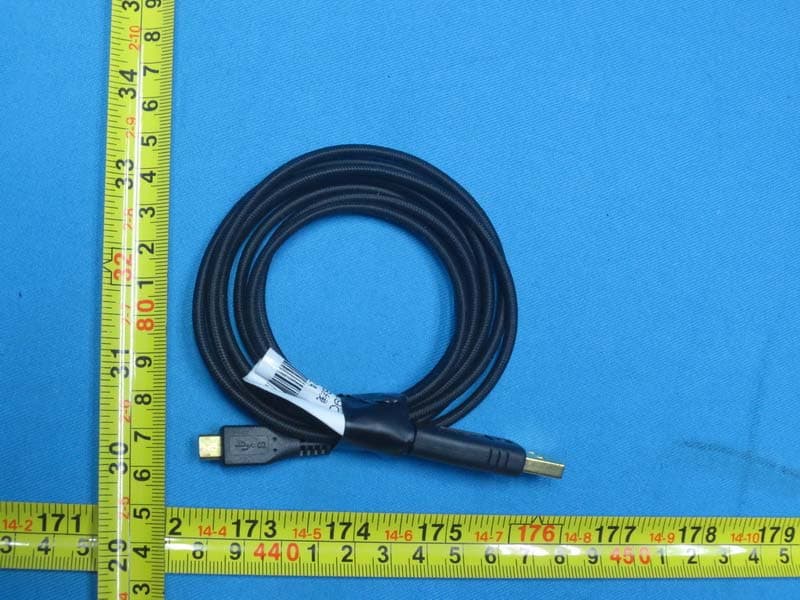
Click to zoom
Application Details
- Equipment Class
- DSS - Part 15 Spread Spectrum Transmitter
- Date of Grant
- Jan 05, 2015
- Application Purpose
- Original Equipment
- Date of Application
- Jan 05, 2015
- Equipment Note
- Gaming Controller
- Frequency Range
- 2402.00000000 - 2480.00000000
- Company
- Razer Inc.
- Country
- United States
Documents & Files
Document Text
Text extracted from the exhibit documents filed with the FCC. Open a document above to read the original.
Users Manual
1 User Manual Draft Verison: 13 oct 2014 PACKAGE CONTENTS / SYSTEM REQUIREMENTS PACKAGE CONTENTS • Razer Wireless Gaming Controller (Model No. : RZ06-0128) • Battery casing • 2 AA battery • USB to micro USB cable • Game clip • Quick Start Guide SYSTEM REQUIREMENTS • Android mobile device / Android TV device with Bluetooth Low Energy (BT 4.0 or higher) capability • Windows® 8 / Windows® 7 / Windows Vista® / Windows® XP 2 REGISTRATION / TECHNICAL SUPPORT REGISTRATION Sign up now for a Razer Synapse account to get real-time information on your product’s warranty status. To learn more about Razer Synapse and all its features, visit www.razerzone.com/synapse. If you are already a Razer Synapse user, register your product by clicking on your email address at the Razer Synapse application and select Warranty Status from the dropdown list. To register your product online, visit www.razerzone.com/registration. Please note that you will not be able to view your warranty status if you register via the website. TECHNICAL SUPPORT What you’ll get: • 1 year limited manufacturer’s warranty. • Free online technical support at www.razersupport.com. Your product’s serial number can be found here. 3 DEVICE LAYOUT A. Status indicator B. Analog sticks C. Select button D. Power / Mode button E. Start button F. Action buttons G. Directional pad H. Back button I. Home button C D B A E F G H B I 4 J. Shoulder triggers K. Micro USB port L. Shoulder buttons M. Batteries N. USB cable O. Game clip L K M N O J J L 5 Controller Basics Button Function Directional Pad Press the directional buttons to navigate the Home screen. Select Button This button is mainly used for gaming to select an item or a function. Power (Short Press) Press this button for less than 1 second to power up or put the controller to sleep. Mode (Long Press) Press this button for more than 3 seconds to change the controller assignment. Start Button This button is mainly used for gaming to start or pause the game. Back Button Press this button to return to the previous screen or undo a previous action. Home Button Press this button to exit from an app and return to the Home screen. LED Status State Description (All off) Powered down or in sleep mode (All flashing) Pairing to an Android device (One button lit) Connected and assigned as the corresponding player (One button flashing) Low battery warning 6 SETTING UP THE RAZER SERVAL FOR YOUR ANDROID PHONE 1. Insert the batteries into the battery casing. 2. Attach the battery casing onto the controller. 3. Attach the game clip to the controller. 4. From the Home screen of your Android phone, select Settings and then select Controllers. 5. Select Bluetooth Game Controllers, and then select Add Bluetooth Controllers. 6. Press the Power button to power up the controller. 7. When the controller is discovered, select it from the list of discovered devices. 7 SETTING UP THE RAZER SERVAL FOR YOUR ANDROID TV 1. Insert the batteries into the battery casing. 2. Attach the battery casing onto the controller. 3. From the Home screen of your Android TV, select Settings and then select Controllers. 4. Select Bluetooth Game Controllers, and then select Add Bluetooth Controllers. 5. Press the Power button to power up the controller. 6. When the controller is discovered, select it from the list of discovered devices. You can also use the controller in wired mode by connecting the USB cable from the Razer Serval to your Android TV device. 8 SETTING UP THE RAZER SERVAL FOR YOUR PC 1. Connect the USB cable from the Razer Serval to your PC. 2. Wait until Windows automatically detects and installs the necessary drivers. Or download the drivers from this link: www.microsoft.com/hardware/en-us/d/xbox-360-controller-for- windows You are now ready to use the Razer Serval. Have Fun! 9 LEGALESE COPYRIGHT AND INTELLECTUAL PROPERTY INFORMATION ©2014 Razer Inc. Patent Pending. All Rights Reserved. Razer, the Razer Triple- Headed Snake logo, the Razer distressed word logo and other trademarks contained herein are trademarks or registered trademarks of Razer Inc. and/or its affiliated or associated companies, registered in the United States and/or other countries. Windows and the Windows logo are trademarks of the Microsoft group of companies. Android is a trademark of Google Inc. Razer Inc. (“Razer”) may have copyright, trademarks, trade secrets, patents, patent applications, or other intellectual property rights (whether registered or unregistered) concerning the product in this guide. Furnishing of this guide does not give you a license to any such copyright, trademark, patent or other intellectual property right. The Razer Serval (the “Product”) may differ from pictures whether on packaging or otherwise. Razer assumes no responsibility for such differences or for any errors that may appear. Information contained herein is subject to change without notice. LIMITED PRODUCT WARRANTY For the latest and current terms of the Limited Product Warranty, please visit www.razerzone.com/warranty. LIMITATION OF LIABILITY Razer shall in no event be liable for any lost profits, loss of information or data, special, incidental, indirect, punitive or consequential or incidental damages, arising in any way out of distribution of, sale of, resale of, use of, or inability to use the Product. In no event shall Razer’s liability exceed the retail purchase price of the Product. 10 COSTS OF PROCUREMENT For the avoidance of doubt, in no event will Razer be liable for any costs of procurement unless it has been advised of the possibility of such damages, and in no case shall Razer be liable for any costs of procurement liability exceeding the retail purchase price of the Product. GENERAL These terms shall be governed by and construed under the laws of the jurisdiction in which the Product was purchased. If any term herein is held to be invalid or unenforceable, then such term (in so far as it is invalid or unenforceable) shall be given no effect and deemed t…
Text truncated - open the document above for the full version.
Cover Letter(s)
Razer Inc. To: Federal Communications Commission 7435 Oakland Mills Road Columbia, MD 21046 Subject: Request for confidentiality FCC ID: RWO-RZ060128 Dear FCC TCB: 1. Long-Term Confidentiality Pursuant to 47 CFR Section 0.459(a) & (b), we hereby requests non-disclosure and confidential treatment of the following materials submitted in support of FCC certification application: Schematic Block diagram Operational description Above materials contain secrets, proprietary and technical information, which would customarily be guarded from competitors under 47 CFR, section 0.457(d)(2). Disclosure or publication or any portion of this company confidential material to other parties could cause substantial competitive harm and provide unjustified benefits for competitors. 2. Short-Term Confidentiality (STC) Pursuant to Public Notice DA 04-1705 of the Commission’s policy, in order to comply with the marketing regulations in 47 CFR §2.803 and the importation rules in 47 CFR §2.1204, applicant hereby requests Short-Term Confidential treatment of the following materials: Internal Photos, User’s Manual, Test Set-up Photos, External Photos Planned Release Date STC: 180 days from date of grant Justification: This document contains detailed system and equipment description is considered as proprietary information in operation of the equipment. The public disclosure of above documents might be harmful to our company and would give competitor unfair advantage in the market. Sincerely, Johnsen Tia,2014-11-05
Cover Letter(s)
Declaration of Authorization We Name: Razer Inc. Address: 2035 Corte Del Nogal, Suite 101, Carlsbad California 92011, United States City: Carlsbad State: California Country: United States Declare that: Name Representative of agent: Cathy Wang Agent Company name: BTL Inc. Address: No.3 Jinshagang 1 st Road, Shixia, Dalang Town City: Dong Guan Country: China is authorized to apply for Certification of the following product(s), and sign all related documents, including the 731 forms: Product description: Gaming Controller Type designation: RZ06-0128 Trademark: RAZER on our behalf. Date: 2014-11-05 City: Carlsbad Name: Johnsen Tia Function: Senior Engineer Signature:
External Photos
Project No.: 1409C205 Page 2 of 1 0 Project No.: 1409C205 Page 3 of 1 0 Project No.: 1409C205 Page 4 of 1 0 Project No.: 1409C205 Page 10 of 1 0
ID Label/Location Info
FCC ID: RWO-RZ060128 IC: 8092D-RZ060128 20112014 Bottom View –Label Location
Internal Photos
Project No.: 1409C205 Page 5 of 1 0 Project No.: 1409C205 Page 6 of 1 0 Project No.: 1409C205 Page 7 of 1 0 Project No.: 1409C205 Page 8 of 1 0 Project No.: 1409C205 Page 9 of 1 0
Test Report
Report No.: BTL-FCCP-1-1409C205 Page 1 of 78 FCC Radio Test Report FCC ID: RWO-RZ060128 This report concerns (check one): Original Grant Class II Change Project No. : 1409C205 Equipment : Gaming Controller Model Name : RZ06-0128 Applicant : Razer Inc. Address : 2035 Corte Del Nogal, Suite 101. Carlsbad California 92011. USA Date of Receipt : Sep. 24, 2014 Date of Test : Sep. 24, 2014~ Oct. 09, 2014 Issued Date : Oct. 10, 2014 Tested by : BTL Inc. Testing Engineer : (David Mao) Technical Manager : (Leo Hung) Authorized Signatory : (Steven Lu) BTL INC. No.3, Jinshagang 1st Road, Shixia, Dalang Town, Dongguan, Guangdong, China. TEL: +86-769-8318-3000 FAX: +86-769-8319-6000 Report No.: BTL-FCCP-1-1409C205 Page 2 of 78 Declaration BTL represents to the client that testing is done in accordance with standard procedures as applicable and that test instruments used has been calibrated with the standards traceable to National Measurement Laboratory (NML) of CHINA, or National Institute of Standards and Technology (NIST) of U.S.A. BTL's reports apply only to the specific samples tested under conditions. It is manufacture’s responsibility to ensure that additional production units of this model are manufactured with the identical electrical and mechanical components. BTL shall have no liability for any declarations, inferences or generalizations drawn by the client or others from BTL issued reports. BTL’s reports must not be used by the client to claim product endorsement by the authorities or any agency of the Government. This report is the confidential property of the client. As a mutual protection to the clients, the public and BTL-self, extracts from the test report shall not be reproduced except in full with BTL’s authorized written approval. BTL’s laboratory quality assurance procedures are in compliance with the ISO Guide 17025 requirements, and accredited by the conformity assessment authorities listed in this test report. Limitation For the use of the authority's logo is limited unless the Te st Standard(s)/Scope(s)/Item(s) mentioned in this test report is (are) included in the conformity assessment authorities acceptance respective. Report No.: BTL-FCCP-1-1409C205 Page 3 of 78 Table of Contents Page 1 . CERTIFICATION 7 2 . SUMMARY OF TEST RESULTS 8 2.1 TEST FACILITY 9 2.2 MEASUREMENT UNCERTAINTY 9 3 . GENERAL INFORMATION 10 3.1 GENERAL DESCRIPTION OF EUT 10 3.2 DESCRIPTION OF TEST MODES 12 3.3 TABLE OF PARAMETERS OF TEXT SOFTWARE SETTING 12 3.4 BLOCK DIAGRAM SHOWING THE CONFIGURATION OF SYSTEM TESTED 13 3.5 DESCRIPTION OF SUPPORT UNITS 14 4 . EMC EMISSION TEST 15 4.1 CONDUCTED EMISSION MEASUREMENT 15 4.1.1 POWER LINE CONDUCTED EMISSION LIMITS 15 4.1.2 TEST PROCEDURE 15 4.1.3 DEVIATION FROM TEST STANDARD 15 4.1.4 TEST SETUP 16 4.1.5 EUT OPERATING CONDITIONS 16 4.1.6 EUT TEST CONDITIONS 16 4.1.7 TEST RESULTS 16 4.2 RADIATED EMISSION MEASUREMENT 17 4.2.1 RADIATED EMISSION LIMITS 17 4.2.2 TEST PROCEDURE 18 4.2.3 DEVIATION FROM TEST STANDARD 18 4.2.4 TEST SETUP 19 4.2.5 EUT OPERATING CONDITIONS 20 4.2.6 EUT TEST CONDITIONS 20 4.2.7 TEST RESULTS (9KHZ TO 30MHZ) 20 4.2.8 TEST RESULTS (BETWEEN 30MHZ TO 1000 MHZ) 21 4.2.9 TEST RESULTS (ABOVE 1000 MHZ) 21 5 . NUMBER OF HOPPING CHANNEL 22 5.1 APPLIED PROCEDURES 22 5.1.1 TEST PROCEDURE 22 5.1.2 DEVIATION FROM STANDARD 22 5.1.3 TEST SETUP 22 5.1.4 EUT OPERATION CONDITIONS 22 5.1.5 EUT TEST CONDITIONS 22 5.1.6 TEST RESULTS 22 Report No.: BTL-FCCP-1-1409C205 Page 4 of 78 Table of Contents Page 6 . AVERAGE TIME OF OCCUPANCY 23 6.1 APPLIED PROCEDURES / LIMIT 23 6.1.1 TEST PROCEDURE 23 6.1.2 DEVIATION FROM STANDARD 23 6.1.3 TEST SETUP 23 6.1.4 EUT OPERATION CONDITIONS 24 6.1.5 EUT TEST CONDITIONS 24 6.1.6 TEST RESULTS 24 7 . HOPPING CHANNEL SEPARATION MEASUREMENT 25 7.1 APPLIED PROCEDURES / LIMIT 25 7.1.1 TEST PROCEDURE 25 7.1.2 DEVIATION FROM STANDARD 25 7.1.3 TEST SETUP 25 7.1.4 EUT TEST CONDITIONS 25 7.1.5 TEST RESULTS 25 8 . BANDWIDTH TEST 26 8.1 APPLIED PROCEDURES 26 8.1.1 TEST PROCEDURE 26 8.1.2 DEVIATION FROM STANDARD 26 8.1.3 TEST SETUP 26 8.1.4 EUT OPERATION CONDITIONS 26 8.1.5 EUT TEST CONDITIONS 26 8.1.6 TEST RESULTS 26 9 . PEAK OUTPUT POWER TEST 27 9.1 APPLIED PROCEDURES / LIMIT 27 9.1.1 TEST PROCEDURE 27 9.1.2 DEVIATION FROM STANDARD 27 9.1.3 TEST SETUP 27 9.1.4 EUT OPERATION CONDITIONS 27 9.1.5 EUT TEST CONDITIONS 27 9.1.6 TEST RESULTS 27 10 . ANTENNA CONDUCTED SPURIOUS EMISSION 28 10.1 APPLIED PROCEDURES / LIMIT 28 10.1.1 TEST PROCEDURE 28 10.1.2 DEVIATION FROM STANDARD 28 10.1.3 TEST SETUP 28 10.1.4 EUT OPERATION CONDITIONS 28 10.1.5 EUT TEST CONDITIONS 28 10.1.6 TEST RESULTS 28 11 . MEASUREMENT INSTRUMENTS LIST 29 Report No.: BTL-FCCP-1-1409C205 Page 5 of 78 Table of Contents Page ATTACHMENT A - CONDUCTED EMISSION 31 ATTACHMENT B - RADIATED EMISSION (9KHZ-30MHZ) 34 ATTACHMENT C - RADIATED EMISSION (30MHZ TO 1000MHZ) 36 ATTACHMENT D - RADIATED EMISSION (ABOVE 1000MHZ) 43 ATTACHMENT E - NUMBER OF HOPPING CHANNEL 56 ATTACHMENT F - AVERAGE TIME OF OCCUPANCY 58 ATTACHMENT G - HOPPING CHANNEL SEPARATION MEASUREMENT 65 ATTACHMENT H - BANDWIDTH 68 ATTACHMENT I - PEAK OUTPUT POWER 71 ATTACHMENT J - ANTENNA CONDUCTED SPURIOUS EMISSION 74 Report No.: BTL-FCCP-1-1409C205 Page 6 of 78 REPORT ISSUED HISTORY Issued No. Description Issued Date BTL-FCCP-1- 1409C205 Original Issue. Oct. 10, 2014 Report No.: BTL-FCCP-1-1409C205 Page 7 of 78 1. CERTIFICATION Equipment : Gaming Controller Brand Name : RAZER Model Name : RZ06-0128 Applicant Razer Inc. Manufacturer : Razer (Asia-Pacific) Pte Ltd Address : 514 Chai Chee Lane #07-01 ~ 06 Singapore 469029 Factory : RAZER TECHNOLOGY AND DEVELOPMENT (SHENZHEN) CO., LTD Address : East Wing, 3rd Floor, Block 2, Phase 1 of Vision Shenzhen Business Park Keji South Road, Hi-Tech Industrial Park, Shenzhen 518057, China Date of Test : Sep. 24, 2014~ Oct. 09, 2014 Test Sample : ENGINEERING SAMPLE Standard(s) : FCC Part15, Subpart C: 2013 (15.247) / ANSI C63.4 : 2009 / FCC Public Notice DA 00-705, March 30, 2000. The above eq…
Text truncated - open the document above for the full version.
Contact Information
Applicant
Johnsen Tia(Director, Regulatory & Compliance)
Test Firm
BTL Inc.Daisy Dai
Technical Specifications
| # | Rule Parts | Frequency Range | Power Output |
|---|---|---|---|
| 1 | 15C | 2.40 GHz - 2.48 GHz | 1.00 mW |
Other Applications from Razer Inc.
RWO-RZ060519
Sep 02, 2026Gaming Controller
Equipment Class
DTS - Digital Transmission SystemRWO-RZ010566
Aug 26, 2026Gaming Mouse
Equipment Class
DTS - Digital Transmission SystemRWO-RZ380426
Jun 26, 2026Gaming Chair
Equipment Class
DTS - Digital Transmission SystemRWO-DGRFG8
May 28, 2026Wireless Dongle
Equipment Class
DTS - Digital Transmission SystemRWO-RZ010569
May 27, 2026Wireless Mouse
Equipment Class
DTS - Digital Transmission System