RYYEYSF2CSUUBluetooth USB Dongle
TAIYO YUDEN CO., LTD.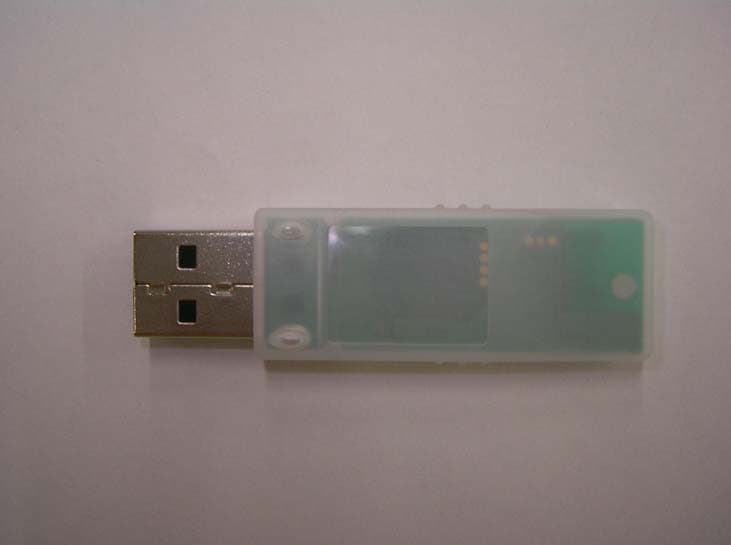
Click to zoom
Application Details
- Equipment Class
- DSS - Part 15 Spread Spectrum Transmitter
- Date of Grant
- Jul 01, 2004
- Application Purpose
- Original Equipment
- Date of Application
- Jul 01, 2004
- Equipment Note
- Bluetooth USB Dongle
- Frequency Range
- 2402.00000000 - 2480.00000000
- Company
- TAIYO YUDEN CO., LTD.
- Country
- Japan
Documents & Files
Document Text
Text extracted from the exhibit documents filed with the FCC. Open a document above to read the original.
Users Manual
Taiyo Yuden Page 1 Rev 1.29_30Aug02 Getting Started With the Bluetooth Software BTW and USB Adaptor Trademark Information BTW is a product of Widcomm Inc. Windows, Windows 98, Windows NT, Windows Millennium, Windows XP are trademarks of Microsoft Corporation. Internet Explorer is a product of Microsoft Corporation. The BLUETOOTH trademarks are owned by Bluetooth SIG and used by Taiyo Yuden under license. T39 handset is a product of Ericsson. All other trade names mentioned in this document or the other documentation provided with Bluetooth USB Dongle are trademarks or registered trademarks of their respective holders. Taiyo Yuden Page 2 Rev 1.29_30Aug02 Getting Started With the Bluetooth Software BTW and USB Adaptor Table of Contents Item Page System Requirement 3 Bluetooth Software Install step by Step 3 -9 Start Connection Over The Bluetooth Airwaves – File Transfer 10-13 Connecting Over The Bluetooth Airwaves – Security 14 - 15 Start Connection Over The Bluetooth Airwaves – Dial Up Networking Profile 16 - 18 Taiyo Yuden Page 3 Rev 1.29_30Aug02 Getting Started With the Bluetooth Software BTW and USB Adaptor System Requirements BTW runs under: - Windows 98 (Second edition) - Millennium (Windows 98 ME) - Windows 2000 - Windows XP During the installation, you need a CD-ROM driver for access to the bundle software. Note: This Getting Started is a simple guide , for more Users Guide please see the ‘BTW Users Guide.pdf’ in BTW CD. Or you can click the Help Topics in the Help Menu of the Tool Bar. Bluetooth Software Install step by step Step 1 Insert the Widcomm BTW CD into the PC’s CDROM drive. Installation proceeds automatically. Since Windows NT does not support USB, the installation of the CD should be done on systems with Windows ’98 or Windows 2000. Step 2 An InstallShield box appears to inform you the installation Wizard is being set up. Please wait. Taiyo Yuden Page 4 Rev 1.29_30Aug02 Getting Started With the Bluetooth Software BTW and USB Adaptor Figure 2. Welcome Window Note: These images were captured from a Windows 2000 system. Your images may look slightly different. Step 3 A Welcome To The Installation Wizard window appears as shown in Figure 2. Select Next to continue the installation proccess. Figure 3. License Agreement Window Step 4 The license agreement window appears as shown in Figure 3. If you accept, mark the “I accept the terms in the license agreement” option and click on Next. The installation will proceed. If you do not accept the conditions of the agreement, the installation process will terminate. Taiyo Yuden Page 5 Rev 1.29_30Aug02 Getting Started With the Bluetooth Software BTW and USB Adaptor Figure 4. Device Information Window Step 5 A Device Information window opens as shown in Figure 4. Enter a device name and choose a device type. These options will not affect the functionality. The device information is used to inform the master device what kinds of other devices are within range to connect to so the user can identify which device is the one they need to connect to if there is more than one device within range. Select the Next Button. Figure 5. Destination Folder Window Step 6 A Destination Folder window appears as shown in Figure 5, which states the default location and gives you the opportunity to choose an alternative folder. When the location is acceptable, select Next. Taiyo Yuden Page 6 Rev 1.29_30Aug02 Getting Started With the Bluetooth Software BTW and USB Adaptor Figure 6. Ready to Install Window Step 7 A Ready to Install Program window appears as shown in Figure 6. Select Install when you are ready to proceed. Figure 7. Installing Window Step 8 An Installing Widcomm Status window appears. Please be patient, this may take up to 5 minutes. Step 9 A notification window appears asking you to restart your system. Select Yes to proceed. Taiyo Yuden Page 7 Rev 1.29_30Aug02 Getting Started With the Bluetooth Software BTW and USB Adaptor Figure 8. Install Complete Window Step 10 You will be informed when the installation is complete. Select Finish. Follow the instructions thereafter. You may be asked to restart the computer after the installation completes. In that case click OK and restart the computer. Step 11 A Bluetooth Neighborhood logo has appeared on your desktop and a small Bluetooth icon has appeared on your icon tray (lower right-hand side of the screen). Taiyo Yuden Page 8 Rev 1.29_30Aug02 Getting Started With the Bluetooth Software BTW and USB Adaptor Figure 9. Device Manager Window Step 12 Plug the Bluetooth USB Dangle into you usb port ,The OS will install the usb Driver auto. And you can check it in the My computer - > Device Manager. You may now remove the Widcomm CD from your CD drive. Step 13 Let’s configure your devices. On your icon tray (lower right-hand side of the screen), right click on the small Bluetooth Neighborhood icon on your icon tray. Figure 10. Bluetooth Configuration Window - General Tab Step 14 A pull down window appears with two words, Security (which we will discuss later) and Configuration. Choose Configuration. Step 15 A Bluetooth Configuration window appears as shown in Figure 10. In this document, there are three tabs-of-interest: General, Information Exchange, and Hardware. Select the General tab. Step 16 Type in a name for your device and choose either Laptop or Desktop. The security option’s default is medium; leave that as it is for now. Select OK. Taiyo Yuden Page 9 Rev 1.29_30Aug02 Getting Started With the Bluetooth Software BTW and USB Adaptor Figure 11. Bluetooth Configuration Window – Information Exchange Tab Step 17 Now choose the Information Exchange tab as shown in Figure 11. The My Shared Directory window allows you to determine where you would like to locate files you want to share with other devices. The default is called File Transfer. My Inbox Directory is the dialogue window that allows you to determine where you wish to put incoming files. Configure the many choices on this tab now or leave them …
Text truncated - open the document above for the full version.
External Photos
Taiyo Yuden Bluetooth TM USB Adaptor EXTERNAL EUT PICTURES I. FRONT VIEW II. REAR VIEW TAIYO YUDEN CO.,LTD.
ID Label/Location Info
001N CAXXX TaiyoYuden Co.,LTD. FCC ID:RYYEYSF2CSUU IC ID:4389A-EYSF2CSU
Internal Photos
Taiyo Yuden Bluetooth TM USB Adaptor INTERNAL EUT PICTURES TAIYO YUDEN CO.,LTD. I. FRONT VIEW Taiyo Yuden Bluetooth TM USB Adaptor INTERNAL EUT PICTURES TAIYO YUDEN CO.,LTD. II. FRONT VIEW with Metallic shield Taiyo Yuden Bluetooth TM USB Adaptor INTERNAL EUT PICTURES TAIYO YUDEN CO.,LTD. III. FRONT VIEW without Metallic shield Taiyo Yuden Bluetooth TM USB Adaptor INTERNAL EUT PICTURES TAIYO YUDEN CO.,LTD. IV. REAR VIEW
Operational Description
Taiyo Yuden Bluetooth TM USB Adaptor Data sheet TAIYO YUDEN CO.,LTD. Matsumura building 16-20 Ueno 6 choume Taitouku Tokyo Japan Integrated Antenna ◎ Peak Gain @ 2.45GHz : 2.0dBi Coverage ◎ 10m ~ 20m (Varies depending on use environment) Dimension ◎ Length : 56.85mm ◎ Width : 16.5 mm ◎Height : 8.1 mm Weight ◎ 6 g Operating Voltage ◎ 5V DC +/- 10% Power Consumption ◎ Peak RF current during TX burst :75.5mA ◎ Peak RF current during RX burst :68mA LED Indicators ◎ Transmit / Receive (Flashing Blue) Temperature ◎ Operation temperature : -10°C ~ +70°C ◎ Storage temperature : -30°C ~ +75°C Standard ◎ Fully compliant with BluetoothTM1.2 Standard ◎ USB UHCI/OHCI spec 1.1 compliant Output Power ◎ 4 dBm max with power control Frequency band ◎ 2.402GHz ~ 2.480GHz Modulation ◎ GFSK Sensitivity ◎ -80 dBm Data Rate ◎ Asynchronous:723.2kbps/57.6kbps ◎ Synchronous:433.9kbps/433.9kbps Interface ◎ A-Type USB Connector Operating systems ◎ Windows 98SE ◎ Windows Me ◎ Windows 2000 ◎ Windows XP Ground The ground line of USB adaptor is connected to one of the host computer via metallic enclosure of USB connecter. 1. Key components: CSR BlueCore 02 External BC212015B, Bluetooth Single Chip AMD AM29LV800B, Flash Memory XC6204B32MR, High Speed LDO Regulators 2. Operation Principle CSR BlueCore 02 External BC212015B, Bluetooth Single Chip BlueCore2-External is a single chip radio and baseband IC for Bluetooth 2.4GHz systems. It is implemented in 0.18um CMOS technology. When used with external flash containing the CSR Bluetooth software stack, it provides a fully compliant Bluetooth system for data and voice communications. Operation at 2.7 ~ 3.3V supply. Operation clock is provided by a 16MHz oscillator. 3. Specifications
Test Report
TEST REPORT Report No. :ICM04004-2-FCC Page : 1 of 53 TEST REPORT Report No. : ICM04004-2-FCC Date : 24 th June 2004 Applicant : TAIYO YUDEN CO.,LTD. 8-1 Sakae-cho , Takasaki-shi , Gunma ,370-8522 Japan. EUT : Bluetooth USB Adaptor FCC ID : RYYEYSF2CSUU Model No. : EYSF2CSUU Serial No. : 00037A009001, 00037a01f019 Receipt date of tested sample : 7 th June 2004 Date of measurement : 7 th , 8 th June 2004 (Radiated Emission) S 8 th June 2004 (Conducted Emission) Test location : TAIYO YUDEN CO.,LTD. EMC CENTER S 5607-2, Nakamuroda,Haruna-machi, S Gunma-Gun,Gunma, 370-3347,Japan. Applied standard : 47 CFR Part 15 Subpart C Section15.207 , Section 15.247 Procedure : ANSI C63.4-2001 Test results: PASS Approved by : Manager / Kenzo Furuta Reviewed by : Chief Engineer / Takeshi Matsumura Table of Contents TEST REPORT Report No. :ICM04004-2-FCC Page : 2 of 53 1 TEST REPORT ..................................................................................................................................................................4 2 GENERAL INFORMATION................................................................................................................................................4 2.1 P RODUCT DESCRIPTION............................................................................................................................................4 2.2 S UMMARY OF TEST AND INSPECTION RESULT.............................................................................................................5 2.3 T EST METHODOLOGY................................................................................................................................................5 2.4 T EST FACILITY..........................................................................................................................................................6 3 SYSTEM TEST CONFIGURATION ...................................................................................................................................6 3.1 J USTIFICATION..........................................................................................................................................................6 3.2 O PERATING MODES...................................................................................................................................................7 3.3 L IST OF ACCESSORIES...............................................................................................................................................7 3.4 I NTERFACE CABLE.....................................................................................................................................................7 3.5 S PECIAL ACCESSORIES.............................................................................................................................................8 3.6 E QUIPMENT MODIFICATIONS......................................................................................................................................8 3.7 C ONFIGURATION OF TESTED SYSTEM.........................................................................................................................8 4 ANTENNA REQUIREMENT...............................................................................................................................................9 5 CONDUCTED EMISSION TEST ......................................................................................................................................10 5.1 T EST SETUP............................................................................................................................................................10 5.2 T EST INSTRUMENTATION..........................................................................................................................................10 5.3 C ONDUCTED EMISSION CALCULATION......................................................................................................................11 5.4 T EST RESULTS........................................................................................................................................................12 6 RADIATED EMISSION TEST ..........................................................................................................................................15 6.1 TEST SETUP............................................................................................................................................................15 6.2 T EST INSTRUMENTATION..........................................................................................................................................16 6.3 R ADIATED EMISSION CALCULATION..........................................................................................................................17 6.4 T EST RESULTS........................................................................................................................................................18 6.4.1 Frequency Range 30MHz to 1GHz ............................................................................................................18 6.4.2 Frequency Range 1GHz to 25GHz ............................................................................................................21 7 20DB BANDWIDTH .........................................................................................................................................................24 7.1 T EST SETUP............................................................................................................................................................24 7.2 T EST INSTRUMENT..................................................................................................................................................24 7.3 T EST RESULTS...........................................................................................................................................…
Text truncated - open the document above for the full version.
Test Setup Photos
Taiyo Yuden Bluetooth TM USB Adaptor TESTED CONFIGRATION PICTURES I. Conducted test configuration pictures FRONT VIEW REAR VIEW TAIYO YUDEN CO.,LTD. Taiyo Yuden Bluetooth TM USB Adaptor II. Radiated test configuration pictures FRONT VIEW REAR VIEW TAIYO YUDEN CO.,LTD.
Contact Information
Applicant
Hideki Kato(Deputy General Manager)
Technical Contact
Taiyo Yuden Co., LTDTakeshi Matsumura
[email protected]+81 27 360 8328
5607-2 Nakamuroda Harunamachi · Gunma-Gun Gunma · Japan
Test Firm
TAIYO YUDEN CO., LTD.Katsuaki Nakajima
Technical Specifications
| # | Rule Parts | Frequency Range | Power Output |
|---|---|---|---|
| 1 | 15C | 2.40 GHz - 2.48 GHz | 900.00 µW |
Other Applications from TAIYO YUDEN CO., LTD.
RYYCL5AD
Nov 17, 2020CatM1 Module
Equipment Class
PCB - PCS Licensed Transmitter
RYYEYSSSN
Nov 16, 2020Bluetooth low energy module
Equipment Class
DTS - Digital Transmission SystemRYYEYSPBN
Sep 07, 2020Bluetooth low energy/ ANT/ 802.15.4 Module
Equipment Class
DTS - Digital Transmission System
RYYEYSNCN
Feb 26, 2020Bluetooth low energy/ ANT/ 802.15.4 Module
Equipment Class
DTS - Digital Transmission System
RYYEYSNSN
Feb 16, 2020Bluetooth low energy/ ANT/ 802.15.4 Module
Equipment Class
DTS - Digital Transmission System