SUZDTZ1200WLCD Tablet
Coretronic Corp.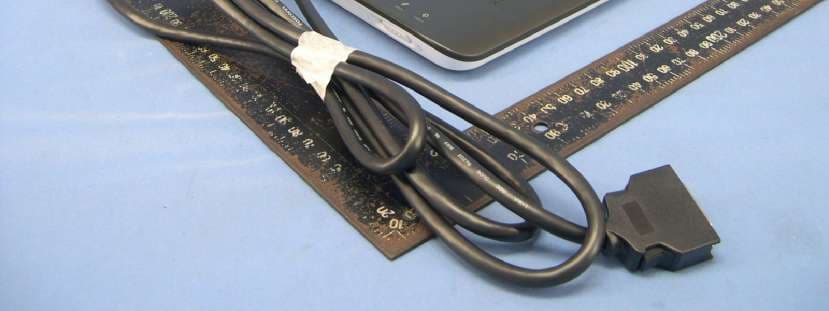
Click to zoom
Application Details
- Equipment Class
- DXX - Part 15 Low Power Communication Device Transmitter
- Date of Grant
- Oct 23, 2007
- Application Purpose
- Original Equipment
- Date of Application
- Oct 23, 2007
- Equipment Note
- LCD Tablet
- Frequency Range
- 0.66700000 - 0.66700000
- Company
- Coretronic Corp.
- Country
- Taiwan
Documents & Files
Document Text
Text extracted from the exhibit documents filed with the FCC. Open a document above to read the original.
Users Manual
Wacom Cintiq ® 12WX Installation Guide & Hardware Manual for Cintiq 12WX (DTZ-1200W) English version 1.0, August 29, 2007 Copyright Wacom Co., Ltd, 2007 All rights reserved. No part of this manual may be reproduced except for your express personal use. Wacom reserves the right to revise this publication without obligation to provide notification of such changes. Wacom does its best to provide current and accurate information in this manual. However, Wacom reserves the right to change any specifications and product configurations at its discretion, without prior notice and without obligation to include such changes in this manual. DuoSwitch is a trademark, and Cintiq and Wacom are registered trademarks of Wacom Co., Ltd. Photoshop is either a registered trademark or a trademark of Adobe Systems Incorporated in the United States and/or other countries. Microsoft, Windows, and Vista are either registered trademarks or trademarks of Microsoft Corporation in the United States and/or other countries. Apple, the Apple logo, and Macintosh are trademarks of Apple Computer, Inc., registered in the U.S. and other countries. Any additional company and product names mentioned in this documentation may be trademarked and/or registered as trademarks. Mention of third-party products is for informational purposes only and constitutes neither an endorsement nor a recommendation. Wacom assumes no responsibility with regard to the performance or use of these products. ExpressKey is a registered trademark of Ginsan Industries, Inc., and is used with permission. 12WX_Manual.fm Page 0 Wednesday, August 29, 2007 10:38 AM Introduction and overview Page 1 INTRODUCTION AND OVERVIEW The Wacom ® Cintiq ® 12WX pen display combines the benefits of a Liquid Crystal Display (LCD) with the control, comfort, and productivity of Wacom’s cordless, battery-free pen technology. This gives you a direct pen-on-screen interface for your computer. Cintiq’s basic components include a Wacom pen tablet internally mounted behind a 12.1" wide format TFT color display, and Wacom’s Grip Pen. Cintiq comes with an integrated display stand, enabling you to use the pen display flat on your desk or at a 25 degree incline. Your pen display also includes a rotation pivot, enabling you to rotate the display as you work. This manual describes how to install and use your Cintiq pen display. The computer treats the Cintiq pen display as two separate devices (the display and the pen tablet). Therefore, the installation process is completed in two stages: • First install the Cintiq as a display. • Then install the Cintiq as a pen tablet. Both stages require hardware and software installations and adjustments. Please follow all instructions carefully. IMPORTANT: You MUST install the Wacom pen tablet driver software for correct pen-on-screen functionality. To learn about using the Wacom Tablet control panel to customize your pen display tablet and pen settings on Windows or Macintosh computers, see Customizing on page 27. The following kinds of information are not included with this product: information about your specific computer hardware or operating system, or information about your application software. Your best source for this information is the set of manuals and discs that came with your hardware, operating system, or application. 12WX_Manual.fm Page 1 Wednesday, August 29, 2007 10:38 AM Precautions Page 2 PRECAUTIONS To ensure the safe usage of your product, be sure to follow all instructions, cautions, and warnings found within this manual. Failure to do so could cause the loss of data or damage to your computer. Failure to do so could also void your warranty, in which case Wacom shall have no responsibility to repair or replace the product. PHYSICAL LOCATION ENVIRONMENT W ARNING This symbol indicates an item that, if disregarded, may lead to loss of human life or serious injury. C AUTION This symbol indicates an item that, if disregarded, may lead to human injury or damage to personal property. Exercise due care and diligence whenever engaging in a described action. W ARNING Do not use the Cintiq pen display in a facility control system that requires extremely high reliability; it may cause other electronic devices to malfunction, or other devices may cause the pen display tablet to malfunction. Where use is prohibited, power off Cintiq to prevent the possibility of it causing other electronic devices to malfunction. Wacom does not accept any liability for direct or consequential damages. For details, please refer to your Warranty located at the end of this manual. Temperature and Humidity •Operating temperature and humidity: 5 ̊ to 35 ̊C, 20 to 80% RH •Storage temperature and humidity: -10 ̊ to 60 ̊C, 20 to 90% RH C AUTION Do not use or store Cintiq where: •Temperature changes are severe or exceed specifications (e.g., outdoors or inside a vehicle). •The pen display, the Grip Pen, and the converter unit are exposed to direct sunlight or heat from an appliance, or are exposed to water or any other kind of liquid. C AUTION Do not use Cintiq in a dusty environment; this may damage the unit. 12WX_Manual.fm Page 2 Wednesday, August 29, 2007 10:38 AM Precautions Page 3 USAGE HANDLING W ARNING Only use the converter unit and power adapter that came with Cintiq. If a different type of converter or power adapter are used, Cintiq will not work properly or may be damaged. Using a different type of converter or power adapter also has the potential to result in fire. Use of a different converter or power adapter will void your warranty. C AUTION Be sure to use a grounded power source when applying power to Cintiq. C AUTION Do not connect or disconnect the video or power cables while Cintiq or your computer are turned on; this may damage the display, converter unit, or computer video card. In this case, Wacom shall have no responsibility to repair or replace the product. C AUTION This product is for use with a DVI or VGA video card; using an inapprop…
Text truncated - open the document above for the full version.
External Photos
Page 1 CONSTRUCTION PHOTOS OF EUT
External Photos
FCC ID:SUZDTZ1200W FCC LABEL LOCATION The label will be permanently affixed at a conspicuous location on the device. LABEL
Internal Photos
Page 2 Page 3 Page 4 Page 5 Page 6 Page 7 Page 8 Page 9 Page 10 Page 11 Page 12 Page 13 Page 14 Page 15 Page 16 Page 17 Page 18 Page 19 Page 20 Page 21 Page 22 Page 23 Page 24
Test Report
Report No.: RF960905H02 1 Report Format Version 2.0.6 FCC TEST REPORT REPORT NO. : RF960905H02 MODEL NO. : DTZ-1200X RECEIVED : Sep. 05, 2007 TESTED : Sep. 05 to 26, 2007 ISSUED : Oct. 01, 2007 APPLICANT : Coretronic Corp. ADDRESS : No. 11, Li-Hsing Road, Science Park, Hsinchu, Taiwan 300, R.O.C. ISSUED BY : Advance Data Technology Corporation LAB LOCATION : No. 81-1, Lu Liao Keng, 9 Ling, Wu Lung Tsuen, Chiung Lin Hsiang, Hsin Chu Hsien, Taiwan, R.O.C. This test report consists of 25 pages in total. It may be duplicated completely for legal use with the approval of the applicant. It should not be reproduced except in full, without the written approval of our laboratory. The client should not use it to claim product endorsement by TAF, A2LA or any government agencies. The test results in the report only apply to the tested sample. The test results in this report are traceable to the national or international standards. No. 2177-01 Report No.: RF960905H02 2 Report Format Version 2.0.6 Table of Contents 1 CERTIFICATION.............................................................................................3 2 SUMMARY OF TEST RESULTS.....................................................................4 2.1 MEASUREMENT UNCERTAINTY..................................................................4 3 GENERAL INFORMATION.............................................................................5 3.1 GENERAL DESCRIPTION OF EUT................................................................5 3.2 DESCRIPTION OF TEST MODES..................................................................6 3.3 DESCRIPTION OF SUPPORT UNITS............................................................7 3.4 CONFIGURATION OF SYSTEM UNDER TEST.............................................8 4 EMISSION TEST.............................................................................................9 4.1 CONDUCTED EMISSION MEASUREMENT..................................................9 4.1.1 LIMITS OF CONDUCTED EMISSION MEASUREMENT.................................9 4.1.2 TEST INSTRUMENTS.....................................................................................9 4.1.3 TEST PROCEDURE......................................................................................10 4.1.4 DEVIATION FROM TEST STANDARD..........................................................10 4.1.5 TEST SETUP.................................................................................................10 4.1.6 EUT OPERATING CONDITIONS...................................................................11 4.1.7 TEST RESULTS (MODE 1)............................................................................12 4.1.8 TEST RESULTS (MODE 2)............................................................................14 4.2 RADIATED EMISSION MEASUREMENT.....................................................16 4.2.1 LIMITS OF RADIATED EMISSION MEASUREMENT....................................16 4.2.2 TEST INSTRUMENTS...................................................................................17 4.2.3 TEST PROCEDURE......................................................................................18 4.2.4 DEVIATION FROM TEST STANDARD..........................................................18 4.2.5 TEST SETUP.................................................................................................19 4.2.6 EUT OPERATING CONDITIONS...................................................................19 4.2.7 TEST RESULTS.............................................................................................20 4.2.8 TEST RESULTS (SPECTRUM BANDWIDTH)...............................................23 5 INFORMATION ON THE TESTING LABORATORIES..................................24 6 APPENDIX A – MODIFICATIONS RECORDERS FOR ENGINEERING CHANGES TO THE EUT BY THE LAB..........................................................25 Report No.: RF960905H02 3 Report Format Version 2.0.6 1 CERTIFICATION PRODUCT : LCD tablet BRAND NAME : Wacom Co., Ltd MODEL NO. : DTZ-1200X TESTED : Sep. 05 to 26, 2007 TEST SAMPLE : ENGINEERING SAMPLE APPLICANT : Coretronic Corp. STANDARDS : 47 CFR Part 15, Subpart C (Section 15.209), ANSI C63.4-2003 The above equipment (Model: DTZ-1200W) has been tested by Advance Data Technology Corporation, and found compliance with the requirement of the above standards. The test record, data evaluation & Equipment Under Test (EUT) configurations represented herein are true and accurate accounts of the measurements of the sample’s EMC characteristics under the conditions specified in this report. PREPARED BY : , DATE: Oct. 01, 2007 ( Sunny Wen, Specialist ) TECHNICAL ACCEPTANCE : , DATE: Oct. 01, 2007 Responsible for RF ( Hank Chung, Deputy Manager ) APPROVED BY : , DATE: Oct. 01, 2007 ( May Chen, Deputy Manager) Report No.: RF960905H02 4 Report Format Version 2.0.6 2 SUMMARY OF TEST RESULTS The EUT has been tested according to the following specifications: APPLIED STANDARD: 47 CFR Part 15, Subpart C Standard Test Type Result Remarks Conducted Test PASS Meets Class B Limit Minimum passing margin is -14.06 dB at 0.189 MHz 47 CFR Part 15, Subpart C Radiated Test PASS Meets Class B Limit Minimum passing margin is -2.22 dB at 256.70 MHz NOTE: For conducted emission test, the test limit used is according to FCC Part 15.107. In this part, conducted emis 2.1 MEASUREMENT UNCERTAINTY Where relevant, the following measurement uncertainty levels have been estimated for tests performed on the EUT as specified in CISPR 16-4: This uncertainty represents an expanded uncertainty expressed at approximately the 95% confidence level using a coverage factor of k=2. Measurement Value Conducted emissions 2.41 dB Radiated emissions (30MHz-1GHz) 3.89 dB Radiated emissions (1GHz ~18GHz) 2.21 dB conducted emission test for telecom port is not mentioned and therefore this item is not tested. sion test for telecom port is not mentioned and therefore this item is not t…
Text truncated - open the document above for the full version.
Test Setup Photos
1 PHOTOGRAPHS OF THE TEST CONFIGURATION CONDUCTED EMISSION TEST 2 3 RADIATED EMISSION TEST 4
Contact Information
Applicant
Roger Ren
Technical Contact
Advance Data Technology Corporation (Hsin Chu)Eric Lin
[email protected]886-3-593-5343
81-1 Luliaoken, 9th Lin, Wulung Tsuen Chiunglin · Hsinchu · Taiwan
Non-Technical Contact
Advance Data Technology CorporationEric Lin
[email protected]886-3-593-5343
Test Firm
Bureau Veritas CPS (H.K.) Ltd. Taoyuan BranchRichard Chen
Technical Specifications
| # | Rule Parts | Frequency Range | Power Output |
|---|---|---|---|
| 1 | 15C | 0.667 MHz - 0.667 MHz | - |
Other Applications from Coretronic Corp.

SUZ-WN6500RHN
Jan 20, 2013802.11n, Dual Band, 2T2R Wireless LAN PCI Express Half Mini Module
Equipment Class
DTS - Digital Transmission System
SUZ-WN6500RH
Nov 27, 2012802.11n, Dual Band, 2T2R Wireless LAN PCI Express Half Mini Module
Equipment Class
NII - Unlicensed National Information Infrastructure TX
SUZ-PBP2
May 29, 2012Interactive Pen
Equipment Class
DXX - Part 15 Low Power Communication Device Transmitter
SUZ-PB2701
Apr 05, 2012Dell Interactive Wireless Dongle
Equipment Class
DXX - Part 15 Low Power Communication Device Transmitter
SUZ-PBP-II
Nov 04, 2010Interactive Pen
Equipment Class
DXX - Part 15 Low Power Communication Device Transmitter