T38PCD1536GSM/GPRS + Bluetooth Mobile phone
Cellon Communications Technology (Shenzhen) Co.,Ltd.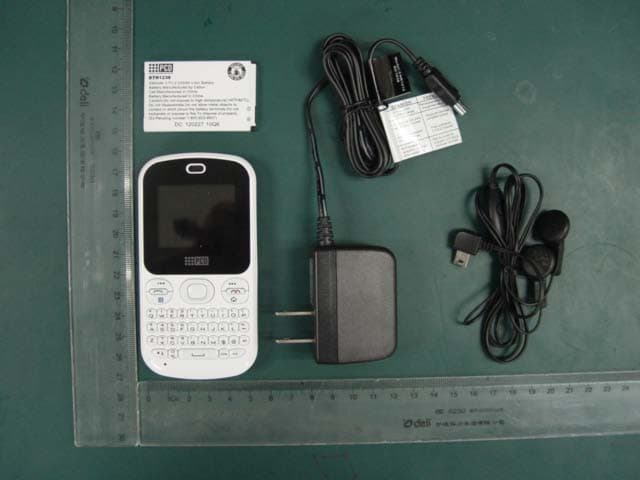
Click to zoom
Application Details
- Equipment Class
- DSS - Part 15 Spread Spectrum Transmitter
- Date of Grant
- Sep 20, 2012
- Application Purpose
- Original Equipment
- Date of Application
- Sep 20, 2012
- Equipment Note
- GSM/GPRS + Bluetooth Mobile phone
- Frequency Range
- 2402.00000000 - 2480.00000000
- Country
- China
Documents & Files
Document Text
Text extracted from the exhibit documents filed with the FCC. Open a document above to read the original.
Users Manual
1 1 Introduction 1.1 Phone Display 1.2 Key Key Function Left/Right Soft Key Press to perform the function currently displayed in the bottom left/right corner of the screen. In idle mode, press Left Soft Key to access Main Menu. 2 Navigation Key In idle mode, Navigation Key UP to access STK. Press the Navigation Key Down to access Phonebook. Press the Navigation Key Left to access Multimedia. Press the Navigation Key Right to access Write message. OK Key In idle mode, press to access Interne t Serv ice. Press to confirm a selection. Dial/Answer Key Press to make/answer a call. In idle mode, press to display call list. End/Power Key Press to end a call. Press and hold to power on/off the phone. Facebook Key Press to access the Facebook. F N Ke y Activate FN mode to enter digits or characters printed on the top part of the keys. Press the FN Key once to activate it once. Press the FN Key twice to activate the FN mode all of the time. To deactivate the FN mode, press the FN key. 1.3 Icons and symbols Vertical bars indicate the signal strength of the GSM Indicates the battery charge level. Indicates your phone is locked. 3 Indicates your phone uses the alert type of “Ring”. Indicates your phone uses the alert type of “Vibrate”. Indicates your phone uses the headsets profile Indicates the alarm clock is set. Indicates a missed call. Indicates new text message(s) . Indicates new multimedia message(s). Indicates new voice mail message(s). Indicates WAP push messages. Indicates stopwatch is enabled. Indicates your phone has logged onto GPRS. Indicates a WIFI connection is set up. 2 Getting Started 2.1 Inserting the SIM Card 2.1.1 Remove the back cover(1), remove the battery (2), and insert the SIM card (3) 4 (1) (2) (3) 2.1.2 Install the battery (4) and back cover (5) (4) (5) 2.1.3 Inserting a T-F lash Car d 5 3 Text Entry 3.1 Input Method Your cellular phone supports several input methods, which include: ABC/Abc/abc/ES/Es/es Nu mer ic (123) 3.1.1 Changing the input modes During text editing, you can press the Shift Key to switch input modes. Or press the Left Soft Key [Options] and choose Input Method to select different input modes. 3.1.2 Entering Symbols In any input mode, press the Symb o l Ke y to open the symbols input screen. Use the Navigatio n ke y to choose the desired symbol and press the Ok key to select it. 3.2 Key Input Letters and symbols represented by each key are as follows: Ke y Function All related keys Press to input letters F N Ke y Activate FN mode to enter digits or characters printed on the top part of the keys, Press the FN Key once to activate it once, press the FN Key twice can activate FN mode all the time, in this case, to deactivate the FN mode, press the FN key. Space Key Press to input space Shift Key Press to switch input methods when entering text. 6 Symbol Key Press to enter symbol screen Example: How to enter the word "Happy2010!" Press the Shift Key to activate the “ABC” mode, press the H Key to enter “H”. Press the Shift Key to activate the “abc” mode, press the a, p, p, y key to enter “appy”. Press the FN Key twice to activate FN mode, press the 2, 0, 1, 0, ! Key to enter “2010!”. 4 Call functions 4.1 Making a Call 1. In idle mode, enter the phone number. 2. Press the Dial / Answer Key to dial the number. 3. Press the End / Power Key to end the call. 4.2 Making an International Call 1. Press the + Key and "+" appears on the screen. 2. Enter the country code. 3. Enter the area code (normally without the 0 before it) followed by the phone number. 4. Press the Dial / Answer Key to call directly. 4.3 Answering or Rejecting an incoming Call 1. Press the Dial / Answer Key to answer a call. 2. Press the End / Power key to reject a call. 5 Using the Menus The phone offers a range of functions that allows you to tailor it to your needs. These functions are arranged in menus and submenus. You can scroll and access these menus by pressing Navigation Keys. 5.1 SMS 5.1.1 Creating a text message 7 1. Select Menu > SM S > Write message >Text message. 2. Write a message, please refer to the Te xt e n tr y section of this manual for detailed information. 3. After entering text, you can access the send options by pressing the Left Soft Key [Options] and then select Send to. 5.1.2 Creating a multimedia message 1. Select Menu > SM S > Write message > Multimedia message. 2. Edit the content of the message; press the Left Soft Key [Options] can add the picture, sound and other object into the message. 3. After entering text, you should press the Left Soft Key [Options] and then select Send to. 4. Enter the recipient and then press the OK Key to send the message. 5.1.3 Broadcast Message 1. Select Menu > SM S > Broadcast message. 2. Press the Left Soft Key [On] to activate this function. 3. Press the Navigation Key Down to select Channel 5.2 STK Note: The submenus of this feature depend on the operator and different operators may provide different services (some SIM cards do not support STK), which cannot be modified. 5.3 Agenda 5.3.1 Se ar ch co ntact 1. Press Menu > Age nda. 2. Enter the first few letters of the contact name to search. 8 Note: You can also press the Navigation key Down to access the contact list. 5.3.2 Add New Contact To create a new SIM/phone contact: 1. Select Menu > Agenda > Add new contact. 2. Enter all related information about the contact. 3. Press the OK Key to save the contact details. 5.3.3 Phonebook settings 1. Select Menu > Age n da. 2. If you select a contact, press the Left Soft Key [Options] can send message, call, edit, copy, move, and so on. 3. Select one item, press the Left Soft Key [Options] and select Phonebook settings. 4. Now you can set the speed dial, view the memory status, copy or move contacts, and so on. 5.4 Call center 5.4.1 View Call History 1. Select Menu > Call center > Call history. 2. Press the Navigation Key to view different call logs. 3. Choose a particular number and press the Dial Key to call the number directly. 4. Select …
Text truncated - open the document above for the full version.
Cover Letter(s)
ZTE Corporation Reliability Testing Center, Address: 1/F, B2 Wing, ZTE Plaza, Keji Road South, Hi-Tech industrial park, Shenzhen, Guangdong, China Company Registration Number : 373926 Declaration We, ZTE Corporation Reliability Testing Center the undersigned hereby declare, that the test performed by ZTE Corporation Reliability Testing Center to the following Report No(project).: 20120817FCC-B(Test Radiated Emission (9kHz ~ 30MHz)) The Test Results relate only to the samples tested. - Point of contact: Jennie He TEL: 0086-755-2677 7735 FAX: 0086-755-2677 0347 E-mail: [email protected]; (Name, telephone and fax number) shenzhen Date: 2012/8/24 (Place, date of issue) (Signature) Jennie / Manager (Name and title in block letters)
Cover Letter(s)
IAC Compliance Laboratory, No.789 Pu Xing Road,Shanghai,PRC Declaration We, IAC Compliance Laboratory the undersigned hereby declare, that the test performed by IAC Compliance Laboratory to the following Report No(project).: 20120817FCC-A 20120817FCC-B 20120817FCC-D 20120817SAR The Test Results relate only to the samples tested. − Point of contact: Jeff Huang TEL: +86-21-5433-6899 FAX: +86-21-5431-5010 [email protected]; (Name, telephone and fax number) Shanghai Date: 2012/8/24 (Place, date of issue) (Signature) Jeff Huang / Manager (Name and title in block letters)
External Photos
IAC Report No. : 20120817EP1 Page : 1 of 7 Version:1.0 Annex external Photographs IAC Report No. : 20120817EP1 Page : 2 of 7 Version:1.0 IAC Report No. : 20120817EP1 Page : 3 of 7 Version:1.0 IAC Report No. : 20120817EP1 Page : 4 of 7 Version:1.0 IAC Report No. : 20120817EP1 Page : 5 of 7 Version:1.0 IAC Report No. : 20120817EP1 Page : 6 of 7 Version:1.0 IAC Report No. : 20120817EP1 Page : 7 of 7 Version:1.0
ID Label/Location Info
IAC Report No. : 20120817EP3 Page : 1 of 2 Version:1.0 Annex Label exhibit IAC Report No. : 20120817EP3 Page : 2 of 2 Version:1.0
Internal Photos
IAC Report No. : 20120817EP2 Page : 1 of 9 Version:1.0 Annex internal Photographs IAC Report No. : 20120817EP2 Page : 2 of 9 Version:1.0 IAC Report No. : 20120817EP2 Page : 3 of 9 Version:1.0 IAC Report No. : 20120817EP2 Page : 4 of 9 Version:1.0 IAC Report No. : 20120817EP2 Page : 5 of 9 Version:1.0 IAC Report No. : 20120817EP2 Page : 6 of 9 Version:1.0 IAC Report No. : 20120817EP2 Page : 7 of 9 Version:1.0 IAC Report No. : 20120817EP2 Page : 8 of 9 Version:1.0 IAC Report No. : 20120817EP2 Page : 9 of 9 Version:1.0
Test Report
IAC Report No.:20120817FCC-B Page 1 of 90 Version:1.0 FCC Test Report FCC Part 15 Subpart C §15.247 Product Name : Handset Model No. : A1536,PCD1361EC,PCD1361ECR,CL1361EC,CL1361ECR,PCD1361, CL1361EN,CL1361,TE1361,PCD1361PE,PCD1361AL,PCD1361,CL, PCD1361PO,PCD1361MV,PCD1361OM,PCD1361MX,TE1361PE, AL1361AL,CL1361CL,CL1361PO,MV1361MV,TE1361MX; CL1361CA; PCD1361BR;PCD1361AR;PCD1361CP FCC ID : T38PCD1536 Prepared By: : Inventec Appliances(Pudong) Corporation Address: : No.789 Pu Xing Road,Shanghai,PRC Date of Receipt : 2012.08.17 Date of Test : 2012.08.17-2012.08.23 Report No. : 20120817FCC-B IAC Report No.:20120817FCC-B Page 2 of 90 Version:1.0 Test Report Certification Date of Issue : Aug.24.2012 Report No. : 20120817FCC-B Product Name : Handset Model No. : A1536,PCD1361EC,PCD1361ECR,CL1361EC,CL1361ECR,PCD1361, CL1361EN,CL1361,TE1361,PCD1361PE,PCD1361AL,PCD1361,CL, PCD1361PO,PCD1361MV,PCD1361OM,PCD1361MX,TE1361PE, AL1361AL,CL1361CL,CL1361PO,MV1361MV,TE1361MX; CL1361CA; PCD1361BR;PCD1361AR;PCD1361CP Trade Name : CLARO\PCD Applicant : Cellon Communications Technology (Shenzhen) Co.,Ltd. Address : 13/F, Skyworth C Building, Gaoxin S.Ave1, Hi-Tech Industrial Park, Nanshan District, Standard : FCC Part 15 Subpart C §15.247 Classification : Bluetooth: Digital Spread Spectrum (DSS) TX/RX Frequency Range : Bluetooth ( 2400 MHz ~ 2483.5 MHz) Test Result : Complied The Test Results relate only to the samples tested. The test report shall not be reproduced except in full without the written approval of IAC regulatory Laboratory Documented By : , Aug.24.2012 Judy Ge/Engineer Tested By : , Aug.24.2012 Alice Lee/Engineer Approved By : , Aug.24.2012 Jeff Huang/Director of Operations IAC Report No.:20120817FCC-B Page 3 of 90 Version:1.0 TABLE OF CONTENTS Description Page 1. GENERAL INFORMATION ..................................................................................................... 5 1.1 Applicant ...................................................................................................................................... 5 1.2 Manufacturer ............................................................................................................................... 5 1.3 Feature of Equipment Under Test .............................................................................................. 6 1.4 Applied Standards ....................................................................................................................... 7 2. Test Configuration of Equipment Under Test ........................................................................... 8 2.1 RF Power ...................................................................................................................................... 8 2.2 Test Modes .................................................................................................................................... 9 2.3 Connection Diagram of Test System ........................................................................................ 10 3. Test Result .................................................................................................................................. 12 3.1 Number of Channel Measurement ........................................................................................... 12 3.2 20dB and 99% Bandwidth Measurement ............................................................................... 16 3.3 Hopping Channel Separation Measurement ........................................................................... 29 3.4 Dwell Time Measurement ......................................................................................................... 36 3.5 Peak Output Power Measurement ........................................................................................... 49 3.6 Band Edges Measurement ........................................................................................................ 56 3.7 Spurious Emission Measurement ............................................................................................. 62 3.8 AC Conducted Emission Measurement ................................................................................... 66 3.9 Radiated Emission Measurement ............................................................................................ 70 3.10 Antenna Requirements ............................................................................................................. 87 4 List of Measuring Equipment................................................................................................... 88 5 Ancillary Equipment List ......................................................................................................... 88 6 Uncertainty Evaluation ............................................................................................................. 88 IAC Report No.:20120817FCC-B Page 4 of 90 Version:1.0 SUMMARY OF TEST RESULT Report Section FCC Rule IC Rule Description Limit Result Remark 4.1 15.247(a)(1) A8.4(2) Number of Channels ≥ 15Chs Pass - 4.2 15.247(a)(1) A8.1(a) 20dB Bandwidth NA Pass - 4.2 - Gen 4.4.1 99% Bandwidth - Pass - 4.3 15.247(a)(1) A8.1(b) Channel Separation ≥ 2/3 of 20dB BW Pass - 4.4 15.247(a)(1) A8.1(d) Dwell Time of Each ≤ 0.4sec in Pass - Channel 31.6sec period 4.5 15.247(b)(1) A8.1(b) Peak Output Power ≤ 1W Pass - 4.6 15.247(d) A8.5 Frequency Band Edges ≤ 20dBc Pass - 4.7 15.247(d) A8.5 Spurious Emission < 20 dBc Pass - 4.8 15.207 Gen 7.2.2 AC Conducted EmissionSection 15.207(a) Pass - 4.9 15.247(d) A8.5 Radiated Emission FCC 47 CFR Part 15 Subpart C/ Section 15.209(a) &15.247(d) Pass - 4.10 15.203 &15.247(b) A8.4 Antenna Requirement N/A Pass - IAC Report No.:20120817FCC-B Page 5 of 90 Version:1.0 1. GENERAL INFORMATION 1.1 Applicant Company Name: Cellon Communications Technology (Shenzhen) Co.,Ltd. Address: 13/F, Skyworth C Building, Gaoxin S.Ave1, Hi-Tech Industrial Park, Nanshan District, 1.2 Manufacturer Compan…
Text truncated - open the document above for the full version.
Test Setup Photos
IAC Report No.:20120817EP5 Page 1 of 4 Ve r sion:1.0 APPENDIX B. SETUP PHOTOGRAPHS FCC Part15C Radiated Emission Plot between 9 kHz ~ 30MHz - Front -Rear IAC Report No.:20120817EP5 Page 2 of 4 Ve r sion:1.0 FCC Part15C Radiated Emission below 1GHz - Front -Rear IAC Report No.:20120817EP5 Page 3 of 4 Ve r sion:1.0 FCC Part15C Radiated Emission above 1GHz -F ro nt -Rear IAC Report No.:20120817EP5 Page 4 of 4 Ve r sion:1.0 AC Conducted Emission Test Setup
Contact Information
Applicant
maggie xu(TA manager)
Test Firm
Inventec Appliances(Pudong) CorporationJeff Huang
Technical Specifications
| # | Rule Parts | Frequency Range | Power Output |
|---|---|---|---|
| 1 | 15C | 2.40 GHz - 2.48 GHz | 8.00 mW |
Other Applications from Cellon Communications Technology (Shenzhen) Co.,Ltd.
T38C1037
Aug 22, 2013GSM quad band mobile phone
Equipment Class
PCE - PCS Licensed Transmitter held to ear
T38C1021ECL
Jul 28, 2013GSM850/1900 Moblie Phone
Equipment Class
PCE - PCS Licensed Transmitter held to ear
T38C8666GP
Apr 18, 2013GSM/GPRS/WCDMA/BT/WIFI/GPS Mobile Phone
Equipment Class
JBP - Part 15 Class B Computing Device Peripheral
T38C8680EK
Mar 26, 2013WCDMA mobile phone
Equipment Class
DSS - Part 15 Spread Spectrum Transmitter
T38C8680GP
Jan 27, 2013WCDMA mobile phone
Equipment Class
JBP - Part 15 Class B Computing Device Peripheral