T4KAT598UMobile Radio
Qixiang Electron Science& Technology Co., Ltd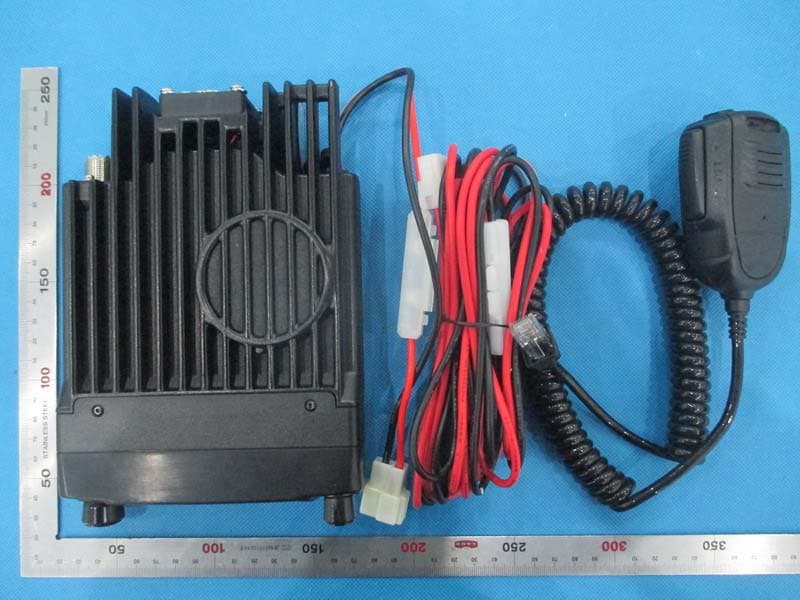
Click to zoom
Application Details
- Equipment Class
- TNB - Licensed Non-Broadcast Station Transmitter
- Date of Grant
- Dec 29, 2014
- Application Purpose
- Original Equipment
- Date of Application
- Dec 29, 2014
- Equipment Note
- Mobile Radio
- Frequency Range
- 406.10000000 - 490.00000000
- Country
- China
Documents & Files
Document Text
Text extracted from the exhibit documents filed with the FCC. Open a document above to read the original.
Users Manual
- L E N N A H U - VO L P W R F U NC V/ M CA L L M H z TX/DCS SC A N M IN I AT-598 Mobile Radiao FCC ID:T4KAT598U CAL Thank you for choosing this vehicle transceiver, always provides high quality products, And this transceiver is no exception. As you learn how to use this transceiver, you will find that is pursuing "user friendliness". For example, each time you change the menu no. in Menu mode, you will see a text message on the display that lets you know what you are configuring. Though friendly design for user, this transceiver is technically complicated and some features may be new to you. Consider this manual to be a personal tutorial from the designers, allow the manual to guide you through the learning process now, then act as a reference in the coming years. Do not attempt to configure your transceiver while driving, it is dangerous. This transceiver is designed for a 13.8V DC power supply. Don't use a 24V battery to power on the transceiver. Do not place the transceiver in excessively dusty, humid or wet areas, nor unstable surfaces. Please keep it away from interferential devices (such as TV, generator etc.). Do not expose the transceiver to long periods of direct sunlight nor place it close to heating appliances. If an abnormal odor or smoke is detected coming from the transceiver, turn OFF the power immediately. Contact an Anytone service station or your dealer. Do not transmit with high output power for extended periods; the transceiver may overheat. Please observe the following precautions to prevent fire, personal injury, or transceiver damage: Precautions - L E N N A H U - V O L P W R F U NC V/ M CA L L M H z TX/DCS H / L SC A N M IN I Mobile radio CONTENTS New and Innovative Features ..............................................1 Supplied Accessories/Optional Accessories .....................2 Supplied Accessories .......................................................................2 Optional Accessories .......................................................................2 Initial Installation ..................................................................3 Mobile Installation ............................................................................3 DC Power Cable Connection ...........................................................4 Power Supply Voltage Display .........................................................6 Antenna Connection ........................................................................6 Accessories Connections .................................................................7 Getting Acquainted ..............................................................8 Front panel .......................................................................................8 Rear panel .......................................................................................9 Display .............................................................................................9 Microphone ......................................................................................10 Working Mode (Amateur Transceiver or Professional Transceiver) ........................................................................11 Basic Operations .................................................................12 Switching the Power On/Off ............................................................12 Adjusting the Volume ......................................................................12 Switch between VFO and Channel mode .......................................12 Adjusting Frequency/Channel Through Selector Knob ....................12 Receiving .........................................................................................12 Transmitting .....................................................................................12 Transmitting Tone-Pulse ..................................................................13 Transmitting Optional Signaling ......................................................13 Channel Edit ....................................................................................13 Channel Delete ................................................................................13 Shortcut Operations .............................................................14 Squelch Off/Squelch Off Momentary................................................14 Squelch Level Setup ........................................................................14 Frequency/Channel Scan ................................................................14 Channel Scan ..................................................................................14 CTCSS/DCS Encode and Decode Setup ........................................14 CTCSS Scan ....................................................................................15 DCS Scan ........................................................................................15 Compander (Decrease the background noise and enhance audio clarity ..................................................................................................15 Offset Direction and Offset Frequency Setup ..................................16 Keypad Lockout ...............................................................................16 Current Voltage Enquiry ...................................................................16 Auto-Dialer Setup .............................................................................16 Transmitting Edited DTMF Tones in the Auto-dialer Memory ...........17 General Setting .....................................................................18 Frequency Channel Step Setup .......................................................18 DTMF, DTMF ANI, 2Tone or 5Tone Signaling ..................................18 Sending 2-Tone Call .........................................................................19 Sending 5-Tone Call .........................................................................19 Sending DTMF cal…
Text truncated - open the document above for the full version.
Users Manual
- L E N N A H U - VO L P W R F U NC V/ M CA L L M H z TX/DCS SC A N M IN I AT-598 Mobile Radiao FCC ID:T4KAT598U CAL Thank you for choosing this vehicle transceiver, always provides high quality products, And this transceiver is no exception. As you learn how to use this transceiver, you will find that is pursuing "user friendliness". For example, each time you change the menu no. in Menu mode, you will see a text message on the display that lets you know what you are configuring. Though friendly design for user, this transceiver is technically complicated and some features may be new to you. Consider this manual to be a personal tutorial from the designers, allow the manual to guide you through the learning process now, then act as a reference in the coming years. Do not attempt to configure your transceiver while driving, it is dangerous. This transceiver is designed for a 13.8V DC power supply. Don't use a 24V battery to power on the transceiver. Do not place the transceiver in excessively dusty, humid or wet areas, nor unstable surfaces. Please keep it away from interferential devices (such as TV, generator etc.). Do not expose the transceiver to long periods of direct sunlight nor place it close to heating appliances. If an abnormal odor or smoke is detected coming from the transceiver, turn OFF the power immediately. Contact an Anytone service station or your dealer. Do not transmit with high output power for extended periods; the transceiver may overheat. Please observe the following precautions to prevent fire, personal injury, or transceiver damage: Precautions - L E N N A H U - V O L P W R F U NC V/ M CA L L M H z TX/DCS H / L SC A N M IN I Mobile radio CONTENTS New and Innovative Features ..............................................1 Supplied Accessories/Optional Accessories .....................2 Supplied Accessories .......................................................................2 Optional Accessories .......................................................................2 Initial Installation ..................................................................3 Mobile Installation ............................................................................3 DC Power Cable Connection ...........................................................4 Power Supply Voltage Display .........................................................6 Antenna Connection ........................................................................6 Accessories Connections .................................................................7 Getting Acquainted ..............................................................8 Front panel .......................................................................................8 Rear panel .......................................................................................9 Display .............................................................................................9 Microphone ......................................................................................10 Working Mode (Amateur Transceiver or Professional Transceiver) ........................................................................11 Basic Operations .................................................................12 Switching the Power On/Off ............................................................12 Adjusting the Volume ......................................................................12 Switch between VFO and Channel mode .......................................12 Adjusting Frequency/Channel Through Selector Knob ....................12 Receiving .........................................................................................12 Transmitting .....................................................................................12 Transmitting Tone-Pulse ..................................................................13 Transmitting Optional Signaling ......................................................13 Channel Edit ....................................................................................13 Channel Delete ................................................................................13 Shortcut Operations .............................................................14 Squelch Off/Squelch Off Momentary................................................14 Squelch Level Setup ........................................................................14 Frequency/Channel Scan ................................................................14 Channel Scan ..................................................................................14 CTCSS/DCS Encode and Decode Setup ........................................14 CTCSS Scan ....................................................................................15 DCS Scan ........................................................................................15 Compander (Decrease the background noise and enhance audio clarity ..................................................................................................15 Offset Direction and Offset Frequency Setup ..................................16 Keypad Lockout ...............................................................................16 Current Voltage Enquiry ...................................................................16 Auto-Dialer Setup .............................................................................16 Transmitting Edited DTMF Tones in the Auto-dialer Memory ...........17 General Setting .....................................................................18 Frequency Channel Step Setup .......................................................18 DTMF, DTMF ANI, 2Tone or 5Tone Signaling ..................................18 Sending 2-Tone Call .........................................................................19 Sending 5-Tone Call .........................................................................19 Sending DTMF cal…
Text truncated - open the document above for the full version.
Users Manual
- L E N N A H U - VO L P W R F U NC V/ M CA L L M H z TX/DCS SC A N M IN I AT-598 Mobile Radiao FCC ID:T4KAT598U CAL Thank you for choosing this vehicle transceiver, always provides high quality products, And this transceiver is no exception. As you learn how to use this transceiver, you will find that is pursuing "user friendliness". For example, each time you change the menu no. in Menu mode, you will see a text message on the display that lets you know what you are configuring. Though friendly design for user, this transceiver is technically complicated and some features may be new to you. Consider this manual to be a personal tutorial from the designers, allow the manual to guide you through the learning process now, then act as a reference in the coming years. Do not attempt to configure your transceiver while driving, it is dangerous. This transceiver is designed for a 13.8V DC power supply. Don't use a 24V battery to power on the transceiver. Do not place the transceiver in excessively dusty, humid or wet areas, nor unstable surfaces. Please keep it away from interferential devices (such as TV, generator etc.). Do not expose the transceiver to long periods of direct sunlight nor place it close to heating appliances. If an abnormal odor or smoke is detected coming from the transceiver, turn OFF the power immediately. Contact an Anytone service station or your dealer. Do not transmit with high output power for extended periods; the transceiver may overheat. Please observe the following precautions to prevent fire, personal injury, or transceiver damage: Precautions - L E N N A H U - V O L P W R F U NC V/ M CA L L M H z TX/DCS H / L SC A N M IN I Mobile radio CONTENTS New and Innovative Features ..............................................1 Supplied Accessories/Optional Accessories .....................2 Supplied Accessories .......................................................................2 Optional Accessories .......................................................................2 Initial Installation ..................................................................3 Mobile Installation ............................................................................3 DC Power Cable Connection ...........................................................4 Power Supply Voltage Display .........................................................6 Antenna Connection ........................................................................6 Accessories Connections .................................................................7 Getting Acquainted ..............................................................8 Front panel .......................................................................................8 Rear panel .......................................................................................9 Display .............................................................................................9 Microphone ......................................................................................10 Working Mode (Amateur Transceiver or Professional Transceiver) ........................................................................11 Basic Operations .................................................................12 Switching the Power On/Off ............................................................12 Adjusting the Volume ......................................................................12 Switch between VFO and Channel mode .......................................12 Adjusting Frequency/Channel Through Selector Knob ....................12 Receiving .........................................................................................12 Transmitting .....................................................................................12 Transmitting Tone-Pulse ..................................................................13 Transmitting Optional Signaling ......................................................13 Channel Edit ....................................................................................13 Channel Delete ................................................................................13 Shortcut Operations .............................................................14 Squelch Off/Squelch Off Momentary................................................14 Squelch Level Setup ........................................................................14 Frequency/Channel Scan ................................................................14 Channel Scan ..................................................................................14 CTCSS/DCS Encode and Decode Setup ........................................14 CTCSS Scan ....................................................................................15 DCS Scan ........................................................................................15 Compander (Decrease the background noise and enhance audio clarity ..................................................................................................15 Offset Direction and Offset Frequency Setup ..................................16 Keypad Lockout ...............................................................................16 Current Voltage Enquiry ...................................................................16 Auto-Dialer Setup .............................................................................16 Transmitting Edited DTMF Tones in the Auto-dialer Memory ...........17 General Setting .....................................................................18 Frequency Channel Step Setup .......................................................18 DTMF, DTMF ANI, 2Tone or 5Tone Signaling ..................................18 Sending 2-Tone Call .........................................................................19 Sending 5-Tone Call .........................................................................19 Sending DTMF cal…
Text truncated - open the document above for the full version.
Users Manual
- L E N N A H U - VO L P W R FUNC V/ M CA LL M H z TX/DCS SC A N MINI AT-598 Mobile Radiao FCC ID:T4KAT598U CAL Thank you for choosing this vehicle transceiver, always provides high quality products, And this transceiver is no exception. As you learn how to use this transceiver, you will find that is pursuing "user friendliness". For example, each time you change the menu no. in Menu mode, you will see a text message on the display that lets you know what you are configuring. Though friendly design for user, this transceiver is technically complicated and some features may be new to you. Consider this manual to be a personal tutorial from the designers, allow the manual to guide you through the learning process now, then act as a reference in the coming years. Do not attempt to configure your transceiver while driving, it is dangerous. This transceiver is designed for a 13.8V DC power supply. Don't use a 24V battery to power on the transceiver. Do not place the transceiver in excessively dusty, humid or wet areas, nor unstable surfaces. Please keep it away from interferential devices (such as TV, generator etc.). Do not expose the transceiver to long periods of direct sunlight nor place it close to heating appliances. If an abnormal odor or smoke is detected coming from the transceiver, turn OFF the power immediately. Contact an Anytone service station or your dealer. Do not transmit with high output power for extended periods; the transceiver may overheat. Please observe the following precautions to prevent fire, personal injury, or transceiver damage: Precautions - L E N N A H U - V O L P W R FUNC V/ M CA LL M H z TX/DCS H / L SC A N MINI Mobile radio CONTENTS New and Innovative Features ..............................................1 Supplied Accessories/Optional Accessories .....................2 Supplied Accessories .......................................................................2 Optional Accessories .......................................................................2 Initial Installation ..................................................................3 Mobile Installation ............................................................................3 DC Power Cable Connection ...........................................................4 Power Supply Voltage Display .........................................................6 Antenna Connection ........................................................................6 Accessories Connections .................................................................7 Getting Acquainted ..............................................................8 Front panel .......................................................................................8 Rear panel .......................................................................................9 Display .............................................................................................9 Microphone ......................................................................................10 Working Mode (Amateur Transceiver or Professional Transceiver) ........................................................................11 Basic Operations .................................................................12 Switching the Power On/Off ............................................................12 Adjusting the Volume ......................................................................12 Switch between VFO and Channel mode .......................................12 Adjusting Frequency/Channel Through Selector Knob ....................12 Receiving .........................................................................................12 Transmitting .....................................................................................12 Transmitting Tone-Pulse ..................................................................13 Transmitting Optional Signaling ......................................................13 Channel Edit ....................................................................................13 Channel Delete ................................................................................13 Shortcut Operations .............................................................14 Squelch Off/Squelch Off Momentary................................................14 Squelch Level Setup ........................................................................14 Frequency/Channel Scan ................................................................14 Channel Scan ..................................................................................14 CTCSS/DCS Encode and Decode Setup ........................................14 CTCSS Scan ....................................................................................15 DCS Scan ........................................................................................15 Compander (Decrease the background noise and enhance audio clarity ..................................................................................................15 Offset Direction and Offset Frequency Setup ..................................16 Keypad Lockout ...............................................................................16 Current Voltage Enquiry ...................................................................16 Auto-Dialer Setup .............................................................................16 Transmitting Edited DTMF Tones in the Auto-dialer Memory ...........17 General Setting .....................................................................18 Frequency Channel Step Setup .......................................................18 DTMF, DTMF ANI, 2Tone or 5Tone Signaling ..................................18 Sending 2-Tone Call .........................................................................19 Sending 5-Tone Call .........................................................................19 Sending DTMF call ........…
Text truncated - open the document above for the full version.
Users Manual
Mobile RadioMobile Radio TraiTrai Qixiang Electron Scien c R&D Re Safety UsageSafety Usage ningning c e&Technology Co., Ltd. paired Department 2015.10.20 AT 598U M AT - 598U M o bil R dibil e R a di o AT 598U M bil R di AT - 598U M o bil e R a di • Operational frequency:400 ‐ 490M H • Output power:50 Watts iIfi o I n f o H z M bil R di W kiM o bil e R a di o W or kin Cdii n g C on di t i on M bil R di S fM o bil e R a di o S a f et y • This radio generates RF electromagnetic • This radio is designed for and classified a be used only during the course of empl o hazards,and the ways to minimize with h b th "G l P l ti " i b y th e "G enera l P opu l a ti on " i n an unco n • For Compliance with FCC and Industry C transmitter antenna installation shall co m • 1.The transmitter antenna gain shall not • 2.The antenna is required to be loacted o of 54 1 centimeters or more between th of 54 . 1 centimeters or more between th any persons during opeation. For samll v located on the roof top at any place on t achieve 54.1 centimeters separation dist achieve 54.1 centimeters separation dist met,the installation of the antenna mus t away form the nearest edge of the vehi c bystanders Ii y I nstruct i on energy during transmission. a s"Occupational Use Only",meaning it must o yament by individuals aware of the h azards.This radio is NOT intended for use tlld it nt ro ll e d env i romen t . anada RF Exposure Requirements,the mp l y with the followin g two conditions: py g exceed 0 dBi o utside of a vehicle and kept at a distance e transmitting antenna of this device and e transmitting antenna of this device and v ehicle as worst case, the antenna shall be t he center line along the vehicle in order to tance. In order to ensure this distance is tance. In order to ensure this distance is t be mounted at least 54.1 centimeters c le in order to protect against exposure to Mobile Radio SafetyMobile Radio Safety Caution: • To ensure that your exposure to RF elec t allowable limits for occupational use alw allowable limits for occupational use , alw • DO NOT operate the radio without a pr o damage the radio and may also cause y o proper atnenna is the antenna supplied proper atnenna is the antenna supplied antenna specifically authorized by the m • DO NOT transmit for more than 50% du r l l)T itti i cyc l e or l ess ) . T ransm itti ng excess i ve am o compliance requirements to be exceede to learn how to transmit and stop trans m y Instructiony Instruction t romagnetic engergy is within the FCC ways adhere to the following guidelines: ways adhere to the following guidelines: o per antenna attached,as this may o u to exceed FCC RF exposure limites. A with this radio by the manufacturer or an with this radio by the manufacturer or an m anufacturer for use with this radio. r ing the time of employment(50% duty t f ti RF o un t o f ti me can cause RF exposure d.Please carefully read intruction manual m itting before starting to use it M bil R di S fM o bil e R a di o S a f et y Electromagnetic Interference/Compatib i • Durin g transmissions ,y our radio g ener a g ,y g interference with other devices or syst the radio in areas where signs are pos t transmitter in areas that are sensitive transmitter in areas that are sensitive hospitals,aircraft and blasting sites Occupational/Controlled USe • This Products is used in situations that consequence of their empolyment pro potential RF hazards and can exercise c potential RF hazards and can exercise c • This transceiver is NOT ATEX approved hazardous ex p losive atmos p heres p p Ii y I nstruct i on i lity a tes RF ener gy that can p ossilbl y cause gy py ems,To avoid such interference,turn off t ed to do so .DO NOT operate the to electromagnetci radiation such as to electromagnetci radiation such as users are exposed to RF as vided those users are fully aware of the control over their exposure control over their exposure and NOT intended for the use in l Qixiang E l ectron Science& T hl d T ec h no l ogy Co., Lt d .
Cover Letter(s)
Dec.25, 2014 Federal Communication Commission Authorization and Evaluation Division FCC ID: T4KAT598U Re: Confidentiality Request Pursuant to Sections 0.457 and 0.459 of the Commission’s Rules, the applicant hereby requests confidential treatment of information applied this application as outlined below: 1: Block Diagram 2: Circuit Diagram 3: Operational Description 4: Parts List 5.Tune Up Procedure The above materials contain trade secrets and proprietary information not customarily released to the public. The public disclosure of these matters might be harmful to the applicant and provide unjustified benefits to its competitors. The Applicant understands that pursuant to Rules 0.457, disclosure of this Application and all accompanying documentation will not be made before the date of the Grant for this application. Sincerely, Qixiang Electron Science& Technology Co., Ltd Contact person: Ken Xu Title: General manager
Cover Letter(s)
Dec.25, 2014 Federal Communication Commission Authorization and Evaluation Division Subject: FCC ID: T4KAT598U Justification Letter for Expanded Frequency Range 400‐490MHz Dear Sir or Madam: This transmitter was design to operate in the frequency range of 400‐490 MHz. To aid equipment authorization in other countries that accept the United States FCC Grant for Certification, Qixiang Electron Science& Technology Co., Ltd is requesting that the FCC list the above frequency/frequencies under FCC Rule Parts 90 on the Grant. For the FCC’s Rule Parts 90 applications, this radio is used in systems by Federal and Public Safety agencies including Police, Fire, and Emergency Medical Services, etc. as indicated in the table below. Equipment programming is the responsibility of Authorized Service Personnel. Also, the radio complies with 47 CFR Part 90.203(e), in that the operator cannot directly program the transmit frequencies using the normally accessible external controls. Per the FCC’s KDB634817 guidance, as an alternative to listing the exact freq…
Text truncated - open the document above for the full version.
Contact Information
Applicant
Ken Xu
Test Firm
Attestation of Global Compliance Shenzhen Co. Ltd.Forrest Lei
Technical Specifications
| # | Rule Parts | Frequency Range | Power Output | Emission | Tolerance |
|---|---|---|---|---|---|
| 2 | 9 | 406.1 MHz - 490 MHz | 50 W | 10K2F3E | 0.7 ppm |
Other Applications from Qixiang Electron Science& Technology Co., Ltd

T4K-AT5100
Jul 28, 202610 METER AMATEUR RADIO
Equipment Class
DTS - Digital Transmission System
T4K-UA1
Apr 07, 2026HANDHELD TRANSCEIVER
Equipment Class
CSR - Scanning Receiver
T4K-UVA1
Mar 30, 2026DUAL BAND HANDHELD TRANSCEIVER
Equipment Class
CSR - Scanning Receiver
T4K-AT-505
Jan 19, 2026CB Radio
Equipment Class
JAV - Other Non-Digital SDoC Devices
T4K-D890UV
Jan 07, 2026Multi-Protocol Digital+Analog Handheld Radio
Equipment Class
DSS - Part 15 Spread Spectrum Transmitter