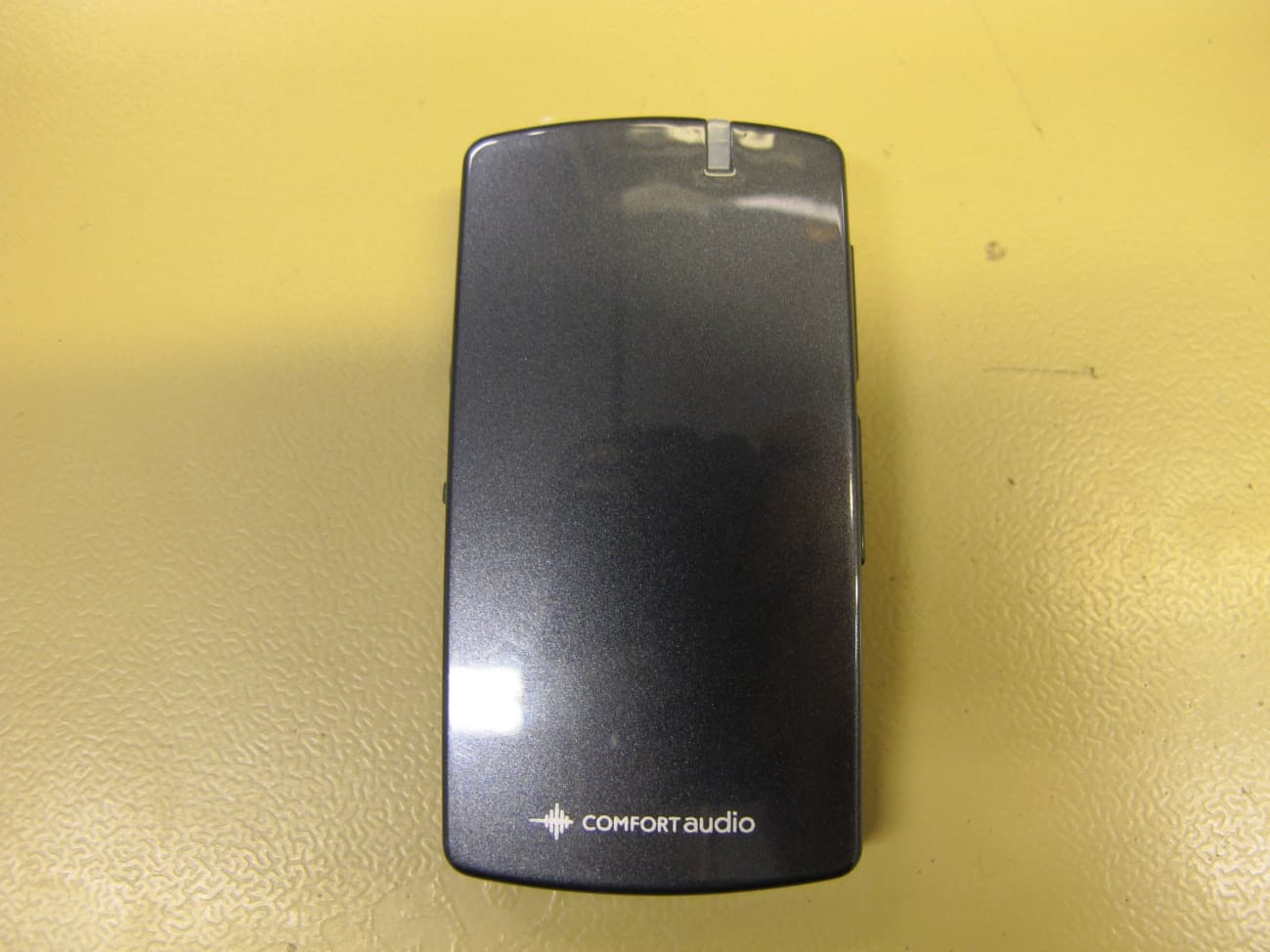
UOJ-DG05TWireless Microphone
Comfort Audio Inc.
Click to zoom
Application Details
- Equipment Class
- DSS - Part 15 Spread Spectrum Transmitter
- Date of Grant
- Mar 04, 2013
- Application Purpose
- Original Equipment
- Date of Application
- Mar 04, 2013
- Equipment Note
- Wireless Microphone
- Frequency Range
- 2402.00000000 - 2480.00000000
- Company
- Comfort Audio Inc.
- Country
- United States
Documents & Files
Document Text
Text extracted from the exhibit documents filed with the FCC. Open a document above to read the original.
Users Manual
Comfort Digisystem Microphone DM90 Instructions for use English Contents I. User guide..................................................................7 1. Introduction.........................................................9 Your device...................................................................9 2. Getting started..................................................15 Charge........................................................................15 Start up......................................................................17 Use the neckloop.......................................................17 Navigate the menu.....................................................19 Pair a Bluetooth device..............................................20 3. Usage................................................................23 Telephone conversations...........................................23 Conversations and smaller meetings.......................25 External audio sources..............................................25 II. For professionals....................................................27 1. Basic setup........................................................29 Change the menu language......................................29 Wireless transmitter.................................................29 Neckloop receiver......................................................30 2. Pairing Comfort Digisystem devices..................31 The pairing button.....................................................31 Change channel.........................................................32 Send pairing information...........................................33 Receive pairing information......................................34 3Microphone DM90 3. Advanced features.............................................37 Microphone modes....................................................37 Volume limits.............................................................38 Bluetooth settings.....................................................39 Lock the buttons........................................................41 Name the device........................................................41 PIN code settings.......................................................41 Reset all settings.......................................................43 III. Product information...............................................45 1. Menu overview..................................................47 Back...........................................................................47 Bluetooth...................................................................47 Key Lock....................................................................48 Advanced...................................................................48 2. Function indicator.............................................49 3. Optional accessories.........................................51 4. Technical specifications....................................53 IV. Miscellaneous.........................................................55 1. Radio.................................................................57 Channel planning.......................................................57 Radio range................................................................57 2. Battery maintenance.........................................59 3. Troubleshooting................................................61 Microphone DM904 Service and warranty..................................................63 Contact information.....................................................65 Product symbols..........................................................67 5Microphone DM90 Microphone DM906 I. User guide 7Microphone DM90 Introduction1. Thank you for choosing MicrophoneDM90! MicrophoneDM90 is part of Comfort Digisystem ™ that uses digital wireless technology to give you the best sound quality available, together with secured transmission to prevent eavesdropping. To get the most out of your new product, please read these instructions before using it for the first time. Take special notice to the printed document Important Safety Instructions included in the box. Your device MicrophoneDM90 is a telephone solution for your hearing aid. It can be used either in conjunction with one of Comfort Audio's ear level receivers, or by it self with the accompanying neckloop. Consult your hearing care professional to decide which option is right for you. It also doubles as a conversation amplifier for the occasions when your hearing aid alone is not sufficient. Bluetooth ® Thanks to Bluetooth technology this product can be used as a wireless handsfree for any Bluetooth equipped phone. It also supports audio streaming from devices such as smart phones and computers. 9Microphone DM90 SST ™ SecureStream Technology (SST) is Comfort Audio's proprietary digital transmission technology. It lets you communicate securely and latency free with other Comfort Digisystem devices. Microphone DM9010 Overview 1 2 3 4 2 5 4 6 12 11 10 9 8 7 1.Answer button 2.Microphone 3.Function indicator 4.Neckloop output 5. Power button 6.Volume button 7.Clip 8.Aux input and output 9.Menu controller 10. Pairing button 11.Charger input 12.Display 11Microphone DM90 Display Ch:2 “NAME” 1 2 3 4 5 6 7 8 9 10 11 1.Current channel 2.Battery status 3.Signal strength 4.Key lock padlock 5.Volume bar 6.Unit name 7.Current aux setting 8.Current microphone mode 9.Bluetooth enabled 10.Bluetooth connection status 11.Current SST mode Microphone DM9012 Included accessories Microfibre pouch Clip on microphone Power supply Cable split Neck loop Digisystem 13Microphone DM90 Audio-kit Car charger incl USB Microphone DM9014 Getting started2. This section will teach you how to perform the basic steps needed to get started. Charge Charging can be done at any time. If you make it routine to charge the unit whenever you do not use it, the unit is always ready for use when you need it. 1.Inser…
Text truncated - open the document above for the full version.
Users Manual
ES Instrucciones de seguridad importantes FR Consignes de sécurité importantes ENG Important safety instructions 1) Read these instructions. 2) Keep these instructions. 3) Heed all warnings. 4) FolIow all instructions. 5) Do not use this apparatus near water. 6) Clean only with dry cloth. 7) Do not use near any heat sources such as radiators heat registers stoves, or other apparatus (including amplifiers) that produce heat. 8) Do not defeat the safety purpose of the polarized or grounding-type plug. A polarized plug has two bla- des with one wider than the other. A grounding type plug has two blades and a third grounding prong. The wide blade or the third prong are provided for your safety. If the provided plug does not fit into your outlet consult an electrician for replacement of the obsolete outlet. (Only when using polarized plug) 9) Protect the power cord from being walked on or pinched particularly at plugs convenience receptacles. and the point where they exit from the apparatus. 10) Only use attachments/accessories specified by Comfort Audio AB. 11) Unplug this apparatus during Iightning storms or when unused for long periods of time. 12) Refer all servicing to qualified service personnel. Servicing is required when the apparatus has been damaged in any way such as power-supply cord or plug is damaged Iiquid has been spilled or objects have fallen into the apparatus, the apparatus has been exposed to rain or moisture does not operate normally or has been dropped. 13) Start listening at a low volume. 14) Too high a volume can seriously damage your hearing. 15) Don’t disassemble the product. 16) Should the product break open because of damage, service should only be done by qualified service personnel. 17) Never use a transmitter or receiver set to a non- permitted frequency. Check with the frequency authority in the country where the equipment is to be used. 18) The product contains sensitive electronic equip- ment and must be handled carefully. 19) Never charge product in closed, unaired spaces such as handbags, cases or other closed storage bags. 20) Only use batteries and power supply specified by Comfort Audio AB. 21) You must not change the battery yourself; please contact your point of purchase. 22) CAUTION! Danger of explosion if battery is incor- rectly replaced. 23) The product shall not be exposed to excessive heat such as sunshine, fire or the like. 24) Products include radio transmitters. Do not use ENG Important safety instructions 1) Lea estas instrucciones. 2) Conserve estas instrucciones. 3) Haga caso de todas las advertencias. 4) Siga todas las instrucciones. 5) No use este aparato cerca del agua. 6) Límpielo sólo con un paño seco. 7) No lo use cerca de fuentes de calor como estufas o rejillas de aire caliente de los radiadores u otros aparatos (incluyendo amplificadores) que generen calor. 8) No desactive la función de seguridad de la clavija polarizada o de toma a tierra. Una clavija polarizada tiene dos patillas, una más ancha que la otra. Una clavija de toma a tierra tiene dos patillas y una tercera punta a tierra. La ES Instrucciones de seguridad importantes 1) Lisez ces instructions. 2) Conservez ces instructions. 3) Respectez tous les avertissements. 4) Suivez toutes les instructions. 5) N’utilisez pas cet appareil près de l’eau. 6) Nettoyez uniquement avec un chiffon sec. 7) N’utilisez pas ce produit près d’une source de chaleur comme des radiateurs, des poêles de chauffage ou tout autre appareil (y compris les amplificateurs) générant de la chaleur. 8) N’éliminez pas la sécurité des prises polarisées ou de mise à la terre. Une fiche polarisée a deux lames avec une lame plus large que l’autre. Les prises de terre ont deux lames et une troisième broche de terre. La lame large ou la troisième broche assurent votre sécurité. Si la fiche fournie ne convient pas à votre prise, consultez un électricien pour qu’il change la prise. (Uniquement si vous utilisez la fiche polarisée) 9) Protégez le cordon d’alimentation contre les piétinements et les coincements, en particulier au niveau des récepteurs et au point de sortie de l’appareil. 10) Utilisez uniquement des accessoires indiqués par Comfort Audio AB. 11) Débranchez l’appareil durant les orages ou s’il n’est pas utilisé pendant de longues périodes de temps. 12) Confiez toute réparation à du personnel qualifié. Un entretien est requis lorsque l’appareil a été endommagé de quelque façon que ce soit, par exemple le cordon d’alimentation ou la fiche sont endommagés, du Iiquide a été renversé sur l’appareil, des objets sont tombés dans l’appareil, l’appareil a été exposé à la pluie ou l’humidité et ne fonctionne plus normalement ou l’appareil a fait une chute. 13) Commencez l’écoute à un faible volume. 14) Un volume trop élevé peut endommager sérieusement votre ouïe. FR Consignes de sécurité importantes products where it is not allowed to use electronic equipment, e.g. on airplanes. 25) The necklace should not be used if there is a risk of getting stuck, e.g. in a machine or other objects. 26) Keep small parts out of reach of children and animals.Choking hazard if swallowed. Not following the Important Safety Instructions, or trying to repair and/or tampering the Equipment without the assistance of an authorized technician will void the Limited Warranty. Comfort Audio is not liable for any damages arising out of such unauthorized uses, repairs, and/or tampering. patilla ancha o la tercera punta se incluyen para su seguridad. Si la clavija que se adjunta no se adapta a la toma de que dispone, consulte a un electricista para sustituir la toma obsoleta. (Sólo si usa una clavija polarizada) 9) Proteja el cable de corriente de pisadas o dobleces, particularmente en los enchufes y en el punto en que salen del aparato. 10) Use sólo fijaciones/accesorios especificados por Comfort Audio AB. 11) Desenchufe el aparato durante las tormentas o si no lo va a usar durante periodos de tiempo prolon- gados. 12) Consulte las cuestion…
Text truncated - open the document above for the full version.
External Photos
External photos DM 90
ID Label/Location Info
Dokument id Revision 04 Utfärdad av CAHA-ERWI Datum 2013-02-28 Microphone DM90-f4 : Label information Godkänd av Datum Sida 1(2) Overview : Dokument id Revision 04 Utfärdad av CAHA-ERWI Datum 2013-02-28 Microphone DM90-f4 : Label information Godkänd av Datum Sida 2(2) All labels are placed on the rear side of the product: Under the fastening clip: Covering the display:
Internal Photos
Internal photos DM 90
Test Report
Nemko Oy P.O.Box 19, FI-02601 Espoo, Finland Street address: Perkkaantie 11, FI-02600 Espoo Telephone +358 (0)424 5454 1 Telefax +358 (0)9 5489 6371 TEST REPORT Date: ESPOO 28.12.2012 Page: 1 (34) Appendices Date of handing in: 08.11.2012 Number: 223827A No. 1 / 1 Tested by: Pekka Kälviäinen, Test Engineer Reviewed by: Timo Hietala, Test Engineer SORT OF EQUIPMENT: Digital hearing aid system MARKETING NAME: TYPE: DM90 MANUFACTURER: Comfort Audio AB CLIENT: Comfort Audio AB ADDRESS: Box 154, SE-30105, Halmstad, Sweden TELEPHONE: +46 35 260 16 00 TEST LABORATORY: Nemko Oy FCC REG. NO. 359859 October 20, 2011 IC FILE NO. 2040F-1 November 22, 2012 SUMMARY: In regard to the performed tests the equipment under test fulfils the requirements defined in the test specifications, see page 2 for details The test results are valid for the tested unit only. Without a written permission of Nemko Oy it is allowed to copy this report as a whole, but not partially. Version f1.00 Type: DM90 Test report: 223827A Page 2 (34) Date 28.12.2012 Summary of performed tests and test results Section in CFR 47 Section in RSS-GEN or RSS-210 Result 15.247 (b)(1) A8.4 (2) Conducted peak output power PASS 15.247 (d) A8.5 Band-edge compliance of RF emissions PASS 15.247 (d) A8.5 Spurious RF conducted emissions PASS 15.247 (d) 15.209 A8.5 Spurious radiated emissions PASS 15.207 7.2.2 AC power line conducted emissions PASS 15.247 (a)(1) A8.1 (a) 20 dB bandwidth PASS 15.247 (a)(1) A8.1 (b) Carrier frequency separation PASS 15.247 (a)(1)(iii) A8.1 (d) Number of hopping frequencies PASS 15.247 (a)/1)(iii) A8.1 (d) Time of occupancy PASS CISPR 22 Radiated emissions 30-1000 MHz PASS, class B CISPR 22 AC power line conducted emissions PASS, class B Explanations: PASS The EUT passed that particular test. FAIL The EUT failed that particular test. X The measurement was done, but there is no applicable performance criteria. Type: DM90 Test report: 223827A Page 3 (34) Date 28.12.2012 Contents Summary of performed tests and test results .......................................................................................... 2 1. EUT and Accessory Information ......................................................................................................... 5 1.1 EUT description ........................................................................................................................ 5 1.2 EUT and accessories ................................................................................................................ 5 1.3 Additional information related to testing ................................................................................... 5 2. Test setups .......................................................................................................................................... 6 3. Standards and measurement methods ............................................................................................... 7 4. Test results .......................................................................................................................................... 7 4.1 Conducted peak output power .................................................................................................. 7 4.1.1 EUT operation mode ................................................................................................................. 7 4.1.2 Test method and limit ............................................................................................................... 7 4.1.3 Test results ............................................................................................................................... 7 4.2 Band-edge compliance of RF emissions .................................................................................. 9 4.2.1 EUT operation mode ................................................................................................................. 9 4.2.2 Test method and limit ............................................................................................................... 9 4.2.3 Test results ............................................................................................................................. 10 4.3 Spurious RF conducted emission ........................................................................................... 13 4.3.1 EUT operation mode ............................................................................................................... 13 4.3.2 Test method and limit ............................................................................................................. 13 4.3.3 Test results ............................................................................................................................. 13 4.4 Spurious radiated emission .................................................................................................... 17 4.4.1 EUT operation mode ............................................................................................................... 17 4.4.2 Test method and limit ............................................................................................................. 17 4.4.3 Test results ............................................................................................................................. 19 4.5 AC power line conducted emissions ....................................................................................... 21 4.5.1 Test method and limit ............................................................................................................. 21 4.5.2 EUT operation mode ............................................................................................................... 21 4.5.3 Test results ............................................................................................................................. 22 4.6 20 dB bandwidth ...................................................…
Text truncated - open the document above for the full version.
Test Setup Photos
Type: DM90 223827 Test setup photographs Page 1 (1) Date 28.12.2012 Test setup photographs for test report 223827A and 223827B Photograph 1. Spurious radiated emissions test setup Photograph 2. AC power line conducted emissions test setup
Contact Information
Applicant
Bill Bielski(Product Specialist, Work Life)
Technical Contact
Test Firm
NEMKO OyJyrki Leino
Technical Specifications
| # | Rule Parts | Frequency Range | Power Output |
|---|---|---|---|
| 1 | 15C | 2.40 GHz - 2.48 GHz | 120.00 µW |
Other Applications from Comfort Audio Inc.
UOJ-DG04T
Aug 30, 2011Remote Programmer
Equipment Class
DXX - Part 15 Low Power Communication Device Transmitter
UOJ-DG01R
Mar 29, 2011Digital Audio Receiver
Equipment Class
CYY - Communications Receiver used w/Pt 15 Transmitter
UOJ-DG03T
Mar 29, 2011Digital Audio Transmitter
Equipment Class
DXX - Part 15 Low Power Communication Device Transmitter
UOJ-DG02T
Mar 28, 2011Digital Audio Transmitter
Equipment Class
DXX - Part 15 Low Power Communication Device Transmitter
UOJ-DG01T
Mar 27, 2011Digital Audio Transmitter
Equipment Class
DXX - Part 15 Low Power Communication Device Transmitter