UV3SCW-10XXBluetooht Weight Scale
AVITA Corporation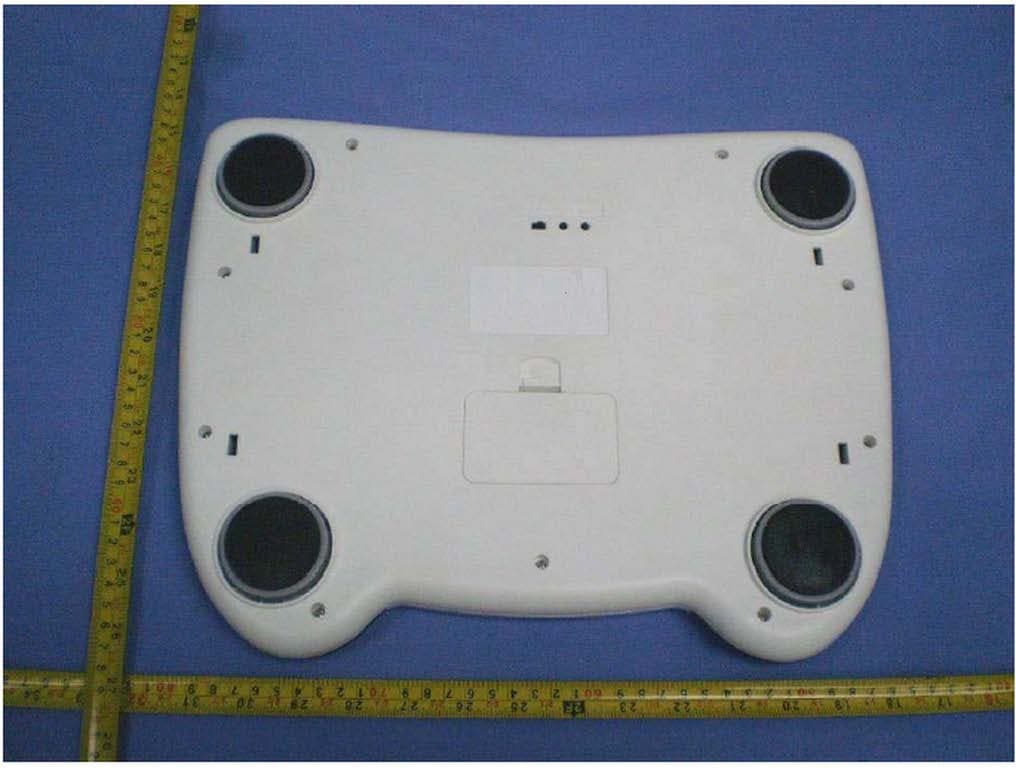
Click to zoom
Application Details
- Equipment Class
- DSS - Part 15 Spread Spectrum Transmitter
- Date of Grant
- Aug 26, 2010
- Application Purpose
- Original Equipment
- Date of Application
- Aug 26, 2010
- Equipment Note
- Bluetooht Weight Scale
- Frequency Range
- 2402.00000000 - 2480.00000000
- Company
- AVITA Corporation
- Country
- Taiwan
Documents & Files
Document Text
Text extracted from the exhibit documents filed with the FCC. Open a document above to read the original.
Users Manual
Model : SC101 Before Use Precautions........................................ 1 Scale Components.............................. 2 Error Displays..................................... 3 Installing(or Replacing) Batteries .......... 4 Measurement weight............................6 Wireless connection............................8 References Specifications....................................9 Maintaining the Scale.......................... 9 FCC Staeement.................................10 Operations Specifications SC101 Read Before Use Type BF Applied Part !Please read this booklet before using your scale. !Do not place your scale on a soft, wet or slippery floor.It is recommended that the scale be used on a solid level surface, such as tile, wood, or laminate flooring. !Place your scale on a solid level flooring surface. Your scale contains delicate, high-precision parts. Avoid extremes in the temperature, humidity, direct sunlight,shock , moisture and dust. !Do not disassemble repair, or remodel the scale. !Do not step onto your scale with wet feet. Make certain that feet are dry to prevent slipping or serious injury. !Do not step on the edge. !Do not place feet on the display window. Precautions 1 Indications for use Scale components !This scale is designed for indoor use to measure the weight. Display Front Back Bluetooth Slide Mod RESET KG/L 2 !The following measurement can be selected by slide switch and are classified into two categories WEIGHT MODE and WEIGHT CONNECTION MODE, you have choice to select and have your weight displayed in KG or LB. !The scale has an “automatic- power-off” function to turn off in about sixty seconds after non-operation. 3 Error Display Low battery mark (Replace the batteries with new ones) Your weight is overload Installing (or Replacing) Batteries Caution: !Insert the battery with the positive (+) and negative (-) terminals properly aligned with the corresponding symbols in the battery compartment. !Improper installation of the batteries may cause battery leakage. !Replace all four batteries with new ones, when “Lo” symbol is displayed. !Do not mix used and new batteries. It may result in damage to the scale or shorten battery life. !The battery life is dependant upon the environmental temperature, battery type and usage. !Remove the batteries from the battery compartment, when the scale is not to be used for a long time. They may leak and damage your scale. !Discard waste batteries according to the local law. 4 5 Steps for Installing (or Replacing) Batteries 1. Remove the battery compartment cover on the underside of the scale by gently pushing on the arrow and lifting the cover backward. 2. Place four new batteries with the positive (+) and negative (-) terminals properly aligned with the corresponding symbols in the battery compartment. 3. Replace the cover by sliding it into the compartment and gently pressing into place. 6 Measurement Weight Measurement Your Weight 1. Slide switch to correct Mode Example A: Set the slide switch to “BLUETOOTH ON”, Tap on the scale,the scale will calibrate and display . Bluetooth indicator light to flash, Means Bluetooth connection is open. (Concrete operation please look at in wireless connection) B. Set the slide switch to “BLUETOOTH OFF”,Tap on the scale, the scale ill calibrate and display . Bluetooth indicator light is power-off, This is measurement weight only All display segments are visible for three seconds. Wait until 0.00 is displayed. (The display show 0.00kg/0.00lb) 7 Step on the scale and position your feet in a manner that will distribute your weight evenly over the entire scale platform. The LCD display will flash two times, then the display will show your weight. Stand still while reading the display. Now you step off the scale, the display will show 0.00kg/0.00lb,You can measurement your weight again. (Caution: If you remain standing on the scale or step off the scale without sixty seconds after your weight has displayed and then turn off automatically). Wireless Connection 1. Turn the Scale to the back side. 2. Turn on the bluetooth switch (From “0” to “1”), while the device is performing an inquiry to find other devices to which to connect, the LED on the front side of the Scale will be quickly flashing. When the device connects successfully to health Monitoring devices, such as a computer or a mobile phone, the LED is keeping on shining. At the end of the measurement, your Scale will be sent to your health monitoring device. 3.To disconnect from health monitoring devices, turn off the bluetooth switch (From “1” to “0”), then the LED will stop shining. Back Bluetooth Slide Mod RESET KG/L 8 9 Digital displayLiquid crystal display, 38mm character height Maximum capacity200kg/440lb Minimum display0.05kg/0.11lb Bluetooth connectionBlueMod+B20 ( Stollmann E+V GMBH)) Power sourceFour type AAA batteries(1.5 volt X 4, included) Battery lifeApproximately 1000 Measurements 5°C~35°C,30~85%RH -20°C~60°C,10~95%RH Specifications are subjects to change without prior notice and any obligation on the part of the manufacturer. □Clean the scale with a dry, soft cloth or a cloth moistened with water and a mild detergent. Never use alcohol, benzene, thinner or other harsh chemicals to clean the scale. □Remove the batteries, if the scale is not going to be used for a long time. Specifications SC101 Maintaining the scale Operation Environment Storage & Transportation Environment FCC Statement FCC Caution: Any changes or modifications not expressly approved by the party responsible for compliance could void the user's authority to operate this equipment. This device complies with Part 15 of the FCC Rules. Operation is subject to the following two conditions: (1) This device may not cause harmful interference, and (2) this device must accept any interference received, including interference that may cause undesired operation. This device and its antenna(s) must not be co- located or operating in conjunction with any other a…
Text truncated - open the document above for the full version.
Cover Letter(s)
Ersteller: U. Rodemeier Revision: 04 Erstelldatum: 03.08.01 Datum: 11.05.07 Seite 1 von 1 Request for Confidentiality PHOENIX TESTLAB GmbH Date: 2010-07-14 Product Certification Königswinkel 10 D 32825 Blomberg RE: Certification Application FCC ID: UV3SCW-10XX Confidentiality Request Pursuant to Sections 0.457 and 0.459 of the Commission’s Rule, the applicant hereby requests confidential treatment of information accompanying this application as outlined below: • Bill of material • Operation Description • Circuit Diagram • (XXXXX to be replaced by Schematics, Block Diagram, etc.) The above materials contain trade secrets and proprietary information not customarily released to the public. The public disclosure of these matters might be harmful to the applicant and provide unjustified benefits to its competitors. The applicant understands that pursuant to rule 0.457, disclosure of this application and all accompanying documentation will not be made before the date of the GRANT for this application. Thank you for your attention in this matter. Applicant’s Company: Centre Testing International Corporation address : Bldg. C, Hongwei Industrial Park, Block 70, Bao’an District, Shenzhen, Guangdong, China Signature : Job Title and Dept. :EMC Engineer, EMC Lab
ID Label/Location Info
FCC label information:
Test Report
Report No. : SZEE100610851314-1 Page 1 of 42 ELECTROMAGNETIC EMISSIONS COMPLIANCE REPORT INTENTIONAL RADIATOR CERTIFICATION Product Name : Bluetooth Weight Scale Model Number : SC101(BS-9032A) Trade Name : AViTA FCC ID : UV3SCW-10XX Report Number : SZEE100610851314-1 Date : Aug. 16 2010 Prepared for AViTA Corporation 9F, NO. 78, SEC.1, KWANG-FU RD., SAN-CHUNG, TAIPEI COUNTY 241. TAIWAN, R.O.C TEL: 85121568 ext: 5501 FAX: 85121347 Prepared by CENTRE TESTING INTERNATIONAL (SHENZHEN) CORPORATION Building C, Hongwei Industrial Zone, Baoan 70 District, Shenzhen, Guangdong, China TEL: 86-755-3368 3362 FAX: 86-755-3368 3368 This report shall not be reproduced, except in full, without the written approval of CENTRE TESTING INTERNATIONAL (SHENZHEN) CORPORATION Building C, Hongwei Industrial Zone, Baoan 70 District, Shenzhen Standards Results 47 CFR FCC Part 15 Subpart C 15.247 PASS Report No. : SZEE100610851314-1 Page 2 of 42 TABLE OF CONTENTS 1. GENERAL INFORMATION .........................................................................................4 2. TEST SUMMARY........................................................................................................5 3. MEASUREMENT UNCERTAINTY ..............................................................................5 4. PRODUCT INFORMATION.........................................................................................6 5. SYSTEM TEST CONFIGURATION.............................................................................6 5.1 JUSTIFICATION.............................................................................................6 5.2 EUT EXERCISING SOFTWARE....................................................................7 6. TABLE OF TEST MODE .............................................................................................7 7. TEST EQUIPMENT LIST.............................................................................................8 8. SUPPORT EQUIPMENT LIST ....................................................................................8 9. 20DB BANDWIDTH MEASUREMENT........................................................................9 9.1 LIMITS............................................................................................................9 9.2 BLOCK DIAGRAM OF TEST SETUP............................................................9 9.3 TEST PROCEDURE.......................................................................................9 9.4 TEST RESULT................................................................................................9 10. CARRIER FREQUENCY SEPARATION.................................................................12 10.1 LIMITS........................................................................................................12 10.2 BLOCK DIAGRAM OF TEST SETUP........................................................12 10.3 TEST PROCEDURE...................................................................................12 10.4 TEST RESULT............................................................................................12 11. NUMBER OF HOPPING FREQUENCY ..................................................................15 11.1 LIMITS........................................................................................................15 11.2 BLOCK DIAGRAM OF TEST SETUP........................................................15 11.3 TEST PROCEDURE...................................................................................15 11.4 TEST RESULT............................................................................................15 12. TIME OF OCCUPANCY (DWELL TIME).................................................................16 12.1 LIMITS........................................................................................................16 12.2 BLOCK DIAGRAM OF TEST SETUP........................................................16 12.3 TEST PROCEDURE...................................................................................16 12.4 TEST RESULT............................................................................................16 13. MAXIMUM PEAK CONDUCTED OUTPUT POWER MEASUREMENT .................20 13.1 LIMITS........................................................................................................20 13.2 BLOCK DIAGRAM OF TEST SETUP........................................................20 13.3 TEST PROCEDURE...................................................................................20 13.4 TEST RESULT............................................................................................20 Report No. : SZEE100610851314-1 Page 3 of 42 14. BAND EDGE EMISSION MEASUREMENT ............................................................23 14.1 LIMITS (FCC ‘s requirement)....................................................................23 14.2 BLOCK DIAGRAM OF TEST SETUP........................................................23 14.3 TEST PROCEDURE...................................................................................23 14.4 TEST RESULT............................................................................................23 15. SPURIOUS RF CONDUCTED EMISSIONS MEASUREMENT...............................25 15.1 LIMITS........................................................................................................25 15.2 BLOCK DIAGRAM OF TEST SETUP........................................................25 15.3 TEST PROCEDURE...................................................................................25 15.4 TEST RESULT............................................................................................25 16. RADIATED EMISSIONS MEASUREMENT ............................................................29 16.1 LIMITS........................................................................................................29 16.2 BLOCK DIAGRAM OF TEST SETUP................…
Text truncated - open the document above for the full version.
Contact Information
Applicant
Terry yang(Deputy Manager)
Test Firm
CENTRE TESTING INTERNATIONAL CORPORATIONChristy Chen
Technical Specifications
| # | Rule Parts | Frequency Range | Power Output |
|---|---|---|---|
| 1 | 15C | 2.40 GHz - 2.48 GHz | 34.00 mW |
Other Applications from AVITA Corporation
UV3NTW-66B
Jun 20, 2024Touch Free Infrared Thermometer
Equipment Class
DTS - Digital Transmission System
UV3BPA-2282B
Jun 27, 2023Arm Type Blood Pressure Monitor
Equipment Class
DTS - Digital Transmission System
UV3-FT95-1
Oct 24, 2022Non-Contact Thermometer
Equipment Class
DTS - Digital Transmission System
UV3-FT95
Dec 03, 2020Non-Contact Thermometer
Equipment Class
DTS - Digital Transmission System
UV3-SFT81
Jul 26, 2020Multifunctional thermometer
Equipment Class
DTS - Digital Transmission System