XJGDS0010Blu-ray Disc Player, support WIFI function
DESAY A & V SCIENCE AND TECHNOLOGY CO.,LTD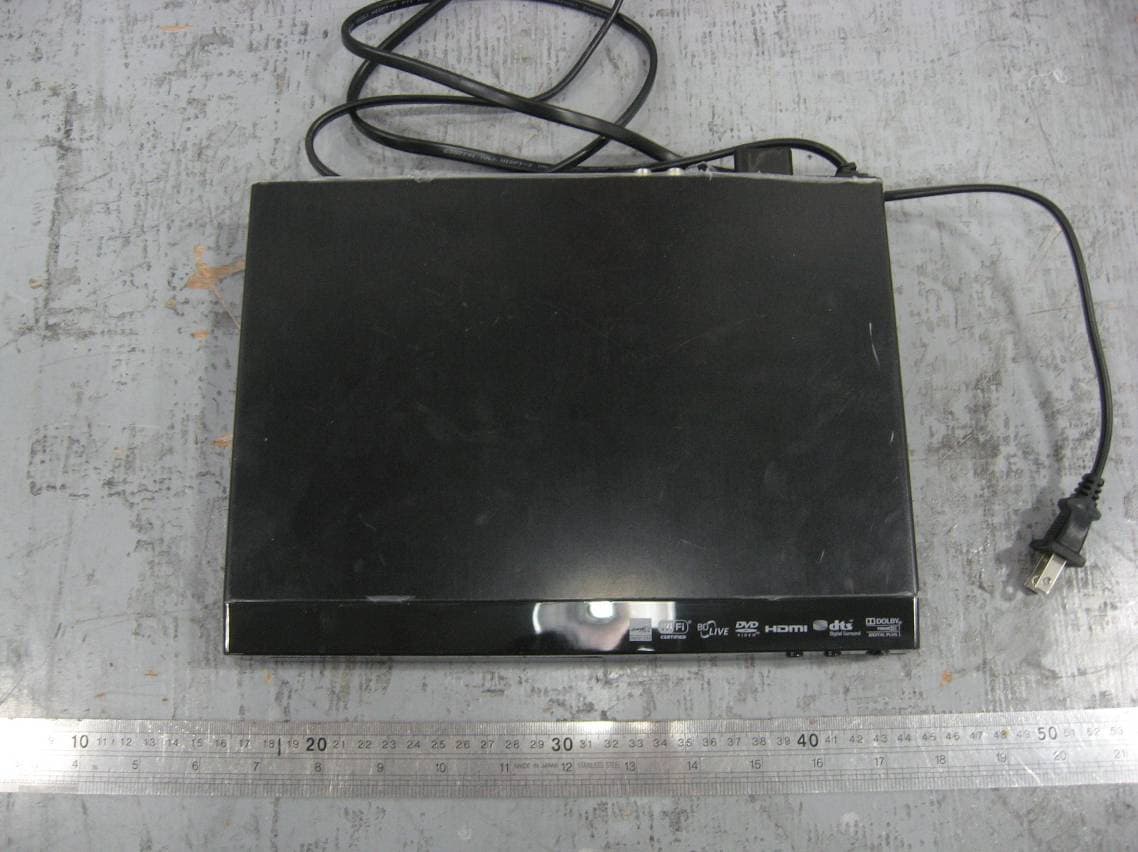
Click to zoom
Application Details
- Equipment Class
- DTS - Digital Transmission System
- Date of Grant
- Mar 28, 2011
- Application Purpose
- Original Equipment
- Date of Application
- Mar 28, 2011
- Equipment Note
- Blu-ray Disc Player, support WIFI function
- Frequency Range
- 2422.00000000 - 2452.00000000
- Country
- China
Documents & Files
Document Text
Text extracted from the exhibit documents filed with the FCC. Open a document above to read the original.
Users Manual
Blu-ray Disc Player DX-WBRDVD1 USER GUIDE v1 R1 ii DX-WBRDVD1 Blu-ray Disc Player Contents Important safety instructions . . . . . . . . . . . . . . . . . . . . . . . . . . . . . . . . . . 1 Introduction . . . . . . . . . . . . . . . . . . . . . . . . . . . . . . . . . . . . . . . . . . . . . . . . . . 2 Features . . . . . . . . . . . . . . . . . . . . . . . . . . . . . . . . . . . . . . . . . . . . . . . . . . . . . . 2 Package contents . . . . . . . . . . . . . . . . . . . . . . . . . . . . . . . . . . . . . . . . . . . . . . . . . . . . . .2 Playable discs . . . . . . . . . . . . . . . . . . . . . . . . . . . . . . . . . . . . . . . . . . . . . . . . . . . . . . . . . .2 About Blu-ray Discs . . . . . . . . . . . . . . . . . . . . . . . . . . . . . . . . . . . . . . . . . . . . . . . . . . . .2 Front . . . . . . . . . . . . . . . . . . . . . . . . . . . . . . . . . . . . . . . . . . . . . . . . . . . . . . . . . . . . . . . . . .3 Back . . . . . . . . . . . . . . . . . . . . . . . . . . . . . . . . . . . . . . . . . . . . . . . . . . . . . . . . . . . . . . . . . . .3 Remote control . . . . . . . . . . . . . . . . . . . . . . . . . . . . . . . . . . . . . . . . . . . . . . . . . . . . . . . .3 Setting up your player . . . . . . . . . . . . . . . . . . . . . . . . . . . . . . . . . . . . . . . . 4 Installing remote control batteries . . . . . . . . . . . . . . . . . . . . . . . . . . . . . . . . . . . . .4 Connecting a TV using an HDMI cable (best) . . . . . . . . . . . . . . . . . . . . . . . . . . . .5 Connecting a TV using an A/V cable (good) . . . . . . . . . . . . . . . . . . . . . . . . . . . . .5 Connecting audio to an amplifier or home theater system . . . . . . . . . . . . . .5 Connecting to your home network . . . . . . . . . . . . . . . . . . . . . . . . . . . . . . . . . . . . .5 Using your player . . . . . . . . . . . . . . . . . . . . . . . . . . . . . . . . . . . . . . . . . . . . . 6 Playing a Blu-ray Disc or DVD . . . . . . . . . . . . . . . . . . . . . . . . . . . . . . . . . . . . . . . . . . .6 Controlling Blu-ray Disc or DVD playback . . . . . . . . . . . . . . . . . . . . . . . . . . . . . . .7 Using connected applications for the US market . . . . . . . . . . . . . . . . . . . . . . . .7 Using connected applications for the Canadian market . . . . . . . . . . . . . . . . .8 Using BD-Live . . . . . . . . . . . . . . . . . . . . . . . . . . . . . . . . . . . . . . . . . . . . . . . . . . . . . . . . .8 Displaying Blu-ray Disc or DVD information . . . . . . . . . . . . . . . . . . . . . . . . . . . . .8 Playing files on a data disc or USB memory stick . . . . . . . . . . . . . . . . . . . . . . . .8 Viewing photographs . . . . . . . . . . . . . . . . . . . . . . . . . . . . . . . . . . . . . . . . . . . . . . . . . .8 Playing an audio CD . . . . . . . . . . . . . . . . . . . . . . . . . . . . . . . . . . . . . . . . . . . . . . . . . . .9 Searching for a title, chapter, or elapsed time . . . . . . . . . . . . . . . . . . . . . . . . . . .9 Repeating a title, chapter, or CD track . . . . . . . . . . . . . . . . . . . . . . . . . . . . . . . . . .9 Creating a playback loop on a DVD or audio CD . . . . . . . . . . . . . . . . . . . . . . . . .9 Using PIP (Picture In Picture) mode . . . . . . . . . . . . . . . . . . . . . . . . . . . . . . . . . . . . .9 Using a disc popup menu . . . . . . . . . . . . . . . . . . . . . . . . . . . . . . . . . . . . . . . . . . . . . .9 Selecting the audio mode . . . . . . . . . . . . . . . . . . . . . . . . . . . . . . . . . . . . . . . . . . . . . .9 Selecting a viewing angle . . . . . . . . . . . . . . . . . . . . . . . . . . . . . . . . . . . . . . . . . . . . . .9 Using the Settings menu . . . . . . . . . . . . . . . . . . . . . . . . . . . . . . . . . . . . . . 9 Changing the Language settings . . . . . . . . . . . . . . . . . . . . . . . . . . . . . . . . . . . . . 10 Changing the Display settings . . . . . . . . . . . . . . . . . . . . . . . . . . . . . . . . . . . . . . . . 10 Changing the Audio settings . . . . . . . . . . . . . . . . . . . . . . . . . . . . . . . . . . . . . . . . . 12 Changing the Parental Control settings . . . . . . . . . . . . . . . . . . . . . . . . . . . . . . . 13 Changing the System settings . . . . . . . . . . . . . . . . . . . . . . . . . . . . . . . . . . . . . . . . 13 Changing BD-Live settings . . . . . . . . . . . . . . . . . . . . . . . . . . . . . . . . . . . . . . . . . . . 14 Changing the Network settings . . . . . . . . . . . . . . . . . . . . . . . . . . . . . . . . . . . . . . 15 Upgrading your player’s firmware . . . . . . . . . . . . . . . . . . . . . . . . . . . . 17 Upgrading the player using a network connection . . . . . . . . . . . . . . . . . . . . 17 Upgrading the player software with a disc or USB stick . . . . . . . . . . . . . . . . 17 Maintaining . . . . . . . . . . . . . . . . . . . . . . . . . . . . . . . . . . . . . . . . . . . . . . . . . 17 General guidelines . . . . . . . . . . . . . . . . . . . . . . . . . . . . . . . . . . . . . . . . . . . . . . . . . . . 17 Electrical disturbance . . . . . . . . . . . . . . . . . . . . . . . . . . . . . . . . . . . . . . . . . . . . . . . . 18 Condensation . . . . . . . . . . . . . . . . . . . . . . . . . . . . . . . . . . . . . . . . . . . . . . . . . . . . . . . 18 Storing discs . . . . . . . . . . . . . . . . . . . . . . . . . . . . . . . . . . . . . . . . . . . . . . . . . . . . . . . . . 18 Handling discs . . . . . . . . . . . . . . . . . . . . . . . . . . . . . . . . . . . . . . . . . . . . . . . . . . . . . . . 18 Cleaning discs . . . . . . . . . . . . . . . . . . . . . . . . . . . . . . . . . . . . . . . . . . . . . . . . . . . . . . . 18 FAQ (frequently asked questions) . . . . . . . . . . . . . . . . . . . . . . . . . . . . 18 iii Troubleshooting . . . . . . . . . . . . . . . . . . . . . . . . . . . . . . . . . . . . . . . . . . . . .18 Resetting your player . . . . . . . . . . . . . . . . . . . . . . . . . . . . . . . . . .…
Text truncated - open the document above for the full version.
External Photos
Report Number: 16030075 001 Model: DX-WBRDVD1 Page 1 of 2 Picture 1 Picture 2 Report Number: 16030075 001 Model: DX-WBRDVD1 Page 2 of 2 Picture 3 Picture 4
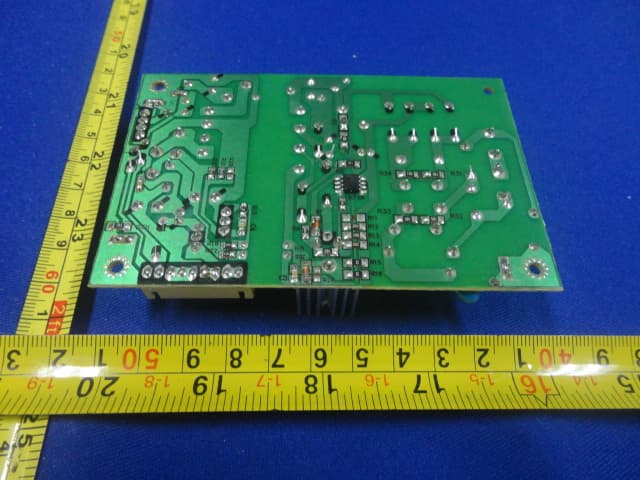
Internal Photos
Report Number: 16030075 001 Model: DX-WBRDVD1 Page 1 of 8 Picture 1 (internal overview) Picture 2 (WIFI module) Report Number: 16030075 001 Model: DX-WBRDVD1 Page 2 of 8 Picture 3 (WIFI module) Picture 4 (WIFI module) Antenna Report Number: 16030075 001 Model: DX-WBRDVD1 Page 3 of 8 Picture 5 (power board) Picture 6 (power board) Report Number: 16030075 001 Model: DX-WBRDVD1 Page 4 of 8 Picture 7 (Decoder board) Picture 8 (Decoder board) Report Number: 16030075 001 Model: DX-WBRDVD1 Page 5 of 8 Picture 9 (key board) Picture 10 (key board) Report Number: 16030075 001 Model: DX-WBRDVD1 Page 6 of 8 Picture 11 (loader) Picture 12 (loader) Report Number: 16030075 001 Model: DX-WBRDVD1 Page 7 of 8 Picture 13 (optical pick-up) Picture 14 (optical pick-up) Report Number: 16030075 001 Model: DX-WBRDVD1 Page 8 of 8 Picture 15 Picture 16
RF Exposure Info
RF Exposure Information Calculation of Max. output power Frequency Peak Conducted Output Power(P 1 ) Antenna Gain(G) Max. output power (Pt) Mode Channel (MHz) (mW) (dBi) (mW) Low 2412 7.16 1 9.01 Mid 2437 7.16 1 9.01 802.11b High 2462 7.31 1 9.20 Low 2412 16.67 1 20.99 Mid 2437 16.60 1 20.90 802.11g High 2462 17.02 1 21.43 Low 2412 33.04 1 41.59 Mid 2437 35.32 1 44.47 802.11n HT20 High 2462 35.04 1 44.11 Low 2422 33.69 1 42.41 Mid 2437 33.85 1 42.61 802.11n HT40 High 2452 37.83 1 47.63 Note: 10/ 1 10 G t PP•= Calculation of power density Since the user’s manual specifies a minimum distance between user and device of at least 20cm, the device is classified as a mobile device. FCC part 1.1310 limits the power density for uncontrolled exposure. The power density Pd calculated from the maximum output power Pt and the distance d, between the transmitting antenna and the closest person, can be calculated using: Pd = Pt / 4 44 4π ππ πd 2 Frequency (MHz) Max. output power Pt (mW) Pd at 20cm (mW/cm 2 ) MPE limit (mW/cm 2 ) Distance where Pd=limit(cm) 2412-2462 47.63 0.01 1 1.94 As shown in the calculations above, the power density at 20cm from the device is below the maximum permitted level for uncontrolled exposure.
Test Report
Produkte Products Prüfbericht - Nr.: Test Report No.: 16030075 001 Seite 2 von 35 Page 2 of 35 Test Summary FCC rules Test items Result Part 15 Per Section 15.207(a) AC Power Conducted Emission Pass Part 15 Per Section 15.209(a) Transmitter Radiated Spurious Emission Pass Part 15 Per Section 15.203 Antenna Requirement Pass Part 15 Per Section 15.247(b)(3) Maximum Peak Conducted Output Power Pass Part 15 Per Section 15.247(a)(2) 6dB Bandwidth Pass Part 15 Per Section 15.247(e) Power Spectral Density Pass Part 15 Per Section 15.247(d) Out-Of-Band Emission measurement Pass Produkte Products Prüfbericht - Nr.: Test Report No.: 16030075 001 Seite 3 von 35 Page 3 of 35 Contents 1 GENERAL REMARKS...................................................................................................................5 1.1 COMPLEMENTARY MATERIALS................................................................................................................... 5 2 T EST SITES..................................................................................................................................5 2.1 TEST FACILITIES.......................................................................................................................................... 5 2.2 LIST OF TEST AND MEASUREMENT INSTRUMENTS...................................................................................... 6 2.3 TRACEABILITY............................................................................................................................................ 6 2.4 CALIBRATION.............................................................................................................................................. 6 2.5 MEASUREMENT UNCERTAINTY................................................................................................................... 7 2.6 LOCATION OF ORIGINAL DATA.................................................................................................................... 7 2.7 STATUS OF FACILITY USED FOR TESTING..................................................................................................... 7 3 G ENERAL PRODUCT INFORMATION...........................................................................................7 3.1 PRODUCT FUNCTION AND INTENDED USE................................................................................................... 8 3.2 RATINGS AND SYSTEM DETAILS................................................................................................................. 8 3.3 INDEPENDENT OPERATION MODES............................................................................................................. 9 3.4 SUBMITTED DOCUMENTS............................................................................................................................ 9 4 TEST SET-UP AND OPERATION MODE.....................................................................................10 4.1 PRINCIPLE OF CONFIGURATION SELECTION.............................................................................................. 10 4.2 TEST OPERATION AND TEST SOFTWARE................................................................................................... 10 4.3 SPECIAL ACCESSORIES AND AUXILIARY EQUIPMENT............................................................................... 10 4.4 COUNTERMEASURES TO ACHIEVE EMC COMPLIANCE.............................................................................. 10 4.5 TEST SET-UP.............................................................................................................................................. 11 5 TEST RESULTS E M I S S I O N .............................................................................................13 5.1 CONDUCTED EMISSION ON AC MAINS......................................................................................................13 5.2 TRANSMITTER RADIATED SPURIOUS EMISSION........................................................................................ 15 5.3 ANTENNA REQUIREMENT.......................................................................................................................... 22 5.4 MAXIMUM PEAK CONDUCTED OUTPUT POWER....................................................................................... 23 5.5 6DB BANDWIDTH...................................................................................................................................... 25 5.6 POWER SPECTRAL DENSITY...................................................................................................................... 27 5.7 OUT-OF-BAND EMISSION.......................................................................................................................... 29 6 PHOTOGRAPHS OF THE TEST SET-UP......................................................................................32 Produkte Products Prüfbericht - Nr.: Test Report No.: 16030075 001 Seite 4 von 35 Page 4 of 35 7 LIST OF TABLES........................................................................................................................35 8 LIST OF PHOTOGRAPHS............................................................................................................35 Produkte Products Prüfbericht - Nr.: Test Report No.: 16030075 001 Seite 5 von 35 Page 5 of 35 1 General Remarks 1.1 Complementary Materials All attachments are integral parts of this test report. This applies especially to the following appendix: Appendix 1: Test result 2 Test Sites 2.1 Test Facilities TÜV Rheinland (Guangdong) Ltd. EMC Laboratory Guangzhou Auto Market, Yuan Gang Section of Guangshan Road Guangzhou 510650 P. R. China Produkte Products Prüfbericht - Nr.: Test Report No.: 16030075 001 Seite 6 von 35 Page 6 of 35 2.2 List of Test and Measurement Instruments Table 1: List of Test and Measurement Equipment Kind of Equipment Type Manufacturer S/N Calibrated until Calibrated Interval EMI Test…
Text truncated - open the document above for the full version.
Test Setup Photos
Photograph 1: Set-up for Conducted Emission Measurement Photograph 2: Set-up for Radiation Measurement below 1GHz Photograph 3: Set-up for Radiation Measurement above 1GHz
Contact Information
Applicant
Li chao
Test Firm
TUV Rheinland (GuangDong) Ltd.Yuxin Huang
Technical Specifications
| # | Rule Parts | Frequency Range | Power Output |
|---|---|---|---|
| 2 | 15C | 2.42 GHz - 2.45 GHz | 38.00 mW |
Other Applications from DESAY A & V SCIENCE AND TECHNOLOGY CO.,LTD
XJGDS0015
May 28, 2012BLU-RAY DISC PLAYER
Equipment Class
JBP - Part 15 Class B Computing Device Peripheral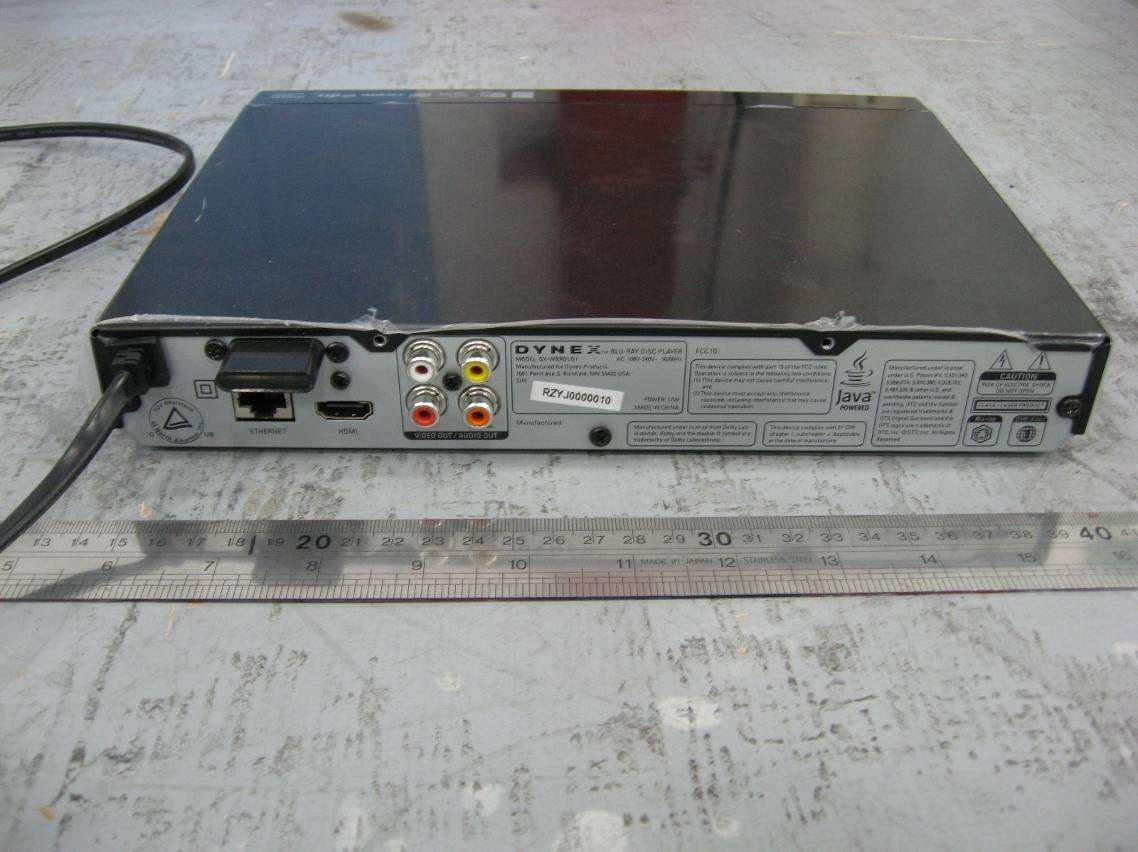
XJGDS0012
May 12, 2011Blu-ray Disc Player
Equipment Class
DTS - Digital Transmission System
XJGDS0011
Apr 27, 2011Blu-ray Disc Player
Equipment Class
DTS - Digital Transmission SystemXJG-JOHNS1
Feb 03, 2010MOBILE PHONE; BRAND: JOHN'S; MODEL: JOHN'S 1
Equipment Class
PCE - PCS Licensed Transmitter held to ear