XMF-MID-BMID
Lightcomm Technology Co., Ltd.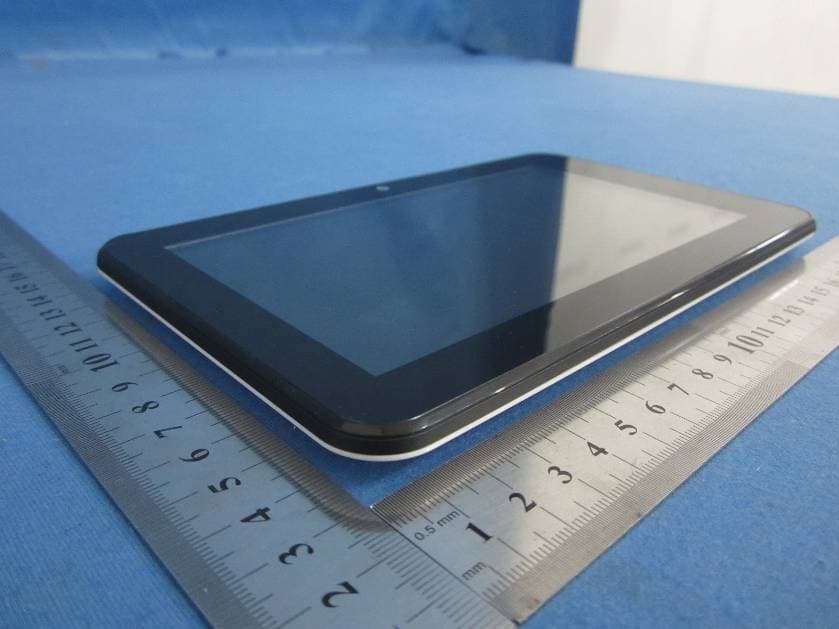
Click to zoom
Application Details
- Equipment Class
- DTS - Digital Transmission System
- Date of Grant
- Nov 28, 2012
- Application Purpose
- Original Equipment
- Date of Application
- Nov 28, 2012
- Equipment Note
- MID
- Frequency Range
- 2412.00000000 - 2462.00000000
- Country
- Hong Kong
Documents & Files
Document Text
Text extracted from the exhibit documents filed with the FCC. Open a document above to read the original.
Users Manual
LT7033D Thanks For Purchasing Your Tablet This user manual has been specially designed to guide you through the functions and features of your device. 1) Please read this manual carefully before using your device to ensure safe and correct use. 2) The descriptions in this manual are based on the default settings of your device. 3) Do not use this unit near water. Do not place over the unit any container with liquid inside. 4) Please do not put your device in high temperature, moisture or dust place; the tablet is not waterproof. 5) Avoid falling or violent collision, do not violently shake the touch screen, otherwise, it could lead to damage or display unnormal. 6) If system shutdown automatically, bootable again soon after the shutdown. 7) Please charge the tablet regularly if not use it for long time to avoid the damage caused by the excessive consumption from battery. 8) Do not disassemble or use alcohol, thinner or benzene class to swab product surface. 9) Please do not use the tablet when driving or walking in the street, otherwise it may lead an accident. 10) Please choose the appropriate volume, if had tinnitus, please lower the volume or stop using. 11) Memory space available dishonest nominal for the android system itself takes up part of the memory space and the operation of the program will also take up space if you open them. 12) Storage capacity that dishonest nominal for android system occupies about hundreds of MB storage capacity, also in order to install the software needs, the system must lay off certain storage capacity, so the actual usable space and nominal space have deviation. 13) When CPU in high-speed operation, especially in 3D games or in long time playback high-definition video, the fuselage will have the phenomenon of fever. 14) Please keep this manual for future reference. Chapter One(overview) Appearance Buttons Open and shut down Open and close standby mode Lock and unlock the screen Homepage information column Text input Reset USB Connect Accessories Chapter Two (Internet) Browser Chapter Three (Applications) Camera Calendar Calculator Explorer Downloads C a t a l o g 1.1 1.2 1.3 1.4 1.5 1.6 1.7 1.8 1.9 1.10 2.1 3.1 3.2 3.3 3.4 3.5 Chapter Four (System setting) Wireless networks setting Sound setting Display setting Application setting Date & Time setting Language and input setting 4.1 4.2 4.3 4.4 4.5 4.6 Chapter Five (Specification) Chapter Six (Attentions) 1 2 2 2 2 3 3 4 4 4 4 5 6 7 7 8 8 8 9 9 10 10 11 12 Volume+Volume- Camera Reset 1.1 Appearance Chapter OneOverview Speaker Power Earphone USB TF card MIC U S B TF DC IN 1 1.2 Buttons Power button Long press the power button 2-3 seconds to open the screen When open the tablet, short press this button to enter the off-screen state and short press again to light up the screen. Note: If the tablet is hanging, please use a small hardware to reset at the bottom upper right corner. Volume Press Volume+/- to adjust the volume. 1.3 Open and shut down Open Long press the power button (see the appearance) 2-3 seconds, pictures will show up until to the interface. Shut down Long press the power button, then the screen shows would you like to shut down, press OK to shut down in charging state, when the tablet is off, press the power button, it will shows charging feature, once again to click power button, the tablet will be opened. 1.4 Open and close standby mode Open the standby mode In boot mode, you can tap the power button, the system will into the standby mode which can save power. Close the standby mode In the standby mode, light tap of the power button of the device, enter the normal state. 1.5 Lock and unlock the screen Lock You can set the sleep time in the system of display. The system will sleep automatically and lock the screen to the standby mode if without any inactivity when reaches the preset of standby time. Unlock Move the sign to unlock, show as below. Drag this to unlock the screen and enter the application interface. 2 ?123 q w e r t as d f g zx c v y u i o p h j kl b nm ?123 , . 1.6 Homepage Information Column 1.7 Text Input When use the tablet, you can use the virtual keyboard to enter text, number, symbols directly by touching screen. After selecting the Android input method, the default keyboard show as below: To switch the numbers and letters, please press this To switch the capital and lowercase letter, please press Menu shortcut key USB USB Debug Time WIFI Batter power Back Host interface Recent search 3 Sound record 1.8 Reset Press the reset button at the bottom upper right corner of the device, then you device will restart and reset. 1.9 USB connect Please connect PC with in-box USB cable for your tablet and you will see on your tablet, click this sign and turn on USB storage to connect your device. Turn off USB storage to disconnect your device with PC. 1.10 Accessories Chapter two: Internet 2.1 Browser Require network support before using a web browser, if there are network supporting problems, please contact your network operator or the service provider. Tablet's web browser can connect to the Internet. via WIFI to satisfy your business and individual network needs . Please touch (Setting) to set up the WIFI so that can use the browser normally. Power Adapter USB Cable User manuaI OTG Cable 1 1 1 1 Touch here (Browser) in the application list to enter the browser pages; the default homepage is the Recently Viewed showing recently viewed pages. 4 Enter the URL-touch the input area to get the soft keyboard, then text the UPL. Bookmark searchclick this to add into the bookmark Touch this to read the favorite website that collected Touch this to search the internet Touch this to add new browser Touch this to close the browser Chapter three: Application 3.1 Camera Touch this in the application list to enter the camera, the views showed on the screen and you can do the following as picture: Camera Click this to get Snap shot Click this to set up white balance, scene mode, Camera setting …
Text truncated - open the document above for the full version.
Cover Letter(s)
Differences Declaration To whom concern, We company Lightcomm Technology Co., Ltd. hereby declares: The product model(s) MID705, MID801, MID802, MID803, MID804, MID902, MID903, MID904, MID1002, MID1003, MID1004 are identical in the same PCB layout, interior structure and electrical circuits with the model MID704 which tested in Global United Technology Services Co., Ltd., the only differences are the model name for commercial purpose. Authorized signature: Position: EMC Engineer Date: 2012-11-26
Cover Letter(s)
Lightcomm Technology Co., Ltd. Rooms M207-8, Haleson Building, 1 Jubilee Street, Central, Hong Kong 2012-11-26 Equipment Autorisation Division Federal Communications Commission 7435 Oakland Mills Road Columbia, MD 21046 FCC ID: XMF-MID-B Product Name: MID Request for Confidentiality Pursuant to Sections 0.457 and 0.459 of the commissions rules, we hereby request that the following documents be held confidential: • Schematics • Block diagram • Operational Description These materials contain trade secrets and proprietary information and are not customarily released to the public. The public disclosure of this information might be harmful to the company and provide unjustified benefits to our competitors. Dated this 11/26/2012 By: Jiang Lin Huang Signature Printed Title: EMC Engineer On behalf of : Lightcomm Technology Co., Ltd. Telephone: 0085221913611
ID Label/Location Info
MODEL NO.: LT7033D MADE IN CHINA Imported by: Curtis International Ltd. FCC ID: XMF-MID-B This device complies with part 15 of the FCC Rules. Operation is subject to the following two conditions: (1) This device may not cause harmful interference, and (2) this device must accept any interference received, including interference that may cause undesired operation
ID Label/Location Info
MODEL NO.: LT7033D MADE IN CHINA Imported by: Curtis International Ltd. FCC ID: XMF-MID-B This device complies with part 15 of the FCC Rules. Operation is subject to the following two conditions: (1) This device may not cause harmful interference, and (2) this device must accept any interference received, including interference that may cause undesired operation
Test Report
Global United Technology Services Co., Ltd. Report No.: GTSE12110137201 Authorized Signature: Robinson Lo Laboratory Manager This report details the results of the testing carried out on one sample. The results contained in this test report do not relate to other samples of the same product and does not permit the use of the GTS product certification mark. The manufacturer should ensure that all products in series production are in conformity with the product sample detailed in this report. This report may only be reproduced and distributed in full. If the product in this report is used in any configuration other than that detailed in the report, the manufacturer must ensure the new system complies with all relevant standards. Any mention of GTS International Electrical Approvals or testing done by GTS International Electrical Approvals in connection with, distribution or use of the product described in this report must be approved by GTS International Electrical Approvals in writing. This document cannot be reproduced except in full, without prior written approval of the Company. Any unauthorized alteration, forgery or falsification of the content or appearance of this document is unlawful and offenders may be prosecuted to the fullest extent of the law. Unless otherwise stated the results shown in this test report refer only to the sample(s) tested and such sample(s) are retained for 90 days only.” FCC REPORT Applicant: Lightcomm Technology Co., Ltd. Address of Applicant: Rooms M207-8, Haleson Building, 1 Jubilee Street, Central, Hong Kong Equipment Under Test (EUT) Product Name: MID Model No.: MID704, MID705, MID801, MID802, MID803, MID804, MID902, MID903, MID904, MID1002, MID1003, MID1004 FCC ID: XMF-MID-B Applicable standards: FCC CFR Title 47 Part 15 Subpart C Section 15.247:2011 Date of sample receipt: November 16, 2012 Date of Test: November 20-26, 2012 Date of report issued: November 27, 2012 Test Result : PASS * * In the configuration tested, the EUT complied with the standards specified above. Report No.: GTSE12110137201 Global United Technology Services Co., Ltd. Project No.: GTSE121101372RF 2nd Floor, Block No.2, Laodong Industrial Zone, Xixiang Road Baoan District, Shenzhen, China 518102 Telephone: +86 (0) 755 2779 8480 Fax: +86 (0) 755 2779 8960 Page 2 of 64 2 Version Version No. Date Description 00 November 27, 2012 Original Prepared By: Date: November 27, 2012 Project Engineer Check By: Date: November 27, 2012 Reviewer Report No.: GTSE12110137201 Global United Technology Services Co., Ltd. Project No.: GTSE121101372RF 2nd Floor, Block No.2, Laodong Industrial Zone, Xixiang Road Baoan District, Shenzhen, China 518102 Telephone: +86 (0) 755 2779 8480 Fax: +86 (0) 755 2779 8960 Page 3 of 64 3 Contents Page 1 COVER PAGE ...........................................................................................................................................1 2 VERSION .................................................................................................................................................. 2 3 CONTENTS .............................................................................................................................................. 3 4 TEST SUMMARY ..................................................................................................................................... 4 5 GENERAL INFORMATION ...................................................................................................................... 5 5.1 CLIENT INFORMATION......................................................................................................................... 5 5.2 GENERAL DESCRIPTION OF EUT ......................................................................................................... 5 5.3 TEST MODE........................................................................................................................................ 6 5.4 DESCRIPTION OF SUPPORT UNITS....................................................................................................... 6 5.5 TEST FACILITY.................................................................................................................................... 7 5.6 TEST LOCATION................................................................................................................................. 7 6 TEST INSTRUMENTS LIST ..................................................................................................................... 8 7 TEST RESULTS AND MEASUREMENT DATA...................................................................................... 9 7.1 ANTENNA REQUIREMENT:.................................................................................................................... 9 7.2 CONDUCTED EMISSIONS................................................................................................................... 10 7.3 CONDUCTED PEAK OUTPUT POWER.................................................................................................. 13 7.4 CHANNEL BANDWIDTH...................................................................................................................... 18 7.5 POWER SPECTRAL DENSITY............................................................................................................. 23 7.6 BAND EDGES.................................................................................................................................... 28 7.6.1 Conducted Emission Method ..................................................................................................... 28 7.6.2 Radiated Emission Method ........................................................................................................31 7.7 SPURIOUS EMISSION......................................................................................................................... 36 7.7.1 Conducted Emission Method ....................…
Text truncated - open the document above for the full version.
Test Setup Photos
Radiated Emission Conducted Emission
Contact Information
Applicant
Jack Sun(Certification Manager)
Technical Contact
Global United Technology Services Co., Ltd.Hans Hu
[email protected]+86-0755-27798480
2nd Floor, Block No.2, Laodong Industrial Zone · Shenzhen · China
Test Firm
Global United Technology Service Co., LtdRobinson Lo
Technical Specifications
| # | Rule Parts | Frequency Range | Power Output |
|---|---|---|---|
| 1 | 15C | 2.41 GHz - 2.46 GHz | 8.91 mW |
Other Applications from Lightcomm Technology Co., Ltd.

XMF-CVD1662
Aug 26, 2024Car Multimedia Playerx
Equipment Class
DSS - Part 15 Spread Spectrum Transmitter
XMF-MID1058
Jul 21, 202410.1inch Tablet
Equipment Class
NII - Unlicensed National Information Infrastructure TX
XMF-DMCPA8W
Jul 02, 2023Car Multimedia System
Equipment Class
DSS - Part 15 Spread Spectrum Transmitter
XMF-MID1108
Jan 10, 202311 inch Tablet
Equipment Class
DTS - Digital Transmission System
XMF-MDT1008
Jun 05, 202210.1 inch QUAD CORE TABLET PDVD COMBO
Equipment Class
DTS - Digital Transmission System