Y7OVP2Car Radio
Continental Automotive Technologies GmbH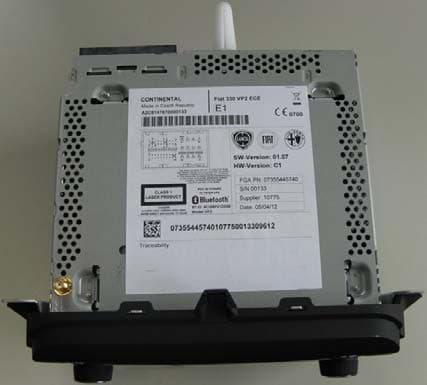
Click to zoom
Application Details
- Equipment Class
- DSS - Part 15 Spread Spectrum Transmitter
- Date of Grant
- Aug 09, 2012
- Application Purpose
- Original Equipment
- Date of Application
- Aug 09, 2012
- Equipment Note
- Car Radio
- Frequency Range
- 2402.00000000 - 2480.00000000
- Country
- Germany
Documents & Files
Document Text
Text extracted from the exhibit documents filed with the FCC. Open a document above to read the original.
Users Manual
S INTRODUCTION ...................................................................275TIPS, CONTROLS AND GENERAL INFORMATION ...276 TIPS...........................................................................................276MULTIMEDIA DEVICES: SUPPORTED AUDIO FILESAND FORMATS.....................................................................278NOTES ON TRADEMARKS...............................................279EXTERNAL AUDIO SOURCES.........................................279TECHNICAL SPECIFICATIONS........................................280 QUICK GUIDE.........................................................................281 CONTROLS ON FRONT PANEL ....................................281FRONT PANEL CONTROL SUMMARY TABLE............282 STEERING WHEEL CONTROLS........................................283 DESCRIPTION.......................................................................283STEERING WHEEL CONTROL SUMMARY TABLE....284 SWITCHING THE SYSTEM ON/OFF ................................285 RADIO (TUNER) MODE....................................................285RADIO MODE SELECTION..............................................285FREQUENCY BAND SELECTION...................................285DISPLAYED INFORMATION.............................................286RADIO STATION SELECTION.........................................286PREVIOUS/NEXT RADIO STATION SEARCH ............287PREVIOUS/NEXT RADIO STATION FAST SEARCH..287AM/FM RADIO STATION TUNING................................287DAB RADIO ...........................................................................288SETTING THE PRESELECTIONS .....................................289AUDIO.....................................................................................289 MEDIA MODE..........................................................................292 TRACK CHANGE (previous/next)...................................292 TRACK FAST FORWARD/REWIND ...............................292TRACK SELECTION (Browse)..........................................292 AUDIO SOURCE SELECTION..........................................293TRACK INFORMATION DISPLAY...................................293RANDOM TRACK REPRODUCTION ...........................293TRACK REPETITION...........................................................293 Bluetooth ® SOURCE .......................................................295 PAIRING A Bluetooth ® AUDIO DEVICE .................295 USB/iPod SUPPORT.................................................................296AUX SUPPORT.........................................................................296PHONE MODE ........................................................................297 PHONE MODE ACTIVATION ..........................................297MAIN FUNCTIONS .............................................................297DISPLAYED INFORMATION.............................................298PAIRING A MOBILE PHONE.............................................298STORING NAMES/NUMBERS IN THE MOBILEPHONE PHONEBOOK ......................................................300CONNECTION/DISCONNECTION OF A MOBILEPHONE OR A Bluetooth ® AUDIO DEVICE ...........300 DELETION OF A MOBILE PHONE OR A Bluetooth ® AUDIO DEVICE........................................301 SETTING A MOBILE PHONE OR A Bluetooth ® AUDIO DEVICE AS FAVOURITE .........302 DELETION OF PHONE DATA(PHONEBOOK AND RECENT CALLS) ........................302 273 UMMARY CD PLAYER........................................................................ .... 294 . LOADING/EJECTING A CD........................................... 294 TRANSMISSION OF PHONE DATA(PHONEBOOK AND RECENT CALLS) ........................302MAKING A PHONE CALL.................................................303MANAGING AN INCOMING CALL ..............................304MAKING A SECOND PHONE CALL.............................306MANAGING TWO PHONE CALLS................................306ENDING A CALL..................................................................307REDIALLING..........................................................................307CONTINUING A PHONE CALL.....................................307ACTIVATION/DEACTIVATION OF THEMICROPHONE......................................................................307TRANSFERRING A CALL...................................................308SMS MESSAGE READER......................................................308 "MORE" MODE........................................................................308 TRIP COMPUTER .................................................................309 CLOCK ....................................................................................309eco:Drive .................................................................................309SETTINGS ...............................................................................311 VOICE COMMANDS ............................................................315 USE OF THE VOICE COMMANDS.................................315USE OF STEERING WHEEL CONTROLSTO ACTIVATE VOICE COMMANDS..............................315VOICE SESSION STATUS....................................................316MULTIPLE CHOICE..............................................................316GLOBAL VOICE COMMANDS.........................................317PHONE VOICE COMMANDS ..........................................318RADIO AM/FM/DAB VOICE COMMANDS ..................32MEDIA VOICE COMMANDS............................................32 CUSTOMER SERVICE NUMBER LIST................................3 274 27 42 INTRODUCTIONThe car is equipped with an infotelematic system designed according to the specific characteristics of thepassenger compartment, with a customised design that matches the style of dashboard.The system is installed in an ergonomic position for the driver and passenger, and controls can be quicklylocated from the graphical display on the front, making the device easy to use.To increase protection a…
Text truncated - open the document above for the full version.
Users Manual
S INTRODUCTION ...................................................................275TIPS, CONTROLS AND GENERAL INFORMATION ...276 TIPS...........................................................................................276MULTIMEDIA DEVICES: SUPPORTED AUDIO FILESAND FORMATS.....................................................................278NOTES ON TRADEMARKS...............................................279EXTERNAL AUDIO SOURCES.........................................279TECHNICAL SPECIFICATIONS........................................280 QUICK GUIDE.........................................................................281 CONTROLS ON FRONT PANEL ....................................281FRONT PANEL CONTROL SUMMARY TABLE............282 STEERING WHEEL CONTROLS........................................283 DESCRIPTION.......................................................................283STEERING WHEEL CONTROL SUMMARY TABLE....284 SWITCHING THE SYSTEM ON/OFF ................................285 RADIO (TUNER) MODE....................................................285RADIO MODE SELECTION..............................................285FREQUENCY BAND SELECTION...................................285DISPLAYED INFORMATION.............................................286RADIO STATION SELECTION.........................................286PREVIOUS/NEXT RADIO STATION SEARCH ............287PREVIOUS/NEXT RADIO STATION FAST SEARCH..287AM/FM RADIO STATION TUNING................................287DAB RADIO ...........................................................................288SETTING THE PRESELECTIONS .....................................289AUDIO.....................................................................................289 MEDIA MODE..........................................................................292 TRACK CHANGE (previous/next)...................................292 TRACK FAST FORWARD/REWIND ...............................292TRACK SELECTION (Browse)..........................................292 AUDIO SOURCE SELECTION..........................................293TRACK INFORMATION DISPLAY...................................293RANDOM TRACK REPRODUCTION ...........................293TRACK REPETITION...........................................................293 Bluetooth ® SOURCE .......................................................295 PAIRING A Bluetooth ® AUDIO DEVICE .................295 USB/iPod SUPPORT.................................................................296AUX SUPPORT.........................................................................296PHONE MODE ........................................................................297 PHONE MODE ACTIVATION ..........................................297MAIN FUNCTIONS .............................................................297DISPLAYED INFORMATION.............................................298PAIRING A MOBILE PHONE.............................................298STORING NAMES/NUMBERS IN THE MOBILEPHONE PHONEBOOK ......................................................300CONNECTION/DISCONNECTION OF A MOBILEPHONE OR A Bluetooth ® AUDIO DEVICE ...........300 DELETION OF A MOBILE PHONE OR A Bluetooth ® AUDIO DEVICE........................................301 SETTING A MOBILE PHONE OR A Bluetooth ® AUDIO DEVICE AS FAVOURITE .........302 DELETION OF PHONE DATA(PHONEBOOK AND RECENT CALLS) ........................302 273 UMMARY CD PLAYER........................................................................ .... 294 . LOADING/EJECTING A CD........................................... 294 TRANSMISSION OF PHONE DATA(PHONEBOOK AND RECENT CALLS) ........................302MAKING A PHONE CALL.................................................303MANAGING AN INCOMING CALL ..............................304MAKING A SECOND PHONE CALL.............................306MANAGING TWO PHONE CALLS................................306ENDING A CALL..................................................................307REDIALLING..........................................................................307CONTINUING A PHONE CALL.....................................307ACTIVATION/DEACTIVATION OF THEMICROPHONE......................................................................307TRANSFERRING A CALL...................................................308SMS MESSAGE READER......................................................308 "MORE" MODE........................................................................308 TRIP COMPUTER .................................................................309 CLOCK ....................................................................................309eco:Drive .................................................................................309SETTINGS ...............................................................................311 VOICE COMMANDS ............................................................315 USE OF THE VOICE COMMANDS.................................315USE OF STEERING WHEEL CONTROLSTO ACTIVATE VOICE COMMANDS..............................315VOICE SESSION STATUS....................................................316MULTIPLE CHOICE..............................................................316GLOBAL VOICE COMMANDS.........................................317PHONE VOICE COMMANDS ..........................................318RADIO AM/FM/DAB VOICE COMMANDS ..................32MEDIA VOICE COMMANDS............................................32 CUSTOMER SERVICE NUMBER LIST................................3 274 27 42 INTRODUCTIONThe car is equipped with an infotelematic system designed according to the specific characteristics of thepassenger compartment, with a customised design that matches the style of dashboard.The system is installed in an ergonomic position for the driver and passenger, and controls can be quicklylocated from the graphical display on the front, making the device easy to use.To increase protection a…
Text truncated - open the document above for the full version.
Cover Letter(s)
7 layers AG Borsigstr.11 40880 Ratingen Germany Attn: Reviewing Engineer Federal Communications Commission 7435 Oakland Mills Road Columbia, MD 21046 CONFIDENTIALITY REQUEST FOR “VP2” product FCC-ID: Y7OVP2 Sirs, In accordance with FCC Rule Section 0.457 and 0.459 of CFR 47, 7 layers AG (authorized by Continental Automotive GmbH) hereby requests the following documentation as Long-term confidential: - Schematic diagrams - Block diagrams - Operational Description Short-term confidential (until 08. November 2012): - Internal Photos - External Photos - Test Setup Photos - User Manual These documents contain detailed system and equipment description and related information about the product, which Flextronics International GmbH considers to be proprietary. This information should never get into the possession of competitors, which would be harmful for our business. Do not hesitate to contact me if you have any additional questions. Aleksey Yevdokymov D- 40880 Ratingen, Germany Phone: +49 (0) 2102 749 387 Fax: +49 (0)2102 749 350 Email: [email protected] Ratingen, 16/07/2012
Cover Letter(s)
7 layers AG Borsigstr.11 40880 Ratingen Germany Attn: Reviewing Engineer Federal Communications Commission 7435 Oakland Mills Road Columbia, MD 21046 CONFIDENTIALITY REQUEST FOR “VP2” product FCC-ID: Y7OVP2 Sirs, In accordance with FCC Rule Section 0.457 and 0.459 of CFR 47, 7 layers AG (authorized by Continental Automotive GmbH) hereby requests the following documentation as Long-term confidential: - Schematic diagrams - Block diagrams - Operational Description Short-term confidential (until 08. November 2012): - Internal Photos - External Photos - Test Setup Photos - User Manual These documents contain detailed system and equipment description and related information about the product, which Flextronics International GmbH considers to be proprietary. This information should never get into the possession of competitors, which would be harmful for our business. Do not hesitate to contact me if you have any additional questions. Aleksey Yevdokymov D- 40880 Ratingen, Germany Phone: +49 (0) 2102 749 387 Fax: +49 (0)2102 749 350 Email: [email protected] Ratingen, 16/07/2012
External Photos
VP2 BT certification I IC RD Copyright © Continental automotive GmbH 2012 All rights reserved, <confidential> Document: VP2_target_pictures_A01.doc 4/ 8 For internal use only Printout from project folder Print date: 15-May-12 Transmittal, reproduction, dissemination and/or editing of this document as well as utilization of its contents and communicati on there of to others without express authorization are prohibited. Offenders will be held liable for payment of damages. All rights created by patent grant or registration of a utility model or design patent are reserved. 2 System overview The following pictures show the VP2 system disassembled down to the Main PCB. Figure2: VP2 front view Figure3: VP2 top view Figure4: VP2 rear view VP2 BT certification I IC RD Copyright © Continental automotive GmbH 2012 All rights reserved, <confidential> Document: VP2_target_pictures_A01.doc 5/ 8 For internal use only Printout from project folder Print date: 15-May-12 Transmittal, reproduction, dissemination and/or editing of this document as well as utilization of its contents and communicati on there of to others without express authorization are prohibited. Offenders will be held liable for payment of damages. All rights created by patent grant or registration of a utility model or design patent are reserved. Figure5: VP2 bottom view Figure6/7: VP2 side view right/left
External Photos
VP2 BT certification I IC RD Copyright © Continental automotive GmbH 2012 All rights reserved, <confidential> Document: VP2_target_pictures_A01.doc 4/ 8 For internal use only Printout from project folder Print date: 15-May-12 Transmittal, reproduction, dissemination and/or editing of this document as well as utilization of its contents and communicati on there of to others without express authorization are prohibited. Offenders will be held liable for payment of damages. All rights created by patent grant or registration of a utility model or design patent are reserved. 2 System overview The following pictures show the VP2 system disassembled down to the Main PCB. Figure2: VP2 front view Figure3: VP2 top view Figure4: VP2 rear view VP2 BT certification I IC RD Copyright © Continental automotive GmbH 2012 All rights reserved, <confidential> Document: VP2_target_pictures_A01.doc 5/ 8 For internal use only Printout from project folder Print date: 15-May-12 Transmittal, reproduction, dissemination and/or editing of this document as well as utilization of its contents and communicati on there of to others without express authorization are prohibited. Offenders will be held liable for payment of damages. All rights created by patent grant or registration of a utility model or design patent are reserved. Figure5: VP2 bottom view Figure6/7: VP2 side view right/left
ID Label/Location Info
CONTINENTAL Made in Czech Republic SW-Version: 00.00.00.00 HW-Version: XXXXXXXXX FGA PN: 07355674440 S/N: 00001 Supplier: 814950 Date: 16/05/12 073556744408149500000113712 A2CXXXXXXXX00001 Fiat 330 VP2 ECE DAB Traceability E1 01234 DANGER Invisible Laser radiation when open. AVOID DIRECT EXPOSURE TO BEAM CLASS 1 LASER PRODUCT 1 11 21 31 41 49 10 20 40 44 52 IN + - IN In R In Ref AUX CAN BL L IN DET IN MIC 1 - 1 + Radio ON + 15 e + 30 RR+ RR- FR+ FR- FL+ FL- RL+ RL- BT ID: 123456789012 Model: VP2 FCC ID:Y7OVP2 IC: 7812H-VP2 This device complies with part 15 of the FCC Rules and Industry Canada licence-exempt RSS standard(s). Operation is subject to the following two conditions: (1) This device may not cause harmful interference,and (2) this device must accept interference received, including interference that may cause undesired operation of the device. Continental Automotive GmbH H.Schieweck / I IC RD G HW D1.1 / 02.07.2012Wetzlar (WET) XXXX YYY Complies with IDA Standards DAXXXXXX This Class B digital apparatus complies with Canadian ICES-003. Cet appareil numérique de la classe B est conforme à la norme NMB-003 du Canada. XXXXXXXXXXXX YYYYYYYYY R T MRXXXX ANRT 2012 XX/YY/2012 AGREE PAR’L ANRT MAROC Numero d’ agrment: Date d’ agrment: é é XXXXXXXXXXXX NTC Type Approved No.: ESD-XXXXXXX 0700 Fiat VP2 330 Label BT-Approbation logos A2CXXXXXXXX 073556744408149500000113712 Code No.: 1234 105 Remains: 105 Label position: Area for SDARS Logo and SID. CONTINENTAL Made in Czech Republic SW-Version: 00.00.00.00 HW-Version: XXXXXXXXX FGA PN: 07355674440 S/N: 00001 Supplier: 814950 Date: 16/05/12 073556744408149500000113712 A2CXXXXXXXX00001 Fiat 330 VP2 ECE DAB Traceability E1 01234 CLASS 1 LASER PRODUCT 1 11 21 31 41 49 10 20 40 44 52 IN + - IN In R In Ref AUX CAN BL L IN DET IN MIC 1 - 1 + Radio ON + 15 e + 30 RR+ RR- FR+ FR- FL+ FL- RL+ RL- BT ID: 123456789012 Model: VP2 FCC ID:Y7OVP2 IC: 7812H-VP2 XXXX YYY Complies with IDA Standards DAXXXXXX XXXXXXXXXXXX YYYYYYYYY R T MRXXXX ANRT 2012 XX/YY/2012 AGREE PAR’L ANRT MAROC Numero d’ agrment: Date d’ agrment: é é XXXXXXXXXXXX NTC Type Approved No.: ESD-XXXXXXX 0700 Area for SDARS Logo and SID. Min. 12 mm height required. Some logo heights are specified! 12
ID Label/Location Info
CONTINENTAL Made in Czech Republic SW-Version: 00.00.00.00 HW-Version: XXXXXXXXX FGA PN: 07355674440 S/N: 00001 Supplier: 814950 Date: 16/05/12 073556744408149500000113712 A2CXXXXXXXX00001 Fiat 330 VP2 ECE DAB Traceability E1 01234 DANGER Invisible Laser radiation when open. AVOID DIRECT EXPOSURE TO BEAM CLASS 1 LASER PRODUCT 1 11 21 31 41 49 10 20 40 44 52 IN + - IN In R In Ref AUX CAN BL L IN DET IN MIC 1 - 1 + Radio ON + 15 e + 30 RR+ RR- FR+ FR- FL+ FL- RL+ RL- BT ID: 123456789012 Model: VP2 FCC ID:Y7OVP2 IC: 7812H-VP2 This device complies with part 15 of the FCC Rules and Industry Canada licence-exempt RSS standard(s). Operation is subject to the following two conditions: (1) This device may not cause harmful interference,and (2) this device must accept interference received, including interference that may cause undesired operation of the device. Continental Automotive GmbH H.Schieweck / I IC RD G HW D1.1 / 02.07.2012Wetzlar (WET) XXXX YYY Complies with IDA Standards DAXXXXXX This Class B digital apparatus complies with Canadian ICES-003. Cet appareil numérique de la classe B est conforme à la norme NMB-003 du Canada. XXXXXXXXXXXX YYYYYYYYY R T MRXXXX ANRT 2012 XX/YY/2012 AGREE PAR’L ANRT MAROC Numero d’ agrment: Date d’ agrment: é é XXXXXXXXXXXX NTC Type Approved No.: ESD-XXXXXXX 0700 Fiat VP2 330 Label BT-Approbation logos A2CXXXXXXXX 073556744408149500000113712 Code No.: 1234 105 Remains: 105 Label position: Area for SDARS Logo and SID. CONTINENTAL Made in Czech Republic SW-Version: 00.00.00.00 HW-Version: XXXXXXXXX FGA PN: 07355674440 S/N: 00001 Supplier: 814950 Date: 16/05/12 073556744408149500000113712 A2CXXXXXXXX00001 Fiat 330 VP2 ECE DAB Traceability E1 01234 CLASS 1 LASER PRODUCT 1 11 21 31 41 49 10 20 40 44 52 IN + - IN In R In Ref AUX CAN BL L IN DET IN MIC 1 - 1 + Radio ON + 15 e + 30 RR+ RR- FR+ FR- FL+ FL- RL+ RL- BT ID: 123456789012 Model: VP2 FCC ID:Y7OVP2 IC: 7812H-VP2 XXXX YYY Complies with IDA Standards DAXXXXXX XXXXXXXXXXXX YYYYYYYYY R T MRXXXX ANRT 2012 XX/YY/2012 AGREE PAR’L ANRT MAROC Numero d’ agrment: Date d’ agrment: é é XXXXXXXXXXXX NTC Type Approved No.: ESD-XXXXXXX 0700 Area for SDARS Logo and SID. Min. 12 mm height required. Some logo heights are specified! 12
Internal Photos
VP2 BT certification I IC RD Copyright © Continental automotive GmbH 2012 All rights reserved, <confidential> Document: VP2_target_pictures_A01.doc 6/ 8 For internal use only Printout from project folder Print date: 15-May-12 Transmittal, reproduction, dissemination and/or editing of this document as well as utilization of its contents and communicati on there of to others without express authorization are prohibited. Offenders will be held liable for payment of damages. All rights created by patent grant or registration of a utility model or design patent are reserved. Figure8: VP2 bottom view without bottom plate Figure9: VP2 bottom view without front unit Figure10: VP2 CD drive with housing VP2 BT certification I IC RD Copyright © Continental automotive GmbH 2012 All rights reserved, <confidential> Document: VP2_target_pictures_A01.doc 7/ 8 For internal use only Printout from project folder Print date: 15-May-12 Transmittal, reproduction, dissemination and/or editing of this document as well as utilization of its contents and communicati on there of to others without express authorization are prohibited. Offenders will be held liable for payment of damages. All rights created by patent grant or registration of a utility model or design patent are reserved. Figure11: VP2 main board PCB bottom view Figure12: VP2 main board PCB top view Figure13: VP2 Bluetooth module with PCB antenna Bluetooth module with PCB antenna VP2 BT certification I IC RD Copyright © Continental automotive GmbH 2012 All rights reserved, <confidential> Document: VP2_target_pictures_A01.doc 8/ 8 For internal use only Printout from project folder Print date: 15-May-12 Transmittal, reproduction, dissemination and/or editing of this document as well as utilization of its contents and communicati on there of to others without express authorization are prohibited. Offenders will be held liable for payment of damages. All rights created by patent grant or registration of a utility model or design patent are reserved. Figure14: VP2 front unit rear view Figure15: VP2 front unit without bracket, bottom view Figure16: VP2 front display rear view Figure17: VP2 front PCB top view
Internal Photos
VP2 BT certification I IC RD Copyright © Continental automotive GmbH 2012 All rights reserved, <confidential> Document: VP2_target_pictures_A01.doc 6/ 8 For internal use only Printout from project folder Print date: 15-May-12 Transmittal, reproduction, dissemination and/or editing of this document as well as utilization of its contents and communicati on there of to others without express authorization are prohibited. Offenders will be held liable for payment of damages. All rights created by patent grant or registration of a utility model or design patent are reserved. Figure8: VP2 bottom view without bottom plate Figure9: VP2 bottom view without front unit Figure10: VP2 CD drive with housing VP2 BT certification I IC RD Copyright © Continental automotive GmbH 2012 All rights reserved, <confidential> Document: VP2_target_pictures_A01.doc 7/ 8 For internal use only Printout from project folder Print date: 15-May-12 Transmittal, reproduction, dissemination and/or editing of this document as well as utilization of its contents and communicati on there of to others without express authorization are prohibited. Offenders will be held liable for payment of damages. All rights created by patent grant or registration of a utility model or design patent are reserved. Figure11: VP2 main board PCB bottom view Figure12: VP2 main board PCB top view Figure13: VP2 Bluetooth module with PCB antenna Bluetooth module with PCB antenna VP2 BT certification I IC RD Copyright © Continental automotive GmbH 2012 All rights reserved, <confidential> Document: VP2_target_pictures_A01.doc 8/ 8 For internal use only Printout from project folder Print date: 15-May-12 Transmittal, reproduction, dissemination and/or editing of this document as well as utilization of its contents and communicati on there of to others without express authorization are prohibited. Offenders will be held liable for payment of damages. All rights created by patent grant or registration of a utility model or design patent are reserved. Figure14: VP2 front unit rear view Figure15: VP2 front unit without bracket, bottom view Figure16: VP2 front display rear view Figure17: VP2 front PCB top view
Test Report
Final Report on FIAT 330 VP2 ECE MDE_CONTI_1110_FCCc acc. Title 47 CFR chapter I part 15 subpart C Report Reference: August 10, 2012Date: Test Laboratory: 7Layers AG Borsigstr. 11 40880 Ratingen Germany Note: The following test results relate only to the devices specified in this document. This report shall not be reproduced in parts without the written approval of the test laboratory. 7Layers AG Aufsichtsratsvorsitzender h Registergerichth registered in: Borsigstrasse 11 Chairman of the Supervisory Board: Düsseldorf, HRB 44096 40880 Ratingen, Germany Ralf Mertens USt-IdNr h VAT No.: Phone: +49 (0) 2102 749 0 Vorstandh Board: DE 203159652 Fax: +49 (0) 2102 749 350 Dr. H.-J. Meckelburg TAX No. 147/5869/0385 www.7Layers.com Reference: MDE_CONTI_1110_FCCc acc. Title 47 CFR chapter I part 15 subpart C 1Administrative Data 1.1 Project Data Aleksey YevdokymovProject Responsible: 2012/08/10Date Of Test Report: 2012/03/22Date of first test: 2012/08/08Date of last test: 1.2 Applicant Data Company Name:Continental Automotive GmbH Siemensstrasse 12Street: 93055 Regensburg City: GermanyCountry: Contact Person:Mr. Martin Gerhard +49 941 790-3007Phone: +49 941 790 99-3007Fax: [email protected]: 1.3 Test Laboratory Data The following list shows all places and laboratories involved for test result generation: 7 layers DE Company Name :7 layers AG Street :Borsigstrasse 11 City :40880 Ratingen Country :Germany Contact Person :Mr. Michael Albert Phone :+49 2102 749 201 Fax :+49 2102 749 444 E Mail :[email protected] Laboratory Details Accreditation Info Lab IDIdentificationResponsible DAkkS-Registration no. D-PL-12140-01-01Radiated EmissionsLab 1Mr. Robert Machulec Mr. Andreas Petz DAkkS-Registration no. D-PL-12140-01-01Regulatory Bluetooth RF Test Solution Lab 2Mr. Jimmy Chatheril Mr. Sören Berentzen 1.4 Signature of the Testing Responsible Marco Kullik responsible for tests performed in: Lab 1, Lab 2 Page 2 of 96 Reference: MDE_CONTI_1110_FCCc acc. Title 47 CFR chapter I part 15 subpart C 1.5 Signature of the Accreditation Responsible Accreditation scope responsible person responsible for Lab 1, Lab 2 2Test Object Data 2.1 General OUT Description The following section lists all OUTs (Object's Under Test) involved during testing. OUT: Fiat 330 VP2 ECE Type / Model / Family:FIAT 330 VP2 ECE Product Category:Module Manufacturer: See applicant DataCompany Name: Contact Person:- ValueParameter name Parameter List: Parameter for Scope FCC_v2: -0.9 (dBi)Antenna Gain 12 (V)DC Power Supply 2480 (MHz)highest channel (BT) 2402 (MHz)lowest channel (BT) 2441 (MHz)mid channel (BT) Page 3 of 96 Reference: MDE_CONTI_1110_FCCc acc. Title 47 CFR chapter I part 15 subpart C 2.2 Detailed Description of OUT Samples Sample : c01 OUT IdentifierFiat 330 VP2 ECE Sample Descriptionradiated sample Serial No.99094 HW StatusC1 SW Status01.07 Parameter List: ValueParameter Description Parameter for Scope FCC_v2 Frequency_high2480 (MHz) Frequency_low2402 (MHz) Frequency_mid2441 (MHz) Sample : d01 OUT IdentifierFiat 330 VP2 ECE Sample Descriptionconducted sample HW StatusC1 SW Status01.07 Low VoltageLow Temp.10 V-40 °C High Temp.High Voltage16 V+85 °C Normal Temp.Nominal Voltage13.5 V+20 °C Parameter List: ValueParameter Description Parameter for Scope FCC_v2 Frequency_high2480 (MHz) Frequency_low2402 (MHz) Frequency_mid2441 (MHz) Page 4 of 96 Reference: MDE_CONTI_1110_FCCc acc. Title 47 CFR chapter I part 15 subpart C 2.3 OUT Features Features for OUT: Fiat 330 VP2 ECE Allowed Values DesignationDescriptionSupported Value(s) Features for scope: FCC_v2 BTEUT supports Bluetooth data rate of 1 Mbps with GFSK modulation in the band 2400 MHz - 2483.5 MHz DCThe OUT is powered by or connected to DC Mains EDR2EUT supports Bluetooth using data rate of 2 Mbps with PI/4 DQPSK modulation in the band 2400 MHz - 2483.5 MHz EDR3EUT supports Bluetooth using data rate of 3 Mbps with 8DPSK modulation in the band 2400 MHz - 2483.5 MHz IantIntegral Antenna: permanent fixed antenna, which may be built-in, designed as an indispensable part of the equipment TantCtemporary antenna connector, which may be only built-in for testing, designed as an example part of the equipment 2.4 …
Text truncated - open the document above for the full version.
Contact Information
Applicant
Thomas Heselberger
Test Firm
7layers AGRobert Machulec
Technical Specifications
| # | Rule Parts | Frequency Range | Power Output |
|---|---|---|---|
| 1 | 15C | 2.40 GHz - 2.48 GHz | 3.00 mW |
Other Applications from Continental Automotive Technologies GmbH

Y7O-TRD312UB-BU
Feb 01, 2021CAR RADIO
Equipment Class
DSS - Part 15 Spread Spectrum Transmitter
Y7O-CSP1321
Dec 24, 2020SPEAKER
Equipment Class
DSS - Part 15 Spread Spectrum Transmitter
Y7O-CDD7428UB
Sep 30, 2014CAR AUDIO
Equipment Class
DSS - Part 15 Spread Spectrum Transmitter
Y7O-CDD7418UB
Sep 27, 2014CAR AUDIO
Equipment Class
DSS - Part 15 Spread Spectrum Transmitter
Y7O-TR7423UB
Sep 27, 2014CAR AUDIO
Equipment Class
DSS - Part 15 Spread Spectrum Transmitter