YPG-SG021813SmartGlobe Horizon (w/Bluetooth Pen), SmartPen
Oregon Scientific Global Distribution Limited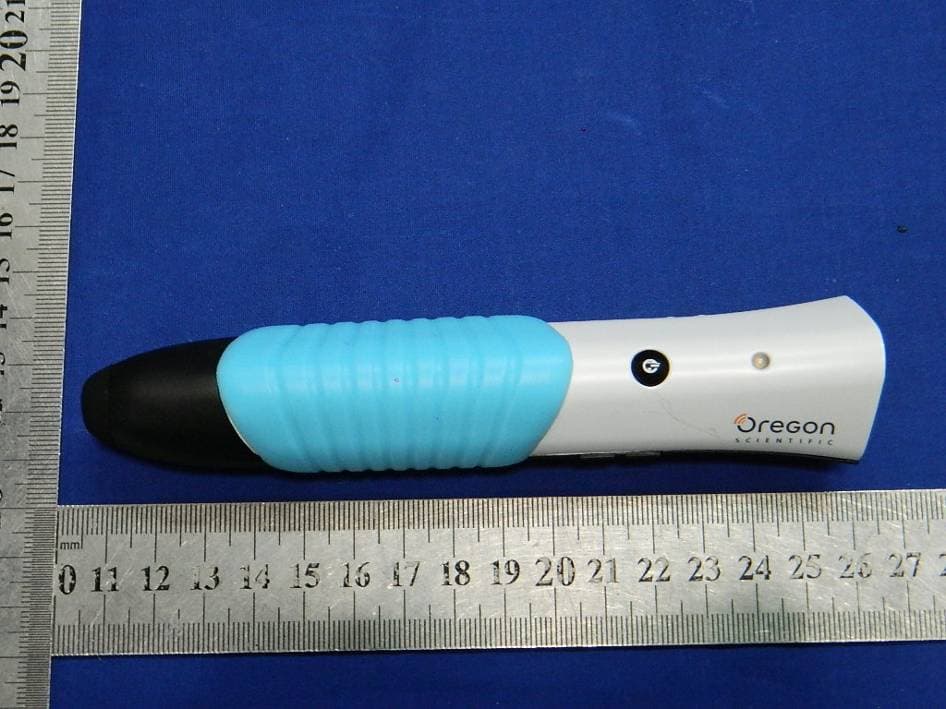
Click to zoom
Application Details
- Equipment Class
- DTS - Digital Transmission System
- Date of Grant
- Jul 28, 2013
- Application Purpose
- Original Equipment
- Date of Application
- Jul 28, 2013
- Equipment Note
- SmartGlobe Horizon (w/Bluetooth Pen), SmartPen
- Frequency Range
- 2402.00000000 - 2480.00000000
- Country
- Hong Kong
Documents & Files
Document Text
Text extracted from the exhibit documents filed with the FCC. Open a document above to read the original.
Users Manual
How to Renew Your Internet Subscription Sound Options Register Your SmartGlobe™ Horizon Activities About Your SmartGlobe™ Horizon Kit Dear customer, Thank you for purchasing SmartGlobe™ Horizon by Oregon Scientific. We hope that this product will help you and your family to learn more about the world we live in, and to develop and interest in geography, history, and in cultures around the world. As a truly international company, all of us at Oregon Scientific take a personal interest in designing products that help both children and adults understand more about our global neighbors. It is our goal that you will learn something new and inspiring that might change your perspective of the world. The SmartGlobe™ Horizon can be updated by connecting the SmartGlobe™ Horizon to our service via the internet with the USB cable provided. As such, we hope that every day will bring a new adventure to your world using SmartGlobe™ Horizon. About Your SmartGlobe™ Horizon Kit Compare To compare information between two places, such as distances, flying times, and exchange rates, choose a category under ‘Compare,’ and then touch two countries on the globe one after the other. The SmartPen will even let you compare places on the U.S. map with places on the main Globe. Note: The time function will only be accurate once you have registered and updated the SmartPen; see pages 7, 8 and 9 for instructions. Also, the exchange rates will be based on those automatically updated at the time of your last download. Find To play a search game, touch one of the ‘Find’ categories with your SmartPen. The SmartGlobe™ Horizon will tell you to find certain places on the map, and you must answer the questions as quickly as you can. Each activity has 3 different levels, and for each level the player must answer the required number of questions correctly. Players need to answer the questions within the time limit; the time limit varies depending on the age group the player has selected. The ‘Ultimate Challenge’ game is a combination of questions from all the other categories. Note: Use the local map to answer the questions about local places. This table shows the time limit of each game for each age group. This table shows the number of correct answers required from the player to advance to a higher level. Knowledge For up-to-date World News, Amazing Facts and Earth Facts, touch an icon with the SmartPen under the ‘Knowledge’ column. Earth Facts Each time you select the Earth Facts icon, you will hear facts about the Earth. Amazing Facts To explore amazing facts in our world, use the tip of the SmartPen to touch Amazing Facts on the activity panel (located on the base), and then use the SmartPen to point to a place on the globe. World News Each time you select the World News icon, you will hear up-to-date World News. Updates are available; see “Register and update your SmartGlobe™ Horizon” on the page 7, 8 and 9 for details. i-GAME SmartGlobe™ Horizon is featured with i-GAME, which is downloadable for free in Apple App Store® (Available soon in GooglePlay™ and MEEP! Store™ )on providing extra fun and informative activities. The app will be available in Meep! market. 1) To play i-GAME, tap i-GAME on the activity panel with your SmartPen being turned on. 2) Connect your SmartPen to the tablet (iPad®, Android™ Tablets or MEEP!™X2) by turning on its Bluetooth® connectivity. Select “SP0218-13” from the discoverable devices after the scan. 3) Launch SmartGlobe™ app after your SmartPen is connected with your tablet. SmartGlobe™ Horizon PC Software Before connecting the SmartPen to your PC, please connect your PC to the Internet and install the SmartGlobe™ PC Software. 1) Download it at: http://smartglobe.oregonscientific.com/horizon/us/ 2) Follow the instructions to install the program. 3) After the installation process, connect the SmartPen to your computer using the USB cable provided. Register your SmartPen 1) After connecting your SmartPen to the PC via the USB cable, start the software and a web page will open up; please fill in the information and enter the access code (located on the page 7). 2) You can now download the latest information from our server. Follow the on-screen instructions on the PC control panel to update your SmartPen. Warning: Do not unplug the SmartPen while downloading the data otherwise it may damage it. Restart your PC or reinstall the PC Software if you encounter download failure several times. 1) Connect SmartPen to your PC using USB cable provided. 2) Launch SmartGlobe™ Horizon PC Software, wait a moment. It will check and show if there is newer version available. 3) Select an age group and a language. 4) Press download button to download the latest version from server. 5) Unplug SmartPen when it shows “Download Completed”. * As a result of our efforts to continually improve our products, the actual screen displays from the product may differ slightly from the diagrams shown. Sound Options Your SmartGlobe™ Horizon can be used in two different sound modes: Built-in speaker With the built-in speaker of the SmartPen. Headphones With headphones connected to the SmartPen. Volume Control Press and to adjust sound volume. Note: Purchasing multiple SmartPens allows multiple users to learn with one SmartGlobe™ Horizon at one time; we recommend using headphones in this case. Register Your SmartGlobe™ Horizon Your new SmartGlobe™ Horizon is not only ready to be used right out of the box, but can also be customized by age level and can receive new educational content updated by Oregon Scientific editors. Note: It is recommended that you register your SmartGlobe™ Horizon in order to download the latest information for your Globe. SmartGlobe™ Horizon Download Services Upon registration, SmartGlobe™ users are allowed to use Internet content download services free for two years from the time they’re first registered. Two years of free service is contingent update SmartPen registration within 24 months of purchase. Ac…
Text truncated - open the document above for the full version.
Attestation Statements
Oregon Scientific Global Distribution Limited 2013-7-22 To: Federal Communications Commission 7435 Oakland Mills Road Columbia, MD FCC ID: YPG-SG021813 To Whom It May Concern: This letter is to ascertain that Oregon Scientific Global Distribution Limited. FCC ID: YPG-SG021813 SmartGlobe Horizon (w/Bluetooth Pen), SmartPen, Model No.: SG0218-13, SP0218-13 has been the units used for conducting FCC compliance testing, the DoC part will be tested by FCC recognized test lab. If you have any question or concerns, pls. contact us. Sincerely, KELVIN CHUN YU NGAN/ Engineering Manager E-mail: [email protected] Phone: 852-22653177 Fax: 27657435 Address: Block C, 9/F, Kaiser Estate, Phase 1, 41 Man Yue Street, Hunghom, Kowloon, Hong Kong
Cover Letter(s)
Family models declaration letter. 2013-7-22 We Oregon Scientific Global Distribution Limited Of Block C, 9/F, Kaiser Estate, Phase 1, 41 Man Yue Street, Hunghom, Kowloon, Hong Kong (address) Declare under our sole responsibility that the product FCC ID: YPG-SG021813 Product: SmartGlobe Horizon (w/Bluetooth Pen), SmartPen Model Number :SG0218-13, SP0218-13 The model of SmartGlobe Horizon (w/Bluetooth Pen) is SG0218-13, and the model of SmartPen is SP0218-13. The difference between SG0218-13 and SP0218-13 is one with Globe, the other without. Thanks Sincerely, KELVIN CHUN YU NGAN/ Engineering Manager E-mail: [email protected] Phone: 852-22653177 Fax: 27657435 Address: Block C, 9/F, Kaiser Estate, Phase 1, 41 Man Yue Street, Hunghom, Kowloon, Hong Kong
Cover Letter(s)
SCS-F18: Project and Product Certification Representative Authorization Letter Page 1 of 2 Rev 3.0 775 Montague Expressway Milpitas, CA 95035 Tel: 408-526-1188 Fax: 408-526-1088 Email: [email protected] Project and Product Certification Representative Authorization Letter Revision History Reason for Amendment (current / obsolete) From To Approved Date Initial Release (obsolete) 1.0 1.0 Nov-14-2006 Revised wording (obsolete) 1.0 2.0 Sept–25-2007 Updated company template (current) 2.0 3.0 Jan-31-2012 SCS-F18: Project and Product Certification Representative Authorization Letter Page 2 of 2 Rev 3.0 Oregon Scientific Global Distribution Limited 2013-7-22 To: SIEMIC, INC. 775 Montague Expressway, Milpitas, CA 95035 USA Dear Sir/Madam, Re: Project and Product Certification Representative Authorization Letter We, Oregon Scientific Global Distribution Limited hereby authorize SIEMIC, INC. to act as a Certification Body for certifying for the following project(s): FCC ID: YPG-SG021813 (SmartGlobe Horizon (w/Bluetooth Pen), SmartPen Model No.: SG0218-13, SP0218-13) We affirm that between SIEMIC and Oregon Scientific Global Distribution Limited, any difference in understanding, including test plan, measurement methods, applicable standards and relevant procedures and processes have been resolved prior to commencement of testing activities. Sincerely, KELVIN CHUN YU NGAN/ Engineering Manager E-mail: [email protected] Phone: 852-22653177 Fax: 27657435 Address: Block C, 9/F, Kaiser Estate, Phase 1, 41 Man Yue Street, Hunghom, Kowloon, Hong Kong
ID Label/Location Info
SG0218-13 LB-R MU COSTCO-US V.1 2013-6-24 P/N: 30020xxxx-00001-10 (A) Rev1.0 All material: Synthetic Paper ()+OPP; Color: 2C (PMS431C & PMS 427C) (Refer to 300203347-00001-30) ; Size: 46x24 mm Diecut: Same as 300207753-01001-30 1 of 1 41.5mm 21.7mm 19.3mm 1.8mm 14.5mm Main unit: Pen: 270112758-11002-20 (A) Rev1.0 SP0218-13 OSI US SILKSCREEN 6.7mm 15mm 3mm 1.2mm 4.2mm
Internal Photos
BT module Antenna Antenna
RF Exposure Info
FCC ID: YPG-SG021813 Portable device According to §15.247(e)(i) and §1.1307(b)(1), systems operating under the provisions of this section shall be operated in a manner that ensures that the public is not exposed to radio frequency energy level in excess of the Commission’s guidelines. According to KDB447498 D01 General RF Exposure Guidance V05 The 1-g and 10-g SAR test exclusion thresholds for 100 MHz to 6 GHz at test separation distances ≤ 50 mm are determined by: [(max. power of channel, including tune-up tolerance, mW)/(min. test separation distance, mm)] * [√f(GHz)] ≤ 3.0 for 1-g SAR and ≤ 7.5 for 10-g extremity SAR, where f(GHz) is the RF channel transmit frequency in GHz; Power and distance are rounded to the nearest mW and mm before calculation; The result is rounded to one decimal place for comparison; The test exclusions are applicable only when the minimum test separation distance is ≤ 50 mm and for transmission frequencies between 100 MHz and 6 GHz. We used a distance 50m to calculated Maximum measured transmitter power: Transmit Frequency (GHz) Mode Max Conducted Power (dBm) Result calculation 1-g SAR 2.402 Bluetooth -2.29 0.018 3.0 Conclusion: For the max result 0.018≤ 3.0 for 1-g SAR extremity SAR, No SAR is required.
Test Report
TRF No:FCC 15.247/A Page 1 of 34 Report No: ES130711073E Shenzhen EMTEK Co.,Ltd. Building 69, Majialong Industry Zone, Nanshan District, Shenzhen,Guangdong,China www.emtek.com.cn Tel: +86-755-2695 4280 Fax: +86-755-2695 4282 Access to the World ELECTROMAGNETIC EMISSIONS COMPLIANCE REPORT INTENTIONAL RADIATOR CERTIFICATION TO FCC PART 15 SUBPART C REQUIREMENT OF SmartGlobe Horizon (w/Bluetooth Pen), SmartPen MODEL No.: SG0218-13, SP0218-13 FCC ID: YPG-SG021813 Trademark: Oregon Scientific REPORT NO: ES130711073E ISSUE DATE: July 22, 2013 Prepared for Oregon Scientific Global Distribution Limited Block C, 9/F, Kaiser Estate, Phase 1, 41 Man Yue Street, Hunghom, Kowloon, Hong Kong Prepared by SHENZHEN EMTEK CO., LTD. Bldg 69, Majialong Industry Zone, Nanshan District, Shenzhen, Guangdong, China TEL: 86-755-26954280 FAX: 86-755-26954282 TRF No:FCC 15.247/A Page 2 of 34 Report No: ES130711073E Shenzhen EMTEK Co.,Ltd. Building 69, Majialong Industry Zone, Nanshan District, Shenzhen,Guangdong,China www.emtek.com.cn Tel: +86-755-2695 4280 Fax: +86-755-2695 4282 Access to the World VERIFICATION OF COMPLIANCE Applicant: Oregon Scientific Global Distribution Limited Block C, 9/F, Kaiser Estate, Phase 1, 41 Man Yue Street, Hunghom, Kowloon, Hong Kong Product Description: SmartGlobe Horizon (w/Bluetooth Pen), SmartPen Model Number: SG0218-13, SP0218-13 Note: the model of SmartGlobe Horizon (w/Bluetooth Pen) is SG0218-13, and the model of SmartPen is SP0218-13. The difference between SG0218-13 and SP0218-13 is one with Globe, the other without. We take SG0218-13 to test. File Number: ES130711073E Date of Test: July 11, 2013 to July 25, 2013 We hereby certify that: The above equipment was tested by SHENZHEN EMTEK CO., LTD. The test data, data evaluation, test procedures, and equipment configurations shown in this report were made in accordance with the procedures given in ANSI C63.4 (2009) and the energy emitted by the sample EUT tested as described in this report is in compliance with conducted and radiated emission limits of FCC Rules Part 15.247. The test results of this report relate only to the tested sample identified in this report. Date of Test : July 11, 2013 to July 25, 2013 Prepared by : Jack.Li/Editor Reviewer : June Xie/Supervisor Approve & Authorized Signer : Lisa Wang/Manager TRF No:FCC 15.247/A Page 3 of 34 Report No: ES130711073E Shenzhen EMTEK Co.,Ltd. Building 69, Majialong Industry Zone, Nanshan District, Shenzhen,Guangdong,China www.emtek.com.cn Tel: +86-755-2695 4280 Fax: +86-755-2695 4282 Access to the World Ta b l e o f C o n t e n t s 1. GENERAL INFORMATION................................................................................................... 5 1.1 P RODUCT DESCRIPTION......................................................................................................... 5 1.2 R ELATED SUBMITTAL(S) / GRANT(S) ..................................................................................... 5 1.3 T EST METHODOLOGY........................................................................................................... 6 1.4 S PECIAL ACCESSORIES.......................................................................................................... 6 1.5 E QUIPMENT MODIFICATIONS................................................................................................. 6 1.6 T EST FACILITY...................................................................................................................... 6 2. SYSTEM TEST CONFIGURATION...................................................................................... 7 2.1 EUT CONFIGURATION........................................................................................................... 7 2.2 EUT EXERCISE...................................................................................................................... 7 2.3 T EST PROCEDURE.................................................................................................................. 7 2.4 C ONFIGURATION OF TESTED SYSTEM.................................................................................... 7 3. DESCRIPTION OF TEST MODES........................................................................................ 9 4. SUMMARY OF TEST RESULTS ......................................................................................... 10 5. CONDUCTED EMISSIONS TEST....................................................................................... 11 5.1 M EASUREMENT PROCEDURE............................................................................................... 11 5.2 T EST SET-UP (BLOCK DIAGRAM OF CONFIGURATION)....................................................... 11 5.3 M EASUREMENT EQUIPMENT USED...................................................................................... 11 5.4 C ONDUCTED EMISSION LIMIT............................................................................................. 11 5.5 M EASUREMENT RESULT...................................................................................................... 11 6. RADIATED EMISSION TEST.............................................................................................. 12 6.1 M EASUREMENT PROCEDURE............................................................................................... 12 6.2 T EST SET-UP (BLOCK DIAGRAM OF CONFIGURATION)....................................................... 12 6.3 M EASUREMENT EQUIPMENT USED...................................................................................... 13 6.4 R ADIATED EMISSION LIMIT................................................................................................. 13 6.5 M EASUREMENT RESULT...................................................................................................... 15 7. 6DB BANDWIDTH TEST ..................................................................................................... 21 7.1 M EASUREMENT PROCEDURE…
Text truncated - open the document above for the full version.
Test Setup Photos
PHOTOGRPHS OF TEST SETUP
Contact Information
Applicant
Terence Chan(Project Supervisor)
Test Firm
EMTEK (Shenzhen) Co., Ltd.David Lee
Technical Specifications
| # | Rule Parts | Frequency Range | Power Output |
|---|---|---|---|
| 1 | 15C | 2.40 GHz - 2.48 GHz | 600.00 µW |
Other Applications from Oregon Scientific Global Distribution Limited
YPG-SG318
Aug 25, 2014SmartGlobe Infinity
Equipment Class
DXX - Part 15 Low Power Communication Device Transmitter
YPG-SE11-01
Aug 19, 2014jumbo wall clock
Equipment Class
DSC - Part 15 Security/Remote Control Transmitter
YPG-011813
Aug 29, 2013MEEP X2
Equipment Class
DTS - Digital Transmission System
YPG-WL388
Jul 29, 2013illumi Shine Wake Up Clock
Equipment Class
DTS - Digital Transmission System
YPG-011813HP
Jul 22, 2013Bluetooth Headset
Equipment Class
DXX - Part 15 Low Power Communication Device Transmitter