ZTT-APA20High Power 700mW Dual Band AC Wi-Fi Access Point
Amped Wireless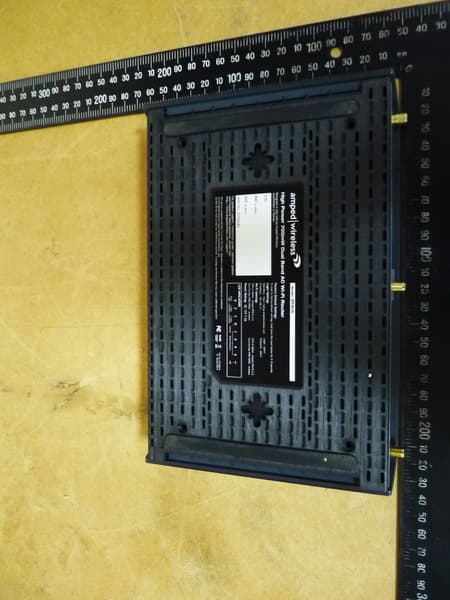
Click to zoom
Application Details
- Equipment Class
- DTS - Digital Transmission System
- Date of Grant
- Nov 07, 2013
- Application Purpose
- Original Equipment
- Date of Application
- Nov 07, 2013
- Equipment Note
- High Power 700mW Dual Band AC Wi-Fi Access Point
- Frequency Range
- 5775.00000000 - 5775.00000000
- Company
- Amped Wireless
- Country
- United States
Documents & Files
Document Text
Text extracted from the exhibit documents filed with the FCC. Open a document above to read the original.
Users Manual
APA20 High Power 700mW Dual Band AC Wi-Fi Access Point User’s Guide APA20 USER’S GUIDE 1 CONTENTS INTRODUCTION ..................................................................... 2 GETTING STARTED ................................................................. 3 Package Contents ...................................................................... 3 LED Indicators............................................................................ 4 Back Panel Description .............................................................. 5 PLUG AND PLAY SETUP GUIDE ............................................... 6 ADDITIONAL SETTINGS ........................................................ 10 Accessing the Settings Menu ................................................... 10 Welcome to the Dashboard .................................................... 12 Set the System Clock ............................................................... 13 Wireless Settings ..................................................................... 14 Setup Summary ....................................................................... 16 5.0GHz WIRELESS SETTINGS ................................................. 17 Basic Settings........................................................................... 17 Basic Settings: Guest Networks ............................................... 19 Security Settings ...................................................................... 20 Wi-Fi Protected Setup – WPS .................................................. 21 User Access ............................................................................. 22 Wireless Coverage Controls..................................................... 23 Access Schedule ...................................................................... 24 Advanced Settings ................................................................... 25 2.4GHz WIRELESS SETTINGS ................................................. 26 Basic Settings ........................................................................... 26 Basic Settings: Guest Networks ................................................ 28 Security Settings ...................................................................... 29 Wi-Fi Protected Setup – WPS ................................................... 30 User Access .............................................................................. 31 Wireless Coverage Controls ..................................................... 32 Access Schedule ....................................................................... 33 Advanced Settings.................................................................... 34 NETWORK SETTINGS ............................................................ 35 USB STORAGE ...................................................................... 37 USB Storage: Local Sharing ...................................................... 37 MANAGEMENT FEATURES ................................................... 41 System Clock ............................................................................ 42 System Logs ............................................................................. 43 Upgrade Firmware ................................................................... 44 Save/Reload Settings ............................................................... 45 TECHNICAL SPECIFICATIONS ................................................. 47 DEFAULT SETTINGS .............................................................. 48 TROUBLESHOOTING AND SUPPORT INFORMATION .............. 49 WARRANTY AND REGULATORY INFORMATION .................... 60 APA20 USER’S GUIDE 2 INTRODUCTION Thank you for purchasing this Amped Wireless product. At Amped Wireless we strive to provide you with the highest quality products through innovation and advanced technology. We pride ourselves on delivering products that outperform the competition and go beyond your expectations. If you have any questions please feel free to contact us. We’d love to hear from you and thank you for your support! Email: [email protected] Call: 888-573-8830 Web: www.ampedwireless.com APA20 USER’S GUIDE 3 GETTING STARTED Package Contents Check to make sure you have all the contents within your package: High Power 700mW Dual Band AC Wi-Fi Access Point Three Detachable High Gain Antennas Power Adapter (100-240v) RJ-45 Ethernet Cable Setup Guide CD: User’s Guide Desktop Stand / Cable Organizer APA20 USER’S GUIDE 4 LED Indicators Power: Indicates when the Access Point is powered on. The LED will remain on. 5.0GHz Wireless Activity: Blinks rapidly when wireless data traffic is transmitted or received over the wireless network. 2.4GHz Wireless Activity: Blinks rapidly when wireless data traffic is transmitted or received over the wireless network. Gigabit Wired Ports 1-4: Indicates when a networking device is connected to a wired port on the back of the Access Point. The LED blinks rapidly when wired data traffic is transmitted or received. Network Connection: Indicates when the Access Point is connected to an available network switch or a router’s LAN port. USB Connection: Indicates when a USB storage device is connected to the USB port. WPS: Wi-Fi Protected Setup activity. When the WPS mode is activated the WPS LED blinks as it awaits a connection. APA20 USER’S GUIDE 5 Back Panel Description Antenna Connectors (1-3): RJ-SMA antenna connectors. Attach the included high gain antennas to these connectors according to their respective numbers. (Mismatching the antennas with the wrong antenna connector port will negatively impact wireless performance.) USB Port: Attach USB storage devices, such as USB flash drives and external hard drives, for file sharing. Reset: Push down once to reboot the Access Point. Hold down for 5-10 seconds to reset the router back to factory settings. WPS: Hold down for 3 seconds to enable WPS push button configuration. Wired Devices: Gigabit R…
Text truncated - open the document above for the full version.
Users Manual
APA20 High Power 700mW Dual Band AC Wi-Fi Access Point User’s Guide APA20 USER’S GUIDE 1 CONTENTS INTRODUCTION ..................................................................... 2 GETTING STARTED ................................................................. 3 Package Contents ...................................................................... 3 LED Indicators............................................................................ 4 Back Panel Description .............................................................. 5 PLUG AND PLAY SETUP GUIDE ............................................... 6 ADDITIONAL SETTINGS ........................................................ 10 Accessing the Settings Menu ................................................... 10 Welcome to the Dashboard .................................................... 12 Set the System Clock ............................................................... 13 Wireless Settings ..................................................................... 14 Setup Summary ....................................................................... 16 5.0GHz WIRELESS SETTINGS ................................................. 17 Basic Settings........................................................................... 17 Basic Settings: Guest Networks ............................................... 19 Security Settings ...................................................................... 20 Wi-Fi Protected Setup – WPS .................................................. 21 User Access ............................................................................. 22 Wireless Coverage Controls..................................................... 23 Access Schedule ...................................................................... 24 Advanced Settings ................................................................... 25 2.4GHz WIRELESS SETTINGS ................................................. 26 Basic Settings ........................................................................... 26 Basic Settings: Guest Networks ................................................ 28 Security Settings ...................................................................... 29 Wi-Fi Protected Setup – WPS ................................................... 30 User Access .............................................................................. 31 Wireless Coverage Controls ..................................................... 32 Access Schedule ....................................................................... 33 Advanced Settings.................................................................... 34 NETWORK SETTINGS ............................................................ 35 USB STORAGE ...................................................................... 37 USB Storage: Local Sharing ...................................................... 37 MANAGEMENT FEATURES ................................................... 41 System Clock ............................................................................ 42 System Logs ............................................................................. 43 Upgrade Firmware ................................................................... 44 Save/Reload Settings ............................................................... 45 TECHNICAL SPECIFICATIONS ................................................. 47 DEFAULT SETTINGS .............................................................. 48 TROUBLESHOOTING AND SUPPORT INFORMATION .............. 49 WARRANTY AND REGULATORY INFORMATION .................... 60 APA20 USER’S GUIDE 2 INTRODUCTION Thank you for purchasing this Amped Wireless product. At Amped Wireless we strive to provide you with the highest quality products through innovation and advanced technology. We pride ourselves on delivering products that outperform the competition and go beyond your expectations. If you have any questions please feel free to contact us. We’d love to hear from you and thank you for your support! Email: [email protected] Call: 888-573-8830 Web: www.ampedwireless.com APA20 USER’S GUIDE 3 GETTING STARTED Package Contents Check to make sure you have all the contents within your package: High Power 700mW Dual Band AC Wi-Fi Access Point Three Detachable High Gain Antennas Power Adapter (100-240v) RJ-45 Ethernet Cable Setup Guide CD: User’s Guide Desktop Stand / Cable Organizer APA20 USER’S GUIDE 4 LED Indicators Power: Indicates when the Access Point is powered on. The LED will remain on. 5.0GHz Wireless Activity: Blinks rapidly when wireless data traffic is transmitted or received over the wireless network. 2.4GHz Wireless Activity: Blinks rapidly when wireless data traffic is transmitted or received over the wireless network. Gigabit Wired Ports 1-4: Indicates when a networking device is connected to a wired port on the back of the Access Point. The LED blinks rapidly when wired data traffic is transmitted or received. Network Connection: Indicates when the Access Point is connected to an available network switch or a router’s LAN port. USB Connection: Indicates when a USB storage device is connected to the USB port. WPS: Wi-Fi Protected Setup activity. When the WPS mode is activated the WPS LED blinks as it awaits a connection. APA20 USER’S GUIDE 5 Back Panel Description Antenna Connectors (1-3): RJ-SMA antenna connectors. Attach the included high gain antennas to these connectors according to their respective numbers. (Mismatching the antennas with the wrong antenna connector port will negatively impact wireless performance.) USB Port: Attach USB storage devices, such as USB flash drives and external hard drives, for file sharing. Reset: Push down once to reboot the Access Point. Hold down for 5-10 seconds to reset the router back to factory settings. WPS: Hold down for 3 seconds to enable WPS push button configuration. Wired Devices: Gigabit R…
Text truncated - open the document above for the full version.
Cover Letter(s)
Amped Wireless 13089 Peyton Dr. #C307 Chino Hills California 91709 United States Federal Communications Commission Authorization and Evaluation Division Equipment Authorization Branch 7435 Oakland Mills Road Columbia, MD 21046 Date: July 26, 2013 To whom it may concern: We, the undersigned, hereby authorize Worldwide Testing Services (Taiwan) Co., Ltd to act on our behalf in all matters relating to applications for equipment authorization FCC ID: ZTT-APA20 including the signing of all documents related to these matters. Any and all acts carried out by Worldwide Testing Services (Taiwan) Co., Ltd on our behalf shall have the same effect as acts of our own. We also hereby certify that no party to this application is subject to a denial of benefits, including FCC benefits, pursuant to Section 5301 of the Anti-Drug Abuse Act of 1988, 21 U.S.C. 862.
Cover Letter(s)
Amped Wireless 13089 Peyton Dr. #C307 Chino Hills California 91709 United States Federal Communications Commission Equipment Authorization Branch 7435 Oakland Mills Road Columbia, MD 21046 Date: 25/10/13 Request for Confidentiality Company name: Amped Wireless FCC ID:ZTT-APA20 FCC Part 15 Certification To whom it may concern: In accordance with 0.459 of CFR 47, Amped Wireless hereby requests confidentiality of all Block Diagrams, Schematics, Operational Description attachments for the subject application. These documents contain detailed system and equipment description and related information about the product which Amped Wireless considers to be proprietary, confidential and a custom design and otherwise would not release to the general public. Since the design is a basis from which future technological products will evolve, Amped Wireless considers that this information would be of benefit to its competitors and that the disclosure of the information in these documents would give competitors an unfair advantage in the market.
External Photos
Registration number: W6D21310-13579-FCC FCC ID: ZTT-APA20 Worldwide Testing Services(Taiwan) Co., Ltd. Appendix Page 2 of 23 External Photos Adaptor1 Registration number: W6D21310-13579-FCC FCC ID: ZTT-APA20 Worldwide Testing Services(Taiwan) Co., Ltd. Appendix Page 3 of 23 Adaptor2 Registration number: W6D21310-13579-FCC FCC ID: ZTT-APA20 Worldwide Testing Services(Taiwan) Co., Ltd. Appendix Page 4 of 23 Registration number: W6D21310-13579-FCC FCC ID: ZTT-APA20 Worldwide Testing Services(Taiwan) Co., Ltd. Appendix Page 5 of 23 Registration number: W6D21310-13579-FCC FCC ID: ZTT-APA20 Worldwide Testing Services(Taiwan) Co., Ltd. Appendix Page 6 of 23 Registration number: W6D21310-13579-FCC FCC ID: ZTT-APA20 Worldwide Testing Services(Taiwan) Co., Ltd. Appendix Page 7 of 23 Registration number: W6D21310-13579-FCC FCC ID: ZTT-APA20 Worldwide Testing Services(Taiwan) Co., Ltd. Appendix Page 8 of 23 Registration number: W6D21310-13579-FCC FCC ID: ZTT-APA20 Worldwide Testing Services(Taiwan) Co., Ltd. Appendix Page 9 of 23 Registration number: W6D21310-13579-FCC FCC ID: ZTT-APA20 Worldwide Testing Services(Taiwan) Co., Ltd. Appendix Page 10 of 23 Registration number: W6D21310-13579-FCC FCC ID: ZTT-APA20 Worldwide Testing Services(Taiwan) Co., Ltd. Appendix Page 11 of 23 Adaptor1 Adaptor2 Registration number: W6D21310-13579-FCC FCC ID: ZTT-APA20 Worldwide Testing Services(Taiwan) Co., Ltd. Appendix Page 12 of 23 Antenna A Antenna C Antenna B
Internal Photos
Registration number: W6D21310-13579-FCC FCC ID: ZTT-APA20 Worldwide Testing Services(Taiwan) Co., Ltd. Appendix Page 13 of 23 Internal Photos Registration number: W6D21310-13579-FCC FCC ID: ZTT-APA20 Worldwide Testing Services(Taiwan) Co., Ltd. Appendix Page 14 of 23 Registration number: W6D21310-13579-FCC FCC ID: ZTT-APA20 Worldwide Testing Services(Taiwan) Co., Ltd. Appendix Page 15 of 23 Registration number: W6D21310-13579-FCC FCC ID: ZTT-APA20 Worldwide Testing Services(Taiwan) Co., Ltd. Appendix Page 16 of 23
RF Exposure Info
Amped Wireless 13089 Peyton Dr. #C307 Chino Hills California 91709 United States Federal Communications Commission Authorization and Evaluation Division Equipment Authorization Branch 7435 Oakland Mills Road Columbia, MD 21046 Applicant’s declaration concerning RF Radiation Exposure We hereby indicate that the product Product description: High Power 700mW Dual Band AC Wi-Fi Access Point Model No: APA20 The equipment complies with FCC RF radiation exposure limits set forth for an uncontrolled environment. The integral antennas used for this transmitter must not be co-located or operating in conjunction with any other antenna or transmitter within the host device. A safety statement concerning minimum separation distances from enclosure of the Product : High Power 700mW Dual Band AC Wi-Fi Access Point will be integrated in the user’s manual to provide end-users with transmitter operating conditions for satisfying RF exposure compliance. The appropriate information can be drawn from the test report no: W6D21310-13579-C-1 and the accompanying calculations. Registration number: W6D21310-13579-C-1 FCC ID: ZTT-APA20 Worldwide Testing Services(Taiwan) Co., Ltd. Page 38 of 131 3.2 Equivalent isotropic radiated power FCC Rule: 15.247(b)(3) EIRP = max. conducted output power + antenna gain 5.8GHz:802.11a EIRP = 21.38 dBm + 7.52 dBi = 28.90 dBm 5.8GHz:802.11n(20MHz), 802.11n(40MHz) EIRP = 23.73 dBm + 7.52 dBi = 31.25 dBm 5.8GHz:802.11ac EIRP = 21.88 dBm + 7.52 dBi = 29.40 dBm 2.4GHz:802.11b/g EIRP = 28.92 dBm + 6.64 dBi = 35.56 dBm 2.4GHz: 802.11n(20MHz), 802.11n(40MHz) EIRP = 28.66 dBm + 6.64 dBi = 35.30 dBm Limit: EIRP = +36 dBm for Antenna gain <6dBi Test equipment used: ETSTW-RE 055 3.3 RF Exposure Compliance Requirements FCC OET Bulletin 65 Edition 97.01 determines the equations for predicting RF fields and applicable limits. The prediction for power density in the far-field but will over-predict power density in the near field, where it could be used for walking a “worst case” or conservative prediction. PG S = --------- 4πR 2 S – Power Density P – Output power ERP R – Distance D – Cable Loss AG – Antenna Gain 5.8GHz:802.11a Item Unit Value Remarks P mW 137.4042 Peak value D dB AG dBi 7.52 G 5.6494 Calculated Value R cm 20 Assumed value S mW/cm2 0.1544 Calculated value Registration number: W6D21310-13579-C-1 FCC ID: ZTT-APA20 Worldwide Testing Services(Taiwan) Co., Ltd. Page 39 of 131 5.8GHz:802.11n(20MHz), 802.11n(40MHz) Item Unit Value Remarks P mW 236.0478 Peak value D dB AG dBi 7.52 G 5.6494 Calculated Value R cm 20 Assumed value S mW/cm2 0.2653 Calculated value 5.8GHz:802.11ac Item Unit Value Remarks P mW 154.1700 Peak value D dB AG dBi 7.52 G 5.6494 Calculated Value R cm 20 Assumed value S mW/cm2 0.1733 Calculated value 802.11b/g Item Unit Value Remarks P mW 779.8301 Peak value D dB AG dBi 6.64 G 4.6132 Calculated Value R cm 20 Assumed value S mW/cm2 0.7157 Calculated value 2.4G:802.11n(20MHz), 802.11n(40MHz) Item Unit Value Remarks P mW 734.5139 Peak value D dB AG dBi 6.64 G 4.6132 Calculated Value R cm 20 Assumed value S mW/cm2 0.6741 Calculated value Limits: Limit for General Population / Uncontrolled Exposure Frequency (MHz) Power Density (mW/cm 2 ) 1500 – 100.000 1.0
RF Exposure Info
Amped Wireless 13089 Peyton Dr. #C307 Chino Hills California 91709 United States Federal Communications Commission Authorization and Evaluation Division Equipment Authorization Branch 7435 Oakland Mills Road Columbia, MD 21046 Applicant’s declaration concerning RF Radiation Exposure We hereby indicate that the product Product description: High Power 700mW Dual Band AC Wi-Fi Access Point Model No: APA20 The equipment complies with FCC RF radiation exposure limits set forth for an uncontrolled environment. The integral antennas used for this transmitter must not be co-located or operating in conjunction with any other antenna or transmitter within the host device. A safety statement concerning minimum separation distances from enclosure of the Product : High Power 700mW Dual Band AC Wi-Fi Access Point will be integrated in the user’s manual to provide end-users with transmitter operating conditions for satisfying RF exposure compliance. The appropriate information can be drawn from the test report no: W6D21310-13579-C-1 and the accompanying calculations. Registration number: W6D21310-13579-C-1 FCC ID: ZTT-APA20 Worldwide Testing Services(Taiwan) Co., Ltd. Page 38 of 131 3.2 Equivalent isotropic radiated power FCC Rule: 15.247(b)(3) EIRP = max. conducted output power + antenna gain 5.8GHz:802.11a EIRP = 21.38 dBm + 7.52 dBi = 28.90 dBm 5.8GHz:802.11n(20MHz), 802.11n(40MHz) EIRP = 23.73 dBm + 7.52 dBi = 31.25 dBm 5.8GHz:802.11ac EIRP = 21.88 dBm + 7.52 dBi = 29.40 dBm 2.4GHz:802.11b/g EIRP = 28.92 dBm + 6.64 dBi = 35.56 dBm 2.4GHz: 802.11n(20MHz), 802.11n(40MHz) EIRP = 28.66 dBm + 6.64 dBi = 35.30 dBm Limit: EIRP = +36 dBm for Antenna gain <6dBi Test equipment used: ETSTW-RE 055 3.3 RF Exposure Compliance Requirements FCC OET Bulletin 65 Edition 97.01 determines the equations for predicting RF fields and applicable limits. The prediction for power density in the far-field but will over-predict power density in the near field, where it could be used for walking a “worst case” or conservative prediction. PG S = --------- 4πR 2 S – Power Density P – Output power ERP R – Distance D – Cable Loss AG – Antenna Gain 5.8GHz:802.11a Item Unit Value Remarks P mW 137.4042 Peak value D dB AG dBi 7.52 G 5.6494 Calculated Value R cm 20 Assumed value S mW/cm2 0.1544 Calculated value Registration number: W6D21310-13579-C-1 FCC ID: ZTT-APA20 Worldwide Testing Services(Taiwan) Co., Ltd. Page 39 of 131 5.8GHz:802.11n(20MHz), 802.11n(40MHz) Item Unit Value Remarks P mW 236.0478 Peak value D dB AG dBi 7.52 G 5.6494 Calculated Value R cm 20 Assumed value S mW/cm2 0.2653 Calculated value 5.8GHz:802.11ac Item Unit Value Remarks P mW 154.1700 Peak value D dB AG dBi 7.52 G 5.6494 Calculated Value R cm 20 Assumed value S mW/cm2 0.1733 Calculated value 802.11b/g Item Unit Value Remarks P mW 779.8301 Peak value D dB AG dBi 6.64 G 4.6132 Calculated Value R cm 20 Assumed value S mW/cm2 0.7157 Calculated value 2.4G:802.11n(20MHz), 802.11n(40MHz) Item Unit Value Remarks P mW 734.5139 Peak value D dB AG dBi 6.64 G 4.6132 Calculated Value R cm 20 Assumed value S mW/cm2 0.6741 Calculated value Limits: Limit for General Population / Uncontrolled Exposure Frequency (MHz) Power Density (mW/cm 2 ) 1500 – 100.000 1.0
Test Report
of Applicant: Amped Wireless Address: 13089 Peyton Dr. #C307 Chino Hills California 91709 United States Tested and Prepared by Worldwide Testing Services (Taiwan) Co., Ltd. FCC Registration No.: 930600 Industry Canada filed test laboratory Reg. No. IC 5679A-1 A2LA Accredited No.: 2732.01 Report No.: W6D21310-13579-C-1 6F, NO. 58, LANE 188, RUEY-KUANG RD., NEIHU TAIPEI 114, TAIWAN, R.O.C. TEL: 886-2-66068877 FAX: 886-2-66068879 E-mail: [email protected] FCC PART 15 SUBPART C TEST REPORT for High Power 700mW Dual Band AC Wi-Fi Access Point Model No.: APA20 FCC ID: ZTT-APA20 Registration number: W6D21310-13579-C-1 FCC ID: ZTT-APA20 Worldwide Testing Services(Taiwan) Co., Ltd. Page 1 of 131 TABLE OF CONTENTS 1 GENERAL INFORMATION ................................................................................................... 2 1.1 NOTES................................................................................................................................... 2 1.2 TESTING LABORATORY......................................................................................................... 3 1.2.1 Location .......................................................................................................................3 1.2.2 Details of accreditation status ..................................................................................... 3 1.3 DETAILS OF APPROVAL HOLDER............................................................................................ 3 1.4 APPLICATION DETAILS.......................................................................................................... 4 1.5 G ENERAL INFORMATION OF TEST ITEM................................................................................. 4 1.6 T EST STANDARDS.................................................................................................................. 8 2 TECHNICAL TEST ..................................................................................................................9 2.1 SUMMARY OF TEST RESULTS................................................................................................. 9 2.2 T EST ENVIRONMENT............................................................................................................. 9 2.3 TEST EQUIPMENT LIST........................................................................................................ 10 2.4 GENERAL TEST PROCEDURE............................................................................................... 12 3 TEST RESULTS (ENCLOSURE) ......................................................................................... 14 3.1 P EAK OUTPUT POWER (TRANSMITTER) ............................................................................... 15 3.2 EQUIVALENT ISOTROPIC RADIATED POWER......................................................................... 38 3.3 RF EXPOSURE COMPLIANCE REQUIREMENTS..................................................................... 38 3.4 TRANSMITTER RADIATED EMISSIONS IN RESTRICTED BANDS............................................. 40 3.5 S PURIOUS EMISSIONS (TX) .................................................................................................. 41 3.6 R ADIATED EMISSION ON THE BAND EDGE........................................................................... 63 3.7 MINIMUM 6 dB BANDWIDTH............................................................................................... 80 3.8 PEAK POWER SPECTRAL DENSITY.................................................................................... 102 3.9 R ADIATED EMISSION FROM DIGITAL PART....................................................................... 125 3.10 POWER LINE CONDUCTED EMISSION................................................................................ 126 APPENDIX............................................................................................................................ 131 Registration number: W6D21310-13579-C-1 FCC ID: ZTT-APA20 Worldwide Testing Services(Taiwan) Co., Ltd. Page 2 of 131 1 General Information 1.1 Notes The purpose of conformity testing is to increase the probability of adherence to the essential requirements or conformity specifications, as appropriate. The complexity of the technical specifications, however, means that full and thorough testing is impractical for both technical and economic reasons. Furthermore, there is no guarantee that a test sample which has passed all the relevant tests conforms to a specification. Neither is there any guarantee that such a test sample will interwork with other genuinely open systems. The existence of the tests nevertheless provides the confidence that the test sample possesses the qualities as maintained and that is performance generally conforms to representative cases of communications equipment. The test results of this test report relate exclusively to the item tested as specified in 1.5. The test report may only be reproduced or published in full. Reproduction or publication of extracts from the report requires the prior written approval of the Worldwide Testing Services(Taiwan) Co., Ltd. Specific Conditions: Usage of the hereunder tested device in combination with other integrated or external antennas requires at least additional output power measurements, spurious emission measurements, conducted emission measurements (AC supply lines) and radio frequency exposure evaluations for each individual configuration performed, for certification by FCC. The test sample is able to work according IEEE 802.11 a/b/g/n/ac. This report is related to FCC Part 15 C (DSSS and OFDM device). Tester: November 01, 2013 Rick Chen Date WTS-Lab. Name Signature Technical responsibility for area of testing: November 01, 2013 Kevin Wang Date WTS Name Signature Registration number: W6D21310-13579-C-1 FCC ID: ZTT-APA20 Worldwide Testing Services(Taiwan) Co., Ltd. Page 3 of 131 1.2 Testing laboratory 1.2.1 Location OATS No.5-1, …
Text truncated - open the document above for the full version.
Test Report
of Applicant: Amped Wireless Address: 13089 Peyton Dr. #C307 Chino Hills California 91709 United States Tested and Prepared by Worldwide Testing Services (Taiwan) Co., Ltd. FCC Registration No.: 930600 Industry Canada filed test laboratory Reg. No. IC 5679A-1 A2LA Accredited No.: 2732.01 Report No.: W6D21310-13579-C-1 6F, NO. 58, LANE 188, RUEY-KUANG RD., NEIHU TAIPEI 114, TAIWAN, R.O.C. TEL: 886-2-66068877 FAX: 886-2-66068879 E-mail: [email protected] FCC PART 15 SUBPART C TEST REPORT for High Power 700mW Dual Band AC Wi-Fi Access Point Model No.: APA20 FCC ID: ZTT-APA20 Registration number: W6D21310-13579-C-1 FCC ID: ZTT-APA20 Worldwide Testing Services(Taiwan) Co., Ltd. Page 1 of 131 TABLE OF CONTENTS 1 GENERAL INFORMATION ................................................................................................... 2 1.1 NOTES................................................................................................................................... 2 1.2 TESTING LABORATORY......................................................................................................... 3 1.2.1 Location .......................................................................................................................3 1.2.2 Details of accreditation status ..................................................................................... 3 1.3 DETAILS OF APPROVAL HOLDER............................................................................................ 3 1.4 APPLICATION DETAILS.......................................................................................................... 4 1.5 G ENERAL INFORMATION OF TEST I…
Text truncated - open the document above for the full version.
Contact Information
Applicant
Paul Green(CFO of DPI Inc Parent of Newo Corp dba Amped Wirel)
Technical Contact
Worldwide Testing Services (Taiwan) Co., Ltd.Tse-Ming Chang
[email protected]+886-2-6606-8877
6F., No. 58, Lane 188, Ruey Kuand Rd. · Taipei · Taiwan
Test Firm
Worldwide Testing Services (Taiwan) Co., Ltd.Rex Kao
Technical Specifications
| # | Rule Parts | Frequency Range | Power Output |
|---|---|---|---|
| 5 | 15C | 5.78 GHz - 5.78 GHz | 154.17 mW |
Other Applications from Amped Wireless

ZTT-TAPEX3
Oct 29, 2015High Power Touch Screen AC1750 Wi-Fi Range Extender
Equipment Class
NII - Unlicensed National Information Infrastructure TX
ZTT-TAPR3
Sep 16, 2015High Power Touch Screen AC1750 Wi-Fi Router
Equipment Class
NII - Unlicensed National Information Infrastructure TX
ZTT-RTA1900
Aug 30, 2015TITAN-High Power AC1900 Wi-Fi Router
Equipment Class
NII - Unlicensed National Information Infrastructure TX
ZTT-RTA2600
Jun 23, 2015High Power AC2600 Wi-Fi Router
Equipment Class
DTS - Digital Transmission System
ZTT-RE1750A
Apr 25, 2015High Power AC1750 Wi-Fi Range Extender
Equipment Class
NII - Unlicensed National Information Infrastructure TX