2AAWXKB002Bluetooth Keyboard for Kindle 7 inch Tablet
Incipio, LLC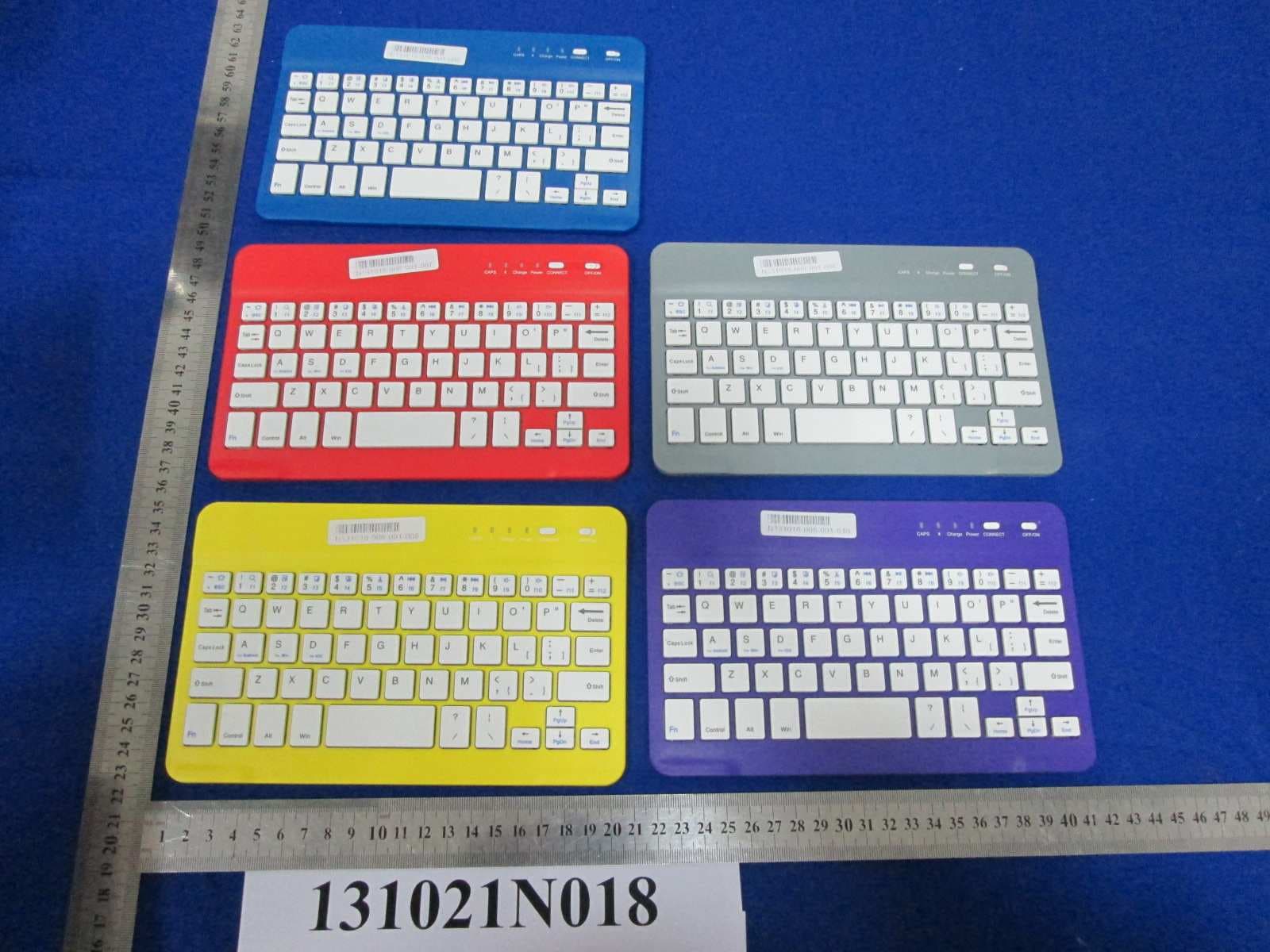
Click to zoom
Application Details
- Equipment Class
- DXX - Part 15 Low Power Communication Device Transmitter
- Date of Grant
- Jan 19, 2014
- Application Purpose
- Original Equipment
- Date of Application
- Jan 19, 2014
- Equipment Note
- Bluetooth Keyboard for Kindle 7 inch Tablet
- Frequency Range
- 2402.00000000 - 2480.00000000
- Company
- Incipio, LLC
- Country
- United States
Documents & Files
Document Text
Text extracted from the exhibit documents filed with the FCC. Open a document above to read the original.
Users Manual
FOLIO WITH BLUETOOTH KEYBOARD Setup Guide What’s in The Box? Main Features • Folio with Bluetooth wireless keyboard • USB to micro USB charging cable • User documentation • Knowledgeware management system. It can access into auto standby to save energy and reduce the radiation to body when you are out of work; just light touch key to wake it within 2~3 seconds when start your work. • Built-in intelligent power management and anti-static function which will protect machine be interfered. • Built-in rechargeable battery which can be charged for cycling use, also support international standard MICRO USB interface. • Designed for Pad exclusively with perfect integration; • Binding with the features of two-way standby and multi-function key etc., • Light weight and compact design enable it a portable one • Record 3 paired exterior devices to fast connect Overview: Delete EnterCaps Lock Ta b Fn CtrlAlt Home CAPSChargePowerCONNECTOFF/ON End Page Up Page Down Shift Shift LEDSTATUS Blue (Blinking) Charge CAPS Red (Blinking) Red (On) Blue (On) Pairing Low Battery Charging Caps Lock On 1. When turn on the power without external power, red LED light will blink, it means battery is lower and need to charge. During charging, the red LED light will not be off till finished charge. 2. When turn on the power, blue LED light will be lit for 3 seconds then go off; Press “CONNECT” button, the blue LED light will be lit steady, this means access into pairing state, the blue LED light will be off at once when finish the pairing. If it did’t finish the pairing and any operation within 60 seconds, the keyboard will access into standby mode till next pairing starts. 3. After finish the pairing, we can run the function operation on keyboard. If it’s unnecessary, please keep the pairing message of external device. 4. If there is not any keyboard operation within 10 minutes or the external device is far away bluetooth’s operating distance for 10 minutes, the keyboard will access into standby mode. You can touch any key to wake the keyboard to work within 2-3 seconds (the external device must be at the valid connecting distance). Brief Description 5. If want to cut off the connection of keyboard and external device, just long press “CONNECT” button for 3 seconds, the blue LED light will blink slowly twice; Either turn off the power directly or cut off the external device. This bluetooth keyboard just supports 1 external device during working but can record 3 recent paired external device’s information. When press [CONNECT] button, the blue LED light blinks, touch any key to activate the auto connection function. By default, The keyboard will search the last paired device. If can’t search last paired external device, it will automatically search and pair with the second external device, then the third one. Special Keys Description As for Pad multimedia function, need to long press Fn and combine with relevant multimedia hotkeys on keyboard. Installation Guide Battery Charging • The red LED indicator will blink when battery is low. It is time to recharge the keyboard. • Connect the Micro-USB cable to the keyboard charging interface. • Connect USB-A to the power adaptor or USB interface of computer • The red LED indicator will be lit steady during charging. Once it finished charging the red LED indicator will turn off. Bluetooth Keyboard Connecting 1 . Turn on the power toggle switch, the blue LED indicator will be lit for 3 seconds then gone off. 2. Press “CONNECT” button, the blue LED indicator will blink, the keyboard is ready for connecting to Pad. 3 . Turn on and unlock Pad. Click on the Pad [setting] icon. 4. On the setting menu, select the item [General] to access [Bluetooth] setting to open Bluetooth’s searching function. 5. Once wireless Bluetooth keyboard found, click on this device to connect. 6 . Input the paired password code as displayed on Pad screen. 7. Wireless keyboard connected successfully, The LED indicator will be off. Troubleshooting Unable to Connect 1. Make sure the power switch is on. 2. Make sure the keyboard is within the operating distance. 3. Make sure the battery is charged. 4. Make sure iPad Bluetooth is activated. 5. Make sure wireless keyboard has been paired with iPad. 6. Clear the paired record of external device and close the bluetooth function, then pair again. Unable to Charge Keyboard 1. Make sure the USB power cord is connected properly to the keyboard and the power source. 2. Make sure the wall charger is plugged into the power outlet. Maintenance and Safety Caution 1 . Do not place heavy object on the top of keyboard 2. Do not Microwave the item. 3 . Do not force or distort the keyboard. 4 . Keep away from oil, chemical or any other organic liquid. 5 . Please clean the keyboard with soft cloth. 6 . Please turn off the power if long time no use. 7 . Routine maintenance for other electronic products. FCC Statement: DECLARATION OF CONFORMITY WITH FCC RULES FOR ELECTROMAGNETIC COMPATIBILITY We, Incipio Technologies, Inc., of 6001 Oak Canyon, Irvine, CA 92618, declare under our sole responsibility that the product BTKYB-002, to which this declaration relates: WARNING: Changes or modifications to this unit not expressly approved by the party responsible for compliance could void the user’s authority to operate the equipment. NOTE: This equipment has been tested and found to comply with the limits for a Class B digital device, pursuant to Part 15 of the FCC Rules. These limits are designed to provide reasonable protection against harmful interference in a residential installation. This equipment generates, uses and can radiate radio frequency energy and, if not installed and used in accordance with the instructions, may cause harmful interference to radio communications. However, there is no guarantee that interference will not occur in a particular installation. If this equipment does cause harmful interference to radio or television reception, which can be determined by turning the…
Text truncated - open the document above for the full version.
Cover Letter(s)
Incipio Technologies, Inc. 6001 Oak Canyon, Irvine, CA 92618 USA AGENCY AUTHORIZATION LETTER Date: 2013-12-19 Federal Communications Commission Authorization and Evaluation Division FCC ID: 2AAWXKB002 Confidentiality Request Pursuant to Sections 0.457 and 0.459 of the Commission’s Rules, the Applicant hereby requests confidential treatment of information accompanying this application as outlined below: 1. Block diagram 2. Schematics 3. Operation Description The above materials contain trade secrets and proprietary information not customarily released to the public. The public disclosure of these matters might to harmful to the applicant and provide unjustified benefits to its competitors. The applicant understands that pursuant to Rule 0.457, disclosure of this application and all accompanying documentation will not be made before the date of the grant for this application. Sincerely, Name:CK LI Company name: Incipio Technologies, Inc. Tel. : 1-949-236-7347 Fax : 1949-250-4928
Cover Letter(s)
Incipio Technologies, Inc. 6001 Oak Canyon, Irvine, CA 92618 USA AGENCY AUTHORIZATION LETTER FCC ID: 2AAWXKB002 Date: 2013-12-19 To whom it may concern: We, the undersigned, hereby authorize Bureau Veritas Shenzhen Co. Ltd Dongguan Branch., to act on our behalf, as our agent, in the following matters related to the FCC approval of our products: report submittal, related correspondence, the signing of all documents relating to these matters, and any other lawful activity necessary to obtain such certification. Any act carried out by BVDG within the scope of this authorization shall have the same effects as our own. This authorization shall expire 6 months form original date. If you have any Questions regarding the authorization, please don’t hesitate to contact us. Thank you. Sincerely, Name:CK LI Company name: Incipio Technologies, Inc. Tel. : 1-949-236-7347 Fax : 1949-250-4928
Cover Letter(s)
Incipio Technologies, Inc. 6001 Oak Canyon, Irvine, CA 92618 USA Federal Communications Commission Authorization and Evaluation Division 1435 Oakland Mills Road Columbia, MD 21046 Date: 10/30/2013 FCC ID: 2AAWXKB002 To whom it may concern: We, Incipio Technologies Inc., hereby attest to the fact that we will apply the Declaration of Conformity procedure to the class B computer peripheral portion of this composite filing. Sincerely, C K LI Senior Director of Quality and Engineering Email: [email protected] Tel.:1-949-236-7347
External Photos
Bureau Veritas Shenzhen Co., Ltd. Dongguan Branch No. 34, Chenwulu Section, Guantai Rd., Houjie Town, Dongguan City, Guangdong 523942, China Tel.: +86 769 8593 5656 Fax: +86 769 8593 1080 Email: [email protected] Page 1 of 3 Report Version 1 Reference No.:131021N018 Bureau Veritas Shenzhen Co., Ltd. Dongguan Branch No. 34, Chenwulu Section, Guantai Rd., Houjie Town, Dongguan City, Guangdong 523942, China Tel.: +86 769 8593 5656 Fax: +86 769 8593 1080 Email: [email protected] Page 2 of 3 Report Version 1 Reference No.:131021N018 Bureau Veritas Shenzhen Co., Ltd. Dongguan Branch No. 34, Chenwulu Section, Guantai Rd., Houjie Town, Dongguan City, Guangdong 523942, China Tel.: +86 769 8593 5656 Fax: +86 769 8593 1080 Email: [email protected] Page 3 of 3 Report Version 1 Reference No.:131021N018 Additional Model
Internal Photos
Bureau Veritas Shenzhen Co., Ltd. Dongguan Branch No. 34, Chenwulu Section, Guantai Rd., Houjie Town, Dongguan City, Guangdong 523942, China Tel.: +86 769 8593 5656 Fax: +86 769 8593 1080 Email: [email protected] Page 1 of 4 Report Version 1 Reference No.:131021N018 Bureau Veritas Shenzhen Co., Ltd. Dongguan Branch No. 34, Chenwulu Section, Guantai Rd., Houjie Town, Dongguan City, Guangdong 523942, China Tel.: +86 769 8593 5656 Fax: +86 769 8593 1080 Email: [email protected] Page 2 of 4 Report Version 1 Reference No.:131021N018 Bureau Veritas Shenzhen Co., Ltd. Dongguan Branch No. 34, Chenwulu Section, Guantai Rd., Houjie Town, Dongguan City, Guangdong 523942, China Tel.: +86 769 8593 5656 Fax: +86 769 8593 1080 Email: [email protected] Page 3 of 4 Report Version 1 Reference No.:131021N018 Bureau Veritas Shenzhen Co., Ltd. Dongguan Branch No. 34, Chenwulu Section, Guantai Rd., Houjie Town, Dongguan City, Guangdong 523942, China Tel.: +86 769 8593 5656 Fax: +86 769 8593 1080 Email: [email protected] Page 4 of 4 Report Version 1 Reference No.:131021N018 ANT
Test Report
Bureau Veritas Shenzhen Co., Ltd. Dongguan Branch No. 34, Chenwulu Section, Guantai Rd., Houjie Town, Dongguan City, Guangdong 523942, China Tel: +86 769 8593 5656 Fax: +86 769 8593 1080 Email: [email protected] Page 1 of 28 Report Version 1 Test Report No.: RF131021N018 TEST REPORT Applicant Incipio Technologies, Inc Address 6001 Oak Canyon, Irvine, CA 92618 Manufacturer or Supplier Incipio Technologies, Inc Address 6001 Oak Canyon, Irvine, CA 92618 Product Bluetooth keyboard for Kindle 7 inch Tablet Brand Name Incipio Model BTKYB-002 Additional Model & Model Difference N/A Date of tests Oct. 21, 2013 ~ Nov. 11, 2013 the tests have been carried out according to the requirements of the following standard: FCC Part 15, Subpart C , Section 15.249(2012-10) CONCLUSION: The submitted sample was found to COMPLY with the test requirement Tested by Venless Long Project Engineer / EMC Department Approved by Glyn He Supervisor / EMC Department This report is for your exclusive use. Any copying or replication of this report to or for any other person or entity, or use of our name or trademark, is permitted only with our prior written permission. This report sets forth our findings solely with respect to the test samples identified herein. The results set forth in this report are not indicative or representative of the quality or characteristics of the lot from which a test sample was taken or any similar or identical product unless specifically and expressly noted. Our report includes all of the tests requested by you and the results thereof based upon the information that you provided to us. You have 60 days from date of issuance of this report to notify us of any material error or omission caused by our negligence, provided, however, that such notice shall be in writing and shall specifically address the issue you wish to raise. A failure to raise such issue within the prescribed time shall constitute your unqualified acceptance of the completeness of this report, the tests conducted and the correctness of the report contents. Unless specific mention, the uncertainty of measurement has been explicitly taken into account to declare the compliance or non-compliance to the specification Bureau Veritas Shenzhen Co., Ltd. Dongguan Branch No. 34, Chenwulu Section, Guantai Rd., Houjie Town, Dongguan City, Guangdong 523942, China Tel: +86 769 8593 5656 Fax: +86 769 8593 1080 Email: [email protected] Page 2 of 28 Report Version 1 Test Report No.: RF131021N018 TABLE OF CONTENTS RELEASE CONTROL RECORD ............................................................................................................ 4 1 SUMMARY OF TEST RESULTS.................................................................................................... 5 2 MEASUREMENT UNCERTAINTY................................................................................................. 5 3 GENERAL INFORMATION ............................................................................................................ 6 3.1 GENERAL DESCRIPTION OF EUT ........................................................................................... 6 3.2 DESCRIPTION OF TEST MODES ............................................................................................. 7 3.3 GENERAL DESCRIPTION OF APPLIED STANDARDS ............................................................ 8 3.4 DESCRIPTION OF SUPPORT UNITS ....................................................................................... 8 4 TEST TYPES AND RESULTS........................................................................................................ 9 4.1 CONDUCTED EMISSION MEASUREMENT ............................................................................. 9 4.1.1 LIMITS OF CONDUCTED EMISSION MEASUREMENT ................................................. 9 4.1.2 TEST INSTRUMENTS....................................................................................................... 9 4.1.3 TEST PROCEDURES ..................................................................................................... 10 4.1.4 DEVIATION FROM TEST STANDARD ........................................................................... 10 4.1.5 TEST SETUP....................................................................................................................11 4.1.6 EUT OPERATING CONDITIONS .....................................................................................11 4.1.7 TEST RESULTS .............................................................................................................. 12 4.2 RADIATED EMISSION MEASUREMENT ................................................................................ 14 4.2.1 LIMITS OF RADIATED EMISSION MEASUREMENT ..................................................... 14 4.2.2 TEST PROCEDURES...................................................................................................... 16 4.2.3 DEVIATION FROM TEST STANDARD ............................................................................ 17 4.2.4 TEST SETUP ................................................................................................................... 17 4.2.5 EUT OPERATING CONDITIONS .................................................................................... 17 4.2.6 TEST RESULTS............................................................................................................... 18 4.3 20dB BANDWIDTH MEASUREMENT...................................................................................... 23 4.3.1 LIMITS OF 20dB BANDWIDTH MEASUREMENT ......................................................... 23 4.3.2 TEST INSTRUMENTS .................................................................................................... 23 4.3.3 TEST PROCEDURE ....................................................................................................... 23 4.3.4 DEVIATION FRO…
Text truncated - open the document above for the full version.
Test Setup Photos
Bureau Veritas Shenzhen Co., Ltd. Dongguan Branch No. 34, Chenwulu Section, Guantai Rd., Houjie Town, Dongguan City, Guangdong 523942, China Tel.: +86 769 8593 5656 Fax: +86 769 8593 1080 Email: [email protected] Page 1 of 2 Report Version 1 Reference No.:131021N018 Bureau Veritas Shenzhen Co., Ltd. Dongguan Branch No. 34, Chenwulu Section, Guantai Rd., Houjie Town, Dongguan City, Guangdong 523942, China Tel.: +86 769 8593 5656 Fax: +86 769 8593 1080 Email: [email protected] Page 2 of 2 Report Version 1 Reference No.:131021N018
Contact Information
Applicant
Joey Landeis
Test Firm
Bureau Veritas Shenzhen Co., Ltd. Dongguan BranchAlec Hu
Technical Specifications
| # | Rule Parts | Frequency Range | Power Output |
|---|---|---|---|
| 1 | 15C | 2.40 GHz - 2.48 GHz | - |
Other Applications from Incipio, LLC

2AAWX-GP109B
Aug 24, 2021Wireless Charging Pad
Equipment Class
DCD - Part 15 Low Power Transmitter Below 1705 kHz
2AAWX0114402
Nov 30, 2015Smart Mobile Power Pack
Equipment Class
DTS - Digital Transmission System
2AAWX-UNV107
Oct 22, 2015Incipio Universal Bluetooth Keyboard for 7 inch Tablet
Equipment Class
DSS - Part 15 Spread Spectrum Transmitter
2AAWXPW-201
Mar 01, 2015PROMPT AUTO Visual Notification Car Charger
Equipment Class
DTS - Digital Transmission System
2AAWX-IPD-346
Aug 21, 2014Steno Keyboard Folio for iPad Mini
Equipment Class
DSS - Part 15 Spread Spectrum Transmitter