2AEWY-NL14Smarter Hub
NANOGRID LIMITED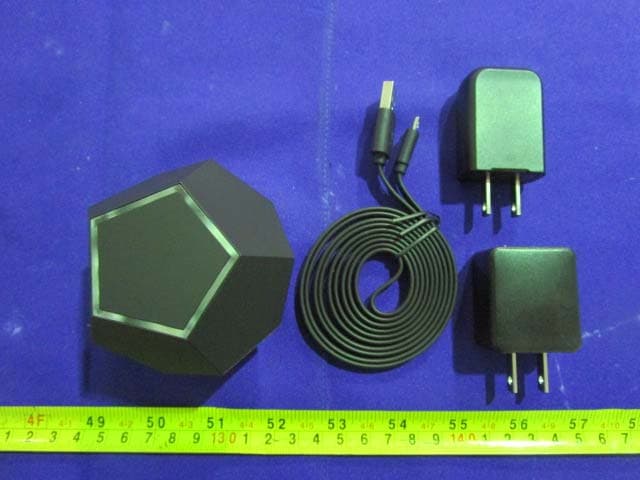
Click to zoom
Application Details
- Equipment Class
- DTS - Digital Transmission System
- Date of Grant
- Jan 02, 2016
- Application Purpose
- Original Equipment
- Date of Application
- Jan 02, 2016
- Equipment Note
- Smarter Hub
- Frequency Range
- 2405.00000000 - 2480.00000000
- Company
- NANOGRID LIMITED
- Country
- Hong Kong
Documents & Files
Document Text
Text extracted from the exhibit documents filed with the FCC. Open a document above to read the original.
Users Manual
LIVE SMARTER TABLE OF CONTENTS Package Content Specifications And Compliance Installation Additional Dimming Functionality Reboot And Factory Reset Joining Nanoleaf Ivy To Other Zigbee Hubs Seaching For A New Network Visual Indicators Troubleshooting Safety Warnings Recycle Your Nanoleaf Ivy Bulbs Manufacturer Contact Information 6 7 10 13 14 15 16 17 18 19 25 26 6 2x Nanoleaf Ivy LED Light Bulb (800 Lumens) Nanoleaf Hub Ethernet Cable USB Cable USB Adapter PACKAGE CONTENT 7 11 custom LEDs provide am- bient, omni-directional light printed circuit board body proprietary NL Bloom Controller chip E26/E27 standard Edison screw base *also available in b22 bayonet base. SPECIFICATIONS AND COMPLIANCE 69 mm 87 mm 108 mm 112 mm 8 RJ45 USB PowerDiscovery Button Reset Button Indicator Light 76 mm 64 mm80 mm 9 OPERATING VOLTAGE OPERATING TEMPERATURE LIGHT OUTPUT MAXIMUM POWER EFFICACY COLOR TEMPERATURE COLOR RENDERING INDEX ANSI FORM FACTOR LIFE-TIME 100-240V -20°C to 45°C 800 Lumens 7.5 Watts 114 Lumens per Watt 3000K (Warm White) 81 A19 30,000 Hours 10 INSTALLATION 1. Download the Nanoleaf Smarter App. 2. Turn the Nanoleaf Hub on by connecting to power with the USB cable ( takes up to 40 seconds to power up). Connect the Hub to your rout er using the Ethernet cable . 3. Pair your phone to the same rout er via WiFi – to ensure proper setup, your phone and hub should be connected to the same rout er. 11 4. Start the app and follow the setup guidelines. 5. You will see the Hub listed in the 'New Device List.’ 6. Turn on the Nanoleaf Ivy LED light bulb. 12 7. Press the Hub’s discovery button. The Hub’s lights should start as hing in a circular motion. The Hub will search for the Ivy for up to 2 minutes. 8. Ivy will pulse gently when searching f or the Hub, and will ash strongly to indicate a successful pairing. 9. You will see the Ivy listed in the 'Hub Accessory List.’ 13 ADDITIONAL DIMMING FUNCTIONALITY The Nanoleaf Ivy LED light bulb also has Nanoleaf Bloom functions, which means it is dim- mable without a dimmer switch. It can be dimmed using a standard on/off light switch. Dim* the Lights Using your Existing Light Switch *Nanoleaf Ivy LED light bulb is not compatible with a standard dimmer switch. **Quickly flick the switch within 0.5 seconds. 1. Turn Ivy on2. Turn Ivy off then on to begin dimming 3. Ivy will automatically begin to dim4. Turn Ivy off then on to lock in brightness 14 REBOOT AND FACTORY RESET 1. Make sure the Hub has been on for at least 1 minute. 2. Use a paper clip or eject tool to press the reset button once. 3. The Hub will be restored to factory settings within 10 seconds. 1. At any time while the light is on: turn the light OFF-ON quickly 8 times. Each repetition, make sure to let the light come back on but do not let the light stay on for more than 1 second. 2. When performed correctly, the light will start to flash indicating that it is resetting back to a factory condition. 1. Switch off the power for at least 5 seconds, then power it back on. 1. Switch off the power for at least 5 seconds, then power it back on. RESETREBOOT 15 JOINING NANOLEAF IVY TO OTHER ZIGBEE HUBS Nanoleaf Ivy uses Zigbee HA 1.2 to communicate with the hub, and can therefore connect to open third-party Zigbee HA 1.2 hubs, e.g. SmartThings, Wink, Almond+. The steps are typically: 1. Remove Nanoleaf Ivy from the Zigbee network by the Nanoleaf Hub. This is done by a factory reset of the Nanoleaf Ivy or through the iOS app, see separate instructions. 2. Open the Zigbee network of the third-party hub for joining, see the instructions you received with the third-party hub. 3. Nanoleaf Ivy should flash if successfully joined to the other Zigbee network, and appear in the associated app. It is possible to control the brightness of Nanoleaf Ivy like any other Zigbee connected light bulb. We do not guarantee this feature, since it depends on the hub supplier. For more informa- tion, check with the third-party hub supplier. 16 SEARC HING FOR A NEW NETWORK After performing a factory reset operation, the bulb will attempt to nd and join a new net- work. It will make three attempts to join on the commonly used Zigbee chann els (11, 14, 15, 19, 20, 24, 25), which will be followed by another three attempts on all Zigbee chann els (11 to 26). If a network could not be found and joined after the six attempts then the light bulb will stop searchin g and operate without wireless control. Another six attempts can be trig- gered right away by turnin g the bulb o for 5 seconds and back on. If no network is joined and the light bulb remains on for over 30 minutes, then it will no longer search for networks even if it is turned o and on. It will simply work like a regular light with no wireless control function. To ini tiate a search again, the bulb must be reset to factory settings. 17 VISUAL INDICATORS While searching for a joinable network, the LED bulb will pulse its brightness gently. Once it has joined a network, it will flash strongly five times. During rejoining, the LED bulb will pulse its brightness gently 3 times and upon successful rejoin will flash strongly 5 times. 18 TROUBLESHOOTING If the Nanoleaf Hub does not pair with your phone: · Ensure your phone and Hub are connected to the same Wifi. The Hub is only able to pair with your phone if the two devices are connected to the same router. Ensure no one has already paired. Internet control must be enabled using an Apple TV. If the Nanoleaf Hub’s lights do not flash after pressing the discovery button: · Reboot the Nanoleaf Hub using the instructions in the Reboot Section. If your Nanoleaf Ivy LED light bulb does not pair with the Hub: · Move the Nanoleaf Ivy LED light bulb closer to the Hub. · Remove obstacles in the path between the Nanoleaf Ivy LED light bulb and the controller (ie large appliances, mirrors, file cabinets). · Try to reboot the Ivy. · If does not work, factory reset Ivy. If your Nanoleaf Ivy LED light bulb was communicating with the Hub bef…
Text truncated - open the document above for the full version.
Cover Letter(s)
QA-FR-172-A FCC Confidential Authorization 2015-9-2 FEDERAL COMMUNICATIONS COMMISSIONS Authorization and Evaluation Division 7435 Oakland Mills Road Columbia, MD 21046 Subject: Confidentiality Request regarding application for certification of FCC ID: 2AEWY-NL14 In accordance with Sections 0.457 and 0.459 of the Commission’s Rules, NANOGRID LIMITED requests long-term confidential treatment of information accompanying this application as outlined below: • Block Diagram • Schematics • Operation Description As well as short-term confidential treatment of information accompanying this application as outlined below: • Internal Photos • User’s Manual • External Photos • Test Set-up Photos The above materials contain proprietary and confidential information not customarily released to the public. The public disclosure of these materials provides unjustified benefits to its competitors in the market. Sincerely, Signature: Print Name:Christian Yan Title: COO Tel: +86 13928802183 Add: ROOM 1405, 135 BONHAM STRAND TRADE CENTRE, 135 BONHAM STRAND, SHEUNG WAN, HONG KONG
External Photos
EXHIBIT B - EUT EXTERNAL PHOTOGRAPHS EUT— All View EUT— Top View EUT- Bottom View EUT- Side View EUT- Side View EUT— Port View EUT— Label View
ID Label/Location Info
EXHIBIT A - FCC ID LABELING AND LOCATION FCC ID Label Proposed FCC ID Label Location The label shown shall be permanently affixed at a conspicuous location on the device and be readily visible to the user at the time purchase (Labeling requirements per 2.925) Label Here
Internal Photos
EXHIBIT C - EUT INTERNAL PHOTOGRAPHS EUT- Uncover View EUT- Uncover View EUT- Uncover View EUT- Uncover View EUT- Main Board Top View EUT- Main Board Bottom View EUT- RF Board Top View EUT- RF Board Bottom View EUT- RF Chip View EUT- Antenna View Antenna EUT- Adapter1 View EUT- Adapter1 Label View EUT- Adapter2 View EUT- Adapter2 Label View
Test Report
Note: This test report is prepared for the customer shown above and for the device described herein. It may not be duplicated or used in part without prior written consent from Bay Area Compliance Laboratories Corp. (Dongguan). FCC PART 15.247 TEST REPORT For NANOGRID LIMITED ROOM 1405, 135 BONHAM STRAND TRADE CENTRE, 135 BONHAM STRAND, SHEUNG WAN, HONG KONG FCC ID: 2AEWY-NL14 Report Type: Original Report Product Type: Smarter Hub Test En gineer: Lion Xiao Re port Number: RDG150818050-00 Re port Date: 2015-10-29 Reviewed By: Sula Huang RF Leader Test Laboratory: Bay Area Compliance Laboratories Corp. (Dongguan) No.69 Pulongcun, Puxinhu Industrial Zone, Tangxia, Dongguan, Guangdong, China Tel: +86-769-86858888 Fax: +86-769-86858891 www.baclcorp.com.cn Bay Area Compliance Laboratories Corp. (Dongguan) Report No.: RDG150818050-00 FCC Part 15.247 Page 2 of 40 TABLE OF CONTENTS GENERAL INFORMATION ....................................................................................................................................... 4 PRODUCT DESCRIPTION FOR EQUIPMENT UNDER TEST (EUT) ..................................................................................... 4 OBJECTIVE ................................................................................................................................................................... 4 RELATED SUBMITTAL(S)/GRANT(S) ............................................................................................................................. 4 TEST METHODOLOGY .................................................................................................................................................. 4 TEST FACILITY ............................................................................................................................................................. 5 SYSTEM TEST CONFIGURATION .......................................................................................................................... 6 DESCRIPTION OF TEST CONFIGURATION ...................................................................................................................... 6 EQUIPMENT MODIFICATIONS ....................................................................................................................................... 6 EUT EXERCISE SOFTWARE .......................................................................................................................................... 6 SUPPORT CABLE LIST AND DETAILS ............................................................................................................................ 6 CONFIGURATION OF TEST SETUP ................................................................................................................................. 7 SUMMARY OF TEST RESULTS ............................................................................................................................... 8 FCC §15.247 (i) & §1.1307 & §2.1091- MAXIMUM PERMISSIBLE EXPOSURE (MPE) ......................................... 9 APPLICABLE STANDARD .............................................................................................................................................. 9 FCC §15.203 - ANTENNA REQUIREMENT ........................................................................................................... 10 APPLICABLE STANDARD ............................................................................................................................................ 10 ANTENNA CONNECTOR CONSTRUCTION .................................................................................................................... 10 FCC §15.207 (a) – AC LINE CONDUCTED EMISSIONS ..................................................................................... 11 APPLICABLE STANDARD ............................................................................................................................................ 11 MEASUREMENT UNCERTAINTY .................................................................................................................................. 11 EUT SETUP ................................................................................................................................................................ 11 EMI TEST RECEIVER SETUP ....................................................................................................................................... 12 TEST PROCEDURE ...................................................................................................................................................... 12 CORRECTED AMPLITUDE & MARGIN CALCULATION ................................................................................................. 12 TEST EQUIPMENT LIST AND DETAILS ......................................................................................................................... 13 TEST RESULTS SUMMARY .......................................................................................................................................... 13 TEST DATA ................................................................................................................................................................ 13 FCC §15.209, §15.205 & §15.247(d) - SPURIOUS EMISSIONS ............................................................................. 18 APPLICABLE STANDARD ............................................................................................................................................ 18 MEASUREMENT UNCERTAINTY .................................................................................................................................. 18 EUT SETUP ................................................................................................................................................................ 18 EMI TEST RECEIVER & SPECTRUM ANALYZER SETUP ........................…
Text truncated - open the document above for the full version.
Test Setup Photos
EXHIBIT D - TEST SETUP PHOTOGRAPHS Adapter 1 Conducted Emissions - Front View Conducted Emissions – Side View Adapter 2 Conducted Emissions - Front View Conducted Emissions – Side View Radiated Emission Below 1GHz -Front View Radiated Emission Above 1GHz -Front View
Contact Information
Applicant
Christian Yan
Test Firm
Bay Area Compliance Laboratories Corp. (Dongguan)John Chan
[email protected]86-769-86858888
Technical Specifications
| # | Rule Parts | Frequency Range | Power Output |
|---|---|---|---|
| 1 | 15C | 2.40 GHz - 2.48 GHz | 38.00 mW |
Other Applications from NANOGRID LIMITED
2AEWY-NL44
Aug 18, 2024Nanoleaf Sense+ Smart Button
Equipment Class
DTS - Digital Transmission System
2AEWY-NL06A
Jun 25, 2024Nanoleaf WIFI module
Equipment Class
DTS - Digital Transmission System
2AEWY-NL69
Aug 23, 2023Strip Light with Bluetooth, Thread and Wi-Fi
Equipment Class
DTS - Digital Transmission System
2AEWY-NL04A
Aug 14, 2022Nanoleaf BLE&Thread-Matter module
Equipment Class
DTS - Digital Transmission System
2AEWY-NL01A
Mar 01, 2021Nanoleaf Esseantials Module
Equipment Class
DXX - Part 15 Low Power Communication Device Transmitter