2AQ7B-IPC180Smart clock camera
Shenzhen Interthings Technology Co., Ltd.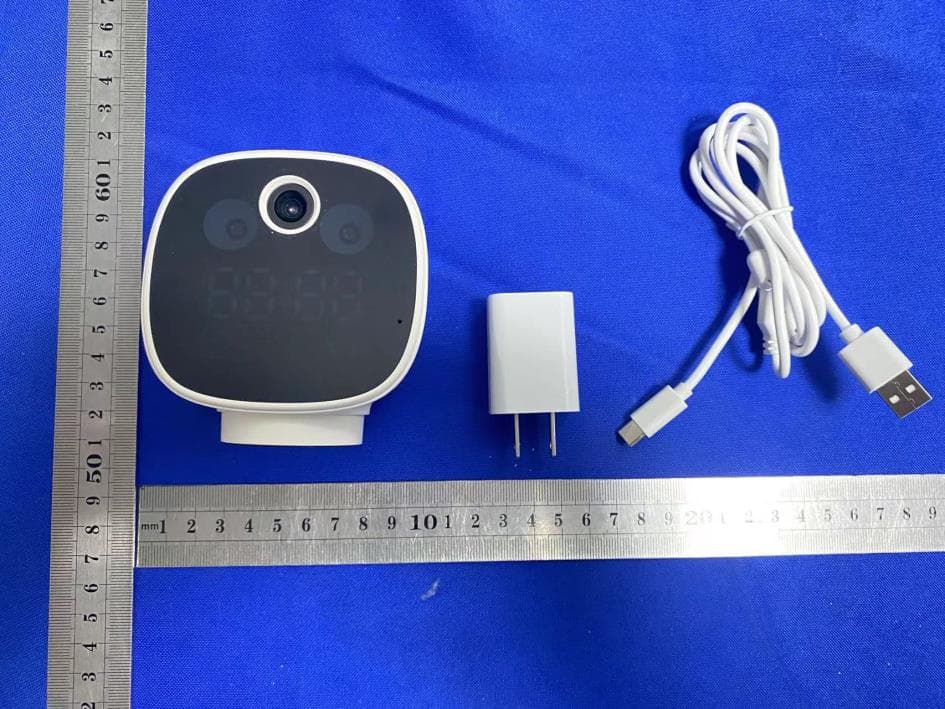
Click to zoom
Application Details
- Equipment Class
- DTS - Digital Transmission System
- Date of Grant
- Sep 26, 2023
- Application Purpose
- Original Equipment
- Date of Application
- Sep 26, 2023
- Equipment Note
- Smart clock camera
- Frequency Range
- 2412.00000000 - 2462.00000000
- Country
- China
Documents & Files
Document Text
Text extracted from the exhibit documents filed with the FCC. Open a document above to read the original.
Users Manual
Model: IPC180 Quick Start Guide Smart Clock Camera Package contents 1x Smart clock camera 1x Power adapter 1x Type-C charging and temperature cable 1x Reset pin *Note: micro SD card not included Description 1. Camera Lens 2. Screen ( Clock, Date, Wi-Fi Status, Time, Temperature, Day of the week) 3. Pedestal 4. Microphone (Talk to the Smartphone app holder) 5. Call-out button (One press to call-out to Smartphone app holder) 6. Reset button (Press and hold for 5 seconds with the Reset Pin to reset the camera.) 7. Micro SD card slot (Add 128GB or less microSD card to enable recording. Only supports microSD card with FAT32 format.)_ 8. Night lamp (to control by APP) 9. Speaker (Hear from the app) 10. Type-C power port (Input power: 5VDC, Max.1-1.5A) Installation 1.) Power the camera Use the supplied DC5V power adapter and power &temperature cable to power on the clock camera. The camera will be turned on automatically. 2.) App setup and installation Search for Tu y a S m a r t or SmartLife app in the App Store or Google Play Store. Download and install the app on your smart device. Set up the smart clock camera by using the app Check to be sure the camera is in pairing mode. The Wi-Fi icon on the camera display must be flashing rapidly to connect. If not already flashing, press and hold the Reset button until you hear an audible tone. Use the Tu y a S m a r t or SmartLife app to complete the set up. Ta p ‘ Add Device’ or the ‘ +’ sign, then select ‘Security camera & Video security’ and ‘Smart camera(Wi-Fi)’ then confirm. You will be prompted to enter your Wi-Fi network and password. Note: Be sure to connect to a 2.4GHz Wi-Fi network that covers your installation location. OR Main Features: 1 Back to app home page 2 Camera name 3 Camera settings 4 Current resolution (HD, SD) 5 Current temperature 6 Open to hear from the camera 7 Zoom in/ Zoom out 8 Thumbnails floating on the screen 9 Full screen of the live view 10 Ta k e a p h o t o ( p h o t o s c r e e n s h o t ) 11 Ta l k t o t h e c a m e r a 12 Ta k e a v i d e o ( v i d e o s c r e e n s h o t ) 13 Hide the menu 14 Area of available functions for clock (and other related features) 15 Message center ( motion/sound detection) 16 Direction (Monitor the direction of the camera, available for horizontal 355°) 17 Clock (Set up the clock function) 18 Features ( All available features of the camera) Smart Clock Camera Power Time Ringtone HD Message Direction Clock Features 1 2 3 4 5 6 7 8 9 10 11 12 13 14 15 16 17 18 Troubleshooting PROBLEM CORRECTIVE ACTION Camera will not connect to my Wi-Fi network Make sure the Wi-Fi signal is flashing. If the Wi-Fi signal is not flashing, you will need to press and hold Reset Button located at the back of the camera(see the Description section). Make sure the Wi-Fi network is a 2.4GHz network, device will not connect to a 5GHz network. Test your Wi-Fi network work with other devices such as your phone or computer to make sure it is operation properly. The Wi-Fi connection may be out of range during pairing. Use your phone to check range, it is recommended to have at least 2 signal bars showing for proper connection. Your Wi-Fi network password is case sensitive, make sure you are entering it correctly. The camera is off-line There could be a temporary issue with your internet connection (e.g., service disruption). Please try again in a few minutes. Make sure your Wi-Fi router is turned On. The camera may not have power to it, make sure the wall switch and breaker is in the On position. Make sure the camera is getting a good signal from your Wi-Fi router. Use your phone to check range, it is recommended to have at least 2 signal bars showing for proper connection. The camera may have been disconnected from your Wi-Fi network, press and hold Reset Button(see the Description section) until you hear an audible tone. Live video stream is slow to load Camera streaming issues may be caused by any of the following: Yo u r p h o n e’s cellular connection, which relies on mobile overage. Limited internet bandwidth at home, for example, other video streaming services running at the same time on your network can cause congestion slowing down the internet upload and download speeds. Wi-Fi reception may not be stable or work reliably if the camera’s Wi-Fi signal strength is less than 2 signal bars. Yo u m a y n e e d t o i n s t a l l a W i-Fi repeater or extender to boost the Wi-Fi signal. How to reset the camera to reenter pairing mode? Press and hold reset button located at the back of the camera (see Description section) until you hear an audible tone. The camera is not recording? Make sure Record Switch is turned On in APP, under SD Card Settings. This is located in Settings menu on the upper right corner in the control panel. Make sure that the microSD card is installed correctly. To confirm the camera is recognizing the microSD card, go to the SD card Settings in the Settings menu and make sure microSD Card capacity shows Total capacity, Used and Free space. If this does not appear you may consider reformatting the microSD card. WARNING: Reformatting microSD card will delete all videos stored on card. Please go through the troubleshooting section before doing so. How do I set the camera to Event or Continuous Recording? In the Settings menu under SD card settings make sure Record Switch is Turned ON and then select Event Recording or Continuous Recording. How do I check the available space on the SD card? In the Settings menu under SD settings, you will see Used Space and Free Space. Note: Camera only support 128GB or less microSD cards with FAT32 format. What happens when the microSD card reaches full capacity? On the microSD card reaches full capacity, new videos will start rewriting(deleting) over the oldest videos. Can I use a new microSD card if I do not want to record over existi ng videos? Ye s , y o u c a n u s e a n e w m i c r o S D card if you do not want…
Text truncated - open the document above for the full version.
Attestation Statements
(Shenzhen Interthings Technology Co., Ltd.) (September 25, 2023) Eurofins Electrical and Electronic Testing NA, Inc. 914 West Patapsco Avenue Baltimore, MD 21230 RE: Attestation Statements Part 2.911(d)(5)(i) request for (FCC ID: 2AQ7B-IPC180) [Shenzhen Interthings Technology Co., Ltd.] (“the applicant”) certifies that the equipment for which authorization is sought is not “covered” equipment prohibited from receiving an equipment authorization pursuant to section 2.903 of the FCC rules. Sincerely, (Applicant signature) (Applicant printed name) Rongli Sun (Shenzhen Interthings Technology Co., Ltd.) (September 25, 2023) Eurofins Electrical and Electronic Testing NA, Inc. 914 West Patapsco Avenue Baltimore, MD 21230 RE: Attestation Statements Part 2.911(d)(5)(ii) request for (FCC ID: 2AQ7B-IPC180) [Shenzhen Interthings Technology Co., Ltd.] (“the applicant”) certifies that, as of the date of the filing of the application, the applicant is not identified on the Covered List as an entity producing “covered” equipment. Sincerely, (Applicant signature) (Applicant printed name) Rongli Sun
Attestation Statements
Attestation Statements (September 25, 2023) TO: Federal Communications Commission Authorization and Evaluation Division 7435 Oakland Mills Road Columbia, MD 21046, USA RE: Attestation Statements Part 2.911(d)(7) request for (FCC ID: 2AQ7B-IPC180) (Shenzhen Interthings Technology Co., Ltd.), the undersigned, hereby authorize (MERKURY INNOVATIONS LLC) to act as our designated U.S. agent for service of process, (Shenzhen Interthings Technology Co., Ltd.) accepts to maintain an agent for no less than one year after the grantee has terminated all marketing and importation or the conclusion of any Commission-related proceeding involving the equipment. (MERKURY INNOVATIONS LLC) accepts the responsibility to act as designated U.S. agent for service of process, provides an agent for no less than one year after the grantee has terminated all marketing and importation or the conclusion of any Commission-related proceeding involving the equipment. Applicant Information: Company name: Shenzhen Interthings Technology Co., Ltd. Contact Name: Rongli Sun Address: 701, Building 1, Lechuanghui Building, No.1211 Guanguang Road, Longhua District, Shenzhen, China Telephone No: 13538214502 Email: [email protected] U.S. Agent Information: Company Name: MERKURY INNOVATIONS LLC Address: 39 Broadway Suite 1530 New York, NY 10006 United States Contact Name: Joan Blendowski Telephone No: (212) 840-8550 Email: [email protected] FRN: 0019755669 Applicant Signature: Agent Signature: Applicant printed name: Rongli Sun Agent printed name: Joan Blendowski
Cover Letter(s)
Shenzhen Interthings Technology Co., Ltd. Model Difference Data:September 25, 2023 Product description: Smart clock camera Model name: IPC180, GN-CW072-277, IPC180TF3 Trade Name: N/A FCC ID: 2AQ7B-IPC180 All the model are the same circuit and RF module, except model names . Regards Sincerely Client’s signature : Client’s name / title : Rongli Sun(Account Manager) Contact information / address:701, Building 1, Lechuanghui Building, No.1211 Guanguang Road, Longhua District, Shenzhen, China
Cover Letter(s)
Shenzhen Interthings Technology Co., Ltd. (September 25, 2023) Eurofins Electrical and Electronic Testing NA, Inc. 914 West Patapsco Avenue Baltimore, MD 21230 RE: CONFIDENTIALITY REQUEST FOR (Smart clock camera / IPC180, GN- CW072-277, IPC180TF3 / FCC ID: 2AQ7B-IPC180) To Whom It May Concern: This letter serves as an official request for confidentiality under sections 0.457 and 0.459 of CFR 47. We have requested that the Exhibits Long-Term Confidentiality Short-Term Confidentiality NOTE 2 ID Label/Location No No Attestation Statement No No External Photos No ☐ Block Diagram ☒ ☐ Schematics ☒ ☐ Test Report No No Test Setup Photos No ☐ User’s Manual ☐ NOTE 1 ☒ Internal Photos ☐ NOTE 1 ☒ Parts List / Tune Up ☐ ☐ RF Exposure Info No No Operational Description ☒ ☐ Cover Letter(s) No No SDR Software / Security Info ☐ No required to be submitted with this application be permanently withheld from public review. Above mentioned document contains detailed system and equipment description are considered as proprietary information in operation of the equipment. The public disclosure of above documents might be harmful to our company and would give competitor an unfair advantage in the market. Please contact me if there is any information you may need. Sincerely, Signature: Name: Rongli Sun Title: Account Manager
Cover Letter(s)
Shenzhen Interthings Technology Co., Ltd. (September 25, 2023) Eurofins Electrical and Electronic Testing NA, Inc. 914 West Patapsco Avenue Baltimore, MD 21230 RE: LETTER OF AGENT AUTHORIZATION To Whom It May Concern: We, the undersigned, hereby authorize (Shenzhen CTB Testing Technology Co., Ltd.) to act on our behalf in all matters relating to application for equipment authorization, including the signing of all documents relating to these matters. We also hereby certify that no party to the application authorized hereunder is subject to the denial of benefits, including FCC benefits, pursuant to Section 5301 of the Anti-Drug Abuse Act of 1988, 21 U.S.C.853(a). This agreement expires one year from the current date. Sincerely, Signature: Name: Rongli Sun Title: Account Manager
External Photos
External Photos
ID Label/Location Info
FCC ID LABEL: Label Location:
Internal Photos
Internal Photos ANT
RF Exposure Info
FCC §15.247 (i), §2.1091 – RF Exposure FCC ID: 2AQ7B-IPC180 Applied procedures / limit According to FCC §15.247(i) and §1.1307(b)(1), systems operating under the provisions of this section shall be operated in a manner that ensures that the public is not exposed to radio frequency energy level in excess of the Commission’s guidelines. Limits for Occupational / Controlled Exposure Frequency Range (MHz) Electric Field Strength (E) (V/m) Magnetic Field Strength (H) (A/m) Power Density (S) (mW/ cm 2 ) Averaging Time |E| 2 ,|H| 2 or S (minutes) 0.3-3.0 614 1.63 (100)* 6 3.0-30 1842 / f 4.89 / f (900 / f)* 6 30-300 61.4 0.163 1.0 6 300-1500 F/300 6 1500-100,000 5 6 Note: ƒ is frequency in MHz * = Power density limit is applicable at frequencies greater than 100 MHz Limits for General Population / Uncontrolled Exposure Frequency Range (MHz) Electric Field Strength (E) (V/m) Magnetic Field Strength (H) (A/m) Power Density (S) (mW/ cm 2 ) Averaging Time |E| 2 ,|H| 2 or S (minutes) 0.3-1.34 614 1.63 (100)* 30 1.34-30 824/f 2.19/f (180/f)* 30 30-300 27.5 0.073 0.2 30 300-1500 F/1500 30 1500-100,000 1.0 30 Note: f = frequency in MHz * = Plane-wave equivalent power density MPE PREDICTION Predication of MPE limit at a given distance, Equation from OET Bulletin 65, Edition 97-01 Where: S = power density P = power input to antenna G = power gain of the antenna in the direction of interest relative to an isotropic radiator R = distance to the center of radiation of the antenna,R=20cm Test Result of RF Exposure Evaluation Modes& Channel Freq. (MHz) Tune up Produce power Maximu m peak output power (dBm) Output power to antenna (mW) Antenna Gain (numeric) Power Density (S) (mW/ cm2) Limit (mW / cm2 ) Result 2.4G WIFI 802.11g &2412 15±1 16 39.8107 1.3521 (1.31dBi) 0.0107 1 Pass
Test Report
天线图档: 2 3 公司地址:深圳市宝安区福永镇重庆路新福工业园B5栋4楼 深圳顺达成科技有限公司
Test Report
Shenzhen CTB Testing Technology Co., Ltd. Report No.: CTB230914013RFX Report Tel: 4008-707-283Web: http://www.ctb-lab.net Page 1 of 54 TEST REPORT Compiled by: Reviewed by: Approved by: Zhou Kui Arron Liu Bin Mei / Director Note: If there is any objection to the inspection results in this report, please submit a written report to the company within 15 days from the date of receiving the report. The test report is effective only with both signature and specialized stamp. This result(s) shown in this report refer only to the sample(s) tested. Without written approval of Shenzhen CTB Testing Technology Co., Ltd. this report can’t be reproduced except in full. The tested sample(s) and the sample information are provided by the client. “*” indicates the testing items were fulfilled by subcontracted lab. “#” indicates the items are not in CNAS accreditation scope. Product Name: Smart clock camera FCC ID: 2AQ7B-IPC180 Trademark: N/A Model Number: IPC180, GN-CW072-277, IPC180TF3 Prepared For: Shenzhen Interthings Technology Co., Ltd. Address: 701, Building 1, Lechuanghui Building, No.1211 Guanguang Road, Longhua District, Shenzhen, China Manufacturer: Shenzhen Interthings Technology Co., Ltd. Address: 701, Building 1, Lechuanghui Building, No.1211 Guanguang Road, Longhua District, Shenzhen, China Prepared By: Shenzhen CTB Testing Technology Co., Ltd. Address: 1&2/F., Building A, No.26, Xinhe Road, Xinqiao, Xinqiao Street, Bao'an District, Shenzhen, Guangdong, China Sample Received Date: Sep. 01, 2023 Sample tested Date: Sep. 01, 2023 to Sep. 14, 2023 Issue Date: Sep. 14, 2023 Report No.: CTB230914013RFX Test Standards FCC Part15.247 ANSI C63.10:2013 Test Results PASS Remark: This is WIFI-2.4GHz band radio test report. Shenzhen CTB Testing Technology Co., Ltd. Report No.: CTB230914013RFX Report Tel: 4008-707-283 Web: http://www.ctb-lab.net Page 2 of 54 TABLE OF CONTENT Test Report Declaration Page 1. VERSION .......................................................................... 3 2. TEST SUMMARY ................................................................... 4 3. MEASUREMENT UNCERTAINTY ..................................................... 5 4. PRODUCT INFORMATION AND TEST SETUP .......................................... 6 4.1 Product Information .................................................................... 6 4.2 Test Setup Configuration ............................................................... 6 4.3 Support Equipment .................................................................... 6 4.4 Channel List .......................................................................... 7 4.5 Test Mode ............................................................................ 7 4.6 Test Environment ...................................................................... 7 5. TEST FACILITY AND TEST INSTRUMENT USED ....................................... 8 5.1 Test Facility ........................................................................... 8 5.2 Test Instrument Used .................................................................. 8 6. AC POWER LINE CONDUCTED EMISSION ............................................ 10 6.1 Block Diagram Of Test Setup .......................................................... 10 6.2 Limit ................................................................................ 10 6.3 Test procedure ....................................................................... 10 6.4 Test Result .......................................................................... 12 7. RADIATED SPURIOUS EMISSION ................................................... 14 7.1 Block Diagram Of Test Setup .......................................................... 14 7.2 Limit ................................................................................ 14 7.3 Test procedure ....................................................................... 15 7.4 Test Result .......................................................................... 16 8. BAND EDGE AND RF COUNDUCTED SPURIOUS EMISSIONS .......................... 33 8.1 Block Diagram Of Test Setup .......................................................... 33 8.2 Limit ................................................................................ 33 8.3 Test procedure ....................................................................... 33 8.4 Test Result .......................................................................... 34 9. COUDUCTED OUTPUT POWER ..................................................... 40 9.1 Block Diagram Of Test Setup .......................................................... 40 9.2 Limit ................................................................................ 40 9.3 Test procedure ....................................................................... 40 9.4 Test Result .......................................................................... 41 10. 6DB OCCUPIED BANDWIDTH ....................................................... 42 10.1 Block Diagram Of Test Setup ......................................................... 42 10.2 Limit ............................................................................... 42 10.3 Test procedure ...................................................................... 42 10.4 Test Result ......................................................................... 43 11. POWER SPECTRAL DENSITY ...................................................... 47 11.1 Block Diagram Of Test Setup ......................................................... 47 11.2 Limit ............................................................................... 47 11.3 Test procedure ...................................................................... 47 11.4 Test Result ......................................................................... 48 12. ANTENNA REQUIREMENT ......................................................... 52 13. EUT TEST SETUP PHOTOGRAPHS .........................…
Text truncated - open the document above for the full version.
Test Setup Photos
Radiated Emission Below 1G Above 1G Conducted emissions
Contact Information
Applicant
Rongli Sun(Account Manager)
Technical Contact
Shenzhen Interthings Technology Co., Ltd.Rongli Sun
[email protected]13538214502
701, Building 1, Lechuanghui Building, · Shenzhen, · China
Test Firm
Shenzhen CTB Testing Technology Co., Ltd.Rita Xiao
[email protected]86-13538218145
Technical Specifications
| # | Rule Parts | Frequency Range | Power Output |
|---|---|---|---|
| 1 | 15C | 2.41 GHz - 2.46 GHz | 33.75 mW |
Other Applications from Shenzhen Interthings Technology Co., Ltd.

2AQ7B-PF326
Aug 20, 2026Digital Frame
Equipment Class
DTS - Digital Transmission System
2AQ7B-IPC236
Aug 13, 2026Smart Two Way Security Camera
Equipment Class
NII - Unlicensed National Information Infrastructure TX2AQ7B-IPB217
Aug 03, 2026Smart Doorbell
Equipment Class
DTS - Digital Transmission System
2AQ7B-IPB239
Jul 31, 2026Smart Video Doorbell
Equipment Class
DTS - Digital Transmission System
2AQ7B-IPC267
Jul 30, 2026Smart PTZ Camera
Equipment Class
DTS - Digital Transmission System