AAO4300124C900MHz Wireless Intercom
RadioShack Corporation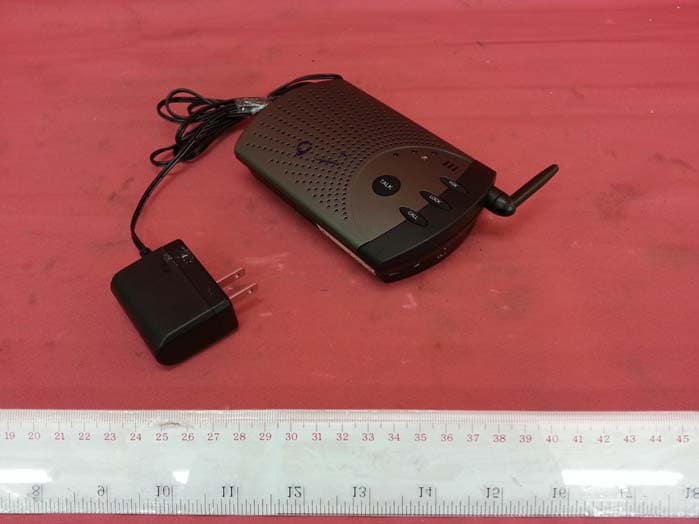
Click to zoom
Application Details
- Equipment Class
- DXT - Part 15 Low Power Transceiver, Rx Verified
- Date of Grant
- May 02, 2013
- Application Purpose
- Original Equipment
- Date of Application
- May 02, 2013
- Equipment Note
- 900MHz Wireless Intercom
- Frequency Range
- 910.00000000 - 913.00000000
- Company
- RadioShack Corporation
- Country
- United States
Documents & Files
Document Text
Text extracted from the exhibit documents filed with the FCC. Open a document above to read the original.
Users Manual
4300124 User’s Guide 23456 2 Set the Channel and Sub Tone To change channel and sub tone settings, use a pointed object to set the SUB TONE and CH switches inside the battery compartment. Your intercoms have four channels to set the radio frequencies used to communicate with each other. They also have eight sub tone settings to help eliminate interference. Your intercoms must be set to the same channel and sub tone for them to communicate with each other. 1. Set each intercom to channel 1, 2, 3, or 4 as shown. 2. Set each intercom to sub tone 1–8 as shown. n Note: • If you want all the intercoms to communicate with each other, set them to the same channel and sub tone. Thank you for purchasing your Voice-Activated Wireless Intercoms from RadioShack. Please read this user’s guide before installing, setting up, and using your new intercoms. Package Contents • Wireless Intercom (2) • AC Adapter (2) • User’s Guide Features • Selectable VOX mode for hands-free communication. • Lockable talk button turns an intercom into a baby monitor. • Expandable by purchasing additional intercoms. • Can transmit up to 200 feet line of sight. 1 Power Your Intercoms (two options) AC power: Using the supplied AC adapter, connect the intercom’s DC 9V jack to a wall outlet. Battery power: 1. Slide to open the battery compartment cover. 2. Set the RECHARGE ON/OFF switch in the compartment to ON for rechargeable batteries or OFF for alkaline batteries. If you use rechargeable batteries, the intercom will automatically recharge them whenever the AC adapter is plugged in and the RECHARGE switch is set to ON. 3. Insert four AA batteries (not included) matching the polarity symbols (+ and –) marked inside the battery compartment. w Warning: Never install alkaline batteries with the RECHARGE switch set to ON. Alkaline batteries can get hot or explode if you try to recharge them. Battery Notes: • We recommend AA 1.2V/2500mAh NiMH rechargeable batteries, available from RadioShack. • Dispose of batteries promptly and properly. Do not burn or bury them. • Use only fresh batteries of the required size and type. • Do not mix old and new batteries, different types of batteries (standard, alkaline, or rechargeable), or rechargeable batteries of different capacities. • If you do not plan to use the intercoms for a long time, remove the batteries. Batteries can leak chemicals that can damage electronic parts. • If you want one intercom to communicate only with one other intercom, set only those two intercoms to the same channel and sub tone. • If you receive occasional interference falsely triggering your intercom, you can set each intercom to a different sub tone. However, if there is frequent interference that affects the conversation or audio quality, set your intercoms to a different channel. 3 Use Your Intercoms To turn on an intercom, rotate VOLUME to the maximum volume direction until it clicks. Then adjust VOLUME to a comfortable listening level. Call another intercom: 1. Press CALL once. The TRANSMIT indicator lights. Each intercom that is turned on and set to the same channel and sub tone beeps for about three seconds. 2. Press and hold TALK and speak in a normal voice after you hear the beep. When you finish speaking, release TALK and listen for the response. Monitor an intercom: You can set any intercom so it continuously transmits sounds from the area where it is located to another intercom. You can only monitor one intercom at a time. 1. Press LOCK on the intercom in the area you want to monitor. The TRANSMIT indicator flashes. 2. When you finish monitoring, release the lock by pressing TALK on the intercom in the area you are monitoring. TRANSMIT turns off. Sub tone Channel Voice-Activated Wireless Intercoms LOCK Press to monitor continuously. CALL Press to sound a tone (or call) on another intercom for about three seconds. VOX • Press for hands-free communication. • Press to set the sensitivity level from low, medium, to high. VOLUME (On/Off) RECEIVE BUSY Indicator • Lights when you receive a voice message or when you monitor a locked intercom. • Flashes when the selected “frequency” channel is in use. TALK Press and hold and speak into the microphone; release to listen. VOX Level Indicator Microphone CH (Channel) SUB TONE RECHARGE ON/OFF 4300124C_UG_EN_032713.indd 1-63/27/2013 5:46:06 PM 789101112 alert out jack. Follow the instructions in the owner’s manual for your weather radio to create a weather alert. • If you use the AUX broadcasting feature and the weather radio input at the same time, you MUST connect the weather radio alarm’s output to the unit that is transmitting the AUX input audio. Do not connect the weather radio inputs to a unit that is receiving the broadcast. • Always connect the weather radio’s alarm output to the intercom you most frequently use to broadcast. • If you connect an intercom to both a weather radio and another audio source and both sources are active, the intercom always sounds the weather alert first. • The intercom’s weather alarm will only shut off after the weather radio alerts expire or after you manually stop the weather radio alert. To avoid disturbing neighbors or pets if you are away from the weather radio, turn off the intercom or lower the volume before leaving. Specifications Channel Selectivity ± 500KHz .............................................................50 dB Squelch Threshold ...................................................................20 dB SINAD S/N at 1mV input, ± 38KHz deviation (A-weight) (@ROP) ................50 dB 10% THD Output Power ..................................................................500 mW RX Current Drain at Reference Output ...........................................140 mA MIC Input Sensitivity (@38 kHz Deviation) ...........................................3 mV AUX Input Sensitivity (@38 kHz Deviation) ........................................90 mV Sub tone Deviation .........................................................…
Text truncated - open the document above for the full version.
External Photos
INTERTEK TESTING SERVICE Report No.: HK13020527-1 FCC ID: AAO4300124C Equipment Photographs Model: 4300124 (External) INTERTEK TESTING SERVICE Report No.: HK13020527-1 FCC ID: AAO4300124C Equipment Photographs Model: 4300124 (External)
Internal Photos
INTERTEK TESTING SERVICE Report No.: HK13020527-1 FCC ID: AAO4300124C Equipment Photographs Model : 4300124 (Internal) INTERTEK TESTING SERVICE Report No.: HK13020527-1 FCC ID: AAO4300124C Equipment Photographs Model : 4300124 (Internal) INTERTEK TESTING SERVICE Report No.: HK13020527-1 FCC ID: AAO4300124C Equipment Photographs Model : 4300124 (Internal)
RF Exposure Info
Analysis Report Report No.: 13020527HKG-001 FCC ID: AAO4300124C The equipment under test (EUT) is an intercom operating at 910 – 913MHz. The EUT is powered by 6.0VDC (4X "AA" size rechargeable batteries or AC/DC adaptor). The EUT will transmit RF signal to the corresponding receiver portion and the user can tale to each other with same channel selection. Antenna Type: Internal integral antenna Antenna Gain: 0dBi Nominal rated field strength: 90.1dBμV/m at 3m Allowed field strength of production tolerance: ±3 dB Maximum allowed field strength of production: 93.1dBuV/m @ 3m (-4.3dBm) According to the KDB 447498: Based on the Maximum allowed field strength of production was 93.1dBμV/m at 3m in frequency 913MHz, thus; The EIRP = [(FS*D) ^2*1000 / 30] = 0.613mW Conducted Power = Radiated Power (EIRP) – Antenna Gain; So, Conducted Power = 0.613mW Threshold = 3.0 * (min. test separation distance, mm)/ SQRT(f in GHz) = 3.0 * ( 5 / SQRT(0.913) ) = 15.7mW Since the above maximum output power is well below the SAR low threshold level, so the EUT is considered to comply with SAR requirement without testing.
Test Report
Issuing Laboratory: Intertek Testing Services Hong Kong Limited Hong Kong Accreditation Service (HKAS) has accredited this laboratory under the Hong Kong Laboratory Accreditation Scheme (HOKLAS) for specific laboratory activities as listed in the HOKLAS directory of accredited laboratories. The results shown in this report were determined by this laboratory in accordance with its terms of accreditation. Report No.: 13020527HKG-001 i FCC ID: AAO4300124C Intertek Testing Services Hong Kong Ltd. 2/F., Garment Centre, 576 Castle Peak Road, Kowloon, Hong Kong. Tel: (852) 2173 8888 Fax: (852) 2785 5487 Website: www.hk.intertek-etlsemko.com GENERAL INFORMATION RadioShack Corporation BRAND NAME: RadioShack, MODEL: 4300124 FCC ID: AAO4300124C Grantee: RadioShack Corporation Grantee Address: 300 RadioShack Circle, Mail Stop WF4-136, Fort Worth, Texas, 76102-2802, USA. Contact Person: Pat Loehr Tel: 817-415-6221 Fax: 817-415-9247 Manufacturer: Jebsee Electronics Co., Ltd. Manufacturer Address: 24-3, Sin Le Road Tainan City, Taiwan Brand Name: RadioShack Model: 4300124 Type of EUT: Transceiver Description of EUT: 900MHz Wireless Intercom Serial Number: N/A Remark: sku version C version FCC ID / IC: AAO4300124C Date of Sample Submitted: February 20, 2013 Date of Test: March 19, 2013 Report No.: 13020527HKG-001 Report Date: April 24, 2013 Environmental Conditions: Temperature: +10 to 40°C Humidity: 10 to 90% Issuing Laboratory: Intertek Testing Services Hong Kong Limited Hong Kong Accreditation Service (HKAS) has accredited this laboratory under the Hong Kong Laboratory Accreditation Scheme (HOKLAS) for specific laboratory activities as listed in the HOKLAS directory of accredited laboratories. The results shown in this report were determined by this laboratory in accordance with its terms of accreditation. Report No.: 13020527HKG-001 ii FCC ID: AAO4300124C Intertek Testing Services Hong Kong Ltd. 2/F., Garment Centre, 576 Castle Peak Road, Kowloon, Hong Kong. Tel: (852) 2173 8888 Fax: (852) 2785 5487 Website: www.hk.intertek-etlsemko.com SUMMARY OF TEST RESULT RadioShack Corporation BRAND NAME: RadioShack, MODEL: 4300124 FCC ID: AAO4300124C TEST SPECIFICATION REFERENCE RESULTS Transmitter Power Line Conducted Emissions 15.207 Pass Transmitter Field Strength and Bandwidth Requirement 15.249 Pass The equipment under test is found to be complying with the following standards: FCC Part 15, October 1, 2011 Edition Note: 1. The EUT uses a permanently attached antenna which, in accordance to section 15.203, is considered sufficient to comply with the pervisions of this section. 2. Pursuant to FCC part 15 Section 15.215(c), the 20 dB bandwidth of the emission was contained within the frequency band designated (mentioned as above) which the EUT operated. The effects, if any, from frequency sweeping, frequency hopping, other modulation techniques and frequency stability over excepted variations in temperature and supply voltage were considered. Issuing Laboratory: Intertek Testing Services Hong Kong Limited Hong Kong Accreditation Service (HKAS) has accredited this laboratory under the Hong Kong Laboratory Accreditation Scheme (HOKLAS) for specific laboratory activities as listed in the HOKLAS directory of accredited laboratories. The results shown in this report were determined by this laboratory in accordance with its terms of accreditation. Report No.: 13020527HKG-001 iii FCC ID: AAO4300124C Intertek Testing Services Hong Kong Ltd. 2/F., Garment Centre, 576 Castle Peak Road, Kowloon, Hong Kong. Tel: (852) 2173 8888 Fax: (852) 2785 5487 Website: www.hk.intertek-etlsemko.com Table of Contents 1.0 General Description....................................................................................... 1 1.1 Product Description ...................................................................................... 1 1.2 Related Submittal(s) Grants .......................................................................... 1 1.3 Test Methodology ......................................................................................... 1 1.4 Test Facility .................................................................................................. 1 2.0 System Test Configuration ............................................................................ 2 2.1 Justification................................................................................................... 2 2.2 EUT Exercising Software .............................................................................. 2 2.3 Special Accessories...................................................................................... 2 2.4 Equipment Modification................................................................................. 2 2.5 Measurement Uncertainty ............................................................................. 2 2.6 Support Equipment List and Description........................................................ 3 3.0 Emission Results........................................................................................... 4 3.1 Field Strength Calculation ............................................................................. 4 3.2 Radiated Emission Configuration Photograph ............................................... 5 3.3 Radiated Emission Data ............................................................................... 5 3.4 Conducted Emission Configuration Photograph ............................................ 5 3.5 Conducted Emission Data............................................................................. 5 4.0 Equipment Photographs ................................................................................ 8 5.0 Product Labelling........................................................................................... 8 6.0 Technical Specifications ................................................................................ 8 7.0 Instruction Manual ...................................…
Text truncated - open the document above for the full version.
Test Setup Photos
INTERTEK TESTING SERVICE Report No: HK13030527-1 FCC ID: AAO4300124C Configuration Photographs Worst-Case Radiated Emissions (Front View) Model : 4300124 INTERTEK TESTING SERVICE Report No: HK13030527-1 FCC ID: AAO4300124C Configuration Photographs Worst-Case Radiated Emissions (Back View) Model : 4300124
Test Setup Photos
INTERTEK TESTING SERVICE Report No: HK13030527-1 FCC ID: AAO4300124C i Configuration Photographs Worst-Case Line-Conducted Emissions (Front View) Model : 4300124 INTERTEK TESTING SERVICE Report No: HK13030527-1 FCC ID: AAO4300124C ii Configuration Photographs Worst-Case Line-Conducted Emissions (Back View) Model : 4300124 INTERTEK TESTING SERVICE Report No: HK13030527-1 FCC ID: AAO4300124C iii Configuration Photographs Worst-Case Line-Conducted Emissions (Side View) Model : 4300124
Contact Information
Applicant
Elizabeth Granados(Regulatory Affairs Manager)
Technical Contact
Intertek Testing Services Hong Kong Ltd.Terry Chan
[email protected](852)21738503
2/F., Garment Centre, · Kowloon · Hong Kong
Non-Technical Contact
Intertek Testing Services Hong Kong Ltd.Terry Chan
[email protected](852)21738503
Test Firm
Intertek Testing Services Hong Kong Ltd.Billy Chow
Technical Specifications
| # | Rule Parts | Frequency Range | Power Output |
|---|---|---|---|
| 1 | 15C | 910 MHz - 913 MHz | - |
Other Applications from RadioShack Corporation
AAO2302500
Feb 10, 2015Bluetooth Power Bank
Equipment Class
DXX - Part 15 Low Power Communication Device Transmitter
AAO1200876
Nov 30, 2011Universal FM Transmitter
Equipment Class
DXX - Part 15 Low Power Communication Device Transmitter
AAO1200962
Aug 02, 2011Universal FM Transmitter
Equipment Class
DXX - Part 15 Low Power Communication Device Transmitter
AAO1500044T
Apr 02, 20112.4GHz Digital Wireless Rear Speaker Kit - Transmitter
Equipment Class
DSS - Part 15 Spread Spectrum Transmitter
AAO1200769
Aug 19, 2010FM Transmitter/Charger for iPod or iPhone
Equipment Class
DXX - Part 15 Low Power Communication Device Transmitter