AL8-995USB02.Audio 995USB-02
HP Inc.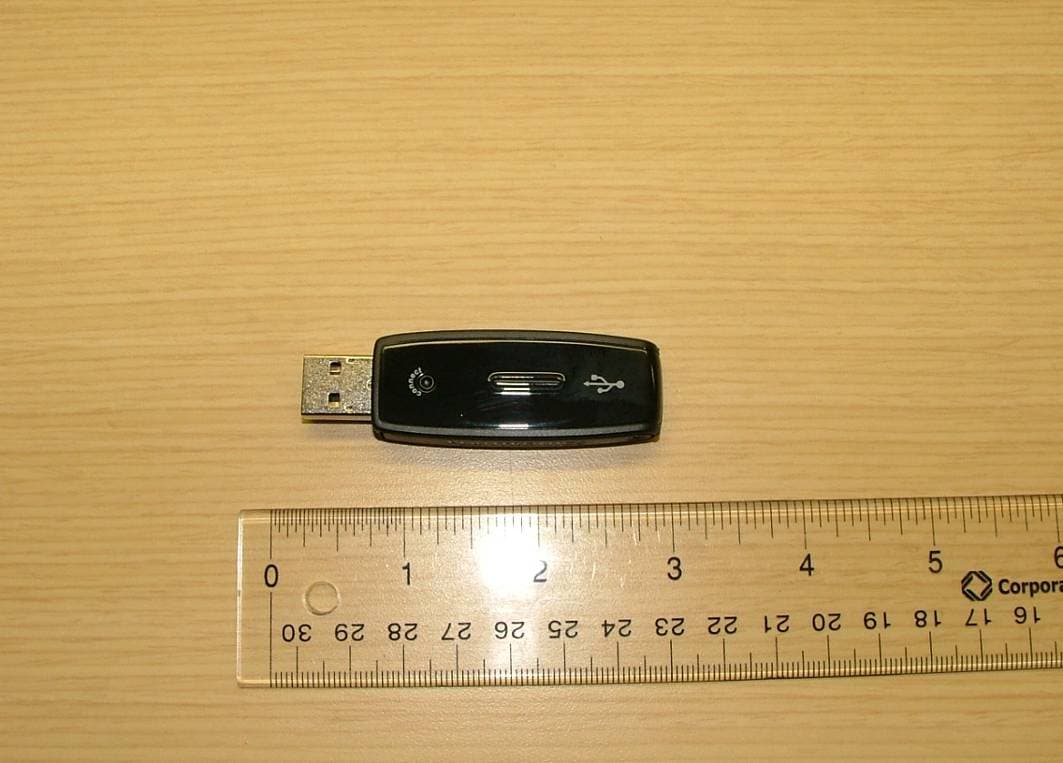
Click to zoom
Application Details
- Equipment Class
- DTS - Digital Transmission System
- Date of Grant
- Dec 12, 2012
- Application Purpose
- Original Equipment
- Date of Application
- Dec 12, 2012
- Equipment Note
- .Audio 995USB-02
- Frequency Range
- 2401.35000000 - 2479.35000000
- Company
- HP Inc.
- Country
- United States
Documents & Files
Document Text
Text extracted from the exhibit documents filed with the FCC. Open a document above to read the original.
Users Manual
Plantronics .Audio ™ 995 User Guide ii Welcome Congratulations on purchasing your new Plantronics .Audio ™ 995. This User Guide contains instructions for setting up and using the .Audio 995. Please refer to the separate For Your Safety guide for important product safety and charging information prior to installation or use. Getting Assistance The Plantronics Technical Assistance Center is ready to assist you. You can find answers to frequently asked questions, ask a question using e-mail, receive service over the Internet, or speak directly with a representative. Call (800) 544-4660 or visit www.plantronics.com/support Registering Your Product Visit www.plantronics.com/product registration to register your product online so we can provide you with the best service and technical support. iii EN Contents Range ...............................................................................................iv Package Contents and Features ......................................................1 Charging Your Headset Using the USB Charger ..............................2 Using Your Headset ..........................................................................3 Pairing Your Headset ........................................................................4 How to Manually Pair Your Headset and Adapter ...................4 Headset Controls..............................................................................5 Operating Systerms Configuration ...................................................6 Indicator Lights .................................................................................8 Product Specifications .....................................................................9 Troubleshooting .............................................................................10 Regulatory Notices .........................................................................12 Limited Warranty ............................................................................14 iv Important Note on Wireless Range The .Audio 995 headset has a wireless range of up to 40 feet. However, wireless performance may be affected by nearby objects including walls, metal items, and other wireless devices. When you move the headset to the edge of its wireless range, audio may become distorted and will eventually cut out. Move closer to the wireless adapter to restore clear audio. 1 EN Package Contents and Features Volume Up Status Lights Play/Pause Microphone Volume Down Track Skip Forward/ Fast Forward Power On/Off Status Lights Connect/Pair Wireless Adapter Mute Microphone 2 Charging Your Headset Using the USB Charger Before using your headset for the first time, charge it for at least one hour. A full charge takes approximately three hours. 1 Connect the charger cable to the headset. 2 Plug the charger into the USB port on your computer. While your headset is charging the indicator glows red. When your headset is fully charged, the indicator turns off. Note Charging time depends on the amount of power your USB device provides. CHARgINg TIMe 3-4 hours ................ Full charge 1 hour ..................... Minimum charge before first use 3 EN Using Your Headset Congratulations, you can now listen to your favorite music or talk with friends and family using your new wireless headset. Using Your Headset 1 Make sure that your headset is fully charged. When fully charged, the red status light turns off. Do not use your headset while it is connected to the charger. 2 Connect the wireless adapter to a USB port on your computer. Your computer and USB hub (if using) should be turned on. 3 After removing your headset from the charger, press the Power button to turn the headset on. The headset and the adapter should connect immediately, and the indicator lights on both headset and wireless adapter will be solid blue. If you cannot hear anything through your headset, try adjusting the volume up or restarting the media application. Note If steps 1 through 3 do not work, refer to “Pairing Your Headset” on page 4 to manually pair your headset and adapter. 4 Pairing Your Headset How to Manually Pair Your Headset and Adapter Your headset and adapter are factory pre-paired, and should automatically connect with each other. Should your headset and adapter become unpaired, you can initiate pairing manually: 1 Press and hold the Power and Connect buttons on the headset and adapter for 4 seconds. The status lights on the headset and adapter will rapidly flash blue. 2 The headset and adapter will automatically attempt to pair. If the pairing is successful the status lights will glow solid blue; if unsuccessful, both headset and adapter will stay in pairing mode. If manual pairing was unsuccessful, and you want to re-attempt the pairing process, you must first take your headset and adapter out of pairing mode. 3 Turn headset off 4 Single press the Connect/Pair button on the adapter, then repeat steps 1 and 2. Note If your headset and adapter are separated and lose their connection after being successfully paired, they will automatically reconnect when they come back into range of each other. If they remain out of range for more than 30 seconds, the headset will go into sleep mode, but will reconnect automatically with the adapter once it is back in range. If the headset is out of range for more than 15 minutes, it automatically shuts off. 5 EN Headset Controls Adjust volume Increase: Press + Decrease: Press - Minimum volume: Continually press - Mute speakers: Press WARNING Do not use headsets at high volumes for an extended period of time. Doing so can cause hearing loss. Always listen at moderate levels. See www. plantronics.com/healthandsafety for more information on headsets and hearing. Muting the microphone Mute: Lift the boom to full stop. Unmute: Lower the boom. CAUtIoN Do not force the boom past its upper or lower limits. Music controls Press to Play or Pause/Mute music. Press to skip track forward. Press and hold to fast f…
Text truncated - open the document above for the full version.
Attestation Statements
plantronics.com 345 Encinal St., Santa Cruz CA 95060 United States +1‐831‐426‐5858 December 10, 2012 FCC Authorization and Evaluation Division 7435 Oakland Mills Road Columbia, MD 21046 RE: FCC ID: AL8‐995USB02 To whom it may concern, We, the undersigned, hereby attest that a Declaration of Conformity, based on the testing from a FCC recognized accredited testing laboratory, will be made prior to marketing the device. Sincerely, Peter Clark Compliance Manager
Cover Letter(s)
WTD 12.7.3 FCC Compliance Opinion PLAN0005 Information about the Applicant Grantee (Company Name) Plantronics Inc. FCC Contact Person Peter Clark Address 345 Encinal St. City, State, Zip Santa Cruz, CA 95060 Job Number PLNT0005 Model .Audio 995USB‐02 FCC ID AL8-995USB02 Agent None Approval Type Original Equipment Class DTS Digital Transmission System Rule Part 15.247 Overview Plantronics Inc. is submitting this application for the certification of their Model .Audio 995USB‐ 02 transmitter, FCC ID: AL8‐995USB02. It is a wireless USB dongle that operates in the 2.4 GHz band and is seeking authorization under FCC 15.247 as a DTS device. The radio utilizes printed antennas that are not user accessible. This configuration satisfies the requirements of 47 CFR 15.203. Confidentiality requested for allowed files. Request is properly addressed and referenced. Short term confidentiality requested for external photos, internal photos, Test Setup photos and user manual. Recommendation All items have been resolved and completed to my satisfaction; therefore I recommend this application for approval. Signature Dean Ghizzone, TCB Committee 08-DEC-2012
Cover Letter(s)
plantronics.com 345 Encinal St., Santa Cruz CA 95060 United States +1‐831‐426‐5858 August 15, 2012 Dear Application Examiner: Plantronics Inc is submitting this application for the certification of their Model .Audio 995USB‐ 02 transmitter, FCC ID: AL8‐995USB02. It is a wireless USB dongle that operates in the 2.4 GHz band and is seeking authorization under FCC 15.247 as a DTS device. The radio utilizes printed antennas that are not user accessible. This configuration satisfies the requirements of 47 CFR 15.203. Your efforts in reviewing this application are greatly appreciated. Best regards, Peter Clark Compliance Manager
Cover Letter(s)
plantronics.com 345 Encinal St., Santa Cruz CA 95060 United States +1‐831‐426‐5858 August 15, 2012 Federal Communications Commission 7435 Oakland Mills Road Columbia MD 21046 Subject: Request for Long Term Confidentiality FCC ID: AL8‐995USB02 To Whom It May Concern: Pursuant to Public Notice DA 04‐1705 of the Commission’s policy, in order to comply with the marketing regulations in 47 CFR §2.803 and the importation rules in 47 CFR §2.1204, while ensuring that business sensitive information remains confidential until the actual marketing of newly authorized devices. We are requesting the commission to grant short‐term confidentiality request on the following attachments until February 1, 2013. External Photos Internal Photos Test Setup Photos User Manual It is our understanding that all measurement test reports, FCC ID label format and correspondent during certification review process cannot be granted as confidential documents and those information will be available for public review once the grant of equipment authorization is issued. Sincerely, Peter Clark Compliance Engineering Manager
Cover Letter(s)
plantronics.com 345 Encinal St., Santa Cruz CA 95060 United States +1‐831‐426‐5858 November 16, 2012 Federal Communications Commission 7435 Oakland Mills Road Columbia MD 21046 Subject: Request for Long Term Confidentiality FCC ID: AL8‐995USB02 To Whom It May Concern: Pursuant to the provisions of Sections 0.457 and 0.459 of the Commission’s rules (47 CFR §§ 0.457, 0.459), we are requesting the Commission to withhold the following attachments as confidential document from public disclosure indefinitely. Schematic Diagram Block Diagram Theory of Operation Above mentioned document contains detailed system and equipment description are considered as proprietary information in operation of the equipment. The public disclosure of above documents might be harmful to our company and would give competitor an unfair advantage in the market. Sincerely, Peter Clark Compliance Engineering Manager
External Photos
External Photos for AL8-995USB02 TOP BOTTOM LEFT RIGHT FRONT BACK
ID Label/Location Info
FCC Label and Location for AL8-995USB02
Internal Photos
Internal Photos for AL8-995USB02 TOP BOTTOM
RF Exposure Info
RF Exposure Requirements for FCC ID: AL8-995USB02 Requirements: §1.1307(b)(1) and §1.1307(b)(2): Systems operating under the provisions of this section shall be operated in a manner that ensures that the public is not exposed to radio frequency energy levels in excess of the Commission’s Guidelines. Limits: §1.1310: As specified in this section, the Maximum Permissible Exposure (MPE) Limit shall be used to evaluate the environmental impact to human exposure to radiofrequency (RF) radiation as specified in Sec 1.1307(b), except in the case of portable devices which shall be evaluated according to the provisions of Sec. 2.1093 of this Chapter. Limit for Uncontrolled exposure: 1 mW/cm 2 or 10 W/m 2 MPE Calculation: Equation from page 18 of OET 65, Edition 97-01 S = PG /( 4R 2 ) where, S = Power Density (W/m 2 ) P = Power Input to antenna ( 0.003Watts) G = Antenna Gain, in numeric ( 4 dBi; 2.511 numeric) R = distance to the center of radiation of the antenna (0.2 m) S = 0.003W*2.511 / (4*3.14*(0.2m) 2 ) = 0.014 W/m 2 EUT complies with 20cm distance exposure.
Test Report
Plantronics .Audio995USB-02 FCC ID: AL8-995USB02 Report #: PLNT0005 Report Prepared By Northwest EMC Inc. NORTHWEST EMC – (888) 364-2378 – www.nwemc.com California – Minnesota – Oregon – New York – Washington WTD 12.5.23 CERTIFICATE OF TEST Last Date of Test: July 06, 2012 Plantronics Model: .Audio995USB-02, FCC ID: AL8-995USB02 Emissions Test Description Specification Test Method Pass/Fail Occupied Bandwidth FCC 15.247:2012 ANSI C63.10:2009 Pass Output Power FCC 15.247:2012 ANSI C63.10:2009 Pass Band Edge Compliance FCC 15.247:2012 ANSI C63.10:2009 Pass Spurious Conducted Emissions FCC 15.247:2012 ANSI C63.10:2009 Pass Power Spectral Density FCC 15.247:2012 ANSI C63.10:2009 Pass Duty Cycle FCC 15.247:2012 ANSI C63.10:2009 Pass Spurious Radiated Emissions FCC 15.247:2012 ANSI C63.10:2009 Pass AC Power Line Conducted Emissions FCC 15.207:2012 ANSI C63.10:2009 Pass Deviations From Test Standards None Approved By: Tim O'Shea, Operations Manager NVLAP Lab Code: 200630-0 Test Facility The measurement facility used to collect the data is located at: Northwest EMC, Inc. 22975 NW Evergreen Parkway, Suite 400 Hillsboro, OR 97124 Phone: (503) 844-4066 Fax: 844-3826 This site has been fully described in a report filed with and accepted by the FCC (Federal Communications Commission) and Industry Canada (Site filing #2834D-1). This report must not be used to claim product certification, approval, or endorsement by NVLAP, NIST, or any agency of the federal government of the United States of America. Product compliance is the responsibility of the client, therefore the tests and equipment modes of operation represented in this report were agreed upon by the client, prior to testing. This Report may only be duplicated in its entirety. The results of this test pertain only to the sample(s) tested. The specific description is noted in each of the individual sections of the test report supporting this certificate of test. REV 2012.05.24 REVISION HISTORY Revision Number Description Date Page Number 00 None REV 2012.05.24 ACCREDITATIONS AND AUTHORIZATIONS United States FCC - Designated by the FCC as a Telecommunications Certification Body (TCB). Certification chambers, Open Area Test Sites, and conducted measurement facilities are listed with the FCC. A2LA - Accredited by A2LA to ISO / IEC Guide 65 as a product certifier. This allows Northwest EMC to certify transmitters to FCC and IC specifications. NVLAP - Each laboratory is accredited by NVLAP to ISO 17025 Canada IC - Recognized by Industry Canada as a Certification Body (CB). Certification chambers and Open Area Test Sites are filed with IC. European Union European Commission – Validated by the European Commission as a Conformity Assessment Body (CAB) under the EMC directive and as a Notified Body under the R&TTE Directive. Australia/New Zealand ACMA - Recognized by ACMA as a CAB for the acceptance of test data. Korea KCC / RRA - Recognized by KCC’s RRA as a CAB for the acceptance of test data. Japan VCCI - Associate Member of the VCCI. Conducted and radiated measurement facilities are registered. Taiwan BSMI – Recognized by BSMI as a CAB for the acceptance of test data. NCC - Recognized by NCC as a CAB for the acceptance of test data. Singapore IDA – Recognized by IDA as a CAB for the acceptance of test data. Hong Kong OFTA – Recognized by OFTA as a CAB for the acceptance of test data. Vietnam MIC – Recognized by MIC as a CAB for the acceptance of test data. Russia GOST – Accredited by Certinform VNIINMASH, CERTINFO, SAMTES, and Federal CHEC to perform EMC and Hygienic testing for Information Technology products to GOST standards. SCOPE For details on the Scopes of our Accreditations, please visit: http://www.nwemc.com/accreditations/ REV 2012.05.24 LOCATIONS Oregon Labs EV01-EV12 22975 NW Evergreen Pkwy, #400 Hillsboro, OR 97124 (503) 844-4066 California Labs OC01-OC13 41 Tesla Irvine, CA 92618 (949) 861-8918 New York Labs WA01-WA04 4939 Jordan Rd. Elbridge, NY 13060 (315) 685-0796 Minnesota Labs MN01-MN08 9349 W Broadway Ave. Brooklyn Park, MN 55445 (763) 425-2281 Washington Labs SU01-SU07 14128 339 th Ave. SE Sultan, WA 98294 (360) 793-8675 VCCI EV01: C-1071, R-1025, G-84 EV07: C-2687, T-1658 EV11: R-2318 OC06: C-2766, T-1659 OC07: G-548 OC08: R-1943, G-85 OC10: A-0029 MN03: C-3464, T-1634 MN04: R-3125 MN05: G-141 SU01: C-3265, T-1511 SU02: R-871, G-83 Industry Canada 2834D-1, 2834D-2 2834B-1, 2834B-2, 2834B-3 2834E-1 2834C-1 WTD 12.5.23 PRODUCT DESCRIPTION Client and Equipment Under Test (EUT) Information Company Name: Plantronics Address: 345 Encinal Street City, State, Zip: Santa Cruz, CA 95060 Test Requested By: Alvin Ilarina Model: .Audio995USB-02, FCC ID: AL8-995USB02 First Date of Test: July 02, 2012 Last Date of Test: July 06, 2012 Receipt Date of Samples: July 02, 2012 Equipment Design Stage: Preproduction Equipment Condition: No Damage Information Provided by the Party Requesting the Test Functional Description of the EUT (Equipment Under Test): DTS device operating in the 2.4 GHz band (2401.35 - 2479.35MHz). It is a consumer audio transmission device comprised of two separate units using a nearly identical radio. .Audio 995 H is a headset and .Audio 995 USB is a USB dongle. Testing Objective: To demonstrate compliance under FCC 15.247. WTD 12.5.23 CONFIGURATIONS Configuration 2 PLNT0005 Software/Firmware Running during test Description Version VMIdebug 1.1.6.38 EUT Description Manufacturer Model/Part Number Serial Number Wireless USB Dongle - Direct Connect Plantronics .Audio995USB-02 USB Dongle 01 Remote Equipment Outside of Test Setup Boundary Description Manufacturer Model/Part Number Serial Number Remote PC Dell Inspiron 6000 DZ88H81 Cables Cable Type Shield Length (m) Ferrite Connection 1 Connection 2 USB Yes 3.0m No Wireless Audio Device Remote PC PA = Cable is permanently attached to the device. Shielding and/or presence of ferrite may be unknown. Configuration 4 PLNT0005 Software/Firmware Running during test Description Version VMI…
Text truncated - open the document above for the full version.
Test Setup Photos
Occupied Bandwidth XMit 2012.05.09 NORTHWEST Occupied Bandwidth PsaTx 2012.05.24 EMC EV06 Dongle Ant 0 001.jpg EV06 Dongle Ant 0 002.jpg Occupied Bandwidth Occupied Bandwidth XMit 2012.05.09 NORTHWEST Occupied Bandwidth PsaTx 2012.05.24 EMC EV06 Dongle Ant 1 001.jpg EV06 Dongle Ant 1 002.jpg Occupied Bandwidth Output Power XMit 2012.05.09 NORTHWEST Output Power PsaTx 2012.05.24 EMC EV06 Dongle Ant 0 002.jpg EV06 Dongle Ant 0 001.jpg Output Power Output Power XMit 2012.05.09 NORTHWEST Output Power PsaTx 2012.05.24 EMC EV06 Dongle Ant 1 001.jpg EV06 Dongle Ant 1 002.jpg Output Power Band Edge Compliance XMit 2012.05.09 NORTHWEST Band Edge Complianc PsaTx 2012.05.24 EMC EV06 Dongle Ant 0 001.jpg EV06 Dongle Ant 0 002.jpg Band Edge Compliance Band Edge Compliance XMit 2012.05.09 NORTHWEST Band Edge Complianc PsaTx 2012.05.24 EMC EV06 Dongle Ant 1 001.jpg EV06 Dongle Ant 1 002.jpg Band Edge Compliance Spurious Conducted Emissions XMit 2012.05.09 NORTHWEST Spurious Conducted E PsaTx 2012.05.24 EMC EV06 Dongle Ant 0 001.jpg EV06 Dongle Ant 0 002.jpg Spurious Conducted Emissions Spurious Conducted Emissions XMit 2012.05.09 NORTHWEST Spurious Conducted E PsaTx 2012.05.24 EMC EV06 Dongle Ant 1 001.jpg EV06 Dongle Ant 1 002.jpg Spurious Conducted Emissions Power Spectral Density XMit 2012.05.09 NORTHWEST Power Spectral Densit PsaTx 2012.05.24 EMC EV06 Dongle Ant 0 001.jpg EV06 Dongle Ant 0 002.jpg Power Spectral Density Power Spectral Density XMit 2012.05.09 NORTHWEST Power Spectral Densit PsaTx 2012.05.24 EMC EV06 Dongle Ant 1 001.jpg EV06 Dongle Ant 1 002.jpg Power Spectral Density DUTY CYCLE XMit 2012.05.09 NORTHWEST DUTY CYCLE EMC EV06 Dongle Ant 0 001.jpg EV06 Dongle Ant 0 002.jpg DUTY CYCLE photo Spurious RE - Dongle 004.JPG Spurious RE - Dongle 006.JPG SPURIOUS RADIATED EMISSIONS PSA-ESCI 2012.05.07 photo Spurious RE - Dongle 010.JPG SPURIOUS RADIATED EMISSIONS PSA-ESCI 2012.05.07 photo CE Dongle PLNT0005 001.JPG CE Dongle PLNT0005 002.JPG AC POWERLINE CONDUCTED EMISSIONS PSA-ESCI 2012.05.07 photo CE Dongle PLNT0005 006.JPG AC POWERLINE CONDUCTED EMISSIONS PSA-ESCI 2012.05.07
Contact Information
Applicant
Richard Tarsio(US/CAN TRSE Worldwide Technical Regulations)
Test Firm
Northwest EMC, Inc.Greg Kiemel
Technical Specifications
| # | Rule Parts | Frequency Range | Power Output |
|---|---|---|---|
| 1 | 15C | 2.40 GHz - 2.48 GHz | 2.60 mW |
Other Applications from HP Inc.
AL8-PWPTF620P
Feb 03, 2026Wireless Charge Stand
Equipment Class
DCD - Part 15 Low Power Transmitter Below 1705 kHzAL8-PBF620F
Jan 23, 2026Bluetooth Headset
Equipment Class
DTS - Digital Transmission SystemAL8-PBVOYX2
Jun 20, 2024Bluetooth Base
Equipment Class
DTS - Digital Transmission System
AL8-VF2R
Mar 07, 2024Wireless Bluetooth Earphones
Equipment Class
DTS - Digital Transmission System
AL8-CBVS1
Oct 16, 2023Wireless Charge Stand
Equipment Class
DXX - Part 15 Low Power Communication Device Transmitter