AL8-E60EMobile Phone Station with Bluetooth
HP Inc.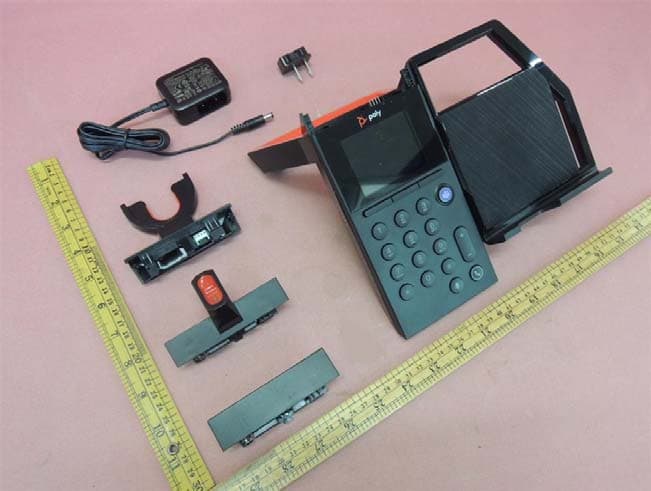
Click to zoom
Application Details
- Equipment Class
- DTS - Digital Transmission System
- Date of Grant
- Mar 18, 2020
- Application Purpose
- Original Equipment
- Date of Application
- Mar 18, 2020
- Equipment Note
- Mobile Phone Station with Bluetooth
- Frequency Range
- 2402.00000000 - 2480.00000000
- Company
- HP Inc.
- Country
- United States
Documents & Files
Document Text
Text extracted from the exhibit documents filed with the FCC. Open a document above to read the original.
Users Manual
Poly Elara © 2019 Plantronics, Inc. All rights reserved. Poly, the propeller design, and the Poly logo are trademarks of Plantronics, Inc. Bluetooth is a registered trademark of Bluetooth SIG, Inc. and any use by Plantronics, Inc. is under license. All other trademarks are the property of their respective owners. 214360-01 09.19 Elara 60 E has a Voyager Focus UC or Voyager 5200 UC headset and an Elara 60 E base. Manufactured by Plantronics plantronics.com/support Headset cradle/headset design may vary. WIRED CHARGING POWER ON HEADSET 1 2 SET UP View complete user guide BACK FRONT Slide the switch on your headset to power it on. * Cable not provided VIDEO CONFERENCING ENGLISH Your system has a headset quick start guide and a base quick start guide. SET UP AND POWER 1Using the illustration, set up the mobile phone station. Ensure the power cord is not under the foot of the base. 2Next, slide the switch on your headset and power it on. PAIR YOUR PHONE 1To pair your mobile phone to the base, place your phone on the charge pad and press the "Pair" softkey. 2Go to Bluetooth settings on your mobile phone and select Poly Elara 60 Series. Follow the on-screen directions to finish pairing. TIP If you have trouble pairing/connecting, forget prior Elara connections in your phone's Bluetooth settings and retry. ATTENTION Your headset is already paired to the base if purchased together (if not, go to Settings > Bluetooth > Headset Pairing > Add New). 3Optional: You can also pair your headset to your phone if you want to walk away and use your headset (see your headset quick start guide). CHARGE YOUR PHONE W ired charging: For wired charging, connect a charge cable as shown. Connection provides power only. UPDATE FIRMWARE To update your mobile phone station firmware and customize your settings, download the Poly Elara app from the Apple App Store or Google Play Store. HOW TO Use Microsoft Teams Download and open the Microsoft Teams app on your phone. Press the dial pad Teams button to launch. TIP First use on Android, launch the Teams app and then disconnect and reconnect Bluetooth to initiate. Make a call To make a call, dial a number from your phone or the base and press the Call button. NOTE After you have dialed a number, use the "Line" softkey to toggle between a cell call and Microsoft Teams call (requires active Teams connection). Answer a call To answer a call, put on the headset (headsets with sensors only), press the Call button on the base or headset, or press the "Accept" softkey . End a call To end a call, press the Call button on the base, phone or headset or press the "End call" softkey. Connect/Disconnect Bluetooth Use the "Disconnect" softkey for easy walk-away with your phone. Press the "Connect" softkey when you come back in range. Set time and language Automatic time, date and language sync requires the Poly Elara app and is triggered by opening the app on your phone. Stream media To stream media, open the app on your phone and selec t the "Media" softkey on the base. Discover Click U ser Guide in the Poly Elara app to discover more features (must be actively connected to Elara). DEUTSCHE Ihr System wird mit Kurzanleitungen für das Headset und die Basis geliefert. EINRICHTEN UND EINSCHALTEN 1.Richten Sie die Mobiltelefonstation wie in der Abbildung gezeigt ein. Stellen Sie sicher, dass das Netzkabel nicht unter dem Fuß der Basis liegt. 2.Schalten Sie dann Ihr Headset über den Schieberegler ein. TELEFON PAAREN 1.Um Ihr Mobiltelefon mit der Basis zu paaren, legen Sie Ihr Telefon auf die Ladefläche und drücken Sie den Softkey „Paaren“. 2.Gehen Sie zu den Bluetooth-Einstellungen auf Ihrem Mobiltelefon und wählen Sie Poly Elara 60 Series. Folgen Sie den Anweisungen auf dem Bildschirm, um die Paarung abzuschließen. TIPP Wenn Sie beim Paaren/Verbinden Schwierigkeiten haben, löschen Sie die vorherigen Elara-Verbindungen in den Bluetooth- Einstellungen Ihres Telefons und versuchen Sie es erneut. ACHTUNG Wenn Sie beide Geräte zusammen erworben haben, ist Ihr Headset bereits mit der Basis gepaart (wenn nicht, gehen Sie zu Einstellungen > Bluetooth > Headset-Paarung > Neues hinzufügen). 3.Optional: Sie können Ihr Headset auch mit Ihrem Telefon paaren, wenn Sie Ihr Headset unabhängig von der Basis verwenden und sich frei bewegen möchten (siehe Headset- Kurzanleitung). LADEN DES TELEFONS S chnurgebundenes Laden: Zum schnurgebundenen Laden schließen Sie wie dargestellt ein Ladekabel an. Die Verbindung stellt lediglich die Stromversorgung sicher. FIRMWARE AKTUALISIEREN Zur Anpassung der Einstellungen und Aktualisierung der Firmware Ihrer Mobiltelefonstation laden Sie die App für die Poly Elara-Serie aus dem Apple App Store oder Google Play Store herunter. TIPPS Verwendung von Microsoft Teams Laden Sie die Microsoft Teams-App auf Ihr Telefon herunter und öffnen Sie sie. Drücken Sie zum Starten auf dem Tastenfeld die Teams-Taste. TIPP Starten Sie bei der ersten Nutzung auf Android erst die Teams- App, trennen Sie dann die Bluetooth-Verbindung und stellen Sie sie wieder her, um sie zu initiieren. Anruf tätigen Um einen Anruf zu tätigen, wählen Sie auf Ihrem Telefon oder an der Basis eine Nummer und drücken Sie dann die Anruftaste . HINWEIS Wenn Sie eine Nummer gewählt haben, können Sie über den Softkey „Leitung“ zwischen einem Mobilfunkanruf und einem Microsoft Teams-Anruf umschalten (aktive Teams-Verbindung erforderlich). Anruf entgegennehmen Um einen Anruf anzunehmen, setzen Sie das Headset auf (nur Headsets mit Sensoren) und drücken die Anruftaste an der Basis oder am Headset oder den Softkey „Annehmen“. Anruf beenden Drücken Sie zum Beenden eines Anrufs die Anruftaste auf Basis, Telefon oder Headset oder drücken Sie den Softkey „Anruf beenden“. Bluetooth verbinden/trennen Drücken Sie den Softkey „Trennen“, um sich mit Ihrem Telefon frei zu bewegen. Drücken Sie den Softkey „Verbinden“, sobald Sie wieder in Reichweite sind. Zeit und Sprache einstellen Für die automatische Zeit-/Datums- und Sprachsyn…
Text truncated - open the document above for the full version.
Cover Letter(s)
345 Encinal Street | Santa Cruz | CA | 95060 U.S.A | TEL: +1 (800) 544 4660 Appendix B1 Letter of Agency for FCC Certification April 24, 2019 To whom it may concern, Letter of Agency I, senior manager of Plantronics, Inc. do hereby authorize Intertek Testing Services (Mr. Terry Chan/ Kenneth Wong/ Ms. Jess Tang) to act on our behalf in front of the Federal Communications Commission with respect to all matters relating to certification of equipment under Part 15 and/or Part 95 of the FCC Rules until further notice. I further certify that no party (as defined in §1.2002(b) of CFR 47, 2004) to this application, including myself, is subject to a denial of federal benefits, that includes FCC benefits, pursuant to Section 5301 of the Anti-Drug Abuse Act of 1988, 21 U.S.C., 862. Regards, Mark Lawson Sr. Manager Global Compliance
Cover Letter(s)
345 Encinal Street | Santa Cruz | CA | 95060 USA | TEL: +1 (831) 426 5858 | FAX: +1 (831) 426 6098 February 7, 2020 Attn: Reviewing Engineer Federal Communications Commission 7435 Oakland Mills Road Columbia, MD 21046 RE: PERMANENT CONFIDENTIALITY REQUEST FOR Elara 60 E FCC ID: AL8-E60E To Whom It May Concern: This letter serves as an official request for confidentiality under FCC Rule Section 0.457(d) and 0.459. We have requested that: 1) the schematic diagrams 2) the detailed block diagrams 3) the theory of operation/functional description required to be submitted with this application be withheld from public review. These documents are company proprietary information that is not publicly available and would damage Plantronics, Inc.’s commercial interests if made public. Please contact me if there is any information that you may need. Regards, Mark Lawson Sr. Manager Global Compliance 345 Encinal Street | Santa Cruz | CA | 95060 USA | TEL: +1 (831) 426 5858 | FAX: +1 (831) 426 6098 February 7, 2020 Attention: Application Examiner RE: Request for Short-term Confidentiality Under FCC Part 15 Certification Applicant: Plantronics, Inc. FCC ID: AL8-E60E To Whom It May Concern: Short-term Confidentiality Request is hereby submitted by Plantronics, Inc.to withhold from public review for a period of 180 days from the date of the Grant of Equipment Authorization and prior to marketing, certain portions of the application for equipment certification for the referenced FCC identifiers. This request for confidentiality is made pursuant to 47 CFR 0.457(d) and 0.459 of the FCC Rules. In particular, the following sections of the application are to be kept confidential for a period of 180 days from the date of Authorization: • Test setup photos • External photos • Internal photos • User manual Rationale for request for confidentiality: Plantronics, Inc. has invested considerable time and materials in research and development to produce the referenced product. Disclosure of the short-term confidential portions of this application during the period of importation and/or distribution would reveal key aspects of proprietary technology to competitors and diminish the value of our investment in research and development. If you have questions or need further information, please contact the undersigned. Regards, Mark Lawson Sr. Manager Global Compliance
External Photos
INTERTEK TESTING SERVICE Report No: 190701178HKG-002 190701178HKG-004 FCC ID: AL8-E60E IC: 457A-E60E Equipment Photographs (External)
ID Label/Location Info
J. Yang1/28/2019 ARTMASTER, COMPLIANCE LABEL, PIKA, US, CANADA213156-02A 1:1 scale 1:1 scale 65 mm 8 mm 52 mm 25 mm r0.6 mm r0.6 mm 62 mm Manufactured in China Manufactured in China CONFORMS TO ANSI/UL STD. 62368-1 CERTIFIED TO CAN/CSA STD. C22.2 NO.62368-1 MODEL: ELARA 60 E 12VDC 1.5A (input) 5V 500mA (headset output) 5V 1.3A max.(USB output) Use only adaptor SCC-120150 CAN ICES-3 (B)/NMB-3(B) IC:457A-E60E Contains FCC ID: AL8-BT600 FCC ID: AL8-E60E Contains IC: 457A-BT600 This device complies with part 15 of the FCC Rules. Operation is subject to the following two conditions: (1) This device may not cause harmful interference, and (2) this device must accept any interference received, including interference that may cause undesired operation. Cet appareil numerique de la casse B est conforme a la norme NMB-003 du Canada 5013600 CONFORMS TO ANSI/UL STD. 62368-1 CERTIFIED TO CAN/CSA STD. C22.2 NO.62368-1 MODEL: ELARA 60 E 12VDC 1.5A (input) 5V 500mA (headset output) 5V 1.3A max.(USB output) Use only adaptor SCC-120150 CAN ICES-3 (B)/NMB-3(B) IC:457A-E60E Contains FCC ID: AL8-BT600 FCC ID: AL8-E60E Contains IC: 457A-BT600 This device complies with part 15 of the FCC Rules. Operation is subject to the following two conditions: (1) This device may not cause harmful interference, and (2) this device must accept any interference received, including interference that may cause undesired operation. Cet appareil numerique de la casse B est conforme a la norme NMB-003 du Canada 5013600
Internal Photos
INTERTEK TESTING SERVICE Report No: 190701178HKG-002 190701178HKG-004 Equipment Photographs (Internal) INTERTEK TESTING SERVICE Report No: 190701178HKG-002 190701178HKG-004 Equipment Photographs (Internal) INTERTEK TESTING SERVICE Report No: 190701178HKG-002 190701178HKG-004 Equipment Photographs (Internal) INTERTEK TESTING SERVICE Report No: 190701178HKG-002 190701178HKG-004 Equipment Photographs (Internal) INTERTEK TESTING SERVICE Report No: 190701178HKG-002 190701178HKG-004 Equipment Photographs (Internal)
RF Exposure Info
INTERTEK TESTING SERVICE FCC ID: AL8-E60E For Maximum Permissible Exposure (MPE) evaluation of the unit, the maximum power density at 20 cm from this transmitter shall be less than the General Population / Uncontrolled MPE limit in OET Bulletin 65 and meet the requirement listed in KDB447498. 1) For the Bluetooth portion of the unit, the measured powers among all the measured channels were within its production tolerance. The antenna gain is 2 dBi = 1.58 (num gain) and its maximum source-based time-averaging duty factor is 100%. From these data and its operating configuration, the exposed power density at a distance (R) of 20cm from the center of radiation of the antenna can be calculated according to OET Bulletin 65 as follow: EUT(FCC ID: AL8-E60E) : The EIRP radiated power = 4 dBm = 2.51 mW The radiated (EIRP) source-based time-averaging output power = (2.51 * 1) mW = 2.51 mW The power density at 20cm = 2.51 / 4R 2 = 0.00049 mW cm -2 USB dongle (FCC ID: AL8-BT600): The EIRP radiated power= maximum conducted output power(10dBm)+antenna gain(-4.12dBi) = 5.88 dBm = 3.87 mW The radiated (EIRP) source-based time-averaging output power = (3.87 * 1) mW = 3.87 mW The power density at 20cm = 3.87 / 4R 2 = 0.00071 mW cm -2 “ FCC RF Radiation Exposure Statement Caution: To maintain compliance with the FCC’s RF exposure guidelines, place the Internet Music System at least 20cm from nearby persons.” INTERTEK TESTING SERVICE FCC ID: AL8-E60E In addition, for this product with multiple transmitter and antenna (Bluetooth (PIKA), Bluetooth(USB Dongle) and QI) the requirement of Simultaneous Transmission evaluation has also been considered and has complied with the following conditions of the worst case; MPE1/Limit1 + MPE2/Limit2 1 Thus, 0.00049/1 + 0.00071/1 = 0.012 PIKA BT + USB Dongle It is concluded that no Simultaneous Transmission evaluation is required.
Test Report
2/F., Garment Centre, 576 Castle Peak Road, Kowloon, Hong Kong. Telephone: (852) 2173 8888 Facsimile: (852) 2785 5487 www.intertek.com Intertek’s standard Terms and Conditions can be obtained at our website http://www.intertek.com/terms/. The test report only allows to be revised within the retention period unless further standard or the requirement was noticed. This report is for the exclusive use of Intertek's Client and is provided pursuant to the agreement between Intertek and its Client. Intertek's responsibility and liability are limited to the terms and conditions of the agreement. Intertek assumes no liability to any party, other than to the Client in accordance with the agreement, for any loss, expense or damage occasioned by the use of this report. Only the Client is authorized to permit copying or distribution of this report and then only in its entirety. Any use of the Intertek name or one of its marks for the sale or advertisement of the tested material, product or service must first be approved in writing by Intertek. The observations and test results in this report are relevant only to the sample tested. This report by itself does not imply that the material, product, or service is or has ever been under an Intertek certification program. © 2017 Intertek Page 1 of 42 TEST REPORT Report Number: 19071178HKG‐004 Application for Original Grant of 47 CFR Part 15 Certification Single New of RSS‐247 Issue 2 Equipment FCC ID: AL8‐E60E IC: 457A‐E60E Prepared and Checked by: Approved by: Signed On File Lee Shui Tim, Tim Assistant Supervisor Chan Chi Hung, Terry Manager Date: March 09, 2020 TEST REPORT Plantronics, Inc. Intertek Report No: 19071178HKG‐004 Page 2 of 42 GENERAL INFORMATION Applicant Name: Plantronics, Inc. Applicant Address: 345 Encinal Street, Santa Cruz, CA 95060, United States of America. FCC Specification Standard: FCC Part 15, October 1, 2018 Edition FCC ID: AL8‐E60E FCC Model(s): Elara 60 E IC Specification Standard: RSS‐247 Issue 2, February 2017 RSS‐Gen Issue 5, April 2018 IC: 457A‐E60E PMN: Elara 60 E HVIN: Elara 60 E Firmware Version: 0.8.10 Type of EUT: Unlicensed National Information Infrastructure Transmitter Description of EUT: Mobile Phone Station with Bluetooth Serial Number: N/A Sample Receipt Date: July 23, 2019 Date of Test: July 23, 2019 to January 27, 2020 Report Date: March 09, 2020 Environmental Conditions: Temperature: +10 to 40°C Humidity: 10 to 90% Conclusion: Test was conducted by clientsubmitted sample. The submitted sample as received complied with the 47 CFR Part 15 / RSS‐247 Issue 2 Certification. TEST REPORT Plantronics, Inc. Intertek Report No: 19071178HKG‐004 Page 3 of 42 TABLE OF CONTENTS 1.0 TEST RESULTS SUMMARY & STATEMENT OF COMPLIANCE ............................................ 4 1.1 Summary of Test Results ...............................................................................................4 1.2 Statement of Compliance ..............................................................................................4 2.0 GENERAL DESCRIPTION ................................................................................................ 5 2.1 Product Description ......................................................................................................5 2.2 Test Methodology .........................................................................................................5 2.3 Test Facility ...................................................................................................................5 2.4 Related Submittal(s) Grants ...........................................................................................5 3.0 SYSTEM TEST CONFIGURATION .................................................................................... 6 3.1 Justification ...................................................................................................................6 3.2 EUT Exercising Software ................................................................................................7 3.3 Details of EUT and Description of Accessories ................................................................8 3.4 Measurement Uncertainty ............................................................................................8 4.0 TEST RESULTS .............................................................................................................. 9 4.1 Maximum Conducted Output Power at Antenna Terminals ...........................................9 4.2 Minimum 6dB RF Bandwidth .......................................................................................10 4.3 Maximum Power Spectral Density ...............................................................................14 4.4 Out of Band Conducted Emissions ...............................................................................18 4.5 Field Strength Calculation ............................................................................................25 4.6 Transmitter Radiated Emissions in Restricted Bands and Spurious Emissions ...............26 4.6.1 Radiated Emission Configuration Photograph ...........................................................26 4.6.2 Radiated Emission Data ............................................................................................26 4.6.3 Radiated Emission Test Setup ...................................................................................37 4.6.4 Transmitter Duty Cycle Calculation ...........................................................................38 4.7 AC Power Line Conducted Emission .............................................................................39 4.7.1 AC Power Line Conducted Emission Configuration Photograph ................................39 4.7.2 AC Power Line Conducted Emission Data ..................................................................39 4.7.3 Conducted Emission Test Setup .............................................................…
Text truncated - open the document above for the full version.
Test Setup Photos
INTERTEK TESTING SERVICE Report No: 190701178HKG-002 190701178HKG-004 FCC ID: AL8-E60E IC: 457A-E60E Configuration Photographs Worst-Case Radiated Emissions (Front View) INTERTEK TESTING SERVICE Report No: 190701178HKG-002 190701178HKG-004 FCC ID: AL8-E60E IC: 457A-E60E Configuration Photographs Worst-Case Radiated Emissions (Back View) INTERTEK TESTING SERVICE Report No: 190701178HKG-002 190701178HKG-004 FCC ID: AL8-E60E IC: 457A-E60E Configuration Photographs Worst-Case Radiated Emissions (Front View) INTERTEK TESTING SERVICE Report No: 190701178HKG-002 190701178HKG-004 FCC ID: AL8-E60E IC: 457A-E60E Configuration Photographs Worst-Case Radiated Emissions (Back View)
Test Setup Photos
INTERTEK TESTING SERVICE Report No: 190701178HKG-002 190701178HKG-004 FCC ID: AL8-E60E IC: 457A-E60E Configuration Photographs Worst-Case Line-Conducted Emissions (Front View) INTERTEK TESTING SERVICE Report No: 190701178HKG-002 190701178HKG-004 FCC ID: AL8-E60E IC: 457A-E60E Configuration Photographs Worst-Case Line-Conducted Emissions (Back View) INTERTEK TESTING SERVICE Report No: 190701178HKG-002 190701178HKG-004 FCC ID: AL8-E60E IC: 457A-E60E Configuration Photographs Worst-Case Line-Conducted Emissions (Back View)
Contact Information
Applicant
Richard Tarsio(US/CAN TRSE Worldwide Technical Regulations)
Technical Contact
Intertek Testing Services Hong Kong Ltd.Terry Chan
[email protected](852) 2173 8888
2/F., Garment Centre, · Hong Kong
Non-Technical Contact
Intertek Testing Services Hong Kong Ltd.Terry Chan
[email protected](852) 2173 8888
Test Firm
Intertek Testing Services Hong Kong Ltd.Billy Chow
Technical Specifications
| # | Rule Parts | Frequency Range | Power Output |
|---|---|---|---|
| 1 | 15C | 2.40 GHz - 2.48 GHz | 1.10 mW |
Other Applications from HP Inc.
AL8-PWPTF620P
Feb 03, 2026Wireless Charge Stand
Equipment Class
DCD - Part 15 Low Power Transmitter Below 1705 kHzAL8-PBF620F
Jan 23, 2026Bluetooth Headset
Equipment Class
DTS - Digital Transmission SystemAL8-PBVOYX2
Jun 20, 2024Bluetooth Base
Equipment Class
DTS - Digital Transmission System
AL8-VF2R
Mar 07, 2024Wireless Bluetooth Earphones
Equipment Class
DTS - Digital Transmission System
AL8-CBVS1
Oct 16, 2023Wireless Charge Stand
Equipment Class
DXX - Part 15 Low Power Communication Device Transmitter