AL8-F60LTrue Wireless In-Ear Headphones
HP Inc.
Click to zoom
Application Details
- Equipment Class
- DTS - Digital Transmission System
- Date of Grant
- Dec 22, 2022
- Application Purpose
- Original Equipment
- Date of Application
- Dec 22, 2022
- Equipment Note
- True Wireless In-Ear Headphones
- Frequency Range
- 2402.00000000 - 2480.00000000
- Company
- HP Inc.
- Country
- United States
Documents & Files
Document Text
Text extracted from the exhibit documents filed with the FCC. Open a document above to read the original.
Users Manual
Regulatory Compliance Information Compliance e-labeling Model ID F60T(F60TR, F60TL), CBF60+: Find compliance e-labeling information on the charge case touch screen by selecting the information (i) icon next to the QR code. Alternatively, find it by swiping left twice from the home screen. United States/Puerto Rico BC 4006678 81242 3115593 5018866 I .T. E FCC Regulatory Information Declaration of Conformity We Plantronics, Inc., 345 Encinal Street Santa Cruz, California, 95060 USA (800) 544-4660 declare under our sole responsibility that the product MODELS F60T (F60TR, F60TL) / CBF60+ / CBF60 / BT700 / BT700C complies with Part 15 of the FCC Rules. Operation is subject to the following two conditions: (1) this device may not cause harmful interference, and (2) this device must accept any interference received, including interference that may cause undesired operation. Note: This equipment has been tested and found to comply with the limits for a Class B digital device, pursuant to part 15 of the FCC Rules. These limits are designed to provide reasonable protection against harmful interference in a residential installation. This equipment generates, uses, and can radiate radio frequency energy and, if not installed and used in accordance with the instructions, may cause harmful interference to radio communications. However, there is no guarantee that interference will not occur in a particular installation. If this equipment does cause harmful interference to radio or television reception, which can be determined by turning the equipment off and on, the user is encouraged to try to correct the interference by one or more of the following measures: 1. Reorient or relocate the receiving antenna. 2. Increase the separation between the equipment and receiver. 3. Connect the equipment into an outlet on another circuit. 4. Consult the dealer or an experienced radio/TV technician for help. Changes or modifications not expressly approved by the party responsible for compliance could void the user’s authority to operate the equipment. FreeRTOS software Permission is hereby granted, free of charge, to any person obtaining a copy of this FreeRTOS software and associated documentation files (the “Software”), to deal in the Software without restriction, including without limitation the rights to use, copy, modify, merge, publish, distribute, sublicense, and/or sell copies of the Software, and to permit persons to whom the Software is furnished to do so, subject to the following conditions: The above copyright notice and this permission notice shall be included in all copies or substantial portions of the Software. THE SOFTWARE IS PROVIDED “AS IS”, WITHOUT WARRANTY OF ANY KIND, EXPRESS OR IMPLIED, INCLUDING BUT NOT LIMITED TO THE WARRANTIES OF MERCHANTABILITY, FITNESS FOR A PARTICULAR PURPOSE AND NONINFRINGEMENT. IN NO EVENT SHALL THE AUTHORS OR COPYRIGHT HOLDERS BE LIABLE FOR ANY CLAIM, DAMAGES OR OTHER LIABILITY, WHETHER IN AN ACTION OF CONTRACT, TORT OR OTHERWISE, ARISING FROM, OUT OF OR IN CONNECTION WITH THE SOFTWARE OR THE USE OR OTHER DEALINGS IN THE SOFTWARE. UAE MFi iPhone 12 Pro Max, iPhone 12 Pro, iPhone 12, iPhone 12 mini, iPhone SE (2nd generation), iPhone 11 Pro Max, iPhone 11 Pro, iPhone 11, iPhone XS Max, iPhone XS, iPhone XR, iPhone X, iPhone 8 plus, iPhone 7, iPad Pro 12.9-inch (5th generation), iPad Pro 11-inch (3rd generation), iPad Pro 10.5-inch, iPad Pro 12.9-inch (3rd generation), iPad Pro 10.5-inch, iPad Pro 12.9-inch (2nd generation), iPad Pro 9.7 inch, iPad Pro 12.9-inch (1st generation), iPad Air (3rd generation), iPad Air 2, iPad mini (5th generation), iPad mini 4, iPad (7th generation), iPad (6th generation). Model IDs CBF60/CBF60+: CAN RSS-216 / CNR-216 China Model IDs F60T, CBF60+: 型号核准代码显示在产品标签和 产品本体上 Europe Japan Korea 해당 무선설비는 전파혼신 가능성이 있으므로 인명안전과 관련된 서비스는 할 수 없습니다 이 기기는 가정용(B급) 전자파적합기기로서 주로 가정에서 사용하는 것을 목적 으로 하며, 모든 지역에서 사용할 수 있습니다. Mexico Model IDs F60T (F60TR, F60TL), CBF60+: Requisitos del IFT Su uso está sujeto a las dos condiciones siguientes: 1. Este dispositivo no puede causar interferencias nocivas. 2. Este dispositivo debe aceptar todas las interferencias recibidas,incluidas aquellas que puedan causar un funcionamiento no deseado. Philippines Russia Singapore Model IDs F60T (F60TR, F60TL), CBF60+: Complies with IMDA Standards DA101619 Taiwan Model IDs F60T (F60TR, F60TL), CBF60+: 根據NCC低功率管理辦法規定:取得審驗證明之低功率射頻器材, 非經核准,公司、商號或使用者均不得擅自變更頻率、加大功率或變 更原設計之特性及功能。低功率射頻器材之使用不得影響飛航安全 及干擾合法通信;經發現有干擾現象時,應立即停用,並改善至無干 擾時方得繼續使用。前述合法通信,指依電信管理法規定作業之無線 電通信。低功率射頻器材須忍受合法通信或工業、科學及醫療用電波 輻射性電機設備之干擾。 Model IDs F60T (F60TR, F60TL), CBF60+: Exposure to RF Radiation This equipment has been tested and meets applicable limits for radio frequency (RF) exposure. Specific Absorption Rate (SAR) refers to the rate at which the body absorbs RF energy. The SAR limit is 1.6 watts per kilogram in countries that set the limit averaged over 1 gram of tissue. During testing, device radios are set to their highest transmission levels and placed in positions that simulate use near the body, with 0mm separation. Cases with metal parts may change the RF performance of the device, including its compliance with RF exposure guidelines, in a manner that has not been tested or certified. Cet équipement a été testé et respecte les limites applicables d’exposition aux radiofréquences (RF). Le débit d’absorption spécifique est la vitesse à laquelle le corps absorbe l’énergie radiofréquence. La limite du débit d’absorption spécifique est de 1,6 watt par kilogramme dans les pays où la moyenne a été établie sur un gramme de tissu. Pendant l’essai, les radios de appareil sont réglées sur le niveau de transmission maximal et sont placées dans des positions simulant une utilisation à proximité du corps, avec une séparation de 0mm. Les étuis dotés de pièces métalliques peuvent modifier les performances des radiofréquences de l’appareil, y compris sa conformité aux directives d’exposition aux radiofréquences, d’une façon qu…
Text truncated - open the document above for the full version.
Users Manual
Voyager Free 60+ True Wireless Earbuds Draft User Guide Contents Your earbud system3 Earbud controls4 Be safe4 Charge case controls5 USB Bluetooth adapter6 Power7 Power on/off your earbuds7 Connect and pair8 Pair to mobile device8 Connect to PC8 Configure USB adapter9 Reconnect9 Pair mode9 Pair BT700 USB adapter again9 Bluetooth transmitter 10 The basics11 Adjust the volume 11 Play or pause audio11 Track selection11 Answer or end a call11 Mute 11 Use sensors11 Charge12 Wireless charging12 Load software13 Update your Poly device13 Support14 2 Your earbud system easily connects to your mobile phone and computer. The system includes: •Wireless earbuds with smart sensors •Bluetooth adapter for connection to high-fidelity computer audio •Charge case with touch screen controls Your earbud system 3 Control audio features on either earbud. Click the button by pinching your earbud stem. Swipe the touch sensor on your earbud stem to change levels. Voice assistant Button controls Call answer/end Click 1 time Bluetooth pairing Hold 4 seconds Play/pause * Click 1 time Next track * Click 2 times Previous track * Click 3 times Siri/Google Assistant Default phone assistant Click and hold 2 seconds NOTE*Functionality varies by application. May not function with web-based apps. ANC Swipe controls Volume Swipe to change level Mute Swipe during an active call ANCActive Noise Canceling With earbuds idle, swipe to change level Please read the safety guide for important safety, charging, battery and regulatory information before using your new device. Earbud controls Be safe 4 Control audio features and settings on your charge case touch screen. ANC Touch screen controls Volume Bluetooth pairing Call answer/end Mute ANCActive Noise Canceling Music and streaming audio* Battery level NOTE*Functionality varies by application. May not function with web-based apps. Charge case controls 5 Your high-fidelity Bluetooth USB adapter comes pre-paired to your Poly device. Plug it into your computer to connect to high-fidelity computer audio. NOTEAdapter's USB connection and design may vary, but function is the same. Standard LEDs USB LEDsWhat they mean Flashing red and bluePairing Solid blueDevice connected Flashing blueOn a call Solid redMute active Flashing purpleStreaming media from computer LEDs when Microsoft Teams* is detected USB LEDsWhat they mean Flashing red and bluePairing Solid purpleMicrosoft Teams connected Flashing blueOn a call Solid redMute active Pulsing purpleMicrosoft Teams notification NOTE*Requires Microsoft Teams desktop application. USB Bluetooth adapter 6 •Removing your earbuds from the case automatically powers them on. Conversely, placing your earbuds in the case automatically powers them off and starts charging them. Power Power on/off your earbuds 7 1Remove the earbuds from the charge case. 2Select the Bluetooth pairing icon on your case touch screen to put your earbuds in pairing mode. 3Activate Bluetooth ® on your phone and set it to search for new devices. •iPhone Settings > Bluetooth > On* •Android ™ Settings > Bluetooth: On > Scan for devices* NOTE* Menus may vary by device. 4Select " Poly VFree 60 Series." When your earbuds are successfully paired, you hear “pairing successful” and "phone connected." Your Bluetooth USB adapter provides the best connection, softphone functionality and acoustic sound quality through your headset. The adapter comes pre-paired to your headset. 1Turn on your headset and insert the Bluetooth USB adapter into your laptop or PC. 2The USB adapter LED flashes and then turns solid to indicate the headset is connected to the USB adapter. If you are wearing your headset you hear “PC connected” to indicate the connection has been established. When on a call, the LED on the USB adapter flashes blue. When not on a call the LED is solid. Connect and pair Pair to mobile device Connect to PC 8 3Load Poly Lens Desktop App by visiting poly.com/lens. This allows you to customize your headset behavior through advanced settings and options. Your high-fidelity Bluetooth USB adapter comes ready to take calls. If you want to listen to music, you will need to configure your Bluetooth USB adapter. Windows 1To configure your Bluetooth USB adapter to play music, go to Start menu > Control Panel > Sound > Playback tab. Select Poly BT700 or Plantronics BT600, set it as the Default Device and click OK. 2To pause music when you place or receive calls, go to Start menu > Control Panel > Sound > Communications tab and select the desired parameter. Mac 1To configure the Bluetooth USB adapter, go to Apple menu > System Preferences > Sound. On both the Input and Output tabs, select Poly BT700 or Plantronics BT600. With Bluetooth activated and in range, click your right earbud to reconnect to your phone. Choose from 2 ways to put your earbuds in pair mode: • With your earbuds removed from the case, select the Bluetooth icon on the charge case touch screen. • Press and hold your earbud button for 4 seconds until you hear "pairing." Your USB adapter requires Poly Lens Desktop App to pair to a Poly audio device. Download: poly.com/lens. BT700 USB-C BT700 USB-A 1Insert the high-fidelity Bluetooth USB adapter into your laptop or computer and wait for your computer to recognize it. Configure USB adapter Reconnect Pair mode Pair BT700 USB adapter again 9 2Put your Poly audio device in pair mode. 3Launch Poly Lens Desktop App and navigate to Poly BT700. 4Put your Bluetooth USB adapter into pair mode by selecting "Pair new device" on the adapter's main page or overflow menu. Your adapter flashes red and blue. Pairing is successful when you hear "pairing successful" and "PC connected" and the Bluetooth USB adapter LED is solid. NOTETo pair again using Plantronics Hub Desktop App, navigate to the app's Poly BT700 general settings and select "Pair." Stream audio wirelessly from an inflight entertainment system or other audio source with 3.5 mm port. 1Connect the supplied adapter cable from your charge case…
Text truncated - open the document above for the full version.
Cover Letter(s)
Letter of Authorization Date: November 14, 2022 Federal Communications Commission Authorization and Evaluation Division 7435 Oakland Mills Rd Columbia MD 21046-1609 Subject: Product Certification Representative Authorization Letter FCC ID: AL8-F60L Product Name: True Wireless In-Ear Headphones To whom it may concern: We the undersigned, hereby authorize following person to act as our agent in the preparation of an application for equipment authorization to the FCC Rules and Regulations. Sporton International Inc. Address : No.52, Huaya 1st Rd., Guishan Dist., Taoyuan City 333, Taiwan (R.O.C.) Name : Leo Huang Job Title : Director e-mail : [email protected] We further certify that neither the applicant nor any party to this application, as defined in 47 CFR Ch. 1.2002(b), is subject to a denial to Federal benefits, that include FCC benefits, pursuant to section 5301 of the Anti-Drug Abuse Act of 1988, 21 U.S.C. § 862. This appointment also includes the authority to complete FCC Form 731 on our behalf and sign the application as an authorized agent. Applicant : Plantronics Inc Address : 345 Encinal Street, Santa Cruz, California 95060, United States Signature : _________________________________ Name and Job Title. : Mark Lawson, Director, Global Compliance E-mail : [email protected] Tel. : +44 1793842416
Cover Letter(s)
Date: November 14, 2022 Federal Communications Commission Authorization and Evaluation Division 7435 Oakland Mills Rd Columbia MD 21046-1609 Subject: declaration of composite/rated equipment for FCC ID: AL8-F60L To Whom it may concern, We, the undersigned, would like to declare that the composite portion catagorized as Class B personal computers and peripherals has been authorized under the Supplier's Declaration of Conformity (SDoC) procedures. Sincerely, Applicant : Plantronics Inc Address : 345 Encinal Street, Santa Cruz, California 95060, United States Signature : _________________________________ Name and Job Title. : Mark Lawson, Director, Global Compliance E-mail : [email protected] Tel. : +44 1793842416
Cover Letter(s)
Confidentiality Request Letter Date: November 14, 2022 Federal Communications Commission Authorization and Evaluation Division Subject: Request for confidentiality FCC ID: AL8-F60L To whom it may concern: Short-term Confidentiality pursuant to Public Notice DA 04-1705, and in order to comply with the marketing regulations in 47 C.F.R. §2.803 and the importation rules in 47 C.F.R. §2.1204 while ensuring that business-sensitive information remains confidential until the actual marketing of newly authorized devices, we are request the Commission grant temporary confidential treatment and not release the following attachments for routine public disclosure until 45 days after the grant date. 1. Internal Photographs 2. External Photographs 3. User’s manual 4. Test Set up photos Permanent Confidentiality Pursuant to the provisions of Sections 0.457 and 0.459 of Commission’s rules (47CFR§§0.457, 0.459), we are requesting the Commission to withhold the following attachment(s) as confidential document from public disclosure indefinitely. 1. Block Diagram 2. Schematics 3. Operational Description It is our understanding that test measurement reports and correspondence during the certification review process cannot be granted confidential treatment, and such information will be available for public review once the grant of equipment authorization is issued. Sincerely, Applicant : Plantronics Inc Address : 345 Encinal Street, Santa Cruz, California 95060, United States Signature : _________________________________ Name and Job Title. : Mark Lawson, Director, Global Compliance E-mail : [email protected] Tel. : +44 1793842416
External Photos
Photographs of EUT Report No. : EP252601 SPORTON International Inc. Page No. : 1 of 37 EP Report Version : Rev. 01 Issued Date : Dec. 13, 2022 Photographs of EUT Report No. : EP252601 SPORTON International Inc. Page No. : 2 of 37 EP Report Version : Rev. 01 Issued Date : Dec. 13, 2022 Photographs of EUT Report No. : EP252601 SPORTON International Inc. Page No. : 3 of 37 EP Report Version : Rev. 01 Issued Date : Dec. 13, 2022 Photographs of EUT Report No. : EP252601 SPORTON International Inc. Page No. : 25 of 37 EP Report Version : Rev. 01 Issued Date : Dec. 13, 2022 Audio Cable (Type-C to Audio) (Optional) Photographs of EUT Report No. : EP252601 SPORTON International Inc. Page No. : 27 of 37 EP Report Version : Rev. 01 Issued Date : Dec. 13, 2022 Bluetooth Dongle (Type-A) (Optional) Photographs of EUT Report No. : EP252601 SPORTON International Inc. Page No. : 28 of 37 EP Report Version : Rev. 01 Issued Date : Dec. 13, 2022 Photographs of EUT Report No. : EP252601 SPORTON International Inc. Page No. : 29 of 37 EP Report Version : Rev. 01 Issued Date : Dec. 13, 2022 Bluetooth Dongle (Type-C) (Optional) Photographs of EUT Report No. : EP252601 SPORTON International Inc. Page No. : 30 of 37 EP Report Version : Rev. 01 Issued Date : Dec. 13, 2022 Photographs of EUT Report No. : EP252601 SPORTON International Inc. Page No. : 31 of 37 EP Report Version : Rev. 01 Issued Date : Dec. 13, 2022 USB Cable (Type-C to A) (Optional) Photographs of EUT Report No. : EP252601 SPORTON International Inc. Page No. : 32 of 37 EP Report Version : Rev. 01 Issued Date : Dec. 13, 2022 USB Cable (Type-C to C) (Optional) Photographs of EUT Report No. : EP252601 SPORTON International Inc. Page No. : 33 of 37 EP Report Version : Rev. 01 Issued Date : Dec. 13, 2022 Wireless Charging case (Optional) Photographs of EUT Report No. : EP252601 SPORTON International Inc. Page No. : 34 of 37 EP Report Version : Rev. 01 Issued Date : Dec. 13, 2022 Photographs of EUT Report No. : EP252601 SPORTON International Inc. Page No. : 35 of 37 EP Report Version : Rev. 01 Issued Date : Dec. 13, 2022 Photographs of EUT Report No. : EP252601 SPORTON International Inc. Page No. : 36 of 37 EP Report Version : Rev. 01 Issued Date : Dec. 13, 2022 Photographs of EUT Report No. : EP252601 SPORTON International Inc. Page No. : 37 of 37 EP Report Version : Rev. 01 Issued Date : Dec. 13, 2022 ─────THE END────
ID Label/Location Info
Plantronics Inc 345 Encinal Street Santa Cruz, CA 95060 +1 (831) 426-5858 poly.com Date: 2022-12-20 FCC ID: AL8-F60R IC: 457A-F60R HVIN: F60TR AL8-F60L 457A-F60L F60TL AL8-CBF60 457A-CBF60 CBF60+ FCC E-Label Information: 1. Justification of using the alternative method of e-labeling for the product The electronic labeling method was used because the radiofrequency device is equipped with an integrated electronic display screen, or only operate in conjunction with another associated product that has an electronic display. 2. According to KDB 784748 D02 e labeling v02 section 4, for devices with an integrated electronic display, or those devices that only operate in conjunction with another associated product that has an electronic display, below info has been stated in e-label and/or user manual. A. User Steps to Access Information Users can access the information in no more than three steps from the product’s menu. Product access process is as follows: Starting from Main or Home Menu: Step 1 – Swip left Step 2 – Select the information (i) icon next to the QR code Step 3 – Swip right B. Products must not require special accessories or supplemental plug-ins (e.g., the installation of a SIM/USIM card) to access the information. The product does not require special accessories or supplemental plug-ins to access the information. Access to the information does not require special codes, accessories, or permissions beyond the normal security protection to unlock the screen, sign-in page, or overall product access. C. Information to be Displayed and Readability of Regulatory Information Information on E-label In Manual FCC ID number Yes No FCC logo No No 15.19 statement (“This device complies with part 15 of the FCC Rules. Operation is subject to the following two conditions: (1) This device may not cause harmful interference, and (2) this device must accept any interference received, including interference that may cause undesired operation.”) No Yes Class A / B Digital Device user manual statements No Yes Plantronics Inc 345 Encinal Street Santa Cruz, CA 95060 +1 (831) 426-5858 poly.com Caution to the user that changes or modifications not expressly approved by the party responsible for compliance could void the user's authority to operate the equipment. No Yes IC ID number Yes No HVIN Yes Yes Product’s e-label screen is provided below: The above information is displayed electronically in a manner that is clearly legible without the aid of magnification. D. Regulatory Information must be Secure The regulatory information and dedicated exclusive application(s) or script(s) are secured and implemented in a factory-set-unalterable format. The regulatory information is capable of being retrieved and displayed locally and accessed by the end user. The e-label information is pre-programmed by the grantee. The information cannot be modified by the end user. E. Physical and Temporary label for Purchasing and Importation The below information is also on the packaging, at the time of importation, marketing, and sales: 1. FCC ID; 2. IC ID; 3. HVIN; and 4. Product model number. F. Additional Considerations (Modular transmitters) The device is not a modular device. _________________________________ (Signature & Company Seal) Name: Mark Lawson Designation: Director, Global Compliance Department: Compliance and Environmental Eng Company Name: Plantronics, Inc.
Internal Photos
Photographs of EUT Report No. : EP252601 SPORTON International Inc. Page No. : 4 of 37 EP Report Version : Rev. 01 Issued Date : Dec. 13, 2022 SKU 1 Photographs of EUT Report No. : EP252601 SPORTON International Inc. Page No. : 5 of 37 EP Report Version : Rev. 01 Issued Date : Dec. 13, 2022 Photographs of EUT Report No. : EP252601 SPORTON International Inc. Page No. : 6 of 37 EP Report Version : Rev. 01 Issued Date : Dec. 13, 2022 Photographs of EUT Report No. : EP252601 SPORTON International Inc. Page No. : 7 of 37 EP Report Version : Rev. 01 Issued Date : Dec. 13, 2022 Photographs of EUT Report No. : EP252601 SPORTON International Inc. Page No. : 8 of 37 EP Report Version : Rev. 01 Issued Date : Dec. 13, 2022 Photographs of EUT Report No. : EP252601 SPORTON International Inc. Page No. : 9 of 37 EP Report Version : Rev. 01 Issued Date : Dec. 13, 2022 Photographs of EUT Report No. : EP252601 SPORTON International Inc. Page No. : 10 of 37 EP Report Version : Rev. 01 Issued Date : Dec. 13, 2022 Photographs of EUT Report No. : EP252601 SPORTON International Inc. Page No. : 11 of 37 EP Report Version : Rev. 01 Issued Date : Dec. 13, 2022 Photographs of EUT Report No. : EP252601 SPORTON International Inc. Page No. : 12 of 37 EP Report Version : Rev. 01 Issued Date : Dec. 13, 2022 Photographs of EUT Report No. : EP252601 SPORTON International Inc. Page No. : 13 of 37 EP Report Version : Rev. 01 Issued Date : Dec. 13, 2022 SKU 2 Photographs of EUT Report No. : EP252601 SPORTON International Inc. Page No. : 14 of 37 EP Report Version : Rev. 01 Issued Date : Dec. 13, 2022 Photographs of EUT Report No. : EP252601 SPORTON International Inc. Page No. : 15 of 37 EP Report Version : Rev. 01 Issued Date : Dec. 13, 2022 Photographs of EUT Report No. : EP252601 SPORTON International Inc. Page No. : 16 of 37 EP Report Version : Rev. 01 Issued Date : Dec. 13, 2022 Photographs of EUT Report No. : EP252601 SPORTON International Inc. Page No. : 17 of 37 EP Report Version : Rev. 01 Issued Date : Dec. 13, 2022 Photographs of EUT Report No. : EP252601 SPORTON International Inc. Page No. : 18 of 37 EP Report Version : Rev. 01 Issued Date : Dec. 13, 2022 Photographs of EUT Report No. : EP252601 SPORTON International Inc. Page No. : 19 of 37 EP Report Version : Rev. 01 Issued Date : Dec. 13, 2022 Photographs of EUT Report No. : EP252601 SPORTON International Inc. Page No. : 20 of 37 EP Report Version : Rev. 01 Issued Date : Dec. 13, 2022 Photographs of EUT Report No. : EP252601 SPORTON International Inc. Page No. : 21 of 37 EP Report Version : Rev. 01 Issued Date : Dec. 13, 2022 Photographs of EUT Report No. : EP252601 SPORTON International Inc. Page No. : 22 of 37 EP Report Version : Rev. 01 Issued Date : Dec. 13, 2022 Photographs of EUT Report No. : EP252601 SPORTON International Inc. Page No. : 23 of 37 EP Report Version : Rev. 01 Issued Date : Dec. 13, 2022 Photographs of EUT Report No. : EP252601 SPORTON International Inc. Page No. : 24 of 37 EP Report Version : Rev. 01 Issued Date : Dec. 13, 2022 Photographs of EUT Report No. : EP252601 SPORTON International Inc. Page No. : 25 of 37 EP Report Version : Rev. 01 Issued Date : Dec. 13, 2022 Battery Photographs of EUT Report No. : EP252601 SPORTON International Inc. Page No. : 26 of 37 EP Report Version : Rev. 01 Issued Date : Dec. 13, 2022
Test Report
1. Introduction Part ANT-Earbuds Location TWS-R or L Antenna Type FPC Photo Part ANT101 Location Wireless Charging case Antenna Type Printed Photo 2. Revision History Date Version Revision History 2022-08-04 1.0 New Release 3. Antenna Drawings 3.1 ANT-Earbuds 3.2 ANT101 4. Antenna Performance 4.1 VSWR, Return Loss, Smith Chart 4.1.1 ANT-Earbuds 4.1.2 Ant101 4.2 Antenna Gain and Efficiency 2.4 GHz 2.45 GHz 2.4835 GHz ANT-Earbuds Gain (dBi) -6.40 -5.72 -5.56 Efficiency (%) 11.36 13.59 15.88 Ant101 Gain (dBi) -0.29 -0.46 -0.51 Efficiency (%) 22.92 22.43 21.64 4.3 Antenna Pattern 4.3.1 ANT-Earbuds XZ XY ZY 4.3.2 ANT101 XZ XY ZY
Test Report
FCC Radio Test Report Report No. : FR252601AL TEL : 886-3-3273456 Page Number : 1 of 19 FAX : 886-3-3270973 Issued Date : Dec. 13, 2022 Report Template No.: HE1-C10 Ver4.3 Report Version : 01 FCC ID: AL8-F60L FCC Radio Test Report FCC ID : AL8-F60L Equipment : True Wireless In-Ear Headphones Brand Name : PLANTRONICS Model Name : F60T Applicant : Plantronics, Inc. 345 Encinal Street, Santa Cruz, CA 95060 USA Manufacturer : Plantronics, Inc. 345 Encinal Street, Santa Cruz, CA 95060 USA Standard : 47 CFR FCC Part 15.247 The product was received on May 30, 2022, and testing was started from Oct. 17, 2022 and completed on Oct. 25, 2022. We, SPORTON INTERNATIONAL INC. Hsinhua Laboratory, would like to declare that the tested sample has been evaluated in accordance with the procedures given in ANSI C63.10-2013 and shown compliance with the applicable technical standards. The test results in this report apply exclusively to the tested model / sample. Without written approval of SPORTON INTERNATIONAL INC. Hsinhua Laboratory, the test report shall not be reproduced except in full. ___________________________________________ Approved by: Jackson Tsai __________________________________________ SDoC by: XXXXX SPORTON INTERNATIONAL INC. Hsinhua Laboratory No.52, Huaya 1st Rd., Guishan Dist., Taoyuan City 333411, Taiwan (R.O.C.) FCC Radio Test Report Report No. : FR252601AL TEL : 886-3-3273456 Page Number : 2 of 19 FAX : 886-3-3270973 Issued Date : Dec. 13, 2022 Report Template No.: HE1-C10 Ver4.3 Report Version : 01 FCC ID: AL8-F60L Table of Contents HISTORY OF THIS TEST REPORT .................................................................................................................. 3 SUMMARY OF TEST RESULT ......................................................................................................................... 4 1 GENERAL DESCRIPTION .................................................................................................................... 5 1.1 Information .............................................................................................................................................. 5 1.2 Testing Applied Standards ..................................................................................................................... 7 1.3 Testing Location Information .................................................................................................................. 7 1.4 Measurement Uncertainty ...................................................................................................................... 7 2 TEST CONFIGURATION OF EUT......................................................................................................... 8 2.1 Test Channel Mode ................................................................................................................................ 8 2.2 The Worst Case Measurement Configuration ........................................................................................ 8 2.3 Accessories ............................................................................................................................................ 9 2.4 Support Equipment ................................................................................................................................. 9 2.5 Test Setup Diagram ............................................................................................................................... 9 3 TRANSMITTER TEST RESULT .......................................................................................................... 10 3.1 DTS Bandwidth..................................................................................................................................... 10 3.2 Maximum Conducted Output Power .................................................................................................... 11 3.3 Power Spectral Density ........................................................................................................................ 13 3.4 Emissions in Non-restricted Frequency Bands .................................................................................... 14 3.5 Emissions in Restricted Frequency Bands ........................................................................................... 15 4 TEST EQUIPMENT AND CALIBRATION DATA ................................................................................ 19 APPENDIX A. TEST RESULTS OF DTS BANDWIDTH APPENDIX B. TEST RESULTS OF MAXIMUM CONDU…
Text truncated - open the document above for the full version.
Contact Information
Applicant
Richard Tarsio(US/CAN TRSE Worldwide Technical Regulations)
Test Firm
Sporton International Inc. Hsinhua LaboratoryAlex Chen
Technical Specifications
| # | Rule Parts | Frequency Range | Power Output |
|---|---|---|---|
| 1 | 15C | 2.40 GHz - 2.48 GHz | 5.70 mW |
Other Applications from HP Inc.
AL8-PWPTF620P
Feb 03, 2026Wireless Charge Stand
Equipment Class
DCD - Part 15 Low Power Transmitter Below 1705 kHzAL8-PBF620F
Jan 23, 2026Bluetooth Headset
Equipment Class
DTS - Digital Transmission SystemAL8-PBVOYX2
Jun 20, 2024Bluetooth Base
Equipment Class
DTS - Digital Transmission System
AL8-VF2R
Mar 07, 2024Wireless Bluetooth Earphones
Equipment Class
DTS - Digital Transmission System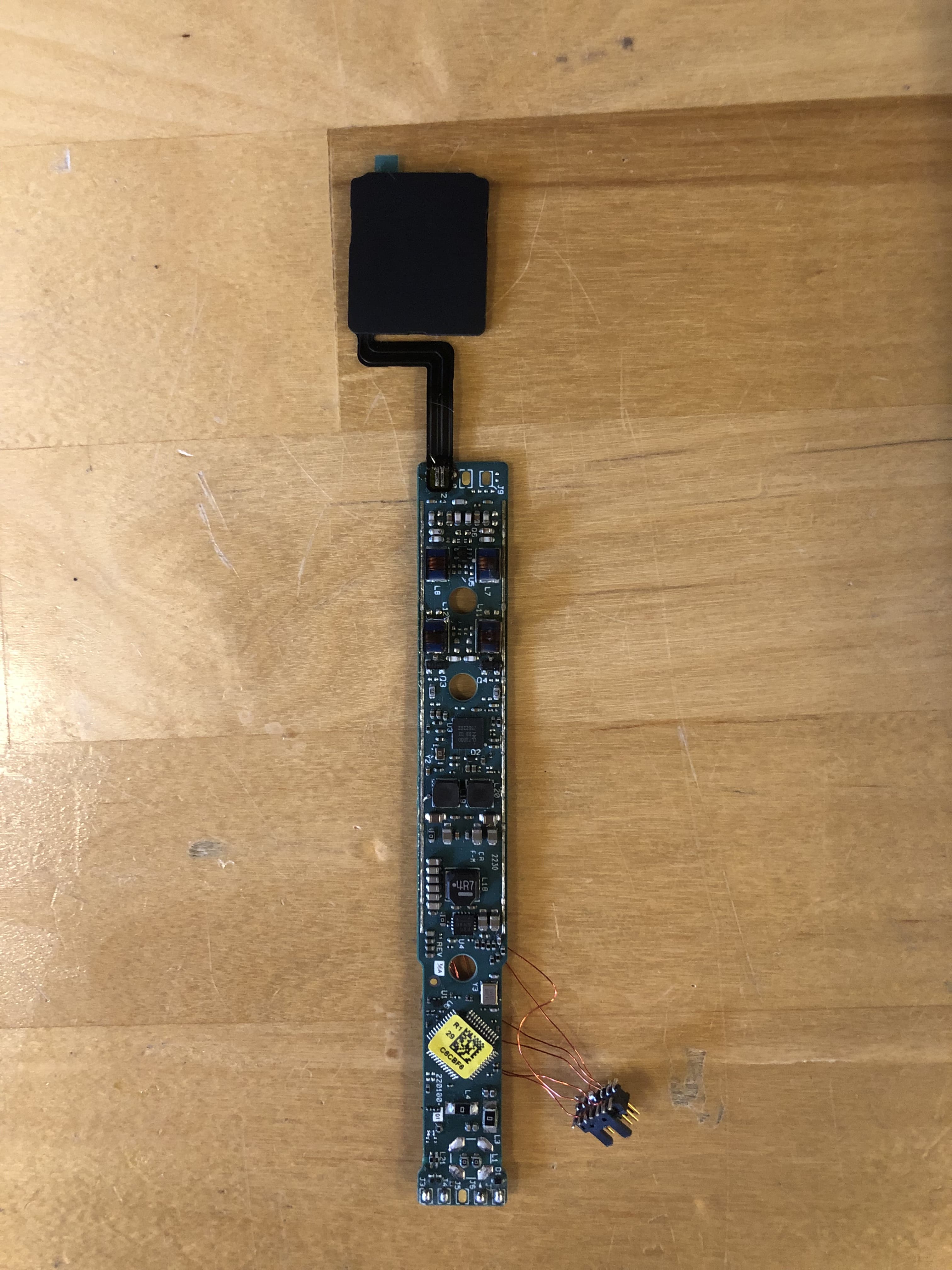
AL8-CBVS1
Oct 16, 2023Wireless Charge Stand
Equipment Class
DXX - Part 15 Low Power Communication Device Transmitter