AL8-P620SBluetooth Speakerphone
HP Inc.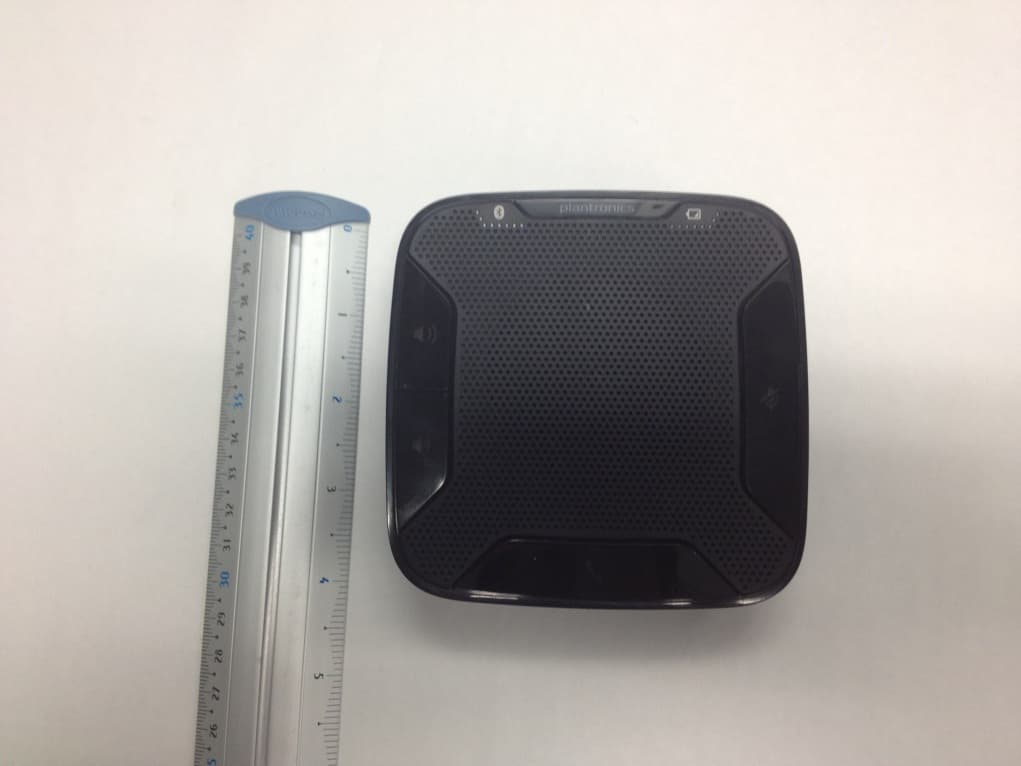
Click to zoom
Application Details
- Equipment Class
- DSS - Part 15 Spread Spectrum Transmitter
- Date of Grant
- Sep 09, 2012
- Application Purpose
- Original Equipment
- Date of Application
- Sep 09, 2012
- Equipment Note
- Bluetooth Speakerphone
- Frequency Range
- 2402.00000000 - 2480.00000000
- Company
- HP Inc.
- Country
- United States
Documents & Files
Document Text
Text extracted from the exhibit documents filed with the FCC. Open a document above to read the original.
Users Manual
Calisto ® 620 Bluetooth Wireless Speakerphone + Bluetooth USB Adapter Designed in Santa Cruz, California QUICK START GUIDE 1 4 3 2 1 Call button Answer or end a PC or Mobile call 1 short key press Answer a 2nd call while on a call 1 short key press ends 1st call, 2nd short key press answers 2nd call 2 Mute microphone button Mute mic 1 short key press mutes; Mute LED turns solid red Unmute mic 1 short key press unmutes; Mute LED turns off 3 Pairing Flashing red/blue In pairing mode Solid blue Paired successfully; times out after 10 minutes 4 Volume up, Volume down Increase/decrease volume Press up/down volume buttons Ringer volume Press volume up/down keys while no call is active 88530--02 (07-12) 1 Speakerphone Charge Charge of a minimum of 30 minutes needed for complete setup. The speakerphone can be charged with a wall charger or with a USB cord and your PC. The power LED on the speakerphone will be solid red when charging and off when fully charged. A full charge with a wall charger will take approximately 1 ½ hours. A full charge with a USB cord and your PC will take ap proximately 2 ½ hours. NOTETo charge the speakerphone with the USB cable and PC, the PC must be on and in an active state (not standby). See the complete user guide at http://docs.plantronics.com/calisto-620 Turn speakerphone off when not in use to save battery power. 2 PC Connect and Call 1 Insert the Bluetooth USB adapter into the PC. NOTEFor best results plug directly into PC and not a hub or docking station. Th e speakerphone and USB adapter are pre-paired and will connect automatically when USB adapter is connected to the PC and the speakerphone is powered on and in range of the PC. 2 Slide the power switch on the speakerphone to the “On” position. The LED on the USB adapter will flash and then turn solid blue when the speakerphone is connected to the Bluetooth adapter. 3 Load Plantronics Enterprise software by visiting plantronics.com/software and click on the download button. 4 Check your audio settings, as necessary. Confirm the speaker and microphone settings for your PC softphone are set to Plantronics BT300C. Windows 7 Go to Control Panel -> Sound-> Playback tab, and set the Plantronics BT300C device as both the Default Communications Device and the Default Audio Device. In the Playback tab, this is indicated by the green checkmark. Windows XP Go to Control Panel -> Sounds and Audio Devices, and in the Audio tab set the Plantronics BT300C for both the Sound playback and Sound recording sections. In the Voice tab, select the Plantronics BT300C item for both the Voice playback and Voice recording sections. 5 Make a test call from your computer softphone. During an active call, the Bluetooth USB adapter will flash blue. 6 End the call by pressing the speakerphone call button. 3 Mobile Phone Connect and Call 1 Ensure your speakerphone is fully charged. Place the speakerphone in pairing mode by pressing and holding the power button to the RIGHT until the Bluetooth pairing LED flashes RED/BLUE. NOTEIf you don’t see the red and blue flash, slide the power button all the way LEFT to turn speakerphone off. Then press and hold the power button again until you see the red and blue flash. Th e speakerphone will stay in pairing mode for ten minutes. 2 Place Bluetooth mobile phone into search mode. Select Calisto 620 from the list of devices found. Calisto 620 3If prompted by your mobile phone for a passcode enter 0000. The LED will stop flashing when your speakerphone and phone are successfully paired. 4 Make a test call from your mobile phone. 5 End the call by pressing the speakerphone call button. Bluetooth Connection To Re-Pair USB adapter In the event the USB adapter and speakerphone become unpaired. 1 Start with the speakerphone powered off. 2 Remove the Bluetooth USB adapter. 3 Place the speakerphone in pairing mode by pressing and holding the power button to the RIGHT until the Bluetooth pairing LED flashes BLUE/RED. 4 Insert the Bluetooth USB adapter into your PC USB port. The LED will flash and then turn solid blue to indicate the speakerphone is connected to the Bluetooth USB adapter. 5 Speakerphone will exit pairing mode. See the complete user guide at http://docs.plantronics.com/calisto-620 The speakerphone wireless range is 10m/33feet NEED MORE HELP? Product support ht tp://www.plantronics.com/support Online user guide http://docs.plantronics.com/calisto-620 Calisto ® 620 Bluetooth Wireless Speakerphone + Bluetooth USB Adapter Designed in Santa Cruz, California QUICK START GUIDE 1 4 3 2 1 Botón de llamada Contestar o finalizar una llamada de PC o teléfono celular 1 pulsación breve Responda una 2da llamada mientras transcurre la llamada 1 pulsación breve finaliza la 1era llamada, la 2da pulsación breve contesta la 2da llamada 2 Botón Silencio del micrófono Silenciar micrófono 1 pulsación breve silencia, el LED de silenciar se vuelve rojo sin parpadeo Quitar silencio al micrófono 1 pulsación breve quita el silencio, el LED de silenciar se apaga 3 Emparejamiento Parpadeo rojo/azul En modo emparejamiento Azul sin parpadeo Emparejado exitoso, expira después de 10 minutos 4 Subir y bajar el volumen Aumentar/disminuir el volumen Presionar botones para subir/bajar el volumen Volumen del timbre Presionar teclas para subir/bajar el volumen mientras no hay llamadas activas 88530-00 1 Teléfono con altavoz Cargar Se requiere una carga de un mínimo de 30 minutos para la configuración completa. Se puede cargar el altavoz con un cargador de pared o un cable USB y su PC. El LED de encendido del altavoz tendrá una luz roja continua cuando se esté cargando y estará apagado cuando la carga esté completa. Una carga completa con un cargador de pared tardará aproximadamente 1 ½ horas. Una carga completa con un cable USB y su PC tardará aproximadamente 2 ½ horas. NOTAPara cargar el altavoz con el cable USB y la PC, esta debe estar encendida y en estado activo (no en espera). Consulte la guía completa del usuario en http://docs.pl…
Text truncated - open the document above for the full version.
Cover Letter(s)
plantronics.com 345 Encinal St., Santa Cruz CA 95060 United States +1‐831‐426‐5858 August 22, 2012 Federal Communications Commission 7435 Oakland Mills Road Columbia MD 21046 Subject: Request for Confidentiality FCC ID: AL8-P620S To Whom It May Concern: Pursuant to the provisions of Sections 0.457 and 0.459 of the Commission’s rules (47 CFR §§ 0.457, 0.459), we are requesting the Commission to withhold the following attachments as confidential document from public disclosure indefinitely. Schematic Diagram Block Diagram Theory of Operation Antenna Specification Above mentioned document contains detailed system and equipment description are considered as proprietary information in operation of the equipment. The public disclosure of above documents might be harmful to our company and would give competitor an unfair advantage in the market. In additional to above mentioned documents, pursuant to Public Notice DA 04- 1705 of the Commission’s policy, in order to comply with the marketing regulations in 47 CFR §2.803 and the importation rules in 47 CFR §2.1204, while ensuring that business sensitive information remains confidential until the actual marketing of newly authorized devices. We are requesting the commission to grant short-term confidentiality request on the following attachments until October 1, 2012. External Photos Internal Photos Test Setup Photos User Manual It is our understanding that all measurement test reports, FCC ID label format and correspondent during certification review process cannot be granted as confidential documents and those information will be available for public review once the grant of equipment authorization is issued. Sincerely, Peter Clark Compliance Engineering Manager
Cover Letter(s)
plantronics.com 345 Encinal St., Santa Cruz CA 95060 United States +1‐831‐426‐5858 August 21, 2012 Compliance Certification Services Certification Division 47173 Benicia Street Fremont, CA 94538, USA To whom it may concern: I, the undersigned, hereby authorize Ms. Claire Hoque/Application Examiner of Compliance Engineering Services, Inc., d.b.a. Compliance Certification Services and hereafter referred to as CCS, to act on our behalf in all manners relating to application for equipment authorization, including signing of all documents relating to these matters. Any and all acts carried out by Ms. Claire Hoque of CCS on our behalf shall have the same effect as acts of our own. I, the undersigned, hereby certify that we are not subject to a denial of federal benefits, that includes FCC benefits, pursuant to Section 5301 of the Anti-Drug Abuse Act of 1988, 21 U.S.C. 853(a). In authorizing CCS as our agent, we still recognize that we are responsible to: a) comply with the relevant provisions of the certification program; b) make all necessary arrangements for the conduct of the evaluation, including provision for examining documentation and access to all areas, records (including internal audit reports) and personnel for the purposes of evaluation (e.g. testing, inspection, assessment, surveillance, reassessment) and resolution of complaints; c) make claims regarding certification only in respect of the scope for which certification has been granted; d) do not use our product certification in such a manner as to bring the Certification Division into disrepute and not make any statement regarding our product certification which the Certification Division may consider misleading or unauthorized; e) upon suspension or cancellation of certification, discontinue use of all advertising matter that contains any reference thereto and return any certification documents as required by the Certification Division; f) use certification only to indicate the products are certified as being in conformity with specified standards; g) endeavor to ensure that no certificate or report nor any part thereof is used in a misleading manner; h) ensure that any reference to our product certification in communication media such as documents, brochures or advertising, complies with the requirements of the Certification Division; i) keep a record of all complaints made known to the us relating to the product’s compliance with requirements of the relevant standard and to make these records available to the Certification Division when requested; j) take appropriate action with respect to such complaints and any deficiencies found in products or services that affect compliance with the requirements for certification; k) document the actions taken. This authorization is valid until further written notice from the applicant. Sincerely, Peter Clark Compliance Engineering Manager
Cover Letter(s)
plantronics.com 345 Encinal St., Santa Cruz CA 95060 United States +1‐831‐426‐5858 August 20, 2012 Compliance Certification Services Certification Division 47173 Benicia Street Fremont, CA 94538, USA To whom it may concern: Regarding FCC ID: AL8-P620S, we, the undersigned, declare that the equipment complies with the Bluetooth CORE Specification 2.1 which includes: 1) a pseudorandom hopping sequence 2) equal on average channel use 3) a receiver with a compliant input bandwidth, based on the measured 20 dB emission bandwidth 4) a receiver with the ability to hop in synchronization with the transmitter 5) a frequency hopping system compliant with all pertinent requirements when presented with a lengthy data stream 6) a frequency hopping system compliant with the non-coordination requirement Sincerely, Peter Clark Compliance Engineering Manager
External Photos
External Photos AL8‐P620S Top Bottom Back Front Right Left
ID Label/Location Info
Label and Location for AL8‐P620S Label: Location: THIS IS THE BOTTOM OF THE DEVICE THIS IS WHERE THE LABEL WILL BE PLACED IN THE BOTTOM OF THE DEVICE
Internal Photos
Internal Photos AL8‐P620S PCB Installed PCB Removed PCB Top PCB Bottom with Shield PCB Bottom with Shield Removed PCB Bottom with Shield Frame Removed
Internal Photos
AL8‐P620S Antenna Location
Test Report
FCC CFR47 PART 15 SUBPART C INDUSTRY CANADA RSS-210 ISSUE 8 CERTIFICATION TEST REPORT FOR BLUETOOTH SPEAKERPHONE MODEL NUMBER: P620S FCC ID: AL8-P620S IC: 457A-P620S REPORT NUMBER: 12U14539-1, Revision A ISSUE DATE: AUGUST 27, 2012 Prepared for PLANTRONICS, INC. 345 ENCINAL STREET SANTA CRUZ, CA 95060, USA Prepared by UL CCS 47173 BENICIA STREET FREMONT, CA 94538, U.S.A. TEL: (510) 771-1000 FAX: (510) 661-0888 REPORT NO: 12U14539-1A DATE: AUGUST 27, 2012 FCC ID: AL8-P620S IC: 457A-P620S Page 2 of 114 UL CCS FORM NO: CCSUP4701G 47173 BENICIA STREET, FREMONT, CA 94538, USA TEL: (510) 771-1000 FAX: (510) 661-0888 This report shall not be reproduced except in full, without the written approval of UL CCS. Revision History Rev. Issue Date Revisions Revised By -- 08/03/2012 Initial Issue T. LEE A 08/27/12 Updated FCC and IC ID A. Zaffar REPORT NO: 12U14539-1A DATE: AUGUST 27, 2012 FCC ID: AL8-P620S IC: 457A-P620S Page 3 of 114 UL CCS FORM NO: CCSUP4701G 47173 BENICIA STREET, FREMONT, CA 94538, USA TEL: (510) 771-1000 FAX: (510) 661-0888 This report shall not be reproduced except in full, without the written approval of UL CCS. TABLE OF CONTENTS 1. ATTESTATION OF TEST RESULTS .................................................................................... 5 2. TEST METHODOLOGY ........................................................................................................ 6 3. FACILITIES AND ACCREDITATION .................................................................................... 6 4. CALIBRATION AND UNCERTAINTY .................................................................................. 6 4.1. MEASURING INSTRUMENT CALIBRATION ................................................................ 6 4.2. SAMPLE CALCULATION ............................................................................................... 6 4.3. MEASUREMENT UNCERTAINTY ................................................................................. 6 5. EQUIPMENT UNDER TEST ................................................................................................. 7 5.1. DESCRIPTION OF EUT ................................................................................................. 7 5.2. MAXIMUM OUTPUT POWER ........................................................................................ 7 5.3. DESCRIPTION OF AVAILABLE ANTENNAS ................................................................ 7 5.4. SOFTWARE AND FIRMWARE ...................................................................................... 7 5.5. WORST-CASE CONFIGURATION AND MODE ............................................................ 7 5.1. DESCRIPTION OF TEST SETUP .................................................................................. 8 6. TEST AND MEASUREMENT EQUIPMENT ....................................................................... 10 7. ANTENNA PORT TEST RESULTS .................................................................................... 11 7.1. BASIC DATA RATE GFSK MODULATION .................................................................. 11 7.1.1. 20 dB AND 99% BANDWIDTH ............................................................................. 11 7.1.2. HOPPING FREQUENCY SEPARATION .............................................................. 16 7.1.3. NUMBER OF HOPPING CHANNELS ................................................................... 18 7.1.4. AVERAGE TIME OF OCCUPANCY ..................................................................... 23 7.1.5. OUTPUT POWER ................................................................................................. 30 7.1.6. AVERAGE POWER .............................................................................................. 34 7.1.7. CONDUCTED SPURIOUS EMISSIONS ............................................................... 35 7.1. ENHANCED DATA RATE QPSK MODULATION ........................................................ 44 7.1.1. OUTPUT POWER ................................................................................................. 44 7.1.2. AVERAGE POWER .............................................................................................. 48 7.2. ENHANCED DATA RATE 8PSK MODULATION ......................................................... 49 7.2.1. 20 dB AND 99% BANDWIDTH ............................................................................. 49 7.2.1. HOPPING FREQUENCY SEPARATION .............................................................. 54 7.2.2. NUMBER OF HOPPING CHANNELS ................................................................... 56 7.2.3. AVERAGE TIME OF OCCUPANCY ..................................................................... 61 7.2.4. OUTPUT POWER ................................................................................................. 68 7.2.5. AVERAGE POWER .............................................................................................. 72 7.2.6. CONDUCTED SPURIOUS EMISSIONS ............................................................... 73 8. RADIATED TEST RESULTS .............................................................................................. 82 8.1. LIMITS AND PROCEDURE ......................................................................................... 82 REPORT NO: 12U14539-1A DATE: AUGUST 27, 2012 FCC ID: AL8-P620S IC: 457A-P620S Page 4 of 114 UL CCS FORM NO: CCSUP4701G 47173 BENICIA STREET, FREMONT, CA 94538, USA TEL: (510) 771-1000 FAX: (510) 661-0888 This report shall not be reproduced except in full, without the written approval of UL CCS. 8.2. TRANSMITTER ABOVE 1 GHz ................................................................................... 83 8.2.1. BASIC DATA RATE GFSK MODULATION ........................................................... 83 8.2.2. ENHANCED DATA RATE 8PSK MODULATION .................................................. 92 8.3. WORST-CASE BELOW 1 GHz .............................…
Text truncated - open the document above for the full version.
Test Setup Photos
REPORT NO: 12U14539-1A DATE: AUGUST 27, 2012 FCC ID: AL8-P620S IC: 457A-P620S Page 112 of 114 UL CCS FORM NO: CCSUP4701G 47173 BENICIA STREET, FREMONT, CA 94538, USA TEL: (510) 771-1000 FAX: (510) 661-0888 This report shall not be reproduced except in full, without the written approval of UL CCS. 11. SETUP PHOTOS ANTENNA PORT CONDUCTED RF MEASUREMENT SETUP RADIATED RF MEASUREMENT SETUP ANTENNA PORT CONDUCTED PHOTO RADIATED FRONT PHOTO REPORT NO: 12U14539-1A DATE: AUGUST 27, 2012 FCC ID: AL8-P620S IC: 457A-P620S Page 113 of 114 UL CCS FORM NO: CCSUP4701G 47173 BENICIA STREET, FREMONT, CA 94538, USA TEL: (510) 771-1000 FAX: (510) 661-0888 This report shall not be reproduced except in full, without the written approval of UL CCS. RADIATED BACK PHOTO REPORT NO: 12U14539-1A DATE: AUGUST 27, 2012 FCC ID: AL8-P620S IC: 457A-P620S Page 114 of 114 UL CCS FORM NO: CCSUP4701G 47173 BENICIA STREET, FREMONT, CA 94538, USA TEL: (510) 771-1000 FAX: (510) 661-0888 This report shall not be reproduced except in full, without the written approval of UL CCS. POWERLINE CONDUCTED EMISSIONS MEASUREMENT SETUP END OF REPORT LINE CONDUCTED FRONT PHOTO LINE CONDUCTED BACK PHOTO
Contact Information
Applicant
Richard Tarsio(US/CAN TRSE Worldwide Technical Regulations)
Test Firm
Compliance Certification ServicesThu Chan
Technical Specifications
| # | Rule Parts | Frequency Range | Power Output |
|---|---|---|---|
| 1 | 15C | 2.40 GHz - 2.48 GHz | 2.65 mW |
Other Applications from HP Inc.
AL8-PWPTF620P
Feb 03, 2026Wireless Charge Stand
Equipment Class
DCD - Part 15 Low Power Transmitter Below 1705 kHzAL8-PBF620F
Jan 23, 2026Bluetooth Headset
Equipment Class
DTS - Digital Transmission SystemAL8-PBVOYX2
Jun 20, 2024Bluetooth Base
Equipment Class
DTS - Digital Transmission System
AL8-VF2R
Mar 07, 2024Wireless Bluetooth Earphones
Equipment Class
DTS - Digital Transmission System
AL8-CBVS1
Oct 16, 2023Wireless Charge Stand
Equipment Class
DXX - Part 15 Low Power Communication Device Transmitter