AL8BUA-100Bluetooth Dongle
HP Inc.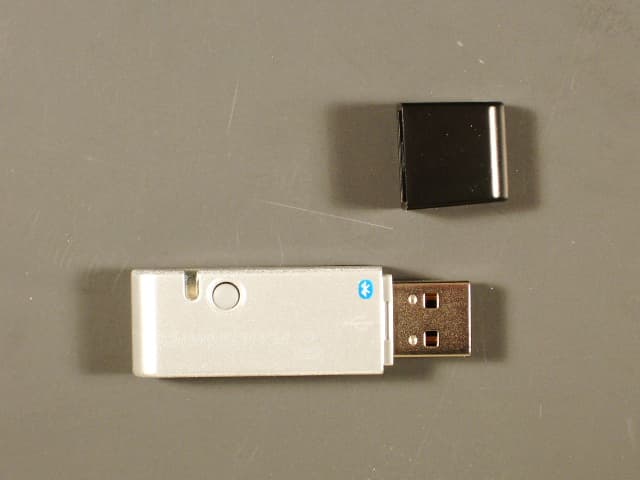
Click to zoom
Application Details
- Equipment Class
- DSS - Part 15 Spread Spectrum Transmitter
- Date of Grant
- Jul 13, 2006
- Application Purpose
- Original Equipment
- Date of Application
- Jul 10, 2006
- Equipment Note
- Bluetooth Dongle
- Frequency Range
- 2402.00000000 - 2480.00000000
- Company
- HP Inc.
- Country
- United States
Documents & Files
Document Text
Text extracted from the exhibit documents filed with the FCC. Open a document above to read the original.
Users Manual
000 Plantronics VoYaGEr™ 510-UsB BLUETOOTH ® HEADSET SySTEm U S E R G U I D E 3 REGISTER YOUR PRODUCT ONLINE Visit www.plantronics.com/productregistration to register your product online so we can provide you with the best possible service and technical support. TABLE OF CONTENTSPACKAGE CONTENTS Package Contents 3 Features 4 Charging 5 Powering 6 Pairing 7 Installing PerSonoCall Software 9 Adjusting Fit 12 Using Your Headset 14 Indicator Lights 17 Troubleshooting 18 Technical Assistance 20 Warranty And Service20 20 Regulatory Notices20 20 Headset (Front and Side View) PerSonoCall ® Software CD Charging Stand Headset AC Charger Headset USB Charging Cable USB Bluetooth Adapter 3 Ear Tips (Small, Medium, Large) USB Extension Cable (3') Travel Pouch 45 FEATURESCHARGING Before using, you must first charge your headset. The indicator light flashes red while charging and turns solid blue when the headset is fully charged. 20 minutes = minimum charge 3 hours = full charge NOTE: Do not use headset while charging and do not connect the charger while headset is in use. Pairing/Connect Button Indicator Light Power/Mute Button Listen Volume Adjust Button +/- Ear Tip Horizontal Boom Adjustment Call Control Button Charge Connection Noise-Canceling Microphone with WindSmart ® Technology AC ChargingUSB Charging AC Charging with Charging Stand USB Charging with Charging Stand Before using your headset for the first time, you must pair it with your Bluetooth phone or device. Be sure the headset is fully charged. For set up and pairing instructions with Bluetooth devices other than mobile phones, please consult your Bluetooth device user guide. Turn on both devices. 67 POWERINGPAIRING Powering Headset Powering USB Bluetooth Adapter Pairing Headset with Bluetooth Phone The USB Bluetooth adapter is automatically powered on upon inserting into the USB port of the computer. If your USB port on the computer is hard to access, you can use the USB extension cable. NOTE: The USB Bluetooth adapter is automatically active with the current paired headset upon powering on. Press and hold the power/mute button for three seconds to turn the headset on or off. The indicator light flashes blue when the headset is on. The indicator light will flash red when the battery becomes low. 1. Simultaneously press the listen volume adjust button marked + (volume up) and the call control button. Release the buttons when the indicator light begins to flash red then blue. 2. While the headset is flashing red and blue, use the phone menu to search for Bluetooth devices and select “510 Plantronics”. 3. When prompted for passkey enter 0000. The headset will flash blue when paired successfully. 89 PAIRING Pairing Headset with USB Bluetooth Adapter NOTE: The headset and USB Bluetooth adapter are paired to each other at the factory. However, if you have purchased a USB Bluetooth adapter separately, or if you wish to use a replacement headset with your existing adapter, the units must be paired. Power on the headset. Insert the USB Bluetooth adapter in the USB port of your computer. 1. Simultaneously press the listen volume adjust button marked + (volume up) and the call control button. Release the buttons when the indicator light begins to flash red then blue. NOTE: Take caution when manually pairing the USB adapter. Do not press hard. Please “pinch” with both fingers rather than push on the adapter to avoid damage to the adapter or USB port. 2. Pinch the pairing/connect button for at least 2 seconds until adapter flashes red and blue and begin pairing with your Bluetooth headset. 2 sec. INSTALLING PERSONOCALL ® SOFTWARE Plantronics PerSonoCall ® software provides the link between your Bluetooth headset and the softphone application on your computer. PerSonoCall software provides the ability to remotely detect and answer/end a call from your softphone application via the headset call control button. In addition PerSonoCall provides some basic configuration and status information about the system. See page 10 for more details. 1. With the CD inserted, go to the PerSonoCall main screen and click on “Install the PerSonoCall Software.” 2. Your softphone may require you to choose which audio device you wish to use. Please refer to softphone documentation for details. NOTE: When the USB Bluetooth adapter is installed, it becomes the default audio device in your computer. You can set preferences manually in the Windows ® operating system through the Sounds and Audio Devices option in the Control Panel. NOTE: Once installed we recommend that you set PerSonoCall to launch whenever the Windows ® operating system starts. See page 10 for details. System Tray Icons After installing the software, one of the four system tray icons will appear in the tray bar at the bottom of your screen showing status of headset communication with PerSonoCall. : No headset detected : Headset detected, no radio link to USB Bluetooth adapter : Headset detected, and radio link to USB Bluetooth adapter active : Headset detected, and radio link to USB Bluetooth adapter is locked on NOTE: Some PerSonoCall features are grayed and not applicable to the Voyager 510-USB system. Headset Status Box Provides information you may need for technical assistance. The Headset Indicators listed will be checked if active. Softphone Status Box Lists the selectable outgoing lines as well as the number of calls active, ringing, on hold and completed. NOTE: In some cases compatible softphones may not show the available outgoing line in the Softphone Status box. This will not affect how the softphone operates with PerSonoCall. Current Status Screen 1011 INSTALLING PERSONOCALL SOFTWARE NOTE: Some PerSonoCall features are grayed and not applicable to the Voyager 510-USB system. Launch PerSonoCall Whenever Windows ® Starts Check this box to automatically launch the PerSonoCall application whenever you start your computer. This is recommended. Lock Headset Radio Link On Check this box to prevent PerSon…
Text truncated - open the document above for the full version.
Cover Letter(s)
6/14/06 AmericanTCB 6731 Whittier Ave. McLean, VA 22101 FCC ID: AL8BUA-100 / IC: 457A-BUA-100 In regards the application submittal for FCC ID: AL8BUA-100 and IC: 457A-BUA-100. Please review the associated exhibits for the purpose of issuing a FCC Grant of Certification and an IC TAC for the Plantronics, Inc. Bluetooth Dongle. Bob Cole President EMCE Engineering 44366 S. Grimmer Blvd Fremont, ca 94538 510-490-4307 510-490-3441 (Authorized Agent for Socket Communications, Inc.)
Cover Letter(s)
Confidentiality Request 6/14/06 AmericanTCB 6731 Whittier Ave. McLean, VA 22101 FCC ID: AL8BUA-100 and IC: 457A-BUA-100 In regards the exhibits submitted in support of the application for FCC ID: AL8BUA-100 and IC # 457A-BUA-100, please classify the following as confidential under the provision of 47 CFR 0.459: • Schematics • Parts List • System Block Diagram These exhibits contain technical information which the Applicant deems to be sensitive and proprietary. Therefore this information cannot be published. If this information were to be made public it could be used to the disadvantage of the applicant in the marketplace. Bob Cole President EMCE Engineering (Authorized Agent)
External Photos
Plantronics, Inc. BUA-100 EUT Photos External Photos EUT Top View Plantronics, Inc. BUA-100 EUT Photos External Photos EUT Bottom View
Internal Photos
Plantronics, Inc. BUA-100 EUT Photos Internal Photos PCB Top View [Antenna Trace to the Right in Photo] Plantronics, Inc. BUA-100 EUT Photos Internal Photos PCB Bottom View
Operational Description
VOYAGER 510-USB | www.plantronics.com P lA n tR On i cS V O YA G E R ™ 5 1 0 - U S B >>> >> Plantronics Voyager ™ 510-USB Headset and Bluetooth adapter. Plantronics Voyager ™ 510-USB Bluetooth ® Headset System The ultimate plug-and-play headset for VoIP Bluetooth communications Experience true plug-and-play wireless connectivity with this lightweight, mobile, Bluetooth headset system. Ideal for mobile professionals, the Voyager 510-USB Bluetooth Headset System features a USB Bluetooth adapter that, with the Voyager 510 headset, enables instant, wireless access to PC softphones. Exclusive multipoint technology lets you seamlessly transition between multiple wireless devices, softphones and mobile phones. And with Plantronics PerSonoCall ® software included, you can be notified of incoming calls and answer/end calls directly from the headset, even while moving about the office, airport, or wherever business takes you. • Bluetooth adapter enables plug-and-play connectivity to PC Softphones. • Multipoint technology lets you seamlessly switch between your softphone and mobile phone. • Answer and end both softphone and mobile phone calls—even while away from your desk—with a single button. • USB adapter supports Bluetooth headset profile. • Remote ring detection through PerSonoCall software notifies you of incoming calls via the headset. • Lightweight, compact design allows easy portability while traveling. • Noise-Canceling microphone with WindSmart ® technology improves sound quality of Internet calls. • Convenient USB charging right from your PC—no AC adapter needed. • Freedom to roam up to 33 feet (10 meters) from your Bluetooth device. • Approximately 6 hours talk time makes it easy to stay connected. • System includes: Bluetooth enabled Voyager 510 headset, convenient charging stand, USB Bluetooth adapter, travel pouch, USB charging cable, 3 ft. USB extension cable, AC charger and PerSonoCall software. PlAntROnicS VOYAGER™ 510-USB For more information about the Voyager 510-USB Bluetooth Headset System or other Plantronics products, please call or visit our Web site at: www.plantronics.com TEL: 800-544-4660 (USA AND CANADA) 831-458-7700 (OUTSIDE USA) © 2006 Plantronics, Inc. All rights reserved. Plantronics, the logo design, PerSonoCall, Plantronics Voyager, Sound Innovation and WindSmart are trademarks or registered trademarks of Plantronics, Inc. The Bluetooth® word mark and logos are owned by the Bluetooth SIG, Inc. and any use of such marks by Plantronics, Inc. is under license. All other trademarks are the property of their respective owners. Space photo imagery courtesy of NASA. OPS-13. Printed 05/06. Sound Innovation for missions to the moon. And for everyday life on this planet, too. In 1969, a Plantronics headset carried the historic first words from the moon: “That’s one small step for man, one giant leap for mankind.” Today, we’re the headset of choice in mission-critical applications such as air traffic control and 911 dispatch. This history of proven sound innovation is the basis for every product we build—whether it’s for work, for home or on the go. Voyager 510-USB Bluetooth ® Key Features Talk Time Approximately 6 hours Standby Time Approximately 100 hours Headset Range Up to 33 feet (10 meters) Headset Wearing Style Over-the-ear; boom swivels for wearing on either ear Headset Weight 1/2 ounce Headset Microphone Noise-Canceling with WindSmart ® technology Headset Controls Volume, mute, call answer/end Headset Battery Lithium Polymer Wireless Compatibility Bluetooth (v2.0) devices supporting headset profile Supports Adaptive Frequency Yes Hopping (AFH) to help avoid interference, for co-existence with Wi-Fi/WLAN Multipoint Support Yes Plug-and-play USB Bluetooth Yes Connectivity Auto Pairing Interface Via Adapter Yes One-button Headset Interface Yes For Call Answer/End One-button Headset Interface Yes for Remote Call Detection Volume controls One-touch call-control button Boom swivels for use on either ear USB Bluetooth plug-and-play adapter Status/in-use indicator light Noise-Canceling microphone with WindSmart technology • > Convenient charging stand plugs into PC with USB cable, or it can be used with an AC adapter. As the new benchmark in Bluetooth multipoint versatility, the Plantronics Voyager 510-USB Headset System lets you seamlessly switch from your softphone to other voice-enabled Bluetooth devices, such as a mobile phone or PDA, without having to switch headsets.
Test Report
EMCE Test Report # 2489-1 3/27/06 EMCE Engineering, Inc., 44366 S. Grimmer Blvd., Fremont, CA 94538 Page 1 of 49 Tel:510-490-4307 Fax: 510-490-3441 e-mail: [email protected] Accredited by the National Voluntary Laboratory Accreditation Program for the specific scope of Accreditation under Lab Code 200092-0 Intentional Radiator Test Report Test Standards: FCC Part 15 (Subpart C – Intentional Radiators) Industry Canada RSS-210 Prepared For: Plantronics, Inc. 345 Encinal Street Santa Cruz, CA 95060 Equipment Under Test: Bluetooth Dongle Model: BLUEMAX M/N: BUA-100 Prepared by: 44366 S. Grimmer Blvd. Fremont, CA 94538 USA EMCE Test Report # 2489-1 3/27/06 EMCE Engineering, Inc., 44366 S. Grimmer Blvd., Fremont, CA 94538 Page 2 of 49 Tel:510-490-4307 Fax: 510-490-3441 e-mail: [email protected] Accredited by the National Voluntary Laboratory Accreditation Program for the specific scope of Accreditation under Lab Code 200092-0 TABLE OF CONTENTS 1. CUSTOMER INFORMATION 3 2. EUT AND ACCESSORY INFORMATION 4 3. SUMMARY OF TEST RESULTS 5 4. STANDARDS AND MEASUREMENT METHODS 6 5. TEST SETUPS 7 6. TEST RESULTS 9 7. TEST EQUIPMENT 47 EMCE Test Report # 2489-1 3/27/06 EMCE Engineering, Inc., 44366 S. Grimmer Blvd., Fremont, CA 94538 Page 3 of 49 Tel:510-490-4307 Fax: 510-490-3441 e-mail: [email protected] Accredited by the National Voluntary Laboratory Accreditation Program for the specific scope of Accreditation under Lab Code 200092-0 1.0 CUSTOMER INFORMATION Test Laboratory: FCC registration number EMCE Engineering 44366 S. Grimmer Blvd. Fremont, CA 94538 USA Tel: 510-490-4307 Fax: 510-490-3441 [email protected] 0007198120 Customer: Plantronics, Inc. 345 Encinal Street Santa Cruz, CA Tel: 831-426-5858 Fax: 831-426-6098 Contact Person: Myhassan Bakrim Receipt of EUT: 3/5/06 Test plan reference: FCC Part 2, 15 (15.247) / IC RSS-210 FCC ID: AL8BUA-100 IC#: 457A-BUA-100 Date of testing: 3/5/06 – 3/27/06 Date of Report: 3/27/06 The tests listed in this report have been completed to demonstrate compliance to the CFR 47 Section 15.247, as well as Industry Canada Radio Standard RSS-210, Issue 5. Contents approved: Name: Bob Cole Title: President EMCE Test Report # 2489-1 3/27/06 EMCE Engineering, Inc., 44366 S. Grimmer Blvd., Fremont, CA 94538 Page 4 of 49 Tel:510-490-4307 Fax: 510-490-3441 e-mail: [email protected] Accredited by the National Voluntary Laboratory Accreditation Program for the specific scope of Accreditation under Lab Code 200092-0 2.0 EUT AND ACCESSORY INFORMATION EUT description The EUT is a Plantronics, Inc. BLUEMAX Bluetooth Dongle, M/N: BUA-100 EUT and accessories The table below lists all EUTs and accessories used in the tests. Later in this report, only numbers in the last column are used to refer to the devices in each test. Software The computers were equipped with test software provided by the customer. The software was used to control the EUT in the tests. Name Type S/N Number EUT BLUEMAX BUA-100 USB Dongle N/A E0001 Accessories Laptop Computer Compaq Presario M/N: 1694 3882A744 S0001 Software CSR Bluesuite 1.20 Bluetest, BlueChat N/A N/A EUT Information Product Specification Description Model Name BLUEMAX Model Number BUA-100 Type of Modulation Frequency Hopping Spread Spectrum (FHSS) Number of Hopping Channels 79 Operating Frequency Range 2480 – 2483.5 MHz Type of Equipment Combined, Battery Powered Extreme Operating Temperature Range -20 C – 55 C Extreme Operating Voltage Range Fully Charged Battery Type of Antenna Integral Antenna Gain (dBi) 0.0 dB [nominal] Transmitter Method of Frequency Generation Synthesized Transmitter Aggregate Data Rate >250kbps Transmitter Duty Type Intermittant Transmitter Duty Cycle Tx ON: .326 ms, Tx OFF: .924 ms: Duty Cycle = .261 Continuous Operation for Testing Purposes? Yes Transmit Emissions Designator 1M00 Q1D EMCE Test Report # 2489-1 3/27/06 EMCE Engineering, Inc., 44366 S. Grimmer Blvd., Fremont, CA 94538 Page 5 of 49 Tel:510-490-4307 Fax: 510-490-3441 e-mail: [email protected] Accredited by the National Voluntary Laboratory Accreditation Program for the specific scope of Accreditation under Lab Code 200092-0 3.0 SUMMARY OF TEST RESULTS Section in CFR 47 Section in RSS-210Description Results 15.245 (b)(1) 6.2.2(o) (a2) Peak output power (Radiated Emissions) PASSED 15.247 (a)(1) 6.2.2(o) (a3) CF Separation PASSED 15.247 (a)(1)(ii) 6.2.2(o) (a3) Number of Hopping Frequencies PASSED 15.247 (a)(1)(ii) 6.2.2(o) (a3) Dwell Time PASSED 15.247 (a)(1)(ii) 6.2.2(o) (a3) 20 dB Bandwidth PASSED 15.247, c 6.2.2(o) (e1) Band-edge compliance of RF Radiated emission PASSED 15.247, c 6.2.2(o) (e1) Restricted Band (Radiated Emissions) PASSED 15.247(d) 6.2.2(o) (e1) Spurious radiated emissions PASSED 15.247(d) 6.2.2(o) (e1) Spurious Antenna Conducted emissions PASSED PASS The EUT passed that particular test. FAIL The EUT failed that particular test. EMCE Test Report # 2489-1 3/27/06 EMCE Engineering, Inc., 44366 S. Grimmer Blvd., Fremont, CA 94538 Page 6 of 49 Tel:510-490-4307 Fax: 510-490-3441 e-mail: [email protected] Accredited by the National Voluntary Laboratory Accreditation Program for the specific scope of Accreditation under Lab Code 200092-0 4.0 STANDARDS AND MEASUREMENT METHODS The tests were performed in guidance of CFR 47 section 15.247, FCC Public Notice DA 00-705 (March 30, 2000), FCC Report & Order 97-114 (April 10, 1997),and ANSI C63.4 (2003). Deviations, modifications or clarifications (if any) to above mentioned documents are written in each section under “Test method”. For the test equipment, see device list in the end of this test. 4.1 Selection of operation mode for tests Before tests, several operation modes, and modulation patterns were tried. The worst case was selected for each test and those results reported. EMCE Test Report # 2489-1 3/27/06 EMCE Engineering, Inc., 44366 S. Grimmer Blvd., Fremont, CA 94538 Page 7 of 49 Tel:510-490-4307 Fax: 510-490-3441 e-mail: bo…
Text truncated - open the document above for the full version.
Test Setup Photos
Plantronics, Inc. FCC ID: AL8BUA-100 M/N: BUA-100 Test Setup Photos Radiated Emissions Test Setup – Front Plantronics, Inc. FCC ID: AL8-BUA-100 M/N: BUA-100 Test Setup Photos Line Conducted Emissions Test Setup
Contact Information
Applicant
Richard Tarsio(US/CAN TRSE Worldwide Technical Regulations)
Technical Contact
EMCE EngineeringRobert Cole
[email protected]510-490-4307
44366 S. Grimmer Blvd. · Fremont, California · United States
Test Firm
EMCE Engineering, Inc.Bob Cole
Technical Specifications
| # | Rule Parts | Frequency Range | Power Output |
|---|---|---|---|
| 1 | 15C | 2.40 GHz - 2.48 GHz | 1.90 mW |
Other Applications from HP Inc.
AL8-PWPTF620P
Feb 03, 2026Wireless Charge Stand
Equipment Class
DCD - Part 15 Low Power Transmitter Below 1705 kHzAL8-PBF620F
Jan 23, 2026Bluetooth Headset
Equipment Class
DTS - Digital Transmission SystemAL8-PBVOYX2
Jun 20, 2024Bluetooth Base
Equipment Class
DTS - Digital Transmission System
AL8-VF2R
Mar 07, 2024Wireless Bluetooth Earphones
Equipment Class
DTS - Digital Transmission System
AL8-CBVS1
Oct 16, 2023Wireless Charge Stand
Equipment Class
DXX - Part 15 Low Power Communication Device Transmitter