EHA-01CN3CN3
Intermec Technologies Corporation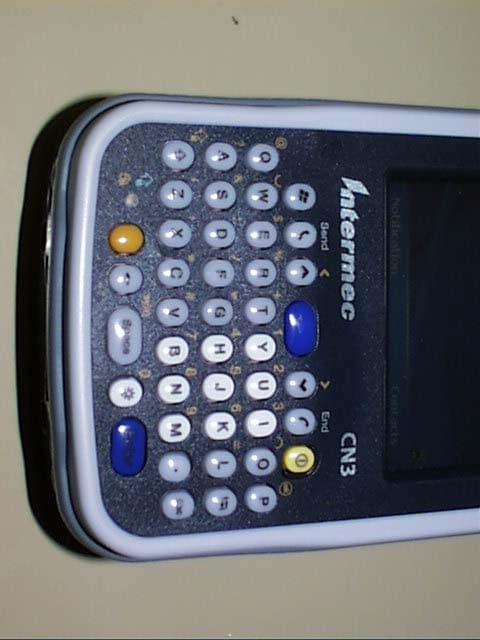
Click to zoom
Application Details
- Equipment Class
- DTS - Digital Transmission System
- Date of Grant
- Oct 04, 2006
- Application Purpose
- Original Equipment
- Date of Application
- Oct 04, 2006
- Equipment Note
- CN3
- Frequency Range
- 2412.00000000 - 2462.00000000
- Country
- United States
Documents & Files
Document Text
Text extracted from the exhibit documents filed with the FCC. Open a document above to read the original.
Users Manual
CN3 Compliance Insert For Users in the United States and Canada For Users Outside of the United States or Canada Caution: This marking indicates that the user should read all included documentation before use. This product conforms to the following approvals. The users of this product are cautioned to use accessories and peripherals approved by Intermec Technologies Corporation. The use of accessories other than those recommended, or changes to this product that are not approved by Intermec Technologies Corporation, may void the compliance of this product and may result in the loss of the user’s authority to operate the equipment. Class B Compliant Products FCC Digital Emissions Compliance This equipment has been tested and found to comply with the limits for a Class B digital device, pursuant to Part 15 of the FCC Rules. These limits are designed to provide reasonable protection against harmful interference in a residential installation. This equipment generates uses and can radiate radio frequency energy and, if not installed and used in accordance with the instructions, may cause harmful interference to radio communications. However, there is no guarantee that interference will not occur in a particular installation. If this equipment does cause harmful interference to radio or television reception, which can be determined by turning the equipment off and on, the user is encouraged to try to correct the interference by one or more of the following measures: • Reorient or relocate the radio or television receiving antenna. • Increase the separation between the computer equipment and receiver. • Connect the equipment into an outlet on a circuit different from that to which the radio or television receiver is connected. • Consult the dealer or an experienced radio television technician for help. Canadian Digital Apparatus Compliance This Class B digital apparatus meets all requirements of the Canadian Interference- Causing Equipment Regulations. Document Number: 632194 Rev: A Page 1 of 4 Caution: The battery pack used in this device may ignite, create a chemical burn hazard, explode, or release toxic materials if mistreated. Do not incinerate, disassemble, or heat above 100°C (212°F). Charge only with Intermec Models AC14, AD10, AD11, AD12 or AV6. Do not short circuit; may cause burns. Keep away from children. Use only Intermec battery pack Model AB8 or AB9. Use of incorrect battery pack may present a risk of fire or explosion. Promptly dispose of used battery pack according to the instructions. Battery Recycling Information This product contains or uses a lithium ion (Li-ion) main battery. When the battery reaches the end of its useful life, the spent battery should be disposed of by a qualified recycler or hazardous materials handler. Do not mix this battery with the solid waste stream. Contact your Intermec Technologies Service Center for recycling or disposal information. Note: In the U.S.A., the EPA does not consider spent Li-ion batteries as hazardous waste. Caution: For Power Supply use Intermec Model (list model number(s) here). No user-serviceable parts. Specific Absorption Rate (SAR) Radio Wave Exposure and Specific Absorption Rate (SAR) Information for Model CN3 Configurations with 802.11g Radio The FCC permits a maximum SAR value of 1.6 W/kg. For body worn operation, the highest SAR value for the Model CN3, as tested by BABT, is 0.087 W/kg. The FCC permits a maximum SAR value of 1.6 W/kg. For head worn operation, the highest SAR value for the Model CN3, as tested by BABT, is 1.031 W/kg. This product has been tested and meets the FCC RF exposure guidelines when used with the Intermec accessories supplied or designated for this product. Use of other accessories may not ensure compliance with FCC RF exposure guidelines. Radio Wave Exposure and Specific Absorption Rate (SAR) Information for Model CN3 Configurations with GSM/GPRS Radio For residents of Canada and the United States and other countries/regions that have adopted the SAR limit recommended by Industry Canada RSS-102 and Federal Communications Commission Office of Engineering and Technology (OET) Bulletin 65, the maximum allowed SAR value is 1.6W/kg over 1g of tissue. For use at the ear, the highest SAR value for the Model CN3, as tested by BABT, is 0.528 W/kg. For body worn operation, the highest SAR value for the Model CN3, as tested by BABT, is 0.543 W/kg. Document Number: 632194 Rev: A Page 2 of 4 This product has been tested and meets the FCC RF exposure guidelines when used with the Intermec accessories supplied or designated for this product. Use of other accessories may not ensure compliance with FCC RF exposure guidelines. Radio Wave Exposure and Specific Absorption Rate (SAR) Information for Model CN3 Configurations with GSM/GPRS Radio For residents of the European Union and other countries/regions that have adopted the International Commission on Non-Ionizing Radiation Protection (ICNIRP) SAR limit, the maximum allowed SAR value is 2.0W/kg over 10g of tissue. For use at the ear, the highest SAR value for the Model CN3, as tested by BABT, is 0.369 W/kg. For body worn operation, the highest SAR value for the Model CN3, as tested by BABT, is 0.292 W/kg. This product has been tested and meets the FCC RF exposure guidelines when used with the Intermec accessories supplied or designated for this product. Use of other accessories may not ensure compliance with FCC RF exposure guidelines. Laser and Imager Compliance and Precaution (Rest of World) This product complies with the following standards for LED safety: IEC 60825-1 / EN 60825-1 - Class 1 LED Product Important Radio Information For Users in the United States and Canada Place this supplement in your manual. This device complies with Part 15 of the FCC rules and with RSS-210 of Industry Canada. Operation is subject to the following two conditions: (1) This device may not cause harmful interference, and (2) This device must accept any interference received, incl…
Text truncated - open the document above for the full version.
Users Manual
CN3 Mobile Computer User's Manual iiPRELIMINARY - CN3 Mobile Computer User’s Manual Intermec Technologies Corporation Worldwide HeadquartersCedar Rapids Technical Communications 6001 36th Ave.W. 550 Second Street SE Everett, WA 98203Cedar Rapids, IA 52401 U.S.A.U.S.A. www.intermec.com The information contained herein is provided solely for the purpose of allowing customers to operate and ser- vice Intermec-manufactured equipment and is not to be released, reproduced, or used for any other purpose without written permission of Intermec Technologies Corporation. Information and specifications contained in this document are subject to change without prior notice and do not represent a commitment on the part of Intermec Technologies Corporation. © 2006 by Intermec Technologies Corporation. All rights reserved. The word Intermec, the Intermec logo, Norand, ArciTech, Beverage Routebook, CrossBar, dcBrowser, Durath- erm, EasyADC, EasyCoder, EasySet, Fingerprint, i-gistics, INCA (under license), Intellitag, Intellitag Gen2, JANUS, LabelShop, MobileLAN, Picolink, Ready-to-Work, RoutePower, Sabre, ScanPlus, ShopScan, Smart Mobile Computing, TE 2000, Trakker Antares, and Vista Powered are either trademarks or registered trade- marks of Intermec Technologies Corporation. There are U.S. and foreign patents as well as U.S. and foreign patent applications pending. Microsoft, Windows, and the Windows logo are registered trademarks of Microsoft Corporation in the United States and/or other countries. Bluetooth is a trademark of Bluetooth SIG, Inc., U.S.A. Contents CN3 Mobile Computer User’s Manual - PRELIMINARYiii Contents Before You Begin . . . . . . . . . . . . . . . . . . . . . . . . . . . . . . . . . . . . . . . . . . . . . . . . . . . . . . . . .ix Safety Information . . . . . . . . . . . . . . . . . . . . . . . . . . . . . . . . . . . . . . . . . . . . . . . . . ix Global Services and Support . . . . . . . . . . . . . . . . . . . . . . . . . . . . . . . . . . . . . . . . . . ix Who Should Read this Manual. . . . . . . . . . . . . . . . . . . . . . . . . . . . . . . . . . . . . . . . x Related Documents . . . . . . . . . . . . . . . . . . . . . . . . . . . . . . . . . . . . . . . . . . . . . . . . x Patent Information . . . . . . . . . . . . . . . . . . . . . . . . . . . . . . . . . . . . . . . . . . . . . . . . . xi 1 Using the Computer. . . . . . . . . . . . . . . . . . . . . . . . . . . . . . . . . . . . . . . . . . . . . . . . . . . . . . . . . 1 Introducing the CN3 Mobile Computer . . . . . . . . . . . . . . . . . . . . . . . . . . . . . . . . . . . . . . . 2 Learning Software Build Versions . . . . . . . . . . . . . . . . . . . . . . . . . . . . . . . . . . . . . . . . . . . . 3 Resetting Your CN3 Computer . . . . . . . . . . . . . . . . . . . . . . . . . . . . . . . . . . . . . . . . . . . . . . 3 Scanning Bar Codes. . . . . . . . . . . . . . . . . . . . . . . . . . . . . . . . . . . . . . . . . . . . . . . . . . . . . . . 4 Scanning with the 2D Area Imager . . . . . . . . . . . . . . . . . . . . . . . . . . . . . . . . . . . . . 4 Reading Distances . . . . . . . . . . . . . . . . . . . . . . . . . . . . . . . . . . . . . . . . . . . . . . . . . 6 Using the Batteries. . . . . . . . . . . . . . . . . . . . . . . . . . . . . . . . . . . . . . . . . . . . . . . . . . . . . . . . 7 Charging and Installing the Battery . . . . . . . . . . . . . . . . . . . . . . . . . . . . . . . . . . . . 7 Maximizing Battery Life . . . . . . . . . . . . . . . . . . . . . . . . . . . . . . . . . . . . . . . . . . . . . 8 Checking the Battery Status . . . . . . . . . . . . . . . . . . . . . . . . . . . . . . . . . . . . . . . . . . 8 Adjusting the Beeper . . . . . . . . . . . . . . . . . . . . . . . . . . . . . . . . . . . . . . . . . . . . . . . . . . . . . . 9 Enabling the Beeper . . . . . . . . . . . . . . . . . . . . . . . . . . . . . . . . . . . . . . . . . . . . . . . . 9 Disabling the Beeper. . . . . . . . . . . . . . . . . . . . . . . . . . . . . . . . . . . . . . . . . . . . . . . 10 Intermec Settings Applet . . . . . . . . . . . . . . . . . . . . . . . . . . . . . . . . . . . . . . . . . . . . . . . . . . 10 Using the Keypad . . . . . . . . . . . . . . . . . . . . . . . . . . . . . . . . . . . . . . . . . . . . . . . . . . . . . . . 11 Using the Color-Coded Keys . . . . . . . . . . . . . . . . . . . . . . . . . . . . . . . . . . . . . . . . 12 Capitalizing All Characters . . . . . . . . . . . . . . . . . . . . . . . . . . . . . . . . . . . . . . . . . . 12 Using the Power (I/O) Switch . . . . . . . . . . . . . . . . . . . . . . . . . . . . . . . . . . . . . . . 12 Using the Screen . . . . . . . . . . . . . . . . . . . . . . . . . . . . . . . . . . . . . . . . . . . . . . . . . . . . . . . . 12 Software Tools. . . . . . . . . . . . . . . . . . . . . . . . . . . . . . . . . . . . . . . . . . . . . . . . . . . . . . . . . . 13 SmartSystems Foundation Console (www.intermec.com/SmartSystems) . . . . . . . 13 Intermec Resource Kits (www.intermec.com/IDL) . . . . . . . . . . . . . . . . . . . . . . . . 13 Using the Speakers. . . . . . . . . . . . . . . . . . . . . . . . . . . . . . . . . . . . . . . . . . . . . . . . . . . . . . . 14 Using the Status LEDs. . . . . . . . . . . . . . . . . . . . . . . . . . . . . . . . . . . . . . . . . . . . . . . . . . . . 15 Using the Storage Card . . . . . . . . . . . . . . . . . . . . . . . . . . . . . . . . . . . . . . . . . . . . . . . . . . . 16 Setting the Vibrator . . . . . . . . . . . . . . . . . . . . . . . . . . . . . . . . . . . . . . . . . . . . . . . . . . . . . . 17 Wireless Network Support. . . . . . . . . . . . . . . . . . . . . . . . . . . . . . . . . . . . . . . . . . . . . . . . . 18 Contents ivPRELIMINARY - CN3 Mobile Computer User’s Manual Accessories for the CN3 Computer . . . . . . . . . . . . . . . . . . . . . . . . . . . . . . . . . . . . . . . . . . 18 Physical and Environmental Specifications . . . . . . . . . . . . . . . . . . . . . . . . . . . . . .…
Text truncated - open the document above for the full version.
Users Manual
CN3 Mobile Computer User’s Manual - PRELIMINARY69 3 Configuring the Computer There are multiple ways to get an application to your CN3 Mobile Com- puter; like there are multiple ways to package the application for delivery. Note: Desktop icons and settings applet icons are shown to the left. Any place that Start is mentioned, tap the following Windows icon in the top, left corner of your CN3 desktop. Chapter 3 — Configuring the Computer 70PRELIMINARY - CN3 Mobile Computer User’s Manual Developing Applications for the Computer CN3Computers run applications programmed in Microsoft Visual Studios 2005. Use this chapter to understand what you need to develop a new application for the CN3 Computer. To develop applications for your CN3 Computer, use the Resource Kits in the Intermec Developer Library (IDL). Download the IDL from the Inter- mec web site at www.intermec.com/idl. Contact your Intermec representa- tive for more information. You need the following hardware and software components to use the resource kits: • Pentium desktop, 400 MHz or higher • Windows 2000 (Service Pack 2 or later) or Windows XP (Home, Profes- sional, or Server) • For native and managed development, Microsoft Visual Studio 2005 • 128 MB RAM (196 MB recommended) • 360 MB hard drive space for minimum installation (720 MB for com- plete) • CD-ROM drive compatible with multimedia desktop specification • VGA or higher-resolution monitor (Super VGA recommended) • Microsoft Mouse or compatible pointing device Packaging Applications for the CN3 Computer Use any of these methods to package applications for installation: • You could package an application as a cabinet (CAB) file. Recommended • For simple applications, the application itself may be the file to deliver. • It could be a directory structure that contains the application, supporting files like ActiveX controls, DLLs, images, sound files, and data files. Consider any of these when choosing a storage location for applications: • In the basic CN3 Computer, there are two built-in storage options: the Object Store and the Flash File Store. The Object Store is a Disk on Chip (DOC) Flash that looks like a disk. The Flash File Store is an area of storage which is embedded in a section of the system’s FLASH mem- ory. This storage area is not erased during a clean-boot. • If the optional Secure Digital storage card is in the system, then consider this card the primary location for placing an applications install files. This storage card creates the “\Storage Card” folder. Note: Microsoft eMbedded Visual C++ 4.0 may be used, but some features are not available. Chapter 3 — Configuring the Computer CN3 Mobile Computer User’s Manual - PRELIMINARY71 • Use the small nonvolatile Flash File Store region to hold CAB files that rebuild the system at clean-boot or install applications from a CAB file into the Flash File Store so they are “ready-to-run” when a clean-boot is performed. Since the FLASH in the system has a limited number of write cycles, do not use the Flash File Store for excessive writing pur- poses; however, reading is okay. Installing Applications on the Computer Any of these options can move items to locations on your CN3 Computer: Microsoft ActiveSync (page 71), Secure Digital storage cards (page 72), Wavelink Avalanche (page 72), or SmartSystems™ Console (page 73). Using Microsoft ActiveSync You can use Microsoft ActiveSync to establish a connection between your desktop and the CN3 Computer. Microsoft ActiveSync transfers files, syn- chronizes files, remote debugging, and other device management activities. See Chapter 2, “Windows Mobile” for information about the Microsoft ActiveSync application as provided by Microsoft Corporation. This can be a USB Microsoft ActiveSync connection. Files can be copied using Windows Explorer on a desktop or a laptop computer. This is usually good when updating few CN3 Computers. These instructions assume that Microsoft ActiveSync was installed onto your desktop and is up and running. If not, go to Chapter 2, “Windows Mobile” for an URL from which to download the latest application. 1Connect your CN3 Computer to your desktop using a USB cable. You may have to detach, then reattach the cable to “wake” the connection. 2Wait for a “Connected” message to appear in the Microsoft ActiveSync application to signal a connection to the CN3 Computer. If necessary, select File > Get Connected to initiate a connection or detach, then reat- tach the USB cable. 3Click Explore to access the “\Mobile Device” folder on your unit. Chapter 3 — Configuring the Computer 72PRELIMINARY - CN3 Mobile Computer User’s Manual 4From your desktop, select Start > Windows Explorer, then browse the “C:\Intermec\CN3 Mgmt Tools\CabFiles” path for any CAB files needed for your CN3 Computer. Select the appropriate file, right-click the file for a pop-up menu, then select Copy. 5Within the “\My Windows Mobile-Based Device” directory, go to the directory where you want the files located on the CN3 Computer, do a right-click for a pop-up menu, then select Paste. 6When all of the files are pasted, perform a clean-boot on the CN3 Com- puter. When the computer reboots, wait for the LED on the top left of your keypad to stop blinking. Tap Start > Programs > Windows Explorer to locate the newly copied executable files, then tap these files to activate their utilities. Using a Storage Card If you have a mini-Secure Digital (SD) storage card for your CN3 Com- puter, this is the best place for you to installation applications. 1If you are using a Secure Digital card reader, suspend the CN3 Com- puter, remove its mini-SD storage card, insert it in a mini-SD adapter card, then place it in the reader. For help, see “Using the Storage Card” on page 16. 2Copy your application file to the mini-SD card. If you are using Microsoft ActiveSync to copy the files to the mini-SD card, place the application in the “\Storage Card” folder on the CN3 Computer. 3If using a Secure Digital card re…
Text truncated - open the document above for the full version.
Cover Letter(s)
August 24, 2006 To Who It May Concern: Intermec Technologies Corporation, the undersigned, hereby authorizes Northwest EMC, Inc., to act on our behalf, as our agent, in the following matters related to the FCC and Industry Canada approval of our products: report submittal, related correspondence, the signing of all documents related to these matters, and any other lawful activity necessary to obtain such certification. Any act carried out by Northwest EMC, Inc. within the scope of this authorization shall have the same affect as our own. This authorization shall expire 12 months from original date. If you have any questions regarding this application, please feel free to contact me via phone at 425- 267-2928, via fax at 425-348-2633 or via email at [email protected]. Sincerely, Cheryl D. White Compliance Engineer Intermec Technologies Corporation Safety & Compliance 6001 36 th Avenue West Everett, Washington 98203 United States tel 425 267 2928 fax 425 348 2633
Cover Letter(s)
NORTHWEST EMC, INC. 22975 NW Evergreen Parkway, Suite 400 Hillsboro, OR 97124 October 2, 2006 Dear Application Examiner: On behalf of Intermec Technologies, Inc., Northwest EMC, Inc. is submitting this application for the certification of Intermec’s CN3 handheld computer, FCC ID: EHA- 01CN3. It is a composite device that contains an 802.11b/g – Bluetooth combo radio, Model DHIB. Each radio uses it’s own RF path and antenna. The antennas will be internal to the CN3 and not user accessible, thus satisfying the requirements of 47 CFR 15.203. The digital portion of the CN3 has been authorized through the DoC process. The technical reports and exhibits demonstrate compliance with FCC rules 47 CFR 15.247 as a DTS device. Your efforts in reviewing this application are greatly appreciated. Best regards, Northwest EMC, Inc.
Cover Letter(s)
6001 36 th Avenue West Everett, Washington 98203 United States tel 425.348.2600 fax 425.355.9551 www.intermec.com 5-OCT-2006 CONFIDENTIALITY REQUEST CONTAINED WITHIN Federal Communications Commission Authorization and Evaluation Division 7435 Oakland Mills Road Columbia, Maryland 21046 Re: Application for Hand Held Computer with Transceiver Certification To whom it may concern, Application: Intermec Technologies Corporation, 550 Second Street SE, Cedar Rapids, Iowa 52401-2029 herein submits for Certification of a Hand Held Computer with transceiver FCC ID: EHA01CN3. Intermec is also the manufacturer of this equipment. Confidentiality: Pursuant to Section 0.459 of the Commission's rules (CFR 47), Intermec requests confidentiality for portions of the material contained in this application and that the identified material be withheld from public inspection following the grant of this authorization. This material contains Intermec trade secrets and confidential information that Intermec does not customarily release to the public and which is otherwise not generally available to the public. Confidentiality is requested for the following exhibits: • Theory of Operation • Schematics • Frequency Block Diagram • Tune up Procedure • Parts List Description: This equipment contains a combination 802.11g and Bluetooth module, which operates in the 2.400 – 2.4835 GHz frequency band. Contact Information: Please contact me by telephone at (319) 369-3865 or by e-mail ([email protected]) if there are questions or additional information needed concerning this filing. Yours truly, Scott J. Holub RF and EMC Compliance Supervisor Intermec Technologies Corporation 550 Second Street S.E. Cedar Rapids, IA 52401 USA
Cover Letter(s)
Northwest EMC TCB Compliance Opinion Rev. 9/15/03 ITRM0128 Information about the Applicant Company Name Intermec Technologies Corporation Grantee Dave Fry Address 550 Second St. SE City, State, Zip Cedar Rapids, IA 52401-2023 Job Number ITRM0128 Model CN3 FCC ID EHA-01CN3 Agent Northwest EMC, Inc. Approval Type Original Equipment Class DTS Digital Transmission System Rule Part 15.247c Industry Canada Information Model CN3 Industry Canada ID 1223A-01CN3 Rule Part RSS210 Overview Recommendation All items have been resolved and completed to my satisfaction; therefore I recommend this application for approval. Signature 10/4/2006 Dean Ghizzone, TCB Committee
Operational Description
Based upon the CN3 units tested for SAR and EMC measurements, the peak antenna gain when installed in the CN3: Bluetooth Chip Antenna: -3.33 dBi The following is supplemental antenna performance information. Intermec CN3 2200 Brian Klinkner Bluetooth antenna gain test Summary: Screen View Right Side View Back Side View Left Side View Top View Bottom View CN3 Unit with MC75 Module and support board removed to see DHIB module
RF Exposure Info
REPORT ON Specific Absorption Rate Testing of the Intermec Technologies Corporation CN3 Mobile Computer Report No WS615435/01 Issue 2 September 2006 Competence. Certainty. Quality. TUV Product Service Ltd, Octagon House, Concorde Way, Segensworth North, Fareham, Hampshire, United Kingdom, PO15 5RL Tel: +44 (0) 1489 558100. Website: www.tuvps.co.uk ; www.babt.com Report Number WS615435/01 Issue 2 Page 1 of 68 REPORT ON Specific Absorption Rate Testing of the Intermec Technologies Corporation CN3 Mobile Computer Report No: WS615435/01 Issue 2 PREPARED FOR Intermec Technologies Corporation 550 Second Street. SE CEDAR RAPIDS IA 52401-2023 USA ATTESTATION The wireless portable device described within this report has been shown to be capable of compliance for localised specific absorption rate (SAR) for General Population/Uncontrolled Exposure Limits as defined in the Following standards; FCC standard Supplement C (Edition 01-01) to OET Bulletin 65 (Edition 97-01) and RSS-102 Issue 2 (Provisional) September 25, 1999 of 1.6 W/kg. The measurements shown in this report were made in accordance with the procedures specified in Supplement C (Edition 01-01) to OET Bulletin 65 (Edition 97-01), RSS-102 Issue 2 (Provisional) September 25, 1999. All reported testing was carried out on a sample of equipment to demonstrate compliance with the above standards. The sample tested was found to comply with the requirements in the applied rules. A Miller SAR Test Engineer APPROVED BY M Jenkins Authorised Signatory DATED 1 st September 2006 Note: The test results reported herein relate only to the item tested as identified above and on the Status Page. This report has been re-issued as Issue 2 to rectify typographical errors. Report Number WS615435/01 Issue 2 Page 2 of 68 CONTENTS Section Page No 1 REPORT SUMMARY 1.1 Status .............................................................................................................................. 4 1.2 Summary .......................................................................................................................... 5 1.3 Test Results Summary ..................................................................................................... 7 1.4 Output Power Measurements......................................................................................... 11 2 TEST DETAILS 2.1 SAR Measurement System ............................................................................................ 14 2.1.1 Robot System Specification 2.1.2 Probe and Amplifier Specification 2.1.3 SAR Measurement Procedure 2.2 Test Positions ................................................................................................................. 19 2.3 850MHz GSM Head SAR Test Result Including Course Area Scan – 2D..................... 20 2.3.1 850MHz GPRS Body SAR Test Result Including Course Area Scan – 2D ................... 26 2.3.2 850MHz EGPRS Body SAR Test Result Including Course Area Scan – 2D................. 30 2.3.3 850MHz GPRS Body Holster SAR Test Result Including Course Area Scan – 2D....... 31 2.4 1900MHz GSM Head SAR Test Result Including Course Area Scan – 2D................... 32 2.4.1 1900MHz GSM Body SAR Test Result Including Course Area Scan – 2D ................... 38 2.4.2 1900MHz EGPRS Body SAR Test Result Including Course Area Scan – 2D............... 42 2.4.3 1900MHz GPRS Body Holster SAR Test Result Including Course Area Scan – 2D..... 43 2.5 2450MHz WLAN Head SAR Test Result Including Course Area Scan – 2D................. 44 2.5.1 2450MHz WLAN Body SAR Test Result Including Course Area Scan – 2D ................. 50 2.5.2 2450MHz WLAN Body Holster SAR Test Result Including Course Area Scan – 2D .... 54 3 TEST EQUIPMENT 3.1 Test Equipment .............................................................................................................. 56 3.2 Test Software ................................................................................................................. 56 3.3 Dielectric Properties of Simulant Liquids........................................................................ 57 3.4 Test Conditions............................................................................................................... 58 3.5 Measurement Uncertainty .............................................................................................. 59 4 PHOTOGRAPHS 4.1 Test Positional Photographs........................................................................................... 61 4.2 Photographs of Equipment Under Test (EUT)... ............................................................ 64 5 ACCREDITATION, DISCLAIMERS AND COPYRIGHT 5.1 Accreditation, Disclaimers and Copyright....................................................................... 68 ANNEX A Probe Calibration Information........................................................................................ A.2 Report Number WS615435/01 Issue 2 Page 3 of 68 SECTION 1 REPORT SUMMARY Specific Absorption Rate Testing of the Intermec Technologies Corporation CN3 Mobile Computer Max 1g SAR (W/kg) 1.031 The maximum 1g volume averaged SAR level measured for all the tests performed did not exceed the limits for General Population/Uncontrolled Exposure (W/kg) Partial Body of 1.6 W/kg. Level defined in Supplement C (Edition 01-01) to OET Bulletin 65 (97-01). Report Number WS615435/01 Issue 2 Page 4 of 68 1.1 STATUS MANUFACTURING DESCRIPTION Mobile Computer STATUS OF TEST Specific Absorption Rate Testing APPLICANT Intermec Technologies Corporation POWER CLASS GSM 850 Class 4 (+33dBm) PCS 1900 Class 1 (+30dBm) EGPRS GSM 850 (+27dBm) PCS1900 Class E2 (+26dBm GPRS CLASS Class B GPRS MULTI-SLOT CLASS 12 (4Dn;4Up;Sum5) EGPRS CLASS Class B EGPRS MULTI-SLOT CLASS 10 (4Dn;2Up;Sum5) MANUFACTURER Intermec Technologies Corporation TYPE OR MODEL NUMBER Intermec CN3 CN3 HARDWARE VERSION 004 CN3 SOFTWARE VERSION 15096 CN3 SERIAL NUMBER 21590600241 MC75 HARDWARE VERSION B2.5 MC…
Text truncated - open the document above for the full version.
Test Report
Intermec Technologies Corporation DHIB August 30, 2006 Report No. ITRM0128 Report Prepared By www.nwemc.com 1-888-EMI-CERT © 2006 Northwest EMC, Inc 22975 NW Evergreen Parkway Suite 400 Hillsboro, Oregon 97124 Certificate of Test Issue Date: August 30, 2006 Intermec Technologies Corporation Model: DHIB Emissions Test Description Specification Test Method Pass Fail Occupied Bandwidth FCC 15.247:2006 ANSI C63.4:2003 Output Power FCC 15.247:2006 ANSI C63.4:2003 Band Edge compliance FCC 15.247:2006 ANSI C63.4:2003 Spurious Conducted Emissions FCC 15.247:2006 ANSI C63.4:2003 Power Spectral Density FCC 15.247:2006 ANSI C63.4:2003 Spurious Radiated Emissions FCC 15.247:2006 ANSI C63.4:2003 AC Powerline Conducted Emissions FCC 15.207:2006 ANSI C63.4:2003 Modifications made to the product See the Modifications section of this report Test Facility The measurement facility used to collect the data is located at: Northwest EMC, Inc. 22975 NW Evergreen Parkway, Suite 400; Hillsboro, OR 97124 Phone: (503) 844-4066 Fax: 844-3826 This site has been fully described in a report filed with and accepted by the FCC (Federal Communications Commission) and Industry Canada. Approved By: Greg Kiemel, Director of Engineering This report must not be used to claim product certification, approval, or endorsement by NVLAP, NIST, or any agency of the federal government of the United S…
Text truncated - open the document above for the full version.
Contact Information
Applicant
Brian Rudick(VP & GC, Honeywell Scanning & Mobility)
Test Firm
Northwest EMC, Inc.Greg Kiemel
Technical Specifications
| # | Rule Parts | Frequency Range | Power Output |
|---|---|---|---|
| 2 | 15C | 2.41 GHz - 2.46 GHz | 175.00 mW |
Other Applications from Intermec Technologies Corporation
EHA-1015CP01X1
Sep 29, 20131015CP01
Equipment Class
NII - Unlicensed National Information Infrastructure TX
EHA-1015CP01SX1
Sep 08, 20131015CP01S
Equipment Class
PCE - PCS Licensed Transmitter held to ear
EHA-RC12ABGN
Aug 19, 2013WLAN board
Equipment Class
DSS - Part 15 Spread Spectrum Transmitter
EHA-1000CP01F
Feb 19, 20131000CP01F9, 1000CP02F9, 1001CP01F9
Equipment Class
DTS - Digital Transmission System
EHA-INBT02
Dec 11, 2012BT Board
Equipment Class
DSS - Part 15 Spread Spectrum Transmitter