EHA2610CF2610CF
Intermec Technologies Corporation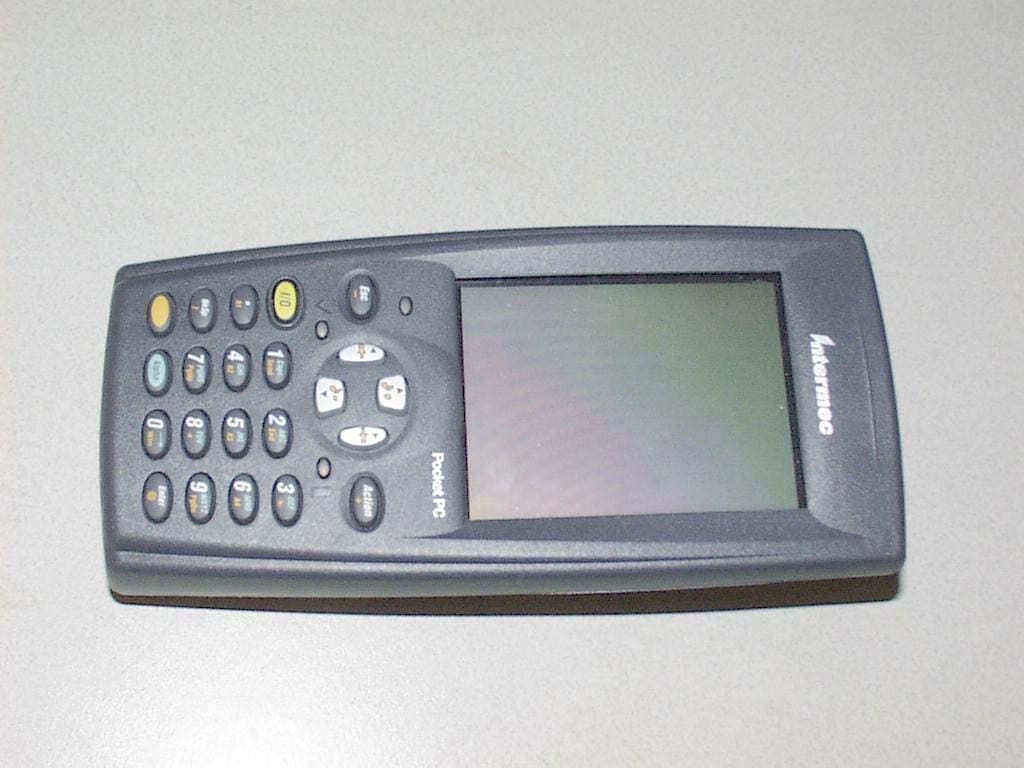
Click to zoom
Application Details
- Equipment Class
- DTS - Digital Transmission System
- Date of Grant
- Mar 29, 2005
- Application Purpose
- Original Equipment
- Date of Application
- Mar 29, 2005
- Equipment Note
- 2610CF
- Frequency Range
- 2412.00000000 - 2462.00000000
- Country
- United States
Documents & Files
Document Text
Text extracted from the exhibit documents filed with the FCC. Open a document above to read the original.
Users Manual
700 Series Color Mobile Computer User's Manual ii700 Series Color Mobile Computer User’s Manual Intermec Technologies Corporation Corporate HeadquartersTechnical Communications Department 6001 36th Ave. W.550 Second Street SE Everett, WA 98203Cedar Rapids, IA 52401 U.S.A.U.S.A. www.intermec.com The information contained herein is proprietary and is provided solely for the purpose of allowing customers to operate and service Intermec-manufactured equipment and is not to be released, reproduced, or used for any other purpose without written permission of Intermec. Information and specifications contained in this document are subject to change without prior notice and do not represent a commitment on the part of Intermec Technologies Corporation. E2002-2004 by Intermec Technologies Corporation. All rights reserved. The word Intermec, the Intermec logo, Norand, ArciTech, CrossBar, Data Collection Browser, dcBrowser, Duratherm, EasyCoder, EasyLAN, Enterprise Wireless LAN, EZBuilder, Fingerprint, i-gistics, INCA (under license), InterDriver, Intermec Printer Network Manager, IRL, JANUS, LabelShop, Mobile Framework, MobileLAN, Nor*Ware, Pen*Key, Precision Print, PrintSet, RoutePower, TE 2000, Trakker Antares, UAP, Universal Access Point, and Virtual Wedge are either trademarks or registered trademarks of Intermec Technologies Corporation. Throughout this manual, trademarked names may be used. Rather than put a trademark (™or®) symbol in every occurrence of a trademarked name, we state that we are using the names only in an editorial fashion, and to the benefit of the trademark owner, with no intention of infringement. There are U.S. and foreign patents pending. Microsoft, Windows, and the Windows logo are registered trademarks of Microsoft Corporation in the United States and/or other countries. Bluetooth is a trademark of Bluetooth SIG, Inc., U.S.A. This product includes software developed by the OpenSSL Project for use in the OpenSSL Toolkit (www.opensssl.org). This product includes cryptographic softwarewritten by Eric Young ([email protected]). Wi-Fi is a registered certification mark of the Wi-Fi Alliance. iii700 Series Color Mobile Computer User’s Manual Document Change Record This page records changes to this document. The document was originally released as Revision A. RevisionDateDescription of Change B11/2002Added information about the Siemens MC45 radio module, the tethered scanner, CAB extraction, FTP Server parameters, and Data Collection control panel applet imager op- tions. C04/2003Added information about the ambient light sensor, the beeper, keypad sequences, the alphanumeric keypad, the vibrator, an accessories list, programming notifications, the MaxiCode symbology, the Utilities control panel applet, and the Wireless Network con- trol panel applet. D08/2003Upgraded Pocket PC 2002 information to Windows Mobile 2003, upgraded all illustra- tions to gray-scale, added new Imager functions, moved the Automatic Data Collection COM Interface material to the SDK User’s Manual. E01/2004Added 730 Computer information, revised CDMASetup information, and revised Wire- less Area Network Printing information. F04/2004Updated 802.11 security supplicant information. Added new network selection APIs. Incorporated information about the Intermec Settings control panel applet for PSM Builds 3.00 or newer. Added information about the PhoneUtility application. Revised Chapter 4, “Network Support.” Added tethered scanner and internal scanner configura- tion and troubleshooting information to Chapter 6, “Scanner Support.” G01/2005Added information about resetting the 700 Series Computer. Updated the Profile Wizard information in Appendix A, “Configurable Settings.” Revised information about using Sprint Watcher and added information about a Phone application for units with CDMA or GSM radios in Chapter 4, “Network Support.” Added information about the 741, 751, and 761 Computers and the MC46 Radio. iv 700 Series Color Mobile Computer User’s Manual Contents v700 Series Color Mobile Computer User’s Manual Contents Before You Beginxix............................................................. Safety Summaryxix....................................................... Donotrepairoradjustalonexix....................................... First aidxix....................................................... Resuscitationxix................................................... Energized equipmentxix............................................. Safety Iconsxx........................................................... Global Services and Supportxxi.............................................. Warranty Informationxxi............................................ Web Supportxxi................................................... Telephone Supportxxi............................................... WhoShouldReadthisManual?xxii.......................................... Related Documentsxxii.................................................... Introduction1............................................................... Ambient Light Sensor2.......................................................... Audio System3................................................................. Speaker3............................................................... Microphone4........................................................... External Headset Jack4.................................................... Battery5...................................................................... Beeper7...................................................................... Enable the Beeper7....................................................... Disable the Scanner Mute8................................................. Select a Beeper Volume9................................................... Disable the Beeper10..................................................... Keypad11..................................................................... Backlight for…
Text truncated - open the document above for the full version.
Users Manual
Quick Start 700 Color Mobile Computer With Guide Windows Mobile 2003 2700 Color with Windows Mobile 2003 Thank youfor purchasing the Intermec 700 Series Color Mobile Computer. You will find your 700 Col- or useful in a variety of data collection and data man- agement applications. Its integrated peripherals and rugged design ensure reliable service for years to come. This guide provides information needed to get started using your 700 Color. For more detailed information refer to “Where to Find More Information” of this guide. Note that the hardware configuration of your 700 Color may differ from the descriptions in this guide. Software operation descriptions are based on factory defaults. 3700 Color with Windows Mobile 2003 Contents 700 Series Color Mobile Computer Description5......................... Setting Up Your 700 Color7................ Learning About The Keypad11.............. Gold Plane Keys11................ Alpha (Blue) Plane Keys-Numeric Keypad11....................... Alpha (Blue) Plane Keys-Alphanumeric Keypad11..................... Ambient Light Sensor12............ Scanning/Keypad Shift and Notification LED12............... Action and Up/Down Navigational Buttons12....................... Battery Status LED13.............. About Microsoft Windows Mobile 2003 Software for Pocket PC13....................... The Today Screen14.............. Navigation Bar and Command Bar 15.. Pop-up Menus15................. Entering Information into Your 700 Color16...................... Setting the Time and Date17........ Ownership Registration18.......... Battery Management19.................... Synchronizing With Your Desktop Computer22......................... Checking Your Scanning Options21......... Data Collection Applet21........... Wireless Printing22............... Wireless Network22............... Warm Resetting Your 700 Color23.......... 4700 Color with Windows Mobile 2003 Cold Resetting Your 700 Color23........... Troubleshooting24....................... Cleaning Your 700 Color25................ Case and Display25............... Where to Find More Information25.......... Radio Use Safety Precautions26............. End User License Agreement27............. Microsoft Windows Mobile 2003 for Pocket PC27.................. Intermec Technologies Corporation End User License Agreement31................... Product Warranty32...................... Obtaining Warranty Service32....... Global Services and Support32.............. Warranty Information32........... Web Support32.................. Telephone Support33..................... Patent Information34..................... 5700 Color with Windows Mobile 2003 700 Series Color Mobile Computer Description Front light (Gold + 3) Gold plane key On/Off Navigational keys (up and down controls) Scanning/Alpha LED Power status Ambient light sensor Alpha (Blue) plane key Action button Alphanumeric Keypad Model Power status Action button Alpha (Blue) plane key Ambient light sensor Gold/White plane key On/Off Scanning/ Alpha LED Navigational keys (up and down controls) Numeric Keypad Model Front light (Gold + I) 6700 Color with Windows Mobile 2003 Battery compartment Stylus Hand strap Speaker IrDA Scanner trigger Scanner lens Charging/Docking connector Microphone Headset jack CompactFlash, Secure Digital, SIM card compartment ScannertriggerorRe- corder button left side of unit 7700 Color with Windows Mobile 2003 Setting Up Your 700 Color 1Remove 700 Color from its packaging. 2Release hand strap. Slide bottom of strap forward to release Strap retaining slot 3Install battery and reattach hand strap. 3a Tilt, insert, and place battery into compartment. Ensure battery compartment latch clicks so battery is secure in compartment. Battery compartment latch Battery compartment Battery pack 3b 8700 Color with Windows Mobile 2003 4Install acrylic adhesive pull tabs on SD or SIM cards (if applicable). Ensure the pull tab does not cover any metal contacts on the card. Split paper adhesive backing Pull tab Peel and stick to card Card 4a 4b 9700 Color with Windows Mobile 2003 5Insert CF, SD, or SIM cards. Remove the two cover screws and lift cover off. Slide card into slot. Reinstall cover SD Card, with adhesive pull tab, insert with contacts toward key- pad SIM Card with adhesive pull tab, insert with con- tacts toward back of unit and facing away from the keypad. CF card with extractor and insertion orientation. Leave card extractor installed on CF card. Note: 700 Color models with 802.11b radio have a card permanently installed in the CF Card slot. If this card is present, it should not be removed. Removal of the card may damage your mobile computer. 5a 5b 5c 10700 Color with Windows Mobile 2003 6Install antenna (if applicable). Remove the antenna from packaging Install by turning in a clockwise motion 6a 6b 7Connect to AC adapter or dock (dock not shown). 8Charge battery pack (4 hours) before using. How- ever, to ensure proper charging, perform the re- maining steps first, with the AC adapter or dock connected. 9The first time you turn on your 700 Color it boots to the operating system. After a few seconds you see the Windows Mobile 2003 Welcome screen. Tap your stylus to advance to the next display on the screen. 10You will be prompted through the several screens to complete the setup process. Read the display mes- sages and follow the instructions. When you reach the Windows Mobile Today screen, you have com- pleted the setup. 11700 Color with Windows Mobile 2003 Learning About The Keypad Gold Plane Keys TheGoldbplane keys provide you access to display controls, special characters, and Windows Mobile 2003 options. Press the goldbkey for each gold plane key stroke you wish to make. For example to turn on the front light, press and hold the goldbkey plus the3 key. To turn the front light off press the gold and the 3key again. TheGold/Whiteckey (Alphanumeric keypad) mo- mentarily shifts between planes to allow entry of nu- meric characters in the same input f…
Text truncated - open the document above for the full version.
Users Manual
P/N 075494-001 Draft Version Note: You only need to read this information if your Intermec product contains the 2610CF 802.11b/g radio. Important 2610CF Radio Information! Contents For Users in the United States and Canada .................................................................................................... 2 For Users Outside of the United States and Canada....................................................................................... 2 Pour les utilisateurs en dehors du Canada et des Etats-unis ............................................................................ 4 Für Benutzer außerhalb von Kanada und den Vereinigten Staaten ................................................................. 5 Per gli utenti al di fuori del Canada o degli Stati Uniti ................................................................................... 5 Para Usuarios Fuera de Canada o de los Estados Unidos ................................................................................ 6 Para Usuários Fora do Canadá ou dos Estados Unidos ................................................................................... 7 ................................................................................ 7 2 Draft Version For Users in the United States and Canada Place this supplement in your manual. This device complies with Part 15 of the FCC Rules and with RSS-210 of Industry Canada. Operation is subject to the following two conditions: (1) This device may not cause harmful interference, and (2) This device must accept any interference received, including interference that can cause undesired operation. For body worn operation, this radio has been tested and meets the FCC RF exposure guidelines when used with the Intermec accessories supplied or designated for this product. Use of other accessories may not ensure compliance with FCC RF exposure guidelines. Specific Absorption Rate, or SAR is a measurement of radio frequency energy. The FCC permits a maximum SAR value of 1.6 W/kg. The highest SAR value for this product when worn on the body, as described in this user guide, is 0.938 W/kg. Agency Approvals: See user’s guide instructions for handling, charging, and replacing batteries. Failure to follow those instructions can result in personal injury, fire, or battery explosion. Changes or modifications not expressly approved by Intermec could void the user’s authority to operate this equipment. Industry Canada Compliance This Class B digital apparatus meets all requirements of the Canadian Interference-Causing Equipment Regulations. This device requires a radio license unless it is used totally inside a building. (The user must obtain this license.) Cet appareil numérique de la classe B respecte toutes les exigences du Règlement sur le matériel brouilleur du Canada. Cet appareil exige une license radio à moins d’être entièrement installé dans un bâtiment. (L’utilisateur doit obtenir cette license.) For Users Outside of the United States and Canada Place this supplement in your manual. The Intermec product you purchased transmits and receives data using a 2.4 GHz Direct Sequence Spread Spectrum system. Programming and configuration information for the transceivers is also provided in the host device documentation. Please check the Intermec web site for additional documentation at www.intermec.com. Hereby, Intermec Technologies Corporation declares that this mini PCI radio is in compliance with the essential requirements and other relevant provisions of R&TTE Directive (1999/5/EC). This product has been assessed to the following standards: • ETSI EN 300 328-2 v1.2.1 (2001-12) • ETSI EN 301 489-17 v1.1.1 (2001-09) Draft Version 3 • EN 60950:1992 (incl. Amdt. 1-4, 11) This product transmits electromagnetic waves at 2.4 GHz frequency range. It has been tested and found compliant with U.S. (OET Guide 65) and Canadian (RSS 102) RF exposure regulations. There are no regulations covering this product type in the EU at this time. The transmitter module’s maximum output power is 60 mW. The products using this module are intended for business and industrial environments. They should not be used in residential environments and by children. Mini PCI: This product is marked with this logo and uses radio frequency bands that are not harmonized throughout the European Community. The following table indicates the areas of intended use of the equipment and any known restrictions. Country of Intended Use License Yes No Required Restrictions Details Austria X Belgium X Cyprus X Czech Republic X Denmark X Estonia X Finland X France X X Outdoor frequency operation restricted to 2446.5 MHz to 2483.5 MHz. Germany X Greece X Hungary X Ireland X Italy X Latvia X Lithuania X Luxembourg X Malta X The Netherlands X Poland X Portugal X Slovakia X Slovenia X Spain X Sweden X United Kingdom X Other non-EU: Iceland X Japan X Liechtenstein X Norway X Switzerland X 4 Draft Version Additional EMI/RFI Compliance This device meets the Class B limit requirements of CISPR 22. Pour les utilisateurs en dehors du Canada et des Etats-unis Veuillez placer ce supplément dans votre manuel. Le produit Intermec que vous avez acheté peut transmettre et recevoir des données à l’aide d’un système d’étalement du spectre en séquence directe de 2,4 GHz. Les informations de programmation et de configuration pour les émetteurs-récepteurs sont également fournies dans la documentation de l’appareil hôte. Pour obtenir toute documentation supplémentaire, veuillez consulter le site web d’Intermec, à l’adresse www.intermec.com. Par la présente, Intermec Technologies Corporation déclare que ce modèle mini PCI radio est conforme aux exigences de base et autres exigences pertinentes de la Directive R&TTE (1999/5/EC). Ce produit a été évalué par rapport aux normes suivantes : • ETSI EN 300 328-2 v1.2.1 (2001-12) • ETSI EN 301 489-17 v1.1.1 (2001-09) • EN 60950:1992 (comprenant l’amendement 1-4, 11) Ce produit émet des ondes électromagnétiques …
Text truncated - open the document above for the full version.
Users Manual
CN2G Handheld Computer User's Manual ii CN2G Handheld Computer User’s Manual Intermec Technologies Corporation Corporate Headquarters 6001 36th Ave. W. Everett, WA 98203 U.S.A. www.intermec.com The information contained herein is proprietary and is provided solely for the purpose of allowing customers to operate and service Intermec-manufactured equipment and is not to be released, reproduced, or used for any other purpose without written permission of Intermec. Information and specifications contained in this document are subject to change without prior notice and do not represent a commitment on the part of Intermec Technologies Corporation. © 2004 by Intermec Technologies Corporation. All rights reserved. The word Intermec, the Intermec logo, Norand, ArciTech, CrossBar, Data Collection Browser, dcBrowser, Duratherm, EasyCoder, EasyLAN, Enterprise Wireless LAN, EZBuilder, Fingerprint, i-gistics, INCA (under license), InterDriver, Intermec Printer Network Manager, IRL, JANUS, LabelShop, Mobile Framework, MobileLAN, Nor*Ware, Pen*Key, Precision Print, PrintSet, RoutePower, TE 2000, Trakker Antares, UAP, Universal Access Point, and Virtual Wedge are either trademarks or registered trademarks of Intermec Technologies Corporation. Throughout this manual, trademarked names may be used. Rather than put a trademark (™ or ®) symbol in every occurrence of a trademarked name, we state that we are using the names only in an editorial fashion, and to the benefit of the trademark owner, with no intention of infringement. Contents CN2G Handheld Computer User’s Manual iii Contents Before You Begin ......................................................................................................vii Safety Summary .........................................................................................vii Safety Icons ...............................................................................................viii Global Services and Support ......................................................................viii Who Should Read This Document? ............................................................ix Related Documents .....................................................................................ix Patent Information ......................................................................................ix Other Copyright Information.......................................................................x Using the CN2G Handheld Computer................................................. 1 Introducing the CN2G Handheld Computer ............................................................ 2 Using the Battery ....................................................................................................... 3 Installing and Charging the Battery ............................................................. 4 Maximizing Battery Life .............................................................................. 5 Checking the Battery Status......................................................................... 6 Using the Keypad ...................................................................................................... 6 Using the Touch Screen............................................................................................. 8 Using the Touch Screen and Stylus ............................................................. 8 Understanding the Desktop......................................................................... 9 Using ScanDemo ...........................................................................9 Using Transcriber ........................................................................10 Understanding the Screen Icons ................................................................ 12 Calibrating the Screen ............................................................................... 12 Understanding the Status Lights .............................................................................. 13 Understanding the Beeps ......................................................................................... 14 Scanning Bar Codes................................................................................................. 14 Using the SD Card .................................................................................................. 16 1 Contents iv CN2G Handheld Computer User’s Manual Configuring the CN2G................................................................................... 19 How to Configure the CN2G Parameters................................................................ 20 Configuring the CN2G With the Setup Assistant...................................... 21 Configuring the CN2G Locally With Intermec Settings ............................ 22 Restoring Default Settings............................................................24 Exiting Intermec Settings .............................................................25 Configuring the CN2G Remotely With Intermec Settings ........................ 25 Configuring the CN2G For Your Network.............................................................. 26 Configuring USB Communications .......................................................... 26 Configuring 802.11b Radio Communications........................................... 27 Configuring the Network Parameters for a TCP/IP Network .......28 Configuring the Network Parameters for a UDP Plus Network....30 Configuring Security ............................................................................................... 31 Using Funk Security.................................................................................. 32 Selecting Funk as Your Security Choice .......................................32 Selecting a Profile for Funk Security.............................................33 Using WPA Security ................................................................................. 34 Configuring WPA Security With Fun…
Text truncated - open the document above for the full version.
Users Manual
P/N 075494-001 Draft Version Note: You only need to read this information if your Intermec product contains the 2610CF 802.11b/g radio. Important 2610CF Radio Information! Contents For Users in the United States and Canada .................................................................................................... 2 For Users Outside of the United States and Canada....................................................................................... 2 Pour les utilisateurs en dehors du Canada et des Etats-unis ............................................................................ 4 Für Benutzer außerhalb von Kanada und den Vereinigten Staaten ................................................................. 5 Per gli utenti al di fuori del Canada o degli Stati Uniti ................................................................................... 5 Para Usuarios Fuera de Canada o de los Estados Unidos ................................................................................ 6 Para Usuários Fora do Canadá ou dos Estados Unidos ................................................................................... 7 ................................................................................ 7 2 Draft Version For Users in the United States and Canada Place this supplement in your manual. This device complies with Part 15 of the FCC Rules and with RSS-210 of Industry Canada. Operation is subject to the following two conditions: (1) This device may not cause harmful interference, and (2) This device must accept any interference received, including interference that can cause undesired operation. For body worn operation, this radio has been tested and meets the FCC RF exposure guidelines when used with the Intermec accessories supplied or designated for this product. Use of other accessories may not ensure compliance with FCC RF exposure guidelines. Specific Absorption Rate, or SAR is a measurement of radio frequency energy. The FCC permits a maximum SAR value of 1.6 W/kg. The highest SAR value for this product when worn on the body, as described in this user guide, is 0.938 W/kg. Agency Approvals: See user’s guide instructions for handling, charging, and replacing batteries. Failure to follow those instructions can result in personal injury, fire, or battery explosion. Changes or modifications not expressly approved by Intermec could void the user’s authority to operate this equipment. Industry Canada Compliance This Class B digital apparatus meets all requirements of the Canadian Interference-Causing Equipment Regulations. This device requires a radio license unless it is used totally inside a building. (The user must obtain this license.) Cet appareil numérique de la classe B respecte toutes les exigences du Règlement sur le matériel brouilleur du Canada. Cet appareil exige une license radio à moins d’être entièrement installé dans un bâtiment. (L’utilisateur doit obtenir cette license.) For Users Outside of the United States and Canada Place this supplement in your manual. The Intermec product you purchased transmits and receives data using a 2.4 GHz Direct Sequence Spread Spectrum system. Programming and configuration information for the transceivers is also provided in the host device documentation. Please check the Intermec web site for additional documentation at www.intermec.com. Hereby, Intermec Technologies Corporation declares that this mini PCI radio is in compliance with the essential requirements and other relevant provisions of R&TTE Directive (1999/5/EC). This product has been assessed to the following standards: • ETSI EN 300 328-2 v1.2.1 (2001-12) • ETSI EN 301 489-17 v1.1.1 (2001-09) Draft Version 3 • EN 60950:1992 (incl. Amdt. 1-4, 11) This product transmits electromagnetic waves at 2.4 GHz frequency range. It has been tested and found compliant with U.S. (OET Guide 65) and Canadian (RSS 102) RF exposure regulations. There are no regulations covering this product type in the EU at this time. The transmitter module’s maximum output power is 60 mW. The products using this module are intended for business and industrial environments. They should not be used in residential environments and by children. Mini PCI: This product is marked with this logo and uses radio frequency bands that are not harmonized throughout the European Community. The following table indicates the areas of intended use of the equipment and any known restrictions. Country of Intended Use License Yes No Required Restrictions Details Austria X Belgium X Cyprus X Czech Republic X Denmark X Estonia X Finland X France X X Outdoor frequency operation restricted to 2446.5 MHz to 2483.5 MHz. Germany X Greece X Hungary X Ireland X Italy X Latvia X Lithuania X Luxembourg X Malta X The Netherlands X Poland X Portugal X Slovakia X Slovenia X Spain X Sweden X United Kingdom X Other non-EU: Iceland X Japan X Liechtenstein X Norway X Switzerland X 4 Draft Version Additional EMI/RFI Compliance This device meets the Class B limit requirements of CISPR 22. Pour les utilisateurs en dehors du Canada et des Etats-unis Veuillez placer ce supplément dans votre manuel. Le produit Intermec que vous avez acheté peut transmettre et recevoir des données à l’aide d’un système d’étalement du spectre en séquence directe de 2,4 GHz. Les informations de programmation et de configuration pour les émetteurs-récepteurs sont également fournies dans la documentation de l’appareil hôte. Pour obtenir toute documentation supplémentaire, veuillez consulter le site web d’Intermec, à l’adresse www.intermec.com. Par la présente, Intermec Technologies Corporation déclare que ce modèle mini PCI radio est conforme aux exigences de base et autres exigences pertinentes de la Directive R&TTE (1999/5/EC). Ce produit a été évalué par rapport aux normes suivantes : • ETSI EN 300 328-2 v1.2.1 (2001-12) • ETSI EN 301 489-17 v1.1.1 (2001-09) • EN 60950:1992 (comprenant l’amendement 1-4, 11) Ce produit émet des ondes électromagnétiques …
Text truncated - open the document above for the full version.
Contact Information
Applicant
Brian Rudick(VP & GC, Honeywell Scanning & Mobility)
Test Firm
Northwest EMC, Inc.Greg Kiemel
Technical Specifications
| # | Rule Parts | Frequency Range | Power Output |
|---|---|---|---|
| 1 | 15C | 2.41 GHz - 2.46 GHz | 60.00 mW |
Other Applications from Intermec Technologies Corporation
EHA-1015CP01X1
Sep 29, 20131015CP01
Equipment Class
NII - Unlicensed National Information Infrastructure TX
EHA-1015CP01SX1
Sep 08, 20131015CP01S
Equipment Class
PCE - PCS Licensed Transmitter held to ear
EHA-RC12ABGN
Aug 19, 2013WLAN board
Equipment Class
DSS - Part 15 Spread Spectrum Transmitter
EHA-1000CP01F
Feb 19, 20131000CP01F9, 1000CP02F9, 1001CP01F9
Equipment Class
DTS - Digital Transmission System
EHA-INBT02
Dec 11, 2012BT Board
Equipment Class
DSS - Part 15 Spread Spectrum Transmitter